
Share northshorepc's profile


northshorepc
northshorepc's stats
- Review count2
- Helpfulness votes55
- First reviewOctober 22, 2014
- Last reviewMay 20, 2016
- Featured reviews0
- Average rating5
Reviews comments
- Review comment count0
- Helpfulness votes0
- First review commentNone
- Last review commentNone
- Featured review comments0
Questions
- Question count0
- Helpfulness votes0
- First questionNone
- Last questionNone
- Featured questions0
- Answer count3
- Helpfulness votes15
- First answerOctober 22, 2014
- Last answerMay 20, 2016
- Featured answers0
- Best answers1
northshorepc's Reviews
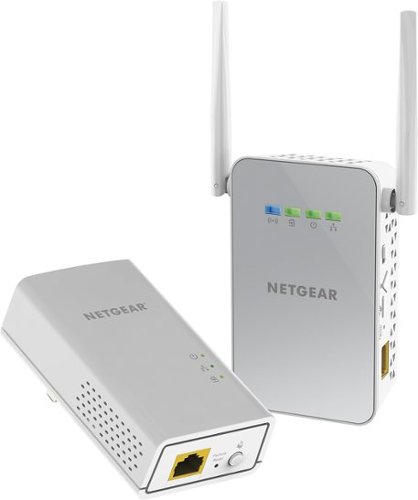
Use your existing electrical wiring to extend your WiFi Internet access to any room in your house. Just plug the PowerLINE Adapter into your modem or router, then plug in the companion PowerLINE WiFi access point to an electrical outlet. It's that easy. With 1000 Mbps speed and Homeplug AV2 support, the PowerLINE WiFi 1000 is perfect for connecting smart TVs, streaming players, and game consoles wirelessly.
Customer Rating

5
Great way to extend your Wi-Fi and wired network!
on May 20, 2016
Posted by: northshorepc
from Chicago
Verified Purchase:Yes
I have tried using power line network extenders and Wi-Fi extenders in the past and never had much luck. This package is a wired power line network extender and a Wi-Fi extender. It allows you to extend your existing network in your house or business without running network wires. You plug in the transmitter unit into a wall electrical outlet near your existing router, plug a network cable from the router to the transmitter, and it sends a network signal through your existing home electrical wires to the other unit that you plug into the wall electrical outlet where you need the Wi-Fi or wired network connection. The second unit has a port to plug a computer or network switch (splitter) or router into, and it also sends out a Wi-Fi signal in both 5 gHz and 2.4 gHz. I needed to get a Wi-Fi signal and wired network connection to a 2nd floor room for my in home business. My router is in my basement and because of the way the house is built I had no way of running a wire. The signal from the existing Wi-Fi router in the basement hardly made it to the first floor. I plugged the first unit in the basement wall outlet, not a power strip, made the connection to the router and then plugged the second unit into the wall outlet, not a power strip, in the upstairs room. I waited about a minute and the units connected to each other through the house electrical wires. The lights on the upstairs unit showed I had a good connection and I had both Wi-Fi and wired connections in the upstairs room that I was never able to get a signal in using the old type of extenders. Better yet, I was able to get more than 40 mbps download speed and 20 mbps upload speed, but I do use Comcast, so your speed will depend on your service provider. I then connected a 5 port network switch to the wired port and I was able to connect 4 computers with wired networking and 3 laptops using Wi-Fi as well as an ipad and iphone, and all had great speed. This all worked right out of the box, but for security, you will want to customize the security and Wi-Fi settings. I have to say this will all depend on your existing house electrical set up. If you have several breaker panels due to room additions or very old wiring, you may not be able to use this type of extender. The electrical wall outlets have to be on the same panel, not the same circuit breaker, but the same panel. Other than that it is worth a try. I have now installed 3 of these for other friends and family and had the same results at all locations but one. In one house I could not get them to connect, but found the room was an addition and it was on its own electrical circuit. I plugged it into several other wall outlets near the room and was lucky enough to find one that connected because it was on the main electrical panel. It was close enough to the room that was a dead spot and the signal was strong enough to connect a smart tv and use Netflix in that room. So in the end it did work in all locations. As I said, it is worth a try. I have to add that one of the units I got did not work right out of the box. I had experience with them so I knew right away something was wrong with this unit. I exchanged it for a new one and was up and running in no time.
My Best Buy number: 2091372707
My Best Buy number: 2091372707
I would recommend this to a friend!
Share this review:


+55points
55of 55voted this as helpful.
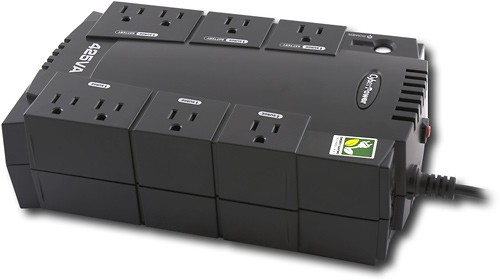
This battery backup features 8 outlets for use with numerous electronics, including printers, monitors, scanners and more. EMI/RFI filters shield electromagnetic interference and a resettable circuit breaker lets you reset in case of an overload.
Customer Rating
5
Great protection and emergency light
on October 22, 2014
Posted by: northshorepc
from Chicago
Verified Purchase:Yes
We have had several storms with lots of lightning and this unit protected my computer while my neighbor lost a computer and tv. It also gave us some emergency lighting. When the power went out, after turning off the computer, I plugged a small desk lamp into the unit and it gave us light until the power came back on. Great product for a great price. Every computer should have one!
My Best Buy number: 2091372707
My Best Buy number: 2091372707
I would recommend this to a friend!
Share this review:


0points
0of 0voted this as helpful.
northshorepc's Review Comments
northshorepc has not submitted comments on any reviews.
northshorepc's Questions
northshorepc has not submitted any questions.
northshorepc's Answers
Use your existing electrical wiring to extend your WiFi Internet access to any room in your house. Just plug the PowerLINE Adapter into your modem or router, then plug in the companion PowerLINE WiFi access point to an electrical outlet. It's that easy. With 1000 Mbps speed and Homeplug AV2 support, the PowerLINE WiFi 1000 is perfect for connecting smart TVs, streaming players, and game consoles wirelessly.
PLW1000 factory password?
Just set up new PLW1000 and everything is connected. Only issue is the Wifi is secured and the start up guide does not have the factory default passcode. HELP!!
The default factory password for both the 2.4 and 5 Ghz ssid are printed in very small text on the back of the Wi-Fi extender, the unit with the antenna. The user name and password to get into the unit to see or change that password are admin and password. You can plug the extender directly into a computer or laptop using the ethernet port and go to http://mywifiext.net with a browser, then enter the user name: admin and password: password and then you can see the default Wi-Fi password or change the ssid and password.
10 years ago
by
northshorepc
Use your existing electrical wiring to extend your WiFi Internet access to any room in your house. Just plug the PowerLINE Adapter into your modem or router, then plug in the companion PowerLINE WiFi access point to an electrical outlet. It's that easy. With 1000 Mbps speed and Homeplug AV2 support, the PowerLINE WiFi 1000 is perfect for connecting smart TVs, streaming players, and game consoles wirelessly.
Does the extender wifi get the same network ID as the wireless router it is connected to?
When you first connect the extender it will have the ssid that Netgear gave it at the factory. You can then customize the ssid for the 2.4 and 5 gHz signal as well as the password to whatever you want, but I did leave the _EXT at the end of the ssid so I know what wireless signal I am connecting to. My router puts out ssid HOME-234 so I made the extender ssid HOME-234_EXT.
10 years ago
by
northshorepc
What docking station is compatible with a Lenovo X220?
Lenovo ThinkPad UltraBase Series 3 will fit the Lenovo x220 ThinkPad
11 years, 7 months ago
by
northshorepc
Chicago