
Share VideoJunkie's profile


VideoJunkie
VideoJunkie's stats
- Review count72
- Helpfulness votes32
- First reviewDecember 20, 2014
- Last reviewApril 30, 2026
- Featured reviews0
- Average rating4.8
Reviews comments
- Review comment count0
- Helpfulness votes0
- First review commentNone
- Last review commentNone
- Featured review comments0
Questions
- Question count0
- Helpfulness votes0
- First questionNone
- Last questionNone
- Featured questions0
- Answer count2
- Helpfulness votes1
- First answerJuly 22, 2017
- Last answerNovember 26, 2017
- Featured answers0
- Best answers0

The Hisense U7 Series is built for speed and clarity, combining ultra-smooth 165Hz motion, powerful MiniLED brightness, and intelligent AI processing for sports, movies, and next-gen gaming. Hi-QLED MiniLED Pro technology, featuring thousands of Mini LEDs, with up to 3,000 local dimming zones and up to 3,000 nits of peak brightness, delivers brighter highlights, deeper blacks, and Pantone Validated color for more natural, accurate detail in every scene. Powered by the Hi-View AI Engine Pro, U7 automatically optimizes color, contrast, and clarity in real time~so everything looks sharp and balanced without over-processing. A Native 165Hz Refresh Rate with AI Smooth Motion keeps fast action fluid and blur-free, while Game Booster 330 with VRR delivers ultra-responsive gameplay with reduced input lag. A 2.1.2 Multi-Channel Sound system tuned by Devialet delivers immersive, room-filling audio, while Google TV with Gemini AI brings personalized content discovery and voice control together in one seamless experience. Bringing together speed, precision, and smart performance, U7 delivers a more balanced, responsive, and lifelike viewing experience across everything you watch.
Posted by: VideoJunkie
I'm using the Hisense U7SG in my basement primarily for gaming. I was really interested in this TV because of the 165hz refresh rate and the fact that I have it connected to my PC which has an Nvidia 4090 graphics card. Occasionally I will use it for watching movies as well.
Unboxing the TV was simple. I was able to do it myself, though having a partner would have made it simpler. Setup was a breeze and the stand is centered, as opposed to my last TV, which had feet at the edges. The centered stand makes it easy for the TV to fit on my entertainment center. One thing to note was that attaching the stand to the TV, while easy, still required 6 screws to fasten the stand to the unit.
When I turned on the TV, it launched into Google TV, which is very familiar if you have ever used an Nvidia Shield or Android TV device. One thing I had a bit of trouble with, was GoogleTV gives you a QR code to scan to setup the device on your network, but for whatever reason, I kept getting an error message and had to use the manual setup to get the TV connected to my network. A bit of a hassle, but probably something Hisense can correct with a software update.
I was very impressed with the picture quality overall. Out of the box, the picture seemed pretty color accurate, which was surprising. I can probably dial it in a little better with a bit of time, but the colors appeared pretty close to accurate. Putting the TV into HDR mode, dimmed the picture considerably, but with some configuration, I was able to get it to a picture that I liked. The TV is really bright too. The specs say it can do up to 3000 nits, and while I don't have equipment to verify that claim, I can say it is the brightest TV I have owned, and ambient light or indirect sunlight is not a problem. Viewing angles are a little disappointing, with a noticeable shift in brightness for those that are off center. So if you have a wide room, the best seats will be straight on.
My only other trouble with the TV was not the TV's fault, but I have the unit connected into my Philips Hue Sync box and a Denon Receiver. When I connected my PC to the receiver, I could only get 120hz refresh rate. I later figured out this was a limitation of my receiver, and to get the faster 165Hz, I needed to plug my PC directly into the TV. At least there were 4 HDMI 2.1 ports that all work at 165Hz.
Aside from that, the sound in the speakers are pretty good. They are not a good as having a soundbar or a Home Theater system, but they get the job done and are pretty good.
Watching a movie and youtube video was great. Quality looked great, the Google TV interface is snappy and fluid, etc. The remote is a little long, and probably has more buttons than I need, but it gets the job done and is backlit, which is a nice replacement over my last remote.
All in all, I'm very impressed with this TV. It's not perfect, but you get a lot of value for the money, and for gaming, 165Hz is fantastic if you have a PC that can handle this.
I would recommend this to a friend!
Share this review:


0points
0of 0voted this as helpful.

Introducing the ROG Xbox Ally X, a groundbreaking device that brings the freedom of Windows, craftsmanship of ROG, and the power of Xbox into the palm of your hands. Built in partnership with Xbox, the ROG Xbox Ally X delivers a seamless experience across Xbox Game Pass, Steam, Epic Games, and more ~ all in one versatile system. At its core is the AMD Ryzen AI Z2 Extreme processor, delivering next-gen performance with AI-powered efficiency and responsiveness. With 24GB of ultra-fast LPDDR5X 8000 MHz RAM and 1TB of SSD storage, the ROG Xbox Ally X is engineered to tackle AAA titles. Its 80Wh battery powers extended play sessions, while the redesigned ergonomics and Xbox-inspired grips keep you comfortable through every mission. Dive deeper into your games with precise impulse triggers and enhanced haptic feedback, and enjoy smooth, vibrant visuals on a 7~ FHD 120Hz display with FreeSync Premium.

Posted by: VideoJunkie
What is an Xbox? That's the question I found myself asking as I unboxed and setup the Asus ROG Xbox Ally X (that's a mouthful). As I broke in the machine, I found myself impressed with the performance and the overall design of the unit, but I'm still left wanting more.
Design
Let me first say that ASUS ROG Xbox Ally X is the most comfortable handheld I have had the opportunity to use. And it's coming from a person that has the Switch, Switch 2, and Steam Deck OLED that I've used over the years. The Ally X simply is a joy to hold and with the deep grips, it feels like I am using an Xbox controller with a screen built in. Great design and easy to hold for extended sessions.
Let me first say that ASUS ROG Xbox Ally X is the most comfortable handheld I have had the opportunity to use. And it's coming from a person that has the Switch, Switch 2, and Steam Deck OLED that I've used over the years. The Ally X simply is a joy to hold and with the deep grips, it feels like I am using an Xbox controller with a screen built in. Great design and easy to hold for extended sessions.
Performance
Overall I would say that I am impressed with the Ally X and it's Z2 Extreme processor. Is it markedly better than my Steeam Deck OLED? I'd say it definitely performs better, but the types of games I will mostly play on the Ally X (retro games, brawlers, schmups. etc) run similarly as they don't require the full power potential of the Z2 extreme to get a good experience. When it comes to AAA games, the experience I got playing Forza Horizon 5 at 60FPS felt great overall, with some caveats I'll touch on momentarily.
Overall I would say that I am impressed with the Ally X and it's Z2 Extreme processor. Is it markedly better than my Steeam Deck OLED? I'd say it definitely performs better, but the types of games I will mostly play on the Ally X (retro games, brawlers, schmups. etc) run similarly as they don't require the full power potential of the Z2 extreme to get a good experience. When it comes to AAA games, the experience I got playing Forza Horizon 5 at 60FPS felt great overall, with some caveats I'll touch on momentarily.
OS
This is the biggest weakness of the Ally X at the moment and my biggest disappointment. This is not an Xbox experience. It's a Windows experience, and it doesn't even try to hide it. Upon boot, it literally tells me it's setting up my PC, just like my Windows PC... The first experience was a bit painful... it took me almost an hour to turn on the unit, go through the Windows setup (even had to name my PC like you do in Windows), download Windows updates, download Xbox updates, get into Armory Crate, and download Bios and driver updates. An hour later I was ready to play games, or so I thought.
This is the biggest weakness of the Ally X at the moment and my biggest disappointment. This is not an Xbox experience. It's a Windows experience, and it doesn't even try to hide it. Upon boot, it literally tells me it's setting up my PC, just like my Windows PC... The first experience was a bit painful... it took me almost an hour to turn on the unit, go through the Windows setup (even had to name my PC like you do in Windows), download Windows updates, download Xbox updates, get into Armory Crate, and download Bios and driver updates. An hour later I was ready to play games, or so I thought.
First up was Forza Horizon 5... and what I was not prepared for was waiting another 15 minutes for the shaders to compile on first launch. Microsoft promised advanced shader delivery for first party titles and my FH5 was purchased through the Microsoft Store since I have an Xbox Series X. I thought shaders would be pre-compiled, but for whatever reason, they were not. And I sat for another 15 minutes waiting to get into the game as they compiled. That's not what I want the Xbox experience to become. I don't know why this happened, but my guess is it was because of the AMD graphics driver I updated via Armory crate was new. On my Windows PC, a driver update will often cause shader recompiles, but my PC is much faster and does it quicker. Here the wait was noticeable. I hope this can be improved over time.
I then installed some Steam games and they launched and worked with no issues. Only complaint here, was that when I exited Steam games, they took me back to the Steam store page, even when I launched them from the Xbox full screen experience, and the Steam screen was the store / main page, and not even big picture mode, so it was a bit jarring.
I feel like the Xbox Fullscreen Experience is just not ready for primetime and I'm essentially beta testing the product. I think it likely will get better over time, but my experience is that this is more of a PC than it is an Xbox.
Battery
I was pretty impressed with the battery. I got about 3 hours of gameplay on a charge and your mileage will vary a bit by how demanding the games are that you play. If you are playing AAA games expect less than if you are playing indie, retro, or 2D games. But overall, I was satisfied.
I was pretty impressed with the battery. I got about 3 hours of gameplay on a charge and your mileage will vary a bit by how demanding the games are that you play. If you are playing AAA games expect less than if you are playing indie, retro, or 2D games. But overall, I was satisfied.
As I own an Xbox Series X and a Windows gaming PC, having a handheld enables me to take my games on the go, and the Asus ROG Xbox Ally X is the one handheld I have that allows me to enjoy my Xbox games that I purchased on the Xbox store (and that are part of Play Anywhere) to work on both my PC and handheld. So for games like Forza Horizon 4, 5, Motorsport, Starfield, etc... I can play these on all my devices. But it's still not an Xbox... as not all of my Xbox games are available on the Ally X. Games I own on physical disc are not playable, console exclusives like College Football 26 are not available, but I feel this is more of a marketing problem that Microsoft needs to clean up.
In the end, I'm excited to see where Microsoft and Asus take the Xbox Ally X and how it improves. I think this is a great device to consider, especially if you don't have another handheld. Just understand that as an early adopter, there are likely to be some growing pains, and it's much more of a Windows experience today than it is an Xbox console experience.
I would recommend this to a friend!
Share this review:


0points
0of 0voted this as helpful.

Obsessively engineered with Bose~s best noise cancellation for headphones and spatialized audio for immersive listening, the QuietComfort Ultra Headphones (2nd Gen) make every note expand, every beat hit harder, and every melody take up more space. Sink deeper into your favorite songs and sounds with the ultimate combination of plush comfort, premium design, and seamless connectivity.
Customer Rating

5
Great Quality with Exceptional Noise Cancelling
on October 20, 2025
Posted by: VideoJunkie
The QuietComfort Ultra Headphones are extremely comfortable to wear on trips. I recently took them on a train ride and found them extremely comfortable to wear. The ANC (Active Noise Canceling) is top notch, with the ability to tweak the amount of noise canceling that you want to apply.
I also found the BeAware mode, which allows sound to filter through to be a good feature to use when you don't want to eliminate outside noise.
The sound on these headphones are top notch, as you would expect from Bose. If you have had previous headphones or speakers from Bose, that warm sound profile that is typical with Bose is present here.
I tried the new CinemaMode that Bose offers for a movie. It simulates a surround sound environment and works pretty well. Does it fully replicate what an Atmos surround system can offer, no, but it is quite enjoyable and I think that I will try to use these more often for gaming on my PC.
Battery life is rated at up to 30hrs with ANC on which is great for long flights and trips. The headphones can be charged with USB-C which is convenient. The USB-C can also be used to connect into your phone, tablet, or PC to experience lossless music from streaming services that offer it. I could not try this out for my review, as I don't subscribe to a service that offers lossless music.
Overall, I think this is another quality product from Bose. Excited to take this on flights, where I will really get a chance to experience the ANC features. I do wish that it offered wireless charging given the price, but it's not a deal breaker.
I would recommend this to a friend!
Share this review:


0points
0of 0voted this as helpful.
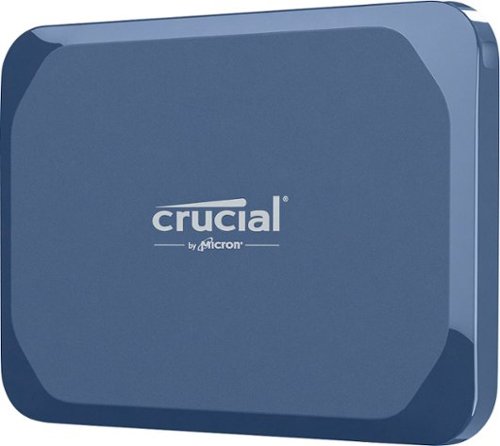
The Crucial X10 Portable SSD is available with up to 8TB of storage, making it perfect for storing files, photos, games, backups and videos. With read speeds up to 2,100MB/s, the X10 is twice as fast as the X9 and comes in a stylish matte blue enclosure. Built to withstand whatever life throws at you, the durable Crucial X10 is IP65 rated for dust and water resistance and is drop resistant up to 9.8 feet (3 meters). It~s compatible with Windows, Mac, Android, iPad, PC, and Linux via an included USB-C cable. Engineered by Micron Technology, a leader in the tech industry for 45 years, the Crucial X10 combines high quality with innovative features that let you edit directly from the drive. Store up to 500,000 4K photos, 114 games, 2.6 million MP3 music files and 133 4K videos.
Posted by: VideoJunkie
I've been using the Crucial X10 2TB for about 2 weeks now, and it's been rock solid reliable in terms of performance. I do quite a bit of video editing and was excited to see how this might perform in terms of read/write speed of 4K videos that I was editing and it hasn't disappointed.
First, in terms of form factor, the X10 is definitely the smallest external hard drive that I have had the opportunity to use. It is about 3/4 the width of a credit card and about 1/2 in thick. It easily can be thrown in your pocket, a backpack, or basically anything else, it's that small. The outer case is made of a blue plastic that feels solid to the touch. It's drop resistant to 3M, but I'm not about to test that claim myself and it is water and dust resistant (IP65).
The SSD comes with a short USB-C cable, which makes it easy to connect to a laptop and supports USB 3.2 2x2 which can deliver 20Gbps in transfer speeds when connected to a compatible USB port on the computer. I really appreciate the portableness of the unit.
I have a couple 2-4TB portable external mechanical drives that I had been using to also backup and transfer videos between machines. I think this is a much better option, given the faster read/write speeds, compactness, and with no moving parts, will hopefully offer increased reliability. Plus Crucial is backing this with a 3 yr warranty, which is a good sign.
I would recommend this to a friend!
Share this review:


0points
0of 0voted this as helpful.
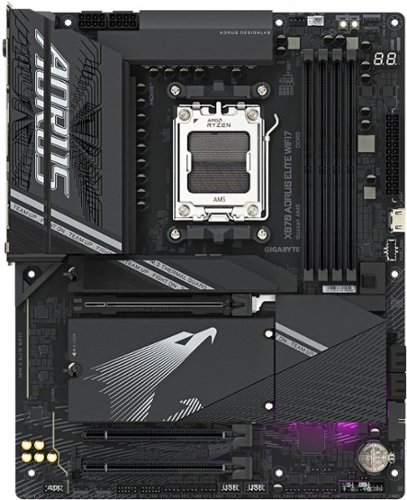
The X870 AORUS ELITE WIFI7 supports AM5 Processors and features unparalleled performance. GIGABYTE X870 motherboards come with upgraded power design, high grade storage standards, and outstanding connectivity that enables you to optimize your performance.
Customer Rating
5
Excellent Motherboard with Future Ready Features
on May 18, 2025
Posted by: VideoJunkie
This is my second experience using a Gigabyte branded board for a build and the experience overall was very positive, with some minor annoyances that may be a "me" problem and not relevant for most people and builds, but I'll touch on the experience and how I got past them.
For this particular build, I was upgrading from AM4 to AM5, replacing out a legacy 5600X3D processor and moving up to the following:
- AMD 7900X
- DDR5 6000 32GB RAM
- 850 W Corsair Power Supply
- Nvidia RTX 4080 Graphics Card
- 2 TB NVME SSD
- Win 11 Pro
- AMD 7900X
- DDR5 6000 32GB RAM
- 850 W Corsair Power Supply
- Nvidia RTX 4080 Graphics Card
- 2 TB NVME SSD
- Win 11 Pro
As I was upgrading to the AM5 platform, this was an opportunity to retain my existing SSD, Power Supply, Graphics Card, and replace the motherboard, CPU, and RAM to DDR5.
I planned to use this build for a Virtual Pinball machine and to support VR through Virtual Desktop and an Oculus Quest 3. The hardware build process was seamless and took a few hours. I had made a backup of my SSD, and planned to do a clean install of Win 11 and would reinstall the software I needed for the rest of the PC.
I only encountered some minor setup issues. First, the Win 11 did not recognize the Wi-FI adapter or Bluetooth on the board and since I had no network connection at the time, it couldn't download the drivers from Gigabyte. Once I connected via Ethernet, established the network connection, I was able to install the Gigabyte Update utility and download the necessary drivers. I also had a Motherboard update that I applied.
The rest of the setup was pretty seamless. I have WiFi 7 router, so I can take advantage of the full speeds offered. I also like the fact that this MB has 3 Gen 5 NVME slots. My current SSD is Gen 4, so I'm not getting the full advantage of the slot, but it's an upgrade path that I can take advantage of.
The MB also has Gen 5 x16 PCiE slot for the Graphics slot, which is the fastest available for your GPU to take advantage of, if it supports it.
I don't do a lot of overclocking, but I can say for the little I have done so far, there are a ton of settings and my system is very stable.
One minor issue I were able to work through: in my Pinball cabinet, I utilize the 7.1 Sound Card features on the MB to drive Surround Sound Feedback (SSF), which deliver haptic feedback and positional ball rolling sounds using small speakers called exciters and amps. This board only has two analog out ports on the MB, and to enable 7.1, you need to make software settings changes and repurpose the headphone jack on the PC case to fully enable 7.1. It's documented but took some trial and error to figure out how to get it working.
Overall though, it was a straightforward build and the motherboard is feature rich with many forward thinking features, like WiFi 7, Gen 5 PCiE and NVME slots, etc. I love the AM5 platform as it offers upgradeability too, so when I am ready, I can upgrade my CPU w/o having to do a full rebuild, providing longevity and support in the platform for years to come.
I would recommend this to a friend!
Share this review:


0points
0of 0voted this as helpful.
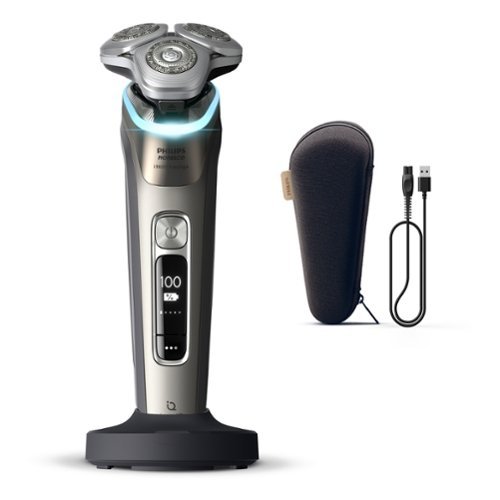
Introducing next level closeness from Philips Norelco, the world~s #1 electric shaving brand. Achieve lasting 0.00mm skin-level closeness and ultimate skin comfort. Day-long close shave, even on hardest-to-shave areas. New 360~ Precision Flexing Heads for 20% more precision in hardest to reach areas vs predecessor. Efficient in every pass even on 1-3-7-day beard. Intelligently senses, adapts and customizes to your skin with Sense IQ technology.
Posted by: VideoJunkie
I’ve been using this Philips Norelco i9000 prestige daily for about a week and it’s a great upgrade over my 10 yr old model.
The rotary head design helps to provide an even shave that consistently close to the skin, even in hard to reach areas under the neck and nose. I love the light sensor that changes color based on the pressure you put on the razor, guiding you to getting the best possible shave. Blue=too light, Green=just right Yellow/Orange=too much pressure.
After using daily for a week or so, I’ve found that applying the right pressure is critical. Pressing too hard can lead to skin irritation (which happened to me initially). For the best possible shave, use a circular motion while moving the razor across your face.
The Norelco i9000 Precision is easy to clean, and comes with a little brush to help with cleaning. It also comes with a carrying case and a charger and cord. Initial charge took about an hour, and I’ve been able to use the razor for a full week and it still is at 85%.
One thing I don’t like is that the unit does not come with a wall plug. It comes with a USB A cable, but you need to supply a charging plug. This seems like a cost cutting move that is just inconvenient on what I consider to be a relatively premium razor.
The unit itself seems well built too, and the travel case is of a good quality. I’m looking forward to making this my regular shaver.
I would recommend this to a friend!
Share this review:


0points
0of 0voted this as helpful.

Galaxy Book5 Pro gives you premium performance and pro-level power in a device designed to move as fast as you do. From creating presentations to editing large files, the AI-powered Intel Core Ultra 7 processor makes it all feel unbelievably fast and smooth. With its lightweight build and long-lasting battery, you can seamlessly transition from your desk to a cafe to a client meeting without missing a beat. Packed with cutting-edge technology, Book5 Pro has smart features like AI Select~ and Copilot AI assistance to help you simplify complex tasks and streamline your workflow. Because work rarely happens on just one device, Book5 Pro is also built with advanced features that make it easy to work in sync with the rest of your Galaxy devices. Get an important notification or need to respond to a text mid-project? Phone Link ~ puts your phone screen right on Book5 Pro, allowing you to access all your important phone features and control it right from your PC. Sharing big files between your devices? With Quick Share~ you can do it wirelessly, quickly and safely. Plus, Auto Hotspot~ kicks in when your Wi-Fi doesn~t, so your laptop stays connected even when your day takes a detour. No matter where work takes you, Galaxy Book5 Pro keeps you a step ahead.
Customer Rating
5
Great, lightweight laptop for work, travel, & home
on March 2, 2025
Posted by: VideoJunkie
I've been using this laptop for a little over a week and I am impressed overall. This is truly an amazing thin and light laptop (2.7lbs), which in my opinion rivals thin and light notebooks from another "fruit" company. My initial overall impression of the construction of the notebook is very positive. The backlit keyboard illuminates well in lower light situations and the half-height function keys are easily accessible. Typing on the unit feels good, with just the right amount of pressure required. The mousepad works well and is very responsive.
Probably the most noteable achievement on this unit is the beautiful AMOLED 14" screen, that is bright, looks great in SDR or HDR and operates at 120hz on what is essentially a 3K screen. Coming from a 60Hz laptop, I appreciate the smoothness and for whatever reason, this display at 120hz feels better to work on for longer periods of time.
The Intel processor is snappy, able to keep up with multiple tasks that I threw at it, including Office Tasks, some small video editing, and casual gaming. This is not a gaming laptop, but with the Arc graphics included, you can easily do some casual and light gaming activities with this unit, though I would not expect AAA titles to run all that well.
Port wise, it includes a full HDMI 2.1 port, 2 Thunderbolt 4 ports, a USB-A port, and a micro-SD slot. I would have preferred an additional USB-A or C port in place of the micro-SD slot, but that is just personal opinion. I utilize both of these when I take the laptop to the office to connect a headset and connect the Thunderbolt 4 port to a hub in the office that connects an external monitor, Ethernet networking, and power over one cable.
Battery life is great. I can easily get over 10+ hours of battery life and I can probably get more if I lowered the brightness and reduced the refresh rate of the display.
I do have a Wi-fi 7 router and this comes with Wi-fi 7 built in, and it works great, but I do not really notice much of a difference between it and Wi-fi 6 or 6e. And for what it's work, I continue to prefer being hard wired for the reliability of the connection when either working from home or being in the office.
Only a few nitpicks I have with the unit. The integrated webcam is ok, but works better in bright rooms than in slightly dimmer locations. I only use it for Teams meetings, so it's not a deal breaker. There is no privacy switch on the camera, which is a bit annoying. So a piece of tape will have to do.
I personally have not found a use in my workflow that tests the NPU in the unit for it's AI capabilities, though I expect this will change as more software is written to take advantage of it.
Finally, there is the software that comes pre-installed. I'm not fan of bloatware, and the unit comes pre-installed with a number of Samsung apps and a trial antivirus subscription (which can be uninstalled). I'm personally not well integrated into the Samsung ecosystem aside from a television, so I don't have much use for the apps that I can see. I'll be uninstalling what I don't need and would prefer that laptops didn't come with many of these. The good news though is that while they are installed, very few appear to run in background or at start, so you need to want to use many of them... meaning they don't get in the way.
Overall, this is a great laptop that is well constructed and feature rich for a thin and light. I would definitely recommend this for a college student, a frequent traveler, or someone that is in the market for a thin and light.
I would recommend this to a friend!
Share this review:


0points
0of 0voted this as helpful.
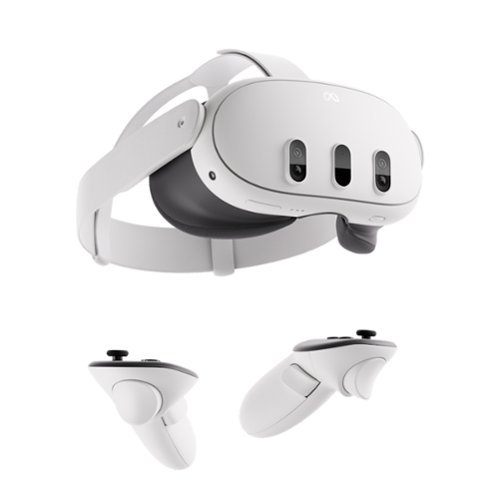
Get ready for the most powerful Meta Quest yet*. With mixed reality, stream shows on giant vibrant screens that you can adjust to the perfect size ~ all while you see the world around you. Dive into full immersion, where you~ll feel like you~re actually inside your favorite games, thanks to brilliant 4K resolution and rich spatial audio. With Infinite Display, enjoy the widest field of view of any Quest for the most immersive experiences yet. The slim, wireless design offers you premium comfort to move freely in workouts, or easily take your headset on the go. From complex games to vibrant movies, enjoy the ultimate experience with the power of Meta Quest 3. *Based on the graphic performance of the Qualcomm Snapdragon XR2 Gen 2 platform vs the Meta Quest 2 platform.
Customer Rating
5
Amazing Experience and an Impressive VR Upgrade
on December 9, 2024
Posted by: VideoJunkie
Talk about an immersive experience! I previously owned the Quest 2 and found it to be a good experience, if not great for playing games like Beat Saber. The Quest 3 is an improvement above and beyond what I could have ever expected.
First, the quality of the visuals is fantastic, and by far, is the most immersive VR set I've had the opportunity to try. The pass through lenses provide a full color view of your surroundings, almost making it feel like you aren't wearing a headset at time. My previous experience was a black and white and somewhat grainy view from the Quest 2. The Q3 is a huge upgrade.
Beyond the visuals, the impressive view in my mind is the level of comfort with the Q3. I can game for an hour with the headset on and it just feels lighter, more comfortable, and less of a weight on my head. It's a huge improvement in terms of design.
Probably as equally important is refresh rate. 90-120hz VR is awesome and makes a huge difference in apps that support it. Motion is so much more fluid.
Now for my particular use case. I love to play video games, and about 5 years ago got into retro games and virtual pinball. I even went as far as to build a 3/4 size pinball cabinet with force feedback and arcade buttons, and instead of mechanical parts, it runs off a PC and 3 monitors. With the Quest 3, I am able to hook the headset into my PC, use the cabinet as a controller (flippers, plunger, etc.), and play entirely in VR. It is so immersive and impressive to play in almost 4K with 120hz on a headset. Yes, you need a capable PC, but it's a fantastic experience.
Short of that, there are virtual pinball apps in the Quest store that you can purchase and get a similar immersive experience.
Hooking up the Quest to a PC to play PC games is pretty simple. There are a few options to play wired (with a separate Link cable to be purchased) or wireless with the Oculus AirLink. Both worked well for me in my testing, but I think I will stick with wired connection when I can, just because my wireless connection to my router can be flaky sometimes (where I play VR and where my router is are in different rooms). Being closer to the router would likely make a difference.
Overall, in my testing, I found the Quest 3 to be a huge upgrade over previous generations. I definitely plan to VR more and am excited to explore other worlds in what is really becoming an immersive experience.
Finally, the last thing I will mention is that the controllers are also an upgrade over previous generations. Menus are snappy and you can even simply use your hands and gestures as a controller, which is a great experience.
I would recommend this to a friend!
Share this review:


0points
0of 0voted this as helpful.

Experience a new pinnacle in productivity and audio quality with the Epic Work ANC Wireless On-Ear Headset. Featuring Smart ANC capabilities of up to 30 dB and 'Be Aware' functionality, it ensures your full engagement during calls while remaining attuned to crucial ambient sounds. Enjoy pristine call clarity through its noise-canceling mic, complemented by the rotating adaptive ENC mic for quick mute and 'Hear Yourself' mode, facilitating seamless communication. This headset provides tailored connectivity with four versatile options for your convenience during work. Equipped with a Cloud Foam headband and rotating earcups, the JLab Epic Work ANC Wireless On-Ear Headset sets a new benchmark for both productivity and comfort during prolonged work sessions.
Customer Rating
5
Great Headset for Open Office Environment
on November 29, 2024
Posted by: VideoJunkie
As a hybrid worker, I work from the office 3 days a week and from my home office 2 days a week. Both of these workspaces offered unique opportunities for me to test out the device. I should first preface that this is my experience with an over the ear headset that covers both ears. My previous headset covered only one ear, but also had noise canceling capabilities and extended talk time, so I was curious to see how this device performed.
I'm really impressed with the Epic Work ANC Headset for a couple of reasons. First, and maybe most important, the audio quality is really good. I use the device exclusively in Bluetooth mode, pairing it with my laptop and my cell phone. With multipoint capability, it can seamlessly switch between the two devices. I had no issues conducting numerous Teams and Zoom calls with this headset and the audio quality was great. Feedback from those listening on the other end was positive as well, as when I told them I was using a new headset, everyone commented that the microphone was working well.
The Headset comes with a cradle that you can use to dock and charge the unit, or you can plug the headset into a PC or USB C powered charging block to charge the device. For charging the device, I plugged the headset directly into the PC to recharge the device. I leave the cradle at home, since I don't have a designated desk when in the office, and I don't want to carry it around when it's not needed.
Battery life is listed as 90 hours when not using Active Noise Canceling (ANC) functionality, and about 60 hours when using ANC. I tested using ANC and using Be Aware mode, which allows you to hear yourself a bit when speaking, so as to help you keep from raising your speaking level and keep a more normal tone. It basically helps to compensate for you wearing over the ear headphones. Another feature is that if you charge the device for about 10 minutes, it can give you about 10 hours of battery life, which is great if you find that battery is low and you have multiple meetings throughout the day.
As I mentioned earlier, the microphone quality is good, and after using it for a week, I experienced no issues with sound quality from the mic. One feature that is nice, is that if you raise the microphone arm up to your ear, it will automatically mute the mic. That's a great feature, but it would have been nice if you could hear a microphone muted message when you do, similar to the audio prompt that happens when you engage ANC or turn it off.
In terms of controls on the unit, there is limited functionality. A power button to turn on/off the device, a +/- to raise / lower volume and the button on the ear to engage ANC, Be Aware, or Turn Off the special features. The same buttons will also allow you to change audio tracks, Play/Pause, Answer/Hangup phone calls, depending on the mode you are in. You can also engage OK Google / SIRI with two quick button presses on the power button.
The JLab app was easy to install and immediately prompted me to do a firmware update. It took maybe 3 minutes to update, but I experience no issues before or after the update.
Overall, I think this unit is great. It has a quality feel to it, long talk time, and quality audio, making it a great headset to use in an open office environment or in a home office. I really like this compared to my previous headset, as it helps me to focus and remove the noise of an open office environment quite well.
I would recommend this to a friend!

Share this review:


0points
0of 0voted this as helpful.
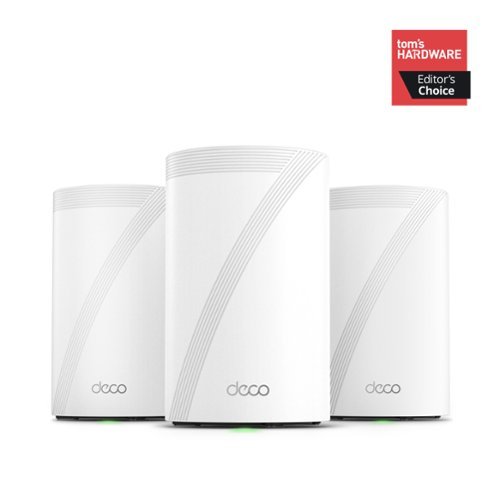
Supercharged by the latest Wi-Fi 7 technology, the Deco BE65 Pro mesh system takes the power and efficiency of your Wi-Fi network to new heights. Delivering combined speeds of up to 11 Gbps on three bands, this powerhouse is an ideal solution for future-proofing your home network, all thanks to Wi-Fi 7 features such as MLO, 320 MHz channel, and 4K-QAM.1,4 Two 5 Gig ports and one USB 2.0 port allow for maximum expandability. With built-in AI-Roaming technology, it creates the ideal Wi-Fi solution with its advanced algorithms and self-learning. Walk through your home and enjoy seamless streaming at the fastest possible speeds~. TP-Link HomeShield keeps your home network safe with cutting-edge network and IoT protection.5
Posted by: VideoJunkie
I was excited to try out this TP-Link - BE11000 Wi-Fi 7 system in my house to see what, if any improvements I might see coming from my previous TP-Link Wi-Fi 6 system that I bought 2 years ago that was serving me quite well. Would I see improvements with Wi-Fi 7 and increased throughput on older legacy devices that still occupy my home... the answer was yes.
Initial Setup
Coming from my older Deco X55 setup made upgrading a breeze. I simply opened the app and indicated that I wanted to replace my existing main Deco. It walked me through connecting the Deco BE65 Pro via an ethernet cable to my Deco X55 and I powered on the Deco BE65 Pro. After about 3-4 minutes, the Deco BE65 Pro had received all of the settings and rebooted and was ready to go. I then powered off my old Deco X55 and disconnected the Ethernet cable. On to switching out my other Deco units for the additional satellites. I did not bother to relocate any, since my previous mesh network covered my entire house previously. After about 10 minutes, I was fully up and running with the Wi-Fi 7 equipment.
Coming from my older Deco X55 setup made upgrading a breeze. I simply opened the app and indicated that I wanted to replace my existing main Deco. It walked me through connecting the Deco BE65 Pro via an ethernet cable to my Deco X55 and I powered on the Deco BE65 Pro. After about 3-4 minutes, the Deco BE65 Pro had received all of the settings and rebooted and was ready to go. I then powered off my old Deco X55 and disconnected the Ethernet cable. On to switching out my other Deco units for the additional satellites. I did not bother to relocate any, since my previous mesh network covered my entire house previously. After about 10 minutes, I was fully up and running with the Wi-Fi 7 equipment.
Experience
In my setup, I run the Deco's as access points, as I have them connected to a Fios router in my basement. The three mesh satellites are all hardwired for backhaul capabilities, and the Deco units serve as my only wireless sources. I also use the ethernet ports on the Deco to provide hard wired connections to an Apple TV in one room and an Nvidia Shield and Xbox Series X in another. I prefer my gaming and streaming setups to be hard wired when possible. My experience at this point was meh... no discernable improvement from my previous setup, since my hardwired devices topped out at 1Gbps.
In my setup, I run the Deco's as access points, as I have them connected to a Fios router in my basement. The three mesh satellites are all hardwired for backhaul capabilities, and the Deco units serve as my only wireless sources. I also use the ethernet ports on the Deco to provide hard wired connections to an Apple TV in one room and an Nvidia Shield and Xbox Series X in another. I prefer my gaming and streaming setups to be hard wired when possible. My experience at this point was meh... no discernable improvement from my previous setup, since my hardwired devices topped out at 1Gbps.
Where I was impressed was with the wireless capabilities, which is where this unit shines for me. I have about 40 devices on the network, ranging from IOT devices, laptops, streaming devices, phones, etc. Testing with an iPhone 13, which I believe is a Wi-fi 6e capable, I was able to get download speeds of about 918 mbps and upload speeds around 800 mbps... nearly a 50% increase for me over what I was able to get on speedtest in the Deco app with my old setup. In this case, I was about 15 feet away from the unit and had clear line of site, so for me was a real-world use case that is best case probably in my setup.
When I tested with my Asus Zenbook 14 laptop which also has Wi-Fi 6E from my office, which is either through 4 walls or an entire floor away from one of the Deco's, I was still able to achieve 600-800 Mbps download speeds consistently, which was still about a 30% improvement. Videoconferencing in MS Teams and Zoom calls were flawless during my testing.
With Wi-Fi 7 features like MLO you can achieve speeds up to 11Gbps, and that's where my biggest caveat is with this unit. I don't yet have client devices that can take advantage of this. None of my IOT devices support Wi-Fi 7, nor does my newest laptop from March 2024. And with my Fios speeds topping out at 1Gbps... it might be a while before I can upgrade in my area to a multi-gig setup.
Overall, I'm thrilled that the wireless is stable, faster at longer distances, and features like 6Ghz bands, wireless backhaul, wired backhaul, etc. all make this an extremely reliable and feature packed unit. But I also recognize that I didn't have a coverage problem before.
The TP-Link BE11000 is a great Wi-Fi 7 system, and is well designed like other TP-Link deco units to make placing them aesthetically easy to do. And if you are coming from an older Deco, like I did, upgrading your network is simple and straightforward.
I would recommend this to a friend!
Share this review:


+1point
1of 1voted this as helpful.
VideoJunkie's Review Comments
VideoJunkie has not submitted comments on any reviews.
VideoJunkie's Questions
VideoJunkie has not submitted any questions.
VideoJunkie's Answers

Go from hundreds of mystery folders to a visual view of your photos automatically sorted by date, subject, people, and places. See your best photos auto-curated based on quality, faces, subjects, and more. Make your photos look amazing with automated photo editing options, and create and share printed artwork, new dynamic slideshows, photo collages, and gifts for friends and family.
The normal Photoshop is a monthly purchase, is this a one-time purchase?
This is a one time purchase. Not a subscription.
8 years, 6 months ago
by
VideoJunkie

Get seriously clean floors without the effort thanks to this Roomba robot vacuum. It automatically navigates across your carpet or vinyl while avoiding hazards and keeping track of its location all the while picking up dirt, debris and mess. Automatic recharging keeps this Roomba robot vacuum powered so that it's ready to go.
Does it clean in a grid pattern or randomly?
Randomly, but it does work well, even though if you watch it go it looks pretty inefficient.
8 years, 10 months ago
by
VideoJunkie