
Share RedOmen's profile


RedOmen
RedOmen's stats
- Review count67
- Helpfulness votes315
- First reviewSeptember 5, 2015
- Last reviewOctober 26, 2025
- Featured reviews0
- Average rating4.3
Reviews comments
- Review comment count0
- Helpfulness votes0
- First review commentNone
- Last review commentNone
- Featured review comments0
Questions
- Question count0
- Helpfulness votes0
- First questionNone
- Last questionNone
- Featured questions0
- Answer count21
- Helpfulness votes63
- First answerMarch 28, 2016
- Last answerDecember 14, 2020
- Featured answers0
- Best answers1

Now you can get Lively~s exclusive services, including Urgent Response for help 24/7, on your own phone! Lively helps you stay connected, safe and healthy with a plan that fits your needs. From getting help in an emergency to notifying friends and family, our plans offer exclusive services that you can count on to help live life on your terms. Every Lively plan comes with Unlimited Talk, Text and 1GB of data, with the option to add more data, as well as our kind and knowledgeable caring team who are here for you day or night.
Customer Rating

4
There is a lot to love About This Service!
on October 26, 2025
Posted by: RedOmen
Over the course of 3 months, the Lively service proved itself to be a solid service overall. Upon initial set-up of the SIM card kit, I downloaded the Lively app to my phone. The app was simple enough to get it up and running quickly, and it leads you through testing out an initial emergency response call to practice using the service. The emergency response staff was attentive and clear, and the app allows for an emergency response button to be placed on your phone's home screen.
Voice service was clear and I received a strong signal regardless of where I was when traveling or at home. Eventually I learned that Lively offers wearable alert services in different forms, so I ended up mentioning that to my mom, who in turn decided to get a Lively wearable alert necklace for herself. I also learned that they have their own phones that are supposed to be easier for older persons to use, although I have not used one of their phones.
On the down side, outside of the strong phone signal and being able to run my typical apps and games done on the service, I did have trouble when it came to downloading updates and data use over the phone service itself. Although I had unlimited data, it appeared that there was a restriction on what I could use my data for over the SIM service. I had no problems handling those tasks over wifi, but this could be a problem if you are out of wifi range, but need a critical update or download, as there seemed to be data restrictions in place no matter what I tried to adjust for in my phone settings. This was the main thing that downgraded this review by a star.
One other issue was with billing in general (a mistake on their part), but it was apologetically resolved, so I am chalking it up to the newness of this service.
I would recommend to anyone looking for this type of emergency alert service, if you have consistent wifi access or at least enough wifi access to download critical phone updates without using cellular data.
I would recommend this to a friend!
Share this review:


0points
0of 0voted this as helpful.

Meet Pixel 9a ~ engineered by Google with more than you expect, for less than you think. Like Gemini built in to supercharge your productivity and creativity.~ A best-in-class camera~ for incredible photos. All-day battery.~ Durable design. And 7 years of updates so it keeps feeling new.~ All for under $500.
Customer Rating

5
Powerful Device, but Makes Some Slight Compromises
on May 12, 2025
Posted by: RedOmen
There's lots to love here, but with some compromises at this price range.
The pros of the Pixel 9a start right away at phone setup. The option to do a full detailed data rip from your previous phone, or to do a quicker rip of the basics, is given very early in the simple setup process. I decided to do the basic rip and was pleasantly surprised to see that even with the basic rip, my wall papers, email account and vast majority of my settings were taken from my primary device. The wall paper was particularly impressive since it is from within another app, but the rip still grabbed that data and applied it to the Pixel exactly as it was on the other device, across different screens.
Photos are another highlight, as I had fun testing out the AI features that allowed me to be creative with my photos. The Pixel led me through my initial experimentation, and then I was off to the races.
Charging speed on the Pixel 9a is about the same as most other devices, and like those other devices, it is a bit behind the times when it comes to charging. With the existence of 80 to 100+ watt charging tech. in some phones (very few at the moment), it is a sad state of affairs when meager 25 watt charging is still the standard speed for most devices. Putting the charging gap aside, if you have not experienced ultra-fast or warp speed charging, you will simply experience charging speeds that you are already accustomed to.
The phone design is nice and sleek, and also a bit slippery. I would suggest getting a clear, non- yellowing case to show it off, but a case of some kind to keep it in hand. The size is perfect for one- handed use, while still giving excellent phone real estate to show off the display. With the exception of lacking slightly in peak brightness, the display is very nice and color accurate.
On the down side, as nice as the camera is, it will not capture the fine details when zooming in. Even in moderate light with the flash on, a picture that looks excellent at first sight blurs if you zoom in the slightest. It will point and shoot with the best of them, but dont expect to zoom in and read something, or to zoom in for fine details in other parts of the photo for identification purposes, and don't expect the AI deblur feature to help either. Most average camera users will not do more than take a standard photo, which they can do successfully in even poor lighting conditions with this phone's camera, but those that are looking for more digital details may want to look at other devices in this flooded camera phone market. At this price point, it's batting over its range, but there are other next-level phone cameras out there. It's clear that there was intention in leveling the camera out from the other more expensive versions of this phone, but you still get a great camera that works perfectly for standard usage.
Some customization options that are common on other phones (and probably included on the other models of this phone) are noticeably missing, or well-hidden away from standard menus. I like my search bar to be at the top of the phone screen, I love having dedicated app folders or drawers at the bottom of the screen underneath any other homepage apps, and I like the ability to choose the shape of the app or file folders on the home screen, but none of these options appear to be available on the Pixel 9a, or none that I could find.
I was also taken a bit off guard by just how many AI device sharing options were activated without my knowledge, until a tool tip or instructional would pop up to assist me with using the feature or with trying to give those apps even more permissions in my phone.
Bottom line is that the phone is stacked with features and powerful software and AI integration. It does make some sacrifices to keep the cost affordable, but aside from certain limited aspects of home screen customization, and your comfort level with heavy AI integration options, there's no major issues that would prevent this from becoming a daily driver for work and/or home. There are other options if you are looking for battery optimization and faster charging speeds, or even for more advanced camera tech., but this device is extremely capable and may be leading the pack if you are leaning into AI integration and an overall solid software package. I'd recommend that this phone be on anybody's list of phone considerations, especially as a more budget friendly but powerful phone option (as if a budget friendly phone exist these days).
I would recommend this to a friend!


Share this review:


+2points
2of 2voted this as helpful.

Stay cool when things heat up with the Razer Laptop Cooling Pad ~ a smart stand that dynamically controls fan speeds based on your laptop~s temperature. Featuring an airtight pressure chamber, customizable fan curves, and a 3-port USB A hub for maximum connectivity, give your laptop the boost it needs for better performance.
Customer Rating
5
A Large Laptop Owner's Dream Cooling Pad!
on February 12, 2025
Posted by: RedOmen
A very sturdy cooling pad with a little flair, and options for customization (except for one specific aspect that may matter for some). The software use to customize the lighting effects, and the separate software to control the fan settings, download automatically once the device is plugged into your PC, so you don't have to go hunting for software online, or to try to use a CD drive to download anything critical. While I found the lighting software to be a bit busy, I was able to intuitively zero in on what I wanted to do fairly quickly with the lighting. One look at the fan software, and I decided to try out the onboard controls first, and they were very intuitive and easy to use, so I wont be going back to the software. Very glad that there was an option here, even if the software looked more user-friendly than it does.
The fan works great, and neither one of the software packs have disrupted any of my PC's other software (my PC has its own RGB lighting and onboard fan controls of its own).
A couple of things to consider are the plugs for this pad, and the nonadjustable tilt angle of the pad. There is an onboard USB plug that you can plug right into the device to utilize the lighting profiles and functions, but a separate plug adapter is necessary to run the fan functions.Anyone with limited plug options or who wants to be more mobile with their PC will need to be conscious of the outlets needed for the fan (or will need to invest in a portable plug adapter/charging bank of some kind to run the devices fan). This consideration is second to the overall portability of this device, as the device is angled with a very solid lift bar at the back of the device. The bar is not adjustable and cannot be detached, so this is not a device that can easily fit into a standard traveling case, or at least not without being intentional about planning transport options in advance. the device fits my 18" laptop perfectly (it comes with a few topside platforms for devices of a smaller size, but comes preinstalled with the larger 18" platform), which means that someone with a bag or tote for a smaller device is going to have their hands full trying to get this well-built pad to fit inside. In my case, I already had to special order a laptop bag that can fit my PC due to the larger size, so the bag I ordered could fit this device as-is, but would require giving up valuable bag space for other items to do so. Anyone who plans to use the pad in a more stationary way with a daily driver PC will be fine without all the extra considerations listed above, with perhaps the exception of the outlet considerations for the fan plug.
Bottom line, this is an excellent device, and the lighting options and available fan customization raise this well above any standard cooling pad. The overall, non-adjustable size and tilt of the device, and the need for an outlet, need to be considered when considering portability, and those with devices less that 17-18" inches may need to give extra consideration regarding travel usage with this pad, but for those with larger devices, and those planning to use this in a more stationary manner, this is a large laptop lover's dream cooling pad. I highly recommend, with encouragement to consider in advance how you plan to use this device, for the best experience.
I would recommend this to a friend!
Share this review:


+1point
1of 1voted this as helpful.

Experience a new pinnacle in productivity and audio quality with the Epic Work ANC Wireless On-Ear Headset. Featuring Smart ANC capabilities of up to 30 dB and 'Be Aware' functionality, it ensures your full engagement during calls while remaining attuned to crucial ambient sounds. Enjoy pristine call clarity through its noise-canceling mic, complemented by the rotating adaptive ENC mic for quick mute and 'Hear Yourself' mode, facilitating seamless communication. This headset provides tailored connectivity with four versatile options for your convenience during work. Equipped with a Cloud Foam headband and rotating earcups, the JLab Epic Work ANC Wireless On-Ear Headset sets a new benchmark for both productivity and comfort during prolonged work sessions.
Customer Rating
5
Great Comfort & Functionality! (missing a feature)
on November 30, 2024
Posted by: RedOmen
This headset comes with handy features overall, and performs very well, in spite of one feature that I couldn't quite get to work (and it could be user error on my part).
My set came fully charged, so I was able to jump right into using them. They come with a base that holds the set by the outside of one of the ear phones, and there are plenty of battery notifications to let you know where you stand (auditory notifications through the phones, as well as a battery power display on whatever device you may be connected to). The charging base comes with a dongle that can be used to connect the phones remotely, or left in the device if Bluetooth is preferred. An instruction booklet is included, but the Bluetooth connection process is very intuitive and quick. I used the device for both work and personal communications, and did not notice a change in audio quality in either format.
The mouthpiece on the phone can be lifted up from near the mouth, and will auto-mute the device, and then reconnect the audio once lowered back to the mouth position. With the thickness of the ear cushions (which feel very comfortable, along with a completely padded headbar) create a level of noticeable noise canceling of everything around you, but these headphones come with an actual noise canceling feature that seems to completely drown out all ambient noise.
Battery life also seems to be great, as I could see minimal batter drain even after using these for work and personal calls, so I cannot speak to charging speed or specific low battery notifications, although the device clearly has battery monitoring and notification features included (as discussed earlier).
Everything I've mentioned make this device a great one for anyone looking for a great headset, for work or personal use, so that is where the 5 star rating comes from. Having said this, I could not get the microphone to pick up my voice through the headphones, after following the instructions for it to do this. There could be user error on my end, or a defective unit for that specific feature, but I was not expecting that feature in the first place, so definitely not a deal breaker.
I would strongly recommend getting this headset, as it comes with a great selection of features, and is padded well for extended usage.
I would recommend this to a friend!
Share this review:


+1point
1of 1voted this as helpful.

Blue Pure 511i Max HEPASilent smart air purifier quickly cleans 193 sqft in about 12.5min, 465 sqft in 30 minutes and upto 926 sqft in 1 hour on high. Independently evaluated for safety standards and third-party tested for performance as part of the AHAM Verifide Program for air cleaners, this air purifier has a Clean Air Delivery Rate (CADR) of 125 for fine smoke particles, dust and pollen.
Customer Rating
5
Good Air Purifier, with Solid App Options
on November 11, 2024
Posted by: RedOmen
This was my first time trying a Blueair branded air purifier, and I was pleasantly surprised!
It came fully assembled, but I actually decided to disassemble it to get a better idea of how to access the filter and how the device opens and latches (I would encourage anybody buying this product to do so, to get a better idea of safe ways to carry the product, and of what the removable and washable parts are). Reviewing the quick start manual is a must, to understand how to connect this product to wifi, although once you look over the guide, you will find that the product is very simple to use and more intuitive than one might think just from looking at it.
The Blueair app was easy to locate in the App store, and was fairly simple to use for connecting the device to wifi (note that you must use a bluetooth connection before you can get to the wifi only connection; you can then disconnect from bluetooth). The primary criticism that I have is for the first page of the App, as I was confused about why I had to enter an "outside" location when there is an indoor location option that forces you to enter your local area information anyways. The actual app options beyond the first page are simple and intuitive to follow, showing air quality, filter life, LED brightness slide bar, night settings, a child lock option, and event the ability to auto-operate the device on a schedule of your choosing.
This purifier gets very good air flow, and the lower setting is fairly quiet. I found the LED lights to be a bit distracting at night even on their lowest settings, so I ended up placing the device in a way where the lights would not disturb me in the evening ( am using it in my bedroom).
I would recommend this air purifier to anyone in the market for one, and have now added Blueair to my listing of preferred purifier brands. While I usually do not like devices that are solely dependent on an App, I did find the App to be very convenient to use with this Purifier, and I enjoy getting air quality and filter quality details digitally alongside having the exterior light to identify filter replacement or poor air quality. I will definitely consider Blueair branded purifiers when looking for my next one, assuming this one last long (I've only had it for about a week or so), and that the filter is as easy to replace as it seems it would be.
I would recommend this to a friend!
Share this review:


+1point
1of 1voted this as helpful.
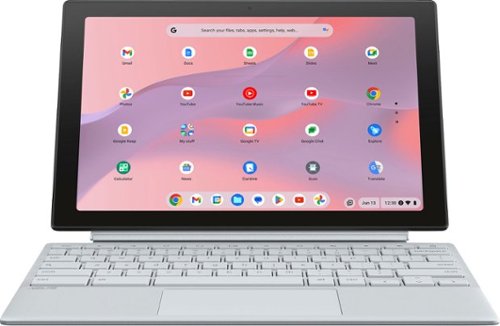
ASUS Chromebook Detachable CM30 is the perfect portable companion for study, work and play, with a versatile 2-in-1 design that allows it to transform seamlessly between laptop. With a two-way, push-pop stylus to quickly capture ideas and notes, both front and world-facing cameras, an impressive up to 12-hour battery life*, fast WiFi connectivity and military-strength design, ASUS Chromebook Detachable is your effective, fun and freeing everyday partner ~ ready to delight at every turn.
Customer Rating
4
Great Chromebook, but has possible deal-breakers
on May 27, 2024
Posted by: RedOmen
There is a lot to love about this Chromebook, but it does have a couple of particularly bothersome items that could make some folks decide it is not the product for them.
Set up and navigation are simple, and you are given the option to link the device with any other devices you'd like (phones, tablets, other Chomebooks/Pixelbooks, etc.), which is becoming more and more common across these types of devices. Battery power is fantastic, and this will easily handle whatever you can throw at it, as a travel companion for work or for more casual or infrequent use. The screen is great and provides a delightful experience whether using it in tablet form or as more of a laptop.
The included keyboard and back cover are not attached to each other, but work in unison to properly use the device in its laptop form factor. Both are detachable from the main unit, so you can use this in a true tablet form if desired. While the key board physically plugs into the screen, the back cover is magnetically attached and comes off with a slight pull, and has a magnetized but movable/bendable lower flap to act as a stand for the screen, with several adjustment angles.
A standout feature for some will be the included Pen for the screen, which is housed within the screen itself (push button release; push down to return to storage).
The two things that I was displeased with are the rear-facing camera and the keyboard attachment. In this era where even basic smartphones are now coming with cameras that can take almost studio quality photos, the camera found here is terrible. It may come in handy in a "any camera will do" kind of on-the-spot, spontaneous situation, but you will certainly not be intentionally trying to use this camera to take any photos outside of an emergency. The inclusion of any rear camera may be seen as a bonus to some, but the quality almost begs the question "why bother?" if the quality is this lacking. I attempted pictures with regular indoor lighting, and it looked like I was taking pictures in a cave. I don't think most people buy a device of this type for the camera quality, and I might be spoiled by the beautiful pictures I typically take with my phones, but if you are specifically looking for a camera in a tablet form factor, look elsewhere.
The biggest offense is the keyboard. While it has a nice amount of punch when typing, and has good key spacing (no dedicated numeric key pad outside of the numbers along the top), there is no back lighting on the key board and this is emphasized by the color scheme of the keys; A light silvery/tan color with off-white symbols on the keys. I had a hard time reading the keys, as the symbols barely contrast with the key color itself. While I could still manage in a brightly lit room (still with some effort/eye strain) the keys were not readable in a more dimly lit setting. If they sell other color schemes, I would avoid any color that does not naturally provide a strong contrast from off white. If the keys had a back light, there would be no issue, but as-is with no lighting, this will get frustrating very quickly for anyone that wants to use this in laptop formation.
Bottom line for me, I think there is a lot to love here, and the onboard Pen and dynamic form factors of the device in general are probably chief among the features to love. However, I would not personally buy this device due to the lack of back lit keys/lack of key and symbol colors with stronger contrast between them, and the poor camera, which looks nice aesthetically but performs less stellar than it looks. If you want to use this strictly as a touchscreen tablet (touch screen is very responsive, with or without the Pen), or if you have identified compatible alternate attachable keyboards for this model (if they exist), then this may be for you. But if you actually ARE looking for a tablet-esque device with a decent camera, or planning to use this as more of a laptop but will not be using this in the most brightly lit environments possible, then you may want to pass.
Most people I know would ignore the camera and buy this device for the plethora of other features it has, but everybody I know that would want to use this in its laptop configuration would find the lack of contrast in the keyboard to be a huge deal breaker.
There are many more benefits to owning this device than there are concerns, and since I believe most would find the benefits more appealing, I am recommending this device, but very cautiously as there are some distinct areas that may be a problem for some, depending on how one plans to use the device.
I would recommend this to a friend!
Share this review:


+5points
5of 5voted this as helpful.

Meet the Razer Seiren V3 Mini~an ultra-compact USB microphone that now packs even more. Featuring a new tap-to-mute function and advanced audio customization, enjoy studio-quality voice capture with the perfect pint-sized companion for gaming, streaming, and chatting.
Posted by: RedOmen
I don't typically use stand-alone microphones, as most of my other tech. tends to have mics built into them (web cams, laptops, phones, bluetooth speakers, etc.), but after the compliments I received after using this microphone, I may be making a standalone mic part of my regular tech. repertoire!
The mic. is plug & play, and sets itself up immediately. There's a software offer for downloading gaming software for the device, but I opted not to use that. I've used the mic. for both personal and work-related meetings, and when I have asked how I sound to those I am meeting with, I get resounding positive feedback, complementing the charity and sound of my voice. Surprisingly, even my family who have heard my voice all my life, have been compelled to tell me how great I sound when using this microphone.
The mute feature was fun to use, as the mic is very responsive to touch. You do not need to slam your hand on the mic nor repeat multiple touches to make it respond. I lightly touched it and the volume instantly muted (admittedly, I touched it successively to see how responsive it was, and it responded to every touch even when tapping it multiple times in a row). There is an indicator light on the front of the mic that illuminates green when the mic is active and red when muted.
The mic is slightly adjustable at the base, and allows for some positioning if needed. Assembly was very quick and painless, as it consisted of just attaching the mic to the pedestal base.
This mic was great for me since this was my first use of a standalone mic as part of my regular computer setup, but this is a corded USB mic, NOT a Bluetooth microphone, so you will want to consider your studio or office setup and availability ports if considering getting this mic, but it does the job very well, and I would happily recommend it to everyone I know!
Share this review:


+1point
1of 1voted this as helpful.
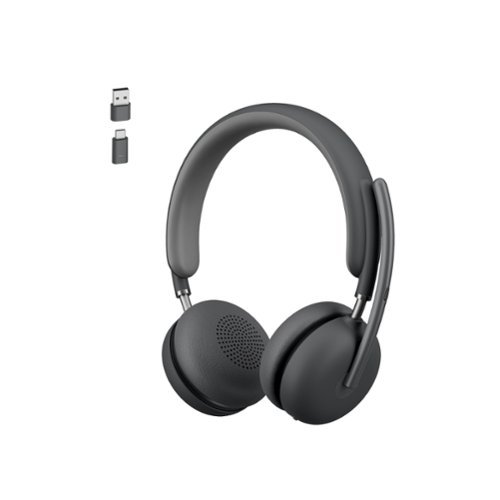
Enjoy exceptionally clear sound with the Logitech Zone 950 Premium Noise Canceling Headset, our best wireless headset. Work from anywhere and ensure you can hear and be heard in busy environments ~ like open offices and cafes. The Zone 950 noise canceling headphones feature Advanced Call Clarity technology, which uses AI to make it easier to hear the person you~re talking to by suppressing ambient noise. Hybrid active noise cancellation (ANC) blocks distracting background sound. Noise canceling mics elevate your voice while suppressing other sounds. 40 mm speakers deliver premium audio for meetings and music. The free Logi Tune app offers a dynamic and personalized equalizer (EQ) that automatically adjusts the audio to your own hearing range or lets you customize the sound to your preferences. Designed for comfort and a longer life with replaceable earpads and battery.
Customer Rating
4
The Best Headset... that I cannot fully recommend.
on November 24, 2023
Posted by: RedOmen
This headset has great sound quality, similar to a standard set for music connoisseurs (although not quite on that level), and I was especially impressed with the noise canceling ability. The first time I placed them on my head, I couldn't hear ANY of the ambient noise around me, except for my own heartbeat in the silence. Bluetooth connectivity was very simple, quick, and intuitive, and the microphone seemed to be clear, from what I was told by MOST people I spoke with using these.
The only issue I have with these headphones is that there does not appear to be an audio notification when the battery is low, and this caused quite a bit of confusion during a conversation I was having with these connected over bluetooth. The person I was speaking to began to periodically say they could not hear me, although I could hear them fine. Since I could hear them, we both assumed that it was their device malfunctioning, but once my voice apparently could not be heard for an extended time, I ended up having to disconnect the headset from my phone and speak though my phone directly. Later I saw that the low battery indicator light was on, and so I charged it up. They worked fine once they were fully charged. My biggest issue here is that this could cause some major inconveniences if using this for work or other important communications (having the microphone drop out with no audible battery notice). Other devices I own will state "low battery," "recharge," or something similar when using headphones with those devices, and wireless headphones I own with a weak battery will at least do a stutter tone, disruption in the sound produced, or some sort of audible signal that the battery is low, and I think this is critical if using these for work or other important communications. It should also be noted that the low battery indicator light was not showing when the microphone first began to have issues, further contributing to my confusion about what the issue actually was.
While I love the sound quality and features of the device (there is a mute button on the microphone, it has both a Type C and Type A USB dongle to use aside from connecting through bluetooth, and it comes with a tote bag that fits the headset nicely and makes it more portable when not in use), I have to take a star off due to the lack of an audio notification about a weak battery, as I was lucky that it gave out during a social call as opposed to a work-related one. I have no way to know if I just happen to have a bad set related to an audio indication for low battery not being present.
Bottom line, great sound quality, microphone (on a full battery), and overall accessories and features, with exceptional noise canceling, but cannot recommend for those that may need a head set for multiple daily phone or video meetings, as it would be too easy to overlook the low battery notification (which leads to microphone issues).
Would be great choice for a casual headset for personal/social communications, or only occasional work-related meetings of minimal importance where you can insure that you are going in fully charged, but in that case, you can find cheaper headsets for casual purposes. As many positives as there are with this set, I still cannot recommend these in general, as i think most will consider these for work, and the low battery/microphone issue is too critical to ignore for that purpose.
No, I would not recommend this to a friend.
Share this review:


0points
0of 0voted this as helpful.
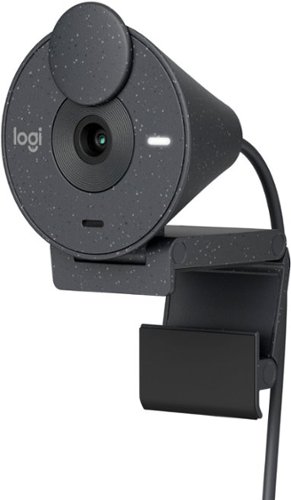
Say hello to better video meetings. Place Brio 300 at your best angle for an eye-to-eye connection. Look natural thanks to 1080p resolution and auto light correction for low-light situations. A noise-reducing mic suppresses background noise so others can hear you clearly. Spin the easy-to-use privacy shutter to cover the lens between calls. Brio 300 is certified for Microsoft Teams, Google Meet, and Zoom, so you can enjoy hassle-free meetings.
Customer Rating
5
Dreams Really Do Come True! Cam w/Privacy Shutter
on August 16, 2023
Posted by: RedOmen
I own a couple of Logitech web cameras, one of which is excellent, and another which is sub par at best. Was hoping this one would be great, and my wish came true.
Picture quality was great and everyone I spoke with said they could hear me crystal clear. In particular, the lighting adjustment was on par with the better of my other two Logitech web cams, and displayed my visage perfectly even with nothing but dim natural light on a dark rainy day. The swiveling privacy shutter is great, and the camera is easy to adjust.
This is a plug & play device that loaded very quickly on my laptop after plugging it in. Although I had a table fan on, everyone I spoke with said they could only here my voice when I spoke, so the sound filtering works great. I did not try adjusting any of the settings with the app, primarily because everything worked so well out the box that I didn't feel the need to try the app.
Could not be happier with this device, and will be replacing the sub par web camera with this one! Now I just need to decide whether to use this for home or office. Highly recommend to anyone needing a web camera for any reason. Fantastic product.
I would recommend this to a friend!
Share this review:


0points
0of 0voted this as helpful.
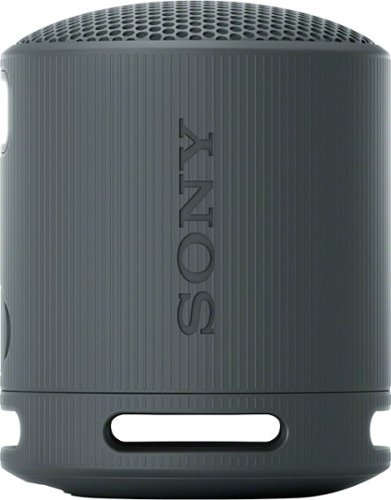
Enjoy big sound with the super-compact SRS-XB100 wireless speaker, offering powerful, clear sound, an updated IP67 waterproof and dustproof design1,2, and up to 16 hours of battery life.3 Small enough to fit in a bag or cupholder, the XB100 also features a versatile strap to take with you wherever you go.
Posted by: RedOmen
Sony has hit an exceptional balance with the XB100. As an owner of two of its older siblings (XB10 & XB13), I can say this is the most balanced sound of the three. The XB10 was base heavy for its size but got a bit muddy at higher volumes; The XB100 can dish out strong (but not as strong) base and stays clearer at higher volumes with the base pumped up (although it gets a bit muddy at the very top volume like most speakers of this size. The XB13 had a crisper overall sound quality than the XB 100, but handles base the least well of the three, and is slightly exceeded in sound quality and detail by the XB100; In short, the XB100 will give you the best qualities of both of its predecessors, and pack the best sound possible for a speaker this size. i found the XB100 to be very responsive to a virtual EQ, and some songs that I've listened to for years sound like a remastered version hearing it on this speaker.
Bluetooth connection was intuitive and extremely easy, as with most Sony products, and the on-speaker controls were easy to use as well. It comes with a strap that works great for carrying or positioning the unit. Its water and dust ratings are high enough to use this speaker in a variety of outdoor settings, and it can be paired with other like speakers if a larger sound is desired.
This is a SMALL portable speaker, so everything I've written is in the context of what is possible with a speaker this size. While it would be hard to find a similarly sized speaker with this sound quality, it will not perform miracles, like trying to use for large gatherings or filling a large outdoor space with robust sound.
Overall, a nice portable speaker for personal use, with full, detailed, quality sound reproduction. Highly recommend for those in need of a smaller device.
I would recommend this to a friend!
Share this review:


+1point
1of 1voted this as helpful.
RedOmen's Review Comments
RedOmen has not submitted comments on any reviews.
RedOmen's Questions
RedOmen has not submitted any questions.
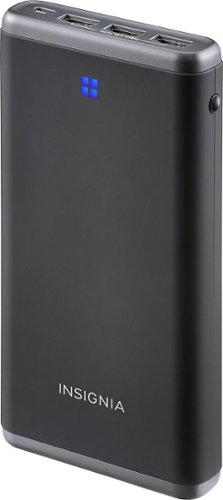
Enjoy additional talk and play time on your mobile device with this Insignia~ NS-MB15600 portable charger, which is compatible with most USB- and micro USB-enabled devices. Overload protection guards against damage.
how can you see how much battery it has left ?
does it display how much it has left ?
There is a small button on the right side of the device that will illuminate the power display on the front of the device. The device only displays the power in quarters; There are four lights arranged in a square formation, and the lights will reduce after each quarter of power has been drained from the device.
10 years, 2 months ago
by
RedOmen