


rtbestbuy's stats
- Review count182
- Helpfulness votes217
- First reviewNovember 22, 2014
- Last reviewJune 2, 2026
- Featured reviews0
- Average rating4.5
Reviews comments
- Review comment count0
- Helpfulness votes0
- First review commentNone
- Last review commentNone
- Featured review comments0
Questions
- Question count0
- Helpfulness votes0
- First questionNone
- Last questionNone
- Featured questions0
- Answer count11
- Helpfulness votes29
- First answerAugust 15, 2017
- Last answerOctober 5, 2021
- Featured answers0
- Best answers3
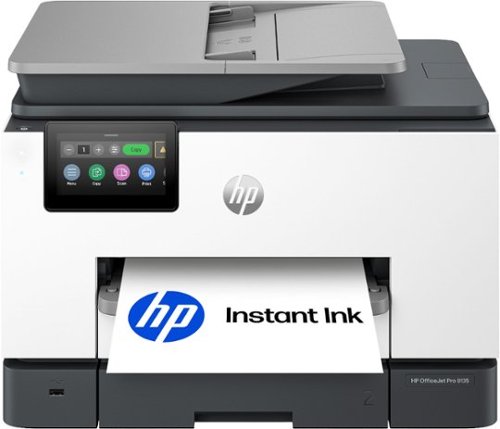
The HP OfficeJet Pro 9135 All-in-One Printer delivers fast color, fade-resistant prints, 500-sheet paper capacity, and single-pass duplex scan, copy capabilities plus fax, perfect for your office. Navigate this printer with the 4.3" color touchscreen and phone-like user interface. It includes wireless and printer security features to keep your multifunction printer up to date and secure, and is made with more than 40% recycled plastic content. Optimize print formatting with HP AI, that easily removes unwanted content from emails and web pages so your prints are just the way you want~no wasted pages or unwanted content. Subscribe to Instant Ink delivery service and get 3 months of free ink delivered directly to the door of your office. The HP OfficeJet Pro 9135 All-in-One also lets you print from anywhere with the HP app.
Customer Rating

4
Excellent Small Office Printer Once It's Set Up
on June 2, 2026
Posted by: rtbestbuy
The HP OfficeJet Pro 9135 All in One printer was clearly designed for small office use and pretty much perfectly hits the mark. It offers the speed, paper handling, features, and functions that makes it perfect for a small or home office. The dual 250-sheet trays provide enough capacity for high volumn jobs without continually reloading paper.
Print quality is excellent, easily equal to a laser printer. Tried printing documents, presentations, spreadsheets, and code listings and all were sharp and crisp. Newsletters with embedded photos printed very nicely. The OfficeJet 9135 is definitely not a photo quality printer, but it handled photo stock well enough. Photo printing is best left to a dedicated ultra high resolution photo printer.
With two 250-sheet trays, the 9135 can handle mixed paper automagically. Combine one tray for letter with one for legal or envelopes or A(4,6) or whatever. I keep letter in one and envelopes in the other, but tried 5x7 photo stock and legal just for grins. The 9135 handled it all without any issues.
Copying and scanning are equally fast and versatile. The full duplex scanner scans both sides of the sheet in one pass, so there is no flipping the page or automagic dual pass scan. The 35 sheet ADF took both regular documents and a photo stack, but it was a little fiddly. Scans were always sharp and crisp, but sometimes were a bit crooked.
Setup was a mixed bag. Control is through a 4+" touchscreen with a very intuitive menu system. HP has chosen to setup using the HP SmartPrint app. I tried on four different computers, three Win 11 and one Win 10. On each one, setup was slow enough to be frustrating. Each one would stop short of full installation, and each at a different point. In the end, I set up the printer with the touchscreen and installed the drivers from the full Windows install package. The printer menu was very intuitive and the Windows driver install package worked quickly and flawlessly. One significant point of annoyance is the popup blurb for HP's Instant Ink subscription program. Because my printing can be very erratic (varies from 10pgs/month to 500pgs/month), the Instant Ink program doesn't really work well for me. One other setup annoyance was the necessity to imput the printer PIN on every computer that would be accessing the 9135.
The ink cartridges themselves are pretty high capacity, and the cost per page seems pretty low for a cartridge based printer. Not as low as the tank refill types, but much easier to renew. The supplied cartridges are not full cartridges, HP calls them 'setup' cartridges. This seems to be universal now in the world of inkjet and laser printers.
Overall, the HP OfficeJet Pro 9135 printer really works well in a small office environment, once you get past the initial setup. Should definitely be on your short list for a small or home office.
I would recommend this to a friend!
Share this review:


0points
0of 0voted this as helpful.
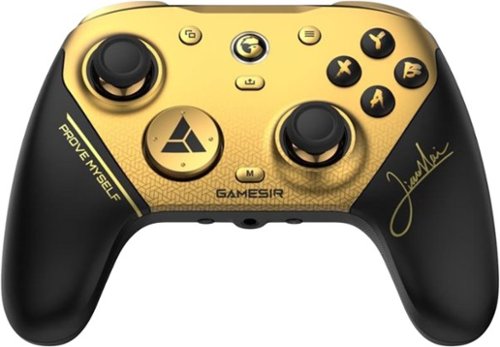
Introducing the G7 Pro 8K PC Champion Edition wireless esports controller~crafted for competitive PC gaming, co-created with world fighting game champion XiaoHai. Boasting 8K Hz wired/2.4G wireless ultra-responsive polling, it captures every move with lightning precision, empowering you with a true competitive edge.
Customer Rating

5
Pro Controller at a Bargain Price
on May 5, 2026
Posted by: rtbestbuy
Short answer: The GameSir G7 Pro Game Controller offers premium feel and features at a very modest price point. Solid build, great feel, mappable buttons, awesome response, vibration and motion control. And a very budget friendly price.
I am a PC gamer. I had tried a cheap wired controller instead of the keyboard, but was unimpressed. Convinced to try a better controller, the GameSir G7 Pro Controller jumped out. What a difference!
Unboxing was simple, box contains the controller, base charging stand, usbc cable, and wireless dongle. The controller can be connected to your pc wired, bluetooth, or dedicated dongle wireless. I chose bluetooth. The base connected to a PC usb charging port. The dongle stores in the underside of the base, keeping it from getting lost. Install the Nexus app for mapping (more later) and you're off and running. The controller has a nice solid feel, slightly heavier than the wired controller, but without the wire it's much less clumsy and tiring to use.
Tried the controller with several games, first person shooters, RPG's, and flight. There was absolutely no drift or response delay that I had experienced with the earlier wired controller. All the controls had a nice positive feel. Movement was very precise, never felt like I was accidentally moving somewhere. The motion control and vibration worked really well, although the motion control might not be to everyone's taste.
The Nexus app is a companion app that provided programming options for the G7 Pro. It really is necessary and not just a 'nice to have'. It allows for multiple profiles to map the buttons to specific functions, kind of a macro facility, which makes some complex operations much simpler. It is available from the Microsoft store. It was a little fiddly the first time I used it(first time, it took a bit to recognize and connect with the controller), but once set up it works fine.
All in all, I'm really pleased with the GameSir G7 Pro and it has restored my belief in game controllers. It should definitely be on your short list, especially at the price point. Highly recommended!
I would recommend this to a friend!
Share this review:


0points
0of 0voted this as helpful.
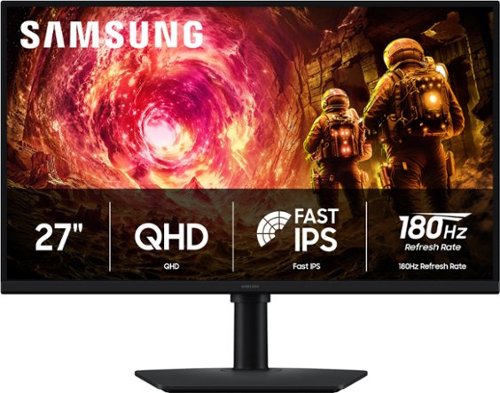
Samsung~s 27" Odyssey G5 QHD Gaming Monitor delivers brilliant visuals for exhilarating gameplay that~s more immersive than ever before. QHD resolution (2560 x 1440), with more than 1.7 times the pixel density of Full HD, boasts incredibly detailed, pin-sharp images. The fast IPS panel, with its 178~ viewing angle, provides an engaging gaming experience by consistently delivering crisp, clear hues from various viewpoints. 180Hz Refresh Rate and 1ms response time (GtG) allow ultimate speed for ultra-smooth gaming precision, while G-Sync compatibility syncs the GPU and panel to reduce choppiness, screen lag, and image tearing. Scenes feel more realistic with HDR10, which provides brighter highlights and nuanced shadows for added depth. Black Equalizer improves visibility in the deepest shadows, while Virtual Aim Point increases the accuracy of the player~s aim when the action peaks. Auto Source Switch+ allows instantaneous switching between connected devices without having to flip through multiple inputs. Maintain winning streaks in total comfort with the height-adjustable Ergonomic Stand that easily pivots, tilts, and swivels for the perfect view.
Customer Rating
5
Excellent Inexpensive QHD Gaming Monitor
on April 21, 2026
Posted by: rtbestbuy
QHD monitors seem to the be the best bang for the buck in gaming monitors these days and the Samsung Odyssey G5(G50F) 27" monitor is a prime example. At $280, it's got all the right credentials: QHD IPS screen, 180hz refresh, 1ms pixel response and both FreeSync and G-Sync compatibility.
I needed to replace an older monitor that was dying. I wanted both FreeSync and G-Sync compatiblity because I have a gaming desktop with AMD video and a gaming laptop with Nvidia video. The dual compatiblity was a real plus. I wanted a 27" monitor due to desk space issues. I also wanted a monitor that could be used in both landscape and portrait configuration.
After unpacking and assembling the monitor, which took all of about five minutes, got it hooked up to the desktop. The Odyssey G5 has a separate power brick which make the monitor very light. The stand and frame seem quite sturdy. The bezel surrounding the screen is very thin and unobtrusive. Rotating between a landscape or portrait display is easy and the stand doesn't get in the way. The tilt, pan, and rotation make the monitor usable in almost any location or angle.
Color depth and uniformity is really excellent, with even lighting all the way to the edges. Firing up a couple of test games, touring a dungeon was a lovely experience with deep blacks. I could easily distinguish the baddies coming out of the shadows. While the Samsung Odyssey G5 may not have the HDR contrast of some high end monitors, it's really quite respectable. There was also no tearing, blooming, or smearing in high action scenes.
A mini joystick on the back is the on off switch and controls access to all the settings with an on screen menu navigator. The menu system was intuitive and easy to navigate and initial setup went very quickly. There were a couple of minor issues with it. Because the joystick is on the back, it's kind of awkward to access. Another issue with setup is that some of the configuration options are not accessible unless a video source is connected. One other minor nit is that there is only one HDMI input and one DisplayPort input. A second DisplayPort input especially would have been really nice.
The Samsung Odyssey G5(G50F) gaming monitor is a very impressive QHD monitor, even more so at the price point. Image quality and in game performance are really excellent. If you are looking for a 27" monitor, it should definitely be on your short list. Highly recommended!
I would recommend this to a friend!
Share this review:


0points
0of 0voted this as helpful.
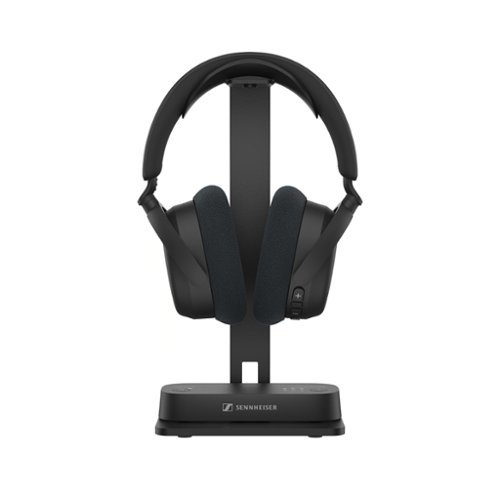
Experience immersive TV sound your way with our Bluetooth TV headphone and transmitter bundle~the RS 275 TV headphones. Enjoy virtual surround sound and crystal-clear speech ~ customizable with personal hearing profiles. Pre-paired for effortless setup, these headphones let you listen at any volume without disturbing others. Experience plush comfort, lightweight, and a stable 50-meter range with flawless sync and up to 50 hours of battery life. Want to connect your phone or tablet? No problem. Watching with others? Bluetooth Auracast~ lets each listener use their own volume and settings. It~s TV sound, personalized just the way you like it.
Customer Rating
5
Great Headphones, Actually Worth the Price!
on April 16, 2026
Posted by: rtbestbuy
Summary: The Sennheiser RS275 TV headphones are a headphone/transmitter bundle that are usable with virtually any TV. It provides immersive sound, highly configurable audio, switchable ambient awareness, and multiple ways to connect to a tv, computer, phone, or audio source.
I use headphones for TV in the evening to because my wife goes to bed early. I have some hearing loss, particularly with higher frequencies. I had been using a set of bluetooth headphones that died and decided that it was time for a better solution. So, Sennheiser RS 275s!
Out of the box there are the headphones, transmitter, 3.5mm audio cable, optical cable, two USB cables, a metal stand, startu instructions, and the ubiquitous safety warnings in a bunch of languages. The box itself is all cardboard and recycles nicely. Setup is pretty easy, connect the transmitter to the TV via HDMI, USB, 3.5mm audio cable, or optical cable. The USBc port on the transmitter is also the power connection, so if you don't have a usb port on the tv, you'll need a 1A USB power dongle. There is also a USB output on the transmittter for charging the headphones. You can connect the transmitter to the TV or audio source via HDMI(ARC), USBc, audio cable, or optical cable. You can have multiple sources connected and switch between them, if you like.
There is a phone app, SmartControl+, that is kind of necessary. Make sure to get the "+" version, there is an older "SmartControl" version that doesn't know about the RS275. First thing, both the transmitter and headphones had a firmware update with some fixes and a couple of new features. Hopefully, Sennheiser will continue to add features and controls in the future. The app itself is a bit clunky, but still quite usable.
The headphones fit nicely, with large earcups that fit well over my large ears. They are also very lightweight, very comfortable for extended use. Interesting note, they can be connected via bluetooth without the transmitter for phone, computer, even the TV. Sennheiser added Auracast support, which to me looks like multicast bluetooth. In any case, one really noticable trait of the RS275 system is no lag! Unlike my old bluetooth headphones, the synchronization between the screen and the sound is perfect.
Sound quality is stellar, even with my degrading ears. There are a number of sound contours for 3D sound, enhanced voice, different types of music, and different hearing enhancement profiles. Whatever your condition your ears are in, there is a sound profile for you. I've used the RS275's paired to my phone as a headset (yes, there is a microphone), paired with the computer for Zoom calls, and for games. Games on the computer were the really interesting one. Again, I experienced zero lag in the audio.
In addition to the mic for calls, etc, there appear to be mics for ambient sound awareness, which can be set at various levels. If you are using them with your phone on a walk, or simply in a room watching tv with other people, it's really nice to not cut out the world. Of course, you can if you really want to.
Battery life is also awesome, I haven't recharged the headphones since I got them almost a week (and probably 30hrs of use) ago. That's actually good in another way, because the stand is just a stand, not a charging station. Charging is through a USBc port, which is probably the only minor fault I could find with the Sennheiser RS 275's.
Overall, I was a little sceptical about the price, but I'm sold. If you are looking for TV headphones that can basically be used for just about anything headphone, give the Sennheiser RS275's a look. I don't think you will be disappointed. Highly recommended!
I would recommend this to a friend!
Share this review:


+9points
9of 9voted this as helpful.
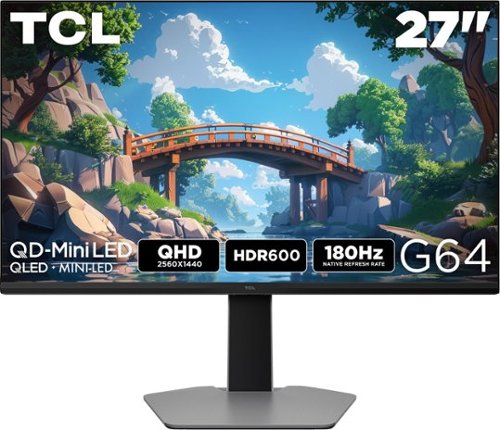
The TCL 27G64 QD-Mini LED Gaming Monitor is ideal for next level gaming with TCL~s Halo Control System that includes the Powerful Light-emitting Microchip, Condensed Micro Lens, Micro OD Reduced Optical Distance, High Contrast HVA Panel, QLED, and Dynamic Light Algorithm for Stunning ~Halo-Free~ Images. Get sharp, QHD resolution and see all the details. The LD180 Precise Dimming Series, HDR600 Brightness, 180Hz native panel refresh rate, and 1ms GTG provide deep contrast, vibrant highlights, and smooth, responsive gameplay. Stutter-free gaming and ultra-smooth frame transitions with AMD FreeSync and NVIDIA G-SYNC Compatible. The built-in Crosshair Aim Guide provides enhanced targeting precision in any game. T~V Low Blue Light certification ensures reduced eye strain and more comfortable viewing.
Customer Rating
5
Excellent Pricey QHD Monitor
on December 23, 2025
Posted by: rtbestbuy
After moving to a new AMD based system (Ryzen 9, Radeon rtx9060ti), I wanted to add a second monitor for gaming and was space limited to 27 inch. My primary monitor is a 4K monitor, but really not suited to gaming. I use the same system for video and photo processing as well as gaming. I wanted a QHD monitor as they seem to be the most bang for the buck in gaming monitors and is the sweet spot for the rtx9060ti.
The TCL 27" G64 monitor is a QHD LED display with 1ms response time and up to 180Hz refresh. It is Freesync capable. The stand is solid, nicely height adjustable and very secure. The stand does allow some rotation. The build quality is excellent. It has a very thin bezel and a very premium feel out of the box. Assembly was trivial. There are two HDMI inputs and one DP input, which seems standard these days. Power is supplied by a separate power brick.
A mini joystick in the center at the bottom of the monitor doubles as an on-off switch and menu navigator. It's nicely obvious, don't have to grope around to find it. The menu system was intuitive and easy to navigate and initial setup went very quickly. One very, very nice feature is that the color schemes are not fixed, you can adjust them to suit your taste and needs. One minor issue is that the menu is not accessible unless a video source is connected.
Performance is stellar in games, blacks are deep and the local dimming is very effective. Really not much difference from the OLED monitors I looked at, and the G64 seems much brighter. The image is sharp all the way to the corners, color saturation and accuracy are both excellent. I would say that the claimed HDR600 level has been achieved, and maybe more. In game, there was no tearing, blooming, or smearing, just a really solid image at all times, even in some of the dark shooters.
This is a very impressive QHD monitor. It's a bit pricey in it's range, but the image quality is really excellent, rivaling some of the OLED monitors I looked at and should definitely be on your short list. Highly recommended!
I would recommend this to a friend!
Share this review:


0points
0of 0voted this as helpful.

Experience next-level protection and clarity with the THINKWARE U3000 PRO. Featuring 4K UHD front and 2K QHD rear recording with Dual STARVIS 2 sensors and Dual HDR, it captures every detail in stunning quality, day or night. Dual built-in 60GHz RADAR sensors deliver smart, energy-efficient parking surveillance, while Super Night Vision 4.0 ensures bright, noise-free footage in low light. Stay connected anywhere with the THINKWARE CONNECTED App (via optional LTE) for live monitoring, impact alerts, and vehicle tracking. Dash cam set includes the U3000 PRO dash cam, rear camera unit, 3M adhesive windshield mount with extra 3M tape, CPL filter, heat blocking film, adhesive cable holders, OBD II cable, trim tool, and 64GB MicroSD card.
Customer Rating
4
Feature Rich, But No Image Stabilization
on December 1, 2025
Posted by: rtbestbuy
The Thinkware U3000PRO is a feature rich dashcam with a remote wired rear camera, excellent video, especially at night, parking monitoring, driver assistance alerts, and remote monitoring with an additional LTE module. Ultimately, I found it a bit disappointing, but that may be my particular situation.
Caveat: This review was done with the camera not completely installed. I'm having it professionally installed by BestBuy and we're waiting on extension wiring to route through the cabinets and headliner of the van. The front camera is temporarily but solidly mounted, but the rear cam is just tacked to the rear door windows. The USB cable and the cable to the OBD2 are just draped through the van.
I wanted a front and back dashcam for our camper van, which meant it needed a separate cam for the rear that could be mounted on the rear door window. I had been using a dash mounted GoPro (11) set up for rotating clips until a permanent dashcam was installed. The Thinkware U3000PRO seemed to fill the bill on all counts. The forward unit does not have a screen, but relies on the phone app for viewing. I find the built in screens to be distracting while driving, so this was a plus for me.
First off, the video quality is excellent. The front cam video at 4K compares favorably to the video from the GoPro and the night time video is even better. The Sony sensors are really good! The rear cam, which also uses a Sony sensor at 2K video, also provides excellent video. We had some foggy days and even that provided pretty clear video.
However... that was when not moving. The U3000PRO does not have any image stabilization, between the temporary mounting and the native van bouncing, the video when moving can be pretty shaky. This was disappointment number one. Hopefully, this will improve when the units are permanently mounted, Thinkware claims some vibration isolation in the mounts. Since digital image stabilization is a purely software feature, perhaps they will think about providing an upgrade in the future.
Which brings me to disappointment number two. Not only is the rear cam a wired slave cam, Thinkware uses mini USB ports on the main and rear camera for connections. While they provide a 25ft cable, it's not long enough for a van, after tucking into the headliner and snaking into the rear door port. Try to find mini USB cables! USBc ports would have been a much better choice. The funny thing is that Thinkware provides a USBc port for their LTE module.
The Android app seems to work well and I haven't had any problems with it. The cams are easily set up and the videos can be retrieved over the camera wifi quickly. As noted, the camera is connected to the ODB2 port for power. There are a couple of switches on the ODB2 connector, one to enable parking mode and one to enable Driver Assistance. Assistance was turned off, the van already has driver assistance modes. I did kick the bumper to test parking mode and managed to record a video of myself, so good there. The LTE module, which enables cloud storage and monitoring, is optional and extra ($150 for a 3yr basic service). I haven't tried it, but it's available.
In summary, the Thinkware U3000PRO is a top of the line dashcam with a couple of ideosyncratic features that detract from an otherwise excellent product. Recommended, with reservations.
I would recommend this to a friend!
Share this review:


0points
0of 0voted this as helpful.
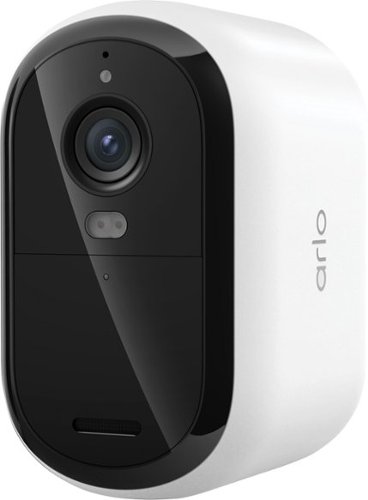
Protect your home longer with this wireless outdoor security camera featuring extended battery life up to 4x longer than standard models and crystal-clear 2K resolution. This long lasting battery camera with XL battery is ideal for hard-to-reach locations and high-traffic areas where frequent recharging isn't convenient. Your purchase includes a 30-day trial of Arlo Secure with premium features including 60-day video history, Smart AI Detection that automatically recognizes people, vehicles, packages, and animals, plus interactive lockscreen notifications with Emergency Response and Call a Friend options for complete peace of mind. Get instant motion detection alerts on your phone, watch live video from anywhere, and stay connected with Dual-Band WiFi for the strongest signal. This battery powered camera delivers 2K HD video quality that captures every detail including shirt colors, car colors, and facial features, plus Color Night Vision for full-color surveillance at night so you can see details in color even in darkness for superior home security. Hear and speak clearly with visitors using Two-Way Audio with noise cancellation, quickly deter threats with the integrated siren, and extend battery life even further with Low Power Mode for reliable outdoor surveillance with less recharging. This rechargeable security camera offers simple, hassle-free installation. Easily mount your wireless security camera in minutes without professional installation or wiring, and conveniently remove it whenever it's time to recharge the extended battery. The XL battery capacity gives you longer runtime to keep your camera powered continuously, making it perfect for outdoor home security cameras mounted in difficult-to-access spots like high on walls or high-traffic areas. Seamlessly works with your existing smart home system including Amazon Alexa, Apple Home, Google Home, Samsung SmartThings, and IFTTT for voice control and automation. Ideal for home security systems, driveway monitoring, front door protection, backyard safety, perimeter surveillance, and complete property security.
Customer Rating
5
Good High Traffic Camera Solution
on November 3, 2025
Posted by: rtbestbuy
Short answer: The Arlo Essential XL Spotlight Camera, 3rd gen is a great addition to the Arlo lineup. Video quality is excellent, the battery life is astounding, and setup is easy. It's a feature rich, low cost way to add an additional camera to an Arlo system.
The Arlo Essential XL battery is not removable and comes partially charged. Charge it up, pair the camera to the Arlo app, and you're ready to go. The 3rd gen battery life is claimed to last up to 16 months before needing a charge. I've only had it installed a few days, but it's still showing 98%, so it's looking good. The mount is new and is not compatible with previous Arlo mounts. The camera swivel is built into the mount which is a permanent part of the camera. The mounting plate has two screws and the camera mount snaps onto the mount. I did try snapping it off the mount so I could take it down for recharging someday, but I may just get a really long usbc cable.
Video quality is excellent, with 2K resolution and good detail both day and night. The built in light is motion and ambient light sensitive. For me, this was a bonus, as the Essential XL replaced an aging Arlo spotlight. It also has two way audio and an integrated siren. WiFi is dual band and connected to my home network without issue.
For me, replacing a spotlight with a camera/spotlight was a no brainer, especially with the battery life of the 3rd gen Essential XL. If you already have an Arlo system, it's an easy and inexpensive way to add a camera. The Arlo environment really requires a plan to be effective and to enable all the enhanced features like package detection, zone security, etc. So the one decision is whether to buy into the Arlo plan going forward. Whether you're looking to add a low maintenance camera to a high traffic area or just looking for a low cost, high quality surveillance camera solution, the Arlo Essential XL 3rd gen is a great choice.
I would recommend this to a friend!
Share this review:


0points
0of 0voted this as helpful.
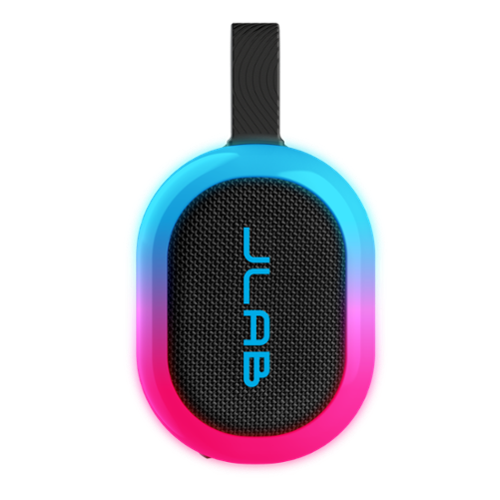
Pop. Play. Party! Designed for ultimate portability, the Pop Party Speaker cranks up the fun anytime, anywhere. With flexible mounting options and a detachable loop handle, it~s made for seamless portability and quick setup. Its compact design is perfect for any adventure, while vibrant RGB lighting sets the perfect vibe. IP55 waterproofing ensures the party continues, rain or shine, and the JLab app gives you full control over sound and lighting. Plus, with LabSync, you can connect up to 100 speakers for an unforgettable experience.
Customer Rating
5
Overachiever!
on September 24, 2025
Posted by: rtbestbuy
The JLab Pop Party speaker is a small, inexpensive, awesome Bluetooth speaker. The sound quality, really the first measure of any speaker, is surprisingly good for a speaker of this size (and price). It offers excellent sound in a package the size of your hand and an amazing array of options for the price. The feature list is also pretty amazing considering the price.
The Pop Party is designed for portability. It fits in your hand, with a loop handle and magnetic base for mounting on handlebars, pack rings, belt loops, or stick it on a metal surface with the magnetic base. Power it on and it's ready to pair, with voice prompts to talk you through each step. The Pop Party can be sync'ed with a second speaker for stereo, or with up to 99 other speakers for music distribution all over. The app (Android, IOS) allows configuration of the lighting, voice prompts, equalization and syncing with other speakers.
Setup was trivial, power on the speaker, pair, and you're up and running. A lot of feature configuration can be done by multiple presses of the power button, but the app is so much more convenient. It adds access to a 10 band equalizer, preset sound curves, pairing and syncing options, as well as voice prompts and lighting configuration.
I've used the Pop Party for all sorts of music, ranging from classical to metal, as well as using it with a laptop for a movie soundtrack. Sound never got muddy or distorted even at high volumes. The bass was surprisingly strong, although not gut punching, and the treble was clear and crisp, never squeaky. Using it for movies and Youtube videos with a laptop was a significant upgrade over the laptop speakers. Yes, lighting can be completely disabled, which I did while watching videos.
I've actually ordered a second Pop Party (yes, they are that inexpensive) to use as stereo speakers with a gaming/AV laptop. The Pop Party can be set up as stereo speakers, with left and right channel assignment. Another cool feature!
The Jlab Pop Party is an amazing Bluetooth speaker that will hardly put a dent in your bank. The sound and features put it in a class way above it's price. I can't recommend it enough. If you're looking for a portable speaker, it should be at the top of your list!
I would recommend this to a friend!
Share this review:


0points
0of 0voted this as helpful.
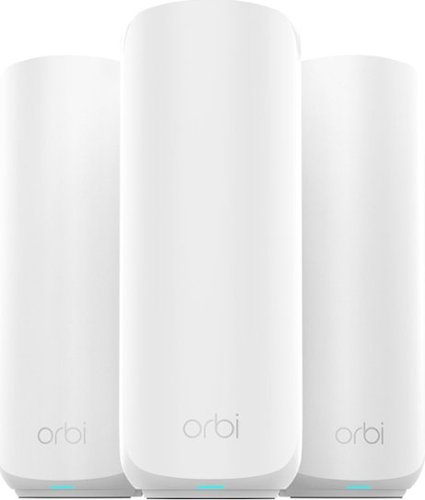
Orbi Wi-Fi 7 is in a class of its own, designed for a new era of entertainment, hybrid work, and smart home convenience. The Orbi 370 Series unlocks the power of Wi-Fi 7 with speeds up to 5 Gbps, 1.7X faster than Wi-Fi 6. In addition, the Orbi 370 brings exceptional 360~ Wi-Fi coverage for whole-home connectivity.
Customer Rating
4
WiFi7 Performance at a Budget Price
on September 21, 2025
Posted by: rtbestbuy
The Netgear Orbi 370 WiFi7 Mesh Router provides very good WiFi performance on a budget. It replaced an older 802.11ac mesh router which also had two satellites. Although my router and satellite placement is the same as the older system, the Orbi 370 provides much better and consistent coverage and throughput. An additional note, I had to contact Netgear/Orbi support for help at one point and their support was really excellent. More on this later.
The Orbi 370 mesh package consists of a router, two satellite units, power supplies, and an Ethernet cable. Each unit has a single 2.5gb port for peripherals and the router has an additional 2.5gb port for internet connection. The router and satellites are otherwise identical, standing about 8in and roughly cylindrical. They are very unobtrusive, lights only come on during power up, configuration and when errors are detected.
Initial installation (cable modem system) should have been very easy. First step, download the Orbi phone app to do the initial configuration and scan the QR code on the router. Then: Unplug modem, connect router and modem via ethernet, plug in router, connect the app, plug in the modem, and follow the instructions in the app. Unfortunatly, I ran into an error that caused the app to loop continuously. Netgear tech support responded very quickly, set up a time convenient for me, and walked me through the workaround. Very patient, knowledgable, and helpful. Definitely a plus point for Netgear!
Once the router was up, I could connect the satellites which was very simple.
Once the router was up, I could connect the satellites which was very simple.
Streaming and gaming are both very smooth with no apparent lag or latency issues. I have about 40-50 devices, 30 or so may be active at any given time. Previous network I had the game systems connected via Ethernet, WiFi would occasionally lag. With the Orbi 370 installed, I've switched the game systems to WiFi with no perceptible issues. Very nice.
There are two 'security' add-ons, at a monthly subscription fee. The first provides Bitdefender enabled application type security and vulnerability scans for $99 a year. There is an additional addon for parental controls for an additional fee. It's kind of unfortunate that so much of the security and access controls have moved into the add-ons. There are some controls available in the app that are not in the web admin interface and vice-versa, also unfortunate. Finally, I believe remote administration now requires the security add-on because it it done via the Netgear proprietary vpn.
There is an option to enable a guest network and password, but no controls over access. The guest network shares the same subnet as the primary network without any firewall controls. There are also no rate limiting controls or other traffic shaping controls. Not totally unexpected at this price range, but it would have been nice to have some basic security options in the router.
Overall, I'm pretty pleased with the performance upgrade and the tech support has been superb. I am a little disappointed with the subscription model for what I consider basic router security. For anyone looking to upgrade to WiFi7, or just get a throughput boost on a budget, the Orbi 370 WiFi7 Mesh Router should be on the short list of candidates.
I would recommend this to a friend!
Share this review:


0points
0of 0voted this as helpful.
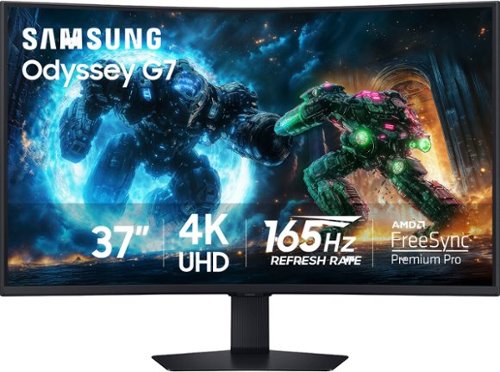
Samsung's 37" 4K UHD Odyssey G7 Curved Gaming Monitor provides spectacular realism for epic game play. The 37" 1000R curved display with 4K UHD resolution wraps around the field of vision for next-level gaming. VESA DisplayHDR 600 delivers more contrast, with deeper blacks and brighter whites for greater clarity even in dark scenes. 165Hz refresh rate and near-instant 1ms response time (GtG) minimizes lag for ultra-smooth gameplay. AMD FreeSync Premium Pro syncs the GPU and panel to reduce choppiness, screen lag, and image tears. Auto Source Switch+ detects when connected devices are turned on and instantly switches to the new source signal. CoreSync technology with 16.7 million colors and CoreLighting+ project vibrant on-screen colors into the real world for a fully immersive experience. The ergonomic stand enables monitor tilt and height adjustment for optimal gaming comfort.
Customer Rating
5
Samsung Hit The Sweet Spot!
on September 13, 2025
Posted by: rtbestbuy
Short Take: The Samsung Odyssey G75F 4K UHD monitor really hits the high notes for gamers. I found the 37-inch curved screen is much more immersive than the popular 32-inch screens. Compared to the larger 43-inch monitors, it feels much less unwieldy, like it belongs on a desktop. The Samsung Odyssey G75F really is the 'just right' monitor, for both gaming and general desktop use.
Searching for a new monitor, I just wasn't that impressed with the difference between a 27-inch and a 32-inch. Both made me feel a bit constrained, especially gaming. I was a bit skeptical about fitting a 37-inch monitor on a desktop, but it worked! Probably should have about two feet of depth available, I use a 30-inch deep table. The box it arrives in is around 40lbs. Out of the box, assembly was suprisingly easy, attach the base to the stand, snap the stand to the monitor back, and lift the whole monitor out of the box and place it.
The build quality is excellent and feels very solid. The stand allows for tilt, swivel, and vertical positioning. It moves easily and stays put. Also included are a HDMI cable, DisplayPort cable, power brick, and CD/quickstart guide. The included cables are a particularly nice touch. The connectors are 2x HDMI 2.1 and 1x DP 1.4. There is also an audio out for headphones, a usbB connector for computer connection and a usbA connector for peripherals. The usbA connector can also be used for monitor firmware upgrades.
The Odyssey G75F is really feature rich, with lots of extras. It fits the bill with basic gaming specs of 165hz refresh, 1ms respoonse, and 4K UHD resolution. Side to side viewing is surprisingly good. Picture quality is excellent with nice saturated colors and lots of configuration options for color, brightness, and contrast. The curved screen works really well for both gaming and desktop viewing. It also supports VESA DisplayHDR 600 for enhanced contrast/brightness and AMD FreeSync Premium Pro, if you're pairing with an AMD card(I am, more later). Two additional features that are really welcome are auto source switch and Picture in picture. Auto switch source allows you to have a second system, like a Playstation, connected to the monitor and it will switch to the system that was turned on last. It can be turned off if you don't want the switch. Picture in Picture can also be configured for placement and size.
My needs were a little different than most in that I wanted a monitor that could do double as a gaming monitor and a standard desktop monitor to replace a two monitor setup. The Odyssey G75F is paired with an AMD Ryzen 99xx processor and AMD 9070 video card. I use this for gaming, video processing, as well as usual desktop applications and some development work. My 2 standards for gaming test are Cyberpunk 2077 and Diablo 4. Cyberpunk 2077 for frame by frame and Diablo 4 for dark dungeons. No tearing, lag, awesome vibrant colors, and excellent dark background separation. On top of that, the huge curved screen makes for a really immersive experience.
(NOTE: Windows desktop) For desktop applications, it's all about squeezing more onto the screen while being able to read it without squinting close to the screen. The Odyssey G75F size and curvature makes it comfortable to be two feet away and use the smallest available text (and app) size, maximizing what I can have on the screen. The pixel density is enough that text still looks sharp and crisp, which would start to spread on a larger screen.
The only thing that took a little getting used to are the controls, which use four arrow pads and a 'not a joystick' at the bottom of the monitor. The 'not a joystick' feels like a joystick, but the arrow keys must be used to select the menu item. The Samsung Odyssey G75F is kind of a unicorn in that most of the monitors in this size class are the ultrawides, it's really set the bar for a new class of monitor. It's a very impressive monitor, both for dedicated gaming and for general desktop usage and I highly recommend it.
I would recommend this to a friend!
Share this review:


0points
0of 0voted this as helpful.
rtbestbuy's Review Comments
rtbestbuy has not submitted comments on any reviews.
rtbestbuy's Questions
rtbestbuy has not submitted any questions.
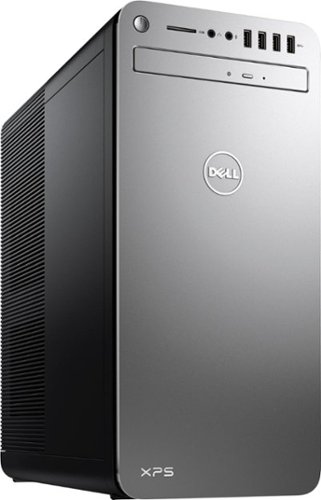
XPS Desktop - Intel Core i7 - 16GB Memory - NVIDIA GeForce GTX 1050 Ti - 2TB Hard Drive + Intel Optane Memory
Since there is no graphics card, I'm curious to the max resolution. My Dell monitor is capable of 2560x1440. Will I need an add on card to get this resolution?
Max resolution of the Intel HD 620 video controller is 4096x2304.
8 years, 9 months ago
by
rtbestbuy