
Share amamar5's profile


amamar5
amamar5's stats
- Review count3
- Helpfulness votes0
- First reviewDecember 12, 2014
- Last reviewFebruary 15, 2017
- Featured reviews0
- Average rating4
Reviews comments
- Review comment count0
- Helpfulness votes0
- First review commentNone
- Last review commentNone
- Featured review comments0
Questions
- Question count0
- Helpfulness votes0
- First questionNone
- Last questionNone
- Featured questions0
Answers
- Answer count0
- Helpfulness votes0
- First answerNone
- Last answerNone
- Featured answers0
- Best answers0
amamar5's Reviews
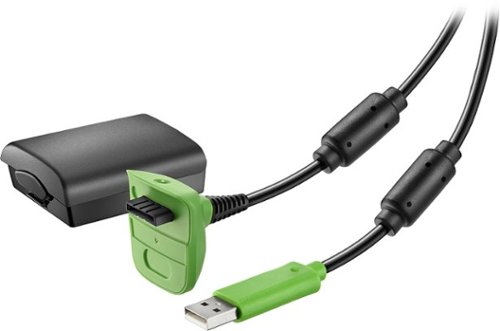
You've been locked in a heated battle on the diamond for nine innings, and now you're down to your final strike. With runners on second and third, and your team down by a run, you know a single will win the game. You've been locked in all game, and have been on top of every pitch that has been hurled your way. The pitcher begins his wind-up, and you send the runners. As the ball approaches the plate, you see that it's right down the middle and you hit the button to swing away, but nothing happens. You press again and again, but still nothing. Just as the ball pops the mitt, you look down and see the inevitable ~ your controller has run out of power.With this Insignia~ Charge & Play Kit, you'll be equipped to keep your Xbox 360 controller charged and ready for use when you are. The included Xbox 360 battery powers your controller to eliminate the need for disposable batteries. Play your games comfortably from your couch, while charging your controller at the same time with the 10' cable. With this Charge & Play Kit, you'll rest assured knowing your adventures will never have to end.
Customer Rating

4
It works
on February 15, 2017
Posted by: amamar5
Verified Purchase:Yes
It works as advertised. It allows me to keep playing when the battery runs down. It would have been nice if this also allowed me to connect the controller to my PC and play, but it doesn't seem to allow that, even with the drivers installed. It would also be nice if I could hook this up to a USB wall charger, so Idon't have to leave your XBox on while it charges, but it doesn't seem to allow that either. Regardless, it does work and since I got it on sale, I'm satisfied.
My Best Buy number: 0417249757
My Best Buy number: 0417249757
I would recommend this to a friend!
Share this review:


0points
0of 0voted this as helpful.
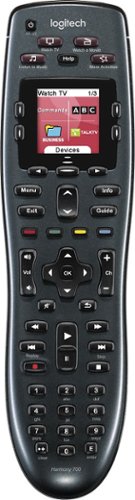
Manage up to 8 of your home theater electronics devices with this Logitech Harmony 700 915-000162 universal remote, which features a brilliant color command screen for easy navigation. One-touch activity buttons simplify device selection.
Customer Rating

3
Meh
on December 28, 2015
Posted by: amamar5
Verified Purchase:Yes
It's okay. It's not really comfortable in my hand and I find it difficult to use by touch. I keep having to glance down to find where my fingers are. It also takes quite a bit of customization to make it work really well. They also made some questionable programming choices , like you can't rearrange the order of your devices, so you better put them in the order that you use them most. Also, you can't tell it what keys to use from other devices. Like if you have an amp that you want to use for the volume when watching tv, you can't just tell it to use the amp volume. You have to use the learning function to teach it the amp volume up and down for each input. I had to do this for my tv, bluray, x box, and Wii. With all the different functions it got rather annoying.
My Best Buy number: 0417249757
My Best Buy number: 0417249757
Mobile Submission: True
I would recommend this to a friend!
Share this review:


0points
0of 0voted this as helpful.
![Guardians of the Galaxy [Includes Digital Copy] [3D] [Blu-ray/DVD] [Only @ Best Buy] [SteelBook] [Blu-ray/Blu-ray 3D/DVD] [2014]](https://pisces.bbystatic.com/prescaled/500/500/image2/BestBuy_US/images/products/304b2327-370a-41e7-956a-951dd4939472.png)
Customer Rating

5
Great Movie
on December 12, 2014
Posted by: amamar5
Verified Purchase:Yes
Great movie, cool packaging. That about covers it.
My Best Buy number: 0417249757
My Best Buy number: 0417249757
Mobile Submission: True
I would recommend this to a friend!
Share this review:


0points
0of 0voted this as helpful.
amamar5's Review Comments
amamar5 has not submitted comments on any reviews.
amamar5's Questions
amamar5 has not submitted any questions.
amamar5's Answers
amamar5 has not submitted any answers.