
Share roaddoggm's profile


roaddoggm
roaddoggm's stats
- Review count3
- Helpfulness votes3
- First reviewAugust 27, 2013
- Last reviewAugust 16, 2014
- Featured reviews0
- Average rating5
Reviews comments
- Review comment count0
- Helpfulness votes0
- First review commentNone
- Last review commentNone
- Featured review comments0
Questions
- Question count0
- Helpfulness votes0
- First questionNone
- Last questionNone
- Featured questions0
Answers
- Answer count0
- Helpfulness votes0
- First answerNone
- Last answerNone
- Featured answers0
- Best answers0
roaddoggm's Reviews
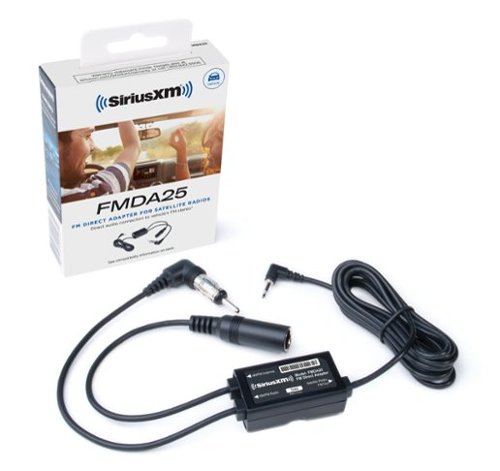
Enjoy virtually static-free sound with this SiriusXM FM direct adapter, which provides a high-performance wired audio connection to your vehicle's radio. You can still listen to your local AM and FM stations when your Satellite Radio is turned off. Compatible with most SiriusXM, XM and Sirius radio models with a PowerConnect Vehicle Kit.
Posted by: roaddoggm
from Anaheim, CA
Verified Purchase:Yes
I have an Acura TL and recently bought a SiriusXM Onyx unit. The built in FM modulator works very poor in the TL with having to constantly change stations. I sprung for the direct adapter to fix the problem. Installation was a breeze, if you know basic radio installation you can install it yourself in under 15 minutes. The adapter does exactly what its supposed to do and eliminates the need to find stations all the time. Sound quality is great with no loss of signal or fidelity. Since the adapter has a port for the regular antenna, one can easily switch between terrestrial radio and satellite without issues. Overall great product at a decent price!
What's great about it: Does what its supposed to do, block out static
What's not so great: nothing
I would recommend this to a friend!
Performance

5
Ease of Use
5
Share this review:


+2points
2of 2voted this as helpful.
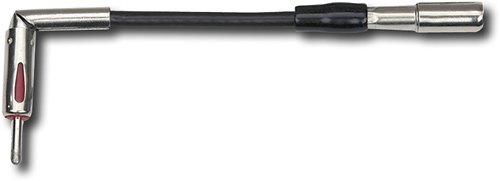
For quick and easy installation, use this aftermarket antenna adapter to fit an OEM radio into your vehicle.
Customer Rating

5
Couldn't finish the job without it!
on August 27, 2013
Posted by: roaddoggm
from Anaheim, CA
Verified Purchase:Yes
Recent change from stock radio to aftermarket on my 06 GMC Envoy, I wouldn't have been able to finish the job without it. This adapter just plugged into existing antenna cable and plugged right into new radio. Took seconds to finish.
My Best Buy number: 2841645723
My Best Buy number: 2841645723
What's great about it: Easy to use
I would recommend this to a friend!
Ease of Use
5
Share this review:


+1point
1of 1voted this as helpful.
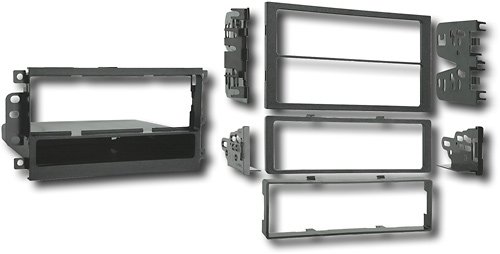
Put a stereo system in your vehicle with this installation kit that allows you to install a DIN radio for flexible installation options.
Customer Rating
5
Just what I needed!
on August 27, 2013
Posted by: roaddoggm
from Anaheim, CA
Verified Purchase:Yes
Recently did a head unit replacement in my 06' GMC Envoy, bought this after shopping around and found the price to be quite competitive. Instructions were easy to read and overall kit had everything I could use for the job, I only wound up needing 3 pieces from the kit for my setup. Only thing I would recommend for the project is to make sure you open all the packaging within the kit. I found a set of screws that I needed but didn't know they where included until I was cleaning up and getting ready to throw everything away.
My Best Buy number: 2841645723
My Best Buy number: 2841645723
What's great about it: Easy to use
I would recommend this to a friend!
Ease of Use
5
Share this review:


0points
0of 0voted this as helpful.
roaddoggm's Review Comments
roaddoggm has not submitted comments on any reviews.
roaddoggm's Questions
roaddoggm has not submitted any questions.
roaddoggm's Answers
roaddoggm has not submitted any answers.