
Share Cashmoney's profile


Cashmoney
Cashmoney's stats
- Review count13
- Helpfulness votes1
- First reviewAugust 19, 2015
- Last reviewDecember 4, 2017
- Featured reviews0
- Average rating4.8
Reviews comments
- Review comment count0
- Helpfulness votes0
- First review commentNone
- Last review commentNone
- Featured review comments0
Questions
- Question count0
- Helpfulness votes0
- First questionNone
- Last questionNone
- Featured questions0
- Answer count9
- Helpfulness votes0
- First answerAugust 19, 2015
- Last answerDecember 17, 2015
- Featured answers0
- Best answers0
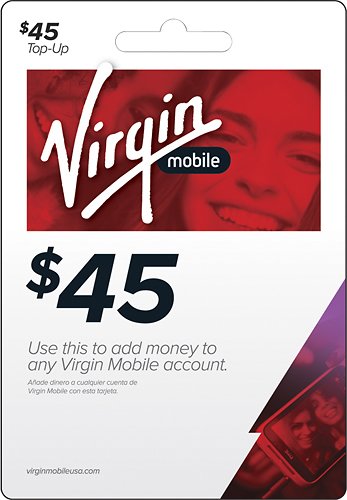
This top-up card allows you to purchase talk time and more for your compatible Virgin Mobile wireless plan.
Customer Rating

5
Simple to Use
on December 17, 2015
Posted by: Cashmoney
from Here & There
Verified Purchase:Yes
I like buying the virgin mobile top up cards because it allows me a simple way to add money on our account without using my personal banking account. Even simple enough for tweens & others to apply themselves. Plus you don't even have to directly sign into your account. Just need your phone# & a top up card & you are good to go.
Could be used as a nice surprise & pay someone phone bill.
Could be used as a nice surprise & pay someone phone bill.
My Best Buy number: 0785482381
My Best Buy number: 0785482381
Mobile Submission: True
I would recommend this to a friend!
Share this review:


0points
0of 0voted this as helpful.
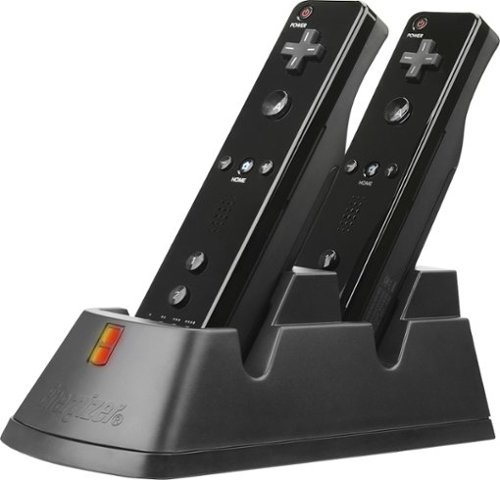
You love the action-packed, motion-tracking adventures that your Nintendo Wii provides, but truly hate it when the juice runs out of your Nintendo Wii Remotes. Now, you can easily make sure the controllers are always powered and ready when you are with this Charging System. Keep the excitement going with the help of effortless power replenishment.Recharge your Nintendo Wii Remotes for additional gaming without having to remove the batteries. With this Energizer Power & Play Charging System, all you need to do is drop the Wii Remote onto the system to begin power replenishment. The sturdy base and secure contacts provide a sure connection for reliable charging. Always know how your Wii Remotes are progressing with the glowing charger ports. Keep your Wii Remotes powered and ready for your next gaming adventure with this Energizer Power & Play Charging System.
Customer Rating
5
Nice charger
on August 25, 2015
Posted by: Cashmoney
from In my room
Verified Purchase:Yes
I have been using this charger for about a month now and it has been working fine. I like the way the wiimotes sits in the base. You may have to do a little moving it around to get it in just right especially if you have the wrist strap attached. I am replacing the Energizer charger with some Nyko ones I had for awhile and those batteries were on their last leg. When the wiimotes are charging a red light appears and when fully charged a green light appears. The lights can be a little bright depending on location. A simple solution would be put some tape over it.
I guess if I had a con it would be for those that use the sync button on the wiimotes. There is no access to that red button once you put the battery cover on. It's a small con but nonetheless important to some.
I caught these on sale for ten bucks apiece, so def worth it to me.
I guess if I had a con it would be for those that use the sync button on the wiimotes. There is no access to that red button once you put the battery cover on. It's a small con but nonetheless important to some.
I caught these on sale for ten bucks apiece, so def worth it to me.
My Best Buy number: 0785482381
My Best Buy number: 0785482381
Mobile Submission: True
I would recommend this to a friend!
Share this review:


0points
0of 0voted this as helpful.
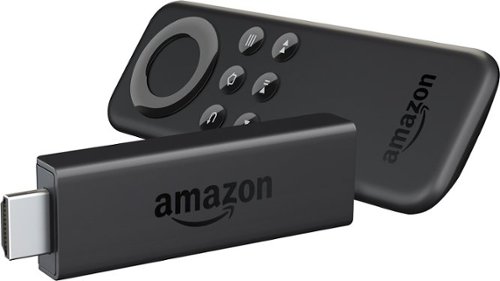
Amazon Fire TV Stick connects to your TV's HDMI port. Just grab and go to enjoy Netflix, Prime Instant Video, Hulu Plus, YouTube.com, music, and much more.
Customer Rating
5
Great Gadget
on August 19, 2015
Posted by: Cashmoney
Verified Purchase:Yes
I already have 2 of these in the house and have recently bought 4 more for myself and family as gifts. Out the box it's really easy to setup and add your Amazon apps to it. Remote control is pretty simple (getting the batteries was the hardest part of setup). This is more useful if you already have a Netflix and Amazon account, if you are not technically inclined.
If you are into tinkering with technology, there are plenty of information on the internet that can make this baby an Entertainment Beast. Just search Kodi. You can still have your regular apps work. You also can customize the look and have easy access to your favorite apps and shows. Make sure you use the hdmi extender that's included in the box.
I won't debate whether this is better or worse than a Roku. I have a Roku and it has its place and has its pros and cons just like the Amazon Fire Stick. Both have an phone app to use your phone as a remote. Both have a great community that is available to maximize the performance of both devices.
I was able to get my 1st one at launch for $20 and subsequent ones on sale at 25. I can say it's worth the regular price of 40 if you like to tinker with gadgets cause you will easily see the value in it. If you will use it as is out the box I would wait for a sale.
Overall it's a great device and make a great gift either way.
If you are into tinkering with technology, there are plenty of information on the internet that can make this baby an Entertainment Beast. Just search Kodi. You can still have your regular apps work. You also can customize the look and have easy access to your favorite apps and shows. Make sure you use the hdmi extender that's included in the box.
I won't debate whether this is better or worse than a Roku. I have a Roku and it has its place and has its pros and cons just like the Amazon Fire Stick. Both have an phone app to use your phone as a remote. Both have a great community that is available to maximize the performance of both devices.
I was able to get my 1st one at launch for $20 and subsequent ones on sale at 25. I can say it's worth the regular price of 40 if you like to tinker with gadgets cause you will easily see the value in it. If you will use it as is out the box I would wait for a sale.
Overall it's a great device and make a great gift either way.
My Best Buy number: 0785482381
My Best Buy number: 0785482381
Mobile Submission: True
I would recommend this to a friend!
Share this review:


0points
0of 0voted this as helpful.
Cashmoney's Review Comments
Cashmoney has not submitted comments on any reviews.
Cashmoney's Questions
Cashmoney has not submitted any questions.
Cashmoney's Answers
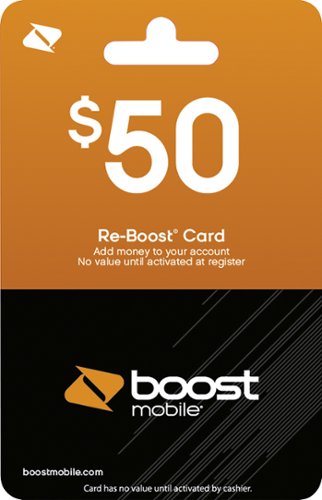
Stay in touch with loved ones with help from this Boost Mobile $50 Re-Boost prepaid phone card, which is compatible with a wide variety of Boost Mobile products and plans. Use this card to enjoy data, talk time and text messaging on your cell phone.
Can I purchase on line and load minutes without physical delivery or store pick up?
You only have this option if it says it will be sent via email. Otherwise you need the actual card to get the #s off the card. There are not many places that offer this option. I think Wally (u kno the store) may be an option. Make sure that it says "email delivery".
10 years, 5 months ago
by
Cashmoney
Here & There
Amazon Fire TV Stick connects to your TV's HDMI port. Just grab and go to enjoy Netflix, Prime Instant Video, Hulu Plus, YouTube.com, music, and much more.
what all channels do the device have
Can i watch the history channel discovery channel show me all channel's
That is going to depend how you decide to set this up. You can put some apps on the stick through your Amazon account. You may also be able to install your cable or satellite provider's app on it, if you have those services. You can also sideload apps without rooting. If that statement was over your head then you may struggle trying to do my next suggestions. You may also want to check out and research "Kodi on Amazon Fire Stick" if you are up for that challenge. You must also remember that the stick is also limited by the small storage size.
Good luck and hope you are adventurous. It's worth it.
Good luck and hope you are adventurous. It's worth it.
10 years, 9 months ago
by
Cashmoney
Here & There
Amazon Fire TV Stick connects to your TV's HDMI port. Just grab and go to enjoy Netflix, Prime Instant Video, Hulu Plus, YouTube.com, music, and much more.
do extension come with firestick from best buy.
Brought firestorm at best buy extension was not in the box. Do it comes we with the firestick it states on the box it should be in there.
I'm assuming you are referring to the hdmi extension cord. Yes it comes with the Amazon Fire Stick. It's helpful because some folks have issues with their fire stick getting warm/hot during play. It allow air to circulation and moves it from behind the tv where heat could generate. Some people says it helps their network connection. I have used mines on all my fire stick purchases.


10 years, 9 months ago
by
Cashmoney
Here & There
Amazon Fire TV Stick connects to your TV's HDMI port. Just grab and go to enjoy Netflix, Prime Instant Video, Hulu Plus, YouTube.com, music, and much more.
No phone, just Smart TV and Amazon TV Fire Stick
without any cell phone or other device: just Amazon TV Fire Stick, Smart TV, plus keyboard:
How to use a keyboard with the Amazon Fire TV Stick to type in searches for YouTube videos, and then to save them into my YouTube folders at my Google account, watching on my Samsung Smart TV?
How to use a keyboard with the Amazon Fire TV Stick to type in searches for YouTube videos, and then to save them into my YouTube folders at my Google account, watching on my Samsung Smart TV?

You will need to find the settings apk & sideload it using the aftv sideload apk app before putting on the Amazon Fire Stick. It will be challenging if you don't have a cell phone or tablet. Check out aftv.com to search. Only connection you would have would be Bluetooth since fire stick doesn't have USB port that's why you need the settings apk.
Good luck
Good luck
10 years, 9 months ago
by
Cashmoney
Here & There
You love the action-packed, motion-tracking adventures that your Nintendo Wii provides, but truly hate it when the juice runs out of your Nintendo Wii Remotes. Now, you can easily make sure the controllers are always powered and ready when you are with this Charging System. Keep the excitement going with the help of effortless power replenishment.Recharge your Nintendo Wii Remotes for additional gaming without having to remove the batteries. With this Energizer Power & Play Charging System, all you need to do is drop the Wii Remote onto the system to begin power replenishment. The sturdy base and secure contacts provide a sure connection for reliable charging. Always know how your Wii Remotes are progressing with the glowing charger ports. Keep your Wii Remotes powered and ready for your next gaming adventure with this Energizer Power & Play Charging System.
how do i open back to put 2 ea batteries in
how open put batters in
energizer charging system
energizer charging system
Just press the clip piece on the lower rear of the wiimote and it should open. It's near the wrist strap.


10 years, 9 months ago
by
Cashmoney
In my room
Amazon Fire TV Stick connects to your TV's HDMI port. Just grab and go to enjoy Netflix, Prime Instant Video, Hulu Plus, YouTube.com, music, and much more.
Have a 2009 Plazma tv
Wanted to stream my Surface Pro 3 and purchased the wireless Display adapter. However it doesn't seem to be able to work with this set up. Am I right? Anything cheaper than buying a new TV?
Sounds like you may do better streaming off your Surface Pro using a Chromecast and miracast app, chromecast app etc. You can also look into an hdmi to micro (is that what the Surface Pro use?) cable to run straight to your TV.
Amazon Fire Stick won't help your setup.
Amazon Fire Stick won't help your setup.
Products from my answer
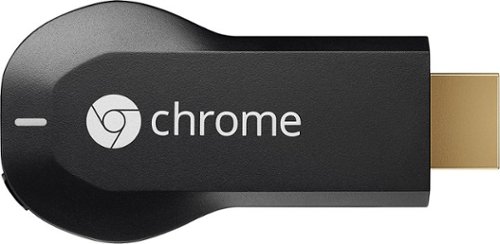
Google - Chromecast - Black
 (18,771)
10 years, 9 months ago
by
Cashmoney
In my room
Amazon Fire TV Stick connects to your TV's HDMI port. Just grab and go to enjoy Netflix, Prime Instant Video, Hulu Plus, YouTube.com, music, and much more.
Does it support Claro video?
Claro video is a Mexican service equal to netflix
Is this an app? If it's an app, with some tinkering, you can sideload apps. Sorry I am unfamiliar with that program.
10 years, 9 months ago
by
Cashmoney
In my room
Amazon Fire TV Stick connects to your TV's HDMI port. Just grab and go to enjoy Netflix, Prime Instant Video, Hulu Plus, YouTube.com, music, and much more.
Is there a way to watch, lets say ESPN, for 30 min, then switch to a personal slideshow for 30 min, and repeat?
I am needing to play tv part time, while playing a personal slideshow after. I need it to do it continuously, and switch between the two after 30 minutes. (Office setting)
No you will not be able to accomplish this. Remember the Fire Stick does not have a way to download pics on it. It was not designed to do what you need it to do.
10 years, 9 months ago
by
Cashmoney
In my room
Amazon Fire TV Stick connects to your TV's HDMI port. Just grab and go to enjoy Netflix, Prime Instant Video, Hulu Plus, YouTube.com, music, and much more.
Amazon Fire TV Stick w Asus Notebook M70 Vm-X1 w hdmi and usb ports
1. Can Amazon Fire TV Stick play YouTube videos that are now blocked by the Google upgrade that stopped YouTube videos on my WD TV Live media player? see images of the YouTube upgrade that stopped my YouTube videos playing on my Samsung Smart TV.
2. Can Amazon Fire TV Stick work on my laptop, and my desktop PCs, to stream DVDs from my HDDs to my Samsung Smart TV?
3. Does the Amazon Fire TV Stick work anywhere on a laptop w Wi-Fi?
4. Would the Amazon - Fire TV Streaming Device work better for all practical purposes rather than the Amazon Fire TV Stick?
2. Can Amazon Fire TV Stick work on my laptop, and my desktop PCs, to stream DVDs from my HDDs to my Samsung Smart TV?
3. Does the Amazon Fire TV Stick work anywhere on a laptop w Wi-Fi?
4. Would the Amazon - Fire TV Streaming Device work better for all practical purposes rather than the Amazon Fire TV Stick?


1. Not sure as I haven't tried it yet.
2 & 3. I was unable to get the Amazon Fire Stick to work on my laptop at all. The hdmi on my laptop is for output not input. I think you would be better off setting up Plex on your laptop and adding the app on the Fire Stick to stream your media. I believe there is also a way to setup your media via your network & streaming thru DLNA. Check out www.aftvnews.com for additional info.
4. The Amazon Fire TV has an USB port that you can use to connect your hard drive, mouse or keyboard. The Stick has to be connected via Bluetooth with a "setting" sideloaded ask to use keyboard or mouse. Plus the Fire tv has more room internally for apps.
Hope this helps.
Cashmoney
2 & 3. I was unable to get the Amazon Fire Stick to work on my laptop at all. The hdmi on my laptop is for output not input. I think you would be better off setting up Plex on your laptop and adding the app on the Fire Stick to stream your media. I believe there is also a way to setup your media via your network & streaming thru DLNA. Check out www.aftvnews.com for additional info.
4. The Amazon Fire TV has an USB port that you can use to connect your hard drive, mouse or keyboard. The Stick has to be connected via Bluetooth with a "setting" sideloaded ask to use keyboard or mouse. Plus the Fire tv has more room internally for apps.
Hope this helps.
Cashmoney
10 years, 9 months ago
by
Cashmoney
In my room