
Share ATMGuru's profile


ATMGuru
ATMGuru's stats
- Review count42
- Helpfulness votes9
- First reviewOctober 14, 2013
- Last reviewFebruary 11, 2018
- Featured reviews0
- Average rating4.2
Reviews comments
- Review comment count0
- Helpfulness votes0
- First review commentNone
- Last review commentNone
- Featured review comments0
Questions
- Question count0
- Helpfulness votes0
- First questionNone
- Last questionNone
- Featured questions0
- Answer count5
- Helpfulness votes11
- First answerMay 6, 2016
- Last answerFebruary 11, 2018
- Featured answers0
- Best answers3
Customer Rating

4
Great addition to iPhone/iPad/Mac users arsenal
on January 5, 2014
Posted by: ATMGuru
from Columbus Ohio
I use it in...:Large home
Verified Purchase:Yes
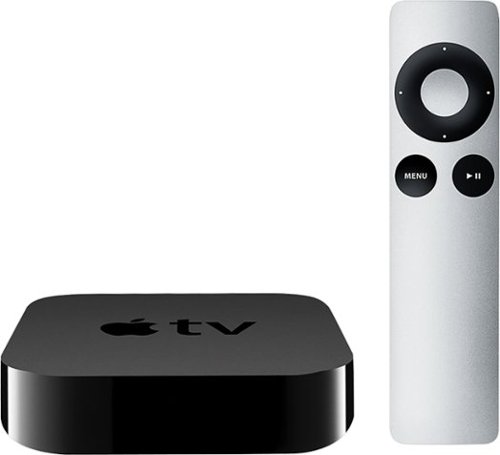
While having an engagement party recently, a friend brought her 5 year old boy. He wanted to watch a couple kid shows while the party was going on, but my Netflix account is not set up to be kid friendly. Using his moms iPad, he was able to use their account with shows selected for him, but was able to watch it on the big screen. This reduced the risk for dropping the iPad as it was not his focal point, he was able to watch his previously set up shows and still able to be a boy and play with his toys. Mirroring the screen from the iPhone has helped me show off some new functionality apps to large customers, as well as show off pictures taken at demos and trade shows.
My Best Buy number: 2677620741
My Best Buy number: 2677620741
What's great about it: Easy to use, mirroring and pushing video
What's not so great: Little high price, but anything Apple is high
I would recommend this to a friend!
Ease of Use

4
Performance

5
Share this review:


0points
0of 0voted this as helpful.

With the Logitech C270 Webcam, you can confidently join any video meeting knowing you~ll always have quality audio and video. Our most affordable camera, the C270 Webcam is an upgrade for your laptop or desktop with practical features that outperform most built-in laptop cameras. It supports crisp HD 720p/30 fps video calls with diagonal 55~ field of view. Logitech~s RightLight technology adjusts to your lighting conditions, producing brighter images to help you look good even in low-light and backlit situations. And the noise-reducing mic makes sure your voice comes across clearly, even in busy environments.
Customer Rating
4
Good quality for most purposes
on October 14, 2013
Posted by: ATMGuru
from Columbus Ohio
Verified Purchase:Yes
Easy set up and good quality picture for most monitors. Using this for video chat on a local network.
My Best Buy number: 2677620741
My Best Buy number: 2677620741
What's great about it: Good price, good quality
What's not so great: N/A
I would recommend this to a friend!
Ease of Use
4
Share this review:


+4points
4of 4voted this as helpful.
ATMGuru's Review Comments
ATMGuru has not submitted comments on any reviews.
ATMGuru's Questions
ATMGuru has not submitted any questions.
ATMGuru's Answers

Display media from your Apple device on an HDTV or other HDMI-compatible screen using this Apple MD826ZM/A Lightning digital A/V adapter, which features video mirroring capability for enjoying content in up to 1080p resolution.
Will this work on monitors and hdmi to displayport? Also, can I stream Netflix, amazon prime etc.?
Streaming is a yes. The screen on your iPad/iPhone/iPod will show that it is being mirrored and the video will be full screen resolution vs the iDevice resolution. If you attach to a monitor with HDMI it will work as any other input would. As for DisplayPort, I believe you can get an adapter of HDMI to DP then to the monitor.
8 years, 4 months ago
by
ATMGuru
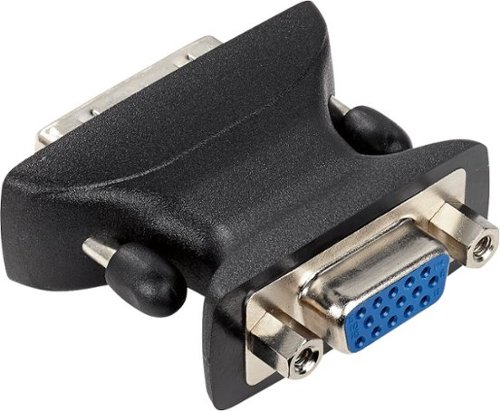
Easily convert DVI-I video card signals to VGA analog using this Insignia~ NS-PV90501 adapter that features a high-speed data cable and copper contacts to help promote optimal performance.
how many pins on digital side? ie 24+5, 24+1. Your picture and description stink, they are of no use in determining what plug they will fit. There are at least these two (2) variants, which, in this case, means only a 50% chance I can use it!
DVI-I has four extra pins surrounding the spade (flat part). If your card has the four extra pins you can use the DVI-I OR the DVI-D (Lacks the four pins). VGA does not use the extra four pins so one is not superior to the other.
9 years, 11 months ago
by
ATMGuru
Easily convert DVI-I video card signals to VGA analog using this Insignia~ NS-PV90501 adapter that features a high-speed data cable and copper contacts to help promote optimal performance.
what gender is the dvi side?
Easily convert DVI-I video card signals to VGA analog using this Insignia~ NS-PV90501 adapter that features a high-speed data cable and copper contacts to help promote optimal performance.
Product NS-PV90501: . QUESTION: Can I simply connect VDI cable to PC''s video card, other end of cable to DVI-to-VGA Adapter, vga end of adapter to vga input of my current KVM switch, and be good to go?
Not likely, not sure that you would have a gain from this either. The adapter is Male DVI-I and Female VGA. A DVI cable consists of two male ends (pins stick out) so you would need a gender changer for the DVI. For your setup to go into a VGA KVM you would need a VGA male to male cable (standard cable) or a male to male gender changer.
Skip the hassle, put the DVI to VGA at your VGA card DVI-I port, take the VGA from that to your KVM. Cheaper and quicker this way.
Skip the hassle, put the DVI to VGA at your VGA card DVI-I port, take the VGA from that to your KVM. Cheaper and quicker this way.
9 years, 11 months ago
by
ATMGuru
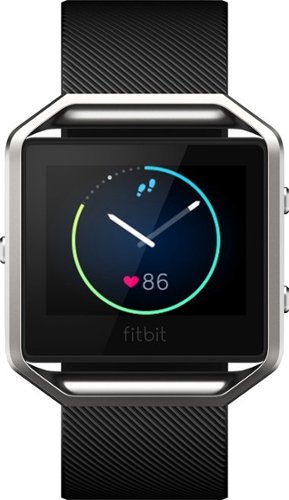
Automatically track any exercise you do with the Fitbit Blaze in black. This smart fitness watch instantly recognizes when you are exercising with SmartTrack, whether you are cycling, running or jogging, and the GPS tracks where you are in real-time. Get help from the on-screen workouts, and let the Fitbit Blaze in blue track your sleep for optimal health.
Does it set the time automatically?
Time is synced via Bluetooth or the optional USB sync dongle (not included with the purchase of the Blaze).
10 years, 1 month ago
by
ATMGuru