
Share NicoR's profile


NicoR
NicoR's stats
- Review count103
- Helpfulness votes51
- First reviewMay 30, 2023
- Last reviewNovember 25, 2023
- Featured reviews0
- Average rating4.7
Reviews comments
- Review comment count0
- Helpfulness votes0
- First review commentNone
- Last review commentNone
- Featured review comments0
Questions
- Question count0
- Helpfulness votes0
- First questionNone
- Last questionNone
- Featured questions0
- Answer count48
- Helpfulness votes110
- First answerJune 2, 2023
- Last answerSeptember 22, 2023
- Featured answers0
- Best answers10
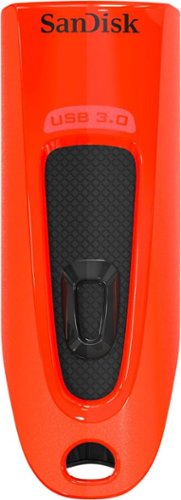
Step up to high-speed USB 3.0 and transfer your videos, photos and files up to ten times faster than standard USB 2.0 drives. SanDisk Ultra USB 3.0 Flash Drive takes the wait out of moving, sharing or backing up big files - now you can transfer a full-length movie from your laptop to your flash drive in less than a minute. Password protection lets you keep your private files private, while still being able to share generously with family and friends. And, with a sleek, sturdy SanDisk Ultra USB 3.0 Flash Drive in your pocket, you won~t need an internet connection to access those photos and videos any place or any time you want. For more than 25 years, SanDisk has been known for quality and reliability all around the world.
Customer Rating

4
Great little flash drive
on August 8, 2023
Posted by: NicoR
I purchased the SanDisk Ultra 32GB USB 3.0 Flash Drive - Red four years ago for work. I needed a reliable and fast flash drive to transfer files between my computer and my work devices. I was very happy with the SanDisk Ultra, and I've been using it ever since.
Here are some of the pros and cons of the SanDisk Ultra:
**Pros:**
* Fast transfer speeds
* Small and portable
* Durable
* Affordable
* Long lifespan
* Small and portable
* Durable
* Affordable
* Long lifespan
**Cons:**
* Not as fast as some other USB 3.0 flash drives
* Can be a bit slow when writing large files
* Can be a bit slow when writing large files
Overall, I think the SanDisk Ultra is a great flash drive for work. It's fast, reliable, and affordable. It's also small and portable, so it's easy to take with you wherever you go.
Here are some specific things I've enjoyed about using the SanDisk Ultra for work:
* The transfer speeds are very fast. I can transfer large files quickly and easily.
* The flash drive is small and portable. I can easily take it with me to meetings or on the go.
* The flash drive is durable. I've dropped it a few times and it's still working perfectly.
* The flash drive is affordable. I got a great deal on it, and it's still going strong after four years.
* The flash drive has a long lifespan. SanDisk claims that it can last for up to 10 years, which is great for me as I need a flash drive that can last for a long time.
* The flash drive is small and portable. I can easily take it with me to meetings or on the go.
* The flash drive is durable. I've dropped it a few times and it's still working perfectly.
* The flash drive is affordable. I got a great deal on it, and it's still going strong after four years.
* The flash drive has a long lifespan. SanDisk claims that it can last for up to 10 years, which is great for me as I need a flash drive that can last for a long time.
Overall, I've been very happy with my purchase of the SanDisk Ultra. It's a great flash drive for work that is fast, reliable, and affordable. I would definitely recommend it to others.
Mobile Submission: True
I would recommend this to a friend!
Ease of Use

4
Quality

5
Value
4
Share this review:


0points
0of 0voted this as helpful.
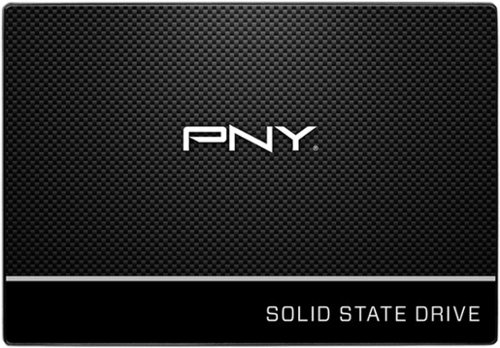
Store your files safely on this 240GB PNY solid-state drive. It achieves write speeds of 500MB/sec. and read speeds of 535MB/sec., providing transfer rates faster than traditional hard drives. The lack of moving parts on this PNY solid-state drive reduces its chance of failure.
Customer Rating
4
Good replacement hardrive
on August 8, 2023
Posted by: NicoR
I purchased the PNY - CS900 240GB Internal SSD SATA four years ago to replace my laptop's hard drive. I was looking for an affordable SSD that would give me a significant speed boost, and I was very happy with the PNY CS900.
Here are some of the pros and cons of the PNY CS900:
**Pros:**
* Affordable
* Fast
* Reliable
* Easy to install
* 5-year warranty
* Fast
* Reliable
* Easy to install
* 5-year warranty
**Cons:**
* No DRAM cache
* Not as fast as some more expensive SSDs
* Not as fast as some more expensive SSDs
Overall, I think the PNY CS900 is a great budget SSD. It's fast, reliable, and easy to install. It doesn't have DRAM cache, which can affect performance in some cases, but it's still a great value for the price.
Here are some specific things I've enjoyed about using the PNY CS900 since I purchased it:
* The speed boost has been incredible. My laptop boots up much faster, and applications load much quicker.
* The SSD has been very reliable. I haven't had any problems with it in the four years that I've been using it.
* It was easy to install. I followed the instructions that came with the SSD, and it was up and running in no time.
* The SSD comes with a 5-year warranty, which gives me peace of mind knowing that I'm covered if anything goes wrong.
* The SSD has been very reliable. I haven't had any problems with it in the four years that I've been using it.
* It was easy to install. I followed the instructions that came with the SSD, and it was up and running in no time.
* The SSD comes with a 5-year warranty, which gives me peace of mind knowing that I'm covered if anything goes wrong.
Overall, I've been very happy with my purchase of the PNY CS900. It's a great budget SSD that has given me a significant speed boost. I would definitely recommend it to others.
Mobile Submission: True
I would recommend this to a friend!
Ease of Use
5
Quality
4
Value
4
Share this review:


0points
0of 0voted this as helpful.
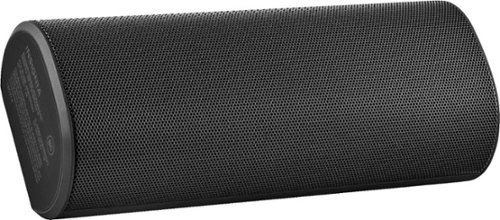
Enjoy clear, rich audio with this Insignia portable Bluetooth speaker. It streams wirelessly from any Bluetooth-enabled device, lasting up to 40 hours without recharging, and it has a built-in power bank that lets you charge your phone while listening to music. This Insignia portable Bluetooth speaker has a water-resistant body that protects against moisture damage.
Customer Rating
4
Great little speaker and handy charger
on August 8, 2023
Posted by: NicoR
I purchased the Insignia BRICK 2 Portable Bluetooth Speaker - Black for a vacation a few years ago, and I've used it numerous times at hotels and the beach. I've been very impressed with the speaker, and I think it's a great value for the price.
Here are some of the pros and cons of the Insignia BRICK 2 Portable Bluetooth Speaker:
**Pros:**
* Affordable
* Portable
* Long battery life
* Good sound quality
* Water-resistant
* Can be used as a power bank
* Portable
* Long battery life
* Good sound quality
* Water-resistant
* Can be used as a power bank
**Cons:**
* Not as loud as some other speakers
* The controls can be a bit hard to use
* The controls can be a bit hard to use
Overall, I think the Insignia BRICK 2 Portable Bluetooth Speaker is a great speaker for travel. It's affordable, portable, and has a long battery life. The sound quality is good, and it's water-resistant, so you don't have to worry about it getting wet. You can also use it as a power bank to charge your phone or other devices.
Here are some specific things I've enjoyed about using the BRICK 2 Portable Bluetooth Speaker at hotels and the beach:
* It's small and lightweight, so it's easy to pack and carry.
* The battery life is long, so I don't have to worry about it running out of power.
* The sound quality is good, even at higher volumes.
* It's water-resistant, so I don't have to worry about it getting wet at the beach.
* I can also use it as a power bank to charge my phone or other devices.
* The battery life is long, so I don't have to worry about it running out of power.
* The sound quality is good, even at higher volumes.
* It's water-resistant, so I don't have to worry about it getting wet at the beach.
* I can also use it as a power bank to charge my phone or other devices.
Overall, I've been very happy with my purchase of the BRICK 2 Portable Bluetooth Speaker. It's a great speaker for travel, and I would definitely recommend it to others.
Here are some additional things to consider when purchasing a portable Bluetooth speaker:
* **Sound quality:** This is obviously an important factor, as you want to be able to hear your music clearly.
* **Portability:** You'll be carrying the speaker around with you, so it's important that it's not too big or heavy.
* **Battery life:** You don't want the speaker to run out of power in the middle of your vacation.
* **Features:** Some speakers have features like water resistance, a built-in microphone, or the ability to be used as a power bank. Consider what features are important to you.
* **Price:** Portable Bluetooth speakers can range in price from around $50 to $200. Set a budget before you start shopping.
* **Portability:** You'll be carrying the speaker around with you, so it's important that it's not too big or heavy.
* **Battery life:** You don't want the speaker to run out of power in the middle of your vacation.
* **Features:** Some speakers have features like water resistance, a built-in microphone, or the ability to be used as a power bank. Consider what features are important to you.
* **Price:** Portable Bluetooth speakers can range in price from around $50 to $200. Set a budget before you start shopping.
Mobile Submission: True
I would recommend this to a friend!
Sound Quality

3
Battery Life
5
Range
5

Share this review:


0points
0of 0voted this as helpful.
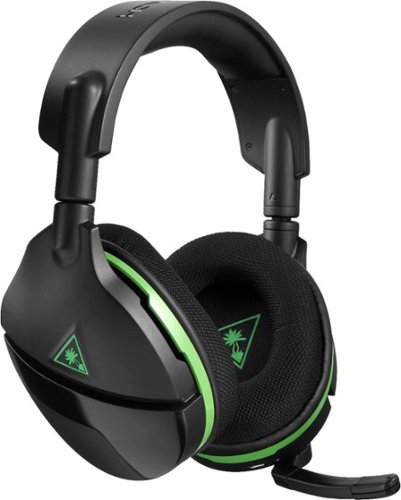
Immerse yourself in the action with this Turtle Beach Stealth 600 gaming headset for the Xbox One and Windows 10. Powerful 50mm over-the-ear speakers with Superhuman Hearing let you hear even the softest sounds for a competitive advantage. The high-sensitivity mic on this Turtle Beach Stealth 600 gaming headset ensures that your every command is heard.
Customer Rating

5
Great for late night gaming
on August 8, 2023
Posted by: NicoR
I purchased the Turtle Beach Stealth 600 Wireless Surround Sound Gaming Headset for Xbox One, Windows 10 and Xbox Series X - Black/Green four years ago for Christmas, and I've been using it ever since for late night gaming. I've been very impressed with the headset, and I think it's a great value for the price.
Here are some of the pros and cons of the Turtle Beach Stealth 600:
**Pros:**
* Affordable
* Wireless
* Comfortable to wear
* Good sound quality
* Surround sound
* Mic monitoring
* Long battery life
* Wireless
* Comfortable to wear
* Good sound quality
* Surround sound
* Mic monitoring
* Long battery life
**Cons:**
* Not as good as some more expensive headsets
* Can be a bit bulky
* The mic can be a bit sensitive
* Can be a bit bulky
* The mic can be a bit sensitive
Overall, I think the Turtle Beach Stealth 600 is a great headset for late night gaming. It's affordable, wireless, and comfortable to wear. The sound quality is good, and the surround sound is immersive. The mic monitoring is also a great feature, and the battery life is long.
Here are some specific things I've enjoyed about using the Turtle Beach Stealth 600 for late night gaming:
* The wireless feature is great because I don't have to worry about wires getting tangled or getting in the way.
* The headset is comfortable to wear, even for long gaming sessions.
* The sound quality is good, and the surround sound is immersive. This is great for games like Call of Duty, where I need to be able to hear where enemies are coming from.
* The mic monitoring is a great feature because I can hear myself talk, which helps me to avoid yelling.
* The battery life is long, so I don't have to worry about it running out of power in the middle of a gaming session.
* The headset is comfortable to wear, even for long gaming sessions.
* The sound quality is good, and the surround sound is immersive. This is great for games like Call of Duty, where I need to be able to hear where enemies are coming from.
* The mic monitoring is a great feature because I can hear myself talk, which helps me to avoid yelling.
* The battery life is long, so I don't have to worry about it running out of power in the middle of a gaming session.
Overall, I've been very happy with my purchase of the Turtle Beach Stealth 600. It's a great headset for late night gaming, and I would definitely recommend it to others.
Here are some additional things to consider when purchasing a gaming headset:
* **Sound quality:** This is obviously an important factor, as you want to be able to hear the game clearly.
* **Comfort:** You'll be wearing the headset for long periods of time, so it's important that it's comfortable.
* **Features:** Some headsets have features like surround sound, mic monitoring, and long battery life. Consider what features are important to you.
* **Price:** Gaming headsets can range in price from around $50 to $300. Set a budget before you start shopping.
* **Comfort:** You'll be wearing the headset for long periods of time, so it's important that it's comfortable.
* **Features:** Some headsets have features like surround sound, mic monitoring, and long battery life. Consider what features are important to you.
* **Price:** Gaming headsets can range in price from around $50 to $300. Set a budget before you start shopping.
Mobile Submission: True
I would recommend this to a friend!
Ease of Use
5
Quality
5
Value
4
Share this review:


0points
0of 0voted this as helpful.
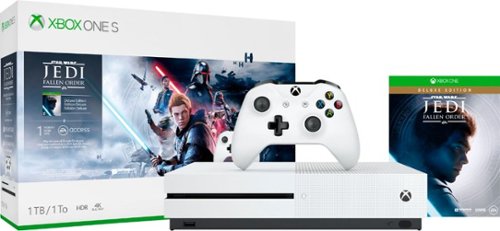
Own the Xbox One S Star Wars Jedi: Fallen Order~ Deluxe Edition bundle and experience the thrill and challenge of becoming a Jedi. Step into the role of a Jedi Padawan who narrowly escaped the purge of Order 66. Engage in innovative lightsaber and Force combat on a galaxy-spanning adventure as you stay one step ahead of the Empire and its deadly Inquisitors. Continue your training, explore the mysteries of the Force and become the Jedi you were meant to be. This bundle includes an Xbox One S, an Xbox Wireless Controller, a full-game download of Star Wars Jedi: Fallen Order~ Deluxe Edition, a 1-Month Xbox Live Gold subscription, a 1-Month Xbox Game Pass for Console trial, and 1-Month of EA Access.* Whether you~re playing games, watching 4K movies, or streaming gameplay, there's never been a better time to game with Xbox One.
Customer Rating
5
Greay unit for gaming and multi-media
on August 8, 2023
Posted by: NicoR
I purchased the Microsoft Xbox One S 1TB Star Wars Jedi: Fallen Order Deluxe Edition Console Bundle four years ago, and I've been using it ever since for both avid gaming and family entertainment. I've been very impressed with the console, and I think it's a great value for the price.
Here are some of the pros and cons of the Xbox One S:
**Pros:**
* Affordable
* Small and compact design
* Supports 4K Blu-ray playback
* Comes with a variety of games, including Star Wars Jedi: Fallen Order
* Can be used for both gaming and streaming
* Wide range of accessories available
* Small and compact design
* Supports 4K Blu-ray playback
* Comes with a variety of games, including Star Wars Jedi: Fallen Order
* Can be used for both gaming and streaming
* Wide range of accessories available
**Cons:**
* Not as powerful as the Xbox One X
* No disc drive on the digital-only version
* Can be noisy when running demanding games
* Lack of some exclusive games compared to the PlayStation 4
* No disc drive on the digital-only version
* Can be noisy when running demanding games
* Lack of some exclusive games compared to the PlayStation 4
Overall, I think the Xbox One S is a great console for gamers and families alike. It's affordable, compact, and supports a wide range of games and entertainment features. However, it's not as powerful as the Xbox One X, and it lacks some exclusive games compared to the PlayStation 4.
Here are some specific things I've enjoyed about using the Xbox One S for avid gaming and family entertainment:
* For gaming, I've been able to play a variety of games on the Xbox One S, including some of my favorites like Halo, Gears of War, and Forza Horizon. The console has handled all of these games well, and I've been impressed with the graphics and performance.
* For family entertainment, I've used the Xbox One S to watch movies, stream TV shows, and play games with my kids. The console has been great for this, and it's been a great way to bond with my family.
* I've also used the Xbox One S to play games online with my friends. This has been a great way to stay connected with friends who live far away, and it's been a lot of fun.
* For family entertainment, I've used the Xbox One S to watch movies, stream TV shows, and play games with my kids. The console has been great for this, and it's been a great way to bond with my family.
* I've also used the Xbox One S to play games online with my friends. This has been a great way to stay connected with friends who live far away, and it's been a lot of fun.
Overall, I've been very happy with my purchase of the Microsoft Xbox One S. It's a great console for gamers and families alike, and I would definitely recommend it to others.
Mobile Submission: True
I would recommend this to a friend!
Controller
4
Performance
4
Storage Capacity
4

Share this review:


0points
0of 0voted this as helpful.
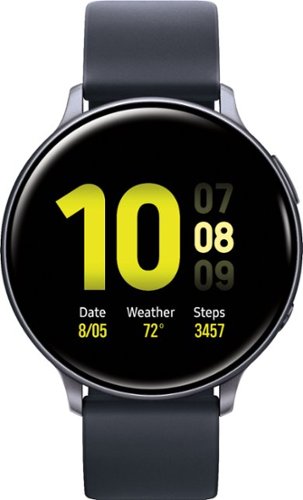
Enhance your sporting performance with this Samsung Galaxy Watch Active2 Bluetooth smartwatch. Monitor your workouts and receive detailed reports on your performance even as the running coach feature gives you important insight in real time. This Samsung Galaxy Watch Active2 Bluetooth smartwatch analyses your sleep pattern and offers helpful advice on how to improve it.
Posted by: NicoR
I purchased the Samsung Galaxy Watch Active2 a few years ago, when I had just had my first baby. I was looking for a smartwatch that would help me stay organized and connected, even when I was busy taking care of a newborn.
The Galaxy Watch Active2 has been a great watch for me, and I've found it to be incredibly convenient for a new parent. Here are some of the features that I've found most useful:
* **Notifications:** The Galaxy Watch Active2 can display notifications from my phone, so I don't have to keep reaching for it. This is really helpful when I'm holding my baby or when my hands are dirty.
* **Fitness tracking:** The Galaxy Watch Active2 tracks my steps, heart rate, and workouts. This is great for staying motivated and making sure I'm getting enough exercise.
* **Sleep tracking:** The Galaxy Watch Active2 tracks my sleep, so I can see how much sleep I'm getting and how well I'm sleeping. This has been helpful for improving my sleep habits.
* **Music control:** I can control music playback on my phone from the Galaxy Watch Active2. This is great for when I'm working out or when I'm just relaxing with my baby.
* **Siri and Bixby support:** The Galaxy Watch Active2 supports Siri and Bixby, so I can use voice commands to control my phone, get directions, set alarms, and more. This is really helpful when I'm hands-free.
* **Fitness tracking:** The Galaxy Watch Active2 tracks my steps, heart rate, and workouts. This is great for staying motivated and making sure I'm getting enough exercise.
* **Sleep tracking:** The Galaxy Watch Active2 tracks my sleep, so I can see how much sleep I'm getting and how well I'm sleeping. This has been helpful for improving my sleep habits.
* **Music control:** I can control music playback on my phone from the Galaxy Watch Active2. This is great for when I'm working out or when I'm just relaxing with my baby.
* **Siri and Bixby support:** The Galaxy Watch Active2 supports Siri and Bixby, so I can use voice commands to control my phone, get directions, set alarms, and more. This is really helpful when I'm hands-free.
Overall, I've been very happy with the Samsung Galaxy Watch Active2. It's a great smartwatch for new parents, and it's helped me stay organized, connected, and motivated.
Here are some of the pros and cons of the Galaxy Watch Active2:
**Pros:**
* Lightweight and comfortable to wear
* Long battery life
* Packed with features, including fitness tracking, sleep tracking, notifications, music control, and voice assistant support
* Compatible with both Android and iOS devices
* Long battery life
* Packed with features, including fitness tracking, sleep tracking, notifications, music control, and voice assistant support
* Compatible with both Android and iOS devices
**Cons:**
* Can be a bit expensive
* The rotating bezel can be a bit finicky to use
* The screen can be a bit hard to see in bright sunlight
* The rotating bezel can be a bit finicky to use
* The screen can be a bit hard to see in bright sunlight
Overall, the Galaxy Watch Active2 is a great smartwatch that offers a lot of features for new parents. It's lightweight, comfortable to wear, and has a long battery life. The rotating bezel can be a bit finicky to use, and the screen can be a bit hard to see in bright sunlight. However, these are minor complaints, and the Galaxy Watch Active2 is still a great smartwatch for new parents.
Mobile Submission: True
I would recommend this to a friend!
Battery Life
4
Durability
5
Comfort
4

Share this review:


0points
0of 0voted this as helpful.
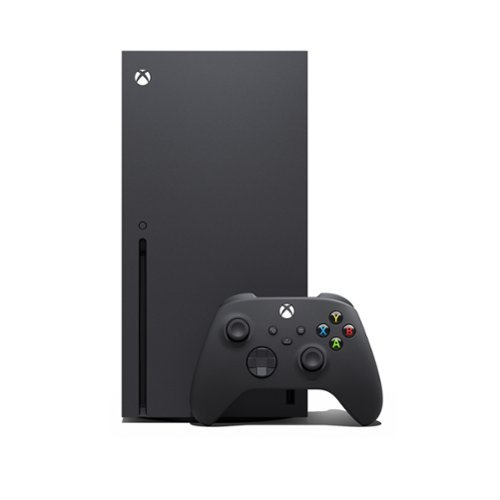
Experience brighter worlds, vivid imagery, and sharper details with 4K gaming and up to 120 FPS that makes everything feel so real it~s unreal. Seamlessly switch between your favorite games and pick up right where you left off with Quick Resume. Play four generations of games with backward compatibility, plus games that are optimized for Xbox Series X|S that look and play better than ever. Jump into your favorite games like Fortnite and Grand Theft Auto instantly with lightning-fast load times. Get the most out of your Xbox Series X with Xbox Game Pass Ultimate (membership sold separately). Play new games like The Outer Worlds 2, Call of Duty: Black Ops 7, NINJA GAIDEN 4, and more on day one. Choose from hundreds of high-quality games like DOOM: The Dark Ages, Tony Hawk~s Pro Skater 3 + 4, and Grounded 2. Dive into legendary franchises including Call of Duty, Forza, Diablo, Halo, and everything in between.*
Customer Rating
5
Still kicking and perfect gaming console
on August 8, 2023
Posted by: NicoR
I've been an avid gamer for many years, and I've owned a number of different consoles over the years. When the Microsoft Xbox Series X was released a few years ago, I was immediately interested. I had heard great things about its powerful hardware and its support for next-generation games.
I decided to purchase the Xbox Series X, and I've been very impressed with it ever since. The console is incredibly fast, and it can easily handle even the most demanding games. The graphics are also stunning, and I've been blown away by how realistic some of the games look.
In addition to its powerful hardware, the Xbox Series X also has a number of other great features. The controller is very comfortable to hold, and it has a number of new features that make gaming more immersive. The console also supports a wide range of accessories, so you can customize your gaming experience to your liking.
Overall, I'm very happy with my purchase of the Microsoft Xbox Series X. It's a powerful console with great features that will make you love gaming even more.
Here are some of the pros and cons of the Xbox Series X:
**Pros:**
* Powerful hardware that can handle even the most demanding games
* Stunning graphics
* Comfortable controller with new features
* Wide range of accessories
* Support for next-generation games
* Quick resume feature allows you to pick up where you left off in multiple games
* Smart Delivery ensures that you always have the best possible version of a game, regardless of the console you're playing on
* Stunning graphics
* Comfortable controller with new features
* Wide range of accessories
* Support for next-generation games
* Quick resume feature allows you to pick up where you left off in multiple games
* Smart Delivery ensures that you always have the best possible version of a game, regardless of the console you're playing on
**Cons:**
* Expensive
* No disc drive (digital-only version only)
* Can be noisy when running demanding games
* Lack of some exclusive games compared to the PlayStation 5
* No disc drive (digital-only version only)
* Can be noisy when running demanding games
* Lack of some exclusive games compared to the PlayStation 5
Overall, the Xbox Series X is a great console that offers a powerful gaming experience with stunning graphics. It's perfect for gamers who want the best possible performance and features. However, it is expensive and lacks some exclusive games compared to the PlayStation 5.
Mobile Submission: True
I would recommend this to a friend!
Controller
4
Performance
5
Storage Capacity
5

Share this review:


0points
0of 0voted this as helpful.
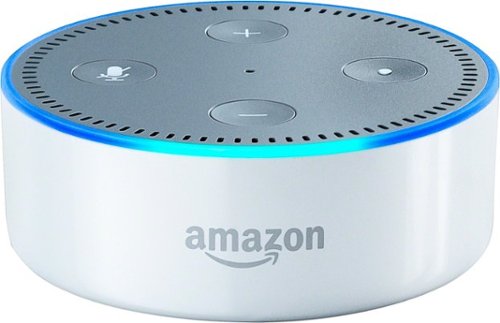
Interact with Alexa anywhere in your home with the Amazon Echo Dot voice-controlled device. The compact size is a perfect fit in any room, and the built-in speaker lets you set an alarm or stream music. The Amazon Echo Dot voice-controlled device plugs into your home stereo speakers or connects wirelessly through Bluetooth.
Customer Rating
5
Still a great smart speaker
on August 7, 2023
Posted by: NicoR
The Amazon Echo Dot (2nd Generation) is a small, cylindrical smart speaker with Alexa built-in. It's a great option for anyone who wants to get started with the world of voice-activated assistants.
The Echo Dot is very easy to set up. Just plug it in, connect it to your Wi-Fi network, and follow the instructions in the Alexa app. Once it's set up, you can start using Alexa to control your music, get news and weather updates, set alarms, and more.
The Echo Dot has a decent sound quality for its size. It's not going to blow you away, but it's good enough for listening to music or podcasts in the kitchen or bedroom. If you're looking for a speaker with better sound quality, you'll want to consider the Echo or Echo Plus.
One of the best things about the Echo Dot is its price. It's very affordable, making it a great option for anyone who wants to try out a smart speaker without spending a lot of money.
Here are some specific pros and cons of the Amazon Echo Dot (2nd Generation):
**Pros:**
* Affordable
* Easy to set up
* Great sound quality for its size
* Compatible with a wide range of Alexa skills
* Can be used to control smart home devices
* Easy to set up
* Great sound quality for its size
* Compatible with a wide range of Alexa skills
* Can be used to control smart home devices
**Cons:**
* Not as powerful as the Echo or Echo Plus
* Doesn't have a built-in speakerphone
* Can be a bit too loud for some people
* Doesn't have a built-in speakerphone
* Can be a bit too loud for some people
Overall, I think the Amazon Echo Dot (2nd Generation) is a great smart speaker for the price. It's easy to use, has a decent sound quality, and is compatible with a wide range of Alexa skills. If you're looking for a smart speaker to get started with Alexa, the Echo Dot is a great option.
Here are some additional things to consider when purchasing the Amazon Echo Dot (2nd Generation):
* Make sure it's compatible with your Wi-Fi network. The Echo Dot requires a 2.4GHz Wi-Fi network. If you have a 5GHz Wi-Fi network, you'll need to make sure your router supports dual-band Wi-Fi.
* Decide if you want a white or black Echo Dot. The Echo Dot is available in two colors: white and black. The white Echo Dot is more popular, but the black Echo Dot is also a good option.
* Consider purchasing an Echo Dot bundle. Amazon often offers bundles that include the Echo Dot, a smart plug, and a light bulb. These bundles are a great way to save money and get started with your smart home.
* Decide if you want a white or black Echo Dot. The Echo Dot is available in two colors: white and black. The white Echo Dot is more popular, but the black Echo Dot is also a good option.
* Consider purchasing an Echo Dot bundle. Amazon often offers bundles that include the Echo Dot, a smart plug, and a light bulb. These bundles are a great way to save money and get started with your smart home.
Mobile Submission: True
I would recommend this to a friend!
Quality
4
Value
4
Ease of Use
4
Share this review:


+1point
1of 1voted this as helpful.
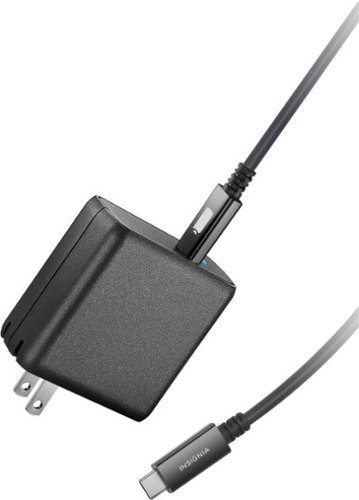
Transfer data or charge your portable device with this Insignia USB-C wall charger. An 8-foot cable provides an extended reach to the nearest wall outlet, and the folding plug makes this charger easy to store in a suitcase or backpack. An included cable tie prevents the cord from tangling. This Insignia USB-C wall charger works with a wide range of smartphones and tablets for added versatility.
Customer Rating
4
Great value charger
on August 7, 2023
Posted by: NicoR
Verified Purchase:Yes
The Insignia 65W USB-C wall charger is a great option for anyone looking for a powerful and compact charger for their laptop. It's small enough to fit in your pocket or bag, but it packs enough power to charge most laptops quickly and efficiently.
The Insignia 65W USB-C wall charger has two USB-C ports, so you can charge two devices at the same time. It also supports Power Delivery (PD), which means it can charge your laptop at its fastest possible speed.
I recently purchased the Insignia 65W USB-C wall charger for my MacBook Pro, and I've been very happy with it. It charges my laptop quickly and efficiently, and it's small enough to take with me on the go.
Here are some specific pros and cons of the Insignia 65W USB-C wall charger:
**Pros:**
* Powerful: Can charge most laptops quickly and efficiently
* Compact: Small enough to fit in your pocket or bag
* Supports Power Delivery (PD): Charges your laptop at its fastest possible speed
* Two USB-C ports: Charge two devices at the same time
* Compact: Small enough to fit in your pocket or bag
* Supports Power Delivery (PD): Charges your laptop at its fastest possible speed
* Two USB-C ports: Charge two devices at the same time
**Cons:**
* No built-in cable: You'll need to provide your own USB-C to USB-C cable
* Can get warm when in use: Not a major issue, but it's worth noting
* Can get warm when in use: Not a major issue, but it's worth noting
Overall, I think the Insignia 65W USB-C wall charger is a great option for anyone looking for a powerful and compact charger for their laptop. It's small enough to take with you on the go, and it charges your laptop quickly and efficiently. I highly recommend it.
Here are some additional things to consider when purchasing the Insignia 65W USB-C wall charger:
* Make sure it's compatible with your laptop. Not all laptops support Power Delivery, so you'll need to check the specifications of your laptop to make sure it's compatible with the Insignia 65W USB-C wall charger.
* Consider the size and weight of the charger. If you're going to be traveling with the charger, you'll want to make sure it's not too big or heavy. The Insignia 65W USB-C wall charger is relatively small and lightweight, so it's a good option for travel.
* Decide if you need a built-in cable. The Insignia 65W USB-C wall charger does not come with a built-in cable. If you don't already have a USB-C to USB-C cable, you'll need to purchase one separately.
* Consider the size and weight of the charger. If you're going to be traveling with the charger, you'll want to make sure it's not too big or heavy. The Insignia 65W USB-C wall charger is relatively small and lightweight, so it's a good option for travel.
* Decide if you need a built-in cable. The Insignia 65W USB-C wall charger does not come with a built-in cable. If you don't already have a USB-C to USB-C cable, you'll need to purchase one separately.
Length of ownership: 812
Mobile Submission: True
I would recommend this to a friend!
Quality
4
Value
4
Ease of Use
4

Share this review:


0points
0of 0voted this as helpful.

We'll deliver, install and make sure your new electric dryer is working. We'll connect a new, customer-supplied 220V power cord and vent kit. Additional charges may apply if not up to local codes or requirements.
Customer Rating
5
Good service and worth it
on August 7, 2023
Posted by: NicoR
Verified Purchase:Yes
I recently purchased a new electric dryer from Best Buy, and I decided to have them install it for me. I was a bit hesitant at first, because I've heard horror stories about appliance installers damaging walls and appliances. However, I was pleasantly surprised with the service I received from Best Buy.
The installers arrived on time and were very professional. They took the time to explain the installation process to me and answer any questions I had. They were also very careful not to damage my walls or my new dryer.
The installation process went smoothly and quickly. The installers were efficient and knew what they were doing. They were also very friendly and helpful.
Overall, I was very happy with the electric dryer installation service I received from Best Buy. The installers were professional, efficient, and friendly. They did a great job installing my new dryer and I would definitely recommend them to others.
Here are some specific pros and cons of the electric dryer installation service from Best Buy:
**Pros:**
* Professional installers
* Efficient and quick installation
* Careful not to damage walls or appliances
* Friendly and helpful
* Efficient and quick installation
* Careful not to damage walls or appliances
* Friendly and helpful
**Cons:**
* Can be a bit pricey
* Not all Best Buy stores offer installation services
* Not all Best Buy stores offer installation services
Overall, I think the electric dryer installation service from Best Buy is a great option for anyone who wants a professional and reliable installation. They have experienced installers who know what they're doing, and they take the time to do a good job. If you're not comfortable installing your own dryer, I highly recommend using Best Buy's installation service.
Length of ownership: 343
Mobile Submission: True
I would recommend this to a friend!
Expertise
5
Professionalism
4
Service
5

Share this review:


0points
0of 0voted this as helpful.
NicoR's Review Comments
NicoR has not submitted comments on any reviews.
NicoR's Questions
NicoR has not submitted any questions.

Everything you need is right in your screen. Watch, work and chat - all without connecting a separate PC - with Smart Monitor. Your favorite content, productivity and video call apps are built-in for a simpler and more stylish desk setup that~s a joy to use every time.
Speakers seam to be not so good my 32" smart TV is amazing what happened to sound quality how can it be fixed. As it was open box maybe displayed and speakers could be bad I'm not sure. Maybe I'm supposed to get a new soundbar for good sound ....
There are a few things you can do to improve the sound quality of your Samsung 32" smart TV:
Check the audio settings. Make sure that the volume is turned up and that the audio mode is set to the best setting for your content. You can also try adjusting the equalizer settings to improve the sound quality.
Move the speakers. If the speakers are placed in a corner or against a wall, the sound quality may be muffled. Try moving them to a more open area.
Get a soundbar. A soundbar is a great way to improve the sound quality of your TV. It will provide you with richer, fuller sound that will make your movies and TV shows more enjoyable
Check the audio settings. Make sure that the volume is turned up and that the audio mode is set to the best setting for your content. You can also try adjusting the equalizer settings to improve the sound quality.
Move the speakers. If the speakers are placed in a corner or against a wall, the sound quality may be muffled. Try moving them to a more open area.
Get a soundbar. A soundbar is a great way to improve the sound quality of your TV. It will provide you with richer, fuller sound that will make your movies and TV shows more enjoyable
2 years, 9 months ago
by
NicoR
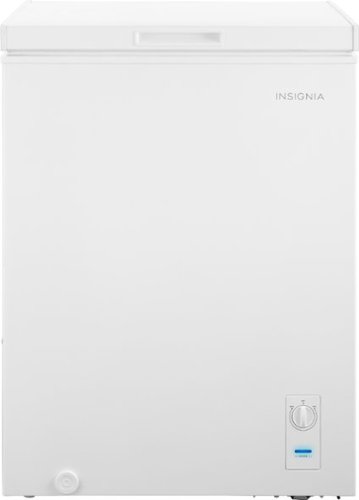
The Insignia 5.0 Cu. Ft. chest freezer has a removable storage basket to keep your food organized so you can find all your items. Have confidence that your food is stored correctly by adjusting the temperature control panel.
Our power went out. Do I need to reset? Or should I unplug the freezer and plug it back in?
If the power outage was brief, you do not need to reset your freezer. Just keep the door closed and the food inside will stay safe.
However, if the power outage was longer, you may need to unplug the freezer and plug it back in. This will help to reset the freezer's temperature control.
Here are the steps on how to reset your freezer after a power outage:
Unplug the freezer from the power outlet.
Wait for a few minutes.
Plug the freezer back in.
Close the freezer door.
The freezer will take a few hours to reach its normal temperature. During this time, do not open the door unless absolutely necessary.
However, if the power outage was longer, you may need to unplug the freezer and plug it back in. This will help to reset the freezer's temperature control.
Here are the steps on how to reset your freezer after a power outage:
Unplug the freezer from the power outlet.
Wait for a few minutes.
Plug the freezer back in.
Close the freezer door.
The freezer will take a few hours to reach its normal temperature. During this time, do not open the door unless absolutely necessary.
2 years, 9 months ago
by
NicoR
The Insignia 5.0 Cu. Ft. chest freezer has a removable storage basket to keep your food organized so you can find all your items. Have confidence that your food is stored correctly by adjusting the temperature control panel.
Can I order extra baskets? What is the size of the basket?
Yes, you can order extra baskets for the Insignia 5 cu ft garage ready chest freezer. The baskets are not sold separately by Insignia, but you can find them on Amazon and other online retailers.
The baskets are 20.4 x 16.7 x 27.7 inches (518 x 425 x 705 mm) and have a capacity of 2.5 cubic feet. They are made of wire mesh and have a black powder-coated finish.
To order extra baskets, you can search for "Insignia 5 cu ft chest freezer baskets" on Amazon or other online retailers. The baskets typically cost around $20 each.
The baskets are 20.4 x 16.7 x 27.7 inches (518 x 425 x 705 mm) and have a capacity of 2.5 cubic feet. They are made of wire mesh and have a black powder-coated finish.
To order extra baskets, you can search for "Insignia 5 cu ft chest freezer baskets" on Amazon or other online retailers. The baskets typically cost around $20 each.
2 years, 9 months ago
by
NicoR
The Insignia 5.0 Cu. Ft. chest freezer has a removable storage basket to keep your food organized so you can find all your items. Have confidence that your food is stored correctly by adjusting the temperature control panel.
I just noticed there are 2 screw-in pegs on the (front and back corner) underneath/ bottom left side only. For balance purposes? Anyway, are there 2 more screw holes on the underneath/ bottom right. And can I buy 4 caster wheels and just screw them in?
Yes, there are two more screw holes on the bottom right side of the Insignia 5 cu ft garage ready chest freezer. You can buy four caster wheels and screw them into these holes to make the freezer more portable.
The screw-in pegs on the bottom left side of the freezer are for balance purposes. They help to prevent the freezer from tipping over. If you screw in the caster wheels, you can remove the pegs.
When choosing caster wheels, make sure that they are the right size for the freezer. The wheels should also be rated for the weight of the freezer.
Here are the steps on how to install caster wheels on the Insignia 5 cu ft garage ready chest freezer:
Remove the two screw-in pegs on the bottom left side of the freezer.
Screw in the caster wheels into the holes.
Make sure that the caster wheels are level.
Here are some safety tips to keep in mind when installing caster wheels:
Make sure that the freezer is unplugged and empty before you start.
Be careful not to overtighten the screws, as this could damage the freezer.
Test the freezer to make sure that it is stable on the caster wheels.
With the caster wheels installed, you can easily move the freezer around your garage or other storage area. This can be helpful for cleaning or making space for other items.
The screw-in pegs on the bottom left side of the freezer are for balance purposes. They help to prevent the freezer from tipping over. If you screw in the caster wheels, you can remove the pegs.
When choosing caster wheels, make sure that they are the right size for the freezer. The wheels should also be rated for the weight of the freezer.
Here are the steps on how to install caster wheels on the Insignia 5 cu ft garage ready chest freezer:
Remove the two screw-in pegs on the bottom left side of the freezer.
Screw in the caster wheels into the holes.
Make sure that the caster wheels are level.
Here are some safety tips to keep in mind when installing caster wheels:
Make sure that the freezer is unplugged and empty before you start.
Be careful not to overtighten the screws, as this could damage the freezer.
Test the freezer to make sure that it is stable on the caster wheels.
With the caster wheels installed, you can easily move the freezer around your garage or other storage area. This can be helpful for cleaning or making space for other items.
2 years, 9 months ago
by
NicoR
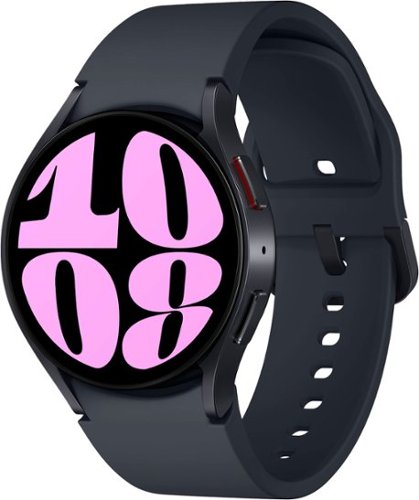
It~s your day ~own it with Samsung Galaxy Watch6. From the gym to the office, our large display keeps you in the know with simple navigation and a super easy-to-read screen. Work out smarter with personalized heart rate zones, and get insights for better rest with Advanced Sleep Coaching. Stay connected by using Galaxy Watch6 to call, text, play music and get notifications on the go. Plus, wherever the day takes you, own your look with a variety of customizable Watch bands and faces. Unlock your day~s full potential with Galaxy Watch6.
Does this have the elliptical workout option? I have an old Active that has it and I use it regularly and track it in Samsung Health. Thanks!
Yes, the Samsung Galaxy Watch6 Aluminum Smartwatch 40mm BT has an elliptical workout option. To start an elliptical workout on your watch, follow these steps:
Open the Samsung Health app on your watch.
Tap Workout.
Scroll down and tap Elliptical.
Tap Start.
The watch will start tracking your workout and will display your heart rate, calories burned, and other metrics. You can also pause or stop the workout at any time.
The elliptical workout option is available on both the Bluetooth and LTE models of the Galaxy Watch6. It is also available on other Samsung smartwatches, such as the Galaxy Watch4 and Galaxy Watch5.
Open the Samsung Health app on your watch.
Tap Workout.
Scroll down and tap Elliptical.
Tap Start.
The watch will start tracking your workout and will display your heart rate, calories burned, and other metrics. You can also pause or stop the workout at any time.
The elliptical workout option is available on both the Bluetooth and LTE models of the Galaxy Watch6. It is also available on other Samsung smartwatches, such as the Galaxy Watch4 and Galaxy Watch5.
2 years, 9 months ago
by
NicoR
It~s your day ~own it with Samsung Galaxy Watch6. From the gym to the office, our large display keeps you in the know with simple navigation and a super easy-to-read screen. Work out smarter with personalized heart rate zones, and get insights for better rest with Advanced Sleep Coaching. Stay connected by using Galaxy Watch6 to call, text, play music and get notifications on the go. Plus, wherever the day takes you, own your look with a variety of customizable Watch bands and faces. Unlock your day~s full potential with Galaxy Watch6.
Does this watch connect to the Galaxy Fold4?
Yes, the Samsung Galaxy Watch6 Aluminum Smartwatch 40mm BT can connect to the Galaxy Fold4. Both devices use Bluetooth to connect to each other. To connect the watch to the phone, follow these steps:
Make sure that both devices are turned on and Bluetooth is enabled.
On the watch, open the Settings app.
Tap Connections > Bluetooth.
Tap the name of the phone to connect to it.
Once the watch is connected to the phone, you can use it to control the phone, receive notifications, and make and answer calls.
Here are some of the features that you can use with the Galaxy Watch6 Aluminum Smartwatch 40mm BT - Cream and the Galaxy Fold4:
Make and answer calls: You can use the watch to make and answer calls if the phone is nearby.
Control the phone: You can use the watch to control the phone's music playback, volume, and settings.
Receive notifications: You can receive notifications from the phone on the watch, such as text messages, emails, and social media updates.
Track your fitness: You can use the watch to track your steps, calories burned, and heart rate.
Pay for things: You can use the watch to pay for things with Samsung Pay if the phone is nearby.
I hope this helps!
Make sure that both devices are turned on and Bluetooth is enabled.
On the watch, open the Settings app.
Tap Connections > Bluetooth.
Tap the name of the phone to connect to it.
Once the watch is connected to the phone, you can use it to control the phone, receive notifications, and make and answer calls.
Here are some of the features that you can use with the Galaxy Watch6 Aluminum Smartwatch 40mm BT - Cream and the Galaxy Fold4:
Make and answer calls: You can use the watch to make and answer calls if the phone is nearby.
Control the phone: You can use the watch to control the phone's music playback, volume, and settings.
Receive notifications: You can receive notifications from the phone on the watch, such as text messages, emails, and social media updates.
Track your fitness: You can use the watch to track your steps, calories burned, and heart rate.
Pay for things: You can use the watch to pay for things with Samsung Pay if the phone is nearby.
I hope this helps!
2 years, 9 months ago
by
NicoR
It~s your day ~own it with Samsung Galaxy Watch6. From the gym to the office, our large display keeps you in the know with simple navigation and a super easy-to-read screen. Work out smarter with personalized heart rate zones, and get insights for better rest with Advanced Sleep Coaching. Stay connected by using Galaxy Watch6 to call, text, play music and get notifications on the go. Plus, wherever the day takes you, own your look with a variety of customizable Watch bands and faces. Unlock your day~s full potential with Galaxy Watch6.
Does this watch show, receive, read & send RCS text
The Samsung Galaxy Watch6 Aluminum Smartwatch 40mm BT can show, receive, read, and send RCS text messages if the phone it is paired with has RCS enabled. RCS stands for Rich Communication Services, and it is a more advanced messaging protocol than SMS. RCS messages can include features such as typing indicators, read receipts, and high-quality photos and videos.
To enable RCS on your phone, you will need to use the Messages app from Google. Open the Messages app and tap on the three dots in the top right corner. Then, select Settings > Chat features > Turn on chat features.
Once RCS is enabled on your phone, it will be enabled on your watch as well. You can then send and receive RCS messages from your watch just like you would from your phone.
However, it is important to note that not all carriers support RCS. If your carrier does not support RCS, you will not be able to use these features on your watch.
Here are the steps on how to check if your carrier supports RCS:
Open the Messages app on your phone.
Tap on the three dots in the top right corner.
Select Settings > Chat features.
If you see the message "Chat features are unavailable," then your carrier does not support RCS.
If your carrier does not support RCS, you can still use your watch to send and receive SMS messages. However, you will not be able to use the more advanced features that are available with RCS.
To enable RCS on your phone, you will need to use the Messages app from Google. Open the Messages app and tap on the three dots in the top right corner. Then, select Settings > Chat features > Turn on chat features.
Once RCS is enabled on your phone, it will be enabled on your watch as well. You can then send and receive RCS messages from your watch just like you would from your phone.
However, it is important to note that not all carriers support RCS. If your carrier does not support RCS, you will not be able to use these features on your watch.
Here are the steps on how to check if your carrier supports RCS:
Open the Messages app on your phone.
Tap on the three dots in the top right corner.
Select Settings > Chat features.
If you see the message "Chat features are unavailable," then your carrier does not support RCS.
If your carrier does not support RCS, you can still use your watch to send and receive SMS messages. However, you will not be able to use the more advanced features that are available with RCS.
2 years, 9 months ago
by
NicoR
It~s your day ~own it with Samsung Galaxy Watch6. From the gym to the office, our large display keeps you in the know with simple navigation and a super easy-to-read screen. Work out smarter with personalized heart rate zones, and get insights for better rest with Advanced Sleep Coaching. Stay connected by using Galaxy Watch6 to call, text, play music and get notifications on the go. Plus, wherever the day takes you, own your look with a variety of customizable Watch bands and faces. Unlock your day~s full potential with Galaxy Watch6.
Is this watch for women or for men?
he Samsung Galaxy Watch6 Aluminum Smartwatch 40mm BT is a unisex watch. It is designed to fit both men and women. The 40mm case size is considered a smaller size, so it may be a better fit for women with smaller wrists. However, ultimately the best way to determine if the watch is right for you is to try it on and see how it feels.
Here are some of the factors to consider when choosing a smartwatch:
Case size: The case size is the diameter of the watch face. Smaller case sizes are typically better for women with smaller wrists, while larger case sizes are better for men with larger wrists.
Band size: The band size is the width of the watch band. It is important to choose a band size that is comfortable and does not feel too tight or too loose.
Style: The style of the watch is also an important consideration. Choose a watch that you think looks good and that you will be happy to wear.
If you are still not sure if the Samsung Galaxy Watch6 Aluminum Smartwatch 40mm BT is right for you, I recommend trying it on at a local store. This will give you a chance to see how it looks and feels on your wrist.
Here are some of the factors to consider when choosing a smartwatch:
Case size: The case size is the diameter of the watch face. Smaller case sizes are typically better for women with smaller wrists, while larger case sizes are better for men with larger wrists.
Band size: The band size is the width of the watch band. It is important to choose a band size that is comfortable and does not feel too tight or too loose.
Style: The style of the watch is also an important consideration. Choose a watch that you think looks good and that you will be happy to wear.
If you are still not sure if the Samsung Galaxy Watch6 Aluminum Smartwatch 40mm BT is right for you, I recommend trying it on at a local store. This will give you a chance to see how it looks and feels on your wrist.
2 years, 9 months ago
by
NicoR
It~s your day ~own it with Samsung Galaxy Watch6. From the gym to the office, our large display keeps you in the know with simple navigation and a super easy-to-read screen. Work out smarter with personalized heart rate zones, and get insights for better rest with Advanced Sleep Coaching. Stay connected by using Galaxy Watch6 to call, text, play music and get notifications on the go. Plus, wherever the day takes you, own your look with a variety of customizable Watch bands and faces. Unlock your day~s full potential with Galaxy Watch6.
Can you swim while wearing this watch?
Yes, you can swim while wearing the Samsung Galaxy Watch6 Aluminum Smartwatch 40mm BT -. It is water resistant up to 50 meters, which means it can withstand water pressure equivalent to being 50 meters underwater for up to 10 minutes.
However, there are a few things to keep in mind when swimming with the watch:
Turn on Water Lock mode before swimming. This will prevent the touchscreen from being activated accidentally and will also prevent water from getting into the speaker and microphone.
Do not use the watch in saltwater or hot tubs. Saltwater can corrode the watch's components, and hot water can damage the seals that make it water resistant.
After swimming, rinse the watch with fresh water and dry it thoroughly. This will help to prevent the growth of mold and mildew.
By following these simple tips, you can safely swim with your Samsung Galaxy Watch6 Aluminum Smartwatch 40mm BT and enjoy all of its features, even underwater.
Here are some additional tips for swimming with your smartwatch:
Choose a watch band that is made of a material that is not absorbent, such as silicone or nylon.
Avoid wearing any jewelry while swimming, as this could scratch the watch or get caught on something.
If you are going to be swimming in a pool, make sure that the pool is properly chlorinated. Chlorine can damage the watch's seals.
With a little care, you can enjoy swimming with your smartwatch without any problems.
However, there are a few things to keep in mind when swimming with the watch:
Turn on Water Lock mode before swimming. This will prevent the touchscreen from being activated accidentally and will also prevent water from getting into the speaker and microphone.
Do not use the watch in saltwater or hot tubs. Saltwater can corrode the watch's components, and hot water can damage the seals that make it water resistant.
After swimming, rinse the watch with fresh water and dry it thoroughly. This will help to prevent the growth of mold and mildew.
By following these simple tips, you can safely swim with your Samsung Galaxy Watch6 Aluminum Smartwatch 40mm BT and enjoy all of its features, even underwater.
Here are some additional tips for swimming with your smartwatch:
Choose a watch band that is made of a material that is not absorbent, such as silicone or nylon.
Avoid wearing any jewelry while swimming, as this could scratch the watch or get caught on something.
If you are going to be swimming in a pool, make sure that the pool is properly chlorinated. Chlorine can damage the watch's seals.
With a little care, you can enjoy swimming with your smartwatch without any problems.
2 years, 9 months ago
by
NicoR
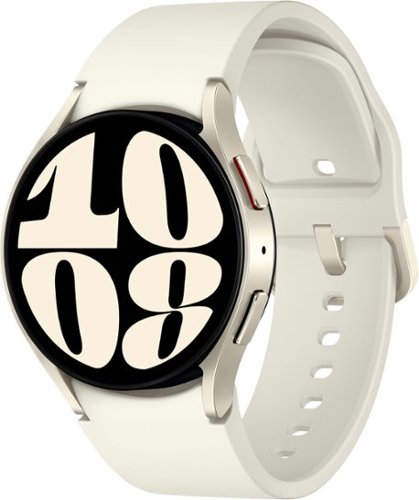
It~s your day ~own it with Samsung Galaxy Watch6. From the gym to the office, our large display keeps you in the know with simple navigation and a super easy-to-read screen. Work out smarter with personalized heart rate zones, and get insights for better rest with Advanced Sleep Coaching. Stay connected by using Galaxy Watch6 to call, text, play music and get notifications on the go. Plus, wherever the day takes you, own your look with a variety of customizable Watch bands and faces. Unlock your day~s full potential with Galaxy Watch6.
What does it mean by carrier GPS? I thought the watch is not carrier locked, isn't it?
The term "carrier GPS" refers to the type of GPS used by the watch. There are two types of GPS: standalone GPS and carrier GPS. Standalone GPS uses its own satellite network to determine your location. Carrier GPS uses the satellite network of a cellular carrier, such as AT&T, Verizon, or T-Mobile.
The Samsung Galaxy Watch6 Aluminum Smartwatch 40mm BT - Cream has a built-in GPS sensor, but it does not have carrier GPS. This means that it can only use standalone GPS to determine your location. If you want to use carrier GPS, you will need to purchase a model that is specifically designed for that carrier.
The watch is not carrier locked, which means that you can use it with any cellular carrier. However, if you want to use carrier GPS, you will need to purchase a model that is specifically designed for that carrier.
The Samsung Galaxy Watch6 Aluminum Smartwatch 40mm BT - Cream has a built-in GPS sensor, but it does not have carrier GPS. This means that it can only use standalone GPS to determine your location. If you want to use carrier GPS, you will need to purchase a model that is specifically designed for that carrier.
The watch is not carrier locked, which means that you can use it with any cellular carrier. However, if you want to use carrier GPS, you will need to purchase a model that is specifically designed for that carrier.
2 years, 9 months ago
by
NicoR