
Share NicoR's profile


NicoR
NicoR's stats
- Review count103
- Helpfulness votes51
- First reviewMay 30, 2023
- Last reviewNovember 25, 2023
- Featured reviews0
- Average rating4.7
Reviews comments
- Review comment count0
- Helpfulness votes0
- First review commentNone
- Last review commentNone
- Featured review comments0
Questions
- Question count0
- Helpfulness votes0
- First questionNone
- Last questionNone
- Featured questions0
- Answer count48
- Helpfulness votes110
- First answerJune 2, 2023
- Last answerSeptember 22, 2023
- Featured answers0
- Best answers10

Monthly Best Buy Protection (up to 24 mo.)
Customer Rating

5
Great all around Coverage
on August 6, 2023
Posted by: NicoR
Verified Purchase:Yes
The Best Buy 24 Month Extended Warranty is a comprehensive protection plan that offers peace of mind for your appliances. The plan covers accidental damage, defects, and malfunctions for up to 24 months after the original manufacturer's warranty expires.
Here are some of the benefits of the Best Buy 24 Month Extended Warranty:
* **Comprehensive coverage:** The plan covers accidental damage, defects, and malfunctions. This means that you're protected even if your appliance is damaged by a spill, a drop, or a power surge.
* **Easy to purchase:** The plan can be purchased at the time of purchase or within 60 days of purchase. You can purchase the plan online, in-store, or over the phone.
* **Convenient claims process:** If you need to file a claim, you can do so online, by phone, or in-store. The claims process is easy and straightforward.
* **Reliable customer service:** Best Buy has a reputation for providing excellent customer service. If you have any questions or concerns about your plan, you can reach out to customer service for assistance.
* **Easy to purchase:** The plan can be purchased at the time of purchase or within 60 days of purchase. You can purchase the plan online, in-store, or over the phone.
* **Convenient claims process:** If you need to file a claim, you can do so online, by phone, or in-store. The claims process is easy and straightforward.
* **Reliable customer service:** Best Buy has a reputation for providing excellent customer service. If you have any questions or concerns about your plan, you can reach out to customer service for assistance.
The Best Buy 24 Month Extended Warranty is a valuable protection plan for your appliances. The plan offers comprehensive coverage, easy purchasing, and a convenient claims process. If you're looking for peace of mind for your appliances, the Best Buy 24 Month Extended Warranty is a great option.
**Pros:**
* Comprehensive coverage
* Easy to purchase
* Convenient claims process
* Reliable customer service
* Easy to purchase
* Convenient claims process
* Reliable customer service
**Cons:**
* The cost of the plan may be prohibitive for some people.
* The plan does not cover all appliances.
* The plan does not cover all appliances.
**Overall:**
The Best Buy 24 Month Extended Warranty is a valuable protection plan for your appliances. The plan offers comprehensive coverage, easy purchasing, and a convenient claims process. If you're looking for peace of mind for your appliances, the Best Buy 24 Month Extended Warranty is a great option.
Length of ownership: 3
Mobile Submission: True
I would recommend this to a friend!
Quality

5
Value

4
Ease of Use
5
Share this review:


0points
0of 0voted this as helpful.
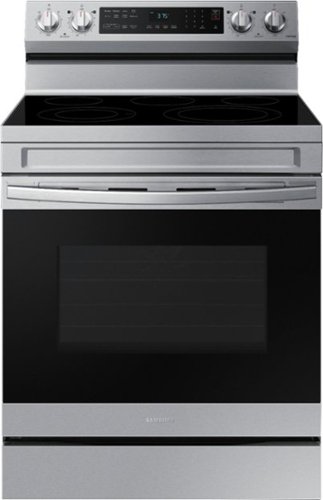
Elevate the look of your kitchen with Samsung~s Smart Freestanding Electric Range. Our Stainless Steel design elegantly wraps around cooktop sides and up through the slim control panel. Upgraded technology makes cooking simple and fun.
Customer Rating
5
A Cutting-Edge Addition to Your Kitchen
on August 5, 2023
Posted by: NicoR
Verified Purchase:Yes
Here is my in depth review of the Samsung 6.3 cu. ft. Freestanding Electric Range with WiFi, No-Preheat Air Fry & Convection in Stainless Steel! If you're on the lookout for a stylish and high-performing stove to complement your kitchen remodel, look no further. Samsung's latest innovation brings together convenience, advanced features, and modern aesthetics that are sure to elevate your cooking experience.
Design and Aesthetics:
The first thing that catches the eye is the stove's stunning stainless steel finish, seamlessly blending into contemporary and traditional kitchen designs alike. Its freestanding design allows you to place it anywhere without requiring additional installation. The sleek and minimalist control panel, illuminated by a modern LED display, not only adds elegance but also ensures easy operation and accessibility.
The first thing that catches the eye is the stove's stunning stainless steel finish, seamlessly blending into contemporary and traditional kitchen designs alike. Its freestanding design allows you to place it anywhere without requiring additional installation. The sleek and minimalist control panel, illuminated by a modern LED display, not only adds elegance but also ensures easy operation and accessibility.
Performance and Cooking Capabilities:
Samsung's electric range boasts a generous 6.3 cu. ft. oven capacity, providing ample space for multiple dishes, accommodating large family gatherings and entertaining friends. The inclusion of WiFi connectivity allows you to monitor and control the oven remotely using your smartphone, bringing convenience and flexibility to your culinary adventures.
Samsung's electric range boasts a generous 6.3 cu. ft. oven capacity, providing ample space for multiple dishes, accommodating large family gatherings and entertaining friends. The inclusion of WiFi connectivity allows you to monitor and control the oven remotely using your smartphone, bringing convenience and flexibility to your culinary adventures.
One of the standout features is the No-Preheat Air Fry function, which means you can achieve crispy and delicious results without the need for preheating the oven. Whether you're whipping up fries, chicken wings, or even doughnuts, this feature will be your go-to option for healthier frying alternatives.
The convection cooking technology is another impressive addition, ensuring even heat distribution throughout the oven for consistent and perfectly cooked dishes every time. You can say goodbye to the days of unevenly cooked foods and rejoice in the pleasure of evenly browned roasts and perfectly golden baked goods.
Intuitive Controls and Smart Features:
Navigating through various cooking options is effortless thanks to the intuitive touch controls on the control panel. Choose from an array of pre-programmed cooking settings, or if you're feeling adventurous, create your own custom recipes for an added personal touch.
Navigating through various cooking options is effortless thanks to the intuitive touch controls on the control panel. Choose from an array of pre-programmed cooking settings, or if you're feeling adventurous, create your own custom recipes for an added personal touch.
The integrated WiFi capability opens up a world of possibilities. Download the accompanying smartphone app, and you can preheat the oven while you're still at the grocery store, adjust cooking times, or even receive notifications when your meal is ready. This feature not only saves time but also allows you to multitask efficiently.
Safety and Convenience:
Safety is paramount in any kitchen, and Samsung doesn't disappoint. The stove features a child lock function, preventing accidental changes to settings and ensuring peace of mind when children are around.
Safety is paramount in any kitchen, and Samsung doesn't disappoint. The stove features a child lock function, preventing accidental changes to settings and ensuring peace of mind when children are around.
Cleaning the oven is often a tedious task, but with Samsung's steam-cleaning option, it becomes a breeze. The steam-cleaning feature efficiently loosens and eliminates residue, leaving you with minimal scrubbing effort.
Conclusion:
In conclusion, Samsung's 6.3 cu. ft. Freestanding Electric Range with WiFi, No-Preheat Air Fry & Convection in Stainless Steel is a standout product that brings innovation, convenience, and style to your kitchen. Its combination of advanced cooking capabilities, intuitive controls, and smart features make it a worthy investment for any tech-savvy home chef. Say hello to tastier and healthier meals without compromising on aesthetics. Upgrade your kitchen today and you wont regret it.
In conclusion, Samsung's 6.3 cu. ft. Freestanding Electric Range with WiFi, No-Preheat Air Fry & Convection in Stainless Steel is a standout product that brings innovation, convenience, and style to your kitchen. Its combination of advanced cooking capabilities, intuitive controls, and smart features make it a worthy investment for any tech-savvy home chef. Say hello to tastier and healthier meals without compromising on aesthetics. Upgrade your kitchen today and you wont regret it.
Length of ownership: 210
Mobile Submission: True
I would recommend this to a friend!
Ease of Cleaning
4
Performance
5
Quality
5

Share this review:


+5points
7of 9voted this as helpful.
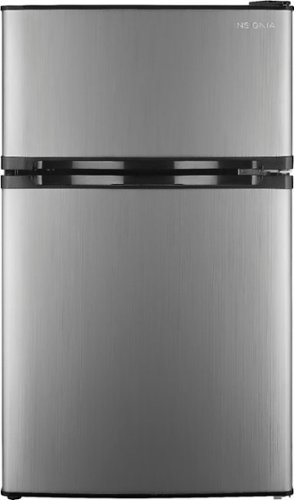
The Insignia 3.0 Cu. Ft. Mini Fridge with Top Freezer is Energy Star-certified and provides 3 cu. ft. of storage space without using a lot of energy. Measuring only 19.1 inches wide, this compact unit is perfect for apartment kitchens and other tight spaces.
Customer Rating
5
Bedroom essential for new parents
on August 5, 2023
Posted by: NicoR
Verified Purchase:Yes
As a soon-to-be new parent, I recently purchased the Insignia 3.0 cu ft Mini Fridge with Top Freezer from BestBuy, and it has been an absolute lifesaver for my bedroom setup. This little wonder not only provides easy convenience but also serves as a perfect storage solution for breast milk.
First and foremost, the compact size of this mini fridge fits perfectly in my bedroom without taking up too much space. Its sleek design blends seamlessly with the room's decor, making it a practical and aesthetically pleasing addition.
The top freezer compartment is a game-changer! It allows me to keep ice packs or small frozen treats handy, while the main fridge section provides ample room for storing breast milk, snacks, and beverages. No more running to the kitchen in the middle of the night!
Temperature control is a breeze with the adjustable thermostat, ensuring my breast milk stays fresh and safe at the perfect temperature. I love how it maintains a consistent temperature without any fuss.
The fridge operates quietly, which is a big plus for uninterrupted sleep during those precious nights when the little one arrives. Its energy-efficient design is also a win, as it helps keep electricity costs down while still keeping everything chilled.
The ease of access is a major convenience factor. With the mini fridge right in the bedroom, I don't have to trek to the kitchen every time I need something. It's like having a mini-kitchen right at arm's reach, making those late-night feedings much more manageable.
Overall, the Insignia 3.0 cu ft Mini Fridge with Top Freezer has been a lifesaver for my bedroom setup as we prepare for our new addition to the family. It's perfect for storing breast milk, providing easy convenience, and offering efficient cooling without disturbing our sleep.
If you're expecting a baby or simply looking for a convenient, space-saving fridge, I highly recommend this Insignia gem from BestBuy. It's the ultimate bedroom essential for new parents, bringing joy and convenience in one compact package. I can't imagine parenting without it!
Length of ownership: 168
Mobile Submission: True
I would recommend this to a friend!
Quality
5
Ease of Use
5
Value
5

Share this review:


-2points
0of 2voted this as helpful.
Monthly Best Buy Protection (up to 24 mo.)
Customer Rating
5
Shield your appliances
on August 5, 2023
Posted by: NicoR
Verified Purchase:Yes
When I picked up my new appliance from BestBuy, they surprised me with a 24-Month Protection Plan that's been a game-changer! This plan offers a safety net for two whole years, ensuring my appliance is covered in case of any unexpected mishaps.
I had my doubts about making a claim, but when a small issue cropped up, the customer support team swooped in like superheroes! They were lightning-fast, and they got everything sorted without any fuss.
The best part? Repairs and replacements are on the house! No more stressing over repair costs or waiting forever to get my appliance back in action.
With BestBuy's Protection Plan in place, I feel like my appliance is invincible, and I can sit back, relax, and enjoy its performance worry-free. If you want to give your appliance a superhero-level defense, this plan is a must-have!
Length of ownership: 2
Mobile Submission: True
I would recommend this to a friend!
Quality
5
Value
5
Ease of Use
5
Share this review:


0points
0of 0voted this as helpful.
Monthly Best Buy Protection (up to 24 mo.)
Customer Rating
5
Protect your appliances
on August 5, 2023
Posted by: NicoR
Verified Purchase:Yes
I recently got BestBuy's 24-Month Protection Plan when I purchased my appliance, and it's been a great decision. This plan covers my appliance for two years, so I don't have to worry about unexpected issues.
If anything goes wrong with my appliance during the coverage period, I can easily make a claim. The customer support team was quick and helpful when I had to use the plan.
The best part is that repairs and replacements are free, which saves me from unexpected costs and hassle.
Overall, BestBuy's Protection Plan gives me peace of mind, knowing my appliance is protected for two years. It's definitely worth considering if you want to keep your appliance safe and worry-free.
Length of ownership: 3
Mobile Submission: True
I would recommend this to a friend!
Quality
5
Value
5
Ease of Use
5
Share this review:


0points
0of 0voted this as helpful.
Monthly Best Buy Protection (up to 24 mo.)
Customer Rating
5
Comprehensive plan for appliances
on August 5, 2023
Posted by: NicoR
Verified Purchase:Yes
I recently had the privilege of receiving BestBuy's 24-Month Protection Plan with my appliance purchase, and I must say, it has exceeded my expectations in every way.
This protection plan offers extensive coverage for a generous two-year period, safeguarding my newly acquired appliance from any unforeseen mishaps or malfunctions that may occur during regular usage.
One of the most impressive features of this plan is the hassle-free claims process. When I needed to make a claim due to an unexpected issue, BestBuy's customer support team was quick, understanding, and highly efficient in resolving the matter to my complete satisfaction.
Having the protection plan also entitles me to free repairs and replacements, which provides added assurance and saves me from potential repair costs or inconvenience in case of any mishaps.
Throughout my experience with the BestBuy Protection Plan, the service team demonstrated professionalism and expertise, making the entire process smooth and seamless. Their commitment to addressing any concerns and offering top-notch service truly sets this protection plan apart.
While some might hesitate about the initial investment for the protection plan, I firmly believe it is well worth it. The peace of mind it brings, knowing that my valuable appliance is covered for two years, provides invaluable reassurance.
In conclusion, BestBuy's 24-Month Protection Plan, received with my appliance purchase, offers comprehensive coverage and exceptional service. The two-year protection, hassle-free claims process, and free repairs or replacements make it an absolute must-have for anyone looking to safeguard their valuable appliances. I highly recommend considering the BestBuy Protection Plan to ensure lasting peace of mind and protect your appliance investment for years to come.
Mobile Submission: True
I would recommend this to a friend!
Quality
5
Value
5
Ease of Use
5
Share this review:


0points
0of 0voted this as helpful.
Monthly Best Buy Protection (up to 24 mo.)
Customer Rating
5
Comprehensive protection and peace of mind
on August 5, 2023
Posted by: NicoR
Verified Purchase:Yes
BestBuy's 24-Month Protection Plan is an absolute game-changer when it comes to safeguarding your valuable purchases. Having experienced this service firsthand, I can confidently say it provides an unparalleled level of protection and peace of mind.
The standout feature of this protection plan is its extensive coverage for a generous two-year period. From accidental damage to malfunctions, the plan ensures your products are protected from unexpected mishaps that can occur during everyday use.
One of the aspects that impressed me the most was the hassle-free claims process. In the unfortunate event that I needed to make a claim, BestBuy's customer support team was prompt, understanding, and efficient. They quickly resolved my issue and ensured my satisfaction throughout the process.
Furthermore, the protection plan also covers free repairs and replacements, saving you from unexpected repair costs and the inconvenience of being without your product for an extended period.
During my experience with the BestBuy Protection Plan, the service team demonstrated professionalism and expertise, making the whole process seamless. Their commitment to resolving issues and providing top-notch service truly sets this protection plan apart from others in the market.
While some may consider the initial investment for the protection plan, I firmly believe it is worth every penny. The peace of mind it brings, knowing that your valuable purchases are covered for an extended period, is truly invaluable.
In conclusion, BestBuy's 24-Month Protection Plan offers comprehensive coverage and exceptional service for your valuable purchases. The two-year coverage, hassle-free claims process, and free repairs or replacements make it a must-have for anyone looking to safeguard their investments. Whether it's for electronics, appliances, or other valuable items, I highly recommend considering the BestBuy Protection Plan to ensure your peace of mind and protect your purchases for years to come.
Length of ownership: 97
Mobile Submission: True
I would recommend this to a friend!
Quality
5
Value
5
Ease of Use
5
Share this review:


0points
0of 0voted this as helpful.

Auto-renews at $15.99/mo. YouTube Premium is everything you love about YouTube ~ ad-free and uninterrupted. Watch YouTube without ads, then download your favorites to view them on-the-go. Multi-tasking? Don~t worry, mobile videos and music play seamlessly when your screen is off. Oh, and you also get premium access to our music streaming app ~ YouTube Music.
Customer Rating
5
Great entertainment from Youtube Trial
on August 5, 2023
Posted by: NicoR
Verified Purchase:Yes
I recently had the opportunity to enjoy a free month of YouTube Premium, thanks to BestBuy's generous offer with my recent purchase. This trial proved to be a game-changer, elevating my entertainment experience to new heights.
The standout feature of YouTube Premium is undoubtedly the ad-free viewing. It completely transforms the way you enjoy videos on the platform, removing interruptions and allowing you to immerse yourself fully in your favorite content without pesky ads popping up.
Moreover, the ability to download videos for offline viewing was a real game-changer for me. It meant that I could save my favorite videos and playlists to watch later, even when I had limited or no internet access. This feature proved incredibly useful during travel and commutes, making my downtime more enjoyable.
The inclusion of YouTube Music with the Premium trial was an added bonus. Having access to a vast library of ad-free music and the option to listen offline made it my go-to music streaming service during the trial period.
Another impressive feature is background play, which allowed me to listen to YouTube videos in the background while using other apps or when my device was locked. This multitasking ability further enhanced the overall YouTube Premium experience.
Throughout the trial, the user interface remained smooth and intuitive, making navigation a breeze. It seamlessly integrated with my existing YouTube account, making the transition to Premium effortless.
As the trial drew to a close, I found myself seriously considering continuing with a YouTube Premium subscription. The added benefits and convenience it brings to my entertainment experience are truly worthwhile.
In conclusion, the free month of YouTube Premium offered through my BestBuy purchase was an eye-opening experience. The ad-free viewing, offline downloads, access to YouTube Music, and background play completely transformed my entertainment routine. If you're an avid YouTube user, I highly recommend giving YouTube Premium a try to take your viewing experience to a whole new level.
Length of ownership: 61
Mobile Submission: True
I would recommend this to a friend!
Quality
5
Value
5
Ease of Use
5
Share this review:


0points
0of 0voted this as helpful.
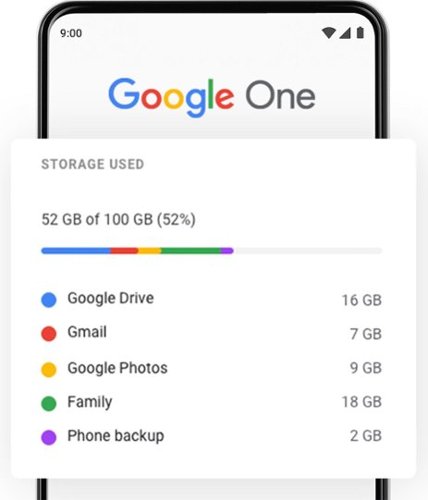
Keep your memories and files safe with 100GB of cloud storage from Google One. Enjoy the peace of mind of having extra cloud storage across Gmail, Google Drive, and Google Photos, plus seamless phone backup.
Customer Rating
5
Great trial elevating your digital experience
on August 5, 2023
Posted by: NicoR
Verified Purchase:Yes
Recently, I had the pleasure of experiencing the free Google Premium Trial offered as a bonus with my purchase at BestBuy, and I must say, it brought my digital life to a whole new level.
The trial period provided access to an array of premium features and services across various Google products. One of the highlights was the ad-free experience on YouTube, which allowed me to enjoy uninterrupted videos without any pesky ads disrupting my viewing pleasure.
Another standout feature was the increased storage space on Google Drive. With the extended capacity, I could comfortably back up all my important files, photos, and videos without worrying about running out of space.
The trial also included exclusive access to Google Play Pass, which gave me the chance to explore a vast collection of apps and games without any additional costs. It was a delightful way to discover new apps and enhance my productivity.
Throughout the trial, I noticed improved performance on Google services, thanks to the priority support provided. Any queries or issues I had were addressed promptly and efficiently, making the overall experience even more enjoyable.
The integration of the premium trial with my existing Google account was seamless, ensuring that I could take full advantage of all the features without any complications.
While the trial period was limited, it gave me a taste of the possibilities and benefits of using Google Premium services. As a result, I am seriously considering continuing with the subscription after the trial ends.
In conclusion, the free Google Premium Trial offered through my BestBuy purchase was a pleasant surprise that enhanced my digital experience across various Google products. The ad-free YouTube, expanded storage on Google Drive, and access to Google Play Pass were just some of the amazing perks that came with the trial. If you're a frequent user of Google services, I highly recommend giving this trial a shot to explore the world of premium features and elevate your digital lifestyle.
Length of ownership: 61
Mobile Submission: True
I would recommend this to a friend!
Quality
5
Value
5
Ease of Use
5
Share this review:


0points
0of 0voted this as helpful.
Monthly Best Buy Protection (up to 24 mo.)
Customer Rating
5
Great coverage!
on August 5, 2023
Posted by: NicoR
Verified Purchase:Yes
As a tech enthusiast and experienced reviewer, I recently tried out BestBuy's Total Tech Coverage, and it exceeded my expectations.
The standout feature is the two-year all-inclusive warranty. It provides worry-free protection for any unforeseen issues with the product at no additional cost during the warranty period.
I was impressed with the added perk of free installation and service, saving time and hassle.
BestBuy's customer support team was exceptional, knowledgeable, and responsive.
Overall, BestBuy Total Tech Coverage offers great value for money, and I highly recommend it for peace of mind and a hassle-free tech experience.
Length of ownership: 5
Mobile Submission: True
I would recommend this to a friend!
Quality
5
Value
5
Ease of Use
5
Share this review:


0points
0of 0voted this as helpful.
NicoR's Review Comments
NicoR has not submitted comments on any reviews.
NicoR's Questions
NicoR has not submitted any questions.

Everything you need is right in your screen. Watch, work and chat - all without connecting a separate PC - with Smart Monitor. Your favorite content, productivity and video call apps are built-in for a simpler and more stylish desk setup that~s a joy to use every time.
Speakers seam to be not so good my 32" smart TV is amazing what happened to sound quality how can it be fixed. As it was open box maybe displayed and speakers could be bad I'm not sure. Maybe I'm supposed to get a new soundbar for good sound ....
There are a few things you can do to improve the sound quality of your Samsung 32" smart TV:
Check the audio settings. Make sure that the volume is turned up and that the audio mode is set to the best setting for your content. You can also try adjusting the equalizer settings to improve the sound quality.
Move the speakers. If the speakers are placed in a corner or against a wall, the sound quality may be muffled. Try moving them to a more open area.
Get a soundbar. A soundbar is a great way to improve the sound quality of your TV. It will provide you with richer, fuller sound that will make your movies and TV shows more enjoyable
Check the audio settings. Make sure that the volume is turned up and that the audio mode is set to the best setting for your content. You can also try adjusting the equalizer settings to improve the sound quality.
Move the speakers. If the speakers are placed in a corner or against a wall, the sound quality may be muffled. Try moving them to a more open area.
Get a soundbar. A soundbar is a great way to improve the sound quality of your TV. It will provide you with richer, fuller sound that will make your movies and TV shows more enjoyable
2 years, 9 months ago
by
NicoR
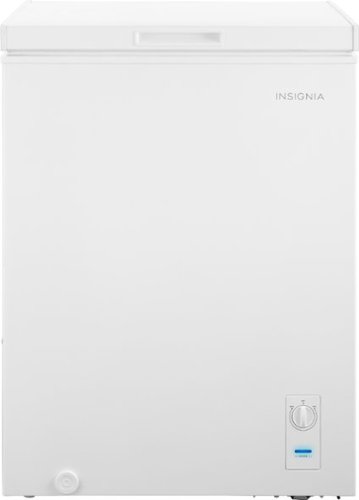
The Insignia 5.0 Cu. Ft. chest freezer has a removable storage basket to keep your food organized so you can find all your items. Have confidence that your food is stored correctly by adjusting the temperature control panel.
Our power went out. Do I need to reset? Or should I unplug the freezer and plug it back in?
If the power outage was brief, you do not need to reset your freezer. Just keep the door closed and the food inside will stay safe.
However, if the power outage was longer, you may need to unplug the freezer and plug it back in. This will help to reset the freezer's temperature control.
Here are the steps on how to reset your freezer after a power outage:
Unplug the freezer from the power outlet.
Wait for a few minutes.
Plug the freezer back in.
Close the freezer door.
The freezer will take a few hours to reach its normal temperature. During this time, do not open the door unless absolutely necessary.
However, if the power outage was longer, you may need to unplug the freezer and plug it back in. This will help to reset the freezer's temperature control.
Here are the steps on how to reset your freezer after a power outage:
Unplug the freezer from the power outlet.
Wait for a few minutes.
Plug the freezer back in.
Close the freezer door.
The freezer will take a few hours to reach its normal temperature. During this time, do not open the door unless absolutely necessary.
2 years, 9 months ago
by
NicoR
The Insignia 5.0 Cu. Ft. chest freezer has a removable storage basket to keep your food organized so you can find all your items. Have confidence that your food is stored correctly by adjusting the temperature control panel.
Can I order extra baskets? What is the size of the basket?
Yes, you can order extra baskets for the Insignia 5 cu ft garage ready chest freezer. The baskets are not sold separately by Insignia, but you can find them on Amazon and other online retailers.
The baskets are 20.4 x 16.7 x 27.7 inches (518 x 425 x 705 mm) and have a capacity of 2.5 cubic feet. They are made of wire mesh and have a black powder-coated finish.
To order extra baskets, you can search for "Insignia 5 cu ft chest freezer baskets" on Amazon or other online retailers. The baskets typically cost around $20 each.
The baskets are 20.4 x 16.7 x 27.7 inches (518 x 425 x 705 mm) and have a capacity of 2.5 cubic feet. They are made of wire mesh and have a black powder-coated finish.
To order extra baskets, you can search for "Insignia 5 cu ft chest freezer baskets" on Amazon or other online retailers. The baskets typically cost around $20 each.
2 years, 9 months ago
by
NicoR
The Insignia 5.0 Cu. Ft. chest freezer has a removable storage basket to keep your food organized so you can find all your items. Have confidence that your food is stored correctly by adjusting the temperature control panel.
I just noticed there are 2 screw-in pegs on the (front and back corner) underneath/ bottom left side only. For balance purposes? Anyway, are there 2 more screw holes on the underneath/ bottom right. And can I buy 4 caster wheels and just screw them in?
Yes, there are two more screw holes on the bottom right side of the Insignia 5 cu ft garage ready chest freezer. You can buy four caster wheels and screw them into these holes to make the freezer more portable.
The screw-in pegs on the bottom left side of the freezer are for balance purposes. They help to prevent the freezer from tipping over. If you screw in the caster wheels, you can remove the pegs.
When choosing caster wheels, make sure that they are the right size for the freezer. The wheels should also be rated for the weight of the freezer.
Here are the steps on how to install caster wheels on the Insignia 5 cu ft garage ready chest freezer:
Remove the two screw-in pegs on the bottom left side of the freezer.
Screw in the caster wheels into the holes.
Make sure that the caster wheels are level.
Here are some safety tips to keep in mind when installing caster wheels:
Make sure that the freezer is unplugged and empty before you start.
Be careful not to overtighten the screws, as this could damage the freezer.
Test the freezer to make sure that it is stable on the caster wheels.
With the caster wheels installed, you can easily move the freezer around your garage or other storage area. This can be helpful for cleaning or making space for other items.
The screw-in pegs on the bottom left side of the freezer are for balance purposes. They help to prevent the freezer from tipping over. If you screw in the caster wheels, you can remove the pegs.
When choosing caster wheels, make sure that they are the right size for the freezer. The wheels should also be rated for the weight of the freezer.
Here are the steps on how to install caster wheels on the Insignia 5 cu ft garage ready chest freezer:
Remove the two screw-in pegs on the bottom left side of the freezer.
Screw in the caster wheels into the holes.
Make sure that the caster wheels are level.
Here are some safety tips to keep in mind when installing caster wheels:
Make sure that the freezer is unplugged and empty before you start.
Be careful not to overtighten the screws, as this could damage the freezer.
Test the freezer to make sure that it is stable on the caster wheels.
With the caster wheels installed, you can easily move the freezer around your garage or other storage area. This can be helpful for cleaning or making space for other items.
2 years, 9 months ago
by
NicoR
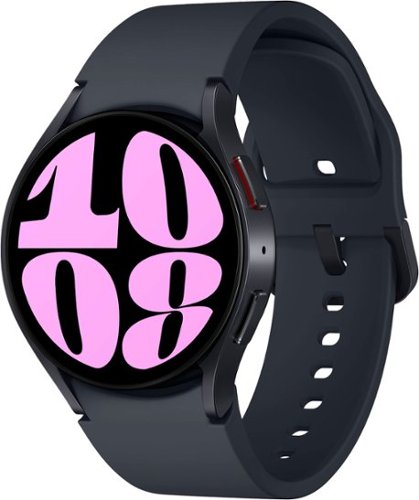
It~s your day ~own it with Samsung Galaxy Watch6. From the gym to the office, our large display keeps you in the know with simple navigation and a super easy-to-read screen. Work out smarter with personalized heart rate zones, and get insights for better rest with Advanced Sleep Coaching. Stay connected by using Galaxy Watch6 to call, text, play music and get notifications on the go. Plus, wherever the day takes you, own your look with a variety of customizable Watch bands and faces. Unlock your day~s full potential with Galaxy Watch6.
Does this have the elliptical workout option? I have an old Active that has it and I use it regularly and track it in Samsung Health. Thanks!
Yes, the Samsung Galaxy Watch6 Aluminum Smartwatch 40mm BT has an elliptical workout option. To start an elliptical workout on your watch, follow these steps:
Open the Samsung Health app on your watch.
Tap Workout.
Scroll down and tap Elliptical.
Tap Start.
The watch will start tracking your workout and will display your heart rate, calories burned, and other metrics. You can also pause or stop the workout at any time.
The elliptical workout option is available on both the Bluetooth and LTE models of the Galaxy Watch6. It is also available on other Samsung smartwatches, such as the Galaxy Watch4 and Galaxy Watch5.
Open the Samsung Health app on your watch.
Tap Workout.
Scroll down and tap Elliptical.
Tap Start.
The watch will start tracking your workout and will display your heart rate, calories burned, and other metrics. You can also pause or stop the workout at any time.
The elliptical workout option is available on both the Bluetooth and LTE models of the Galaxy Watch6. It is also available on other Samsung smartwatches, such as the Galaxy Watch4 and Galaxy Watch5.
2 years, 9 months ago
by
NicoR
It~s your day ~own it with Samsung Galaxy Watch6. From the gym to the office, our large display keeps you in the know with simple navigation and a super easy-to-read screen. Work out smarter with personalized heart rate zones, and get insights for better rest with Advanced Sleep Coaching. Stay connected by using Galaxy Watch6 to call, text, play music and get notifications on the go. Plus, wherever the day takes you, own your look with a variety of customizable Watch bands and faces. Unlock your day~s full potential with Galaxy Watch6.
Does this watch connect to the Galaxy Fold4?
Yes, the Samsung Galaxy Watch6 Aluminum Smartwatch 40mm BT can connect to the Galaxy Fold4. Both devices use Bluetooth to connect to each other. To connect the watch to the phone, follow these steps:
Make sure that both devices are turned on and Bluetooth is enabled.
On the watch, open the Settings app.
Tap Connections > Bluetooth.
Tap the name of the phone to connect to it.
Once the watch is connected to the phone, you can use it to control the phone, receive notifications, and make and answer calls.
Here are some of the features that you can use with the Galaxy Watch6 Aluminum Smartwatch 40mm BT - Cream and the Galaxy Fold4:
Make and answer calls: You can use the watch to make and answer calls if the phone is nearby.
Control the phone: You can use the watch to control the phone's music playback, volume, and settings.
Receive notifications: You can receive notifications from the phone on the watch, such as text messages, emails, and social media updates.
Track your fitness: You can use the watch to track your steps, calories burned, and heart rate.
Pay for things: You can use the watch to pay for things with Samsung Pay if the phone is nearby.
I hope this helps!
Make sure that both devices are turned on and Bluetooth is enabled.
On the watch, open the Settings app.
Tap Connections > Bluetooth.
Tap the name of the phone to connect to it.
Once the watch is connected to the phone, you can use it to control the phone, receive notifications, and make and answer calls.
Here are some of the features that you can use with the Galaxy Watch6 Aluminum Smartwatch 40mm BT - Cream and the Galaxy Fold4:
Make and answer calls: You can use the watch to make and answer calls if the phone is nearby.
Control the phone: You can use the watch to control the phone's music playback, volume, and settings.
Receive notifications: You can receive notifications from the phone on the watch, such as text messages, emails, and social media updates.
Track your fitness: You can use the watch to track your steps, calories burned, and heart rate.
Pay for things: You can use the watch to pay for things with Samsung Pay if the phone is nearby.
I hope this helps!
2 years, 9 months ago
by
NicoR
It~s your day ~own it with Samsung Galaxy Watch6. From the gym to the office, our large display keeps you in the know with simple navigation and a super easy-to-read screen. Work out smarter with personalized heart rate zones, and get insights for better rest with Advanced Sleep Coaching. Stay connected by using Galaxy Watch6 to call, text, play music and get notifications on the go. Plus, wherever the day takes you, own your look with a variety of customizable Watch bands and faces. Unlock your day~s full potential with Galaxy Watch6.
Does this watch show, receive, read & send RCS text
The Samsung Galaxy Watch6 Aluminum Smartwatch 40mm BT can show, receive, read, and send RCS text messages if the phone it is paired with has RCS enabled. RCS stands for Rich Communication Services, and it is a more advanced messaging protocol than SMS. RCS messages can include features such as typing indicators, read receipts, and high-quality photos and videos.
To enable RCS on your phone, you will need to use the Messages app from Google. Open the Messages app and tap on the three dots in the top right corner. Then, select Settings > Chat features > Turn on chat features.
Once RCS is enabled on your phone, it will be enabled on your watch as well. You can then send and receive RCS messages from your watch just like you would from your phone.
However, it is important to note that not all carriers support RCS. If your carrier does not support RCS, you will not be able to use these features on your watch.
Here are the steps on how to check if your carrier supports RCS:
Open the Messages app on your phone.
Tap on the three dots in the top right corner.
Select Settings > Chat features.
If you see the message "Chat features are unavailable," then your carrier does not support RCS.
If your carrier does not support RCS, you can still use your watch to send and receive SMS messages. However, you will not be able to use the more advanced features that are available with RCS.
To enable RCS on your phone, you will need to use the Messages app from Google. Open the Messages app and tap on the three dots in the top right corner. Then, select Settings > Chat features > Turn on chat features.
Once RCS is enabled on your phone, it will be enabled on your watch as well. You can then send and receive RCS messages from your watch just like you would from your phone.
However, it is important to note that not all carriers support RCS. If your carrier does not support RCS, you will not be able to use these features on your watch.
Here are the steps on how to check if your carrier supports RCS:
Open the Messages app on your phone.
Tap on the three dots in the top right corner.
Select Settings > Chat features.
If you see the message "Chat features are unavailable," then your carrier does not support RCS.
If your carrier does not support RCS, you can still use your watch to send and receive SMS messages. However, you will not be able to use the more advanced features that are available with RCS.
2 years, 9 months ago
by
NicoR
It~s your day ~own it with Samsung Galaxy Watch6. From the gym to the office, our large display keeps you in the know with simple navigation and a super easy-to-read screen. Work out smarter with personalized heart rate zones, and get insights for better rest with Advanced Sleep Coaching. Stay connected by using Galaxy Watch6 to call, text, play music and get notifications on the go. Plus, wherever the day takes you, own your look with a variety of customizable Watch bands and faces. Unlock your day~s full potential with Galaxy Watch6.
Is this watch for women or for men?
he Samsung Galaxy Watch6 Aluminum Smartwatch 40mm BT is a unisex watch. It is designed to fit both men and women. The 40mm case size is considered a smaller size, so it may be a better fit for women with smaller wrists. However, ultimately the best way to determine if the watch is right for you is to try it on and see how it feels.
Here are some of the factors to consider when choosing a smartwatch:
Case size: The case size is the diameter of the watch face. Smaller case sizes are typically better for women with smaller wrists, while larger case sizes are better for men with larger wrists.
Band size: The band size is the width of the watch band. It is important to choose a band size that is comfortable and does not feel too tight or too loose.
Style: The style of the watch is also an important consideration. Choose a watch that you think looks good and that you will be happy to wear.
If you are still not sure if the Samsung Galaxy Watch6 Aluminum Smartwatch 40mm BT is right for you, I recommend trying it on at a local store. This will give you a chance to see how it looks and feels on your wrist.
Here are some of the factors to consider when choosing a smartwatch:
Case size: The case size is the diameter of the watch face. Smaller case sizes are typically better for women with smaller wrists, while larger case sizes are better for men with larger wrists.
Band size: The band size is the width of the watch band. It is important to choose a band size that is comfortable and does not feel too tight or too loose.
Style: The style of the watch is also an important consideration. Choose a watch that you think looks good and that you will be happy to wear.
If you are still not sure if the Samsung Galaxy Watch6 Aluminum Smartwatch 40mm BT is right for you, I recommend trying it on at a local store. This will give you a chance to see how it looks and feels on your wrist.
2 years, 9 months ago
by
NicoR
It~s your day ~own it with Samsung Galaxy Watch6. From the gym to the office, our large display keeps you in the know with simple navigation and a super easy-to-read screen. Work out smarter with personalized heart rate zones, and get insights for better rest with Advanced Sleep Coaching. Stay connected by using Galaxy Watch6 to call, text, play music and get notifications on the go. Plus, wherever the day takes you, own your look with a variety of customizable Watch bands and faces. Unlock your day~s full potential with Galaxy Watch6.
Can you swim while wearing this watch?
Yes, you can swim while wearing the Samsung Galaxy Watch6 Aluminum Smartwatch 40mm BT -. It is water resistant up to 50 meters, which means it can withstand water pressure equivalent to being 50 meters underwater for up to 10 minutes.
However, there are a few things to keep in mind when swimming with the watch:
Turn on Water Lock mode before swimming. This will prevent the touchscreen from being activated accidentally and will also prevent water from getting into the speaker and microphone.
Do not use the watch in saltwater or hot tubs. Saltwater can corrode the watch's components, and hot water can damage the seals that make it water resistant.
After swimming, rinse the watch with fresh water and dry it thoroughly. This will help to prevent the growth of mold and mildew.
By following these simple tips, you can safely swim with your Samsung Galaxy Watch6 Aluminum Smartwatch 40mm BT and enjoy all of its features, even underwater.
Here are some additional tips for swimming with your smartwatch:
Choose a watch band that is made of a material that is not absorbent, such as silicone or nylon.
Avoid wearing any jewelry while swimming, as this could scratch the watch or get caught on something.
If you are going to be swimming in a pool, make sure that the pool is properly chlorinated. Chlorine can damage the watch's seals.
With a little care, you can enjoy swimming with your smartwatch without any problems.
However, there are a few things to keep in mind when swimming with the watch:
Turn on Water Lock mode before swimming. This will prevent the touchscreen from being activated accidentally and will also prevent water from getting into the speaker and microphone.
Do not use the watch in saltwater or hot tubs. Saltwater can corrode the watch's components, and hot water can damage the seals that make it water resistant.
After swimming, rinse the watch with fresh water and dry it thoroughly. This will help to prevent the growth of mold and mildew.
By following these simple tips, you can safely swim with your Samsung Galaxy Watch6 Aluminum Smartwatch 40mm BT and enjoy all of its features, even underwater.
Here are some additional tips for swimming with your smartwatch:
Choose a watch band that is made of a material that is not absorbent, such as silicone or nylon.
Avoid wearing any jewelry while swimming, as this could scratch the watch or get caught on something.
If you are going to be swimming in a pool, make sure that the pool is properly chlorinated. Chlorine can damage the watch's seals.
With a little care, you can enjoy swimming with your smartwatch without any problems.
2 years, 9 months ago
by
NicoR
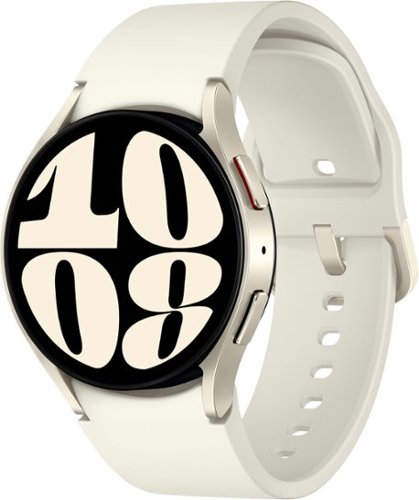
It~s your day ~own it with Samsung Galaxy Watch6. From the gym to the office, our large display keeps you in the know with simple navigation and a super easy-to-read screen. Work out smarter with personalized heart rate zones, and get insights for better rest with Advanced Sleep Coaching. Stay connected by using Galaxy Watch6 to call, text, play music and get notifications on the go. Plus, wherever the day takes you, own your look with a variety of customizable Watch bands and faces. Unlock your day~s full potential with Galaxy Watch6.
What does it mean by carrier GPS? I thought the watch is not carrier locked, isn't it?
The term "carrier GPS" refers to the type of GPS used by the watch. There are two types of GPS: standalone GPS and carrier GPS. Standalone GPS uses its own satellite network to determine your location. Carrier GPS uses the satellite network of a cellular carrier, such as AT&T, Verizon, or T-Mobile.
The Samsung Galaxy Watch6 Aluminum Smartwatch 40mm BT - Cream has a built-in GPS sensor, but it does not have carrier GPS. This means that it can only use standalone GPS to determine your location. If you want to use carrier GPS, you will need to purchase a model that is specifically designed for that carrier.
The watch is not carrier locked, which means that you can use it with any cellular carrier. However, if you want to use carrier GPS, you will need to purchase a model that is specifically designed for that carrier.
The Samsung Galaxy Watch6 Aluminum Smartwatch 40mm BT - Cream has a built-in GPS sensor, but it does not have carrier GPS. This means that it can only use standalone GPS to determine your location. If you want to use carrier GPS, you will need to purchase a model that is specifically designed for that carrier.
The watch is not carrier locked, which means that you can use it with any cellular carrier. However, if you want to use carrier GPS, you will need to purchase a model that is specifically designed for that carrier.
2 years, 9 months ago
by
NicoR