
Share Seth's profile


Seth
Seth's stats
- Review count22
- Helpfulness votes2
- First reviewOctober 12, 2021
- Last reviewNovember 15, 2023
- Featured reviews0
- Average rating5
Reviews comments
- Review comment count0
- Helpfulness votes0
- First review commentNone
- Last review commentNone
- Featured review comments0
Questions
- Question count0
- Helpfulness votes0
- First questionNone
- Last questionNone
- Featured questions0
- Answer count1
- Helpfulness votes0
- First answerOctober 12, 2021
- Last answerOctober 12, 2021
- Featured answers0
- Best answers0
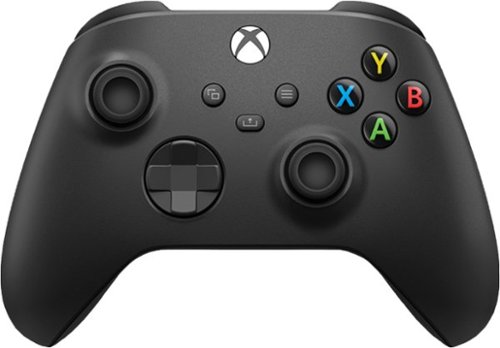
Experience the modernized design of the Xbox Wireless Controller in Carbon Black, featuring sculpted surfaces and refined geometry for enhanced comfort during gameplay. Stay on target with a hybrid D -pad and textured grip on the triggers, bumpers, and back-case. Seamlessly capture and share content such as screenshots, recordings, and more with the Share button. Plug in any compatible headset with the 3.5mm audio jack. Use the Xbox Accessories app to remap buttons and create custom controller profiles for your favorite games. Quickly pair with, play on, and switch between devices including console, PC, and mobile.* Not all versions of this controller include an expansion port.
Customer Rating

5
Great gamepad
on October 12, 2021
Posted by: Seth
Verified Purchase:Yes
Received as part of a bonus for buying a laptop, I really enjoy how this controller feels when playing on my Xbox. Functions really well and battery life is quite good.
Length of ownership: 4
Mobile Submission: false
I would recommend this to a friend!
Quality

5
Value
5
Ease of Use
5
Share this review:


0points
0of 0voted this as helpful.
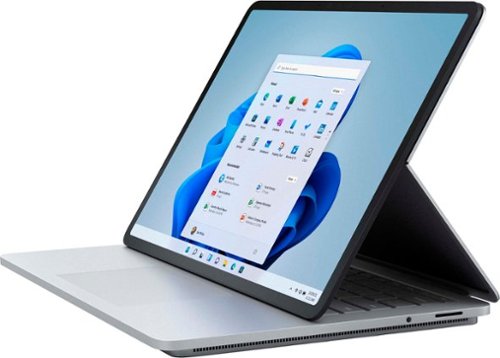
Set your imagination free on the most powerful Surface Laptop, designed to light up the best of Windows 11. Boundary-pushing design lets you flex your creative muscle on the sleek 14.4~~ touchscreen, making seamless transitions from laptop to entertainment-ready stage to portable creative canvas, complete with built-in storage and charging for Surface Slim Pen 2* under the keyboard. Enjoy smooth gameplay, and draw, sketch and take notes like you would on paper on the bright, vibrant 120Hz display. Run intensive applications and get things done anywhere with all-day battery life, and get inspired with graphics power that exceeds your expectations. Elevate your entertainment with Quad Omnisonic speakers, featuring large bass and immersive Dolby Atmos. Stay in the flow, be inspired and get closer to what you love.
Customer Rating
5
Work, play, create
on October 12, 2021
Posted by: Seth
Verified Purchase:Yes
A wonderful upgrade from my Surface Pro 3. I purchased this with a Surface Slim Pen 2, great accessory. I will be mainly using this for work and writing notes, so more than enough horsepower for that, but I will probably be using it for some gaming on the side. The Nvidia RTX 3050 Ti won't be winning any huge awards, but it is certainly powerful enough to run games respectably. This device strikes a great balance on what it wants to do, and I enjoy the different modes.
Length of ownership: 4
Mobile Submission: false
I would recommend this to a friend!
Battery Life

4
Speed
5
Display
5
Share this review:


+1point
1of 1voted this as helpful.
Seth's Review Comments
Seth has not submitted comments on any reviews.
Seth's Questions
Seth has not submitted any questions.
Seth's Answers

Write, sketch, navigate, and recharge. Take handwritten notes and draw with the same feeling you get with pen on paper, with exceptional accuracy and a new storable design. Surface Slim Pen (2nd Edition) also delivers incredible shading and exceptional pressure sensitivity.~