
Share Mymetra's profile


Mymetra
Mymetra's stats
- Review count43
- Helpfulness votes0
- First reviewDecember 19, 2018
- Last reviewMay 1, 2022
- Featured reviews0
- Average rating4.9
Reviews comments
- Review comment count0
- Helpfulness votes0
- First review commentNone
- Last review commentNone
- Featured review comments0
Questions
- Question count0
- Helpfulness votes0
- First questionNone
- Last questionNone
- Featured questions0
- Answer count4
- Helpfulness votes0
- First answerJanuary 16, 2020
- Last answerMarch 12, 2021
- Featured answers0
- Best answers0
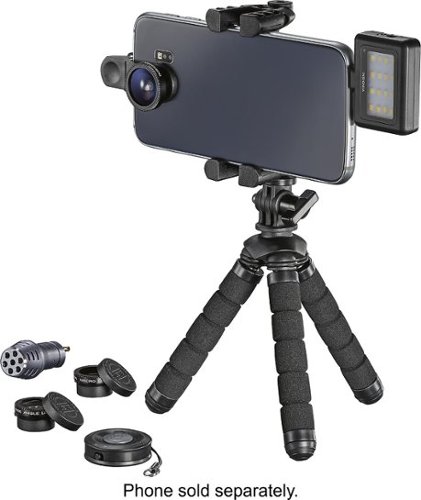
Get everything you need to turn your phone into a mobile recording device with this Insignia mobile photography kit. It includes lenses, lighting, audio and support so that you can get crisp, clear video in a variety of situations. Whether landscape, macro or portraits, this Insignia mobile photography kit gets more from your smartphone camera and microphone.
Customer Rating

4
Works pretty well
on December 19, 2018
Posted by: Mymetra
from Riverside, MO
Verified Purchase:Yes
A little difficult to set up, but works well. Is compact and stores well.
Mobile Submission: True
I would recommend this to a friend!
Share this review:


0points
0of 0voted this as helpful.
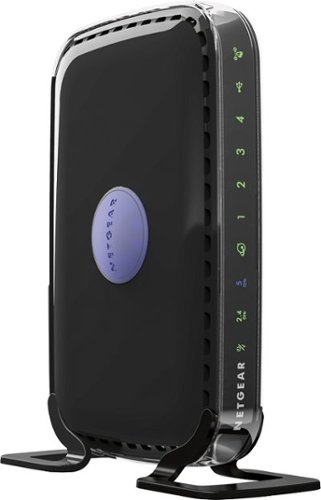
Choose this NETGEAR router and receive high level wireless security, the ability to share photos, music and more, and a way to keep track of your kids~ activity online. Plus, with easy installation for tablets, smartphones and computers, you~ll be able to start enjoying Wi-Fi throughout your home right away.
Customer Rating

5
Works well
on December 19, 2018
Posted by: Mymetra
from Riverside, MO
Verified Purchase:Yes
Range is good. Easy to set up. Form factor is good.
Mobile Submission: True
I would recommend this to a friend!
Share this review:


0points
0of 0voted this as helpful.

Safely back up your vehicle with the help of this Metra BBBPC back-up camera, which delivers a 170~ viewing angle to help you see obstacles behind you. The camera mounts easily above your vehicle's license plate for simple installation.
Customer Rating

1
I returned the item. Could not use
on December 19, 2018
Posted by: Mymetra
from Riverside, MO
Verified Purchase:Yes
Device looked real good, however, when I got it home, I could not use it on my old car.
Mobile Submission: True
I would recommend this to a friend!
Share this review:


0points
0of 0voted this as helpful.
Mymetra's Review Comments
Mymetra has not submitted comments on any reviews.
Mymetra's Questions
Mymetra has not submitted any questions.
Mymetra's Answers

Outfit your printer with this Epson DURABrite Ultra ink combo pack. It includes all four colors, so you're ready to create stunning documents and lifelike photographs.
Outfit your printer with this Epson DURABrite Ultra ink combo pack. It includes all four colors, so you're ready to create stunning documents and lifelike photographs.
WorkForce Pro WF-3820 Purchased few months ago. Also purchased with replacement cartridges; 702 received. These are shorter cartridges that do not fit? Are Epson 202 the correct cartridges?
Probably not. Check your requirements by googling for your model of the epson printer. The epson site will tell you’ve the correct csrtridge. Also loom at Bestbuy.com. They have a search bar. Type in: print cartridge for epson printer and include your printer model number.
5 years, 4 months ago
by
Mymetra
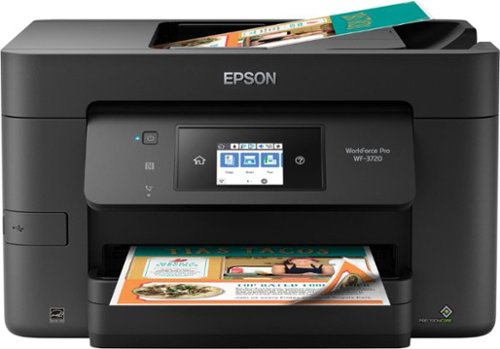
Get high-quality document copies fast with this Epson WorkForce all-in-one printer. It produces up to 15 ppm of black and white copy or 9 ppm of color copy, and it saves time and paper consumption with its automatic two-sided printing function. This Epson WorkForce all-in-one printer lets you print and scan remotely via its Wi-Fi connectivity.
I bought this last yr never used it took it out of the box .having trouble setting up it keeps saying printers offline . Then it prints blank . I replaced the new cartridges it came with bought another set of new ones and same thing prints blank ?help
Turn off your printer.
Power down your PC
turn printer back on
power up your pc
Be sure you have followed the installation procedures fore your printer. If it is wireless, be sure your modem and / or your wireless router is turn on.
Look carefully at your user starup guide. Also check your user manual, which, if you have installed the Epson software, and if you have Windows 10 operating system on your PC, will be in he start menu click windows logo in he bottom left hand of your screen and scroll down to the Epson section. Click on EPSON and a user guide, etc line will pop up. click on that to get the user guide.
if you are not using wireless, attach a USB cable to the printer and plug the other end to a USB port on your computer. Power off the computer. Power on your EPSON printer then power on your computer. It should automatically find the "drives" - software it needs to talk to the Epson.
Power down your PC
turn printer back on
power up your pc
Be sure you have followed the installation procedures fore your printer. If it is wireless, be sure your modem and / or your wireless router is turn on.
Look carefully at your user starup guide. Also check your user manual, which, if you have installed the Epson software, and if you have Windows 10 operating system on your PC, will be in he start menu click windows logo in he bottom left hand of your screen and scroll down to the Epson section. Click on EPSON and a user guide, etc line will pop up. click on that to get the user guide.
if you are not using wireless, attach a USB cable to the printer and plug the other end to a USB port on your computer. Power off the computer. Power on your EPSON printer then power on your computer. It should automatically find the "drives" - software it needs to talk to the Epson.
6 years, 2 months ago
by
Mymetra

Print crisp text and images on your Epson Workforce printer with this Epson 252XL T252XL120-S ink cartridge, which features DURABrite Ultra ink for smudge-, fade- and water-resistant documents. The high yield easily handles your office printing needs.
Purchased first 252 epson replacement cartridge for my WF-7710 printer (but not the 'i' version that shipped with the printer). Immediately after replacing, print quality is very poor and door over cartridges is hard to reopen. Ideas?
go to help menu on the display screen. scroll down to "maintenance". within the menu scroll down to "replace cartridge". click that. the cartridge carrier will then move way left then move back to the right, stopping just the right place to allow you to pull on the plastic cover tab and lifi it up. next, squeeze the top tab on the cartridge you want to replace - while doing that, pull from the top of the cartridge and remove it. Find the new cartridge an be SURE to REMOVE the yellow sticker attached to th top side of the cartridge. Next, slide that new cartridge into the slot where the old one was. press it down until the tab at the top clicks. next, roll the black plastic using its tab back over all the cartridges press down until it clicks.
the help menu on the printer screen takes you thru step by step.
it appears that you might not have followed all the steps in installing the new cartridge.
xt
the help menu on the printer screen takes you thru step by step.
it appears that you might not have followed all the steps in installing the new cartridge.
xt
6 years, 6 months ago
by
Mymetra