
Share BobR's profile


BobR
BobR's stats
- Review count13
- Helpfulness votes2
- First reviewApril 6, 2019
- Last reviewFebruary 16, 2024
- Featured reviews0
- Average rating4.2
Reviews comments
- Review comment count0
- Helpfulness votes0
- First review commentNone
- Last review commentNone
- Featured review comments0
Questions
- Question count0
- Helpfulness votes0
- First questionNone
- Last questionNone
- Featured questions0
- Answer count14
- Helpfulness votes1
- First answerApril 8, 2020
- Last answerSeptember 23, 2022
- Featured answers0
- Best answers1
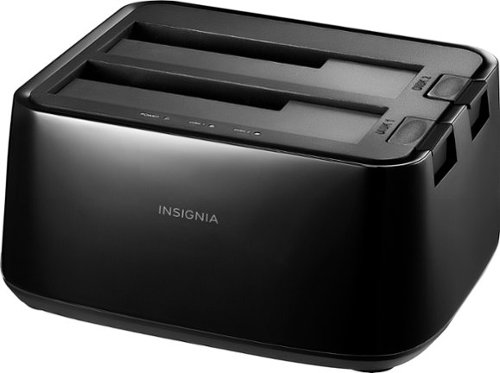
Connect and store external hard drives on your desktop with this Insignia hard drive enclosure docking station. Two slots accept SSD and HDD drives for simultaneous reading, and a USB 3.0 port allows for fast data transfer. An eject button lets you safely remove each drive when not needed, and this Insignia hard drive enclosure docking station features an LED indicator light to show the working status of each device.
Customer Rating

5
Great Idea
on April 10, 2020
Posted by: BobR
Verified Purchase:Yes
This thing saved me money and trouble in getting my data back up-to-date. Just plug in the old hard drive and hook it to the new computer. As long as it isn't totally crashed, you can get most if not all back. Saves having a computer store do it or losing your latest data.
Length of ownership: 22
Mobile Submission: false
I would recommend this to a friend!
Ease of Use

5
Quality
5
Value
5
Share this review:


0points
0of 0voted this as helpful.
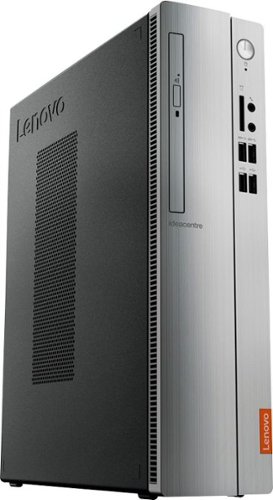
Upgrade your PC with this Lenovo IdeaCentre computer. Its 4GB of RAM and 1TB hard drive provide a powerful performance, and the AMD A9 processor with integrated Radeon graphics powers through your favorite apps, media and games. This Lenovo IdeaCentre computer has a slim form factor for high space efficiency.
Customer Rating

4
over-all great buy
on April 10, 2020
Posted by: BobR
Verified Purchase:Yes
I got my new computer up and working with a minimum of trouble except for the normal headache of getting my old files back where I want them. It does everything I want it for and handles it nicely. It even had an extra video port to stream from it to my TV, which was relatively simple to do as well.The only 2 things I didn't particularly like that kept me from giving it a 5 star, was first the windows 10. Not the computer's fault but window's 10 just does too many things in the background that I'd rather it didn't. Which brings me to the 2nd thing. It can handle 8 MB ram but comes with 4. I think I'll pay the extra money and buy the other 4. The background items constantly slow down the operation. But over-all still a good buy.
Length of ownership: 23
Mobile Submission: false
I would recommend this to a friend!
Quality
5
Value
5
Ease of Use

4
Share this review:


+1point
1of 1voted this as helpful.

H&R Block Deluxe + State Tax software offers everything homeowners and investors need to easily complete federal and state taxes. It includes free online chat with a tax professional, step-by-step guidance on more than 350 credits and deductions, in-person representation in the unlikely event of an audit, and reporting assistance on income from investments, home sales, retirement and more.
Customer Rating
4
Worked just fine
on April 6, 2019
Posted by: BobR
from Florence, KY
Verified Purchase:Yes
I had been using another brand for some time so it was a bit hard getting used to the way this works, but it worked fine and it saved me over the price of the other product.
Mobile Submission: False
I would recommend this to a friend!
Share this review:


0points
0of 0voted this as helpful.
BobR's Review Comments
BobR has not submitted comments on any reviews.
BobR's Questions
BobR has not submitted any questions.
Upgrade your PC with this Lenovo IdeaCentre computer. Its 4GB of RAM and 1TB hard drive provide a powerful performance, and the AMD A9 processor with integrated Radeon graphics powers through your favorite apps, media and games. This Lenovo IdeaCentre computer has a slim form factor for high space efficiency.
Upgrade your PC with this Lenovo IdeaCentre computer. Its 4GB of RAM and 1TB hard drive provide a powerful performance, and the AMD A9 processor with integrated Radeon graphics powers through your favorite apps, media and games. This Lenovo IdeaCentre computer has a slim form factor for high space efficiency.
Upgrade your PC with this Lenovo IdeaCentre computer. Its 4GB of RAM and 1TB hard drive provide a powerful performance, and the AMD A9 processor with integrated Radeon graphics powers through your favorite apps, media and games. This Lenovo IdeaCentre computer has a slim form factor for high space efficiency.
Upgrade your PC with this Lenovo IdeaCentre computer. Its 4GB of RAM and 1TB hard drive provide a powerful performance, and the AMD A9 processor with integrated Radeon graphics powers through your favorite apps, media and games. This Lenovo IdeaCentre computer has a slim form factor for high space efficiency.
Can I connect two monitors to this tower? One monitor is hdmi , The other monitor only connects by VGI or DGA. I am looking for dual image not mirror image.
Yes it can ad two monitors of any connection to this tower. I think you mean a VGA port though. And this computer has both so no adapters needed. Just connect the HDMI to the HDMI and the VGA to the VGA. Do this however with the computer OFF. That way when it reboots it recognizes both. Then right click on the desktop and a screen comes up and you select display settings (on windows 10 - others are similar) like in pic 1. It shows two videos 1 & 2 in the green box. There may also be two separate boxes with a number in each. Either way scroll down to Multiple Displays as in pic 2 and see the box listed as multiple displays. Choose "Duplicate these displays" as shown. That's all there is to it really. It sounds complicated, but you'll find it easy. There are other things you can look at in that box as well before closing. There is a button called Identify that will show which is which on each monitor. But it you're setting them as same, then they both just show a 1|2.


6 years, 3 months ago
by
BobR