
Share TexasJoe's profile


TexasJoe
TexasJoe's stats
- Review count35
- Helpfulness votes16
- First reviewAugust 11, 2019
- Last reviewApril 2, 2021
- Featured reviews0
- Average rating4.6
Reviews comments
- Review comment count0
- Helpfulness votes0
- First review commentNone
- Last review commentNone
- Featured review comments0
Questions
- Question count0
- Helpfulness votes0
- First questionNone
- Last questionNone
- Featured questions0
- Answer count13
- Helpfulness votes32
- First answerAugust 11, 2019
- Last answerMarch 12, 2021
- Featured answers0
- Best answers2
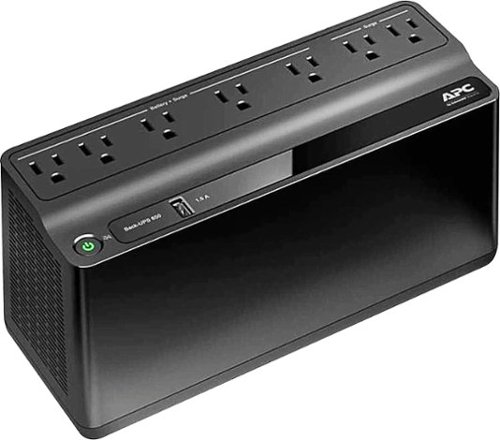
Protect computers and other delicate electronic equipment from power surges and data loss with this APC Back-UPS uninterrupted power supply. It provides surge protection as well as battery backup so that nothing is damaged or lost during a thunderstorm. This APC Back-UPS uninterrupted power supply also includes a USB port for charging phones and other devices.
Customer Rating

5
Great product!
on August 12, 2019
Posted by: TexasJoe
Verified Purchase:Yes
I bought one of these while on sale about 6 months ago to plug my cable modem, wife router, cable box, and DVD player into. We have occasional power outages that usually only last a minute or two, so I wanted to keep these devices from losing power for those short-duration outages. Works great!
I don't know exactly how long it provides power in my configuration because I rarely have power outages that last more than a few minutes, but we did have an outage that lasted almost 10 minutes and it worked great for that, too. That's actually better than I really expected.
I liked it so much that the next time it went on sale I bought two more to plug some other devices into that I'd prefer not to lose power during short outages. So far, no problems.
For this (or any UPS), the more you plug into it, the less time it will last when the power goes out. The idea should be to plug the things you want to maintain power for, not to treat it like a backup generator. This works perfectly for me.
Length of ownership: 149
Mobile Submission: false
I would recommend this to a friend!
Quality

5
Value
5
Ease of Use
5
Share this review:


0points
0of 0voted this as helpful.
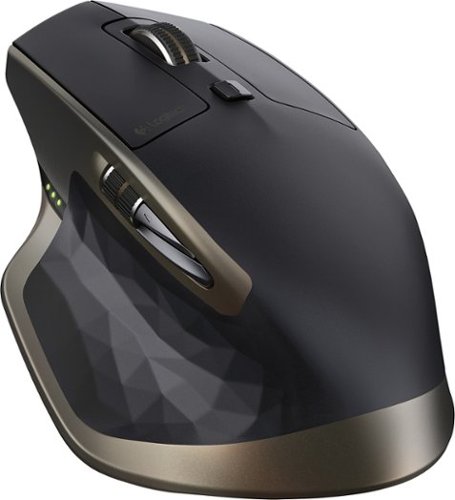
Easily navigate features on your compatible PC or Mac with this Logitech MX Master 910-004337 mouse, which features Bluetooth technology for wireless connectivity and Darkfield laser tracking for precise operation.
Customer Rating

4
Great mouse! Comfortable, versatile!
on August 12, 2019
Posted by: TexasJoe
Verified Purchase:Yes
The Logitech MX Master wireless laser mouse is excellent!
It has a very comfortable feel for a right-handed mouse user. It also feels solid, not cheap.
I love that this mouse is rechargeable. I try to remember to plug it in to charge every few weeks or so for a few hours and that usually keeps it working great. I know some prefer replaceable batteries, but I like that the MX Master generally lasts several weeks to a couple of months on a charge. I have had it die on me suddenly, but as soon as you plug it in it starts working again, so you can use it while it's charging. Then it's good for weeks again.
One of its standout features is that you can control up to 3 devices with the mouse. Unfortunately, the button you press to change which device you're connected to is on the bottom of the mouse, so you have to lift the mouse up to press the button.
I do share this mouse between two Windows computers and that works great, but I keep the mouse on my primary computer about 90% of the time, and once in a while I use it on the secondary computer. Since I do not change which computer the mouse is connected to often, this works fine for me and lets me have a little less clutter on my desk because I have one mouse instead of two.
If controlling multiple computers is a requirement and you'll be going back and forth between those computers frequently, I'd recommend the newer version of this mouse, the Logitech MX Master 2S, which has a Flow feature allowing you to move between computers seamlessly without physically pressing a button.
Length of ownership: 877
Mobile Submission: false
I would recommend this to a friend!
Ease of Use
5
Quality
5
Value
5
Share this review:


0points
0of 0voted this as helpful.
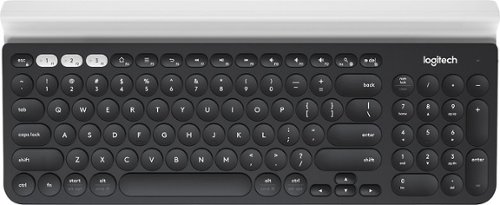
Type with this multi-device Logitech wireless keyboard. The built-in rubber cradle supports devices vertically, making small screens easily viewable, and 128-bit AES encryption keeps information private. Compatible with Windows, Mac, Chrome and Android devices, this Logitech wireless keyboard uses USB and Bluetooth technology to connect to your smartphone and tablet.
Customer Rating

3
Good keyboard, but missing features and keys
on August 11, 2019
Posted by: TexasJoe
Verified Purchase:Yes
This is a very good keyboard, but it falls short in several ways.
First, the good.
1. I like the feel, both overall and of the keys themselves much more than I thought I would. They have a good feel, and even though it's smaller than a full-size keyboard, MOST of the keys don't feel like they're squished together like on many miniature or laptop keyboards. I can comfortably touch-type with this keyboard using MOST of the keys.
2. It's wireless and can connect to up to 3 devices. I'm connected to 2 Windows machines, and that has been flawless.
3. The shelf or ledge that can hold phones or tablets is a nice touch. My phone feels secure perched in the nook, though I don't see myself parking it there very often.
4. There's an on/off switch that's easy to get to so one can reasonably expect that if you get in the habit of turning the keyboard off when not in use, the batteries should last longer.
Things I do not like:
1. I'd like the keyboard to have backlighting so the keys are illuminated. Yes, that uses battery power, but Logitech keyboards like the wireless K800 have had this feature for years. For those who don't need it or want to conserve battery power, backlighting could be configurable either through software or an on/off switch. That's a feature I want, though.
2. Keys! Kudos for having the inverted T arrow keys, though small and placed in an odd spot. But foul for not having dedicated PrintScr, Home, Pause, Ins, Del, Home, End, PgUp, PgDn.
While most of those keys are available somewhere on the keyboard, I'm missing the PrintScr key I use for screen captures. Also, no LED showing when CapsLock or NumLock are on. There are LEDs for keys showing if you're currently connected to device 1, 2, or 3, but they only light up for a couple of seconds when you press the keys. There's no way to know which device you're currently connected to just by looking.
And the default is that function keys are non-standard commands unless you hold the Fn key. That is, you have to press Fn+F1 to get F1, the opposite of how most keyboards work. Thankfully, you can change that behavior using Logitech Options software, but it's an odd default setting.
Overall, while a good keyboard, I'd have much preferred it to be truly full-size keyboard instead of the cross between a miniature and full-size that doesn't have all the advantages of either. A full-sized version with all the missing keys and with backlighting would be about perfect!
Length of ownership: 13
Mobile Submission: false
I would recommend this to a friend!
Ease of Use

4
Quality
5
Value
5
Share this review:


+1point
1of 1voted this as helpful.
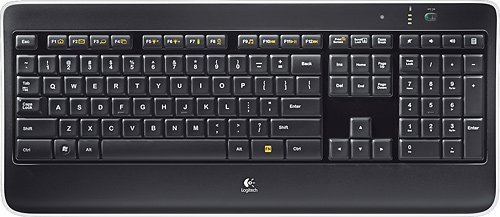
Customize your computer with this Logitech wireless keyboard. Laser-etched backlit keys let you work in virtually any lighting conditions, while the proximity sensors detect your hands to power on the backlights. The PerfectStroke system allows for whisper-quiet, responsive typing. Featuring a unifying receiver, this Logitech wireless keyboard lets you connect one or many mice with just one USB port.
Customer Rating
4
Great keyboard!
on August 11, 2019
Posted by: TexasJoe
Verified Purchase:Yes
I've tried many different keyboards over the years, but this is the one I keep coming back to. I currently have 3 of them, and for a single computer I think it's the best of the best.
It's full-sized and has all the keys you'd expect to find on a full-size keyboard. I think the only thing missing is an LED that lights up when the NumLock is on. Otherwise, very complete.
My oldest K800 is over 5 years old, never a problem, but the keys are starting to to feel worn. In particular, I can no longer feel the bumps on the J and F keys that aid in touch-typing, so I sometimes lose the home row now. My other two K800 keyboards are almost 3 years old and that problem has not developed on them yet.
The keyboard's backlighting illumination is very good, and that's one of the main features I like about this keyboard. The key press feel is pretty good (but not the best), and the keyboard is rechargeable so no need to replace batteries. I just plug in a charging cable every few weeks or so for a few hours to keep it working well.
I continue to check out new keyboards, but so far I still prefer the K800 over anything out there.
Still, despite being out for years, the only major feature missing is the ability to control multiple computers like some of the newer Logitech keyboards (keyboards that otherwise are generally not as good as this one). So if controlling multiple computers with a single keyboard is not a requirement for you, then I think this is the best keyboard out there.
Length of ownership: 877
Mobile Submission: false
I would recommend this to a friend!
Ease of Use
5
Quality
5
Value
5
Share this review:


0points
0of 0voted this as helpful.
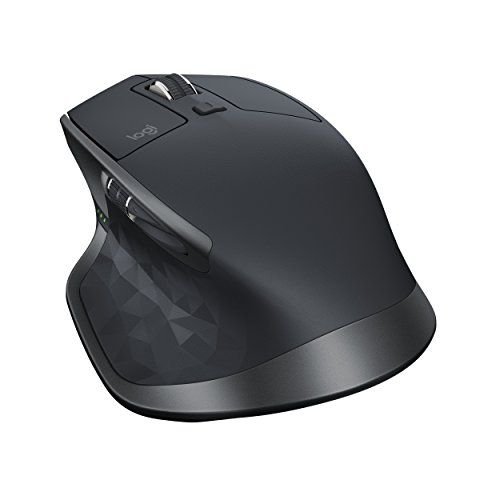
Ensure maximum comfort from this Logitech mouse. The precise ergonomic design ensures you stay comfortable throughout the day even if you're a power user, and the additional side button lets you create a custom setup. Smooth gliding is assured from this Logitech mouse thanks to the low-resistance base that slips over any surface.
Customer Rating
5
Great mouse! Great features and feels well made.
on August 11, 2019
Posted by: TexasJoe
Verified Purchase:Yes
I recently bought a Logitech MX Master 2S mouse from Best Buy because I have two computers that I want to share one mouse for. I've used an older Logitech MX Master mouse (not 2S) for a similar set up for years and it's worked well, so when I needed another one it was a no-brainer to me to get the latest version of the MX Master.
What I don't love:
- Like the older MX Master, the button to toggle through which computer the mouse is connected to is on the bottom of the mouse. That means you have to pick the mouse up to push the button. While not the end of the world, it is a little bit of a pain if you change frequently. But I want the convenience of having a single mouse for two computers without cluttering my desk with an additional mouse. Works great!
- Like the older MX Master, the button to toggle through which computer the mouse is connected to is on the bottom of the mouse. That means you have to pick the mouse up to push the button. While not the end of the world, it is a little bit of a pain if you change frequently. But I want the convenience of having a single mouse for two computers without cluttering my desk with an additional mouse. Works great!
And now, the MX Master 2S is even better because its Flow feature lets you change computers by just moving your mouse pointer off to the far left or right of the screen. You don't have to press any buttons, and it works great! That eliminates the one negative with this mouse.
What I love:
- MX Master 2S looks and feels like the MX Master. That's a good thing, because the original MX Master is a great mouse. It feels solid, not cheap, and I cannot tell by look or feel any difference between the MX Master and the MX Master 2S, but there are changes "under the hood." I've read that the wireless pairing is improved, but it's been so long since I paired my original MX Master that I don't remember how it went. No problems pairing the 2S though -- very fast, very easy!
- Rechargeable. This is one of the things I love about the MX Master, and so far I love it just as much with the 2S. I know some prefer replaceable batteries, but I like that the MX Master generally lasts several weeks to a couple of months on a charge. I have had it die on me suddenly, but as soon as you plug it in it starts working again, so you can use it while it's charging. Then it's good for weeks again. I've only charged the new 2S once so far, and that was several days ago, so I don't know how long the charge will last yet. The orginal MX Master lasts anywhere from 3 weeks to 2 months for me, and I'll be very pleased if the 2S lasts as long. I've read that the 2S lasts even longer.
- Rechargeable. This is one of the things I love about the MX Master, and so far I love it just as much with the 2S. I know some prefer replaceable batteries, but I like that the MX Master generally lasts several weeks to a couple of months on a charge. I have had it die on me suddenly, but as soon as you plug it in it starts working again, so you can use it while it's charging. Then it's good for weeks again. I've only charged the new 2S once so far, and that was several days ago, so I don't know how long the charge will last yet. The orginal MX Master lasts anywhere from 3 weeks to 2 months for me, and I'll be very pleased if the 2S lasts as long. I've read that the 2S lasts even longer.
- Price. The 2S is pricey at $99.99, and I was debating whether I should get it or not. Then it went on sale and I got it for $69.99. I feel the quality and features make it worth that price.
- The Flow feature that I discuss above. It really does "flow." It does not feel jagged and no hiccups. So far, works great every time.
Overall, I love that Logitech took a great product and made it even better.
Length of ownership: 3
Mobile Submission: false
I would recommend this to a friend!
Ease of Use
5
Quality
5
Value
5
Share this review:


0points
0of 0voted this as helpful.
TexasJoe's Review Comments
TexasJoe has not submitted comments on any reviews.
TexasJoe's Questions
TexasJoe has not submitted any questions.
Type with this multi-device Logitech wireless keyboard. The built-in rubber cradle supports devices vertically, making small screens easily viewable, and 128-bit AES encryption keeps information private. Compatible with Windows, Mac, Chrome and Android devices, this Logitech wireless keyboard uses USB and Bluetooth technology to connect to your smartphone and tablet.
Is there a Logitec Mouse that would be able to utilize the same USB receiver as the keyboard. Therefore having only one USB devise plugged into computer for both the keyboard and mouse?
Type with this multi-device Logitech wireless keyboard. The built-in rubber cradle supports devices vertically, making small screens easily viewable, and 128-bit AES encryption keeps information private. Compatible with Windows, Mac, Chrome and Android devices, this Logitech wireless keyboard uses USB and Bluetooth technology to connect to your smartphone and tablet.
Ensure maximum comfort from this Logitech mouse. The precise ergonomic design ensures you stay comfortable throughout the day even if you're a power user, and the additional side button lets you create a custom setup. Smooth gliding is assured from this Logitech mouse thanks to the low-resistance base that slips over any surface.
What is the different between this one and the MX Master? Other than price/color choice of course.
The only difference I see is that the 2S has Flow, which allows you to switch which computer the mouse is connected to just by moving the mouse pointer to the edge of the screen. With the original MX Master you could still control more than one computer, but you had to pick up the mouse and press a button to change which computer was controlled by the mouse.
6 years, 10 months ago
by
TexasJoe