
Share TexasJoe's profile


TexasJoe
TexasJoe's stats
- Review count35
- Helpfulness votes16
- First reviewAugust 11, 2019
- Last reviewApril 2, 2021
- Featured reviews0
- Average rating4.6
Reviews comments
- Review comment count0
- Helpfulness votes0
- First review commentNone
- Last review commentNone
- Featured review comments0
Questions
- Question count0
- Helpfulness votes0
- First questionNone
- Last questionNone
- Featured questions0
- Answer count13
- Helpfulness votes32
- First answerAugust 11, 2019
- Last answerMarch 12, 2021
- Featured answers0
- Best answers2
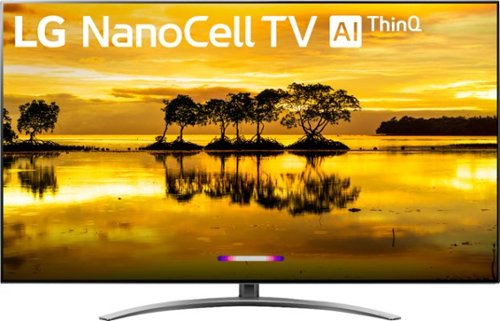
Create a cinematic experience with this LG Nano 9 65-inch 4K HDR smart TV. Dolby Vision and Dolby Atmos support provides immersive picture and audio quality, and Nano Cell technology ensures color accuracy for lifelike image reproduction. The ThinQ AI system of this LG Nano 9 65-inch 4K HDR smart TV enables voice control via Google Assistant or Amazon Alexa.
Customer Rating

5
Great TV!
on November 21, 2019
Posted by: TexasJoe
Verified Purchase:Yes
We bought the 65-inch LG NanoCell 9 TV four days ago from Best Buy, and so far we really love it.
This was an upgrade to a 55-inch TV we'd had about 5 years, and the size, rich colors, and magic remote are all very obvious enhancements over our old TV.
Overall, the unboxing and set up were very straight forward. The one very frustrating thing was that the TV did not fully recognize our cable provider or its cable box (we use Spectrum, previously Time Warner), so we couldn't use the included magic remote for all funcitons. Most noticably, while we could make use of some cable box funcitons like changing channels, we could not bring up the cable channel guide. We spent a long time trying different cabe provider options trying to get it to work, but we could not solve the cable guide program.
Then a software update ran on the TV and the next day our provider was a choice and we could bring up the cable guide! Great!
The cable guide isn't perfect when using the magic remote. One annoyance is that it always starts with channel 2 instead of the TV's current channel, but at least I have hope that future software updates might fix that.
We're still learning some of the TV features, but overall we're very happy with the quality of the TV and the remote. We don't have a sound bar, and I thought that might be our next purchase, but so far I'm pretty satisfied with the TV's built-in sound system.
So we're very happy with it, and if I were to do it again, I'd buy the same TV.
Length of ownership: 3
Mobile Submission: false
I would recommend this to a friend!
Quality

5
Value
5
Ease of Use
5
Share this review:


+2points
2of 2voted this as helpful.
![Iron Man 3 [Includes Digital Copy] [DVD] [2013]](https://pisces.bbystatic.com/prescaled/500/500/image2/BestBuy_US/images/products/1671b4b0-ce46-4603-974e-dc48da62f8ad.jpg)
Customer Rating

4
Still great, but the franchise is showing its age
on September 9, 2019
Posted by: TexasJoe
Verified Purchase:Yes
Robert Downey Jr. does fantastic as Tony Stark / Iron Man, but the characters and story line aren't as fresh as they were in earlier renditions of Iron Man and, of course, Avengers. Still, especially if you can pick it up on sale, this is a great movie for your Marvel collection.
Length of ownership: 13
Mobile Submission: false
I would recommend this to a friend!
Share this review:


0points
0of 0voted this as helpful.

Customer Rating
5
Robert Downey Jr. does it again! Great movie!
on September 9, 2019
Posted by: TexasJoe
Verified Purchase:Yes
Another great chapter in the Iron Man franchise. Robert Downey Jr. is a natural in the role of Tony Stark / Iron Man. He makes the movie fun even if you don't normally like superhero flicks.
Length of ownership: 13
Mobile Submission: false
I would recommend this to a friend!
Share this review:


0points
0of 0voted this as helpful.
![Iron Man [DVD] [2008]](https://pisces.bbystatic.com/prescaled/500/500/image2/BestBuy_US/images/products/968d8bfa-c461-4a18-9246-3327bfa74711.jpg)
Customer Rating
5
Great movie!
on September 9, 2019
Posted by: TexasJoe
Verified Purchase:Yes
This 2008 movie still holds up! Without this first Iron Man movie there'd be no Avengers. Robert Downey Jr. demonstrated he's perfect for the suave, serious, and maybe slightly crazy character of Tony Stark.
Length of ownership: 13
Mobile Submission: false
I would recommend this to a friend!
Share this review:


0points
0of 0voted this as helpful.

Head from hardwood to carpet for quick-and-easy full-house cleanups with this Dyson V7 Motorhead vacuum in hand. The direct-drive cleaner head dives deep into your rugs, getting up dirt from even hard-to-reach spaces. Disconnect the handle of this Dyson V7 Motorhead vacuum, and you've got a cordless handheld vac for simple sweep-ups of spills.
Customer Rating
5
Very good vacuum!
on August 22, 2019
Posted by: TexasJoe
Verified Purchase:Yes
I bought this 2 years ago on sale. I never thought I'd pay as much as I did for a vacuum cleaner, but I'm glad I did.
Over the years I've bought many cheap vacuum cleaners that worked like, well, cheap vacuum cleaners.
This time around I bought two expensive vacuum cleaners (an iRobot Roomba and this Dyson), and I think they complement each other perfectly.
The Roomba pretty much automatically keeps the house mostly pet hair free takes care of most day-to-day debris, but it does not alleviate the need for occasional REAL vacuuming.
That's where the Dyson comes in. The Dyson's battery only lasts about 15 minutes at a time, but that's plenty for small touch-ups or in-depth vacuuming of a room or two. I also pull it out to do the stairs, which the Roomba has no knack for.
I thought the 15-minute battery would be a major problem at first, but I think I've only actually run it down to nothing maybe 3 times in the 2 years I've had it. You just know you can't dilly dally, so reasonably fast to get the most out of the charge. As an additional bonus, I find being so cognizant of time and battery really does get me to finish vacuuming faster, which gives me more time for other things.
And unlike some of the cheap vacuums I've owned, the Dyson does not force me to keep re-doing dirty areas trying to pick up the mess of the day. Instead, it's powerful suction cleans things up quickly.
Anything bad: well, as I said, the battery time is fairly short, so that can be a problem if you're set on vacuuming the whole house in one pass. But if you get used to doing a room or two at a time, it works great.
Being cordless is great! No running over the stupid cord or messing with the auto-rolling cords and any of that nonsense. But the battery does make the vacuum a little heavy. Doing one or two rooms at a time works out there too! If the battery lasted much longer I'd probably wind up with a sore arm from trying to work the vacuum longer.
Otherwise, no problems and no complaints. I should have gotten one of these sooner!
Length of ownership: 786
Mobile Submission: false
I would recommend this to a friend!
Quality
5
Value
5
Ease of Use
5
Share this review:


0points
0of 0voted this as helpful.
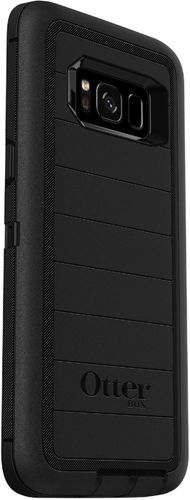
Safeguard your Samsung Galaxy S8 with this OtterBox Defender Pro case. The rugged shell's multiple layers offer maximum protection from wear and tear, and the belt clip enables secure attachment while also serving as a viewing stand. This OtterBox Defender Pro case has port covers to keep dust at bay.
Customer Rating

3
Great case, awkward holster
on August 18, 2019
Posted by: TexasJoe
Verified Purchase:Yes
When I needed a new case for my Samsung Galaxy S8, the OtterBox seemed like a great choice. I've used many OtterBox phone and tablet cases over the years, and I've never been disappointed.
When I first got this phone a couple of years ago, there were no OtterBox cases in stock for it, so I went with another brand. But fastforward 2 years and I need a new case, and the OtterBox was available.
The case itself is very high quality and I'm certain it'll protect the phone well, but I won't be using it because the holster is flawed and I really need a good holster. With this holster, the phone often doesn't snap in securely, and the phone has fallen to the floor three times already because I didn't realize it wasn't locked into the holster. Thankfully, the case protected the phone for those drops, but I won't keep chancing it. I stopped using it after about 2 weeks.
In a perfect world I would keep the OtterBox case and use a different holster, but that doesn't work (at least with the holsters I've tried), so instead I'll settle for a less protective case that has a better holster.
If you don't need the holster, this is a great case! If you're like me and you need a good holster, this product is lacking and I can't recommend it.
Length of ownership: 62
Mobile Submission: false
No, I would not recommend this to a friend.
Quality

3
Value

2
Ease of Use
3
Share this review:


0points
0of 0voted this as helpful.

Slip on this comfortable Sony wearable Walkman, and head off on adventures by land or by sea. This durable MP3 player resists saltwater and freshwater up to 2 meters, letting you run your laps without missing a beat or a note. With 4GB of storage available, this Sony wearable Walkman is ready for your favorite tunes.
Customer Rating
4
Great MP3 Player!
on August 18, 2019
Posted by: TexasJoe
Verified Purchase:Yes
I've been using the Sony Walkman NW-WS413 for about 2 months, and so far I'm pretty happy with it.
I use it when I'm running, both outside and on a treadmill. When I run long I sweat a lot, and some supposedly waterproof headphones don't last long in those conditions. So far, this Sony MP3 player has been great.
The one problem I had a few weeks ago was the volume buttons seemed to stick. When I pressed louder the volume would keep increasing to max, and ditto for the pressing lower volume would decrease to no sound. Turning the player off and on didn't help. Thankfully, turning it off and charging it fixed it. It hasn't happened again, so for now I'm considering it a fluke.
Overall, the problem I have with both this and any similar headphones or MP3 players is that the controls are out of sight so it can be hard to know which buttons you're pressing or for the rockers (volume) which side to press. I've seen a version of this MP3 player available in Japan that has a ring with buttons that acts as a remote control, but I haven't seen that available in the U.S. I'd find that useful and wish it were available here.
So far so good, though, so I'm pretty happy with this MP3 player.
Length of ownership: 86
Mobile Submission: false
I would recommend this to a friend!
Ease of Use
3
Quality
5
Value
5
Share this review:


0points
0of 0voted this as helpful.

Take precise, intuitive control of digital projects with this wireless Logitech Craft advanced keyboard. Its creative input dial lets you make accurate object size adjustments, zoom images quickly and perform other shortcut functions with design tools in multimedia and office applications. The backlit keys of this Logitech Craft advanced keyboard automatically adjust their brightness to your environment.
Customer Rating
5
Best keyboard yet!
on August 17, 2019
Posted by: TexasJoe
Verified Purchase:Yes
I love the Logitech Craft Keyboard!
I'm kind of a keyboard snob. I've tried a lot of different keyboards over the years, but most fall way short of being perfect. Sometimes it's the key press feel, sometimes it's the key layout, sometimes it's the lack of important keys, but they all lack something. Until now.
Prior to the Craft, my favorite keyboards were the Logitech K800 and the Logitech K780. The K800 was the best for its time... its strengths were that it is full size, has all the important keys, has backlit keys, and is rechargeable. What it doesn't have is support for connecting to multiple devices.
Enter the K780. It has a nice feel, connects to up 3 devices and effortlessly switches between them either by pressing a button or by automatically staying with a Flow mouse like the Logitech MX Master 2S. Very good! But the K780 is a miniature keyboard missing some keys and having others in awkward non-standard places. Also, no backlit keys and uses batteries instead of being rechargeable. Lastly, it uses the F1, F2, and F3 keys to set which device it's connected to. Overall, the K780 is very nice, but I was hoping it would be a multi-device version of the K800, and from this standpoint the K780 falls short.
But the Craft actually does it! It's a full-size keyboard, adds extra keys to set which device it connects to, has backlit keys, is rechargeable, and the key presses have a good feel to them. I haven't even used the dial (they call it a crown) for anything yet.
Right now I think the ONLY two things I don't like about the Craft are:
A) No numlock LED. To be fair, neither the K800 nor the K780 have numlock keys.
B) The price. I would have never tried this keyboard at the normal price. At $30 off on sale, it was still very pricey, but I thought I'd give it a shot and return it if it didn't meet my expectations. I'm keeping it! And I may even buy another one (I have a lot of computers).
One last thing. I didn't find anyplace where instructions were given on how to enable Flow for the keyboard so that the keyboard would automatically stay with a Flow mouse as it changes which device it's controlling. Playing around with the Logitech Options software I figured it out, and it really was simple, but it didn't seem simple when I didn't know what I was looking for. It's under the mouse Flow options, not under keyboard options.
Overall, this is the best keyboard I've ever had. If I figure out a use for the dial it'll be even better.
Length of ownership: 4
Mobile Submission: false
I would recommend this to a friend!
Ease of Use
5
Quality
5
Value
5
Share this review:


0points
0of 0voted this as helpful.
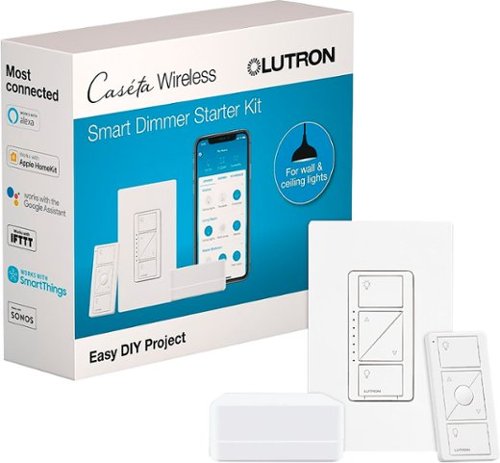
Come home to a well-lit house by installing this Lutron Caseta wireless light switch kit. Its Smart Bridge receiver installs easily to connect with most smart home voice assistants, and the dimmer switch controls up to 17 bulbs per circuit. This Lutron Caseta wireless light switch kit can be controlled with the included Pico remote or a free app.
Customer Rating
5
Fantastic smart switch! Works with Alexa!
on August 12, 2019
Posted by: TexasJoe
Verified Purchase:Yes
Over the last couple of years I've been replacing many of our house light bulbs with Philips Hue smart light bulbs, and I've been mostly happy with them despite the high cost. Some rooms in my house have lights that are not compatible with smart bulbs, though, and I've struggled with what to do with those rooms.
My den is one of those rooms that I really wanted to be able to control by voice or remote control, but the room has a ceiling fan with small light bulb that doesn't have a smart version. So when I came across someone's post on the Internet about this Lutron Caseta wireless smart dimmer switch I was intrigued.
Even once I talked myself into buying this kit (I got it on sale), I didn't install it immediately because I was nervous about trying to install a light switch. I watched a couple of youtube videos to help build my confidence, and it really didn't look very hard, so I decided to give it a shot.
I was very careful, and I probably took a lot longer than I needed to because I wanted to make sure everything was right, but it has worked flawlessly!
I don't really use the remote control (I did make sure it works), but using this switch I can control my den's light through Alexa, exactly as I want. I installed it about 7 months ago and it's been perfect! No problems whatsoever. At some point, probably when I notice just the switch on sale (since I won't need another hub), I'll probably do the same for another room in the house that also has a fan with light that isn't compatible with smart bulbs. So yes, I'd buy again!
Length of ownership: 232
Mobile Submission: false
I would recommend this to a friend!
Quality
5
Value
5
Ease of Use
3
Share this review:


0points
0of 0voted this as helpful.
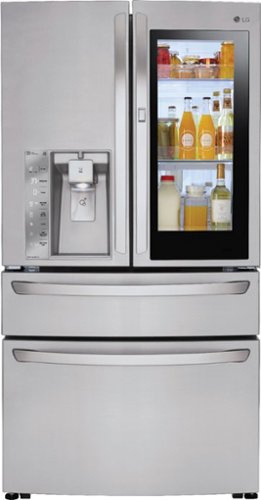
Enjoy the high-tech features of this spacious 29.7 cu. ft. LG InstaView four-door refrigerator. Knocking on its glass panel automatically illuminates the interior, and the extra-slim ice maker provides more space for shelving and door bins. The Smart Cooling tech of this LG InstaView four-door refrigerator keeps food fresh longer than standard fridges.
Customer Rating
5
Excellent Refrigerator!
on August 12, 2019
Posted by: TexasJoe
Verified Purchase:Yes
We bought this about a year ago as we moved into a new house, and we love it.
Before buying this, it hadn't bought a refrigerator in about 10 years, so we had not kept up with all the fancy options available, but we did have some simple requirements in mind.
First, our previous fridge had french doors with the freezer on one side and the refrigerator on the other side. That seemed great at first, but we came to find out both the freezer and fridge were just too narrow for a lot of uses. For example, a big turkey would barely fit in the freezer, and after being cooked it could not fit in the fridge on a big platter. And, most importantly, the fridge was too narrow to fit a pizza box. I knew our next fridge would have to be wide enough for left over pizza boxes!
Which brings us to the LG 4-door French InstaView. We love the big freezer! It's wide enough and deep enough that it holds anything we've thrown at it. On the fridge side, the door-within-a-door seemed unnecessary at first, but it turns out that we really do only use that smaller door most of the time. But when we do have bigger items, like a pizza box, both doors open easily and the fridge is plenty wide to hold those bigger items.
What about the instaview? We rarely use it, but we didn't expect to use it a lot. We liked it for the novelty and because our granddaughter gets a kick out it! Otherwise, not very important for us, but it does have a cool factor.
Length of ownership: 423
Mobile Submission: false
I would recommend this to a friend!
Quality
5
Value
5
Ease of Use
5
Share this review:


0points
0of 0voted this as helpful.
TexasJoe's Review Comments
TexasJoe has not submitted comments on any reviews.
TexasJoe's Questions
TexasJoe has not submitted any questions.

Enhance the performance of your desktop computer with this Intel Core i5-10400 six-core processor. The 2.9GHz base speed provides fast clocking, while the 12MB cache queues instructions quickly, increasing overall task execution. This Intel Core i5-10400 six-core processor features Intel Thermal Velocity Boost technology, which helps keep components at ideal operating temperatures.
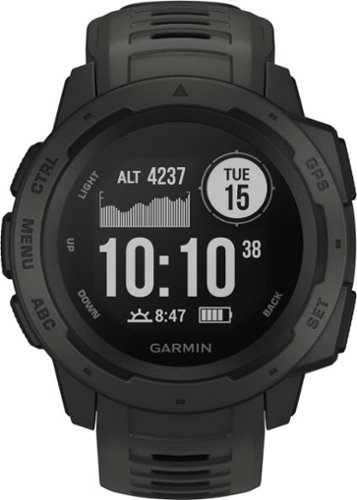
Track your heart rate and exercise with this Garmin GPS watch. It has activity profiles installed to help you plan workouts, and it's water-resistant up to 100m for swimming. This Garmin GPS watch has a battery life of 14 days in smart watch mode so you can wait longer between charges.
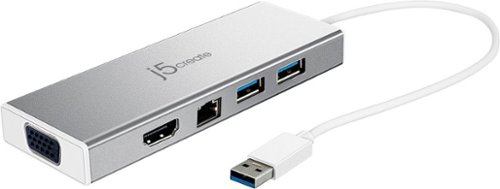
This dual-monitor USB 3.0 mini docking station features two USB 3.0 Type-A ports for connecting extra peripherals, an HDMI & VGA output port, providing up to 2048 x 1152 resolutions, as well as an integrated RJ45 Ether port for a reliable wired network connection.
How do you connect dual monitors to this docking station?
For me it was easy. My laptop has one HDMI port, so one monitor plugs into that. Then I plugged this mini dock into my laptop USB 3.0 port, and plugged my second monitor into the mini port HDMI port. No set up or configuration was needed. It just worked. No sluggishness, no slow-down, no disadvantages that I've noticed so far. Perfect for adding a second monitor!
6 years, 6 months ago
by
TexasJoe
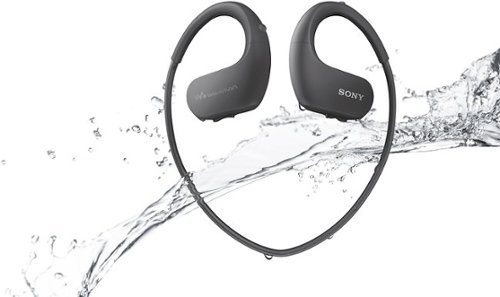
Take to the water or the trails without worry of wear with this Walkman wearable MP3 player. Because it's waterproof to 2 meters, this compact player is perfect for swimmers and even resists saltwater. This Walkman wearable MP3 player is sealed to keep out the dust of the hike and boasts 12 hours of battery life for extreme sporting.
could it be return and get your money back if it was not what you were looking for?
Take to the water or the trails without worry of wear with this Walkman wearable MP3 player. Because it's waterproof to 2 meters, this compact player is perfect for swimmers and even resists saltwater. This Walkman wearable MP3 player is sealed to keep out the dust of the hike and boasts 12 hours of battery life for extreme sporting.
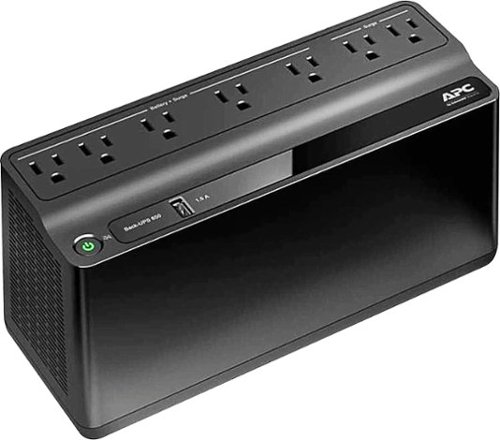
Protect computers and other delicate electronic equipment from power surges and data loss with this APC Back-UPS uninterrupted power supply. It provides surge protection as well as battery backup so that nothing is damaged or lost during a thunderstorm. This APC Back-UPS uninterrupted power supply also includes a USB port for charging phones and other devices.
Protect computers and other delicate electronic equipment from power surges and data loss with this APC Back-UPS uninterrupted power supply. It provides surge protection as well as battery backup so that nothing is damaged or lost during a thunderstorm. This APC Back-UPS uninterrupted power supply also includes a USB port for charging phones and other devices.
Protect computers and other delicate electronic equipment from power surges and data loss with this APC Back-UPS uninterrupted power supply. It provides surge protection as well as battery backup so that nothing is damaged or lost during a thunderstorm. This APC Back-UPS uninterrupted power supply also includes a USB port for charging phones and other devices.
Run time is 2 mins? what is the point?
Run time depends on what you have plugged into it. I have a few small devices that don't use a whole lot of electricity plugged in and it definitely lasts more than 2 minutes.
However, for me, 2 minutes was exactly what I was hoping for because we have frequent power outages that last a minute or two. I just didn't want to have to reset my DVD clock or have the cable modem and wifi router spend 5 minutes rebooting every time we have a one-minute outage. Works great, and I've had outages over 5 minutes and the UPS covered that no problem. That's better than I expected, so I bought two more (on sale) to cover other devices that I don't want to lose power abruptly during a short outage.
However, for me, 2 minutes was exactly what I was hoping for because we have frequent power outages that last a minute or two. I just didn't want to have to reset my DVD clock or have the cable modem and wifi router spend 5 minutes rebooting every time we have a one-minute outage. Works great, and I've had outages over 5 minutes and the UPS covered that no problem. That's better than I expected, so I bought two more (on sale) to cover other devices that I don't want to lose power abruptly during a short outage.
6 years, 10 months ago
by
TexasJoe
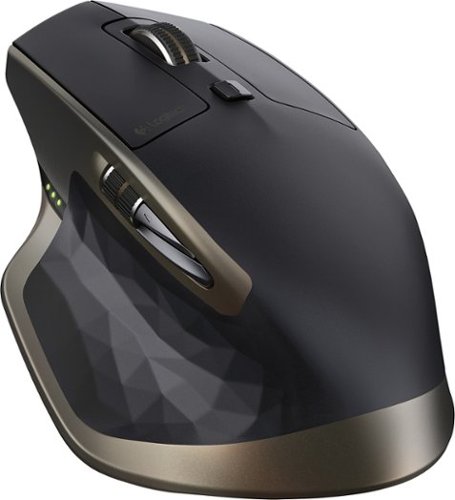
Easily navigate features on your compatible PC or Mac with this Logitech MX Master 910-004337 mouse, which features Bluetooth technology for wireless connectivity and Darkfield laser tracking for precise operation.
Can the mouse be used with a Logitech Unifying Receiver?
Can the mouse be used with a Logitech Unifying Receiver? Or is Bluetooth the only way to connect the mouse aside from the USB cable? Also, can the battery be replaced?
Yes, it works with the Logitech USB Unifying Receiver. I have USB Unifying Receivers on two computers and the mouse connects to both of them without any problems. I love Logitech's Unifying Receiver technology.
The battery is built in and I see no way to replace it. However, I've had two of these mice, and the oldest one is several years old. I've never had a problem with the battery.
The battery is built in and I see no way to replace it. However, I've had two of these mice, and the oldest one is several years old. I've never had a problem with the battery.
6 years, 10 months ago
by
TexasJoe
Easily navigate features on your compatible PC or Mac with this Logitech MX Master 910-004337 mouse, which features Bluetooth technology for wireless connectivity and Darkfield laser tracking for precise operation.