
Share LovetoTravel2019's profile


LovetoTravel2019
LovetoTravel2019's stats
- Review count3
- Helpfulness votes2
- First reviewJune 1, 2019
- Last reviewJune 1, 2019
- Featured reviews0
- Average rating4
Reviews comments
- Review comment count0
- Helpfulness votes0
- First review commentNone
- Last review commentNone
- Featured review comments0
Questions
- Question count0
- Helpfulness votes0
- First questionNone
- Last questionNone
- Featured questions0
- Answer count1
- Helpfulness votes7
- First answerJune 1, 2019
- Last answerJune 1, 2019
- Featured answers0
- Best answers0
LovetoTravel2019's Reviews
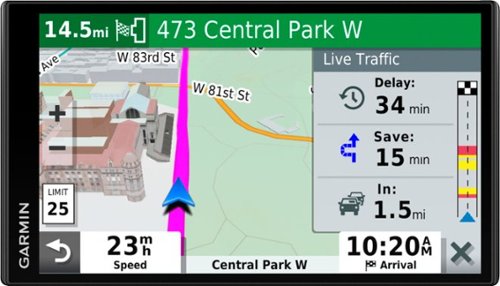
Stay on course with this Garmin DriveSmart 65 & Traffic GPS navigator. The bright 6.95-inch display points you in the right direction with detailed, up-to-date maps, while Garmin Traffic helps avoid congestion. Featuring built-in Wi-Fi connectivity, this Garmin DriveSmart 65 & Traffic GPS navigator receives automatic map and software updates without connecting to a computer.
Customer Rating

5
Garmin - DriveSmart 65 & Traffic - 6.95" GPS with
on June 1, 2019
Posted by: LovetoTravel2019
from Westfield,MA
Verified Purchase:Yes
This is a replacement for a 12 yr old Magellan GPS. Absolutely love it!!!! We were able to find our way all over Cape Cod using this GPS. For someone that is not familiar with all the little side road trips that are not known to the regular tourist this showed us beaches that were previously unknown to us.
Mobile Submission: False
I would recommend this to a friend!
Share this review:


+1point
1of 1voted this as helpful.
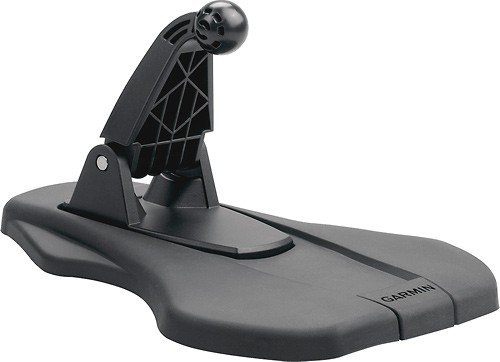
Position your GPS receiver for easy viewing in your vehicle with this friction mount.
Customer Rating

4
Garmin - Portable Auto Friction Mount
on June 1, 2019
Posted by: LovetoTravel2019
from Westfield,MA
Verified Purchase:Yes
This does a good job of holding the GPS on the dashboard of our car. However, you do have to make sure the dashboard is clean before you place this on top. We also use the piece of plastic film that came with it on the base when it is not in use. this helps keep the mount clean. Just hope we never lose this film....
Mobile Submission: False
I would recommend this to a friend!
Share this review:


+1point
1of 1voted this as helpful.
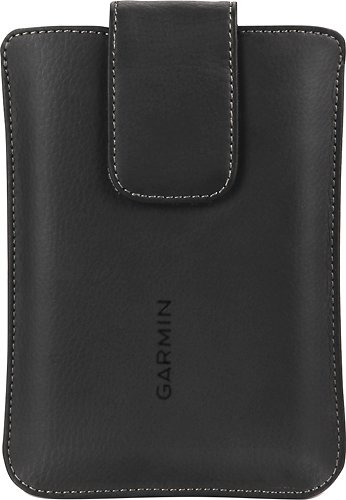
Keep your 5" or 6" Garmin n~vi safe with this Garmin 010-12101-00 carrying case that features a soft fabric interior to shield your device from damage. The magnet helps ensure secure closure.
Customer Rating

3
Garmin Carrying Case
on June 1, 2019
Posted by: LovetoTravel2019
from Westfield,MA
Verified Purchase:Yes
Wish this case were a little bit wider and deeper. it is very hard to pull out the gps. Otherwise i feel it does a good job of protecting the GPS.
Mobile Submission: False
I would recommend this to a friend!
Share this review:


0points
0of 0voted this as helpful.
LovetoTravel2019's Review Comments
LovetoTravel2019 has not submitted comments on any reviews.
LovetoTravel2019's Questions
LovetoTravel2019 has not submitted any questions.
LovetoTravel2019's Answers
Stay on course with this Garmin DriveSmart 65 & Traffic GPS navigator. The bright 6.95-inch display points you in the right direction with detailed, up-to-date maps, while Garmin Traffic helps avoid congestion. Featuring built-in Wi-Fi connectivity, this Garmin DriveSmart 65 & Traffic GPS navigator receives automatic map and software updates without connecting to a computer.
I was told that this is a voice Command activated device but I’m having problems activating device by my voice. What am I doing wrong?
Device will not work if there are loud background noises. Tune down radio, close windows, and speak clearly. to activate voice command -- original setup was -- OK Garmin, (which is what we left it at). This will bring up a list of commands that you can use to find a place, give directions , go home etc.
Just discovered this wkend (i have only had this less than a month, so am still discovering new features), that i can get directions to a place by selecting -- find a place,--- by speaking very clearly, the entire address of the location. it worked perfectly -- no need to key in all the info required. Also download and read the instruction manual. We did have an issue of having the GPS send us around in circles and not to exact location. i corrected the problem by shutting the system down, unplugging it. wait a few seconds and plug back in, turn on device and voice activate the location again.
Just love my Garmin. This screen is so much bigger than our 12 yr old Magellan, easier to see the area around your main route, and the voice is much more clearer. Glad we broke down and purchased this model.
Just discovered this wkend (i have only had this less than a month, so am still discovering new features), that i can get directions to a place by selecting -- find a place,--- by speaking very clearly, the entire address of the location. it worked perfectly -- no need to key in all the info required. Also download and read the instruction manual. We did have an issue of having the GPS send us around in circles and not to exact location. i corrected the problem by shutting the system down, unplugging it. wait a few seconds and plug back in, turn on device and voice activate the location again.
Just love my Garmin. This screen is so much bigger than our 12 yr old Magellan, easier to see the area around your main route, and the voice is much more clearer. Glad we broke down and purchased this model.
7 years ago
by
LovetoTravel2019