
Share Timm's profile


Timm
Timm's stats
- Review count6
- Helpfulness votes3
- First reviewFebruary 12, 2021
- Last reviewOctober 2, 2022
- Featured reviews0
- Average rating3.8
Reviews comments
- Review comment count0
- Helpfulness votes0
- First review commentNone
- Last review commentNone
- Featured review comments0
Questions
- Question count0
- Helpfulness votes0
- First questionNone
- Last questionNone
- Featured questions0
Answers
- Answer count0
- Helpfulness votes0
- First answerNone
- Last answerNone
- Featured answers0
- Best answers0
Timm's Reviews
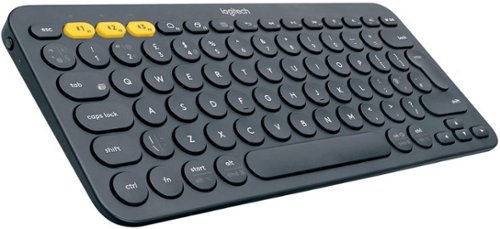
The Logitech K380 Multi-Device Wireless keyboard makes any space minimalist, modern, and multi-device, letting you type on your smartphone, tablet, and more. Connect with up to three Bluetooth-enabled devices simultaneously and switch instantly between them. The K380 Multi-Device is compact and lightweight. You can type on the device of your choice~anywhere. It automatically detects your device, maps keys, and provides a familiar typing experience with all your favorite shortcuts. So you can own your space on any device, anywhere.
Customer Rating

5
Compact, portable, but also for power user
on October 2, 2022
Posted by: Timm
Verified Purchase:Yes
This is a great compact, portable, bluetooth keyboard. It has nice weight to it, and the key travel is perfect (for me). I hate apple macbook's scissor keys and this feels completely opposite of it and much better. It feels closer to the logitech thinkpad keyboard's, which are, IMO, the best laptop keyboard's available. There is a 10-key option if you need that.
Length of ownership: 45
Mobile Submission: False
I would recommend this to a friend!
Ease of Use

5
Quality
5
Value
5
Share this review:


0points
0of 0voted this as helpful.
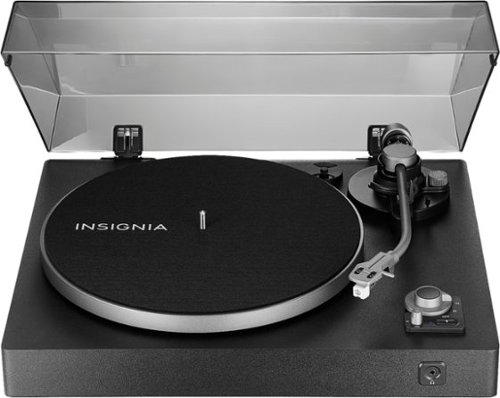
Vinyl audio has authenticity that digital can~t compete with, but you can~t argue with the convenience of modern wireless speakers either. With the Insignia Bluetooth Stereo Turntable, you can enjoy old school music using the latest technology. The turntable~s manual belt-drive design plays your 33-1/3 and 45 rpm 12-inch records. Its adjustable counterweight and magnet cartridge provide reliable tracking and a rich sound that help you lose yourself in the music. Connect a Bluetooth speaker wirelessly to make your music portable, or plug in your tried-and-true wired speakers with one simple connection. After your record is done playing, the turntable will turn off automatically and the detachable cover shields your turntable when it~s not in use. Music holds a lot of memories, and it can also create new ones. Make them count with this Insignia Bluetooth turntable.
Customer Rating
5
Probably the best budget option with bluetooth
on October 2, 2022
Posted by: Timm
Verified Purchase:Yes
The best budget turntable that also has bluetooth. I didn't care for hi-fi/audiophile quality, but I wanted a turntable that wouldn't ruin my records. For this price point it is amazing you get an adjustable tonearm and plate speed sensor for accurate rotation speeds. The cartridge and stylus are top of the line in the budget category. The only downside is that you cannot adjust the cartridge angle and it is slightly off so there may be excessive pressure on the inner or outer grooves, but none of the other turntables in this price point do either. The bluetooth also has poor range. You can only use bluetooth within your room, otherwise, it won't pick up any farther away. This is bare bones and good enough quality to not ruin your records without breaking the bank.
Length of ownership: 44
Mobile Submission: False
I would recommend this to a friend!
Ease of Use
5
Quality
5
Value
5
Share this review:


0points
0of 0voted this as helpful.
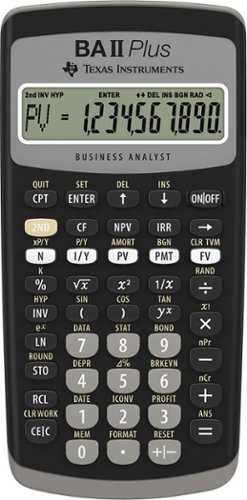
Designed for business professionals and students, this easy-to-use financial calculator delivers powerful computation functions and memory. Easy-to-read, 10-digit display Prompted display shows current variable label and values. Calculate IRR and NPV for cash flow analysis. Store up to 24 uneven cash flows with up to four-digit frequencies. Edit inputs to analyze the impact of changes in variables. Time-value-of-money function.Quickly solve calculations for annuities, loans, mortgages, leases and savings. Depreciation schedules. Choose from six methods for calculating depreciation, book value, and remaining depreciable amount. Interest rate conversions. Convert between annual (nominal) and effective interest rates. Exam acceptance. The BA II Plus calculator is approved for use on the Chartered Financial Analyst*, GARP Financial Risk Manager (FRM)~ exam, and Certified Management Accountants~ exam. *Chartered Financial Analyst is a registered trademark owned by CFA Institute. ~GARP and FRM are registered trademarks owned by Global Association of Risk Professionals, Inc. ~CMA is a registered trademark of the Institute of Management Accountants, Inc. None are affiliated with or endorse TI products.
Customer Rating

1
Cheap and slow calculator
on October 25, 2021
Posted by: Timm
Verified Purchase:Yes
For $35-$40 bucks, this calculator is pure trash. I hate this calculator, but need it because this is the only approved calculator for many standardized testing such as the CFA, CAIA, etc. This is the best for these tests because there are a lot of video tutorials, but the construction and usability is terrible.
Two biggest gripes:
1. The build quality is cheap. It is cheap plastic, flimsy, and you can snap this with two fingers. You have to break open the entire calculator just to replace the battery.. for $35 bucks, that is ridiculous.
1. The build quality is cheap. It is cheap plastic, flimsy, and you can snap this with two fingers. You have to break open the entire calculator just to replace the battery.. for $35 bucks, that is ridiculous.
2. Cannot punch in numbers quickly, otherwise it will not register the number. If you are familiar with TI-83/84 (best calculators), you will not like this. TI-84's can keep up with rapid button pushes, but this calculator is really slow. You have to punch in the numbers slowly, otherwise it will not register. This is extremely frustrating, especially if you are used to punching in numbers fast.
In summary, I would never recommend this calculator if you are not required to use it. Unfortunately, I have to use this calculator, but if you don't, stay away. But something else.
Length of ownership: 26
Mobile Submission: false
No, I would not recommend this to a friend.
Quality

1
Value
1
Ease of Use
1
Share this review:


0points
0of 0voted this as helpful.

Stay productive and entertained with this ASUS 15.6-inch ZenScreen portable monitor. The USB Type-C and HDMI ports let you connect mobile devices easily, while the embedded 7800 mAh lithium-polymer battery provides up to 4 hours of uptime on a single charge. This ASUS 15.6-inch ZenScreen portable monitor has a blue light filter and flicker-free technologies, which help minimize eyestrain during extended periods of viewing.
Customer Rating

2
Does Not Work
on July 15, 2021
Posted by: Timm
Verified Purchase:Yes
I can't really say much because the monitor didn't work out of box. The monitor felt sturdy and had a good weight to it. The origami stand sucks, but will get the job done. Nice large screen.
Length of ownership: 32
Mobile Submission: false
No, I would not recommend this to a friend.
Quality
1
Value

3
Ease of Use
3
Share this review:


-1point
0of 1voted this as helpful.
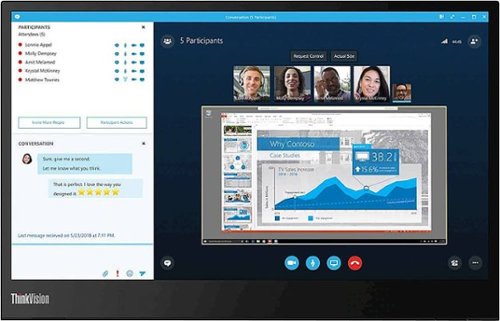
Stay productive with this Lenovo ThinkVision monitor. The USB Type-C ports let you connect to a variety of devices, while the wide viewing angle allows for crisp, clear visuals from almost any direction. This Lenovo ThinkVision monitor produces 16.7 million shades of color for enhanced picture clarity on the 14-inch anti-glare display.
Customer Rating
5
Best Portable Monitor At Good Price
on July 15, 2021
Posted by: Timm
Verified Purchase:Yes
Probably the best portable monitor there is right now. I tried several portable monitors such as the MSI Optix and ASUS ZENSCREEN GO. This was better in terms of reliability, color, brightness, and build.
Pros:
- Brightest screen of most available competitors. Best color.
- Built in stand (sturdy). Dual power plug in positions
- Anti-glare screen
- Works with MacBook Pro (depends on model - i tried it with 2015 and 2018 macbooks).
Pros:
- Brightest screen of most available competitors. Best color.
- Built in stand (sturdy). Dual power plug in positions
- Anti-glare screen
- Works with MacBook Pro (depends on model - i tried it with 2015 and 2018 macbooks).
Cons:
- Small 14" screen
- Small 14" screen
Length of ownership: 32
Mobile Submission: false
I would recommend this to a friend!
Quality
5
Value
5
Ease of Use
5
Share this review:


+3points
3of 3voted this as helpful.
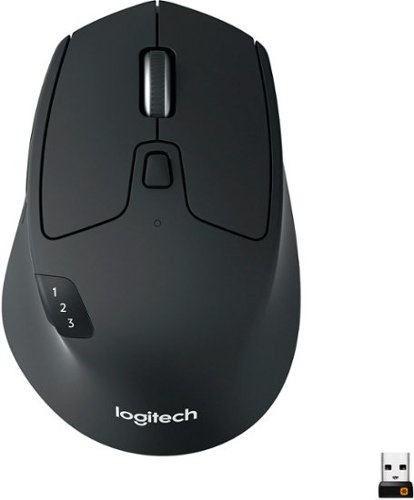
Ready, set go! Move between screens and straight through your to-do list with Logitech M720 Triathlon, the athletic mouse built for endurance, versatility, and comfort. With EASY-SWITCH technology you can pair your mouse with up to 3 computers and seamlessly switch between them with a click of a button. Reliable hyper-fast scrolling lets you fly through documents and web pages or switch to click-to-click scrolling when you need precision. A true athlete, this portable mouse is designed to endure, with buttons built to withstand up to 10 million clicks. Focus on what really matters thanks to the extended battery life of up to 24 months of power on a single AA battery. Simply connect M720 Triathlon wirelessly via the included Logitech Unifying receiver or via Bluetooth smart technology. Download Logitech Options Software to unlock the full range of personalization for your Logitech mouse.
Customer Rating
5
Budget MX MASTER 3
on February 12, 2021
Posted by: Timm
Verified Purchase:Yes
Good form factor ( I have long, medium/large sized hands). Main benefit of this mouse is the amount of configurability of the buttons. The logitech software is really good and works with both Mac and Windows flawlessly. I use both systems. The 'flow' function works great too. I like that I'm able to do ALL my MacBook gestures on the mouse (after config). I'm not a fan of the scroll wheel. It feels cheap, loud, and in 'free-wheel' mode it's impossible to accurately scroll through the page - it either scrolls too fast or not at all. Inconsistent in free-wheel mode - only good if you are blasting your way to the bottom. However, scroll wheel is good enough, that it was not a deal breaker, you just need to get used to the inconsistency. Overall, this is basically the MX MASTER 3 without the fancy scroll wheel.
Length of ownership: 20
Mobile Submission: false
I would recommend this to a friend!
Ease of Use
5
Quality
5
Value
5
Share this review:


0points
0of 0voted this as helpful.
Timm's Review Comments
Timm has not submitted comments on any reviews.
Timm's Questions
Timm has not submitted any questions.
Timm's Answers
Timm has not submitted any answers.