
Share LowerEastSider's profile


LowerEastSider
LowerEastSider's stats
- Review count6
- Helpfulness votes1
- First reviewJune 29, 2019
- Last reviewMay 9, 2026
- Featured reviews0
- Average rating4
Reviews comments
- Review comment count0
- Helpfulness votes0
- First review commentNone
- Last review commentNone
- Featured review comments0
Questions
- Question count0
- Helpfulness votes0
- First questionNone
- Last questionNone
- Featured questions0
Answers
- Answer count0
- Helpfulness votes0
- First answerNone
- Last answerNone
- Featured answers0
- Best answers0
LowerEastSider's Reviews
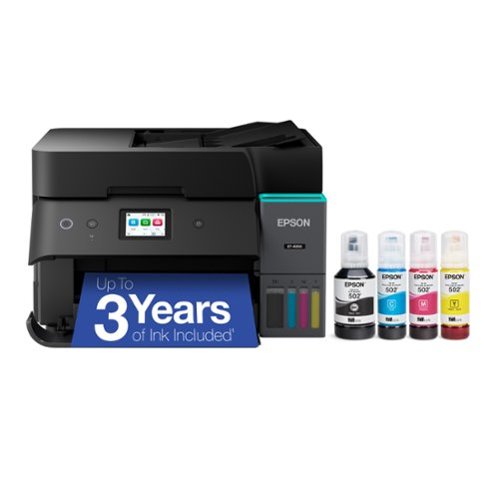
Introducing the EcoTank ET-4950~The Ultimate Home Office Printer. Say goodbye to expensive cartridges with the Epson EcoTank ET-4950, the newest innovation from a recognized leader in photographic printing. Combining simplicity with a modern design, the ET-4950 features advanced technology that enhances both performance and print quality, making it an ideal choice for productive office printing~including content created by AI. Powered by PrecisionCore Heat-Free technology, the ET-4950 offers a duty cycle that~s twice as robust as its predecessor (1). And unlike conventional thermal inkjet printers, its unique permanent printhead is engineered to last the life of the printer. Designed to be simple and error-free, refilling ink is a breeze with large ink tanks and uniquely keyed EcoFit bottles~no mess, no stress and no ink bottle mix-ups. And with enough ink in the box to last up to three years (2), you'll enjoy affordable color printing without the hassle of frequently replacing cartridges. Featuring Ethernet and Wi-Fi for seamless connectivity, along with the user-friendly Epson Smart Panel app (3), you can easily print, scan, and more directly from your computer or mobile device (4). Choose Epson EcoTank, the #1 Best-Selling Supertank Printer (5). With more than 100 million units sold globally (6) across seven generations of innovation, EcoTank consistently delivers affordable, photo-quality prints, making it a reliable choice for all your printing needs.
Posted by: LowerEastSider
Verified Purchase:Yes
My new Epson ET-4950 Ecotank printer replaced an older Epson Ecotank printer. I wanted something with automatic document feeder and fax. I don't use either feature frequently, but I just wanted to have them.
It took me a while to figure out how to use the FAX but it appears to work.
I have my new printer placed in a side cabinet under my L shaped desk. Because the LCD panel faces straight forward, it is difficult to read. But I hopefully won't need to use it much.
It's definitely larger than my previous Epson unit. People replacing older printers should do measurements first.
The FAX feature adds FAX capabilities to Apple iOS. To the best of my knowledge, the new Apple iOS is not usable with an ordinary fax modem as I once had.
Ink refilling is MUCH easier than on my old Ecotank. The ink reservoir is now on the front of the printer instead of on the side. And the newly designed ink bottles and reservoir openings are not as prone to leaking during filling or when the printer is moved.
Length of ownership: 102
I would recommend this to a friend!
Quality

4
Value
4
Ease of Use

3
Share this review:


0points
0of 0voted this as helpful.
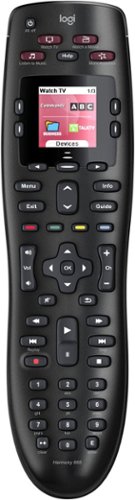
Throw away your extra remotes in favor of the Logitech Harmony 665 remote control. This functional remote works with a range of devices, from basic cable to Apple TV, and can combine up to 10 remotes in one versatile unit. This Logitech Harmony 665 remote control offers one-button setup for easy incorporation with your entertainment system.
Customer Rating

5
Works Well
on February 7, 2021
Posted by: LowerEastSider
Verified Purchase:Yes
I bought this remote to replace an existing Logitech 650 remote. After a few years, some of the buttons were not working on the older remote.
The 665 is very similar to the older remote but it is black in color and I think it controls a few more devices.
My bedroom TV stereo system has six devices which the new remote turns on and off. I did not want anything too tricky and I did not want a charger stand. The 655 uses standard alkaline batteries that should last most users several months.
Before purchasing the 655, check that all your devices are IR (infra-red) controlled. The 655 will not control RF (radio-frequency) devices.
Logitech makes fancier remotes like I have in my living room system. These also allow you to control the system via a smartphone. But I like having a separate remote which includes actual buttons that for the most used functions, I can operate by feel.
Length of ownership: 37
Mobile Submission: false
I would recommend this to a friend!
Ease of Use
4
Quality
4
Value
3
Share this review:


+1point
1of 1voted this as helpful.
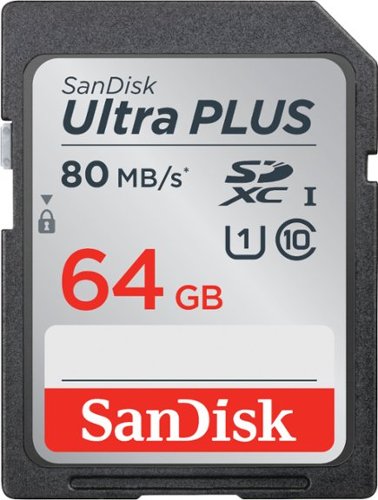
This SanDisk Ultra Plus SDSDUSC-064G-AN6IN SDXC memory card features Class 10 UHS-1 speed for high-quality video recording performance. The 64GB capacity offers ample space to store photos and high-definition videos.
Customer Rating
5
Works Well
on November 28, 2020
Posted by: LowerEastSider
Verified Purchase:Yes
I use this memory card with my Canon SX620 camera. It is fully compatible. It is fairly large and will store many pictures.
Length of ownership: 882
Mobile Submission: false
I would recommend this to a friend!
Quality

5
Value
5
Ease of Use
5
Share this review:


0points
0of 0voted this as helpful.
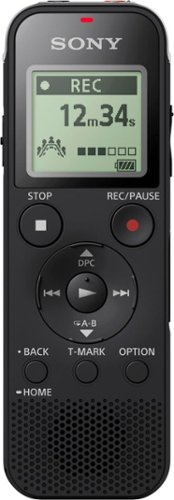
Store hours of high-quality audio with this Sony digital voice recorder. The highly sensitive S-microphone operates in either Focus or Wide mode to optimize sound quality depending on the event setting. This Sony digital voice recorder has 4GB of on-board memory, an expandable microSD storage and USB connectivity for PC transfer and quick charging.
Customer Rating
5
Works Well
on November 28, 2020
Posted by: LowerEastSider
Verified Purchase:Yes
I use this recorder in my job to record meetings and interviews.
It is simple to use and works well.
This is a mid-level unit. It does not have the advanced features of some of the more expensive recorders but has more features than some of the cheaper ones.
Length of ownership: 864
Mobile Submission: false
I would recommend this to a friend!
Ease of Use
5
Quality
5
Value
5
Share this review:


0points
0of 0voted this as helpful.
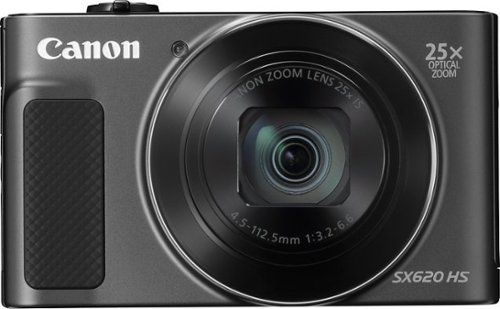
Get ready for your next shot with this Canon PowerShot camera. A massive 25x optical zoom brings even distant objects within view, and image stabilization ensures you get clearer photos even when the lighting is set down low. Easy social media uploading keeps you connected with all your friends and family with this Canon PowerShot camera..
Customer Rating

4
Good Small Camera
on November 28, 2020
Posted by: LowerEastSider
Verified Purchase:Yes
I've had this camera for about 2 years. It takes better pictures than any camera I've ever owned, including fancier and more expensive "bridge super zoom" style ones. It is also just small enough to fit inside a reasonably large coat pocket. I use a small belt pouch.
It contains several menus with numerous adjustments. However, if you want full manual control, this is probably not the camera for you. And, it is probably not the best choice for taking rapid motion sports and action shots. But for general photography, it takes good clear and crisp photos with good color and depth. To me the photos look significantly better than those taken with my I-phone.
The 25x zoom range is just right. You can zoom in to take the photo you want, without having to crop it later using software. It also takes decent 1080P videos.
There is no viewfinder. You must use the screen on the back of the camera to frame your shot. For me, this has not been a problem. Shots are reasonably quick without the lag of older cameras.
The camera works reasonably well with my Apple I-phone. Pictures can be retrieved using the phone app and some remote control of the camera is also possible. Most of the time, I just use a USB cable to download the photos to my computer.
The only disappointment is that you must take out the battery and put it in a separate charger. At least for my unit, the battery will not charge while installed in the camera.
This is a nice alternative to superzoom cameras that are too big to carry around and tiny cameras that are too small and offer little or no improvement over using a cell phone.
Length of ownership: 882
Mobile Submission: false
I would recommend this to a friend!
Quality
5
Value
5
Ease of Use
5
Share this review:


0points
0of 0voted this as helpful.
![GoodFellas [DVD] [1990]](https://pisces.bbystatic.com/prescaled/500/500/image2/BestBuy_US/images/products/304b2327-370a-41e7-956a-951dd4939472.png)
The DVD of Goodfellas has got to be one of the very first DVDs ever released by Warner Brothers because they make a critical error in the release. While many films offer widescreen on one side and full screen on the other, this film offers only one version -- a widescreen film broken into two sides. Viewers have to flip the DVD over to watch the second half of the film; 19 chapters are on side A and the last 15 chapters are on side B. Goodfellas is a classic film, and the DVD offers a great video transfer and excellent Dolby Digital 5:1 Surround, but no DVD fan will accept the two-sided format. In terms of extras, there are very few, limited only to theatrical trailers, production notes, and cast bios. For many, this Martin Scorsese classic is a must-have for any collection, but those who can wait for a future, corrected release of this film are better off watching the widescreen VHS tape. Language option in English and French and subtitles in English, French, and Spanish.
Customer Rating

1
DVD was defective
on June 29, 2019
Posted by: LowerEastSider
Verified Purchase:Yes
I bought this movie from my local Best Buy store three different times in the last year. Each time, the movie failed to play all the way through. Their was no label on the latest DVD disc that I bought.
All the other movies I've ever bought from my Best Buy store have worked flawlessly.
I'd really like to see the end of this movie but I may need to buy it from another retailer to get one that works.
Length of ownership: 7
Mobile Submission: false
No, I would not recommend this to a friend.
Share this review:


0points
0of 0voted this as helpful.
LowerEastSider's Review Comments
LowerEastSider has not submitted comments on any reviews.
LowerEastSider's Questions
LowerEastSider has not submitted any questions.
LowerEastSider's Answers
LowerEastSider has not submitted any answers.