
Share emptystreets130's profile


emptystreets130
emptystreets130's stats
- Review count29
- Helpfulness votes109
- First reviewDecember 16, 2018
- Last reviewApril 2, 2026
- Featured reviews0
- Average rating4
- Review comment count3
- Helpfulness votes4
- First review commentAugust 3, 2021
- Last review commentAugust 10, 2022
- Featured review comments0
- Question count1
- Helpfulness votes0
- First questionDecember 26, 2023
- Last questionDecember 26, 2023
- Featured questions0
- Answer count28
- Helpfulness votes20
- First answerDecember 16, 2018
- Last answerJanuary 9, 2023
- Featured answers0
- Best answers2
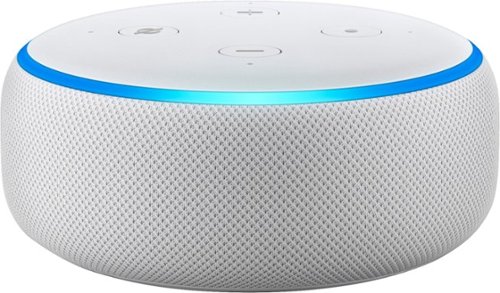
Echo Dot is a voice-controlled Smart Speaker with Alexa, perfect for any room. Just ask for music, news, information, and more. You can also call almost anyone and control compatible smart home devices with your voice.
Customer Rating

5
Much better than the previous gen
on December 2, 2019
Posted by: emptystreets130
Verified Purchase:Yes
I was skeptical about getting another echo, mainly because the older version had a hard time hearing me. Same with my google mini.
The speaker on this is far superior than the past. A little more bass helps a lot. The interface hasn't changed much. It still has a little hard time picking up my voice but I have a lot background noise. Overall a great improvement.
Length of ownership: 7
Mobile Submission: false
I would recommend this to a friend!
Quality

5
Value

3
Ease of Use
5
Share this review:


0points
0of 0voted this as helpful.
![Pandora - 90-Day Free Premium Subscription (New Subscribers Only) [Digital]](https://pisces.bbystatic.com/image2/BestBuy_US/images/products/6386/6386801_sa.jpg)
Tune to the moment you're in. From the free stations you love listening ad-free to, or searching and playing your favorites, Pandora continually evolves with your tastes. Start your 90-day free Premium trial now.
Customer Rating

4
Love Pandora
on December 2, 2019
Posted by: emptystreets130
Verified Purchase:Yes
I love Pandora. Way easier to use than Spotify or any other streaming services. 3 months free is hard to beat.
Length of ownership: 14
Mobile Submission: false
I would recommend this to a friend!
Share this review:


0points
0of 0voted this as helpful.
![SiriusXM - 3-Month Premier Streaming Subscription (New Subscribers Only) [Digital]](https://pisces.bbystatic.com/image2/BestBuy_US/images/products/6321/6321767_sa.jpg)
Free 3-Month SiriusXM Premier Streaming trial of the ultimate listening and video experience. Listen on the SiriusXM app and stream on your devices. . Your trial subscription code will be delivered after checkout. Credit card required upon trial activation. After the trial period, service will automatically renew every month and you will be charged each month at the then-current rates. Fees and taxes apply. All subscriptions are subject to the SiriusXM Customer Agreement available at www.siriusxm.com, which includes complete terms including how to cancel by calling 1-866-635-2349. All fees, content and features are subject to change. Cannot be combined with any other offer and may be modified or terminated at any time. Available only for new SiriusXM subscribers 18 years of age or older who have not previously redeemed a trial subscription offer. Codes are one-time use only and are void after activation or expiration. Codes cannot be transferred or sold or redeemed for cash or credit on any existing SiriusXM subscription or account. SiriusXM reserves the right to reject any code redemption or discontinue the participation privileges of any participant who engaged in any fraudulent conduct or attempts to redeem more than one code per subscription. Upon expiration of the codes, SiriusXM will be obligated to redeem any unused codes.
Customer Rating

1
Must be getting desperate
on December 2, 2019
Posted by: emptystreets130
Verified Purchase:Yes
SiriusXM must be getting desperate to a point where they are just throwing out free services to hook new subscribers. Well don't go for it. Once they get your CC info, you're doomed. It's a battle to cancel their service.
Length of ownership: 7
Mobile Submission: false
No, I would not recommend this to a friend.
Share this review:


0points
0of 0voted this as helpful.
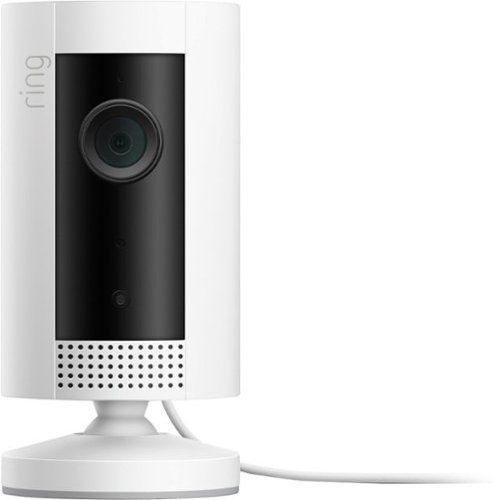
Bring protection inside with the mini marvel that packs a powerful punch. Ring Indoor Cam is your solution to quickly check what~s happening at home right from your phone or tablet. It sends notifications whenever motion is detected, so you can see, hear and speak to people on camera from anywhere. Its compact form can fit the smallest of spaces, and its simple plug-in installation means you'll have peace of mind in no time. Place a few indoors to cover every corner, and watch over your home from anywhere.
Customer Rating
5
Great camera!
on November 26, 2019
Posted by: emptystreets130
Verified Purchase:Yes
The Ring ecosystem seems to be really easy to setup. Great image and video quality and easy to setup. Speakers are a little muffled and it doesn't get loud enough.
I still have my Arlo Q but this Ring camera is so much better in every way. The Arlo Q is very complicated to set up because the Arlo app could never find the camera. This is where the Ring shines. The app is so easy to use that pairing a Ring camera takes no longer than 1 min. No headaches, no frustration. It's that easy.
If you're looking for something that is easy to use and to setup, get the ring camera.
Length of ownership: 8
Mobile Submission: false
I would recommend this to a friend!
Quality
5
Value
5
Ease of Use
5
Share this review:


+1point
1of 1voted this as helpful.
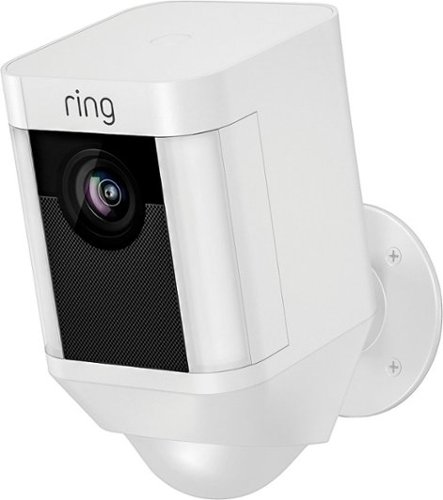
Monitor your property from your phone, tablet or PC with Ring Spotlight Cam Battery, a motion-activated security camera with LED spotlights, a siren alarm and a rechargeable battery pack. Ring Spotlight Cam battery lets you adjust your motion sensors, so you can get the ideal setting for you and your home. When anyone steps on your property and triggers your motion sensors, you~ll get an instant alert on your phone, tablet and PC. Answer the alert, and you can see, hear and speak to people on your property from anywhere.
Customer Rating
5
Wow!
on November 26, 2019
Posted by: emptystreets130
Verified Purchase:Yes
I did purchase the Ring floodlight camera but decided to try the spotlight camera first. I have to say that the spotlight cam satisfies my needs. It's small and compact, the video quality is great and the light is bright enough to capture images at night.
Setup is a breeze with the ring app. Scan the QR code with the app and follow the on-screen instruction.
The provided installation hardware is good. The screws though, horrible. I snap 3 of the 4 screw heads. I would recommend that you pick some up from your local hardware store.
Length of ownership: 1
Mobile Submission: false
I would recommend this to a friend!
Quality
5
Value
5
Ease of Use
5
Share this review:


+1point
1of 1voted this as helpful.
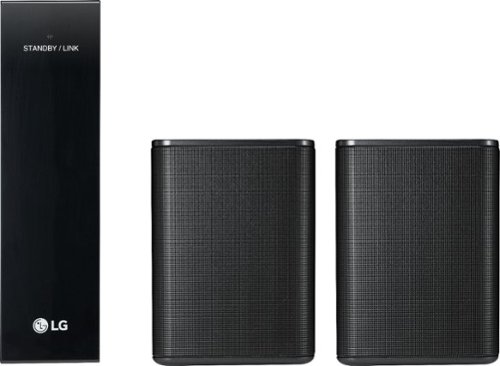
Upgrade your movie experiences with this 2.0-channel LG sound bar speaker kit. It produces 140W of power to blare your favorite song or movie, and it's wireless-enabled to eliminate the need for cables for a clean, uncluttered look.
Customer Rating
4
Great rear wireless speakers but...
on November 26, 2019
Posted by: emptystreets130
Verified Purchase:Yes
Easy to setup and pair with my LG soundbar.
They sound great but they are a little too bright a bit too loud for surround sound speakers. Even if you adjust the rear volume on the soundbar itself, it's still a little too loud. Overall the sound stage is great. If you have a soundbar with Dolby Atmos, these rear speakers will overpower them, so it's kind of pointless to get a soundbar with Dolby Atmos.
Construction is good and solid. The receiver is a bit plasticky but the only purpose is to receive the signal from the soundbar. The wires included is pretty generous.
Length of ownership: 85
Mobile Submission: false
I would recommend this to a friend!
Quality
5
Value

4
Ease of Use
5
Share this review:


+1point
1of 1voted this as helpful.
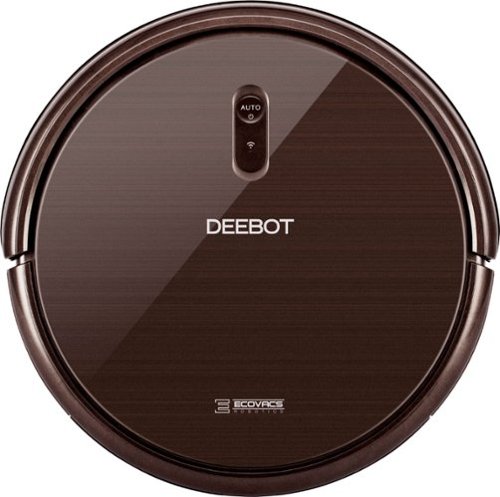
Relax and enjoy hands-free carpet and hard-floor cleaning with this ECOVACS robotic vacuum cleaner. Multiple cleaning modes and a Smart Motion system adapt to your floors, and you can control it with the ECOVACS app, Amazon Alexa or Google Assistant. This ECOVACS robotic vacuum cleaner runs up to 120 minutes for complete floor coverage.
Customer Rating
4
Great entry-mid level robovac
on December 16, 2018
Posted by: emptystreets130
from Plano, TX
Verified Purchase:Yes
This is a great entry to mid level robovac. I mainly used this on the hardwood floor since I'm to tired to Swiffer the floor everyday. I have to Beagles mix that sheds like crazy and keeping up is hard.
Setup is a breeze. Connect the two spinning brush heads, flip the switch on, press AUTO on the robovac, connect the docking station, put batteries in the remote and press the home button on the remote so the robovac can take it's beauty sleep. Let it sleep for 4 hrs before use.
In my initial test, I did Swiffer the floor first and set the schedule to run at 4 am. I woke up the next morning to a very clean floor. I didn't see a lot of dog fur on the floor. The places I did see, were places it couldn't reach, like the multiple legs of an IKEA sleeper sofa. It was very quiet. It didn't wake me or my two dogs up. I took the dustpan out and was surprised that it picked up more dog fur than sweeping. I was amazed.
I did try it on carpet. It's ok. It's not meant to deep clean a low-medium pile carpet. You still need to whip out the vacuum but it's perfect for the in-between maintenance. It did pick up a lot though. I'll attach some pics.
Pairing to the phone is a little tough. Even if you connected to the 2.4GHz band, the phone had a hard time finding the robovac. I figure I let it charge for 4 hrs and try again. It paired after the 4 hrs.
The phone app is very basic. It's almost like the remote, well it's a digital version of the remote but this is where you can see battery status, health of the brushes and filter, set schedules and the only place where you can adjust the suction power. I didn't see that on the physical remote.
Two modes, Standard and Max. If you have MAX set and a schedules to run while you're sleep, then you are in for a rude awaking. It's loud and it seems like it runs into objects a lot harder. I'm on the 4th floor in my complex and I'm pretty sure the person below me can hear this thing running around my living room.
It's fine in standard mode. The tracks is another thing. It squeaks when it turns in MAX. In standard mode its quiet. Keep this in mind if you have it running while you're sleeping.
On standard mode, it's not loud at all. You can watch TV and have a conversation will this is running. Max is slightly louder but you can still watch TV and have a conversation.
Anyways, it definitely a good robovac on hard surface. I'll post pictures up.
Mobile Submission: False
I would recommend this to a friend!


Share this review:


+14points
14of 14voted this as helpful.
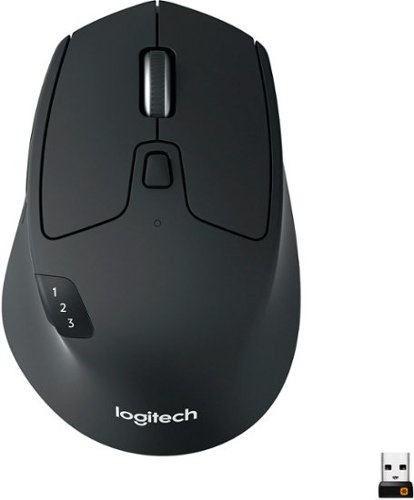
Ready, set go! Move between screens and straight through your to-do list with Logitech M720 Triathlon, the athletic mouse built for endurance, versatility, and comfort. With EASY-SWITCH technology you can pair your mouse with up to 3 computers and seamlessly switch between them with a click of a button. Reliable hyper-fast scrolling lets you fly through documents and web pages or switch to click-to-click scrolling when you need precision. A true athlete, this portable mouse is designed to endure, with buttons built to withstand up to 10 million clicks. Focus on what really matters thanks to the extended battery life of up to 24 months of power on a single AA battery. Simply connect M720 Triathlon wirelessly via the included Logitech Unifying receiver or via Bluetooth smart technology. Download Logitech Options Software to unlock the full range of personalization for your Logitech mouse.
Customer Rating
5
Must have for multiple devices
on December 16, 2018
Posted by: emptystreets130
from Plano, TX
Verified Purchase:Yes
This is a nifty mouse. It's nice that you can pair 3 device and switch between multiple sources. Battery life is avg. I'm already on 1 bar our of 3. Maybe because I use the mouse more than the K780. The mouse is customizable through the Logitech software.
Pairing is pretty easy. I had to use an old mouse first and kick off the Bluetooth searching on Windows 10. Once I was able to do that, I clicked the device selection button on the mouse and click away to pair. You can also use the provide dongle if your computer does not have Bluetooth.
This mouse a hybrid between the MX Anywhere and the Marathon M705. The 2 that I love most. It feel natural in the hand. You do have the hyper scroll feature of the M705 with the stylish looks of the MX Anywhere.
It's a good mice. I think Logitech makes one of the best non-gaming mice out there. Microsoft seems to make a mouse that doesn't fit naturally in your hands.
Mobile Submission: False
I would recommend this to a friend!
Share this review:


0points
0of 0voted this as helpful.

Type with this multi-device Logitech wireless keyboard. The built-in rubber cradle supports devices vertically, making small screens easily viewable, and 128-bit AES encryption keeps information private. Compatible with Windows, Mac, Chrome and Android devices, this Logitech wireless keyboard uses USB and Bluetooth technology to connect to your smartphone and tablet.
Customer Rating
4
Must have for multiple devices
on December 16, 2018
Posted by: emptystreets130
from Plano, TX
Verified Purchase:Yes
This is a must have keyboard if you have more than 1 device. I'm an IT admin, so I work on multiple platforms and devices. I have 2 pc desktop and 1 Mac. Instead of having 3 keyboard and mices on my desk, I have 3 buttons on my keyboard and mouse, each corresponding to a device it pairs to. All I have to do is press a number and voila. It's that easy. It will take a couple of seconds for the device to reconnect. No noticeable input lag. I probably won't use this for gaming but for word processing, web surfing and remote desktop, it's fine. It even has a built in slot for your device. Also, this will content to an android device or a iOS device. I wonder if it will work on my Sony Bravia TV that is power by android.
I wish it could pair up to 5 devices instead of 3. I think most tech savvy folks would appreciate that.
This keyboard is heavy and it's sturdy. My other take away is the rubber slot that I mention. I have a feeling that you'll see more wear and tear there than the actually keyboard itself. Key click and travel is great. Not laptop like. It has a good solid click.
I'm still learning the layout of this keyboard. Home, end Pg Up and Pg Dn are on the number pad. You do have to press the FN key to activate the specialty keys. It could be worst. I have a new Dell keyboard for reference where you have to press FN+ALT+print scrn just to do a screen print. On this Logi, it's only FN+del.
I would recommend that you install the software. You can customize the keyboard a little more like lock or unlock the FN key, etc..
Battery life is good so far. I'm down to 2 battery bar out of 3. This is close to 2 months use. I expected it to live 6 months before swapping out the battery.
Oh and speaking of battery, you have the option of Bluetooth or a wireless dongle connectivity. So you have a couple of options if you don't have Bluetooth on your devices.
Overall, this is a well built keyboard. I could probably use this to knock an intruder out. haha.
Mobile Submission: False
I would recommend this to a friend!
Share this review:


0points
0of 0voted this as helpful.
emptystreets130's Review Comments
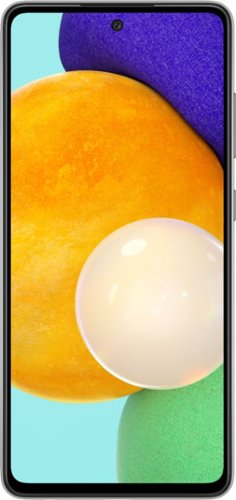
We've outfitted Galaxy A52 5G for Verizon with some of our most awesome Galaxy innovations so you can stream, capture and experience all the action at a price you'll love.
Overall 2 out of 5
2 out of 5Mislead
By GoonSquad
Great phone, but zoomed photos are very over-digitized. Plus the fact that best buy wrongly advertised that it has 2 SIM card capability when it does NOT. ONLY to discover this after i paid for a sim card from AT&T and the phone is out of returnable period. That option is only with the A42

emptystreets130
August 3, 2021
Did you get the AT&T\verizon version of the phone. My Unlocked A52 5G has 2 sim slots. Sim2 is a combo sim or microsd, not both at the same time.
+1point
1of 1voted this comment as helpful.
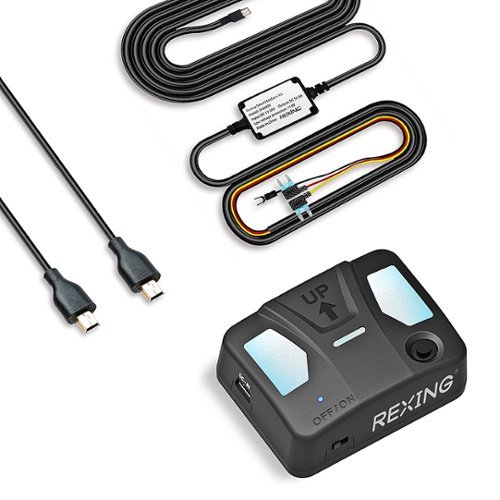
Upgrade your dash cam and protect your vehicle 24/7 with our new REXING Intelligent Hardwire Kit that utilizes motion sensors to monitor your surroundings. Once motion is detected, the camera will instantly wake up and start recording ensuring the camera never misses a moment even if your car is parked and off. This hardwire kit features automatic low-voltage protection to keep your car battery from being depleted. The 13 foot cable easily reaches from the control box to the dashboard and the mini-USB plug connects to the camera for seamless power delivery.
Overall1 out of 5
1 out of 5Don't buy
By Nope
None of the cameras work anymore. All three were good for the first week. I hope I can still get my money back. Didn't even shoot in 4k, kept telling me I had to format the SD card; I would have to cycle through the settings three times before the camera would start recording. It never saved any of the settings I would change in the settings options since day one either. I figured all the bad reviews were just people being dramatic but they were actually spot on for this camera.
emptystreets130
October 19, 2021
I think you are reviewing the wrong item. This isn't a camera. It's a hardwire kit for the Rexing dash cam.
+3points
3of 3voted this comment as helpful.
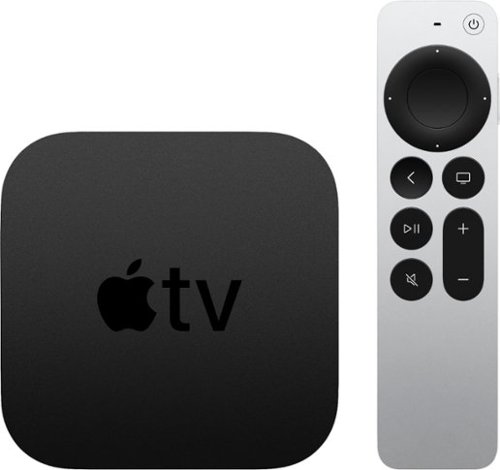
The new Apple TV 4K brings the best shows, movies, sports, and live TV-together with your favorite Apple devices and services.~ Now with 4K High Frame Rate HDR for fluid, crisp video.~ Watch Apple Originals with Apple TV+.~ Experience more ways to enjoy your TV with Apple Arcade, Apple Fitness+, and Apple Music.~ And use the new Siri Remote with touch-enabled clickpad to control it all.
Overall1 out of 5
1 out of 5Defective
By User
Remote is defective out of the box - half of the power button is permanently depressed, so when you press the power button, it stays stuck and doesn't release until you smack the remote against your hand. Furthermore there's no HDMI cable included in the box - a bit of a shocker when every other competitor includes one. On the other hand, as an Apple user, I'm already conditioned to being treated like garbage.
emptystreets130
August 10, 2022
My Shield Pro didn't come with a HDMI cable...
-1point
0of 1voted this comment as helpful.
emptystreets130's Questions

Base One Max delivers official MFi MagSafe charging at up to 15W with a weighted metal body and an elevated glass panel designed to complement any space.
Is this version that can charge the watch, phone and airpod at the same time?
2 years, 5 months ago
by
emptystreets130
Relax and enjoy hands-free carpet and hard-floor cleaning with this ECOVACS robotic vacuum cleaner. Multiple cleaning modes and a Smart Motion system adapt to your floors, and you can control it with the ECOVACS app, Amazon Alexa or Google Assistant. This ECOVACS robotic vacuum cleaner runs up to 120 minutes for complete floor coverage.
How do you get it so it doesn’t get stuck on certain things? And once it does get stuck is there a way to get it unstuck other than picking it up manually?
Relax and enjoy hands-free carpet and hard-floor cleaning with this ECOVACS robotic vacuum cleaner. Multiple cleaning modes and a Smart Motion system adapt to your floors, and you can control it with the ECOVACS app, Amazon Alexa or Google Assistant. This ECOVACS robotic vacuum cleaner runs up to 120 minutes for complete floor coverage.
Relax and enjoy hands-free carpet and hard-floor cleaning with this ECOVACS robotic vacuum cleaner. Multiple cleaning modes and a Smart Motion system adapt to your floors, and you can control it with the ECOVACS app, Amazon Alexa or Google Assistant. This ECOVACS robotic vacuum cleaner runs up to 120 minutes for complete floor coverage.
Ready, set go! Move between screens and straight through your to-do list with Logitech M720 Triathlon, the athletic mouse built for endurance, versatility, and comfort. With EASY-SWITCH technology you can pair your mouse with up to 3 computers and seamlessly switch between them with a click of a button. Reliable hyper-fast scrolling lets you fly through documents and web pages or switch to click-to-click scrolling when you need precision. A true athlete, this portable mouse is designed to endure, with buttons built to withstand up to 10 million clicks. Focus on what really matters thanks to the extended battery life of up to 24 months of power on a single AA battery. Simply connect M720 Triathlon wirelessly via the included Logitech Unifying receiver or via Bluetooth smart technology. Download Logitech Options Software to unlock the full range of personalization for your Logitech mouse.
Type with this multi-device Logitech wireless keyboard. The built-in rubber cradle supports devices vertically, making small screens easily viewable, and 128-bit AES encryption keeps information private. Compatible with Windows, Mac, Chrome and Android devices, this Logitech wireless keyboard uses USB and Bluetooth technology to connect to your smartphone and tablet.
Just got home maybe an hour ago. The directions on the card do not make sense to me. There appear to be no written directions just inexplicable pictures.
Are you trying to connect the device. Do you have Bluetooth built-in on your device?
If not, press the white 1 button down for 3 seconds, plug the dongle into you desktop and press and hold the fn+p button for 3 seconds.
If it has Bluetooth, press the white 1, 2, or 3 button for 3 seconds and your computer should automatically detect the Bluetooth device. Type in the pin code and press enter to pair. If it doesn't automatically detect the device, you will need to launch the Bluetooth control panel on your computer and search for the device.
If not, press the white 1 button down for 3 seconds, plug the dongle into you desktop and press and hold the fn+p button for 3 seconds.
If it has Bluetooth, press the white 1, 2, or 3 button for 3 seconds and your computer should automatically detect the Bluetooth device. Type in the pin code and press enter to pair. If it doesn't automatically detect the device, you will need to launch the Bluetooth control panel on your computer and search for the device.
7 years, 5 months ago
by
emptystreets130
Type with this multi-device Logitech wireless keyboard. The built-in rubber cradle supports devices vertically, making small screens easily viewable, and 128-bit AES encryption keeps information private. Compatible with Windows, Mac, Chrome and Android devices, this Logitech wireless keyboard uses USB and Bluetooth technology to connect to your smartphone and tablet.
Will it work well with my iPhone in a protective case? Nothing complex, just a Tough Case in clear by Casemate.
If you're referring to the slot where you can "dock" your phone, it should work as long as it's not too thick. My Oneplus 6 phone with a spigen case sits in it fine.
If you're talking about the Bluetooth connection, the signal to the phone shouldn't be affected.
If you're talking about the Bluetooth connection, the signal to the phone shouldn't be affected.
7 years, 5 months ago
by
emptystreets130
Type with this multi-device Logitech wireless keyboard. The built-in rubber cradle supports devices vertically, making small screens easily viewable, and 128-bit AES encryption keeps information private. Compatible with Windows, Mac, Chrome and Android devices, this Logitech wireless keyboard uses USB and Bluetooth technology to connect to your smartphone and tablet.
Is it possible to set it up so the Copy and Paste feature works on this keyboard? How does the fn + o feature work?
Type with this multi-device Logitech wireless keyboard. The built-in rubber cradle supports devices vertically, making small screens easily viewable, and 128-bit AES encryption keeps information private. Compatible with Windows, Mac, Chrome and Android devices, this Logitech wireless keyboard uses USB and Bluetooth technology to connect to your smartphone and tablet.