
Share AMXs's profile


AMXs
AMXs's stats
- Review count56
- Helpfulness votes220
- First reviewApril 18, 2020
- Last reviewDecember 27, 2025
- Featured reviews0
- Average rating4.1
- Review comment count5
- Helpfulness votes19
- First review commentNovember 23, 2020
- Last review commentJuly 23, 2023
- Featured review comments0
- Question count2
- Helpfulness votes0
- First questionSeptember 12, 2024
- Last questionSeptember 12, 2024
- Featured questions0
- Answer count15
- Helpfulness votes44
- First answerApril 24, 2020
- Last answerDecember 19, 2025
- Featured answers0
- Best answers8
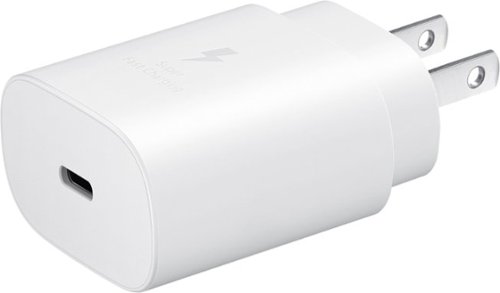
Super fast charging up to 25W with compatible devices and other USB devices will charge at varying rates also works with USB-C cable
Customer Rating

5
Should come with the Phone
on April 29, 2022
Posted by: AMXs
Verified Purchase:Yes
It's a 25W charger, where a lot of others are only 15W or 20W for the same price. It works great for me and charges my phone faster than plugging it into my laptop.
I was told why most cell phone manufacturer's do not include chargers anymore is because most users now just charge from their PC/Laptops. Maybe, but not me or a lot of my friends. For the few bucks it would cost the Manufacturer and the high prices they charge for the phones, they should still include the charger at cost. Just my opinion.
I was told why most cell phone manufacturer's do not include chargers anymore is because most users now just charge from their PC/Laptops. Maybe, but not me or a lot of my friends. For the few bucks it would cost the Manufacturer and the high prices they charge for the phones, they should still include the charger at cost. Just my opinion.
Length of ownership: 1
Mobile Submission: False
I would recommend this to a friend!
Quality

5
Value

4
Ease of Use
5
Share this review:


+1point
1of 1voted this as helpful.

The Kate Spade New York Protective Hardshell Case in our signature Hollyhock print fuses high fashion with everyday convenience. Using TPU plastics, the co-molded Protective Case for the Samsung Galaxy S22 is as chic as it is protective. Model # KSSA-081-HHCCS.
Customer Rating

4
If you want "Bling" with protection, this is it
on April 29, 2022
Posted by: AMXs
Verified Purchase:Yes
My wife and I were looking at cases for our new S-22's. I'm more functional and she is more looks. After trying several cases she found this case. She said it feels good (still a plastic feel to me). I will admit, it is a nice looking case accenting the rose gold of the S-22. With the phone in it laying on a desk, it looks like there is no case at all. This case is rated for a 10ft. fall, so it is better than most "Blingy" cases. It has enough of a raised edge bezel to give protection to the lens and screen. It is not slippery when holding. With the design of phones these days, the face is ALL screen and any color you chose for the phone will be covered by most protective cases. If you want to show off your phone's color, have some "Bling", and still have protection, this case will do it.
Length of ownership: 1
Mobile Submission: False
I would recommend this to a friend!
Quality
4
Value
5
Ease of Use
5
Share this review:


+5points
5of 5voted this as helpful.
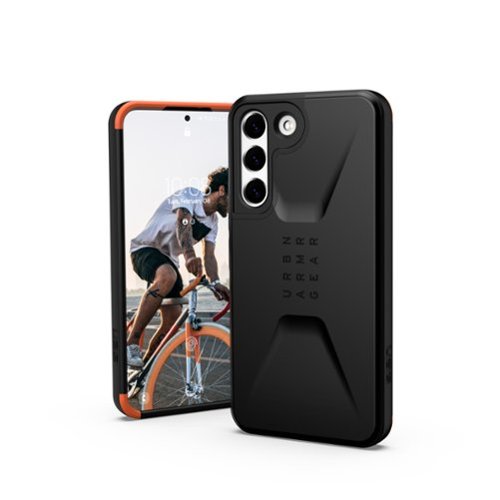
Civilian Series Case for Samsung Galaxy S22 by UAG, protective cases are engineered to dampen and disperse the energy created when a mobile device collides with another surface. Our patent pending, lab-tested design, is created by layering two shock-absorbing materials with a dynamic hexagon pattern. We call it HyperCrush. Model Number 21342D124040
Customer Rating
5
Great light weight rugged case
on April 29, 2022
Posted by: AMXs
Verified Purchase:Yes
Just upgraded from a Galaxy S7 to S22 and bought the UAG Civilian case after trying several brands at BB. My Galaxy S7 case was a Tech21-Tactical. It served me well for the last 5 years. I will not buy a case unless I can handle it for fit and comfort. The Tech21-Tactical felt just right when I tried it on back then and the specs are good. It saved my phone several times. I could not find the Tech21-Tactical for the Galaxy S22 locally, but did find the Tech21 - EVO Check at BB. It is clear (smoked) case with similar specs as my old Tech21 and felt just OK. The sides are textured like the old Tech21, but the rest is a smooth plastic; a feel I don't care for. I did not like the Otter cases, even the new Commuter. They just did not feel right and were bulky. Then I found the UAG Civilian. Just like the old Tech21, this felt perfect as soon as I held it with my phone in it. It is not bulky, weighty, and has just the right texture for secure comfortable holding. It slips easily into a pocket and easy to grip to pull it out of the pocket. The specs are very good. Of course there is only one way to tell, and I'm not willing to find out on purpose. Time will tell. I found that this case gives a little more protection around the lenses and front panel than the others, except for the Otter Defender Pro, which is way more bulky. Also, this case looks as good as it is functional. I feel confident this case will do its job. If I find it does not, I will update this review. I am pleased with the look, fit, and feel of this case. I'm very glad I came across it. As for the orange top and corner piping, as another reviewer said, "it grows on you." I do actually like it.
Length of ownership: 1
Mobile Submission: False
I would recommend this to a friend!
Quality
5
Value
4
Ease of Use
5
Share this review:


+2points
2of 2voted this as helpful.
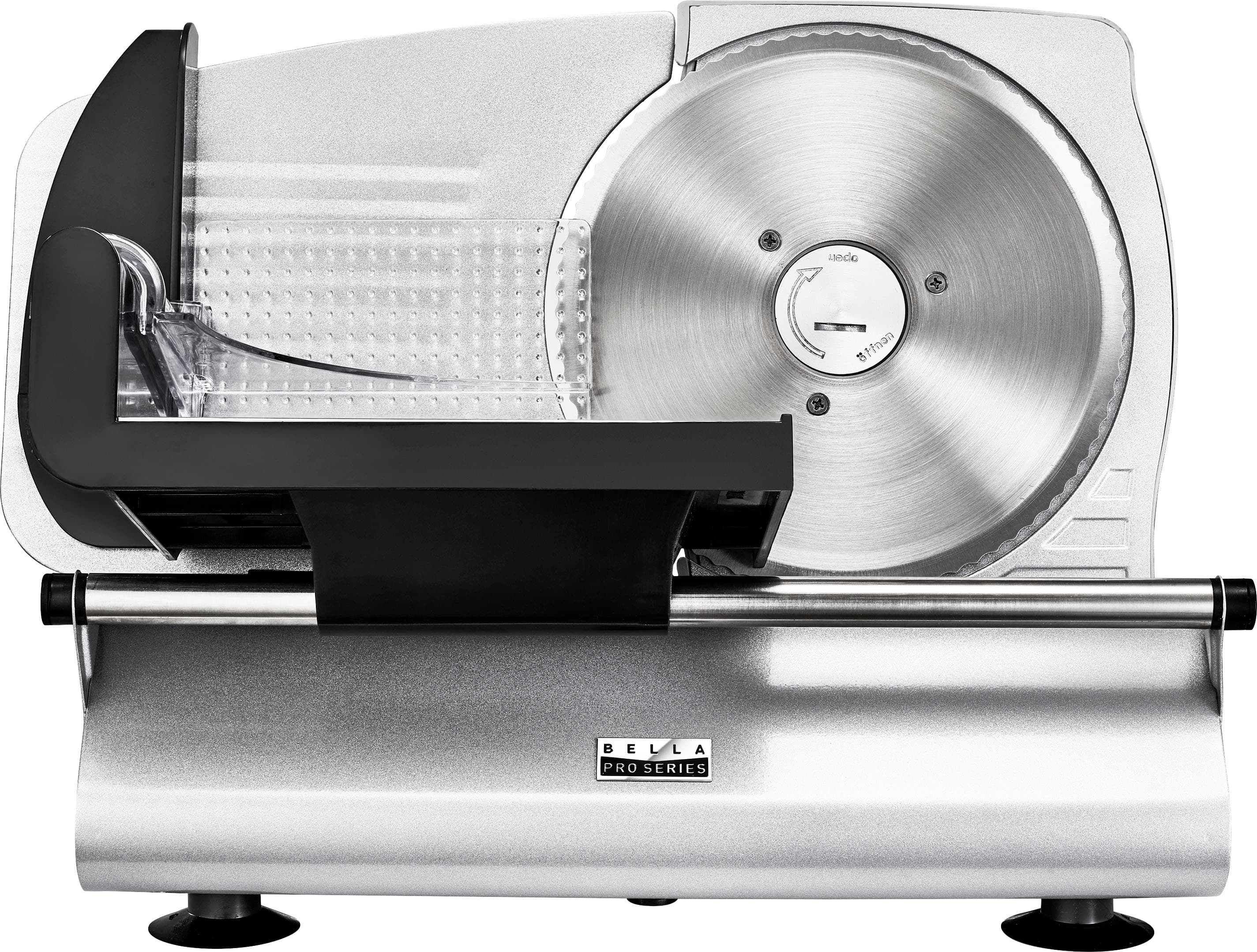
Your very own home-made charcuterie board is just minutes away with the bella PRO Pro-Grade Meat Slicer. Make your plate the envy of any party with thinly sliced salami, prosciutto, mortadella, turkey, ham, cheese, and vegetables. Whether you want deli thin meats or thick half-inch ham slices, this compact slicer will perform. Quick release design makes cleanup a breeze. With a sleek, compact design, this food cutter is small enough for most cabinets and countertops, making it the perfect tool for any home cook. Removable and retractable 7.5-inch serrated stainless steel blade and die-cast aluminum housing are easy to clean. Sturdy non-slip feet, blade safety guard, and food pusher ensure that the food slicer will stay in place, so you can keep a firm grip and full confidence while operating.
Customer Rating

3
OK for the 50% Sale Price
on January 29, 2022
Posted by: AMXs
Verified Purchase:Yes
Meh! It's OK, but nothing to write home about. READ the directions first. I initially removed the blade to clean it. The backside of the blade and the area the blade is attached to has excess clear lubricant, sticky stuff. It is possible any food sliced could contact this area of the back of the blade. Clean the blade first and wipe up any excess off the back that can transfer back to the blade surface. The lubricant only needs to be on the plastic contacts.
The adjustable backing plate is flimsy and will give towards the top if you push too hard to hold the meat against it resulting in an uneven thickness. Also, the slide tray is awkward to push. You need to stand behind the end of the slicer and push the slide tray forward and not stand facing the blade pushing the tray sideways. Also you cannot push to hard/fast forcing the cut. It's best to push slower and let the blade do the work at its speed.
Cleanup is a PIA. Removing the blade is not all that bad, but wear a thick glove on one hand to handle the blade; it is SHARP! I use a soft dish brush to clean both sides of the blade in soapy water while it lays in the sink. The meat tray does not remove from the slide rail. Cleaning the tray and backside of the slicer with a soapy washcloth is easy enough, but is a pain to remove the soap residue afterward. You have to man-handle the entire unit (not real heavy, but bulky) over the sink to rinse being careful not to get any electrical area wet. I don't want soap in my food.
Unless you use this for very thin slicing, for steak&cheese or sandwiches, and slice a whole roast or brisket at one time like at the deli, I find it really is not worth the work for cleanup. All other slicing I can do as well with a sharp knife and not have the mess to clean up.
Make sure you have the storage for this. If you have small children DO NOT leave this out on the counter. Even with the blade adjusted to 0 thickness, it can still be touched with a finger and it WILL bite you like a razor blade.
Overall for me it is OK for the half off sale price, even if you only occasionally use it.
The adjustable backing plate is flimsy and will give towards the top if you push too hard to hold the meat against it resulting in an uneven thickness. Also, the slide tray is awkward to push. You need to stand behind the end of the slicer and push the slide tray forward and not stand facing the blade pushing the tray sideways. Also you cannot push to hard/fast forcing the cut. It's best to push slower and let the blade do the work at its speed.
Cleanup is a PIA. Removing the blade is not all that bad, but wear a thick glove on one hand to handle the blade; it is SHARP! I use a soft dish brush to clean both sides of the blade in soapy water while it lays in the sink. The meat tray does not remove from the slide rail. Cleaning the tray and backside of the slicer with a soapy washcloth is easy enough, but is a pain to remove the soap residue afterward. You have to man-handle the entire unit (not real heavy, but bulky) over the sink to rinse being careful not to get any electrical area wet. I don't want soap in my food.
Unless you use this for very thin slicing, for steak&cheese or sandwiches, and slice a whole roast or brisket at one time like at the deli, I find it really is not worth the work for cleanup. All other slicing I can do as well with a sharp knife and not have the mess to clean up.
Make sure you have the storage for this. If you have small children DO NOT leave this out on the counter. Even with the blade adjusted to 0 thickness, it can still be touched with a finger and it WILL bite you like a razor blade.
Overall for me it is OK for the half off sale price, even if you only occasionally use it.
Length of ownership: 18
Mobile Submission: False
I would recommend this to a friend!
Quality

3
Ease of Use
3
Value
4
Share this review:


+3points
10of 17voted this as helpful.
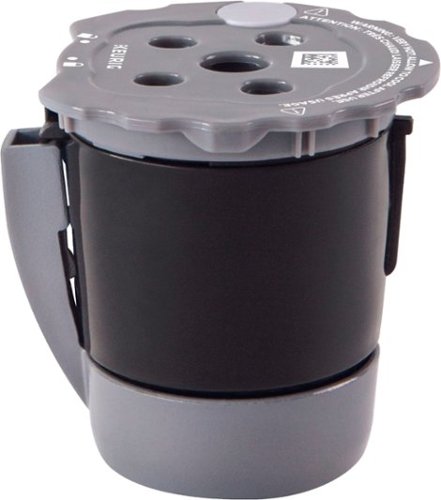
The Keurig~ My K-Cup~ Universal Reusable Filter is a simple and convenient way to brew your favorite ground coffee using your Keurig~ coffee maker. Newly designed with MultiStream Technology~ compatibility to extract full flavor and aroma every time you brew, it~s the only Keurig-designed reusable coffee filter approved for use in all Keurig home coffee makers. So in addition to hundreds of delicious varieties of K-Cup~ pods, you can enjoy an even bigger assortment of freshly brewed coffee. Just fill with ground coffee to the MAX fill line, pop it into your Keurig~ coffee maker, and in no time, you~ll be enjoying a cup of hot, delicious coffee. Brewing your favorites has never been easier, and the removable lid makes filling and cleaning a snap. Highly durable and dishwasher safe (top rack only), the Keurig~ My K-Cup~ Universal Reusable Filter is BPA-free, and made with premium materials that meet the highest standards of product quality and safety.
Customer Rating
5
It Works!
on November 16, 2021
Posted by: AMXs
Verified Purchase:Yes
It works well if you want to use your own coffee blend.
Length of ownership: 352
Mobile Submission: False
I would recommend this to a friend!
Quality
5
Ease of Use
5
Value
5
Share this review:


0points
0of 0voted this as helpful.

The Keurig K-Select single serve coffee maker in Oasis combines sleek design and more intuitive features to help you brew your perfect cup every single time. It features four brew sizes, so you can brew 6, 8, 10, or up to 12 oz. of your favorite coffee, tea, hot cocoa, or iced beverage with the touch of a button. And for those who like a stronger cup of coffee, the Keurig K-Select brewer is the perfect choice. The Strong Brew feature kicks up your coffee~s strength and intensity, so you can enjoy a bolder brew. Choose from hundreds of delicious varieties of K-Cup pods, or brew your own ground coffee with the My-K-Cup Universal Reusable Coffee Filter (sold separately). With the K-Select brewer, you can brew 5 cups between refills of the large 52 oz. water reservoir.
Customer Rating
3
Looks nice for a retro look
on November 16, 2021
Posted by: AMXs
Verified Purchase:Yes
OK until it is not. After 11 months this Keurig is still working, but not at 100%. About 2 months ago it started not to completely dispense the amount of water selected. It seems it is about 2oz short on the 10 & 12 ounce setting and about 1oz short on the others. I have tried all remedies to clean, but nothing works. As far as I can tell nothing is dirty or clogged. It appears the pump may be failing. I think it runs for a specific time for the selected amount, but is no longer pumping at the same rate. It still works, but for a 12oz cup you have to select 8oz and then run again at 6oz.
Length of ownership: 352
Mobile Submission: False
No, I would not recommend this to a friend.
Quality
3
Ease of Use
5
Value
4
Share this review:


0points
0of 0voted this as helpful.
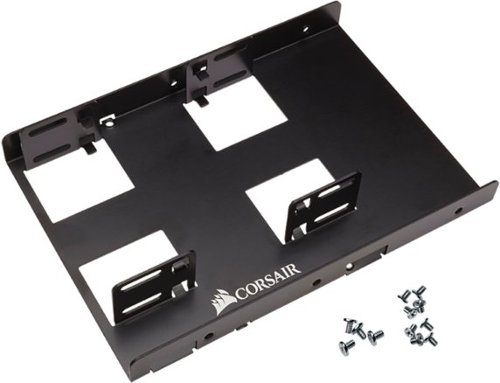
Upgrade your desktop PC using this CORSAIR dual SSD mounting bracket. The adjustable design ensures compatibility with both 7mm and 9.5mm SSDs, while the extra clearance enables safe and strain-free connection of data cables. This CORSAIR dual SSD mounting bracket can accommodate up to two drives and is easy to install.
Customer Rating
5
Perfect for HDD to SSD converions in a desktop
on November 16, 2021
Posted by: AMXs
Verified Purchase:Yes
Perfect for replacing a 3.5 HDD with a 2.5 SSD in a PC. If you have the connections it allows two SSDs mounted in the same space.
It comes with all the screws needed.
It comes with all the screws needed.
Length of ownership: 11
Mobile Submission: False
I would recommend this to a friend!
Ease of Use
5
Quality
5
Value
4
Share this review:


0points
0of 0voted this as helpful.
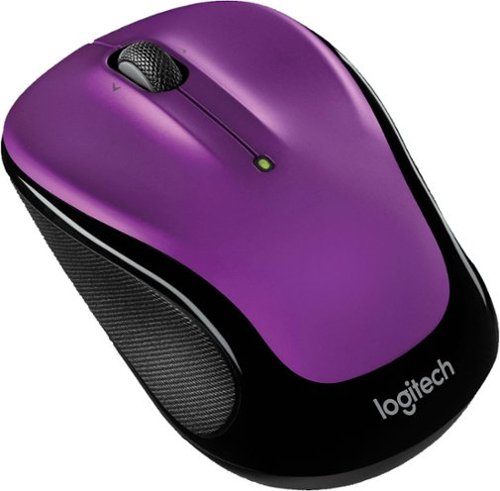
Logitech Wireless Mouse M325s. A better mix of precision and comfort-with designed-for-Web scrolling. Designed for how you use the Web, our newest micro-precise scrolling makes everything you love to do online easier. Its feel-good, contoured shape and textured grips help keep your hand happy-even after long hours. And with up to 18 months of battery life, it virtually eliminates the hassle of changing batteries.
Customer Rating
5
Great Little Mouse
on November 16, 2021
Posted by: AMXs
Verified Purchase:Yes
This is my 3rd Logitech M325 mouse for different PCs. They are the best for everyday mouse work and fit well in a travel bag. You can't beat the price when on sale.
Length of ownership: 11
Mobile Submission: False
I would recommend this to a friend!
Ease of Use
5
Quality
5
Value
5
Share this review:


0points
0of 0voted this as helpful.
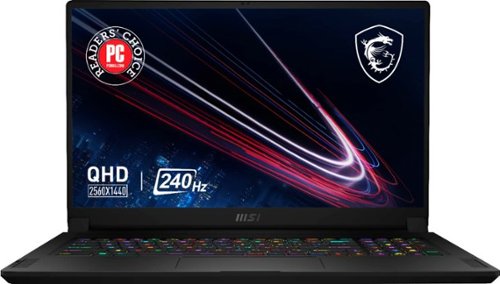
Edge ahead of the pack with this MSI Stealth gaming laptop. The NVIDIA GeForce RTX 3070 graphics card delivers stutter-free, paired with QHD 240hz refresh 3ms screen for fluid gameplay, while the Intel Core i9 processor and 32GB of RAM power through resource-intensive titles. Featuring a 1TB SSD, this MSI Stealth gaming laptop offers ample storage for your files and ultrafast startups.
Customer Rating
5
Great Features and Specs for the price
on November 16, 2021
Posted by: AMXs
Verified Purchase:Yes
I have now had this unit for four weeks and put it through its paces. I am very pleased with its overall performance. I have had no issues. The only down side of this unit is its reduced power to the CPU and GPU. This has to be done to control the heat in the thin format. More power more heat equals a bigger, heavier, and more expensive unit. Although, this unit is not the fastest or the best, you cannot beat the "bang for the buck". It will play AAA games. If you want to do better for the same configuration you will pay about $1K more; that’s if you can find one and not have to wait forever to get it with today’s supply and shipping issues.
I am coming from a 5-year-old Alienware 17 r3 4K UHD 60Hz laptop. I do not do a lot of gaming, but do video and photo processing. I first got the MSI FHD 360Hz unit on sale for $200 less than this one. I wanted the QHD screen but it was out of stock, unknown when it may be available. I was not pleased with the FHD 360Hz panel. Overall, this panel is OK if you want speed. Check out YouTube for gaming speeds. People have complained about the light bleed, but it is no worse than my Alienware. Every LED/LCD panel has light bleed. If you are in a dark room with a black/blank screen you will see it along the edges. In everyday use it is not noticeable; period. I found the MSI panel’s out of the box color calibration to be right on with my Alienware calibrated panel. However, the brightness of the FHD 360Hz panel is a lot dimmer. Same photo on the Alienware (400 nit) I set at a Windows brightness of 50. The MSI (FHD 300 nit) has to be set at 90 to achieve the same brightness. This is in a bright room. For most, this brightness level will be sufficient. But outdoors the MSI FHD panel will fall short. I found I was spoiled by the 4K screen when it comes to graphics. Gaming and watching a movie, the FHD screen is fine. Although I like the MSI FHD 360Hz unit overall, I returned it and decided to wait for a 4K UHD or a 2K QHD unit.
Best Buy got the MSI QHD unit back in stock and I jumped on it. The difference between the FHD 360Hz and the QHD 240Hz is like night and day. The QHD panel is brighter and sharper. When comparing with the Alienware 4K it is right on par. The same picture with the Alienware at 50 brightness, the MSI QHD is at 60. The 2K QHD resolution actually is just fine for my photo and graphic work. Don’t get me wrong, 4K is better if you require it, but I found that this QHD is perfect for my needs. It’s cheaper and less battery drain than a 4K. I found it just as nice on 17” as 4K and it seems to hit the “Sweet Spot” for gamers and photo/video/graphic processors. The brightness and sharpness of the panel is paramount to me. If you want speed and plan on using the laptop inside with normal to low light then the FHD panel is it. But for me the difference of 360Hz to 240Hz is nominal and I want the brighter and sharper image over the little difference of speed.
Heat is an issue with any laptop and especially with gaming laptops. I have a video conversion process I do with proprietary software and it is intense on the CPU and GPU. I’m now working with 4K and the old Alienware can no longer keep up. I found with this unit set in Extreme Performance Mode with GPU set to discrete and GPU over clocked without Cooler Boost turned on, my CPU was running as high as 95c. Turning on cooler boost lowered the CPU to 85C and lower. The GPU ran cool at 75-80c. The fans are running at 6,000 RPM with Cooler Boost and do produce noise, but they are still quieter than a lot of other gaming laptops at max fans. It is no louder than my Alienware when its fans are maxed out. Since my process is automated and takes several hours, I just walk away once I’m satisfied CPU/GPU temps are stable. I found for everyday use and even lighter graphic processing that the Balanced mode works just fine with less fan noise at up to 3,000 RPM with acceptable CPU/GPU temps, or mostly no fan noise for general office work.
MSI GS76 Stealth 11UG-232 QHD Pros and Cons:
Pro: Best bang for the buck for the specs.
Bright, sharp, and fast QHD panel
i9 11th gen mobile CPU
Nvidia RTX 3070 mobile GPU
1TB NVMe PCIe M.2 Gen 4x4 SSD - Second M.2 Gen 3x4 SSD slot available.
32GB RAM – which is more than enough.
Mux switch for the discrete Nvidia GPU
Per Key RGB keyboard
Quiet fans compared to other gaming laptops. All gaming laptops will have fan noise!
Latest generation ports (HDMI is still only 2.1 and not 2.2)
Full Size SD Card Slot, not micro size
AX-6e 2x2 Wi-Fi that can do 6GHz, 5GHz, and 2.4GHz with an AX-6e Network/Router
Number keypad. With disappearing number pads these days, MSI did good for a thin laptop.
Small and light for a 17” laptop. Easy to carry for work and play. Looks like any other work laptop on the outside (Stealth) without all the gaudy lights some gaming laptops have.
I am coming from a 5-year-old Alienware 17 r3 4K UHD 60Hz laptop. I do not do a lot of gaming, but do video and photo processing. I first got the MSI FHD 360Hz unit on sale for $200 less than this one. I wanted the QHD screen but it was out of stock, unknown when it may be available. I was not pleased with the FHD 360Hz panel. Overall, this panel is OK if you want speed. Check out YouTube for gaming speeds. People have complained about the light bleed, but it is no worse than my Alienware. Every LED/LCD panel has light bleed. If you are in a dark room with a black/blank screen you will see it along the edges. In everyday use it is not noticeable; period. I found the MSI panel’s out of the box color calibration to be right on with my Alienware calibrated panel. However, the brightness of the FHD 360Hz panel is a lot dimmer. Same photo on the Alienware (400 nit) I set at a Windows brightness of 50. The MSI (FHD 300 nit) has to be set at 90 to achieve the same brightness. This is in a bright room. For most, this brightness level will be sufficient. But outdoors the MSI FHD panel will fall short. I found I was spoiled by the 4K screen when it comes to graphics. Gaming and watching a movie, the FHD screen is fine. Although I like the MSI FHD 360Hz unit overall, I returned it and decided to wait for a 4K UHD or a 2K QHD unit.
Best Buy got the MSI QHD unit back in stock and I jumped on it. The difference between the FHD 360Hz and the QHD 240Hz is like night and day. The QHD panel is brighter and sharper. When comparing with the Alienware 4K it is right on par. The same picture with the Alienware at 50 brightness, the MSI QHD is at 60. The 2K QHD resolution actually is just fine for my photo and graphic work. Don’t get me wrong, 4K is better if you require it, but I found that this QHD is perfect for my needs. It’s cheaper and less battery drain than a 4K. I found it just as nice on 17” as 4K and it seems to hit the “Sweet Spot” for gamers and photo/video/graphic processors. The brightness and sharpness of the panel is paramount to me. If you want speed and plan on using the laptop inside with normal to low light then the FHD panel is it. But for me the difference of 360Hz to 240Hz is nominal and I want the brighter and sharper image over the little difference of speed.
Heat is an issue with any laptop and especially with gaming laptops. I have a video conversion process I do with proprietary software and it is intense on the CPU and GPU. I’m now working with 4K and the old Alienware can no longer keep up. I found with this unit set in Extreme Performance Mode with GPU set to discrete and GPU over clocked without Cooler Boost turned on, my CPU was running as high as 95c. Turning on cooler boost lowered the CPU to 85C and lower. The GPU ran cool at 75-80c. The fans are running at 6,000 RPM with Cooler Boost and do produce noise, but they are still quieter than a lot of other gaming laptops at max fans. It is no louder than my Alienware when its fans are maxed out. Since my process is automated and takes several hours, I just walk away once I’m satisfied CPU/GPU temps are stable. I found for everyday use and even lighter graphic processing that the Balanced mode works just fine with less fan noise at up to 3,000 RPM with acceptable CPU/GPU temps, or mostly no fan noise for general office work.
MSI GS76 Stealth 11UG-232 QHD Pros and Cons:
Pro: Best bang for the buck for the specs.
Bright, sharp, and fast QHD panel
i9 11th gen mobile CPU
Nvidia RTX 3070 mobile GPU
1TB NVMe PCIe M.2 Gen 4x4 SSD - Second M.2 Gen 3x4 SSD slot available.
32GB RAM – which is more than enough.
Mux switch for the discrete Nvidia GPU
Per Key RGB keyboard
Quiet fans compared to other gaming laptops. All gaming laptops will have fan noise!
Latest generation ports (HDMI is still only 2.1 and not 2.2)
Full Size SD Card Slot, not micro size
AX-6e 2x2 Wi-Fi that can do 6GHz, 5GHz, and 2.4GHz with an AX-6e Network/Router
Number keypad. With disappearing number pads these days, MSI did good for a thin laptop.
Small and light for a 17” laptop. Easy to carry for work and play. Looks like any other work laptop on the outside (Stealth) without all the gaudy lights some gaming laptops have.
Con: Low power CPU/GPU – only 95W to GPU that could handle up to 140W, although too hot for this design. The GE Raider has more power, but is bigger, heavier, and costs more for same specs.
Inverted Motherboard – RAM access requires removal of motherboard. At 32GB there should be no need for more RAM
Keyboard Fonts – Took me some time getting used to compared to a standard keyboard font.
Function Key on right side – Why? You will get used to it.
Internal speakers OK for office work, but not for movies or music.
Right side ports too far front, device cables can get in way of mouse for right handers. Same on left side for lefties.
Inverted Motherboard – RAM access requires removal of motherboard. At 32GB there should be no need for more RAM
Keyboard Fonts – Took me some time getting used to compared to a standard keyboard font.
Function Key on right side – Why? You will get used to it.
Internal speakers OK for office work, but not for movies or music.
Right side ports too far front, device cables can get in way of mouse for right handers. Same on left side for lefties.
I find this laptop to have the best features/specs for the price. MSI quality control seems to very good compared to the last two Alienware laptops I tried in the last two years. Both were returned for motherboard issues. So far, this MSI has handled everything I have thrown at it.
Laptops are personal and subjective. Everyone has different needs. Do your research and know what you are buying. Fan noise is inevitable with any performance gaming laptop and even desktops. It is the nature of the beast. I think MSI has done well with the fans on this unit and they are as quiet as can be. Best Buy has a great return policy. Just be sure to evaluate and return in the allotted time period should you find you do not like your purchase.
FYI, my MSI came with Window 10 “20H2” and not the latest Windows 10 “21H1”. I did update to Windows 11 when offered by Windows update and it went smooth. It kept most my Windows settings, but I did find a few that were changed.
Should anything happen to change my opinion/rating of this unit I will update this review.
Laptops are personal and subjective. Everyone has different needs. Do your research and know what you are buying. Fan noise is inevitable with any performance gaming laptop and even desktops. It is the nature of the beast. I think MSI has done well with the fans on this unit and they are as quiet as can be. Best Buy has a great return policy. Just be sure to evaluate and return in the allotted time period should you find you do not like your purchase.
FYI, my MSI came with Window 10 “20H2” and not the latest Windows 10 “21H1”. I did update to Windows 11 when offered by Windows update and it went smooth. It kept most my Windows settings, but I did find a few that were changed.
Should anything happen to change my opinion/rating of this unit I will update this review.
Length of ownership: 27
Mobile Submission: False
I would recommend this to a friend!
Battery Life
4
Speed
4
Display
5
Share this review:


+50points
50of 50voted this as helpful.
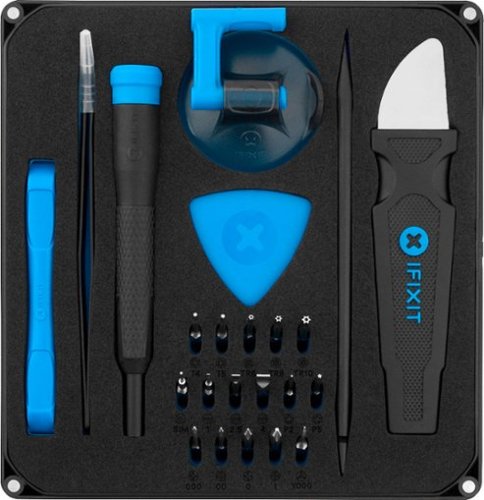
Complete electronics repairs quickly with this iFixit essential electronics toolkit. Opening picks, tweezers, six precision screwdriver bits and an assortment of small tools let you access and adjust device components. This iFixit essential electronics toolkit comes in a magnetized case with a built-in sorting tray for convenient containment of parts and supplies.
Customer Rating
4
Nice Kit - Has most stuff to work on laptops.
on December 25, 2020
Posted by: AMXs
Verified Purchase:Yes
Depending on what tools you already have, this will provide most tools to service a laptop. I needed a Torx 4 for an HP Spectre and since most of my computer tools are mix and match in a bag, using an old credit card as a prying tool, I figure I would invest in an all in one kit. I'm very pleased with this kit. The only thing missing is mechanical fingers. The one I have fits in this kit. I have a great need for them as I have difficulty holding the tiny screws and dropping them. With the mechanical fingers I attach the head of a screw and fit it down in the hole and start threading it then release and then tighten with a driver. It's not fun dropping a small screw in a laptop. So, iFixit please complete this great small kit with some mechanical fingers.
Length of ownership: 194
Mobile Submission: false
I would recommend this to a friend!
Ease of Use
5
Quality
5
Value
4
Share this review:


+1point
1of 1voted this as helpful.
AMXs's Review Comments
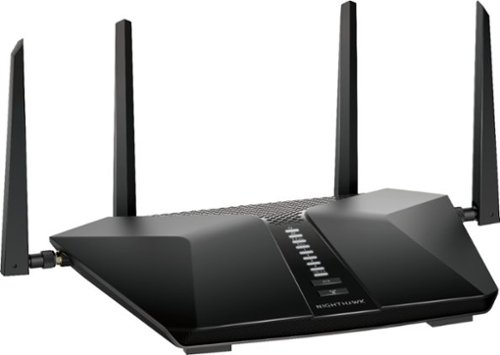
Built with the latest-generation Wi-Fi 6 technology, the NETGEAR Nighthawk AX6 6-stream AX5200 Wi-Fi router provides speeds up to 5.2 Gbps so you can connect, stream, and download faster to newer mobile devices. Powerful 1.5GHz triple-core processor ensures superior performance for concurrent real-time applications such as multimedia streaming, online gaming, and audio/video chats. Engineered to deliver up to four times the data capacity over previous standards, Wi-Fi 6 technology with OFDMA, 160MHz channel support, and 1024-QAM vastly improves network efficiency. High-power amplifiers increase range for reliable whole home network. This next-generation router is recommended for medium to large homes, suitable for up to 25 connected devices.
Overall 1 out of 5
1 out of 5Too Many Bugs
By AMXs
I saw the NETGEAR - Nighthawk AX5200 Dual-Band Wi-Fi Router at BB at half off for Black Friday Sale. Although I currently do not have an AX adapter, I figure this would be a great time to upgrade my current AC router (5-year-old Netgear AC1700 also purchased on Black Friday). I was concerned about some of the reviews regarding reliability and durability, but for this price I took a chance. Big mistake!
After installing the router and configuring the network I was very pleased how this router gave me more performance than the AC1700. Later my issues started. Web pages would take longer to load and other little things concerning speed. However, these issues were not consistent. I then found I could not configure QoS for my devices. Yesterday I spent the over 8hrs researching trying different troubleshooting steps. What is time consuming is EVERY little change requires the router to be rebooted.
I then gave up and called Netgear Support. I will say I was surprised my call was answered so quickly. The person helping me was polite, knowledgeable, and patient. After advising me I will have to reset my router, I was able to change priority by device in the QoS settings, but upon reboot the change did not hold. The tech then asked if I had Denial of Service (DOS) attacks listed in the router log. I had 6 DOS listings for about 4 hours. Again, we reset the router and this time I was able to change the priorities in the QoS and they held on restart. The tech then considered the case closed. The tech told me the DOS attacks can be fixed by my ISP and they need to re-provision my modem. I called and they did and when I restarted everything, my QoS settings were changed back and I could not change them again. I then check the log and saw over 10 DOS attacks just from boot-up. From research, I found out these attacks are apparently false positives and it is how the router handles webpages/cookies. Because of so many, they are affecting the routers performance. My download speed was always good, it’s just web pages were slow to load or would not load at all and I could not change the QoS settings for each device. When this issue then affected my email client and would not connect to any of my three email accounts, that was the end! If others may have issues with this unit, I hope my experience may help. While it’s normal to have a DOS attack once and a while, it’s not normal to have many in say an hour’s time and it can affect the router’s performance.
I gave up and reconnected my old AC1700 router. Wa-la, I was back up and running with no issues. I check the log and NO DOS attacks. No issues with QoS. The next day, at the time I am writing this review, there have been no DOS attacks listed.
I don’t know about you, but I seem to be seeing a lot of poor quality in computer electronics lately and not just Netgear. I will be returning this defective unit to BB. I hate to miss out on this deal, but I’m not willing to try another unit at this time. I wasted way too much time already in the two days of dealing with this router.
I don’t know about you, but I seem to be seeing a lot of poor quality in computer electronics lately and not just Netgear. I will be returning this defective unit to BB. I hate to miss out on this deal, but I’m not willing to try another unit at this time. I wasted way too much time already in the two days of dealing with this router.

AMXs
Update
November 23, 2020
Still wanting this router to work, I tried a second one. After initial setup with only one wired desktop, all seemed to be working without any DOS Attacks. I then updated the firmware (MISTAKE) and when the router restarted BAM, there were 2 DOS attacks right off the bat. I then restarted the router and now there were 5 more DOS attacks, one IP 3 times and that turned out to be Amazon. These are all "False Positives for some reason the router cannot distinguish, but yet all these DOS attacks affect the router's performance over time. As a note, my Nighthawk AC1750 router had NO DOS attacks in the two days between both AX5200 units.
I'm thinking the latest firmware 1.0.2.72 is the cause, but cannot verify. Unless you have an older firmware file saved there is no way I found in the settings to roll back to the previous firmware version. Netgear Support for this router only has the current firmware version to download and not any previous version. So, if you update and there is an issue, you are stuck with it until the next update; unless you can find a previous firmware file. Come on Netgear, at least keep the previous firmware versions available for download just in case. I have also returned this router as the AX5200 is not ready for prime time.
I'm thinking the latest firmware 1.0.2.72 is the cause, but cannot verify. Unless you have an older firmware file saved there is no way I found in the settings to roll back to the previous firmware version. Netgear Support for this router only has the current firmware version to download and not any previous version. So, if you update and there is an issue, you are stuck with it until the next update; unless you can find a previous firmware file. Come on Netgear, at least keep the previous firmware versions available for download just in case. I have also returned this router as the AX5200 is not ready for prime time.
+7points
7of 7voted this comment as helpful.

American car designer Carroll Shelby and driver Ken Miles battle corporate interference, the laws of physics and their own personal demons to build a revolutionary race car for Ford and challenge Ferrari at the 24 Hours of Le Mans in 1966.
Overall1 out of 5
1 out of 5Excellent film. Learned a lot.
By Harpo
I have always followed auto racing and to see a film that tells the story about Carrol Shelby and building race cars was great.
AMXs
Your Title Does Not Support Your Rating
December 26, 2020
Why a 1 Star rating; the lowest for a poor movie? Your title and comments infer you liked the movie and one would think you would at least give it a 3 + Star rating
0points
0of 0voted this comment as helpful.
Edge ahead of the pack with this MSI Stealth gaming laptop. The NVIDIA GeForce RTX 3070 graphics card delivers stutter-free, paired with QHD 240hz refresh 3ms screen for fluid gameplay, while the Intel Core i9 processor and 32GB of RAM power through resource-intensive titles. Featuring a 1TB SSD, this MSI Stealth gaming laptop offers ample storage for your files and ultrafast startups.
Overall5 out of 5
5 out of 5Great Features and Specs for the price
By AMXs
I have now had this unit for four weeks and put it through its paces. I am very pleased with its overall performance. I have had no issues. The only down side of this unit is its reduced power to the CPU and GPU. This has to be done to control the heat in the thin format. More power more heat equals a bigger, heavier, and more expensive unit. Although, this unit is not the fastest or the best, you cannot beat the "bang for the buck". It will play AAA games. If you want to do better for the same configuration you will pay about $1K more; that’s if you can find one and not have to wait forever to get it with today’s supply and shipping issues.
I am coming from a 5-year-old Alienware 17 r3 4K UHD 60Hz laptop. I do not do a lot of gaming, but do video and photo processing. I first got the MSI FHD 360Hz unit on sale for $200 less than this one. I wanted the QHD screen but it was out of stock, unknown when it may be available. I was not pleased with the FHD 360Hz panel. Overall, this panel is OK if you want speed. Check out YouTube for gaming speeds. People have complained about the light bleed, but it is no worse than my Alienware. Every LED/LCD panel has light bleed. If you are in a dark room with a black/blank screen you will see it along the edges. In everyday use it is not noticeable; period. I found the MSI panel’s out of the box color calibration to be right on with my Alienware calibrated panel. However, the brightness of the FHD 360Hz panel is a lot dimmer. Same photo on the Alienware (400 nit) I set at a Windows brightness of 50. The MSI (FHD 300 nit) has to be set at 90 to achieve the same brightness. This is in a bright room. For most, this brightness level will be sufficient. But outdoors the MSI FHD panel will fall short. I found I was spoiled by the 4K screen when it comes to graphics. Gaming and watching a movie, the FHD screen is fine. Although I like the MSI FHD 360Hz unit overall, I returned it and decided to wait for a 4K UHD or a 2K QHD unit.
Best Buy got the MSI QHD unit back in stock and I jumped on it. The difference between the FHD 360Hz and the QHD 240Hz is like night and day. The QHD panel is brighter and sharper. When comparing with the Alienware 4K it is right on par. The same picture with the Alienware at 50 brightness, the MSI QHD is at 60. The 2K QHD resolution actually is just fine for my photo and graphic work. Don’t get me wrong, 4K is better if you require it, but I found that this QHD is perfect for my needs. It’s cheaper and less battery drain than a 4K. I found it just as nice on 17” as 4K and it seems to hit the “Sweet Spot” for gamers and photo/video/graphic processors. The brightness and sharpness of the panel is paramount to me. If you want speed and plan on using the laptop inside with normal to low light then the FHD panel is it. But for me the difference of 360Hz to 240Hz is nominal and I want the brighter and sharper image over the little difference of speed.
Heat is an issue with any laptop and especially with gaming laptops. I have a video conversion process I do with proprietary software and it is intense on the CPU and GPU. I’m now working with 4K and the old Alienware can no longer keep up. I found with this unit set in Extreme Performance Mode with GPU set to discrete and GPU over clocked without Cooler Boost turned on, my CPU was running as high as 95c. Turning on cooler boost lowered the CPU to 85C and lower. The GPU ran cool at 75-80c. The fans are running at 6,000 RPM with Cooler Boost and do produce noise, but they are still quieter than a lot of other gaming laptops at max fans. It is no louder than my Alienware when its fans are maxed out. Since my process is automated and takes several hours, I just walk away once I’m satisfied CPU/GPU temps are stable. I found for everyday use and even lighter graphic processing that the Balanced mode works just fine with less fan noise at up to 3,000 RPM with acceptable CPU/GPU temps, or mostly no fan noise for general office work.
MSI GS76 Stealth 11UG-232 QHD Pros and Cons:
Pro: Best bang for the buck for the specs.
Bright, sharp, and fast QHD panel
i9 11th gen mobile CPU
Nvidia RTX 3070 mobile GPU
1TB NVMe PCIe M.2 Gen 4x4 SSD - Second M.2 Gen 3x4 SSD slot available.
32GB RAM – which is more than enough.
Mux switch for the discrete Nvidia GPU
Per Key RGB keyboard
Quiet fans compared to other gaming laptops. All gaming laptops will have fan noise!
Latest generation ports (HDMI is still only 2.1 and not 2.2)
Full Size SD Card Slot, not micro size
AX-6e 2x2 Wi-Fi that can do 6GHz, 5GHz, and 2.4GHz with an AX-6e Network/Router
Number keypad. With disappearing number pads these days, MSI did good for a thin laptop.
Small and light for a 17” laptop. Easy to carry for work and play. Looks like any other work laptop on the outside (Stealth) without all the gaudy lights some gaming laptops have.
I am coming from a 5-year-old Alienware 17 r3 4K UHD 60Hz laptop. I do not do a lot of gaming, but do video and photo processing. I first got the MSI FHD 360Hz unit on sale for $200 less than this one. I wanted the QHD screen but it was out of stock, unknown when it may be available. I was not pleased with the FHD 360Hz panel. Overall, this panel is OK if you want speed. Check out YouTube for gaming speeds. People have complained about the light bleed, but it is no worse than my Alienware. Every LED/LCD panel has light bleed. If you are in a dark room with a black/blank screen you will see it along the edges. In everyday use it is not noticeable; period. I found the MSI panel’s out of the box color calibration to be right on with my Alienware calibrated panel. However, the brightness of the FHD 360Hz panel is a lot dimmer. Same photo on the Alienware (400 nit) I set at a Windows brightness of 50. The MSI (FHD 300 nit) has to be set at 90 to achieve the same brightness. This is in a bright room. For most, this brightness level will be sufficient. But outdoors the MSI FHD panel will fall short. I found I was spoiled by the 4K screen when it comes to graphics. Gaming and watching a movie, the FHD screen is fine. Although I like the MSI FHD 360Hz unit overall, I returned it and decided to wait for a 4K UHD or a 2K QHD unit.
Best Buy got the MSI QHD unit back in stock and I jumped on it. The difference between the FHD 360Hz and the QHD 240Hz is like night and day. The QHD panel is brighter and sharper. When comparing with the Alienware 4K it is right on par. The same picture with the Alienware at 50 brightness, the MSI QHD is at 60. The 2K QHD resolution actually is just fine for my photo and graphic work. Don’t get me wrong, 4K is better if you require it, but I found that this QHD is perfect for my needs. It’s cheaper and less battery drain than a 4K. I found it just as nice on 17” as 4K and it seems to hit the “Sweet Spot” for gamers and photo/video/graphic processors. The brightness and sharpness of the panel is paramount to me. If you want speed and plan on using the laptop inside with normal to low light then the FHD panel is it. But for me the difference of 360Hz to 240Hz is nominal and I want the brighter and sharper image over the little difference of speed.
Heat is an issue with any laptop and especially with gaming laptops. I have a video conversion process I do with proprietary software and it is intense on the CPU and GPU. I’m now working with 4K and the old Alienware can no longer keep up. I found with this unit set in Extreme Performance Mode with GPU set to discrete and GPU over clocked without Cooler Boost turned on, my CPU was running as high as 95c. Turning on cooler boost lowered the CPU to 85C and lower. The GPU ran cool at 75-80c. The fans are running at 6,000 RPM with Cooler Boost and do produce noise, but they are still quieter than a lot of other gaming laptops at max fans. It is no louder than my Alienware when its fans are maxed out. Since my process is automated and takes several hours, I just walk away once I’m satisfied CPU/GPU temps are stable. I found for everyday use and even lighter graphic processing that the Balanced mode works just fine with less fan noise at up to 3,000 RPM with acceptable CPU/GPU temps, or mostly no fan noise for general office work.
MSI GS76 Stealth 11UG-232 QHD Pros and Cons:
Pro: Best bang for the buck for the specs.
Bright, sharp, and fast QHD panel
i9 11th gen mobile CPU
Nvidia RTX 3070 mobile GPU
1TB NVMe PCIe M.2 Gen 4x4 SSD - Second M.2 Gen 3x4 SSD slot available.
32GB RAM – which is more than enough.
Mux switch for the discrete Nvidia GPU
Per Key RGB keyboard
Quiet fans compared to other gaming laptops. All gaming laptops will have fan noise!
Latest generation ports (HDMI is still only 2.1 and not 2.2)
Full Size SD Card Slot, not micro size
AX-6e 2x2 Wi-Fi that can do 6GHz, 5GHz, and 2.4GHz with an AX-6e Network/Router
Number keypad. With disappearing number pads these days, MSI did good for a thin laptop.
Small and light for a 17” laptop. Easy to carry for work and play. Looks like any other work laptop on the outside (Stealth) without all the gaudy lights some gaming laptops have.
Con: Low power CPU/GPU – only 95W to GPU that could handle up to 140W, although too hot for this design. The GE Raider has more power, but is bigger, heavier, and costs more for same specs.
Inverted Motherboard – RAM access requires removal of motherboard. At 32GB there should be no need for more RAM
Keyboard Fonts – Took me some time getting used to compared to a standard keyboard font.
Function Key on right side – Why? You will get used to it.
Internal speakers OK for office work, but not for movies or music.
Right side ports too far front, device cables can get in way of mouse for right handers. Same on left side for lefties.
Inverted Motherboard – RAM access requires removal of motherboard. At 32GB there should be no need for more RAM
Keyboard Fonts – Took me some time getting used to compared to a standard keyboard font.
Function Key on right side – Why? You will get used to it.
Internal speakers OK for office work, but not for movies or music.
Right side ports too far front, device cables can get in way of mouse for right handers. Same on left side for lefties.
I find this laptop to have the best features/specs for the price. MSI quality control seems to very good compared to the last two Alienware laptops I tried in the last two years. Both were returned for motherboard issues. So far, this MSI has handled everything I have thrown at it.
Laptops are personal and subjective. Everyone has different needs. Do your research and know what you are buying. Fan noise is inevitable with any performance gaming laptop and even desktops. It is the nature of the beast. I think MSI has done well with the fans on this unit and they are as quiet as can be. Best Buy has a great return policy. Just be sure to evaluate and return in the allotted time period should you find you do not like your purchase.
FYI, my MSI came with Window 10 “20H2” and not the latest Windows 10 “21H1”. I did update to Windows 11 when offered by Windows update and it went smooth. It kept most my Windows settings, but I did find a few that were changed.
Should anything happen to change my opinion/rating of this unit I will update this review.
Laptops are personal and subjective. Everyone has different needs. Do your research and know what you are buying. Fan noise is inevitable with any performance gaming laptop and even desktops. It is the nature of the beast. I think MSI has done well with the fans on this unit and they are as quiet as can be. Best Buy has a great return policy. Just be sure to evaluate and return in the allotted time period should you find you do not like your purchase.
FYI, my MSI came with Window 10 “20H2” and not the latest Windows 10 “21H1”. I did update to Windows 11 when offered by Windows update and it went smooth. It kept most my Windows settings, but I did find a few that were changed.
Should anything happen to change my opinion/rating of this unit I will update this review.
AMXs
UPDATE: Still going strong - 2 Notes of interest
December 3, 2021
I found if I was playing MS Solitaire Collection fan #1 would pulse, 5 seconds on 5 seconds off round 2500 rpm. Noise overall is not an issue if it was a steady speed, but the pulsing becomes irritating in a quiet room. Changing fan settings did not help, nor did "Silent" mode setting in the MSI Center help. It seems the CPU temps would fluctuate around 57c to 62c just enough to cause the fan to turn off and on. Not sure why the fan temp settings or Silent mode did not address the issue, but I did find a solution. Monitor Refresh Rate. I read about Windows 11 planning on a new feature called Dynamic Refresh Rate to reduce power consumption. Right now the default 240Hz panel refresh rate can only be set at a static max 240 or min 60. When Windows 11 updates to Dynamic Refresh it will set the refresh rate anywhere between the min and max as needed. Since I do not game a lot I find that 60Hz works for most of my needs and I will change to 240Hz as needed. I can only assume the 60Hz requires less power thus less heat on the system. Regardless as to why, changing to 60hz stopped fan #1 pulsing. It does not turn on at all any more while playing MS Solitaire Collection. CPU Temp now running 47c to 57c.
MSI Update Process is not as simple as HP or Dell. Hopefully those who buy gaming computers are not newbies to computer file systems. There is no automated app that will check for updates, download, and install them. In the MSI Center there is a Support Tab that has a "Live Update" feature. I found that it always seems to not recognize one random install even though the driver is updated and installed. When you do the live update it will find any updates on the MSI server for your system. You have to select the update and download it, but it will not install it for you. If you are running Windows 11 you should verify the driver is for Windows 11. I found when I updated the Intel GPU driver MSI Live Update was only offering the Windows 10 update and not the Windows 11 version even though I have Windows 11 installed and the MSI Center is the latest version. Because of the inconsistencies, I just go to the MSI support website and get my updates there. Also, all updates are provided in a .ZIP file that has to be uncompressed first. I have found that a lot of MSI's updates recently are provided without a Setup, Install, or other .EXE file. You have to install from a .INF file or multiple .INF files. If this is new to you you may find it difficult. Another surprise is the BIOS update process. HP and Dell both use a Windows .EXE file and it is a simple process just follow the onscreen prompts. MSI requires the use of a flash drive. It is best to use a flash drive to update the BIOS as it is a more direct way and less chance of errors. If this is new to you then you can find the instructions on MSI web site. NOTE: the instructions do not mention this, be sure your flash drive is formatted in FAT32 as it will not be recognized by the BIOS in any other format. Also, unlike HP and Dell, when MSI updates a driver it deletes the old driver off their site.
MSI Update Process is not as simple as HP or Dell. Hopefully those who buy gaming computers are not newbies to computer file systems. There is no automated app that will check for updates, download, and install them. In the MSI Center there is a Support Tab that has a "Live Update" feature. I found that it always seems to not recognize one random install even though the driver is updated and installed. When you do the live update it will find any updates on the MSI server for your system. You have to select the update and download it, but it will not install it for you. If you are running Windows 11 you should verify the driver is for Windows 11. I found when I updated the Intel GPU driver MSI Live Update was only offering the Windows 10 update and not the Windows 11 version even though I have Windows 11 installed and the MSI Center is the latest version. Because of the inconsistencies, I just go to the MSI support website and get my updates there. Also, all updates are provided in a .ZIP file that has to be uncompressed first. I have found that a lot of MSI's updates recently are provided without a Setup, Install, or other .EXE file. You have to install from a .INF file or multiple .INF files. If this is new to you you may find it difficult. Another surprise is the BIOS update process. HP and Dell both use a Windows .EXE file and it is a simple process just follow the onscreen prompts. MSI requires the use of a flash drive. It is best to use a flash drive to update the BIOS as it is a more direct way and less chance of errors. If this is new to you then you can find the instructions on MSI web site. NOTE: the instructions do not mention this, be sure your flash drive is formatted in FAT32 as it will not be recognized by the BIOS in any other format. Also, unlike HP and Dell, when MSI updates a driver it deletes the old driver off their site.
As I have said, this laptop to me is still the "best bang for the buck". 5 weeks in and I am still quite satisfied with it. Other than my fan pulsing (fixed) its worked like a champ. And now it is $100 off. For those like me that paid full price, I got BB to price match mine. Hopefully, you can catch the deal before it is gone. Good luck
+12points
12of 12voted this comment as helpful.

Meet the ultimate streaming player, Roku Ultra. It~s the fastest and most powerful Roku player ever, with channels like Sling, Hulu, Netflix, Disney+, Prime Video, and HBO Max and that launch in a snap and a lightning-fast interface. Bring out the rich detail in your entertainment with stunningly sharp 4K picture, four times the resolution of HD. Immerse yourself in three-dimensional sound when you combine this Roku streaming device with Dolby Atmos~ audio, and watch in awe as colors pop off your screen with spectacular Dolby Vision~ picture. Streaming in the highest picture quality requires a strong, steady Wi-Fi~ connection, especially in rooms farther from your router. That~s why we boosted our best Wi-Fi in this Roku 4K device with even more speed and range, so you can enjoy fast, uninterrupted TV streaming in any room in your home. Use the Roku voice remote to easily search across thousands of channels with your voice, enjoy private listening with included headphones, power up your TV, and set personal shortcuts for your favorite channels~there~s even a lost remote finder. Your favorite channels are front and center on the customizable home screen, so you can spend your time streaming~not scrolling. After a simple setup with everything you need in the box, you~ll be able to stream a massive selection of free, live, and premium TV, including Roku~ Originals only on The Roku Channel. This Roku Ultra also works with popular voice assistants. Ask Alexa or Hey Google to control your streaming, launch channels, search for entertainment, and more. You can also control your TV using the Apple Home app or Siri on your Apple devices.
Overall5 out of 5
5 out of 5Good Streaming Device for Dolby Vision
By AMXs
I wanted Dolby Vision capability for my Home Theater setup. This version is similar to the previous version, but with better specs. I have 2 other ROKU devices and they all works great as long as the apps support it. Right now Paramount+ says it supports DV and DA, but on ROKU all you get is 1080p not HDR/DA and Dolby Direct sound, no Atmos. It's the blame game, paramount blames ROKU and ROKU blames Paramount. The customer is caught in the middle. However, Disney +, Netflix, and Prime apps work great and give you what they say.
AMXs
Update
May 28, 2022
Paramount + and ROKU have worked out their issue and now all content Paramount + gives in 4K Dolby Vision/Dolby Atmos plays via ROKU Ultra with OS v. 11
0points
0of 0voted this comment as helpful.
![Top Gun: Maverick - 4K Blu-Ray [4K Ultra HD Blu-ray]](https://pisces.bbystatic.com/prescaled/500/500/image2/BestBuy_US/images/products/1611259c-fe74-4e90-8401-0c3ea0e6470e.jpg)
After more than thirty years of service as a top naval aviator, Pete InchMaverickInch Mitchell (Tom Cruise) is where he belongs, pushing the envelope as a courageous test pilot. Yet, Maverick must confront the ghosts of his past when he returns to TOPGUN to train a group of elite graduates and comes face to face with Lt. Bradshaw (Miles Teller), the son of his former wingman InchGooseInch. Bitter rivalries ignite as the pilots prepare for a specialized mission which will require the ultimate sacrifice from those chosen to fly it.
Overall3 out of 5
3 out of 5To bad
By MichaelH
dvd kept freezing on two players took it back was told it was past 14 days so to bad . Great movie just buy it where you get good customer service.
AMXs
Fix for New 4K DVD's That Hang/Freeze
July 23, 2023
Hello MichaelH, I have found when 4K DVD's freeze it is because of a light oily type film from manufacture process that is almost invisible. Wash the DVD by hand with a drop of Dawn dish soap.Handle with care not to rub too hard with your fingers. Wash both sides of the DVD. Then pat dry with a micro-fiber towel; do not rub. Lint is your enemy, so do not use a regular towel. Then use a clean glasses grade cleaning cloth to lightly buff out any visible residue. I have had many Triple layer 4K DVD's hang around the 1:20+ mark. After the above process my DVD's no longer hang. Hope this works for you. AMX
0points
0of 0voted this comment as helpful.
AMXs's Questions

SLIM,SHARP,STYLISH. Stealth 18 AI Studio is the full evolution for coming era. Born for AI, design and performance. A mighty combination for gaming, business and creativity. Succeed in whatever you strive for, no matter where you go.
How many SSD Nvme Slots? MSI specs are vague on this only saying this model has a 1TB Gen 4 SSD. If more than one, is one a Gen 5 and one Gen 4 or are both Gen4? Also are they 2280 length?
1 year, 8 months ago
by
AMXs
SLIM,SHARP,STYLISH. Stealth 18 AI Studio is the full evolution for coming era. Born for AI, design and performance. A mighty combination for gaming, business and creativity. Succeed in whatever you strive for, no matter where you go.
What is the actual aspect ratio of the UHD 18" screen? MSI says 16:9, yet they say the resolution is 3840x2400 which is 16:10. Best Buy specs say resolution is 3840x2560 which totally wrong. Can someone who actually has this unit advise?
1 year, 8 months ago
by
AMXs
Edge ahead of the pack with this MSI Stealth gaming laptop. The NVIDIA GeForce RTX 3070 graphics card delivers stutter-free, paired with QHD 240hz refresh 3ms screen for fluid gameplay, while the Intel Core i9 processor and 32GB of RAM power through resource-intensive titles. Featuring a 1TB SSD, this MSI Stealth gaming laptop offers ample storage for your files and ultrafast startups.
What is the brightness of QHD 240hz screen in nits ?
I think it is rated at 300 nits like the FHD panel. I have this unit and it is brighter than the FHD panel. The FHD 360Hz panel is rated at 300 nits however a review on youtube says it was about 288 nits when tested. I originally got the FHD unit and did not like the panel. I have a 5yr old calibrated 400 nit UHD Alienware 17m R3 and it is rated at 400 nit. My normal brightness with Windows 10 is at 40 in a well lit room and the FHD MSI is at 80 for the same brightness in the same room. This QHD 240Hz panel is at 51 for the same brightness. So, I am guessing from experience the QHD panel is a 400 nit panel and like the 300 nit panel is probably rating around 350-375 nit. The QHD unit for the same price as the FHD is the way to go. It's the best of both worlds, fast enough for gaming and enough resolution for photo/video work. Also, the color accuracy out of the box of these MSI panels are spot on when set to the Adobe RGB in the MSI True Color app. Unless you are into critical photo work, this panel does not need to be calibrated any further.
4 years, 7 months ago
by
AMXs
Edge ahead of the pack with this MSI Stealth gaming laptop. The NVIDIA GeForce RTX 3070 graphics card delivers stutter-free, paired with QHD 240hz refresh 3ms screen for fluid gameplay, while the Intel Core i9 processor and 32GB of RAM power through resource-intensive titles. Featuring a 1TB SSD, this MSI Stealth gaming laptop offers ample storage for your files and ultrafast startups.
how many memory slots used for the 32gb ram? are all the (2) m2 slots used?
As Shannon says, it has 2 slots with 16GB DDR4 3200MHz RAM. The fly in this ointment is the RAM slots are on the underside of the motherboard requiring the MOBO to be removed to access the RAM slots. Fortunately, this is better than others that solder the RAM on the MOBO. The Caveat is 32GB is more than most will ever require for anything, even MS Flight Simulator. As for the M.2 SSD slots, Shannon mentioned PCIe 3x4. This is the second M.2 SSD slot. This unit comes with 1GB NVMe SSD 4x4 in the main slot which is PCIe 4x4.
4 years, 7 months ago
by
AMXs
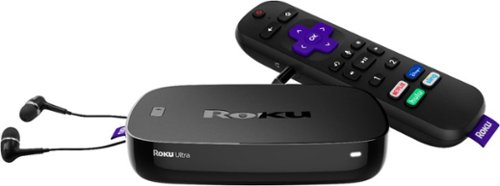
Watch free or paid content over the Internet in 4K resolution with this Roku Ultra TV streaming player. The dual-band channel supports wireless streaming, while the enhanced voice remote enables hands-free operation and lets you create personal shortcut buttons. This Roku Ultra HD TV streaming player includes JBL headphones to enjoy your content privately and an Ethernet port for a wired connection.
Can I transfer Or duplicate app accountS info from older Model?
No. All Streaming services will see the New Roku as a New Device and will require a new login. You can use your same login on the new Roku, but there is no way to import your app account info that I know of.
6 years, 1 month ago
by
AMXs
Watch free or paid content over the Internet in 4K resolution with this Roku Ultra TV streaming player. The dual-band channel supports wireless streaming, while the enhanced voice remote enables hands-free operation and lets you create personal shortcut buttons. This Roku Ultra HD TV streaming player includes JBL headphones to enjoy your content privately and an Ethernet port for a wired connection.
Watch free or paid content over the Internet in 4K resolution with this Roku Ultra TV streaming player. The dual-band channel supports wireless streaming, while the enhanced voice remote enables hands-free operation and lets you create personal shortcut buttons. This Roku Ultra HD TV streaming player includes JBL headphones to enjoy your content privately and an Ethernet port for a wired connection.