
Share Fourthhokage82's profile


Fourthhokage82
Fourthhokage82's stats
- Review count103
- Helpfulness votes4
- First reviewJuly 22, 2018
- Last reviewJanuary 8, 2024
- Featured reviews0
- Average rating4.9
Reviews comments
- Review comment count0
- Helpfulness votes0
- First review commentNone
- Last review commentNone
- Featured review comments0
Questions
- Question count0
- Helpfulness votes0
- First questionNone
- Last questionNone
- Featured questions0
- Answer count3
- Helpfulness votes0
- First answerDecember 20, 2018
- Last answerAugust 24, 2021
- Featured answers0
- Best answers0
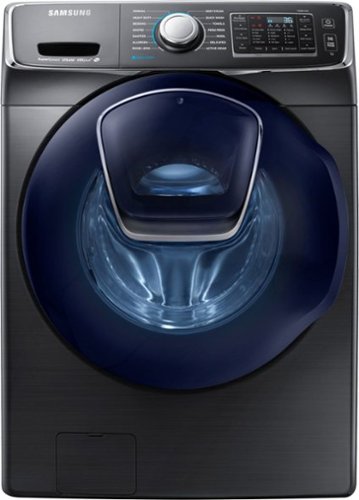
Use a washer you can trust. This Samsung appliance is gentle on clothes and tough on dirt, stains and bacteria. Plus, it has the room and speed to get more laundry done in less time.
Customer Rating

5
Awsome
on October 5, 2018
Posted by: Fourthhokage82
Verified Purchase:Yes
I really got to say that this is the best washer I’ve ever owned. Enough for 2-3 basket wash each load is mind boggling. I highly recommend this product to anyone.
Mobile Submission: True
I would recommend this to a friend!
Share this review:


0points
0of 0voted this as helpful.
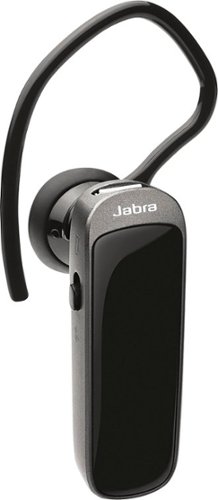
Enjoy wireless productivity with this Jabra mini Bluetooth headset. The sleek design slips over the outside of the ear and has a range of 98 feet, so you can field business calls wherever the day takes you. The hands-free technology behind this Jabra mini Bluetooth headset ensures excellent sound quality.
Customer Rating
5
Nice
on August 21, 2018
Posted by: Fourthhokage82
Verified Purchase:Yes
A very nice low pro file Bluetooth headset that’s well worth the money. I’m now able to talk on the phone or listen to music handfree. I highly recommend this product to anyone.
Mobile Submission: True
I would recommend this to a friend!
Share this review:


0points
0of 0voted this as helpful.
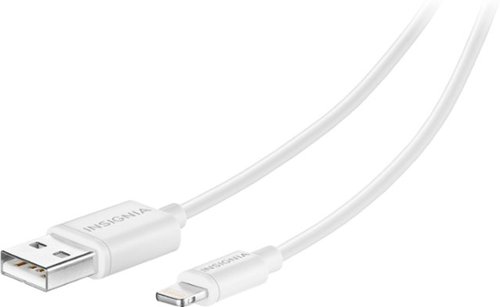
Designed for use with most Apple~ iPhone~, iPad~ and iPod~ models with a Lightning connector, this Insignia~ NS-A5SCW 4' Lightning cable makes it easy to charge and sync your devices.
Customer Rating
5
Awsome
on July 22, 2018
Posted by: Fourthhokage82
Verified Purchase:Yes
Always nice to have an extra cable charger around. This product works as good as the original apple product. I highly recommend to everyone.
Mobile Submission: True
I would recommend this to a friend!
Share this review:


0points
0of 0voted this as helpful.
Fourthhokage82's Review Comments
Fourthhokage82 has not submitted comments on any reviews.
Fourthhokage82's Questions
Fourthhokage82 has not submitted any questions.
Fourthhokage82's Answers
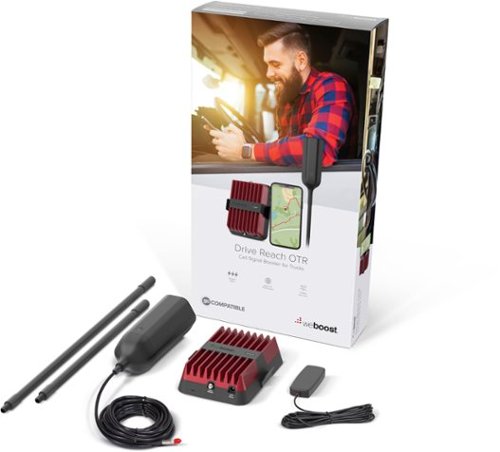
Do you experience slow internet speeds, dropped calls, and the inability to send and receive texts while you~re on the road? With the weBoost Drive Reach OTR, you can improve your cell signal, wherever work (or play) takes you. Designed to enhance signal coverage for trucks and OTRs, especially in remote areas. The weBoost Drive Reach OTR uses the latest technology to pick up an existing cell signal, route it the booster, then broadcast that amplified signal into your truck~s cab. To install the Drive Reach OTR, first select where to mount the outside antenna. This is the most important step as it determines the performance of your booster. Check that the antenna is at least 12 inches from all other antennas and openings to avoid interference. The antenna can be secured using the included 3-way mount on a rack or mirror arm. Use the modular mast extensions to ensure the right height for your antenna, from 7.5 to 40 inches. Once the outside antenna is installed, run the coax cable behind the weather stripping of an opening into your cab. Next, mount the inside antenna by using the adhesive strips to attach it to the dash or a seat. We recommend keeping the inside antenna at least 12 inches away from where you~ll most often use your phone. Then run the coax cable to the booster. Plugin both the outside and inside cables. Now, plug in the power cord to the booster. Finally, plug the power adapter into your vehicle~s power supply and turn on the booster. When the green light is on, it~s working. All coax cable needed for installation is provided. Stay connected, wherever work or play takes you, with the weBoost Drive Reach OTR Cellular Signal Booster!
I want to attach this device on my 5th wheel trailer to boost my cell phone signal. How high does it need to be above the roof line?
Normally the higher the better. That’s just the norm of any antennas. Anyways, since the 5th wheel trailer is so high up there already, the Weboost antenna comes in three different/length standing mounts. For example, you can have the antenna standing short, medium, or tall height. Depends on your need. For you since it’s going on the trailer, I would mount the short stand and it should pickup really good signal. The short stand will be sticking up above the trailer about a foot to a foot 1/2. Hope this helps.
4 years, 9 months ago
by
Fourthhokage82
Do you experience slow internet speeds, dropped calls, and the inability to send and receive texts while you~re on the road? With the weBoost Drive Reach OTR, you can improve your cell signal, wherever work (or play) takes you. Designed to enhance signal coverage for trucks and OTRs, especially in remote areas. The weBoost Drive Reach OTR uses the latest technology to pick up an existing cell signal, route it the booster, then broadcast that amplified signal into your truck~s cab. To install the Drive Reach OTR, first select where to mount the outside antenna. This is the most important step as it determines the performance of your booster. Check that the antenna is at least 12 inches from all other antennas and openings to avoid interference. The antenna can be secured using the included 3-way mount on a rack or mirror arm. Use the modular mast extensions to ensure the right height for your antenna, from 7.5 to 40 inches. Once the outside antenna is installed, run the coax cable behind the weather stripping of an opening into your cab. Next, mount the inside antenna by using the adhesive strips to attach it to the dash or a seat. We recommend keeping the inside antenna at least 12 inches away from where you~ll most often use your phone. Then run the coax cable to the booster. Plugin both the outside and inside cables. Now, plug in the power cord to the booster. Finally, plug the power adapter into your vehicle~s power supply and turn on the booster. When the green light is on, it~s working. All coax cable needed for installation is provided. Stay connected, wherever work or play takes you, with the weBoost Drive Reach OTR Cellular Signal Booster!
Does it come with a mount for the extended antenna?
Yes it comes with a mount with 3 differ t length of antenna stand as well. You can either mount it low, medium or high up depending on your need. The three piece antenna stick mounts together into one piece or interchangeable into 3 different height. Hope that helps.
5 years, 2 months ago
by
Fourthhokage82
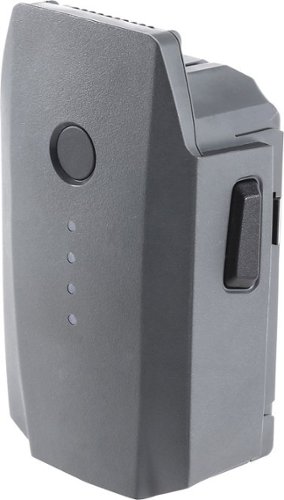
Provide reliable backup power to your Mavic drone with this DJI Intelligent Flight battery. It's packed with 3830 mAh/11.4V of power, and it's rechargeable with the Mavic battery charger or charging hub. The built-in sensors and LED indicators let you know the power status of this DJI Intelligent Flight battery.