MnstrMike
Top 250 Contributor
MnstrMike's Stats
- Review Count169
- Helpfulness Votes890
- First ReviewAugust 5, 2011
- Last ReviewSeptember 2, 2026
- Featured Reviews0
- Average Rating4.1
Reviews Comments
- Review Comment Count2
- Helpfulness Votes5
- First Review CommentNovember 26, 2015
- Last Review CommentJune 18, 2017
- Featured Review Comments0
Questions
- Question Count0
- Helpfulness Votes0
- First QuestionNone
- Last QuestionNone
- Featured Questions0
- Answer Count41
- Helpfulness Votes48
- First AnswerNovember 22, 2010
- Last AnswerDecember 8, 2021
- Featured Answers0
- Best Answers5
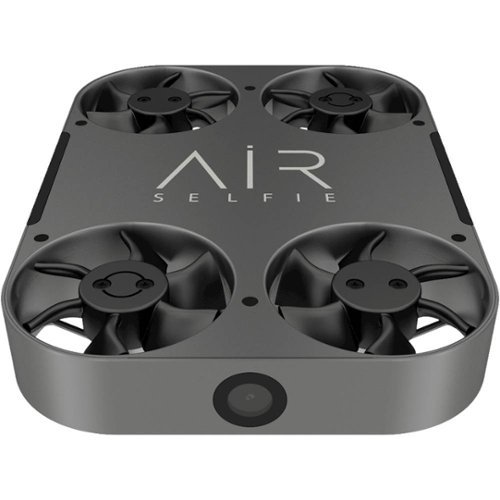
AirSelfie - AirSelfie2 Drone - Silver
Capture your biggest adventures with this AirSelfie2 portable drone with leather carrying case. This drone records 1080p Full HD and features a 12MP still camera for high-quality results, and the compact size makes it easy to take this drone with you when traveling. Featuring a vibration-absorber system and multiple sensors, this AirSelfie2 portable drone records clear, blur-free images.Fly Responsibly:Before takeoff, update all software and firmware, and read the instructions thoroughly.See the FAA website for registration requirements and information about flying a drone safely: https://www.faa.gov/uas/getting_started/. Additional state or local requirements may apply. Check your local jurisdiction. The following websites may help you make informed decisions about flying your drone: www.knowbeforeyoufly.org and www.modelaircraft.org.
Zero rating is not an option
Customer Rating

1.0
Using with OnePlus 5T, no custom ROMs on Android 8.1.0 and latest software updates as of writing.
Out of the box it did an update, so cannot comment on previous Firmware version.
Obviously this is a niche device, I was hoping for it to make the one-handed, family holidays and event selfie taking less of a chore to get everyone in the photo. However after the first 5 minute run (pretty darn short), I've got a nice headache from the whir of the drone, very high pitch.
Photo/Video: It won't save photos or videos. It is supposed to save the photos directly to the 16GB built into the drone and then transfers to the phone wirelessly. However, it won't show them in the App...NO FILES is displayed in each folder section in The Gallery. The Gallery is a bit confusing too with the folder menu, options are: Device Photo, Device Video, Local Photo, Local Video. I'm assuming Device = Drone, Local = Phone...so why not just say that?
I also had it set to take 3 Multiple shots, I'm not 100% sure if it did or not since I couldn't see them. I also had 3 second delay set (off, 3s, 5s, only options) and it only ran the 3 second timer once, so again not sure if it supposed to do it multiple times or just once and take 3 burst shots?
Flight: If you are used to drone flying the concept won't have much of a learning curve for you, however, what may be a learning curve is if its you or the drone flying? This thing is going rouge on me. It has 3 options for control/launch: Easy, Medium, Expert. I couldn't get the device to lift in Expert mode. Most of the time in Easy or Medium it either went straight to the ceiling or to the floor. A few times though it did it properly I could control it just fine. The speed settings are slow, medium, fast. Honestly it felt like this thing when flying auto was on fast the whole time.
When it was hovering, it was slowly drifting, so not sure this is any better than my outstretched arm.
Battery Life: 5 minutes...You will need an powerbank if you actually plan to use this. For an extra fee you can purchase a 15,000mah power bank, but its proprietary and only works with the drone. For what they are charging for the drone, it should be included. Even so, you can find others for cheaper or close to the same price with larger capacity, and they work with other devices...that's the main point here. What they are charging is not so bad, but it is a sleeve for the drone.
I do like the app has many options to change settings for the drone and the user manual is present and legible. There is a short video tutorial as well.
Functionality: Indoor or Outdoor, which is it? If you watch the video tutorial it says not for outside use. If you read marketing material and instruction manual it says no wind or bad weather. However, every promotional photo are ALL outside! So, tell us, does it void the warranty if used outside or not? Please make up your mind and get back to me.
If all the photos are outside, does it do a bad job of inside photos?
I'll update this review once I get a new unit as I am pretty sure this one is defective (or its all firmware?). For now, I guess twiddle your thumbs, don't know of another drone marketing to this category of Pocket Selfies. There are plenty of cheap drones with tiny cameras but none marketing with high quality optics that may end up on a wall.
No, I would not recommend this to a friend.
Mobile Submission: False
0points
0out of 0found this review helpful.
Share this review:


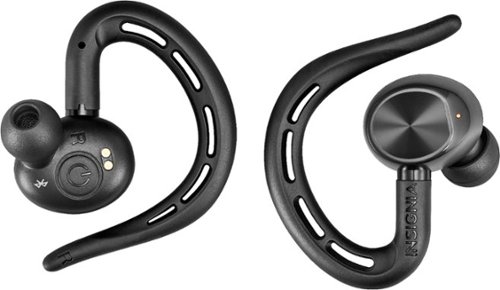
Insignia - True Wireless In-Ear Headphones - Black
Ditch the headphone cable with these Insignia Bluetooth wireless earbuds. With up to five hours of use per charge and an included charging case for mid-day boosts, these earbuds are ideal for daily use. These Insignia Bluetooth wireless earbuds feature a built-in microphone for hands-free calling and easy voice commands.
True Wireless, but keep the phone close!
Customer Rating
1.0
I cannot recommend given the cost and other options available. Read on to see what it does do well, and why the low review.
Sound is great! Cannot fault it!
Fit...pretty good, a little heavy/bulky feeling. I found the best way to get the on the ear is to "screw" them on by putting the bottom of the clip at the top of the ear and then rotating down behind the ear and sliding the bud into the ear. It comes with other bud tips and I definitely needed the smaller size.
Battery life while it seems low, honestly after about 2 hours you would be ready to remove them. They have some bulk behind them. However, with the battery case able to charge at least a full two times, You could easily get through the week with only charging the battery case once. The battery case is hard and sturdy, so throw it in the bag and don't worry about it getting crushed. There is no storage, other than for the earbuds, for a charging cable, etc so that accessory will need to be stored separate.
Pairing was as easy as it says, with the power buttons being on the backside (skin side) of the units and the power indicator on the opposite side, you have to hold it sideways to see the blinking light when setting up for the first time. Setup was easy, just pair the right bud (master) with phone, then turn on left (slave) and they both work. I had a hard time at first telling if the left had connected. When I turned it on and put in the ear, there was no indication from the master that the slave had paired. And if a signal was in the slave, well it wasn't in my ear yet.
Taking the left bud out, playback of music was fine, taking the right bud out and moving more than 3 inches away from my head the sound stopped, moving it closer it picked back up. It never paused, just sound cuts out.
THINGS GO SOUTH REAL QUICK
FUNCTIONALITY (frown face), this is where this unit loses 3 stars! It is simply easier to say the "touch" interface just does not work. Volume is controlled by the phone only that is by design, but play/pause/skip and answer/reject calls are handled by either bud. They only time I could get it to work was when it was accidental while trying to adjust the earbuds to a better position, which is even more of a concern.
It's a hard sell at the full MSRP, on sale i could see these being a good buy, IF...IF you have a smartphone arm band or wear a smartwatch, as you will need to have access to something else to actually control the unit outside of ON/OFF functionality.
I'm a huge fan of Plantronics still using 1st Gen BackBeat Fit and just upgraded to 3100 Series "True Wireless" headphones. Comparing this Insignia headset its not even in the same category as far as ease of use. Again sound quality, and fit, no complaints, Plantronics is better though. However, PRICE...for 2 more of your Alexander Hamilton's you can get the 3100 series. Which as above and beyond an upgrade, dare I say a different category altogether.
Even if the Insignia's are on sale, your in the Plantronics 2100 Series and 1st Gen BackBeat Fit price category, which are not "True Wireless", but you have to look at functionality when deciding how to spend a Benjamin or more.
Giving this product 1 Star didn't seem fair because typically sound and fit is where these fail, but because they are trying to price in the lower-high end or upper mid-range category, its a no go. Even at half price MSRP you have to decide if your okay with not really having any controls on the earbuds. With no companion app, there isn't away to update any firmware, etc. My Plantronics just keep getting better, I can remap the "soft-touch" buttons, again for just two more Hamilton's!
So let's say the control issues were not there, this also cannot launch Google Assistant or Siri with any button presses!! Which drops the review to only 1 Star.
Scenario's I recommend: for phones at Desk use, as the controls are right there for volume and track playback, or even if taking calls also via computer/tablet. Fitness, which I say you don't want to be bothered, so put the phone in DO NOT DISTURB so your sound is not cut out if you get an incoming call; have your playlist in order so you don't have to fool with next track, etc.
But even after all this, they are supposed to be "True Wireless", but clearly it is only meaning the buds are not tethered, and I hate to harp, but PRICE, PRICE, PRICE.
Disclosure I did not test this device to pair directly to a smartwatch as some watches have capabilities. My can but is an Moto 360 Sport and is a little finnicky in its old age, so didn't think it fair to fault any issues that most likely (well maybe not considering) lay with my watch.
DO I RECOMMEND? NO if at full price. I tried to be fair in the scenario's, so unless this is an extremely cheap purchase, with the nearly lack of any controls on the buds, I would recommend a different product.
No, I would not recommend this to a friend.
Mobile Submission: False
-7points
7out of 21found this review helpful.
Share this review:



JLab - Fit Sport Fitness Earbuds Wireless In-Ear Headphones - Black
Listen to customized audio with these black JLab Fit Sport wireless fitness earbuds. Signature, Balanced and Bass Boost modes let you set sound quality preferences, and the adjustable tip placement and flexible memory wire provide a secure, comfortable fit. Recharge these JLab Fit Sport wireless fitness earbuds via the included microUSB cable to enjoy up to six hours of playback.
Definitely worth a look
Customer Rating

4.0
Overall, I'll stick to my more expensive, but better quality Plantronics BackBeat Fit and Fit 3100 series sets.
At the $30 asking price, I think the JLab FitSport3 perform very well and definitely warrant a look depending on your needs.
I've never been too big of a fan of the dangling wire on the "semi-wireless" earphones. At least this set comes with a shirt clip and that adds a star. I'm not a fan of the wireless buds with a neck band, adding the clip will keep the wires from jumping around too much.
The sound is decent with great bass, a decent mids, the highs are pretty "tinny" sounding though; like talking through a tin can.
Controls are easily accessible and provide enough functionality to not need to use the phone to do much other than provide content.
Bluetooth connection seemed fine; I don't think I've owned a headset yet that if the phone is in a cargo pocket or back pocket and turn just right it cuts outs for a second.
Fit? Given that the wireless charge lasts up to six hours, I don't think you would need to worry about it lasting longer if you are planning to wear them continuously. The "Flexible Memory Wire", while convenient in holding the buds in your ears, is not all that comfortable. More than 2 hours and I think you will be ready to move on. While I see the idea behind the "Flexible Memory Wire" I think the reality is that you will be having to adjust these each time you go to put them on as the "flexible" wire will flex in storage. It's a cost cutting measure for sure.
In which you cannot argue with the cost for a "wireless" setup, with decent sound.
If you are on a budget for semi-wireless ear-clip earbuds, I think you get a pretty good bang for buck.
I recommend these if you are just getting in to wireless headphones, want a cheap pair to work in the yard or for fitness, or a cheap set for your kids.
Looking at the other headsets in this price range, I think its the best option if you are wanting an "ear-clip" style and not an "ear-bud" with or without a neck band.
I would recommend this to a friend!
Mobile Submission: False
0points
1out of 2found this review helpful.
Share this review:



VIZIO - 5.1.2-Channel Soundbar with Wireless Subwoofer and Dolby Atmos - Black
Take movie nights to the next level with this 5.1.2 VIZIO home theater sound system. It has Dolby Atmos technology built-in, so sound seems to come from all around you, and a six-inch powerful subwoofer creates thumping bass you can feel. This VIZIO home theater sound system has a main sound bar that produces rich, clear audio.
Great Sound, do your research on Dolby Atmos
Customer Rating
4.0
Excellent sound! Really shows how outdated my other soundbars are compared to the richness of the sound. The others are also 2.1 setups so there is that too and just meant to be better than the tv speakers.
If purchasing solely for Dolby Atmos feature read below.
This makes my 3rd Vizio soundbar since 2011 and they get better each time.
This unit was on sale over the Black Friday weekend and at that price point was a steal! Even at full price it is worth the consideration.
Out-of-the-box setup is quite easy. It does recommend not setting up a device to pass through the content before the initial paring of the sub/surround speakers has been completed; to which I followed.
Styling is very sleek. Depending on the height of your tv, the soundbar should not block most IR receivers.
I don't like soft touch covered speakers, they attract dust and hair and are harder to clean, but its the speaker standard, so not much to choose from.
I love that mounts for the soundbar and satellite speakers have been included. They are simple wall pucks, and in my experience are the easiest ones to mount. The soundbar mounting points are also centered straight line across the back, unlike Samsung that feels its better to offset and make the mounting experience extremely difficult. My soundbar was bundled with Sanus speaker stands and while it is possible to use the stands, the plug style for the satellite speaker protrudes just enough that the speaker cannot be positioned perfectly in a vertical stance. I'm also not a fan of proprietary plugs, some good ol'speaker wire would be nice here. You definitely have enough wire to stretch the speakers out were you want them, just now for Dolby Atmos, the placement and distance is a bit more specific.
The subwoofer for a 6" gives great deep sound. And the satellite speakers after adjusting the sound level output via the Vizio Smartcast app were even better.
Dolby Atmos, while the idea is compelling, I'm not sure a soundbar with two satellite speakers can actually replicate it. As a 5.1 system it does a great job and as expected and wireless rear speakers have come a long way (they do draw power and sound from powered subwoofer). Wired is still better, but for a simple home theater setup, this does better than fine.
Back to Dolby Atmos, more parlor tricks. If your ceiling is more than 12ft tall or shorter than 8ft and is vaulted, the trickery will not work to bounce the sound off the ceiling.
My ceilings are of the typical 8ft-9ft flat variety and not popcorn finished, so it has a nice hard surface to bounce sound.
When using content specifically designed to harness the Dolby Atmos 5.1.2 setup, it was very hard to distinguish the sound being bounced from the ceiling. Sound was definitely heard, but giving the 360 degree feeling of things coming from overhead never quite captivated the senses. As 5.1 it was fantastic.
The Vizio 46" 5.1.4 may offer a better experience as the soundbar height speakers are isolated from the satellite speakers, so it may be able to project the sound better.
I would say the 36" 5.1.2 gave more of a 7.1 affect than a Dolby Atmos affect, which again is not bad, just no so much as advertised. I have not had many experiences yet with other products of this type promoting Dolby Atmos, but from other product reviews and sites I can see that the technology at least at this point is really hard to replicate effect without actually running wires and installing speakers in the ceiling. Of which I am not opposed, but not really looking for the full theater setup yet.
However, most of this point is moot simply because the access to Dolby Atmos content is very hard at this point. Netflix has options, Vudu, and good old 4K Blu-Ray's. If going the Vudu and Blu-Ray route Dolby Atmos is only packaged with the 4K content even though the sound profile is not dependent on the resolution content. Netflix, though will give access to the Dolby Atmos profile (for the content that has it) irrespective of the resolution content, but you do have to have the Ultra HD package to gain access to the extra feature and the source of accessing must also be able to access it ie. Xbox One S in my instance. I had to use the HDMI IN on the Soundbar for the audio to default.
For Xbox One owners have I noticed that my Xbox won't always keep the audio settings set for Dolby Atmos. I have also noticed at times it does not like Dolby Digital Plus. I do feel most of these issues are with the Xbox, not Vizio soundbar. I have not extensively looked into Xbox issues yet.
So if your heart is set on Dolby Atmos, I would say look elsewhere for the actual effect, and still be ready to be disappointed even by other manufacturers as the true setup requires ceiling mounted/installed speakers; anything other is just trying to mimic.
If you just want a great 5.1 system, you're in for a treat!
Inputs/Features: AUX, optical cable (I did find that my TV supported soundbar vol using this option too), HDMI ARC, Bluetooth, Chromecast Audio.
Don't be fooled by that last one, I thought it had a Chromecast built-in, but in fact it is Chromecast Audio, which only works with casting sound from Apps like Pandora, Spotify, and Google Play Music, etc. It is way better than Bluetooth as it is a lossless format and doesn't require you to be near the soundbar as it uses WiFi. I have an Vizio soundbar in the garage with a Chromecast Audio dongle just for this purpose and it is great.
Setting up the Chromecast Audio was litte more difficult than it should have been using the Vizio Smartcast App. The instructions no where linked the two, and it takes figuring out in the app. It took me a few times to get it to work, once simply because I thought it was supposed to cast Video, but also because it would not recognize my local network.
I immediately scanned for firmware updates for the soundbar, however, I am not sure if it even did it, there was no confirmation that the system was up to date or that it was even checking.
You will definitely want the app as its the only way to tweak the soundbar settings. It has a very limited equalizer setup: Music, Movie, Direct. My guess is the direct allows the TV equalizer to be used. Have not messed with it much in that regards. So far the only setting I tweaked was turning up the rear speakers as they were way to quiet at default setting and the soundbar overpowered the rear even though they were closer to my head.
For those with older TV's especially LG, in the past it was a known issue that Vizio and LG did not play nicely. Case in point my 2011 LG 55" LED 3D TV using Optical cable (did not have ARC) would not work with a Vizio soundbar on that input; I don't remember the specifics, but it had to do with Vizio only supported one audio profile PCM, but it was different in some way that the LG sent the signal. Using 3.5mm worked fine, but was only stereo, not 2.1. That being said, I have had Samsung Soundbar hooked to that tv for some time and never had issues. I bring this up as I did encounter some sound issues when using the Vizio 36" 5.1.2 via optical cable on this same TV. It was a highly intermittent issue that happened a couple of times at best and seemed to stop or remedied by turning the soundbar off/on but nonetheless it happened.
There has been a couple of instances where using the Xbox with the soundbar in HDMI ARC and HDMI in setup has had sound leveling issues. Slime Rancher game it was consistent through out. Using Netflix via Roku also had the issue.
This happened using a 2012 Insignia LCD TV.
I have also had this system hooked up to an Insignia 4K Amazon Fire TV and had no issues with sound at all.
There is only one issue that I have been able to replicate and it lays solely with the Xbox One S.
I still highly recommend the product, the issues thus far have been intermittent or mitigated by the setup choice and even then stem from 7 year old problems, so I don't feel like I can fault Vizio here. Seeing as my newest TV showed no issues in sound, I can only think its my older devices that are causing the issues. I cannot say that 100%, but its probably the case.
Looking at upgrading the TV the soundbar is currently setup on to a Vizio come tax season. So i'll know then if where the issues lie. In the mean time I'm as pleased as 5.1 surround sound punch.
I would recommend this to a friend!
Mobile Submission: False
+105points
112out of 119found this review helpful.
Share this review:


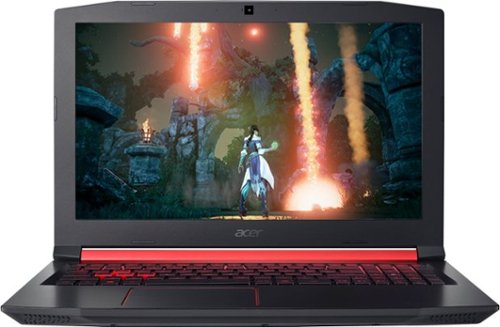
Acer - Nitro 5 15.6" Gaming Laptop - AMD Ryzen 5 - 8GB Memory - AMD Radeon RX 560X - 1TB Hard Drive
Enjoy engaging simulations and immersive visuals with this Acer Nitro 5 gaming laptop. The Radeon graphics card offers 4GB of dedicated video memory for efficient rendering performance, and the 2.GHz AMD Ryzen processor and 8GB of RAM provide ample computing power. This Acer Nitro 5 gaming laptop has a 1TB hard drive for your collection.
Great budget gaming laptop
Customer Rating

5.0
Calling it a laptop is not quite accurate, more appropriately is a mid-range portable gaming station. I would say this is for the casual gamer who may not necessarily care about the latest greatest games, needs a portable computer for doing work. If you are trying to consolidate your gaming to be portable and want to play latest games, you will want to step up to the next level of gaming laptops.
At 6lbs its light enough to lug around in a back pack and battery life will be good enough to last you a days worth of school; I would suggest optimizing the battery settings though.
There isn't an optical drive, so no CD/DVD's, but honestly everything is either streamed or downloaded anyway.
The hard drive is 1TB which is great for storage of 22GB+ games these days, however, it is a bit slow on the wake up. The speed of SSD is what I am used too, so I will definitely be swapping out the HDD for one. Which is extremely easy! Direct bay access with the removal of one screw. I miss those days, most now require taking the entire underside panel off and also removing the rubber sliders/risers off too (which never stick back again even with super glue). The same goes from the RAM bay, 1 screw. The bay supports 2 slots at 8GB each.
The GPU has 4GB dedicated, however, the Processor has 1GB of the System memory allocated for it, so useable memory is 7GB of 8GB, or 15GB of 16GB at full capacity.
I don't know exactly when the GPU kicks and when the Ryzen 5 processor is primary, but under normal use and under gaming I haven't noticed any lag or stutter.
Laptop can easily play older AAA Games and the dual fans run at low. While the sound is good, I would recommend using headphones still to cut out the fan noise and for more rich sound.
YouTube/video streaming, no issues there with fan noise, just really gaming.
Screen lid easily opens with 1 finger. I'd say 99.9% of the weight is in the base and the hinge is really smooth, so it opens easily.
My normal work laptop is a Lenovo Yoga 720 13.3" touchscreen. I can I say I like the keyboard keys better on the Acer as they are quieter and have a bit of a bowl shape to them.
However, the right SHIFT key is smaller and takes an extra reach to get it. It seems to be a trend with keyboards lately. Lenovo's low-end laptops have a ridiculous placement, the Acer 5 Nitro is way better in comparison to that.
Screen has great color for IPS LCD, I wasn't expecting the color punch of touchscreen, but it did surprise me of how good it looked out-of-the-box. It does have a lot of bezel, which even thought it is 15.6" it feels smaller than my daily driver 13.3". Out-of-the-box the zoom setting under Windows 10 was set to 125%, I switched it to 100% and it definitely made the screen feel more useful.
Styling is quite nice, definitely has the gamer's edge of sharp angles and red LED lighting. Which is really nice. Adding the ability to change the LED color would have been cool. Cannot change the keyboard backlight brightness level, but with it being Red, its not distracting.
Definitely recommend.
I would recommend this to a friend!
Mobile Submission: True
0points
0out of 0found this review helpful.
Share this review:


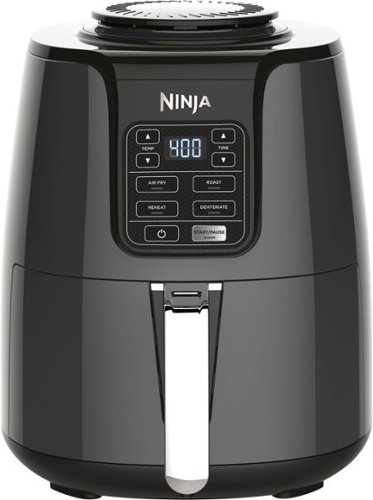
Prepare food with hot air instead of oil by using this Ninja air fryer. It offers a temperature range from 105-400 degrees F to let you create dehydrated snacks or air-cook dishes with 75 percent less fat than traditional frying. Make up to 2 lbs. of food with convection heat in this Ninja air fryer.
Works, but small portion sizes
Customer Rating
4.0
First Impressions: easy to use, looks cool, yields small batches of food compared to size of device, straightforward instructions, easy clean-up.
The 4qt size is a bit misleading as yes you can use the full 4qt size depending on the type of food, however, even using the full 4qts requires moving the food around to make sure it gets "fried". Foods like meats cannot be layered. So overall the design greatly limits the amount of prepared food cooked at a time, so the recommendation is it is great for a family unit of 2, but larger than that you are looking at multiple batches, with two batches of any one type of food taking 45min to an hour to cook. The cooking times stated in the instructions seem to be spot on, so that assessment of multiple batches should hold true too; not adding time for cooling of the device "pot" to be to handle and load another batch, so adding about 10 minutes to get a real world start to finish time.
I don't know if it can be called an "Air Fryer" though, as the food looks like it has been roasted, so no different than using an oven, putting oil on something, and tossing it in. Since the food is not being deep fried it doesn't have that fried look, nor does it taste fried...it tastes roasted. Not that it is a bad thing, but the applications my family had in mind, it definitely will not work for as it will need to be tried and true deep fried.
I would recommend this, but seriously think through the intended applications and quantities desired. For potatoes/french fries, and the like its an easy win as the mess of a true fryer is gone; again just limited by yields.
I would recommend this to a friend!
Mobile Submission: False
+9points
10out of 11found this review helpful.
Share this review:


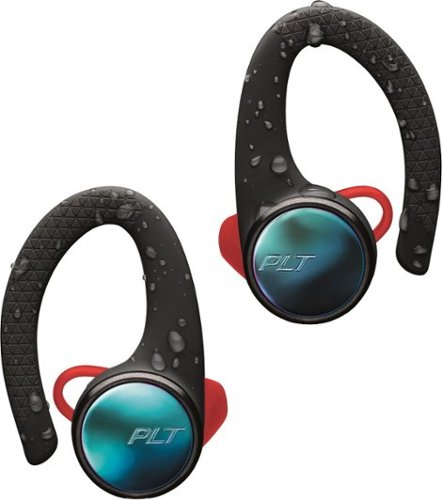
Plantronics - BackBeat FIT 3100 True Wireless Earbud Headphones - Black
Let nothing hold you back with these BackBeat FIT 3100 wireless sport earbuds. Always Aware ear tips maintain an audible level of outside noise to keep you conscious of your surroundings, and the soft, flexible ear hooks ensure a secure, comfortable fit. The charging case of these water-resistant BackBeat FIT 3100 wireless sport earbuds provides 10 hours of additional battery life.
Nice upgrade
Customer Rating
5.0
I've used the original BackBeat Fits for almost 2 years and absolutely love them for my use. Recommend them to any one asking about wireless headphones.
These will be the one's i recommend now! They connect easily, have longer battery life compared to already great battery life of the original.
Can operate as dual or single mode if you just want to use as a headset.
Can operate as dual or single mode if you just want to use as a headset.
Fit is awesome definitely softer than original as they took a few uses to break in and hurt your ears a little in the process, once they warmed up on the sun they molded to your ear. The 3100 fit perfectly, light and no ear soreness after a few hours of wear while doing yard work.
I love that they're NOT noise cancelling. I can hear the ambient noises whatever I'm doing.
Sound... Awesome! Again an upgrade over the original. Using just the right earbud I did notice a little distortion and sound level is quiter overall than original.
Use, took me a little bit to retrain myself on button presses. And the instructions give basic info.
If you only use right ear bud then you don't get volume control (still can on phone obviously), but can start/stop/advance song and launch voice assistant as well as turn on/off.
Left ear bud has volume by tapping (think touch screen) and on/off via button click.
The only thing a little awkward is the case design, as the earbuds sit opposite of the ear they are, right ear left-side of case. I'm guessing the case doesn't have a battery, as the documentation does not state it.
When taking a earbud out of the case it automatically turns on and will first connect to the opposite bud saying "headphones connected" . Then connects to a device saying "device connected."
My phone is in pocket with each use so cannot comment on range. I wouldn't expect much.
I did not try to pair with my Moto 360 Sport Watch, so cannot comment on watches.
Like every new product on the market these days that has a battery, it does not state anywhere the proper or accepted voltage the buds/case can handle.
I do like the case it keeps everything compact and neat. Easy to stick in a cargo pocket or small compartment in the vehicle.
Highly recommend to anyone in the market for true wireless earbuds.If not can't go wrong with the original/2100 series.
I would recommend this to a friend!
Mobile Submission: True
0points
0out of 0found this review helpful.
Share this review:


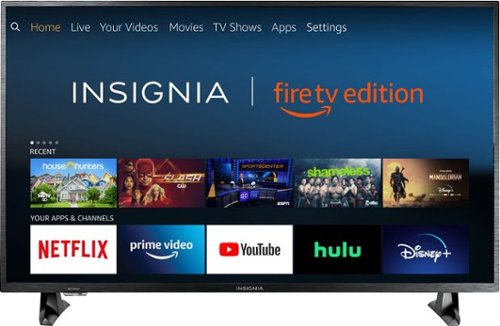
Insignia - 43 Class LED 4K UHD Smart Fire TV Edition TV
Insignia 4K UHD Fire TV Edition is a new generation of smart TVs featuring the Fire TV experience built-in and including a Voice Remote with Alexa. With true-to-life 4K Ultra HD picture quality and access to all the movies and TV shows you love, Insignia Fire TV Edition delivers a superior TV experience that gets smarter every day. The Voice Remote with Alexa lets you do everything you'd expect from a remote~plus, easily launch apps, search for TV shows, play music, switch inputs, control smart home devices and more, using just your voice.
Insignia 5 Stars, Fire TV 2 Stars
Customer Rating

3.0
Images for this Review
(click to see full-size image)

The Short: Insignia Good, Fire TV Bad. 4K/HDR extra price for performance not gained...At this size, save your money, buy a 1080p non-smart version and add your steaming player of choice.
Quick background, I have purchased many of Insignia TVs of the years and have turned to that brand again and again for budget sets. I am also a long time Roku platform user/advocate and at this price point this product was offered to me, I thought I'd give Amazon a shot, both to test the Fire TV platform and to replace an aging 32" TCL Roku TV. In short I will be putting a Roku Streaming device on this set as the Amazon Software just stinks.
Setup:
A neat feature, probably better suited for this size tv versus larger tv's is the that set was in addition to the typical foam protection, came in a big bag with handles, which made removing the tv extremely easy. I install and mount tv's for cabins quite often by myself and that normally requires cutting the box to safely remove the set from the packaging. A 43" is neither heavy nor awkward to remove, but this was made even easier by the handled-bag-design. Installed the two separate stands quickly (they are not reversible) and clearly marked which way is front and which is right/left and then moved on to plugging it in.
A neat feature, probably better suited for this size tv versus larger tv's is the that set was in addition to the typical foam protection, came in a big bag with handles, which made removing the tv extremely easy. I install and mount tv's for cabins quite often by myself and that normally requires cutting the box to safely remove the set from the packaging. A 43" is neither heavy nor awkward to remove, but this was made even easier by the handled-bag-design. Installed the two separate stands quickly (they are not reversible) and clearly marked which way is front and which is right/left and then moved on to plugging it in.
The cords on TV's these days are getting annoying. I did not measure but I am gauging it is in 3.3 meter (4ft) range. 6ft would definitely have been welcomed seeing as the power supplies are either on the far right or left. I had to move my power strip to the other side of my dresser to plug-in the set, mild annoyance. However, if this set is sitting on a taller dresser (mine is short and wide) you may need an extension cord to reach a wall outlet.
The design of the TV is black plastic with a brushed aluminium texture. There was only one sticker/protective wrap on the tv (a first) and it was the yellow power consumption sticker. Bezels are thin enough. The TV is quite thick for its size due to the lighting type.
The startup procedure took a little longer than expected. I had assumed there would be software updates, but it took about 5-7 minutes to download and install. I did notice the set does not have 5Ghz Wifi capabilities. I prefer that for my smart tv devices and use the 2.4Ghz for smartphones, computers, and tablets. I don't count that against the device, but it could have been why it took longer to update as my 2.4Ghz network is full of devices. What was interesting after the update it asked me if I wanted to use the same Wifi Network I just setup minutes before. Um...YES why would I want to change the network?
A cool feature that others could learn from, when signing in to the internet and amazon accounts, the keyboard interface was standard qwerty for email, but not for password. However, both interfaces use program the Menu Button and Play/Pause Buttons as quick keys to toggle Upper/Lower Case and Continue respectively. That's different from other devices I have used.
Hardware
So far the Hardware seems fine for a budget tv. it is a definite upgrade in both picture and speed from my current bedroom TV (minus the software update). The speed could be the differences in the smart platform, but I'm inclined to think the hardware upgrades are definitely helping out.
So far the Hardware seems fine for a budget tv. it is a definite upgrade in both picture and speed from my current bedroom TV (minus the software update). The speed could be the differences in the smart platform, but I'm inclined to think the hardware upgrades are definitely helping out.
I could not find out what type of lighting it was prior to purchase, but surmised it would most likely be edge lighting and after turning it on for the first time, that is correct. There are definite dark and light spots, again this is a budget TV, so don't expect the true 4K HDR combo of pricier sets. The HDR compatibility will be for HDR10 as it is the current industry standard and Dolby Vision requiring certain hardware requirements.
Picture quality and sound quality are great for this price range. Again 4K is the new fad, so it has to have that, HDR as well as, but I'm hard pressed to think this set has any advantage of having it. Better lighting mechanics would greatly improve it, but for what you are paying its a fine entry-level 4K TV.
There are 4 Display Settings to change the warm/cold color of the TV: Standard, Movie, Dynamic, Natural. And then also a Custom setting. Each pre-programmed setting can be tweaked.
Sound comes from two down firing speakers. They are a bit hollow and have an echo effect, treble and bass could be adjusted (deep in the settings menu, more on that below). I've never had a TV set that sound was excellent, but that can always be remedy by adding a soundbar or even computer speakers via 3.5mm headphone jack, which this TV has that and Optical Out. However, the 3.5mm headphone jack was not working properly. It was displaying sound out of only the right speaker and at a greatly reduced rate than what the volume was. The speakers I know work fine on the tv it is replacing, so I am inclined to think it is the port on the Insignia.
Sound I also found to be very loud at only 12-13 sound level. Distortion will occur around the 20 level with any content containing explosions or high treble and bass sounds. Of course having that high I think will be at the max range for any viewers listening experience as it will be extremely loud (and no I'm not old, I still listen to my music loud...I really like to feel the percussion in my Beethoven and Bach...that was a joke..but also true). I did not tweak the treble or bass settings as it seemed fine for normal listening level, but if for some reason you like it louder, I would definitely lower the stock settings.
The remote is good sized, actually like it better than the Roku remotes. You may have to reach a littler further to get to the top most buttons, but that is hardly anything we are not used to. Roku Remotes that have sound control capabilities, place them on the right side edge. Very easy to accidentally mute or change volume. This remote is also bluetooth and it responded quite well, with no noticeable lag.
Software
I'll start with the one positive I mentioned above, this OS is based off of Android TV, which means Apps/Channels can be sideloaded. So if you like to tinker or have specific apps you want, you can get them. But the average user I would not recommend that as you are not even guaranteed a good user experience.
I'll start with the one positive I mentioned above, this OS is based off of Android TV, which means Apps/Channels can be sideloaded. So if you like to tinker or have specific apps you want, you can get them. But the average user I would not recommend that as you are not even guaranteed a good user experience.
And that's where the good stops.
My 2 Stars is generous for this platform. I had hoped that it would improve greatly on the Prime Video App on other platforms, but it is an absolute mess just the same. Adding the fact that you have to use the UI to access other streaming apps, makes it even more a mess. Again, I new this already and for the price point it was offered to me, I went with it, however, Amazon puts is services first, which translates to it does not offer any other apps for download that competes with its ecosystem ie Vudu, Google Play Movies, Fandango Now, etc. Amazon and Google are also in a small war and so you cannot even get Google backed Apps even though the platform is based off of Android TV. This is mainly for Video Steaming services. It does have Spotify, which competes with Amazon Music.
There are definite nay-sayers that Roku is a boring tired UI, however, it works and anyone can quickly navigate it. It took Apple's formula and applied it to its OS, simple, easy, even a mere child or octogenarian could navigate it. If Fire TV is innovative, then I prefer boring.
My two biggest complaints with Fire TV, just like Prime Video App, is I don't know what I am selecting half the time. It takes a while to determine if what I am highlighting is Yellow or not and then the UI navigation is all over the place. I first thought there was no way to access Display or Sound Settings, but after delving into the Settings Menu (and turning off all the "data sharing info" I found them. You are then instructed to hold down the HOME button to bring display this pop-up settings menu, which pauses whatever streaming content you are watching. Each Input HDMI 1, 2, 3 can be adjusted accordingly. Steaming content is lumped together.
When it comes to steaming players the options are: Roku, Apple TV, Chromecast, Fire TV, and then whatever fork of Android also exists. Samsung, LG, and Vizio are busy building their own Smart TV OS Platforms and so to keep things cheap budget brands like Insignia, Toshiba, Element, TCL, Hisense, etc. are turning to partnerships. Google does partner its Android TV with Sony and Hisense and gives built-in Chromecast functionality to Vizio, but Vizio uses its owns limited Smart OS platform. This is new territory for the TV industry having Third Party software running on a multitude of hardware manufacturers devices and quite frankly its scary, its Android but in the tv arena and Google is trying to fix this fragmentation. The difference is the UI with Fire TV or Roku is the same no matter the brand tv, however, if there is an issue the brand only has control of hardware, not software. I ran into this with a 2018 TCL 55" 6 series Roku TV and returned it after 14 days, since the only remedy was to ship for repair, no thanks!
No, I would not recommend this to a friend.
Mobile Submission: False
+50points
118out of 186found this review helpful.
Share this review:


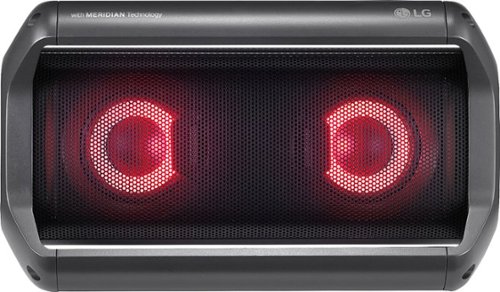
LG - XBOOM Go PK5 Portable Bluetooth Speaker - Black
Take your music anywhere with this LG PK5 portable Bluetooth speaker. It provides up to 18 hours of premium sound per charge and turns anywhere into a nightclub with its LED party lighting. The water-resistant design makes this LG PK5 portable Bluetooth speaker the perfect accessory for the pool or beach.
Typical Bluetooth Speaker issues w/ great sound
Customer Rating
3.0
I've had a few BT speakers over the years and while the sound quality always gets better, bluetooth still has its downfall; limited range and interruption.
The battery life is great, the sound is good. A little hollow on the mid-range.
I also have a UE Wonderboom. Also really good sound and loud, PK5 is louder. However, the UE Wonderboom sometimes just shuts itself off.
The flashing lights are a novelty, turned those off.
I'm actually not a fan of the multiple devices connected at once. My phone and my wife's are both connected to the speaker, and sometimes you can accidentally take over control because it will take input from either phone. I also have mine set not to be used for phone calls and as a mic, but each new session it turns the feature back on (could be an issue with my phone).
The battery life is great!
The other reason for the lower stars besides typically bluetooth issues, is the trend of manufacturers not including a charger with battery operated devices, especially when USB-C is involved. USB-C has a wide range of power delivery and the documentation with the speaker does not state what it is. Side note it did say to only use the included charger (even pictured it) but it does not come with one!
I have a laptop that uses USB-C and charges at 45w, have a Pixel Charger, and OnePlus fast charger, which both charge different rates.
I ended up using the OnePlus charger given that I know the battery size is not going to match that of a laptop and the circuitry would handle the OnePlus even though it wouldn't charge at that rate.
Last item I found interesting/disturbing is the item shipped in the manufacturing box with no security tags showing if the item had already been opened. At first that was why I thought I didn't have a charger, but they just don't include one.
(Oh and don't be a douche and click unhelpful. Unhelpful reviews are 3 word reviews that tell us how you are feeling for a split second. Rant over.)
I would recommend this to a friend!
Mobile Submission: False
+3points
11out of 19found this review helpful.
Share this review:


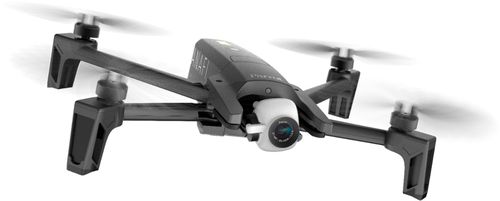
Parrot - ANAFI 4K Quadcopter with Remote Controller - Black
Take in the scenery with this Parrot ANAFI drone. The robust, compact design lets you carry it wherever the trail takes you, and the drone unfolds easily when it's time for flight. The camera captures beautiful 4K images and video, and this Parrot ANAFI drone keeps your footage smooth with its three-axis image stabilization.Fly Responsibly:Before takeoff, update all software and firmware, and read the instructions thoroughly.See the FAA website for registration requirements and information about flying a drone safely: https://www.faa.gov/uas/getting_started/. Additional state or local requirements may apply. Check your local jurisdiction. The following websites may help you make informed decisions about flying your drone: www.knowbeforeyoufly.org and www.modelaircraft.org.
I'm a Beginner...
Customer Rating
4.0
Images for this Review
(click to see full-size image)

Quick Info
Phone Used OnePlus 5T 6" screen and Dash Charger and cable.
Phone Used OnePlus 5T 6" screen and Dash Charger and cable.
The Anafi is my first introduction to a drone, not counting the RadioShack Christmas specials. And so as my summary states, I'm definitely a beginner and I have to say I was quite nervous as I was pretty scared to crash the thing. I read a few reviews first and people said it just took off on them and crashed and there are no replacement parts for control arms. Checking the website, you get battery packs, controllers, and blades. That's about it.
As of writing I received the drone in the mail 7 days ago and our weather has been a little crazy so I've had to delay frequently my time to try it out.
Today was bright and sunny, but had a good 4-5 mph wind. And it didn't phase this thing one bit. It stayed and hovered just were I would leave it.
Again as a beginner, I couldn't be more pleased. I did crash it twice, once into small tall brush. Hard enough it collapsed a control arm and sent a warning to the controller screen. The second time I ran into a group of pine trees and it landed on the ground with arms in full lock, ready to fly! So its at least sturdy enough for that. When it comes to walls and such I'll let you be the judge.
Also as a beginner I think they could do a few things better:
-Have a bit more info in the packaging: there are two pamphlets one labeled a "Super Quick Starter Guide", you can see in the photo, and they mean super quick, like 8 photos. The second was FAA regulations in about 100 hundred languages, that is about 8 pages per language.
-Have a bit more info in the packaging: there are two pamphlets one labeled a "Super Quick Starter Guide", you can see in the photo, and they mean super quick, like 8 photos. The second was FAA regulations in about 100 hundred languages, that is about 8 pages per language.
Any real info is found on the support site and they have it setup as a Q&A style which tells me they really did me to give very limited explanation of things. Which I'm not one to complain about saving a few trees, but a bare minimum would be to have the charging specs included with the drone. The support site had this info. But without a charger included, I'm not just going to throw any old charger on it. I have a laptop that charge off of USB-C, but wasn't sure if it would deliver too much power, verdict is still out. Ended up using my phone charger.
-Include a charger, for the price it's not going to be much more and most people these days don't have one that is USB Power Delivery certified to get the fastest charging times available.
-As well a bit more info on just how to fly the thing.
After my first flight I've realized that its just that simple to fly, it still could have a simple short video tutorial, the FreeFlight 6 app at least has the joystick layout (feels like a video game setup) but it also doesn't give much explanation into all the settings that can be changed and advantages/disadvantages. It definitely has a learning curve in the UI department. I would really like to see a demo mode either in the app or on the website to play with the settings and see how they affect the drone.
-How to turn it on/off! The "Super Quick Guide" could at least two double clicks to get it into pairing mode with the remote.
-My phone is the max size of what Parrott says is the range of 6". It's not the best design, it's quite crazy trying to get it to fit in, but honestly given the setup you don't want a small screened device.
-It did drop GPS signal a couple of times and that didn't disrupt my flying at least at the distances I was flying; not far. It did say that I could do a planned route.
I could keep going, but you get the point...too much guess work. Maybe being a beginner this is all stuff that veterans know? I'm pretty comfortable with tech, but this is out of my normal element.
Honestly, that's why I gave it 4 Stars, while there is a lot of guess work, at least its easy to fly. Its not so easy you feel like a pro. Currently I'm only flying by sight not the screen, but I do live near a small forest, so I'm not ready to rely on my on screen depth perception.
Closing Arguments: It's definitely worth the investment, do take into consideration that if it breaks, its probably broke.
Accessories: Considering an extra battery for longer flight times. Maybe having some sort of harness for the controller would help to prop the arms up higher to fly using the screen.
I would recommend this to a friend!
Mobile Submission: False
+4points
4out of 4found this review helpful.
Share this review:


MnstrMike's Questions
MnstrMike has not submitted any questions.
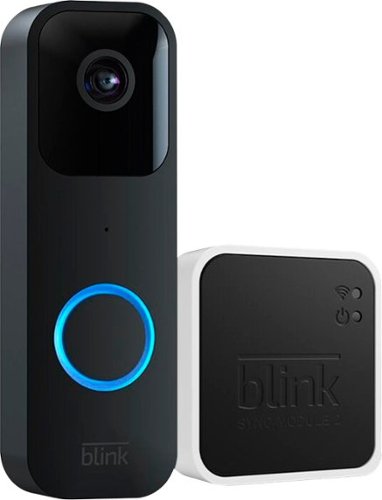
Blink - Smart Wifi Video Doorbell Wired/Battery Operated with Sync Module 2 - Black
Smart security that is designed for every home. Set up in minutes, and receive notifications from the app whenever a visitor presses your Video Doorbell or motion is detected. You can also choose to wire it to sound your existing home chime. Blink Video Doorbell lets you answer your door no matter where you are. Receive customizable alerts right from the Blink Home Monitor app, and experience helpful features like HD day and night video and two-way audio. Best part ~ Blink~s long-battery life technology provides peace of mind for up to two years.
Can you record live videos with the module also ?
No. The Sync Module will only record doorbell presses. Live View recordings require a subscription plan.
4 years, 10 months ago
by
Posted by:
MnstrMike
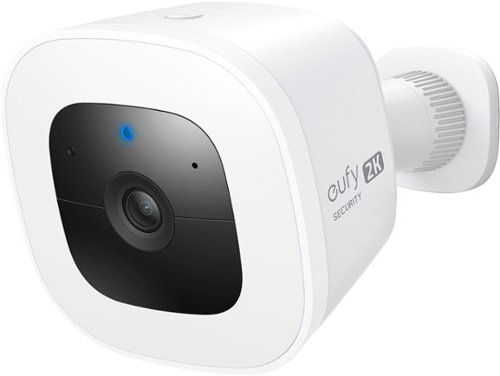
eufy Security - SoloCam L40 Outdoor Wireless 2K Spotlight Camera - White
SoloCam L40 2K is a completely standalone security cam that you can access via your app. No need for a Homebase, or wires, as SoloCam is completely wire-free and battery-powered, so you don't have to mess with anything. Every eufy Security product is engineered to ensure your security data is kept private. Have peace of mind that you will have a secure record of everything that happens around your home. Adjust the brightness and color temperature of the spotlight in case you don~t want to wake the neighbors. Takes just minutes to install the mount using a drill and the included pack of screws. No wires or cords needed. Chat to anyone passing by~invited or not~and hear their response up to 8 meters away in real-time via SoloCam L40~s two-way audio. Connect SoloCam L40 to the Google Assistant or Alexa for complete hands-free control of your home security. Designed to protect your home as well as your wallet, SoloCam L40 is a one-time purchase that combines security with convenience. Only receive the alerts which matter. Customize the area in which detection takes place to suit your home.
Can the SoloCam L40 (or any other SoloCam cameras) use the Solar Charger accessory?
According to Eufy Support, no it cannot. The Solar Charger uses a MicroUSB charger style and the cable is hardwired to the panel. The SoloCam L40 is USB-C.
4 years, 10 months ago
by
Posted by:
MnstrMike

ASUS - TUF Gaming 17.3" Laptop - Intel Core i5 - 8GB Memory - NVIDIA GeForce RTX3050 Ti - 512GB SSD - Eclipse Gray
The latest Intel 11th Core i5 processor with GeForce~ RTX3050 Ti graphics also equipped with a large 17.3" FHD 144hz display. Personalize your laptop with RGB keyboard.
What type of ram module it is? Would like order another compatible 8 gb stick.
got to Crucial.com to run a check, but it is Micron 3200 GDDR4
5 years, 1 month ago
by
Posted by:
MnstrMike
ASUS - TUF Gaming 17.3" Laptop - Intel Core i5 - 8GB Memory - NVIDIA GeForce RTX3050 Ti - 512GB SSD - Eclipse Gray
The latest Intel 11th Core i5 processor with GeForce~ RTX3050 Ti graphics also equipped with a large 17.3" FHD 144hz display. Personalize your laptop with RGB keyboard.
is it more than 60hz?
ASUS - TUF Gaming 17.3" Laptop - Intel Core i5 - 8GB Memory - NVIDIA GeForce RTX3050 Ti - 512GB SSD - Eclipse Gray
The latest Intel 11th Core i5 processor with GeForce~ RTX3050 Ti graphics also equipped with a large 17.3" FHD 144hz display. Personalize your laptop with RGB keyboard.
What is the clock speed of the ram? 2666 or 3200 and if it can be overclocked, to what speed should I upgrade? Can you add more than 32gb ram? And is both ssd slots nvme or the regular? What is the max ssd it can handle?
Installed is Micron 3200; accepts up to 64GB @ 32GB + 32GB.
It may be possible to overclock the memory, but would need other software to do it.
Storage: both are M.2 NVME M-Key. Max size is what you can afford.
It may be possible to overclock the memory, but would need other software to do it.
Storage: both are M.2 NVME M-Key. Max size is what you can afford.
Images for this Answer
(click to see full-size image)

5 years, 1 month ago
by
Posted by:
MnstrMike
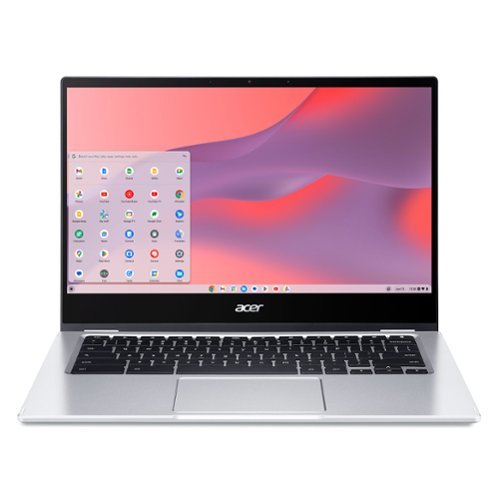
Acer - Chromebook Spin 514 Laptop Convertible-14 Full HD Touch Ryzen 3 3250C GB DDR4 Memory64GB eMMC Flash Memory
Do More, See More, Anywhere: Watch your favorite movies, TV shows and other media~while on the move or traveling~on Acer~s exciting new convertible Chromebook Spin 514, which offers a 78% screen-to-body ratio to maximize your viewing experience on its 14~ Full HD touch display. The Chromebook Spin 514 leverages the power of the latest AMD processor inside to ensure epic functionality when working on intensive and demanding applications~without the worry of ever slowing down! It features a 360~ durable hinge to provide you with four different modes to enjoy, a high-quality, military-grade tested metal casing, and enough battery life to keep you fired up and running all day long!
Is the touchscreen corning gorilla glass?
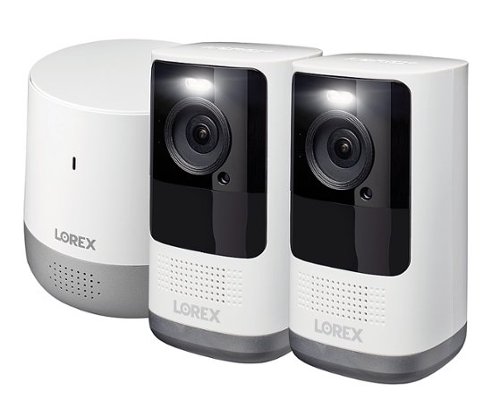
Lorex - 2K QHD WIRE-FREE SECURITY SYSTEM - White
The Lorex 2K Wire-Free System is designed with flexibility in mind. With no wires to run, homeowners can get full home security coverage without clutter or difficulty accessing hard to reach power outlets. The whole system can be up and running in minutes. Wireless and compact, the Home Hub has a sleek design and provides homeowners the freedom to install up to 6 cameras indoors and outdoors. The system works with Alexa as well as Google Assistant, offering the ability to control and activate features with nothing more than voice commands. Featuring a suite of deterrence technology, homeowners get important alerts whenever there is relevant motion thanks to advance person detection and the ability to fully customize notifications in the Lorex Home App. Homeowners can access and manage their 2K Wire-Free System and footage from the App anytime, anywhere.
what comes in the box? Can these be mounted outside on a wall, or inside only? thanks
They are Outdoor and Indoor use. Indoor only requires a flat surface, like a book shelf, recommends 6ft height.
In the Box:
Lorex Home Hub base station, 2 cameras with two exterior mounts, screws, and quick drill guide, 2 chargers and cables; 1 required for Home Hub power, instruction manual, ethernet cable for internet connection (recommended) or WiFi option also available.
In the Box:
Lorex Home Hub base station, 2 cameras with two exterior mounts, screws, and quick drill guide, 2 chargers and cables; 1 required for Home Hub power, instruction manual, ethernet cable for internet connection (recommended) or WiFi option also available.
5 years, 6 months ago
by
Posted by:
MnstrMike

GE - Classic Drip 10-Cup Coffee Maker - Stainless Steel
At GE Appliances, we're bringing craftsmanship to your countertops, with reliable and durable drip coffee makers. Equipped with either a sleek glass or insulated thermal carafe, our coffee makers have convenient functions such as Delayed Start and Timer, to make the brewing process simple and user-friendly. And all GE Appliances drip coffee makers are finished with tasteful and durable stainless steel, making them the perfect accent for any kitchen or office ~ all from a brand you trust.
Will the warmer plate automatically shut off after a period of time
GE - Classic Drip 10-Cup Coffee Maker - Stainless Steel
At GE Appliances, we're bringing craftsmanship to your countertops, with reliable and durable drip coffee makers. Equipped with either a sleek glass or insulated thermal carafe, our coffee makers have convenient functions such as Delayed Start and Timer, to make the brewing process simple and user-friendly. And all GE Appliances drip coffee makers are finished with tasteful and durable stainless steel, making them the perfect accent for any kitchen or office ~ all from a brand you trust.
Is the carafe dishwasher safe on the GE classic drip 10 cup coffeemaker? https://www.bestbuy.com/site/ge-classic-drip-10-cup-coffee-maker-stainless-steel/6421025.p?skuId=6421025
No, everything is hand wash, which is only the carafe, removable cone filter and filter basket.
5 years, 7 months ago
by
Posted by:
MnstrMike
GE - Classic Drip 10-Cup Coffee Maker - Stainless Steel
At GE Appliances, we're bringing craftsmanship to your countertops, with reliable and durable drip coffee makers. Equipped with either a sleek glass or insulated thermal carafe, our coffee makers have convenient functions such as Delayed Start and Timer, to make the brewing process simple and user-friendly. And all GE Appliances drip coffee makers are finished with tasteful and durable stainless steel, making them the perfect accent for any kitchen or office ~ all from a brand you trust.
What type of filter does this maker use?
It has a removable/reusable cone filter
5 years, 7 months ago
by
Posted by:
MnstrMike