


MarkusKong's stats
- Review count99
- Helpfulness votes2,309
- First reviewFebruary 4, 2014
- Last reviewSeptember 2, 2026
- Featured reviews0
- Average rating4.4
Reviews comments
- Review comment count0
- Helpfulness votes0
- First review commentNone
- Last review commentNone
- Featured review comments0
Questions
- Question count0
- Helpfulness votes0
- First questionNone
- Last questionNone
- Featured questions0
- Answer count15
- Helpfulness votes33
- First answerNovember 3, 2016
- Last answerDecember 14, 2021
- Featured answers0
- Best answers2

Experience your music~s true potential with breathtaking immersion and high resolution. Audiophile-grade TrueResponse transducers deliver detail, depth, and immersive 3D sound. A lossless codec and Bluetooth 6.0 enable flawless fidelity for up to 12 hours on a single charge and 40 hours with the charging case. The earbuds and case have user-serviceable batteries. A new, longer housing provides a secure and more comfortable fit. Wherever you go, MOMENTUM True Wireless 5 knows what to do. Adaptive ANC and Adaptive Anti-Wind features reduce noise automatically. Need to take that call? Sennheiser~s AI-powered voice isolation lifts your voice above everything else.
Customer Rating

3
Comfort, Better sound than most, OK battery life
on September 2, 2026
Posted by: MarkusKong
TL;DR, it’s alright. Pretty comfortable, sounds very nice for some genres, decent ANC earphones.
The earbuds come with several unmarked earbud tip sizes. The ones that are on the earbuds out of the box are “medium.” Once you find your size, it is pretty comfortable and can be worn for a while. However, if your ear walls get irritated with any earbuds, these are unfortunately no exception.
These earbuds feature touch control. I personally don’t prefer it because I accidentally pause my music when adjusting my hair, glasses, earrings, etc. and sure enough, paused it one too many times with these. Touch controls are: Single tap=play/pause, Double tap(r)=skip song, Double tap(l)=back, Triple tap=not configured, Hold(l)=vol down, Hold(r)=vol up. There are sound indicators with each tap so it was nice to know how many times I’ve tapped.
The sound quality is better than a lot of the earbuds on the market but not great with all music genres. It absolutely shines with r&b, hip hop, and some pop music. With the right EQ, it is rich and bassy. It is however incredibly disappointing with rock. No matter how much I adjust the EQ - preset or manual - it doesn’t seem to get rid of this muddiness and distorted sound.
The noise cancellation on these are decent. At 50% volume, I can’t hear any low background noises but can hear loud noises. At 25% or lower volume, I can hear most noises and even keyboard typing in a quiet room.
Immersive audio alone without “headtracking” didn’t change much of my music listening experience. There’s a slight added “clarity” that unfortunately doesn’t sound very nice to me - it adds a slight robotic quality to the vocals. However, some people may enjoy that “clarity” and may not hear the robotic quality at all. The “headtracking” mode - which shifts the sound as you move your head away or towards the sound - would be good for movies, perhaps games, but I found no use for them outside of that.
I do really like the “Smart Pause” setting. If you pull out one earbud, it pauses the music as long as the earbud is in your hand. No additional notes here.
Battery life is acceptable when compared to some of the earbuds on the market. It lasts about 6 hours with ANC, 35 hours with case. Without ANC, the earbud battery life is about 9-10 hours. The earbuds battery is in increments of 10%. The case battery percentage has been a little weird for me - it jumps up and down by 5% increments. Either way, it will last through commuting or short domestic traveling but may not be a true “all day” use without charging the earbuds in between. This maybe is a non-issue and I’m nitpicking but “Battery Protection mode” is not enabled by default and has to be turned on in the setting. This means that the case and earbuds are allowed to overcharge by default. I would think at this point, it would be a standard across all electronics to have “smart” charging for battery health. With that being said, these allow you to replace the battery pack in the case and earbuds. If the battery health does become an issue, in theory, you would replace the batteries and they would be like new.
These are water resistant and seem to withstand sweat just fine. These are NOT waterproof.
Overall, I’m divided on this one. I would recommend this if you’re in the market for a comfortable pair of earbuds, sound quality is great for aforementioned music genres, commuting, gym time, and short domestic traveling.
No, I would not recommend this to a friend.



Share this review:


0points
0of 0voted this as helpful.
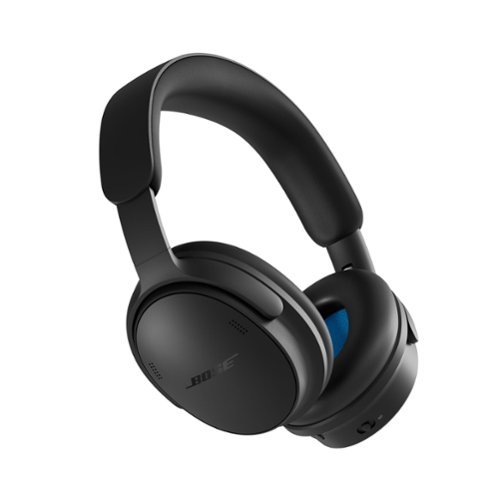
Experience next-level quiet and premium sound with QuietComfort Headphones (2nd Gen). Stylishly designed for comfort, focus, and travel. A refreshed signature look. Legendary QuietControl noise cancelling tech. And more listening options for whatever the musical moment. Modern pill-shaped earcups and a wider super-smooth sliding headband are as stylish as they are comfortable. Updated ActiveSense Technology smooths spikes in unwanted noise while the addition of TrueSpatial Tech creates an immersive listening experience with a wider, fuller soundstage. For layered, nuanced sound and clear dialogue for video content, there~s new Cinema Mode. Or choose lossless listening via wired USB-C to elevate how you experience both music and video.
Customer Rating

4
Great for daily use, commuters and travelers
on August 7, 2026
Posted by: MarkusKong
TL;DR, a 4.5star, solid pair of well rounded, very comfortable, ANC headphones.
The headband and ear cushions are soft, plush, and lightweight. The cans fit over the ear without gaps or squishing. The headband fits snug so it doesn’t slide off but it is very comfortable - perfect for long hours of use. It has button configuration on the cans rather than touch. I personally prefer this. I think it’s pretty straight forward to use and I don’t have to worry about accidentally touching it and changing volume or skipping songs.
The sound quality has gotten better from the original QC. The audio quality is balanced, almost rich, and EQ is good out of the box. With that being said, if you dabble in customized EQ, it’s not incredibly customizable but good enough to get you through day to day use.
The noise cancellation on these are great. It blocks out most of the background noise. If your volume is relatively low, you can hear loud noises and people nearby sound muffled.
Sound leakage is subjective - since everyone’s listening volume varies greatly. With that being said, I tested with my iphone, set volume to 50% and there was no leakage even when my ears were pressed against the cans. When volume was 100%, I was able to hear about 3-4 feet away.
Sound leakage is subjective - since everyone’s listening volume varies greatly. With that being said, I tested with my iphone, set volume to 50% and there was no leakage even when my ears were pressed against the cans. When volume was 100%, I was able to hear about 3-4 feet away.
While I prefer music in “Quiet” mode just because the sound quality is noticeably different in my ears, I can absolutely see the appeal for Immersive audio for most people. There is definitely a feeling of being “surrounded” by sound while “Quiet” mode sounds more “in front of you / your ear.”
Battery life is good, about 25 hours or so. The battery life changes based on ANC usage. It does last through a full day of work, commuting or traveling. This maybe is a non-issue and I’m nitpicking but I wish the battery life read accurately. When you turn it on after a fresh charge, it reads 100%. Within 5 minutes, it drops to 90%. Then drops in increments of 10% and not knowing exactly how long I actually have with the 10% is a bit annoying.
I also really like that this comes with some essentials:
Hard case to keep the headphones protected in a bag or backpack.
Aux cable to be used in airplanes or with devices that don’t have bluetooth
USB-C to USB-C cable to minimize the amount of cables to carry around
Hard case to keep the headphones protected in a bag or backpack.
Aux cable to be used in airplanes or with devices that don’t have bluetooth
USB-C to USB-C cable to minimize the amount of cables to carry around
Overall, I would recommend this if you’re in the market for a lightweight, comfortable, and balanced pair of headphones for commuting, traveling or just daily use. If you’re an audiophilia, these headphones may leave you feeling wanting something more.
I would recommend this to a friend!




Share this review:


0points
0of 0voted this as helpful.
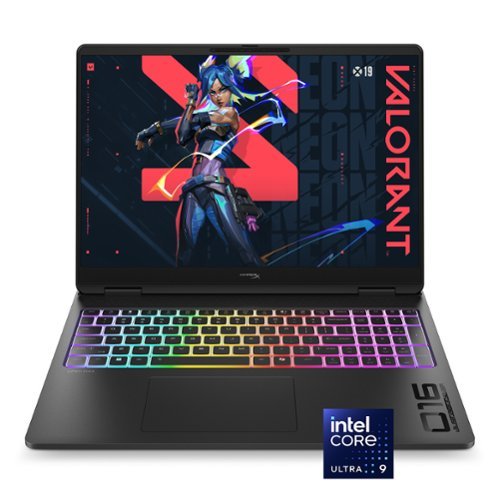
Claim the power. Own the speed. The new HyperX OMEN MAX 16 has the latest and best components and we've also added a high polling rate keyboard, faster OLED display options, and one-click FPS maximization with OMEN AI to ensure you always feel overpowered.
Customer Rating

5
Sleek Stealth Exterior with Next-Gen Muscle
on June 28, 2026
Posted by: MarkusKong
Let's talk about a laptop that’s trying to completely blur the line between portable machines and full-scale desktop rigs: the HyperX OMEN MAX 16.
Right out of the box, this machine makes a statement without screaming "gamer." HyperX wrapped it in an incredibly clean, minimalistic Shadow Black finish that completely skips any obnoxious, flashy plastic accents. It’s mature, feels exceptionally sturdy, and sports a premium aesthetic that easily fits into a professional workspace or a dedicated gaming setup. But what’s going on inside this chassis is where things get wild. We’re looking at a massive step forward in mobile design, packing the Intel Core Ultra 9 290HX processor, a mobile NVIDIA RTX 5070 Ti, 32GB of RAM, and a fast 1TB SSD.
The big story here is the architectural redesign under the hood. HP and HyperX engineered this chassis with a massive 300-watt total platform power capacity alongside their updated cooling system. In the past, laptops always had to take a significant performance hit compared to desktops due to restricted airflow and severe power constraints. But with this new layout—featuring a massive vapor chamber, advanced liquid metal compound, and a critical third internal cooling fan—it pushes sustained, realistic gaming performance that is in some eyes measurable to a high-end desktop gaming rig without needing any external liquid cooling attachments (and again it’s portable!).
To test that desktop-class claim, I put it through its paces with brutal modern AAA titles like Cyberpunk 2077: Ultimate Edition and Alan Wake 2 with ray tracing cranked up. Thanks to that 300W headroom and DLSS, the OMEN MAX 16 handles dense, visually intensive environments with amazing stability, completely eliminating the micro-stuttering you usually expect on a notebook. Heavy-hitting, texture-intensive world streaming in newer titles like STALKER 2: Heart of Chornobyl and Black Myth: Wukong ran beautifully with outstanding frame pacing and near-instant asset loading.
On the competitive front, I spent hours testing it in Counter-Strike 2. For tactical shooters where tracking, visual clarity, and raw input latency dictate everything, this setup is phenomenal. The frame rates stay incredibly high and tightly locked, providing a buttery-smooth experience that makes micro-adjustments and tracking moving targets feel completely natural and responsive. It coordinates perfectly with the HyperAction keyboard, which offers a crisp, tactile response that feels instantly rewarding when executing tight movements. And a massive bonus for the overall ecosystem: the built-in HyperX wireless transceiver lets you sync up compatible peripherals directly to the laptop without taking up a valuable USB port.
Of course, dumping up to 300 watts of power through a 16-inch frame creates an immense amount of heat. While gaming on full performance mode, the CPU and GPU does get quite warm. The fans definitely work overtime to keep it manageable, which means you’ll be dealing with a noticeable, loud fan when the machine is pushed to its limits. My standard recommendation always applies here: elevate the laptop with a laptop cooling pad to help the system dissipate heat.
HyperX introduced a great engineering solution to the ultimate silent killer of gaming laptops: dust. They partnered with Intel to introduce a self-cleaning fan technology called "Fan Cleaner." Between gaming sessions (never during gameplay), the fans will automatically reverse their spinning direction to blow out and expel any accumulated dust through the vents. Although it doesn’t completely eliminate dust, it does do a nice job with helping the fans stay clump free from dust buildup.
And I can't overlook the display. The 16” 2K OLED panel is an absolute masterpiece. If you’ve never gamed on an OLED before, the infinite contrast and deep, rich blacks will completely spoil your eyes. The screen does feature a glossier coating than traditional matte panels, but the benefit is a picture where colors appear jaw-droppingly sharp and saturated.
If there’s any minor downside to point out, it’s that the stock software out of the box can be a bit over-aggressive with its default fan curves during basic, casual workloads. A couple of minutes tweaking the custom fan profiles in the control software easily balances out the acoustics for everyday use. And keep in mind, this beast is quite heavy and bulky.
All in all, the HyperX OMEN MAX 16 is a spectacular piece of tech. It’s a true portable powerhouse that doesn't compromise, delivering genuine desktop-level muscle and smart, self-maintaining cooling tech in a beautifully stealthy chassis. If you have the budget to splurge on a premium machine that masterfully handles high-end gaming, work, and content creation all at once, this laptop will absolutely fit the bill.
Right out of the box, this machine makes a statement without screaming "gamer." HyperX wrapped it in an incredibly clean, minimalistic Shadow Black finish that completely skips any obnoxious, flashy plastic accents. It’s mature, feels exceptionally sturdy, and sports a premium aesthetic that easily fits into a professional workspace or a dedicated gaming setup. But what’s going on inside this chassis is where things get wild. We’re looking at a massive step forward in mobile design, packing the Intel Core Ultra 9 290HX processor, a mobile NVIDIA RTX 5070 Ti, 32GB of RAM, and a fast 1TB SSD.
The big story here is the architectural redesign under the hood. HP and HyperX engineered this chassis with a massive 300-watt total platform power capacity alongside their updated cooling system. In the past, laptops always had to take a significant performance hit compared to desktops due to restricted airflow and severe power constraints. But with this new layout—featuring a massive vapor chamber, advanced liquid metal compound, and a critical third internal cooling fan—it pushes sustained, realistic gaming performance that is in some eyes measurable to a high-end desktop gaming rig without needing any external liquid cooling attachments (and again it’s portable!).
To test that desktop-class claim, I put it through its paces with brutal modern AAA titles like Cyberpunk 2077: Ultimate Edition and Alan Wake 2 with ray tracing cranked up. Thanks to that 300W headroom and DLSS, the OMEN MAX 16 handles dense, visually intensive environments with amazing stability, completely eliminating the micro-stuttering you usually expect on a notebook. Heavy-hitting, texture-intensive world streaming in newer titles like STALKER 2: Heart of Chornobyl and Black Myth: Wukong ran beautifully with outstanding frame pacing and near-instant asset loading.
On the competitive front, I spent hours testing it in Counter-Strike 2. For tactical shooters where tracking, visual clarity, and raw input latency dictate everything, this setup is phenomenal. The frame rates stay incredibly high and tightly locked, providing a buttery-smooth experience that makes micro-adjustments and tracking moving targets feel completely natural and responsive. It coordinates perfectly with the HyperAction keyboard, which offers a crisp, tactile response that feels instantly rewarding when executing tight movements. And a massive bonus for the overall ecosystem: the built-in HyperX wireless transceiver lets you sync up compatible peripherals directly to the laptop without taking up a valuable USB port.
Of course, dumping up to 300 watts of power through a 16-inch frame creates an immense amount of heat. While gaming on full performance mode, the CPU and GPU does get quite warm. The fans definitely work overtime to keep it manageable, which means you’ll be dealing with a noticeable, loud fan when the machine is pushed to its limits. My standard recommendation always applies here: elevate the laptop with a laptop cooling pad to help the system dissipate heat.
HyperX introduced a great engineering solution to the ultimate silent killer of gaming laptops: dust. They partnered with Intel to introduce a self-cleaning fan technology called "Fan Cleaner." Between gaming sessions (never during gameplay), the fans will automatically reverse their spinning direction to blow out and expel any accumulated dust through the vents. Although it doesn’t completely eliminate dust, it does do a nice job with helping the fans stay clump free from dust buildup.
And I can't overlook the display. The 16” 2K OLED panel is an absolute masterpiece. If you’ve never gamed on an OLED before, the infinite contrast and deep, rich blacks will completely spoil your eyes. The screen does feature a glossier coating than traditional matte panels, but the benefit is a picture where colors appear jaw-droppingly sharp and saturated.
If there’s any minor downside to point out, it’s that the stock software out of the box can be a bit over-aggressive with its default fan curves during basic, casual workloads. A couple of minutes tweaking the custom fan profiles in the control software easily balances out the acoustics for everyday use. And keep in mind, this beast is quite heavy and bulky.
All in all, the HyperX OMEN MAX 16 is a spectacular piece of tech. It’s a true portable powerhouse that doesn't compromise, delivering genuine desktop-level muscle and smart, self-maintaining cooling tech in a beautifully stealthy chassis. If you have the budget to splurge on a premium machine that masterfully handles high-end gaming, work, and content creation all at once, this laptop will absolutely fit the bill.
I would recommend this to a friend!




Share this review:


+2points
2of 2voted this as helpful.
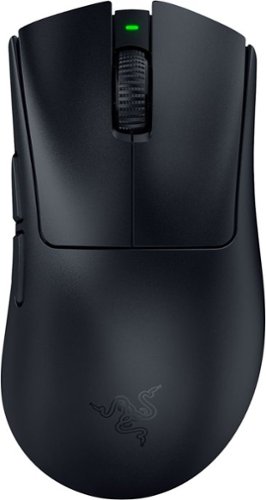
Become the deadliest version of yourself with the Razer DeathAdder V4 Pro~an ultra-lightweight wireless ergonomic mouse that~s the perfect esports specimen. Upgraded on all fronts with our most cutting-edge tech, feel the immediate impact as every advantage you have comes into play.
Customer Rating
5
Razer DeathAdder V4 Pro. Light, Fast, and Complete
on July 11, 2025
Posted by: MarkusKong
Coming from someone who’s been playing Counter-Strike since around 2001, I’ve used everything from ball mice to the iconic (what some may call the “GOAT” of gaming mice) Microsoft Pro IntelliMouse. The shape of the DeathAdder V4 Pro (and previous predecessors from the DeathAdder line up) really reminds me of the Microsoft Pro IntelliMouse. The Razer DeathAdder V4 Pro feels like a modern-evolved yet classic beauty that has met the demands of the current FPS scene.
The Deathadder V4 Pro nails that slightly elongated, right-handed ergonomic design. If you grew up on the IntelliMouse like I did, this shape may make you feel right at home except with all the tech worthy upgrades under the hood. It’s more lightweight than its predecessor weighing in at just 56g. But don’t let the lightweight fool you. The Deathadder V4 Pro is sturdy and glides smoothly even under high-stakes flicks and micro-adjustments in CS2.
Right out of the box the DeathAdder V4 Pro feels, looks, and performs beautifully. With the new HyperSpeed Wireless Gen-2 technology, you’re looking at more power efficiency and lower latency than its predecessor. With true 8000hz wired and wireless polling, you’re looking at faster and more accurate inputs. The DeathAdder V4 Pro also comes equipped with a 45k optical sensor as well. I am going to also highlight some of the stellar upgrades Razer has done under the hood. Razer has made some amazing upgrades to the switches and scroll wheel. The DeathAdder V4 Pro has Gen-4 optical mouse switches which means they have a 100 million click lifecycle (lets not forget to highlight the amazing tactile feedback on those clicks!). The DeathAdder V4 Pro also has Razer Optical Scroll Wheel which correlates to better accuracy, durability, and consistency in every scroll. Lets also mention the redesign of the dongle which now boasts better performance and includes three lights to show connectivity status, battery life and polling rate. Last but not least, the battery life on the DeathAdder V4 Pro is INSANE! I obviously don’t have some sort of timer set to where I am calculating this but just general usage (which includes work and gaming - “a lot”); I have been using this mouse nonstop for over a week and never once had to worry about charging it and this thing is still has more than 50% juice!
One of the standout features is how customizable the DPI stages are. When using Razer Synapse to set up your DPI stages, you are able to fine-tune your sensitivity down to a 1-DPI increment. So what does this mean? Being able to perfectly dial in just the right feel to how you want your movements to move.
Even mouse rotation adjustment is included. Why is this important? For those where minor details including wrist angle and desk posture can affect aim; this feature makes a measurable difference. Razer provides you with a tool (within Synapse) that can test how much rotation you are adding and by running this test and setting the difference in mouse rotation; you can now confidently draw that straight line in paint (mine was -2 degrees - who woulda knew?!?!).
Another big win: I can set different polling rates for different games and with Razer Synapse, it auto switches between them depending on the title I am running. So for example while I am playing CS2; I set my Polling rate to 4000 Hz for raw response and input clarity, but generally like to bring down the Polling rate for more casual games where battery life matters more (higher polling rate means more battery consumption).
When it comes to features and playing a game like CS2, sensor calibration is a game changer. I am a low sensitivity player that does relatively large swipes. The ability to calibrate both lift-off and landing distance separately with up to 26 levels is a huge win. I like being able to fine-tune mine to stop tracking the movement as soon as I lift which reduces unwanted cursor drift when repositioning the mouse. It’s essentially small tweaks that lead to huge consistency gains for me.
Lastly on features, I’d like to touch on Dynamic Sensitivity. With this feature turned on, it automatically adjusts mouse sensitivity based on movement speed. What this means is it could offer higher DPI for quick flicks and lower DPI for when I need my aim to be as precise as possible. With the -2 degrees set for mouse rotation and Dynamic Sensitivity preset of “JUMP”, it allows both fast turns and accurate micro-adjustments all at the same time (180 - HEADSHOT!).
Razer didn’t just throw tech specs at this mouse, they built a tool that adapts to the way YOU play. The DeathAdder V4 Pro hits that sweet spot between nostalgia and cutting-edge performance. Whether you are a palm or claw grip player, the DeathAdder V4 Pro will feel immaculate in your hand. Will you become a professional esports player by purchasing the DeathAdder V4 Pro? Maybe. But one thing is for certain. The DeathAdder V4 Pro is definitely something I would recommend if you are looking to truly customize your gaming mouse to fit all your wants and needs (and heck, possibly even your deepest desires).
I would recommend this to a friend!




Share this review:


0points
0of 0voted this as helpful.
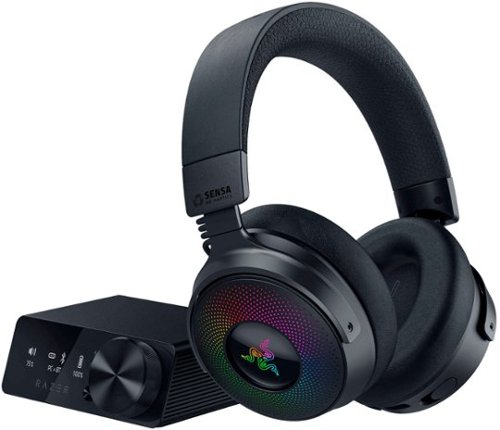
Experience next-gen immersion with the Razer Kraken V4 Pro wireless gaming headset. Gain full control with an all-new OLED Control Hub featuring over 20 customization options, including audio, haptics, and home screen personalization. Connect up to three devices simultaneously using dual USB-C ports and a 3.5 mm input. Powered by Razer Sensa HD Haptics, the headset offers real-time audio-to-haptics conversion for all content and supports game integration, delivering wideband HD haptics that accurately mimic in-game distance and directionality. With 4 connectivity options, including Razer HyperSpeed Wireless, Bluetooth, USB, or 3.5 mm, connect to your favorite systems such as PC, Mac, PlayStation, Nintendo Switch, Steam Deck, ROG Ally, and smartphones. Simultaneous audio support allows you to mix 2.4 GHz and Bluetooth audio on two devices at once. The retractable Razer HyperClear Super Wideband Microphone ensures superior sound quality for crystal-clear team comms, retracting flush with the headset when not in use. Razer~s patented TriForce Bio-Cellulose 40 mm Drivers enable individual tuning of high, mid, and low frequencies for a powerful, lifelike auditory experience with natural high-end sound. The headset also supports THX Spatial Audio, a cutting-edge 7.1 surround sound system that provides realistic positional audio and expands your soundstage. Enhance your setup with 9-Zone Earcup Lighting, offering more Razer Chroma RGB effects. Customize each zone individually to create stunning visuals and light up your battlestation. Elevate your gaming with the ultimate headset that does it all.
Customer Rating
5
Let's get Kraken! Kraken V4 Pro Wireless that is.
on November 25, 2024
Posted by: MarkusKong
Let me first start off by saying this, out of the box the headset is a bit underwhelming but if you’re willing to play around with the settings/audio profile; you’ll end up with one of the best gaming headsets out there. Whether you are looking for warm mids or heavy bass, tweaking the settings will give you what you are looking for. Thanks to the haptic feedback, your FPS games are truly going to be immersive. Adjusting the settings will also give you an all round great experience with these headphones, whether that's gaming, watching movies or listening to music.
Now we dive into comfort, because who would not want comfortable headphones that they can game/use for hours and hours. With the Kraken V4 Pro Wireless, you’ll be greeted with plush leather earcups instead of mesh. I’ve used several headsets throughout the years and years of gaming and I can truly say that the Kraken V4 Pro Wireless offers one of the most comfortable headsets I have ever had the privilege of placing on my head. In terms of build quality, there’s definitely more plastic than metal but that isn’t necessarily a bad thing. I think Razer went this route so that the headset isn’t too heavy because at the end of the day if you are gaming for hours and hours; who really wants something ultra heavy weighing down on their head? So yes, although the build is majority plastic it is overall a sturdy build and does not feel cheap at all. I also do like to mention that ear cups fold/swivel for easy storage and the mic retracts into the left ear cup (no cracking or creaking of anysort - again great build quality overall by Razer).
When it comes down to being “user friendly”, the Kraken V4 Pro Wireless has you covered. The headset itself has all the controls you would need without having the need to utilize Razer Synapse or the base station. What I am trying to mention here is that everything from adjusting volume, muting your mic, and changing the haptic levels can be done right at your fingertips! But with the addition of the base station, it makes things even easier. You’re able to control what I’ve mentioned above in addition to switching audio profiles all on an OLED screen. If you’re looking for customization of the base station, you can also change things via Razer Synapse. Thanks to the Bluetooth connection, you can also use the Kraken V4 Pro Wireless with something like your Nintendo Switch or other handheld gaming consoles. You of course have the standard 2.4GHz wireless connection and if you prefer, you also can use the Kraken V4 Pro Wireless as a “wired” headset.
As far as performance goes, I would highly encourage you to make adjustments in the settings/EQ, profiles, etc. Out of the box you may be a bit underwhelmed when it comes down to the performance but with some slight tweaking in Razer Synapse you’ll end up with one of the best gaming headsets out there. The only complaint I personally have is the mic but again this headset is designed for gaming, not content creation. I do feel that the mic is a bit “lackluster” even with messing around with the settings. So what it boils down to is knowing what you are buying before you make your purchase. If you’re looking for an amazing gaming headset (again need some slight tweaking in Razer Synapse), the Kraken V4 Pro Wireless is a top contender. The immersive sounds of being able to hear every reload, footsteps and gunfire are truly breathtaking.
All in all, would I recommend the Kraken V4 Pro Wireless headset? Yes, if you are looking for a truly immersive gaming headset with intense haptic feedback to truly put you in your games; the Kraken V4 Pro Wireless is for you. The Kraken V4 Pro Wireless has all the bells and whistles. As mentioned in the performance, the only complaint I truly have is with the mic but then again as I stated; it truly depends on what you are getting the Kraken V4 Pro Wireless headset for. If you are getting these to do only content creation, you’re probably better off getting a standalone mic that is made for that specific reason rather than investing in a gaming headset. But, if you are looking to be “IN” your games and hear every single reload, footstep, explosion, gunfire and immerse yourself in your games; the Kraken V4 Pro Wireless is a worthy contender in the line of top-tier gaming headsets.
I would recommend this to a friend!





Share this review:


+1point
1of 1voted this as helpful.

The ultimate guided experience that makes espresso uncomplicated. The Ninja Luxe Caf~ Premier Series is an intelligent espresso & coffee system with unmatched 3-in-1 versatility (no guesswork espresso, well balanced drip coffee and rapid cold brew), that helps you elevate your coffee routine and create caf~-quality drinks at home. Barista Assist Technology guides you to the perfect cup from grind size recommendations to automated brew adjustments, while the Dual Froth System effortlessly creates perfectly textured microfoam hands-free.
Customer Rating
5
Efficient|Easy & Approachable Perfect for Newbies!
on July 10, 2024
Posted by: MarkusKong
TL;DR, it beats out all of the competitors because it makes espresso easy and approachable to dabblers all the way to coffee enthusiasts.
Let’s start from the top.
Right out of the box, it’s so easy to put together and get it going. They include this nifty quick guide - can’t mess this up! I appreciate that a part of the setup includes adjusting the machine to match your water hardness. You can always go back and adjust this in the internal settings should it change. I do want to add here that most cities will have hard water so I personally wouldn’t be too alarmed BUT this can affect the flavor of your coffee - do what you will with this piece of information.
Right out of the box, it’s so easy to put together and get it going. They include this nifty quick guide - can’t mess this up! I appreciate that a part of the setup includes adjusting the machine to match your water hardness. You can always go back and adjust this in the internal settings should it change. I do want to add here that most cities will have hard water so I personally wouldn’t be too alarmed BUT this can affect the flavor of your coffee - do what you will with this piece of information.
The machine, like its competitors, includes a bean hopper that can be topped off for multiple cups. The cover is tinted and seems “airtight;” however, I personally prefer to put in small amounts to keep the beans at their peak. I think it’s important to add here that you also don’t need to measure how many grams you need to put in because the Barista Assist Technology automatically weighs for the grind. Speaking of grind, the Barista Assist Technology also recommends grind sizes based on your pull - double, quad, cup of joe, cold brew, etc. The first few times, the recommendation will change and after a few times, it will stay consistent. THIS, in my opinion, makes this device the winner. It makes the idea and experience of making espresso so easy and approachable for the folks who are new and dabbling in coffee. The setting is not set in stone and just a recommendation, which also makes this approachable for the coffee enthusiast. MAYBE even to the coffee connoisseurs?
Moving on, I appreciate the adjustable platform to accommodate multiple cup sizes. This makes so much sense to me on a time and financial level because sometimes, I am on the go and would like to have a cup without so much cleaning up. With this, I can pull right into a tumbler, rinse the portafilter and basket and go. By having this as an option, I’m also less tempted to buy mediocre coffee for $5-7 a cup.
I’d like to add here that I am impressed by the temperature yielded once pulled - at 165’F - which is expected and what you want. This in turn tells me that the brew temperature was likely in the 190’F to 200’Fs. This is great because you can have a bad time with under extracted or over extracted pulls.
Moving on - a latte wouldn’t be possible without milk and I am so happy this has a built-in frother. I like the froth level and the optimization setting for dairy and plant-based options - it’s a nice touch. I also like that I can froth cold should I desire an iced latte.
The milk jug has markings for cappuccino and latte - you can always do a cortado or flat white by adjusting the foam. These types, unfortunately, aren’t on the machine but you do have a Inspiration Guide to teach you some drinks and you can build on that.
I have yet to use the drip coffee or cold brew options. This is simply because I prefer pourover and typically do not drink cold brew. I like that I have these options in my back pocket though.
Overall, I would recommend this if you’re in the market for a no-fuss espresso machine or an easy, approachable entry to the world of espresso.
I would recommend this to a friend!




Share this review:


0points
0of 0voted this as helpful.
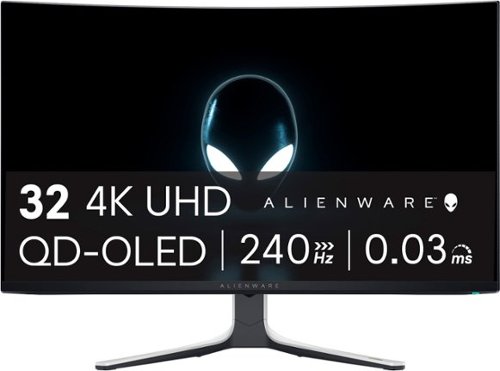
The world~s first 4K QD-OLED gaming monitor has arrived. The AW3225QF delivers ultimate visual fidelity with 4K resolution, Dolby Vision, a 240Hz refresh rate, and 0.03 ms minimum response time, plus superb color performance.
Customer Rating
5
The AW3225QF; Truly Out of this Gaming World!
on April 24, 2024
Posted by: MarkusKong
Alienware AW3225QF was made for gamers, period. Enjoy 4k games with almost near instantaneous response time thanks to the 0.03ms response time. There’s also no sacrifices made here for motion clarity as refresh rate is up to 240Hz. What do these 2 things mean? Crisp motion and low input lag gives you an optimal responsive feel in your games. In addition to that, Alienware has done an amazing job with their infinite contrast ratio which really gives you as close to perfect blacks as there is, yet bright enough to make things pop (where they need to pop) and colors look amazingly vivid.
Alienware AW3225QF, the first 32 inch 4k QD-OLED curved gaming monitor and I gotta say I am here for it all! Alienware has done an amazing job with the AW3225QF. Everything from the build quality to make it look premium down to the actual internal specs and features really makes this a sure choice for gamers. Yes the price point may be a bit steep for some but you are really getting something amazing here (you are getting what you pay for).
For those of you wondering about ports you have two HDMI 2.1 ports, two USB-A 3.2 ports, a USB-B upstream port, DisplayPort, along with additional USB-A and USB-C connectors which can be all found under the monitor.
I had the luxury of being able to throw various games on this beauty and the beast (by all means in a VERY good way) and the Alienware AW3225QF did not disappoint. Yes, as some have mentioned and I am sure you have read other reviews; there have been some issues with software. But to be completely honest that shouldn’t persuade you to skip on this monitor. Dell is doing an amazing job with releasing firmware updates (the most recent one I downloaded and installed was M2b104 which just released March 18 2024. They are working on the “kinks” and have been quite on top of it. On a side note, Dell has already made the improvements with proper packaging. There were a lot of reviews stating they received their AW3225QF scratched due to the bubblewrap having direct contact with the screen. Dell has remedied this issue by putting a protector in between the bubblewrap and the screen (great work Dell!).
I had the luxury of being able to throw various games on this beauty and the beast (by all means in a VERY good way) and the Alienware AW3225QF did not disappoint. Yes, as some have mentioned and I am sure you have read other reviews; there have been some issues with software. But to be completely honest that shouldn’t persuade you to skip on this monitor. Dell is doing an amazing job with releasing firmware updates (the most recent one I downloaded and installed was M2b104 which just released March 18 2024. They are working on the “kinks” and have been quite on top of it. On a side note, Dell has already made the improvements with proper packaging. There were a lot of reviews stating they received their AW3225QF scratched due to the bubblewrap having direct contact with the screen. Dell has remedied this issue by putting a protector in between the bubblewrap and the screen (great work Dell!).
So all in all, are there some issues to be worked out? Yes. Does it cause so much of an issue at this time to skip on this monitor? Absolutely and positively not. The Alienware AW3225QF is a supreme gaming monitor in every way which includes instantaneous response time, 240Hz refresh rate, amazing deep blacks while boasting true OLED HDR brightness and rich vivid colors. I highly encourage you to give the Alienware AW3225QF a go.
I would recommend this to a friend!






Share this review:


+6points
6of 6voted this as helpful.

Experience the height of gaming innovation with the ROG Zephyrus G16. Featuring an all-new premium aluminum chassis with customizable lighting, this laptop merges style and durability. Its ultra-slim 0.59~ profile and lightweight 4.30lbs 16~ chassis redefines portability without compromising performance. Powered by Windows 11, an Intel Core Ultra 9 185H processor, and an NVIDIA GeForce RTX 4090 GPU, the Zephyrus G16 seamlessly aligns with your lifestyle, meeting all your gaming and creative demands. ROG Intelligent Cooling features liquid metal for reduced CPU temperatures and upgraded Arc Flow Fans for improved airflow to sustain peak performance on the Zephyrus G16 no matter the task. Immerse yourself in the OLED ROG Nebula Display and enjoy rapid 0.2ms response times, vivid 2K resolution, and a smooth 240Hz refresh rate.
Customer Rating
5
ROG Zephyrus2024 Ready for Work, Creating & Gaming
on March 6, 2024
Posted by: MarkusKong
TL;DR
The ASUS - ROG Zephyrus G16 (2024) is a high-end/high-quality gaming and multimedia laptop with an extremely beautiful OLED display while boasting some amazing speakers. If you are in the market for an upgrade or simply looking to purchase a new gaming/content creating powerhouse laptop that is also compact and premium; the ASUS - ROG Zephyrus G16 (2024) will fit most if not all of your wants and needs.
The ASUS - ROG Zephyrus G16 (2024) is a high-end/high-quality gaming and multimedia laptop with an extremely beautiful OLED display while boasting some amazing speakers. If you are in the market for an upgrade or simply looking to purchase a new gaming/content creating powerhouse laptop that is also compact and premium; the ASUS - ROG Zephyrus G16 (2024) will fit most if not all of your wants and needs.
–
I have to first talk about the build quality of the ASUS - ROG Zephyrus G16 (2024) which is a thing of beauty. The laptop is very minimalistic and compact (besides the slash lighting on the lid which can be programmed or completely turned off). Now when I say compact, I mean this only weighs 4.3lbs and is 1.7cm thick! The feel and look of the ASUS - ROG Zephyrus G16 (2024) is nothing short of “premium”. It features a beautiful aluminum case body that personally really reminds me of an Apple MacBook Pro with its rounded edges. Now don’t let the looks fool you folks, don’t blink… This compact yet powerful laptop contains an Intel Core Ultra 9 185H processor, Nvidia RTX 4090, 32GB LPDDR5X RAM, 2TB SSD and of course a stunning 16” OLED 240Hz ROG Nebula HDR Display that is NVIDIA G-SYNC ready!
–
Now when it comes down to performance, one thing to keep in mind is that the ASUS - ROG Zephyrus G16 (2024) is made to do it all. So what does that mean? It means that it’s not necessarily a full fledged gaming rig. You can already tell based on what I mentioned above about how compact and elegant it looks; it's designed to be more than just a gaming laptop. It’s an on the go minimalistic yet premium and lightweight laptop that can be utilized for professional purposes (like work), content creation as well as gaming. While the gaming performance isn’t blowing everything out of the water, it’s definitely not by any means a last contender. I had the luxury of testing several games such as CS2, Helldivers 2, Shadow of the Tomb Raider, Far Cry 6, Red Dead Redemption 2 and many others. Most games held over 60fps gaming in QHD+. Long story short in terms of gaming performance, I was able to throw everything at it and thoroughly enjoyed the gaming experience. I also ran some benchmarks and again not mind blowing but also not by any means mediocre. With everything said, please keep in mind that the reason behind why this beauty isn’t outperforming everything is because although the internals are “top of the line”, it has to take a hit somewhere and that somewhere could be things like component power output and airflow due to everything being contained in a thinner chassis. So basically what I am trying to say is a 4090 in the ASUS - ROG Zephyrus G16 (2024) isn’t necessarily the same 4090 in a desktop. Now you are probably wondering how the temps are. Thanks to the Vapor Chamber the CPU temps are around mid 80s while the GPU temps are around mid to high 70s (this is while gaming on Performance Mode via ASUS Armoury Crate). Keep in mind you can bump up the performance slightly by changing to Turbo Mode but fans will definitely kick up as temps will rise and don’t forget about fan noise as well. Personally I felt it most comfortable to leave it on Performance Mode. One thing I can recommend (in any case scenario where you are using a laptop for gaming) is trying to elevate/raise the laptop as this will help the fans dissipate the heat which in turn can help with performance (avoiding any possibility of thermal throttling).
–
–
Now when it comes down to performance, one thing to keep in mind is that the ASUS - ROG Zephyrus G16 (2024) is made to do it all. So what does that mean? It means that it’s not necessarily a full fledged gaming rig. You can already tell based on what I mentioned above about how compact and elegant it looks; it's designed to be more than just a gaming laptop. It’s an on the go minimalistic yet premium and lightweight laptop that can be utilized for professional purposes (like work), content creation as well as gaming. While the gaming performance isn’t blowing everything out of the water, it’s definitely not by any means a last contender. I had the luxury of testing several games such as CS2, Helldivers 2, Shadow of the Tomb Raider, Far Cry 6, Red Dead Redemption 2 and many others. Most games held over 60fps gaming in QHD+. Long story short in terms of gaming performance, I was able to throw everything at it and thoroughly enjoyed the gaming experience. I also ran some benchmarks and again not mind blowing but also not by any means mediocre. With everything said, please keep in mind that the reason behind why this beauty isn’t outperforming everything is because although the internals are “top of the line”, it has to take a hit somewhere and that somewhere could be things like component power output and airflow due to everything being contained in a thinner chassis. So basically what I am trying to say is a 4090 in the ASUS - ROG Zephyrus G16 (2024) isn’t necessarily the same 4090 in a desktop. Now you are probably wondering how the temps are. Thanks to the Vapor Chamber the CPU temps are around mid 80s while the GPU temps are around mid to high 70s (this is while gaming on Performance Mode via ASUS Armoury Crate). Keep in mind you can bump up the performance slightly by changing to Turbo Mode but fans will definitely kick up as temps will rise and don’t forget about fan noise as well. Personally I felt it most comfortable to leave it on Performance Mode. One thing I can recommend (in any case scenario where you are using a laptop for gaming) is trying to elevate/raise the laptop as this will help the fans dissipate the heat which in turn can help with performance (avoiding any possibility of thermal throttling).
–
Overall, the ASUS - ROG Zephyrus G16 (2024) is definitely an excellent choice for anyone looking to splurge a bit in a compact yet absolutely stunning laptop. The fact that this thing of beauty can pack all it has in such a light and thin aluminum chassis is outstanding (not to mention the astonishing 16” OLED 240Hz ROG Nebula HDR Display). If you are someone that uses a laptop for work, content creation and gaming; the ASUS - ROG Zephyrus G16 (2024) fits the bill.
I would recommend this to a friend!



Share this review:


0points
0of 0voted this as helpful.
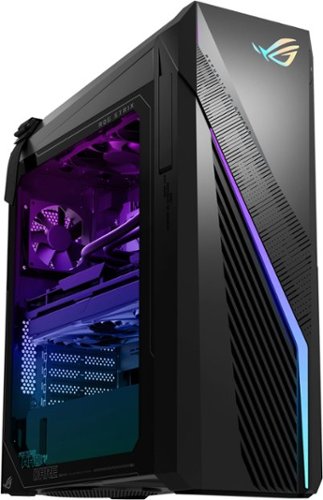
Annihilate your competition with this ASUS ROG gaming desktop. The Intel Core i7 processor and 16GB of RAM deliver rapid performance during fast-paced action, while the 1TB SSD provide plenty of storage for large files and downloads. This Bluetooth-enabled ASUS ROG gaming computer features an NVIDIA GeForce RTX 3070 graphics card for tear-free rendering of 4K games.
Customer Rating
4
ASUS NEVER Disappoints! Amazing 1440p Rig.
on July 7, 2023
Posted by: MarkusKong
---------------------------------------------------------------------------------------------------------------------
*****Review*****
---------------------------------------------------------------------------------------------------------------------
*****Review*****
---------------------------------------------------------------------------------------------------------------------
TL;DR
The ASUS ROG G16CH-I7K3070VR is a steller 1080p and up to 1440p gaming performance rig but falls a bit short when it comes to gaming in 4k.
The ASUS ROG G16CH-I7K3070VR is a steller 1080p and up to 1440p gaming performance rig but falls a bit short when it comes to gaming in 4k.
–
This specific ASUS ROG Strix G16CH comes equipped with an i7-13700KF (the K means it’s an unlocked CPU while the F means there’s no integrated graphics), 16GB DDR4 3200MHz RAM, Nvidia GeForce RTX 3070, and 1 TB SSD. Everything is housed in a wonderful minimalistic chassis that features RGB lighting and a front mesh panel to help support airflow. When it comes to the assembly quality and cable management of a pre-built gaming PC; I have to say that ASUS did an amazing job. I like that the power supply is kept separated within the chassis and all the cables are tucked away nicely (the perfectionist within me is screaming… OH YEAH ASUS!). Oh yeah and for you gaming folks out there that enjoy looking through that glass side panel into your beautiful setup, the ASUS ROG G16CH chassis has just that. I also like that the chassis comes equipped with a double D-ring handle so that if you need to lift/move your setup for whatever reason you don’t need to make it awkward and bear hug your unit to make that move. For those of you that love a headset holder; this chassis also has you covered.
There are a couple things I personally found a bit nit picky when it comes to the chassis though. These are my personal opinions so please take it with a grain of salt. So although the power supply is separated, the material they used to keep the power supply separate is quite interesting. Basically the unit I have had some dust or something on top of the power supply housing unit and when I tried wiping it with a paper towel it started shredding the paper towel. I then tried using a wet wipe like a baby wipe and it started shredding that too! I then realized it’s probably best to use a lint free towel which definitely worked much better. The other thing I noticed is the top and front of the case “the slashes” is a plastic like material that’s most likely been painted and when I tried using a swiffer duster it was catching quite a bit in those areas. For anyone that likes to keep their gaming area clean and constantly cleans this is just something to notate on this chassis. I would recommend just using either canned compressed air or an electrical dust compressor to clean the unit from time to time instead of trying to clean it like I did. It would’ve been nice if the material in these areas were “smooth” to the touch instead of what it is (a bit more rough to the touch). It would help us OCD folks have an easier time cleaning it on the daily.
–
Now onto the performance of the ASUS ROG G16CH-I7K3070VR. I’m just going to throw this out there to make it plain and simple. If you’re looking to game at either 1080p or 1440p; this rig will definitely satisfy your needs and wants (without a doubt). Just to name some of the games I ran on this machine: Overwatch, Fortnite, Call of Duty Warzone, APEX, Cyberpunk 2077, Red Dead Redemption 2, Counter-Strike Global Offensive, The Division 2, and even Witcher 3 (Next Gen Update) - all at either 1440p (for enjoyment) or 1080p (with competitive settings) and had no issues whatsoever. You can expect great frames to where some games are well above 3 digits. Thanks to the 240mm AIO cooler to keep the i7-13700KF cool and the type of RTX that is in the system (ASUS PF DUAL-RTX3070-8GD6-V2); temps are AMAZING! When I say amazing I mean not only is the rig itself quiet even under load; everything is hovering around or below average temps (CPU 60C - Max under 70C / GPU 60-65C - Max under 70C).
Here’s my 2 cents if you’re curious when it comes to 4k performance. I tried playing in 4k and although I could run games in 4k, I wouldn’t necessarily say they were “playable” or “enjoyable”; at least in my standards. If you’re a gamer that wants to venture (or prefer) 4k gaming… I would say it may be best to plan ahead on replacing the RTX 3070. I do know that the ASUS ROG Strix G16CH desktop themselves has the option of going up to an RTX 4080. So if you were to make some upgrades on this desktop you’ll definitely have no problems crushing your AAA titles in 4k (keep in mind you’ll also need to invest in a really good expensive gaming monitor). But overall the ASUS ROG G16CH-I7K3070VR is an amazing performance rig when it comes to 1080p or 1440p for gaming.
–
Long story short, the ASUS ROG G16CH-I7K3070VR is definitely an amazing gaming rig if you are looking to play your games in either 1080p resolution or up to 1440p resolution at high-ultra-maxed settings. There’s some upgrades you can do to this current setup such as upgrading from the 3070 and adding more memory; which would then enable you to run your games in 4k and you’ll definitely be able to comfortably game in “playable” or “enjoyable” settings while maintaining some great frames. So all in all it really depends on what you are looking for. As long as you keep in mind the specs and your gaming resolution/preference; the ASUS ROG G16CH-I7K3070VR should be able to satisfy if not exceed your gaming demands.
---------------------------------------------------------------------------------------------------------------------
*****Quick Features & Specs*****
---------------------------------------------------------------------------------------------------------------------
Windows 11 Operating System
Windows 11 has all the power and security of Windows 10 with a redesigned and refreshed look. It also comes with new tools, sounds, and apps. Every detail has been considered. All of it comes together to bring you a refreshing experience on your PC.
13th Gen Intel Core i7-13700KF processor
Powerful eight-core, eight-way processing performance.
16GB system memory for intense multitasking and gaming
Reams of high-bandwidth DDR4 RAM to smoothly run your graphics-heavy PC games and video-editing applications, as well as numerous programs and browser tabs all at once.
1TB solid state drive (SSD) for storage space and speed
1TB SSD delivers faster start-up times and data access.
NVIDIA GeForce RTX 3070 graphics
Driven by 8GB GDDR6 dedicated video memory to quickly render high-quality images for videos and games.
2 USB Type-C port
To maximize performance on the latest high-speed devices.
6 USB 2.0 ports
Quick plug-and-play connectivity for your devices and accessories.
Next-generation wireless connectivity
Connects to your network or hotspots on all current Wi-Fi standards. Connect to a Wireless-AC router for speed nearly 3x faster than Wireless-N. Gigabit LAN port also plugs into wired networks.
Bluetooth 5.0 interface syncs with compatible devices
Wirelessly transfer photos, music and other media between the desktop and your Bluetooth-enabled cell phone or MP3 player, or connect Bluetooth wireless accessories.
Basic software package included
1-month trial of Microsoft Office.
Additional ports
Microphone and headphone jacks. Subwoofer port.
Note: This computer does not include a built-in DVD/CD drive.
---------------------------------------------------------------------------------------------------------------------
*****Quick Features & Specs*****
---------------------------------------------------------------------------------------------------------------------
Windows 11 Operating System
Windows 11 has all the power and security of Windows 10 with a redesigned and refreshed look. It also comes with new tools, sounds, and apps. Every detail has been considered. All of it comes together to bring you a refreshing experience on your PC.
13th Gen Intel Core i7-13700KF processor
Powerful eight-core, eight-way processing performance.
16GB system memory for intense multitasking and gaming
Reams of high-bandwidth DDR4 RAM to smoothly run your graphics-heavy PC games and video-editing applications, as well as numerous programs and browser tabs all at once.
1TB solid state drive (SSD) for storage space and speed
1TB SSD delivers faster start-up times and data access.
NVIDIA GeForce RTX 3070 graphics
Driven by 8GB GDDR6 dedicated video memory to quickly render high-quality images for videos and games.
2 USB Type-C port
To maximize performance on the latest high-speed devices.
6 USB 2.0 ports
Quick plug-and-play connectivity for your devices and accessories.
Next-generation wireless connectivity
Connects to your network or hotspots on all current Wi-Fi standards. Connect to a Wireless-AC router for speed nearly 3x faster than Wireless-N. Gigabit LAN port also plugs into wired networks.
Bluetooth 5.0 interface syncs with compatible devices
Wirelessly transfer photos, music and other media between the desktop and your Bluetooth-enabled cell phone or MP3 player, or connect Bluetooth wireless accessories.
Basic software package included
1-month trial of Microsoft Office.
Additional ports
Microphone and headphone jacks. Subwoofer port.
Note: This computer does not include a built-in DVD/CD drive.
I would recommend this to a friend!




Share this review:


+7points
7of 7voted this as helpful.
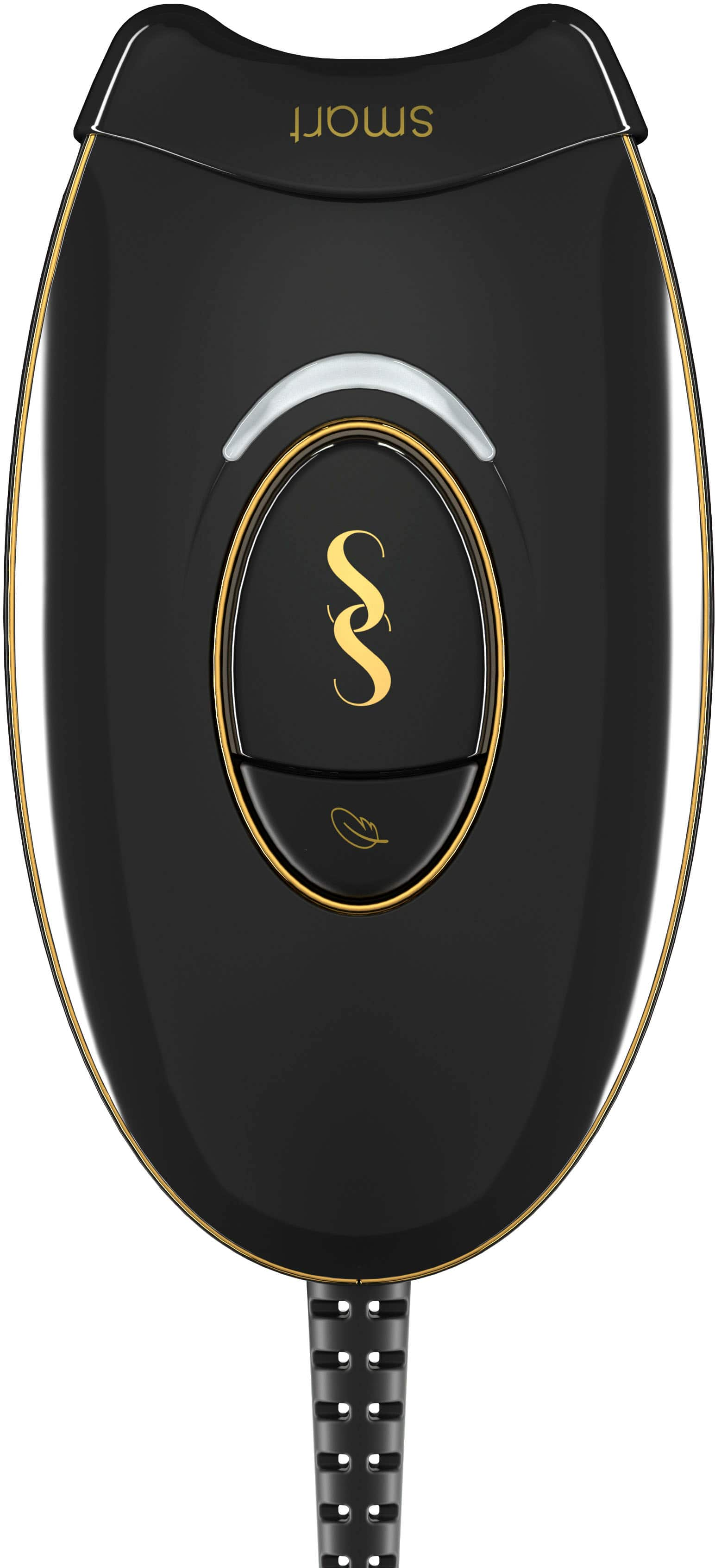
SmoothSkin Pure Mini combines the best of our technology in our most compact device yet! Delivering fast treatments to a maximum of 4J/cm2, you will see visible results in just 4 weeks and up to 97% hair reduction after 12 weeks! Featuring our patented Smart Skin Sensing Technology, Pure Mini measures your skin tone with each flash and automatically tailors its entergy output accordingly for personalized, safe and longer-lasting results. Clinically proven and FDA cleared for permanent and safe hair reduction on your body and face. SmoothSkin PUre Mini features two comfort settings, a precision head attachment and 3 intensity levels for an IPL experience tailored to your personal needs: Power Mode is the highest intensity setting perfet for stubborn areas, Gentle Mode is ideal for more sensitive areas. The precision head helps treating smaller areas. What's more, a full body treatment takes only 10 minutes!
Customer Rating
5
Amazing Do-It-Yourself (At Home) Hair Removal
on November 22, 2022
Posted by: MarkusKong
---------------------------------------------------------------------------------------------------------------------
*****Review*****
---------------------------------------------------------------------------------------------------------------------
*****Review*****
---------------------------------------------------------------------------------------------------------------------
First and foremost I am a male that enjoys having smooth hairless skin. One of my favorite hobbies is bodybuilding and although I am not a professional; I’ve been doing it for quite some time now and one of things bodybuilders do before a show is they shave their entire body. Long story short, prior to the SmoothSkin Pure Mini IPL Hair Removal System I had to continuously shave my body every 2 days or so because that is how my hair grows. So give or take in about 2-3 days I already end up with a good amount of stubble which in turn means I would need to shave; again. Let's just say it got pretty tedious and time consuming.
Long behold came the SmoothSkin Pure Mini IPL Hair Removal System. This thing of beauty is compact, powerful and super easy to use. I do recommend familiarizing yourself with how the device works before you use it though (for example one thing is to not use it on any tattooed skin). When I say it is easy to use I truly mean it is easy to use; simply plug it in and either pulse the button or hold the button and guide it wherever you need. The SmoothSkin Pure Mini IPL Hair Removal System has Smart Skin Sensing technology so it will automatically change the power output depending on your skin tone. If for whatever reason it is too painful or you would like to use a bit less power on certain areas you can toggle the device to “Gentle Mode” (personally though I never had to go into the “Gentle Mode”). Prior to the SmoothSkin Pure Mini IPL Hair Removal System I did have another at home hair remove system device but it wasn’t as fine tuned as the SmoothSkin Pure Mini IPL Hair Removal System. I love the fact that I can effectively and efficiently complete a session of my entire body in such little time. If you have someone that can help you for your sessions; you can literally get your entire body done in less than 30 minutes.
Now when it comes down to the results I can tell you that it works. Just like bodybuilding; hair removal isn’t done in one session. I was able to thoroughly use the device for 6 weeks and can reassure you that most of my hair is already gone. There's going to be certain areas where it may take a few more sessions but overall I can say I can now shave a lot less (or at least there’s very little effort since I don’t have as much hair now). Thanks to the SmoothSkin Pure Mini IPL Hair Removal System I no longer have to shave so often. Do keep in mind though that during these 6+ weeks where you are completing your once a week sessions; you will still need to shave. But I do believe when you hit the 12+ week mark the (Up to 97% hair reduction) claim will become a fact. Overall I am thoroughly happy with the SmoothSkin Pure Mini IPL Hair Removal System and would highly recommend it to family and friends that want to do laser hair removal.
Long behold came the SmoothSkin Pure Mini IPL Hair Removal System. This thing of beauty is compact, powerful and super easy to use. I do recommend familiarizing yourself with how the device works before you use it though (for example one thing is to not use it on any tattooed skin). When I say it is easy to use I truly mean it is easy to use; simply plug it in and either pulse the button or hold the button and guide it wherever you need. The SmoothSkin Pure Mini IPL Hair Removal System has Smart Skin Sensing technology so it will automatically change the power output depending on your skin tone. If for whatever reason it is too painful or you would like to use a bit less power on certain areas you can toggle the device to “Gentle Mode” (personally though I never had to go into the “Gentle Mode”). Prior to the SmoothSkin Pure Mini IPL Hair Removal System I did have another at home hair remove system device but it wasn’t as fine tuned as the SmoothSkin Pure Mini IPL Hair Removal System. I love the fact that I can effectively and efficiently complete a session of my entire body in such little time. If you have someone that can help you for your sessions; you can literally get your entire body done in less than 30 minutes.
Now when it comes down to the results I can tell you that it works. Just like bodybuilding; hair removal isn’t done in one session. I was able to thoroughly use the device for 6 weeks and can reassure you that most of my hair is already gone. There's going to be certain areas where it may take a few more sessions but overall I can say I can now shave a lot less (or at least there’s very little effort since I don’t have as much hair now). Thanks to the SmoothSkin Pure Mini IPL Hair Removal System I no longer have to shave so often. Do keep in mind though that during these 6+ weeks where you are completing your once a week sessions; you will still need to shave. But I do believe when you hit the 12+ week mark the (Up to 97% hair reduction) claim will become a fact. Overall I am thoroughly happy with the SmoothSkin Pure Mini IPL Hair Removal System and would highly recommend it to family and friends that want to do laser hair removal.
---------------------------------------------------------------------------------------------------------------------
*****Quick Features & Specs*****
---------------------------------------------------------------------------------------------------------------------
N1 IPL hair removal technology
SmoothSkin are the world-leading experts in IPL hair removal technology with over 40 years' experience and over 4 million devices sold using our patented technology.
Visible results in just 4 weeks
SmoothSkin Pure Mini is clinically proven to prevent hair regrowth, giving noticeable hair reduction from just 4 weeks.
Up to 97% hair reduction after 12 weeks
Clinically proven and independently reviewed results. Pure Mini is twice as fast and two times more powerful than our competitors.
Tailored to your skin-tone
Pure Mini features our patented Smart Skin Sensing technology, which continuously measures your unique skin-tone, and automatically tailors the energy output, accordingly, delivering personalized, safe, and long-lasting results.
Quick and compact!
Pure Mini is designed to be lightweight and easy to use. With a maximum output of 4J/cm2, us Pure Mini once a week, for 12 weeks and top up every 2-4 weeks for permanent hair-free skin! A full body treatment takes only 10 minutes!
2 comfort modes and 3 intensity levels for a personalized experience
Pure Mini offers 3 intensity levels and two comfort settings; Power Mode for maximum results in those stubborn areas like underarms or bikini line and Gentle Mode for more sensitive areas such as face.
Safe & FDA Cleared
Pure Mini is the safest device on the market. Featuring an intelligent skin tone sensor, dual skin and eye safety sensors and UV filter. Rigorously tested through independently and ethically approved studies, with over 5,500 clinical treatments performed to date.
*****Quick Features & Specs*****
---------------------------------------------------------------------------------------------------------------------
N1 IPL hair removal technology
SmoothSkin are the world-leading experts in IPL hair removal technology with over 40 years' experience and over 4 million devices sold using our patented technology.
Visible results in just 4 weeks
SmoothSkin Pure Mini is clinically proven to prevent hair regrowth, giving noticeable hair reduction from just 4 weeks.
Up to 97% hair reduction after 12 weeks
Clinically proven and independently reviewed results. Pure Mini is twice as fast and two times more powerful than our competitors.
Tailored to your skin-tone
Pure Mini features our patented Smart Skin Sensing technology, which continuously measures your unique skin-tone, and automatically tailors the energy output, accordingly, delivering personalized, safe, and long-lasting results.
Quick and compact!
Pure Mini is designed to be lightweight and easy to use. With a maximum output of 4J/cm2, us Pure Mini once a week, for 12 weeks and top up every 2-4 weeks for permanent hair-free skin! A full body treatment takes only 10 minutes!
2 comfort modes and 3 intensity levels for a personalized experience
Pure Mini offers 3 intensity levels and two comfort settings; Power Mode for maximum results in those stubborn areas like underarms or bikini line and Gentle Mode for more sensitive areas such as face.
Safe & FDA Cleared
Pure Mini is the safest device on the market. Featuring an intelligent skin tone sensor, dual skin and eye safety sensors and UV filter. Rigorously tested through independently and ethically approved studies, with over 5,500 clinical treatments performed to date.
I would recommend this to a friend!



Share this review:


+6points
6of 6voted this as helpful.
MarkusKong's Review Comments
MarkusKong has not submitted comments on any reviews.
MarkusKong's Questions
MarkusKong has not submitted any questions.

Simplify your everyday life with the Google Home, a voice-activated speaker powered by the Google Assistant. Use voice commands to enjoy music, get answers from Google and manage everyday tasks. Google Home is compatible with Android and iOS operating systems, and can control compatible smart devices such as Chromecast or Nest."
Do you have to pay for extra services with this?
Hello Raymon, not at all. The Google Home app is free to download. All you need is to plug this thing in to an outlet and download the Google Home app.
9 years, 11 months ago
by
MarkusKong
Simplify your everyday life with the Google Home, a voice-activated speaker powered by the Google Assistant. Use voice commands to enjoy music, get answers from Google and manage everyday tasks. Google Home is compatible with Android and iOS operating systems, and can control compatible smart devices such as Chromecast or Nest."
Will you be able to take a phone call on this? I.e., do the mics function as a phone mic?
Hello Jordan, as of current no. You can't make phone calls either. When you try and tell Google Home to do anything that has to do with phone calls currently, it says it can't do that right now. So maybe Google will release that feature in the future? Not sure though...
9 years, 11 months ago
by
MarkusKong
Simplify your everyday life with the Google Home, a voice-activated speaker powered by the Google Assistant. Use voice commands to enjoy music, get answers from Google and manage everyday tasks. Google Home is compatible with Android and iOS operating systems, and can control compatible smart devices such as Chromecast or Nest."
Does the Google Home have to be set up with your cell phone provider?
Hello CRC, no it does not need to be set up with your cell phone provider. All you need is a compatible device and a way to download the Google Home APP to set it up.
9 years, 11 months ago
by
MarkusKong
Simplify your everyday life with the Google Home, a voice-activated speaker powered by the Google Assistant. Use voice commands to enjoy music, get answers from Google and manage everyday tasks. Google Home is compatible with Android and iOS operating systems, and can control compatible smart devices such as Chromecast or Nest."
Will the Google Home be compatible with HUE lights?
Hello Pita, yes the Google Home can control Phillps HUE lights. Ok google, dim lights by 10%
9 years, 11 months ago
by
MarkusKong
Simplify your everyday life with the Google Home, a voice-activated speaker powered by the Google Assistant. Use voice commands to enjoy music, get answers from Google and manage everyday tasks. Google Home is compatible with Android and iOS operating systems, and can control compatible smart devices such as Chromecast or Nest."
Can this control sonos?
Hello Almond, unfortunately no. The Google Home can not control Sonos.
9 years, 11 months ago
by
MarkusKong