


MarkusKong's stats
- Review count99
- Helpfulness votes2,309
- First reviewFebruary 4, 2014
- Last reviewSeptember 2, 2026
- Featured reviews0
- Average rating4.4
Reviews comments
- Review comment count0
- Helpfulness votes0
- First review commentNone
- Last review commentNone
- Featured review comments0
Questions
- Question count0
- Helpfulness votes0
- First questionNone
- Last questionNone
- Featured questions0
- Answer count15
- Helpfulness votes33
- First answerNovember 3, 2016
- Last answerDecember 14, 2021
- Featured answers0
- Best answers2
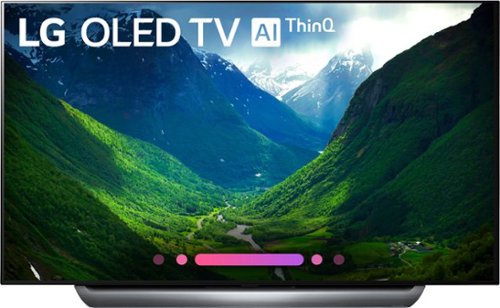
Watch movies and your favorite shows on this 65-inch LG TV. Its OLED interface displays colors realistically for more vibrant, lifelike shades. This LG TV has support for Dolby Atmos to create an immersive surround sound environment.
Customer Rating

5
Beautiful Colors. Horror/Sci-Fi Movie?!?! NO PROB!
on May 14, 2018
Posted by: MarkusKong
from Torrance, CA
LG - 65" Class - OLED - 2160p - Smart - 4K Ultra HD TV with HDR (OLED65C8PUA)
Setup/Testing/Conclusion
The LG C8 in my opinion is an excellent 4k OLED TV with superb picture quality. Because the C8 is an OLED panel, it has an infinite contrast ratio since each individual pixel can be turned off (this is how OLED works). Due to the LG C8 being an OLED TV, you won’t experience any visible flickers (unlike some other company’s technology). The technology of the LG C8 allows it to create perfect blacks, which is great if you have your LG C8 in a dark room. If you’re one of those folks that enjoy the genre of either Sci-Fi or Horror, the C8 is a perfect addition/upgrade to your home entertainment setup. The picture also remains on point when viewed at an angle, this means that even if you have guests over and they are at a wide viewing angle; they won’t have an issue seeing the TV (even if you have the C8 in a large and bright room). The C8 performs great with HDR content, it creates really bright and saturated highlights. I went ahead and tested the LG C8 with my gaming PC and it handled input lag and motion handling without any issues. This is also due to the fact that the native refresh rate of the C8 is 120Hz (at 1080p) and 60Hz (at 4k). As mentioned, the C8 handles motion extremely well; which means it is great for watching sports or playing games. Because of the instantaneous response time, you won’t experience any ghosting or trailing during any fast motion.
The engineers at LG did an excellent job with the design of the C8. Although the base is wide, it’s extremely sturdy and it’s well constructed. The base was designed and constructed in the shape that it is so that it can help direct the built in sound to the whole room. But because of this particular construction, you’re not able to place a soundbar directly in front of the C8. The C8 has better sound quality than other built in sound systems I’ve heard. Although it’s “better sound”, I would still recommend a dedicated sound bar for the stronger “oomph”. The base and frame around the screen is made of aluminum. The bezel of the C8 is very thin and it looks great. As far as the controls of the C8, they are located on the back to the side; similar to the previous model C7. The C8’s top half of the screen is ridiculously thin if you were to compare it to the previous model C7. When mounting the C8 to a wall, be mindful that the 4 HDMI inputs on the side may be difficult to access due to the composite input being rear facing. As mentioned previously with wall mounting, please be very careful as the top portion of the C8 is extremely thin.
When it comes to LG webOS (LG’s smart platform), it has a good selection of pre-installed apps. If you’re adventurous, I think you’ll find a decent collection of apps in LG’s content store. The C8’s remote is compact and works exceptionally well and fast. I went ahead and tested the voice control feature and they also work exceptionally well on the C8.
In conclusion, I was literally blown away with my LG C8. Because of the excellent picture quality, perfect blacks, dark room friendly, great wide viewing angle; the LG C8 is definitely a TV you should check out and splurge on. I mean look, you’re getting infinite contrast ratio, a wide and complete scope of colors, low response time, Dolby Atmos Support, and LG’s ThinQ AI. If that hasn’t sold you, I don’t know what else would. The LG C8 is definitely worth it and I would highly recommend it to friends and family.
Features & Specs
Amazon Echo compatible along with built-in Google Assistant
LG’s most powerful and intelligent processor, a9. It provides true to life images with incredibly rich colors, sharpness and depth to deliver the ultimate picture quality
Uses smart power distribution technology to boost higher peak brightness
Supports major high dynamic range (HDR) formats including Dolby Vision HDR, HDR10, and HLG (Hybrid Log-Gamma)
Built-in WiFi smart TV (AI ThinQ) provides access to popular streaming apps such as Netflix and gives you access to more than 70 free premium internet channels through the LG Channel Plus app
OLED technology can individually light, dim, or completely power off 8.3 million pixels; this achieves perfect black while displaying high level picture quality
Two 10W speakers, two 10W woofers, Dolby Atmos. Dolby Atmos creates a more detailed and realistic sound experience to immerse you into what you’re viewing
4 HDMI ports (HDMI cables not included)
3 USB 2.0 inputs
LG’s most powerful and intelligent processor, a9. It provides true to life images with incredibly rich colors, sharpness and depth to deliver the ultimate picture quality
Uses smart power distribution technology to boost higher peak brightness
Supports major high dynamic range (HDR) formats including Dolby Vision HDR, HDR10, and HLG (Hybrid Log-Gamma)
Built-in WiFi smart TV (AI ThinQ) provides access to popular streaming apps such as Netflix and gives you access to more than 70 free premium internet channels through the LG Channel Plus app
OLED technology can individually light, dim, or completely power off 8.3 million pixels; this achieves perfect black while displaying high level picture quality
Two 10W speakers, two 10W woofers, Dolby Atmos. Dolby Atmos creates a more detailed and realistic sound experience to immerse you into what you’re viewing
4 HDMI ports (HDMI cables not included)
3 USB 2.0 inputs
What's in the box?
LG OLED TV with AI ThinQ OLED65C8PUA
Stand
Remote Control
Batteries
Composite Adapter
Power Cable (59.5”)
Various Manuals/Guides
Stand
Remote Control
Batteries
Composite Adapter
Power Cable (59.5”)
Various Manuals/Guides
My Best Buy number: 272417506
Mobile Submission: False
I would recommend this to a friend!
Share this review:


+69points
82of 95voted this as helpful.
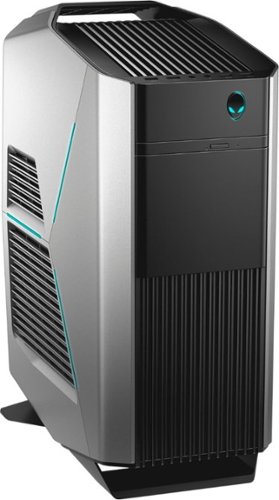
Enjoy high-quality graphics and fast performance with this Dell Alienware Aurora desktop. Its 16GB of Intel Optane memory is expandable to 64GB, providing plenty of room for future expansion, and the 1TB hard drive delivers ample file storage space. This Dell Alienware Aurora desktop has an NVIDIA GeForce 1070 graphics card for smooth rendering of 3D images.
Customer Rating

4
This Alien is a BEAST!
on April 17, 2018
Posted by: MarkusKong
from Torrance, CA
Alienware - Aurora R7 Desktop
Setup/Testing/Conclusion
Let me first start off by saying this… The Alienware Aurora R7 Desktop (with the specs listed below) is a beast! Every single game that I fed this gaming monster it ended up gobbling it up without any issues at all. You would be getting FPS in the range of 70 to 100+ depending on the game (tested on Ultra, 1080p). I tested games like Assassins Creed Origins, Battlefield 1, Crysis 3, Doom 3 (2016), GTA V, Star Wars Battlefront II, Deus Ex: Mankind Divided, Rise of the Tomb Raider, Middle Earth: Shadow of War, and Witcher 3. If you’re wondering how Intel Optane did, I personally feel like it did what it’s intended to do. What do I mean by that? Well, it definitely speeds up your traditional mechanical HDD. Is it faster than an SSD? Depends. You can technically buy a really cheap SSD but the Intel Optane with an HDD would outperform it. While if you spend a fair amount of money to invest in a really fast SSD, the Intel Optane with an HDD might not be able to outperform it. The reason for the Intel Optane with a Mechanical HDD is to save on the cost for some individuals.
Aesthetically in my opinion, the Alienware Aurora R7 Desktop is a thing of beauty. I personally like I size of the desktop itself and the simplicity of it. It’s not a full tower, more about a mid-sized tower. It’s pretty heavy though as it weighs in at about 33 lbs so don’t be fooled! Although it has a carrying handle on top, make sure you support it on the bottom when moving it around.
Now, a lot of folks inquire about upgradability (when purchasing a pre-built gaming PC). I would say that you can upgrade this to a certain extent. I would say people either purchase a pre-built gaming PC for 2 reasons. One, it's sometimes cheaper due to things like Crypto Mining. Two, you buy it pre-built so that you don’t have to build it yourself and have it customized from wherever you’re buying it. I would say this… If you’re looking to always upgrade parts in your PC, custom building one is the way to go. Prior to the Aurora R7, I had a 10+ year old gaming PC that I just kept upgrading. I purchased a full tower case so it’d always be easy to take things out and put things in. I always knew what went in and always did the cable management myself, which made it a lot easier to upgrade. When you have a pre-built gaming PC, it gets a little bit more difficult IMO. I’m not saying it’s not possible, it’s just more difficult to upgrade. I just simply got tired of keeping up with the trend and cost with upgrading. So I turned to the Alienware Aurora R7. Let’s just say, I’m not disappointed with my decision. Oh and might I add, I added a 500GB SSD into the Aurora R7 without any issues and it was super simple. Like I said, it’s doable.
Now for the con(s) of where I knock off a star. I would’ve given the Aurora R7 a 5 out of 5 but there’s somethings I wasn’t too fond of. One, I’m not sure if it’s with all Aurora R7s; but mine specifically has a weird noise coming from the front intake fan. I know it’s that fan because as soon as I gently stop it with my finger, that sound goes away. It’s either a coil whine or some sort of rattling. I may end up changing out that fan if I can’t take it in the near future. The second thing has to do with the sound the Aurora R7 makes. Now, coming from a Noctua DH14 CPU fan cooler to a water cooler, my expectations were that the Aurora R7 was going to be whisper quiet. During idle, it’s definitely not too bad. But as soon as you’re gaming, the PSU and the other fan(s) in the system get quite loud. Thankfully I have headphones with noise cancellation but my spouse next to me can hear it as well. This leads me to the last problem I have which relates to the fan noise, temperature(s). On idle, the i7 8700 sits around 30c which isn’t bad. On load, the i& 8700 got up to 75c. I guess that isn’t TOO bad, but I expected lower temps. I’m aware that Coffee Lake (i7 8700) runs quite hot but with an AIO (all-in-one) watercooler, I expected lower temps. Again this brings me back to my custom gaming rig. I ran an i5 3570k overclocked to a stable 4.4 on air and never really experienced high temps. The GTX 1070 FE (Founders Edition - Blower Style Fan) got quite hot too. On idle it sat around 30c but on load it got up to 80c. Again, this isn’t unsafe but it’s just higher than what I am used to. I came from a MSI GTX 1060 Gaming X 6G video card which never reached above 60c. So a 20 degree difference is a lot for me.
Overall, the Aurora R7 is a great gaming rig. It will handle any game you throw at it. To any gamer out there like me that doesn’t want to fully customize and build your PC yourself, pre-built custom gaming rigs are definitely the way to go. The Alienware Aurora R7 did not disappoint me and it played all the games I could possibly throw at it. Sure there were some gripes I had about it which is listed right above this paragraph, but overall; I would definitely recommend the Aurora R7 to friends, family, and co-workers.
Oh and one last thing… Dell/Alienware, let’s get some filters on this beast! This way when it comes time to clean it, it’s a lot easier and less dust gets into this beauty.
Specs
8th Gen Intel Core i7-8700 (3.2GHz up to 4.6 GHz Max Turbo Frequency. Intel Optane Memory Supported with Intel UHD Graphics 630) *Intel 300 Series Chipset*
16GB DDR4 2666 MHz Memory (2x8)
Nvidia GeForce GTX 1070 (8GB GDDR5)
16GB Intel Optane Memory Module PCIe M.2 80mm
1TB HDD 7200RPM
Killer Wireless AC 1535
DVD/CD Burner
Windows 10 Home Edition (64 Bit)
7 SuperSpeed 10Gbs USB 3.1 Ports
6 USB 2.0 Ports
Bluetooth 4.1
16GB DDR4 2666 MHz Memory (2x8)
Nvidia GeForce GTX 1070 (8GB GDDR5)
16GB Intel Optane Memory Module PCIe M.2 80mm
1TB HDD 7200RPM
Killer Wireless AC 1535
DVD/CD Burner
Windows 10 Home Edition (64 Bit)
7 SuperSpeed 10Gbs USB 3.1 Ports
6 USB 2.0 Ports
Bluetooth 4.1
What's in the box?
Alienware Aurora R7 Desktop
Alienware Keyboard & Mouse
Quick Start Guide
Warranty, Safety, and Regulatory Information
Alienware Keyboard & Mouse
Quick Start Guide
Warranty, Safety, and Regulatory Information
My Best Buy number: 2724175064
Mobile Submission: False
I would recommend this to a friend!


Share this review:


+39points
46of 53voted this as helpful.

The Xperia XZ2 Compact is designed to be the ultimate entertainment device. Whether you're recording breathtaking videos in 4K HDR, or watching films in HDR, the Xperia XZ2 Compact delivers big screen entertainment in the palm of your hand.
Customer Rating
4
The NOT so Little Brother of the Sony Xperia XZ2
on April 12, 2018
Posted by: MarkusKong
from Torrance, CA
Sony Xperia XZ2 Compact
Setup/Testing/Conclusion
The Sony Xperia XZ2 Compact works on Verizon Wireless!!! That is right ladies and gentlemen. Just to clarify, you “may” run into some issues; because I did. On initial setup I was able to make calls but not able to receive any text messages. I ended up speaking with a Verizon Wireless rep and worked it out. The Verizon Wireless rep stated he had to remove the provisioned ID and reprovision it. Once he did that, I was able to receive text messages. But shortly after, I noticed I couldn’t make calls. I was getting an server error, please try again later (or something of that matter). Basically at that point, just log into your My Verizon Wireless account and make sure to enable HD Voice. After all that, the Xperia XZ2 Compact worked without any issues.
Now that I cleared that, I’m going to go into my review of the Sony Xperia XZ2 Compact. Jumping right into it folks! I am going to give the device a 3.7 out of 5 stars. Although this is the “younger sibling” of the Sony Xperia XZ2, the internals are practically identical. Throughout my usage of the Xperia XZ2 Compact, I ran everything without any lag or hiccups. The phone works beautifully and extremely fluid in my opinion. I especially enjoyed watching movies, videos, and listening to the sound that the Xperia XZ2 Compact produced. I compared it to an iPhone 6 Plus that I had along with a Google Pixel and I noticed that the Xperia XZ2 Compact had sharper colors and picture quality when watching 4k videos on YouTube. The Xperia XZ2 Compact is definitely not a “compact” device. It’s quite chubby and has some weight to it. But by all means, this is not a negative part of the phone. I personally like the size and weight but that could be because of my hand size and whatnot. The build quality of the phone is also fantastic in my opinion. It doesn’t look “cheap” at all. I’ve owned several phones in the past that are “plastic” backs but with the Xperia XZ2 Compact I can’t even tell that it’s “plastic”.
So this is where my “docking the star” comes into play. I personally didn’t really like the camera, fingerprint sensor placement, and the 3 buttons on the side of the device. When I say I didn’t like the camera, the phone does well when taking pictures where there’s light, but as soon as low light comes into play; the Xperia XZ2 Compact picture quality takes a big hit. I could barely even see the pictures I took where there was low light. So if/when you compare it with other Android devices and iOS devices, the camera on the Xperia XZ2 Compact is not as great. As for the fingerprint sensor placement along with the 3 buttons on the side; it is just flat out “weird” for me. Even with 3 buttons, I wished the top button was the power button and the volume rocker be placed in the middle. That would’ve made it a bit more manageable for me. The only other thing I can say about the Sony Xperia XZ2 Compact is the fact that there isn’t anything “revolutionary” or game changing. Compared to other devices out on the market right now, the Sony Xperia XZ2 Compact sorta just fits in; there’s nothing that makes it really stand out from the rest. The battery is definitely good (it should last you the day), it lasts longer than the Google Pixel phone. But, I always feel like with battery optimization; iPhones seem to manage battery better.
Overall, the Sony Xperia XZ2 Compact is a good phone. With the latest Qualcomm Snapdragon 845, it handles everything beautifully. But, in my opinion it doesn’t get the perfect score. With so many different devices releasing on the regular basis, something about that phone HAS to stand out from the rest.
Specs
Qualcomm SDM845 Snapdragon 845 (Chipset)
Octa-core (4x2.7 GHz Kryo 385 Gold & 4x1.7 GHz Kryo 385 Silver) (CPU)
Adreno 630 (GPU)
4GB RAM
Internal Memory of 64GB (Expandable to 400GB w/ microSD)
Android 8.0 Oreo
IPS LCD Capacitive Touchscreen (16M colors)
5.0 Inches
Resolution 1080 x 2160 pixels, 18:9 ratio (483 ppi density)
19 MP Rear Camera
5 MP Front Camera
Bluetooth 5.0
Rear Fingerprint Sensor
Non removable Li-Ion 2870 mAh battery
Octa-core (4x2.7 GHz Kryo 385 Gold & 4x1.7 GHz Kryo 385 Silver) (CPU)
Adreno 630 (GPU)
4GB RAM
Internal Memory of 64GB (Expandable to 400GB w/ microSD)
Android 8.0 Oreo
IPS LCD Capacitive Touchscreen (16M colors)
5.0 Inches
Resolution 1080 x 2160 pixels, 18:9 ratio (483 ppi density)
19 MP Rear Camera
5 MP Front Camera
Bluetooth 5.0
Rear Fingerprint Sensor
Non removable Li-Ion 2870 mAh battery
What's in the box?
Sony Xperia XZ2 Compact
USB A to USB C Cable
AC Adapter
USB C to Audio Jack Cable
Wired Earbuds with Interchangeable Earpieces
Various Manuals (Hearing Aid Compatibility, US Safety Guidelines, Startup Guide, Important Information, FCC Statement, Declaration of Conformity)
USB A to USB C Cable
AC Adapter
USB C to Audio Jack Cable
Wired Earbuds with Interchangeable Earpieces
Various Manuals (Hearing Aid Compatibility, US Safety Guidelines, Startup Guide, Important Information, FCC Statement, Declaration of Conformity)
My Best Buy number: 2724175064
Mobile Submission: False
I would recommend this to a friend!

Share this review:


+30points
30of 30voted this as helpful.

Big machine suction power*. But with cord-free versatility. The Dyson Cyclone V10 Absolute cord-free vacuum has a 40% bigger bin than the previous V8 Absolute and up to 40 minutes of fade-free power with the Soft roller cleaner head (in Suction mode I). The new torque drive cleaner head removes more dust from carpets. The soft roller cleaner head removes fine dust and large debris from hard floors. The Dyson Cyclone V10 Absolute cord-free vacuum quickly transforms to a handheld for quick cleanups, spot cleaning and cleaning difficult places.*Suction tested to ASTM F558 at the flexible inlet.BR>
Customer Rating
4
The New and Improved Dyson
on March 4, 2018
Posted by: MarkusKong
from Torrance, CA
Dyson Cyclone v10
Setup/Testing/Conclusion
I’m going to first start off by saying Dyson did a great job with the materials and craftsmanship of the Dyson Cyclone v10. I enjoyed the packaging they used and it honestly hooked me and would hook other consumers as well. I personally feel like it's really important for a company to market their product by creating an attractive packaging to contain the beauty of whatever it is they’re selling. Dyson definitely nailed that here. Although majority of the parts are plastic (the exception is the extension tube), the build quality feels sturdy and the Dyson Cyclone v10 looks sleek.
Once you open up the box and take all the parts out, it’s honestly really easy to put together. I first plugged in the Dyson Cyclone v10 to give it a full charge. A full charge typically takes approximately 3.5 hours. I highly recommend going over the operating manual because it tells you how to do a lot of different things such as attaching the attachments, how to empty the bin, how to wash the parts that could be washed, the different modes/functions, and of course proper safety guidelines.
Now to the usage. I got about an hour of usage on a full charge. I tested the Cyclone v10 on carpet and hardwood floors. First, I will state that the Cyclone v10 definitely did an excellent job cleaning my carpet and hardwood floor. My wife sheds on the regular and her hair is basically everywhere throughout the house. The Cyclone v10 had 0 issues picking up her hair and not only that, it didn’t get tangled anywhere. Both the torque drive cleaner head (for carpets) and the soft roller cleaner head (for hard surfaces) glided with ease. I love the fact that the Cyclone v10 is cordless yet has the power and suction of a corded vacuum. Squeezing the trigger to activate the Cyclone v10 is honestly pretty fun and cool. It makes a sound when you let go of the trigger, to be honest it reminds me of a ray gun or something; long story short I like it. The Cyclone v10 is not loud at all. I’ve owned several different vacuum cleaners in my lifetime. The Cyclone v10 is not loud at all so if you need to use it for a quick clean when it’s late, you shouldn’t be too worried about bothering your neighbors. Cleaning the Cyclone v10 is also relatively easy and the filter along with the head(s) are washable (read the manual folks!).
Now to the personal problems I have with the Cyclone v10. The only three things I’m not too fond of on the Cyclone v10 is the bin capacity, charge/usage, and the manual. The bin doesn’t last too long, I found that I needed to empty it about 15 minutes in to cleaning one room. I mean my house isn’t THAT dirty but the max fill line gets filled pretty quickly. With the corded vacuum I have, you can vacuum the entire house before you have to empty it. Granted the vacuum I have prior to the Cyclone v10 is bigger, bulkier, and heavier. The other problem I mentioned was listed above. So with a 3.5 hour charge, the Cyclone v10 only lasts about an hour. If you have a two story house with several rooms, you will not be able to get your entire house cleaned with one full charge. I purchased the previous model for my mom to clean her house and that was her main complaint; not being able to clean the entire house with a full charge. Although the Cyclone v10 charges in 3.5 hours instead of 5 hours like the v8, 3.5 hour charge to give you 1 hour of cleaning isn’t really enough time to completely clean a house. The last problem I have is with the manual. In my personal opinion, there’s not enough explanation in there. There’s a lot of illustration with “clik” here and there but there’s literally not much written explanation/instructions. So for example the 2 brush heads that came with the Cyclone v10, what are you supposed to use them for? The manual doesn’t explain it anywhere. I mean I’m not asking for paragraphs and paragraphs. The illustrations are nice but I feel like some more written explanation/instructions would’ve been helpful to new users.
Overall, I thoroughly enjoy using the Cyclone v10. It honestly has a very strong motor and does an excellent job cleaning. I had 0 issues vacuuming long hair that my wife sheds and had 0 issues picking up anything and everything on my floor. No real complaints there. As mentioned above, the only personal problems I have with the Cyclone v10 is the bin capacity, the charge/usage, and the manual. Would I recommend this to a friend or relative? Definitely. Because the Cyclone v10 does indeed do a good job with cleaning. But, would I tell them of the personal problems I came across with it? Absolutely. This way the person purchasing the item would know the ins and outs of the product. In conclusion, I feel like Dyson has definitely made an improvement over their last model. But as always, there’s always room for even more improvement.
Product Information
The only vacuum you’ll need
Up to 60 minutes cord-free (suction power of a corded vacuum - suction tested to ASTM F558 at the flexible inlet, against the upright market), fade-free power (7-cell nickel, cobalt, and aluminum batteries)
Torque drive cleaner head (25% more carpet pickup - Brushless motor, twice the power, drives bristles deeper into carpet)
Soft roller cleaner head (picks up dust and debris from delicate floors - Carbon fiber filaments removes fine dust from hard floors)
Advanced filtration expels cleaner air than the air you breathe
40% larger bin capacity
Mini motorized tool
Mini soft dusting brush
Combination and crevice tool
Dyson digital motor V10 spins at up to 125,000rpm to create 20% more suction
Dyson V10 is 20% smaller and half the weight of the Dyson digital motor V8 - yet more powerful
14 concentric array cyclones (generate centrifugal forces to fling dust out of the air and into the bin)
2 year warranty parts and labor: phone and online support 6 days a week. Free shipping there and back. 5 Star service
Up to 60 minutes cord-free (suction power of a corded vacuum - suction tested to ASTM F558 at the flexible inlet, against the upright market), fade-free power (7-cell nickel, cobalt, and aluminum batteries)
Torque drive cleaner head (25% more carpet pickup - Brushless motor, twice the power, drives bristles deeper into carpet)
Soft roller cleaner head (picks up dust and debris from delicate floors - Carbon fiber filaments removes fine dust from hard floors)
Advanced filtration expels cleaner air than the air you breathe
40% larger bin capacity
Mini motorized tool
Mini soft dusting brush
Combination and crevice tool
Dyson digital motor V10 spins at up to 125,000rpm to create 20% more suction
Dyson V10 is 20% smaller and half the weight of the Dyson digital motor V8 - yet more powerful
14 concentric array cyclones (generate centrifugal forces to fling dust out of the air and into the bin)
2 year warranty parts and labor: phone and online support 6 days a week. Free shipping there and back. 5 Star service
What's in the box?
Dyson Cyclone v10
Extension Tube
Extension Head
Torque Drive Cleaner Head (Carpet)
Soft Roller Cleaner Head (Delicate Floors)
Mini Motorized Tool
2 Different Types of Brush Heads
Mounting Kit
AC Adapter
Warranty Guide
Operating Manual
Mounting Instructions
Extension Tube
Extension Head
Torque Drive Cleaner Head (Carpet)
Soft Roller Cleaner Head (Delicate Floors)
Mini Motorized Tool
2 Different Types of Brush Heads
Mounting Kit
AC Adapter
Warranty Guide
Operating Manual
Mounting Instructions
My Best Buy number: 2724175064
Mobile Submission: False
I would recommend this to a friend!


Share this review:


+55points
57of 59voted this as helpful.

Enjoy superior sound and voice quality with these Jabra Elite wireless headphones. Integrated controls let you answer calls, adjust the volume or pause music with the touch of a button, while the included carrying case doubles as a charging station. External ambient noise keeps you aware of your surroundings, while a background noise filter delivers crisp, clear voice calls. With Bluetooth connectivity, these Jabra Elite wireless headphones are easy to pair to a mobile device.
Customer Rating
5
Truly the ELITE Earbuds
on February 14, 2018
Posted by: MarkusKong
from Torrance, CA
Jabra Elite 65t
Setup/Testing/Conclusion
I have to first say… I am quite impressed with Jabra on creating the Elite 65t. When I first saw the box I really liked the packaging. Jabra made the box standout with the yellow color that you’ll typically see with other Jabra products. Some of the text on the box is silver so it gives it that “premium” look. Jabra didn’t overdo it because they only made the Elite and one side of the box text silver.
Once you break the seal on the bottom of the packaging and pull the yellow box out, you’re prompted with a little grey tab to pull out which discloses the “Welcome to Superior Sound” card. On that card you’ll be able to see the earbuds through a hole. Once you remove that card you’ll gain access to the Elite 65t, the charging box, need help contact sheet, get started booklet, usb charging cable, and of course extra ear gels. For those of you that require different size ear gels; Jabra provides you with a small, medium, and large (medium installed by default). I personally didn’t have any problems at all with the already installed medium ear gels.
Getting started was honestly pretty simple and straightforward. I took a look at the get started booklet for reference but found that I got a better understanding of how everything works after downloading the app. The app you want to download is the Jabra Sound+ app. After, you’ll be able to download the Jabra Service app. Please note that the Jabra Service app is not a standalone app! Make sure you download the Jabra Sound+ app. After downloading the two apps I paired the Elite 65t with my Google Pixel phone without any issues whatsoever. Within the app, you’ll be able to set the voice assistant which is on default or you could select Amazon Alexa. When clicking on Audio experience you’ll be able to change settings of HearThrough, Auto Pause, and Headset Prompts. HearThrough basically gives you the ability to have it off where no audio from your surroundings will be transmitted to your headset. Or you can set it to Mix or on and customize the way you want it. AutoPause works where if you remove one earbud from your ear, audio will pause. Headset Prompts basically gives you verbal headset prompts, pretty straightforward there. Other things you can customize is the call experience like call audio, caller ID or even the Sidetone. If you don’t know what Sidetone is, it’s basically where you can hear your own voice when on a call; I set mine to off. The last thing you can customize is the Equalizer. Don’t forget! If you need to change the language for guidance; Jabra gives you the ability to change it to either Deutsch, English, Francais, or Chinese. I must say, the Elite 65t is definitely customizable. I like the fact that the app can control so many things. But what helped me out the most personally is having the ability to reference the actual user manual within the app. So instead of looking at a paper instruction manual or downloading the PDF manual online, I was able to reference to it within the app at any given moment; which I did quite often.
Using the Jabra Elite 65t was fantastic. The earbuds fit into my ear snug and didn’t cause any discomfort at all. My coworker mentioned that it looked just a little bit bulky in his opinion. I personally felt like it wasn’t a problem at all. The sound quality when playing music was fantastic. The earbuds did a great job with blocking out people around me (when working in an office). I tested the Elite 65t by making a couple calls and the receiving end said that I was clear and could barely hear any noise around me. I tested this because I work near the airport runway along with having my window rolled down and driving while talking to someone. The button placement on the earbuds are also not a problem for me. Left earbud basically controls the volume along with being able to skip songs. Right earbud is the “master” earbud I guess you could say. It functions by pausing music, holding it down to access your voice assistant, hanging up phone calls, or even turning off the earbuds. I like the fact that the Elite 65t comes with the portable on-the-go charging case. So the earbuds alone can operate up to 5 hours of use, with the charging case; you’ll get a total of 15 hours. The portable charging case basically gives you 2 full charges, meaning 5 hours (earbuds) + 5 hours (case) + 5 hours (case) gives you a total of 15 hours. I didn’t have any problems loading the earbuds into the case and plugging it into my PC with the included charging cable.
In conclusion; the only thing I would’ve liked to see is instead of the USB charging cable, a USB C cable instead. Only reason why is because a lot of electronics are moving to USB C now. It’s just flat out better… Nonetheless, Jabra has truly done an excellent job on the Elite 65t. Everything from packaging, to sound quality (input and output), to materials used was really thought out by Jabra. The Elite 65t definitely reached and exceeded my expectations. I will continue to use the Elite 65t on the daily and tune everybody out at work while jamming to some music. Don’t forget ladies and gentlemen! Register your product after downloading the app to take benefit of the warranty!
Product Information
4 Microphone Enhanced Sound
Customize your Music
Proven Wireless Connection
Up to 15 Hours Battery
Voice Assistant Enabled
2 Year Warranty (Dust & Water). Registration required with the Jabra Sound+ app.
Customize your Music
Proven Wireless Connection
Up to 15 Hours Battery
Voice Assistant Enabled
2 Year Warranty (Dust & Water). Registration required with the Jabra Sound+ app.
What's in the box?
Elite 65t Earbuds (w/ Medium Ear Gels Installed)
On-The-Go Charging Case
USB to Micro USB Cable
Large and Small Ear Gels
Get Started Guide
Contact (Help) Sheet
On-The-Go Charging Case
USB to Micro USB Cable
Large and Small Ear Gels
Get Started Guide
Contact (Help) Sheet
My Best Buy number: 2724175064
Mobile Submission: False
I would recommend this to a friend!


Share this review:


+79points
110of 141voted this as helpful.
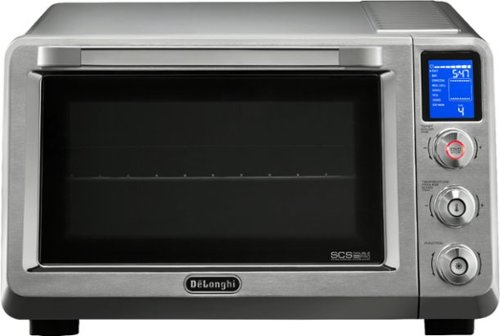
Prepare all your favorite dishes in this DeLonghi Livenza convection oven. Insulated construction helps maintain temperature, and the oven fan distributes hot air to facilitate fast and even cooking. This DeLonghi Livenza convection oven heats multiple dishes at one time in two specific heating areas with four adjustable rack positions that maximize space.
Customer Rating
5
Goodbye Traditional Oven! Hello DeLonghi Livenza!
on December 20, 2017
Posted by: MarkusKong
from Torrance, CA
DeLonghi Livenza EO241150M
Setup/Testing/Conclusion
Let me first say that the DeLonghi Livenza EO241150M is pretty massive. So before you go out and buy this beauty, make sure you have ample kitchen space.
The specific model that I received is a thing of beauty as I mentioned above. The build quality and finish on it is fantastic. I love the stainless steel look. The construction feels and looks extremely durable. The nobs to select temperature, while cycling through the 7 different options and whatnot is also made really well. The nobs have very nice feedback/clicks when you’re cycling through the different options and temperatures. When they marketed this thing as a smaller version of your actual home oven (the one attached to your stove), they weren’t kidding. I really enjoyed the double glass door and the seal that was constructed around it. It literally feels like the same door on your home oven except smaller. The internal construction is also excellent as its well insulated to retain heat. The included pizza pan, wire rack, crumb tray and bake pan are also great quality.
The thing I would like to highlight most is the fact that the DeLonghi Livenza EO241150M is extremely quiet. There were honestly times where I thought that it wasn’t even working… I literally touched the top (CAUTION HOT!) and sides to make sure that there was actually heat. I love the fact that this oven is a convectional oven, the built in fan circulates the heat so that all your food cooks evenly. The auto shut off feature is also nice and it beeps pretty loud when your food is ready so that you know when to pull your goodies out. Another thing I’d like to mention is the built in light. It’s so wonderful having the ability to watch your food cook instead of being left in the “dark”.
I was able to utilize the oven to make some chicken tenderloins, chicken nuggets, french fries, and fried shrimp. I looked through the manual to get familiar with how to operate it before I started and I highly recommend doing this. After you cycle through the different options and temperature, the oven will automatically start preheating. Once it has completed its preheating cycle, it will beep to notify you so that you can put in your goodies. I have to say, the convection feature is really really good. It made everything perfectly! All my food was nice and crispy on the outside yet tender on the inside. Everything was also cooked evenly. The only thing I didn’t like too much were the french fries. But I mean…. This is why you purchase an air fryer no? I’m sure if you were to broil the french fries and move the pan to the indicated position, it would’ve probably came out more crispy. That’s right! DeLonghi made it simple by indicating where to place your rack and pan so you don’t mess up (depending on how you’re using the oven).
Are you tired of having soggy pizza from the microwave? Are you tired of waiting forever for your traditional oven to preheat and cook things? Are you tired of heating up your entire kitchen with your traditional oven during summer? How about clean up? How about even cooking? Let me just say… The DeLonghi Livenza EO241150M is going to be your go to oven. If the above questions are questions you ask yourself, go ahead and make the leap to purchase this beauty. You will not be disappointed.
In conclusion, the DeLonghi Livenza EO241150M delivers what it promises. Talk about even cooking, fast cooking, easy clean up, very well insulated, fancy looking, excellent build quality, and best of all… Perfect results every single time for the food that you’re cooking, If you’re like me and you enjoy being in the kitchen, the DeLonghi Livenza EO241150M is going to be an excellent addition to your other kitchen gadgets. All I am saying is this… I’m going to use this oven every single day! The only time I will use my traditional oven is when I have to cook a huge turkey or ham for a big party. Besides that? The DeLonghi Livenza EO241150M is going to be my go to daily kitchen gadget. Great job Delonghi!!!
Product Information
Digital LCD control panel with preset cooking functions
7 cooking functions: Bake, Grill, DeFrost, Keep Warm, FAN Convection, Pizza and Cookies
SCS Double Pro (lateral fan with the power of 3 heating elements)
Double glass high visibility door with internal light
Internal cavity is thermal insulated (to maintain heat) and has non-stick coating (for easy clean up)
120 minutes digital timer (fully adjustable) with auto shut off
80 degrees celsius to 220 degrees celsius (176 degrees fahrenheit to 428 degrees fahrenheit)
24 Litres capacity
7 cooking functions: Bake, Grill, DeFrost, Keep Warm, FAN Convection, Pizza and Cookies
SCS Double Pro (lateral fan with the power of 3 heating elements)
Double glass high visibility door with internal light
Internal cavity is thermal insulated (to maintain heat) and has non-stick coating (for easy clean up)
120 minutes digital timer (fully adjustable) with auto shut off
80 degrees celsius to 220 degrees celsius (176 degrees fahrenheit to 428 degrees fahrenheit)
24 Litres capacity
What's in the box?
DeLonghi Livenza EO241150M
Crumb Tray
Pizza Pan
Bake Tray
Wire Rack
Quick User Guide
Instruction Booklet
Warranty Guide
Crumb Tray
Pizza Pan
Bake Tray
Wire Rack
Quick User Guide
Instruction Booklet
Warranty Guide
My Best Buy number: 2724175064
Mobile Submission: False
I would recommend this to a friend!


Share this review:


0points
0of 0voted this as helpful.
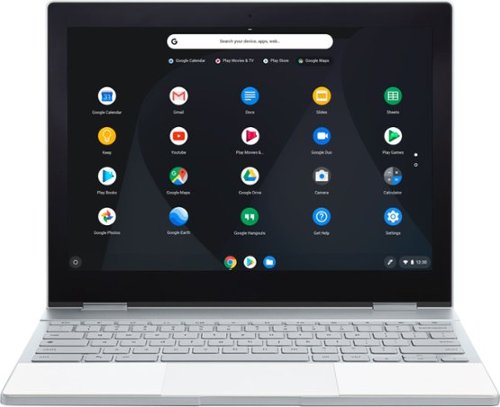
Everything you love about Google, for work and play. Google Pixelbook is the first laptop with the Google Assistant* built in. Its super thin, 4-in-1 design includes a long-lasting battery and 7th Gen Intel~ Core~** processor. It also comes with all the apps you already know and love including Youtube, Infinite Painter, Google Play Movies, Evernote, Slack, Lightroom, Google Photos and many more***.*Google Assistant requires Internet connection.**Intel and Intel Core are trademarks of Intel Corporation in the U.S. and/or other countries.***Availability and performance of certain apps and services may vary by region. Subscriptions(s) may be required, and additional terms, conditions and/or charges may apply. Pixelbook and Pixelbook Pen are optimized for selected apps and services only.
Customer Rating
4
ALMOST Perfect. Best Chromebook & its by GOOGLE
on December 2, 2017
Posted by: MarkusKong
from Torrance, CA
Google Pixelbook
Setup/Testing/Conclusion
I have to say, first impressions are key to a successful relationship… Let's just say, I am in LOVE with the Google Pixelbook. Google has done a wonderful job, everything from the packaging of the Pixelbook down to the actual Pixelbook. On the back of the box it says “Turns Heads”. When I opened up the box and removed the Pixelbook out of its beautiful packaging, I can tell you that everyone around me turned their heads. I had several individuals approach me and ask me what this beauty is. I told them, it’s apparently the best Chromebook out to date right now.
The materials that Googled use are high quality. I mean, even the box is made of quality material. The Pixelbook itself is made of aluminium which makes it look stunning. If you have a Pixel phone, you’ll see the resemblance as the Pixelbook also as it has the glass bar which is in fact where the antenna sits. The Pixelbook also has no vents at all as there are NO fans. That’s right folks! NO VENTS or FANS needed! What does that mean? A low heat, low power consumption, no noise ultrabook. I mean common ladies and gentlemen… That is just wonderful! The screen itself is an LCD of 12.3” 2400x1600 (235 ppi). Normal viewing/use is great and watching YouTube or Netflix is even better. Don’t forget that the screen itself is also touchscreen. I didn’t use it too often but there are no problems to report here as well except for the large bezels. From what I know, Google made the bezels/border larger around the screen so that your fingers have a place to rest/hold/grip when the Pixelbook is turned into tablet mode. That’s right! The Pixelbook also has the ability to go into tablet mode by flipping the screen all the way back or even simply putting it in “tent” mode. The keyboard has some very nice feedback and I thoroughly enjoyed the soft pads that sits perfectly where your palms rest when typing. The keys are well spaced and has a travel of 0.8mm with some nice backlit keys. The Pixelbook’s keyboard is by far one of the best laptop keyboards I’ve ever used. The keyboard does take just a little bit to get acclimated with it. This is because there are no F keys along with no Windows or caps lock key. You can hold the alt key and hit what would be the caps lock key and it’ll turn caps lock on. Otherwise that key is what is used as the “search app key”. The traditional Windows key on the bottom left of the keyboard is the Google Assistant key. Another thing I want to highlight is the trackpad, it's made of glass and works perfectly with both smoothness and accuracy. It took me just a little bit here as well to realise how to right click as there isn’t really a right click built into the trackpad. As a matter of fact, I actually like being able to just tap with two fingers to right click; it’s faster and just feels down right great.
There are a couple things I wasn’t too fond of and felt that Google can make some improvements on. The first problem I have with the Pixelbook are the speakers. The speakers are built underneath the keyboard so the sound doesn’t really have an “oomph” or anything at all. To be completely honest, the speakers sound… small. I can definitely see Google making an improvement on the speakers on their next version/model. The next thing I don’t like too much is the large bezel/border around the screen. There’s a lot of black and I personally feel like Google could’ve made the screen bigger instead of having so much bezel/border. I was able to test the camera and I feel like Google can also make an improvement there. I mean the Pixel phone is marketed to be the best camera on a phone out there. So why not put a crazy good camera on the Pixelbook? The last thing I didn’t like too much was the tablet mode. It just felt downright kinda weird… I mean sure the keyboard gets deactivated and all but holding it in tablet mode just feels… weird. I would’ve liked to see the screen being able to rotate and then flip all the way back into tablet mode. This way it's the back of the laptop that you’re touching instead of the actual keyboard.
Now I’m going to actually talk about usage. Speaking on usage, I wasn’t able to really get 10 hours of usage on a full charge as marketed. I would say I got about anywhere between 6 ~ 7 hours of real world usage. The good thing is since it's USB C that charges the Pixelbook, you’ll be able to get some fast charging so you’ll be back at work in no time! Now to the talk about Chrome OS. Chrome OS definitely takes a little getting use to. Prior to the Pixelbook, I’ve mainly been a Windows guy. With Chrome OS, it gives you the ability to download apps on the Google Play Store along with download other goodies on the Chrome Web Store. Opening the Google Chrome browser, Gmail App, Google Docs, and YouTube was quite interesting… It basically opens everything up in the Chrome browser. I was able to test some games that I downloaded on the Google Play Store and it was pretty fun. All the games I played were all scaled correctly for the Pixelbook. I did have some hiccups like apps force closing and whatnot. The most annoying problem I ran into was when I shutdown the Pixelbook. When I booted it back up for some reason I couldn’t get any sound to come out of the speakers. I tried restarting the Pixelbook, toggle the mute button, and simply turning the volume up but nothing worked. I had to do something called a EC Reset (hardware reset). This is basically where you have to hold down the Refresh icon key and the Power button for 10 seconds. You then release those buttons and the Pixelbook should power down and either power back on or you’ll have to manually power it back on. Once I did the EC Reset the speakers worked again. I found this on a Reddit post by JimDantin. But I mean let's be real here… Chrome OS has been out only for 6 years. I’m a heavy Windows user and Windows has been out about 32 years. I still run into problems with my Windows PC… I’m just saying, there are gonna be some issues here and there. For what it’s worth, Chrome OS has made some major improvements through their 6 year lifespan. As far as being able to do what you need the Pixelbook to do… I don’t see what you would be missing out on if you were to use the Pixelbook instead of a Windows laptop or a MAC. The stores have pretty much everything you would need. Anything from writing docs, to creating spreadsheets, creating powerpoints, playing games, photo editing, video editing, and even music editing. Chrome OS has come a long way. I mean you can even install a copy of Linux (for advanced users) and get things like Steam. I personally feel like I am able to do anything and everything I need/want with the Pixelbook. Sure the price tag starts at $1000, but I mean you’re also paying for a quality built ultrabook. The specs on this beast make up a good part of the best experience in Chrome OS and in Chromebooks.
So in conclusion… Do I recommend the Pixelbook? YES I DO. I can confidently state that. I am able to do all my daily tasks that I need in addition to doing things that I don’t normally do on a daily basis. Now, are there room for improvements? Of course there are. What products come out with nothing to improve? If that’s the case, I guess everyone would be just making one model and that is it right? NOPE! Well, that is why people spend money; to upgrade and get the latest and greatest. The Pixelbook is the latest and greatest Chromebook out there. I can see the next model of Pixelbook being even better than this one. Good job Google! Keep em coming!
Specs
7th Gen Intel Core i5 Processor (1.2GHz i5-7Y57)
Intel HD Graphics 615
8GB RAM (1866MHz)
128GB Solid State Drive
2x USB C Ports
3.5mm Audio Jack
802.11ac Wi-FI
Bluetooth 4.2
720p Webcam @ 60fps
Chrome OS
Intel HD Graphics 615
8GB RAM (1866MHz)
128GB Solid State Drive
2x USB C Ports
3.5mm Audio Jack
802.11ac Wi-FI
Bluetooth 4.2
720p Webcam @ 60fps
Chrome OS
What's in the box?
Google Pixelbook
AC Adapter
USB C to USB C Cable
Quick Start Guides
Safety & Warranty Information
AC Adapter
USB C to USB C Cable
Quick Start Guides
Safety & Warranty Information
My Best Buy number: 2724175064
Mobile Submission: False
I would recommend this to a friend!


Share this review:


+108points
124of 140voted this as helpful.
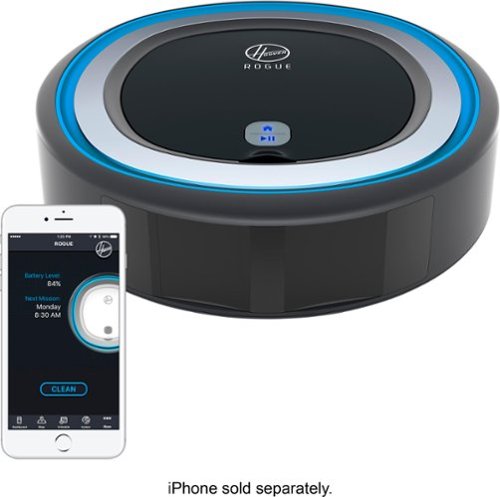
Clean your carpets more efficiently with this Rogue robot vacuum. The intelligent mapping helps the device navigate quickly through your home, and it has a tri-clean system that agitates, brushes and uses suction to ensure a thorough cleaning. This Rogue robot vacuum returns to its base for recharging when the job is done.
Customer Rating

3
Smart Rogue Bot BUT Caught by its APP
on November 12, 2017
Posted by: MarkusKong
from Torrance, CA
Hoover Rogue Robot 970 Vacuum
Setup/Testing/Conclusion
I have to first praise Hoover’s marketing team for doing such a wonderful job with the PR for this robot. Everything from the design of the box, the materials used for the manuals and other goodies within the box; all were done with quality and really thought out ideas. So GOOD JOB there Hoover!!
Setting up the robot was not too difficult. Being that the Hoover Home app was not available on Android when I was first setting up the robot, I did it on my iOS device. Once I was able to connect the Rogue 970 to the app, the very first thing I did was complete a full charge (that is what the instructions tell you to do!). Once the Rogue 970 had a full charge, the next thing I did was recon mode. I found that you can’t necessarily use the robot unless you did the recon mode first. Basically in recon mode, the Rogue 970 will scout out your home and load the map into the app. I found this feature VERY awesome and new to the robotic vacuum cleaning world. Once the Rogue 970 has completed its recon mission, you will have the ability to set up barriers as well as send the Rogue on its next mission; to clean. I didn’t send it right away to clean after its recon mission and instead waited a couple days… To my surprise, my map that was originally already on the app was gone! Someone stole the intel! Well… Not necessarily. I think the app glitched and erased the map. So I ended up having to do the recon mode again which was kinda a waste of time.
Speaking of the Hoover Home app, it definitely needs some work. When I mean it needs some work, it legitimately NEEDS work. The app is very unstable and its glitchy. I lost my mapped out home twice for no reason and in addition, it keeps saying that the Rogue 970 is disconnected. I tried refreshing the tabs back and forth within the app but it didn’t work. The only way to actually get things “connected” again was to close out the app completely and restart it. Even after doing this I still could not locate my maps. I noticed that Hoover updated the “system” tab so now if you click filter, dirt cup, brush roll, or side brushes; it’ll take you to YouTube where there are videos to show you how to clean them which is kinda neat. Hopefully they’ll add the feature where you can also purchase spare filters and brushes so that you can easily purchase replacements when needed.
Now to the cleaning. Overall, the cleaning that the Rogue 970 does is average with a couple other robots that I own. I purchased a Roomba years ago in addition to a Samsung cleaning bot and the Rogue 970 is about the same… Where the Rogue 970 shines is that it doesn’t “always” run into things. It actually does a decent job avoiding objects and not crashing into things like the Roomba and Samsung do. Also, it has a system/pattern in place so that it actually cleans how a person would vacuum as opposed to going everywhere like my Roomba does. Although the Rogue 970 is smarter, it was completely “dumb” when it saw my glass sliding closet doors. It thought there was more room to go so it kept crashing into the glass, thankfully not hard enough to the point where it broke my glass closet sliding doors. With a full charge, it was able to clean my living room, kitchen, one bathroom and one bedroom. The Rogue 970 never made it to my other bedroom or bathroom unfortunately. Overall, it did a pretty decent job with cleaning. When cleaning the dust bin, I found my spouse’s hair and some dust. My place wasn’t too dirty to begin with. Once the Rogue 970 has completed its mission, you can use the included brush to clean the brushes as well as rinse the dust cup and filter. Make sure everything is dry before you send the Rogue 970 on its next mission!
A couple things I would’ve liked to see is the ability to do spot clean and specific room cleaning. I noticed in some of the documents I received that you are technically able to do that. But I tried everything and there’s no option to do that currently. I’m guessing the app needs work as I mentioned above. I also ran into this weird thing where the Rogue 970 kinda “skipped” here and there when it was cleaning. When I mean skipping I mean stuttering, it was weird; this was on hard wood floors. In conclusion, I feel like the Rogue 970 has GREAT potential. In the state of where it is now, I would have to give it a 3 out of 5 stars. As mentioned, the cleaning was on par with other bots except for that the Rogue 970 doesn’t ALWAYS bump into stuff. The app needs A LOT of work… Perhaps Hoover should’ve waited to release the Rogue 970 after the app was fine tuned and polished. Being that the Rogue 970 is driven by the app, you NEED the app. So once Hoover is able to get the app all good to go, I’m sure the Rogue 970 will accomplish all its missions. But as of current… The Rogue 970 has been spotted by the enemy.
Quick Features on the Product
A Smart Vacuum. Not just a ROBOT
Smartwall Technology (Create virtual boundaries in the Hoover Home App to customize what areas are off limits to Rogue)
Robart Technology with Memory (Rogue intelligently maps and remembers your home for an optimized and efficient cleaning mission)
Auto Docking (Rogue returns to base to charge when the cleaning mission is complete)
Wi-Fi Connected (Connect to Rogue wherever you are for commands and mission updates)
Hoover Home App (Schedule and interact with Rogue through the free Hoover Home App)
Voice Control (Control Rogue with vocal commands issued through AMazon Alexa and Google Home Assistant)
Tri-Clean System (Rogue utilizes a trifecta of agitation, brushing, and suction to pick up dirt, dust and pet hair for an advanced clean on multiple floor types
Dirt Detection (With specialized sensors, Rogue recognizes dirtier areas on your floor for a concentrated clean)
Rogue Control Center (One convenient location for commands, alerts and indicators, such as dirt cup full, battery level and Wi-Fi status
Run Time (Rogue has up to 120 minutes of fade-free run time)
Smartwall Technology (Create virtual boundaries in the Hoover Home App to customize what areas are off limits to Rogue)
Robart Technology with Memory (Rogue intelligently maps and remembers your home for an optimized and efficient cleaning mission)
Auto Docking (Rogue returns to base to charge when the cleaning mission is complete)
Wi-Fi Connected (Connect to Rogue wherever you are for commands and mission updates)
Hoover Home App (Schedule and interact with Rogue through the free Hoover Home App)
Voice Control (Control Rogue with vocal commands issued through AMazon Alexa and Google Home Assistant)
Tri-Clean System (Rogue utilizes a trifecta of agitation, brushing, and suction to pick up dirt, dust and pet hair for an advanced clean on multiple floor types
Dirt Detection (With specialized sensors, Rogue recognizes dirtier areas on your floor for a concentrated clean)
Rogue Control Center (One convenient location for commands, alerts and indicators, such as dirt cup full, battery level and Wi-Fi status
Run Time (Rogue has up to 120 minutes of fade-free run time)
What's in the box?
Rogue 970 Robot
Charging Dock/Base
Cleaning Brush
Quick User Guide
User Manual
Charging Dock/Base
Cleaning Brush
Quick User Guide
User Manual
My Best Buy number: 2724175064
Mobile Submission: False
I would recommend this to a friend!


Share this review:


+21points
24of 27voted this as helpful.
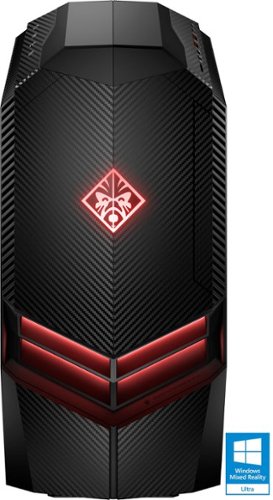
Blast through the newest video games with this HP Omen desktop computer. Its 8GB of DDR4 RAM and AMD Ryzen 5 processor let programs operate quickly and provide smooth transitions between applications. This HP Omen desktop computer includes a 1TB hard drive for ample storage and an AMD Radeon graphics card for crisp images.
Customer Rating
3
Looks AWESOME! But Short on the Performance...
on November 2, 2017
Posted by: MarkusKong
from Torrance, CA
OMEN by HP (880-020)
Setup/Testing/Conclusion
First impressions… I must say that the box itself attracted me. I like the black and red that HP used for the OMEN. Great choice!
Upon opening the box you will notice the quality packaging foam that HP used. It’s not your typical foam that you normally get. It doesn’t flake! Also, the OMEN comes in a nice protective bag that is also black. As you’re removing the bag you’ll see the nice handle on top of the case. The system weighs about 30lbs or so, it’s not TOO heavy… Especially when compared to my full size tower that I already have. HP did a really great job with marketing and packaging.
Setting up the OMEN was not difficult at all. You’ll be able to remove the protective film on the case here and there. The OMEN case is definitely nice. I like the design and carbon fiber look. The finish on it is just simply wonderful in my opinion. Black and red again of course which is beautiful. On the top of the case you’ll see the ports described below in the specs I provided. You of course have your headphone and microphone jack on the top of the case as well. On the front of the case you’ll notice the 2 easy to remove hard drive bays. The actual mechanical hard drive that is included is inside the system itself. I don’t see a way to mount SSDs to the hard drive bays which is quite interesting as so many gamers are adapting/switching to SSDs now. Removing the side panel was really easy to do and I like the fact that you don’t need to remove any screws to do so. All you literally do is unlock it in the back by sliding a plastic piece and then push the top back of the case down where it says “side panel release button”. Once the side panel was removed I was then able to inspect the parts. So personally I haven’t bought a pre-built gaming computer in a VERY long time. But this is where the disappointment begins for me. The SSD is not your traditional SSD, it's the type of SSD that plugs into the motherboard itself. The video card has a single fan and is reference model, instead of it being an aftermarket one. Not really an issue I guess…? BUT, none of the actual components (motherboard, video card, memory, SSD) are from actual reputable companies that a lot of gamers know. When I previously bought Dell systems prior to me building my own custom gaming rigs, it was the same thing. So I can see none of that has changed… But I thought, HEY why not just boot this sexy beast up and see what I can get out of it.
After setting up Windows I went ahead and started installing games. I installed a pretty old game which is Counter-Strike Global Offense. Although old, it is still a widely played FPS. I then installed my BF1 and started testing this rig on both FPS. Counter-Strike GO was pretty standard. I mean like I said, it’s an old game so it’s not very demanding. The OMEN held its own during this game. BF1 was released October 2016 which makes it a year old game. This was where I honestly noticed the difference… Note that the OMEN (880-020) is running an AMD Ryzen 5 1400 processor along with a RX 580 which was released in 2017. My old setup is running an Intel i5 3570K and a GTX 1060. First thing I noticed on the OMEN was the auto settings defaulted to medium. So… I tried cranking it up to Ultra. I mean it’s a system that is running parts that were made in 2017 for a game that was made 1 year ago. So it should play flawlessly right? To my surprise… It was NOT playable. Gameplay was not smooth and I could tell the frame rates I was getting was not in anywhere enjoyable for a gamer. My PC that is at least 4-~5 years old (except for the video card) can run BF1 on Ultra with smooth gameplay and great frame rates. I understand that this specific model wasn’t made to be a top of the line gaming PC and instead it’s a low-mid end gaming rig. And note this… The AMD RX 470/480 series was released to compete with the GTX 1060. The RX 570/580 is an overclocked version of the 470/480. So.. Shouldn’t it technically do better than the 1060? For the MSRP… I honestly expected a lot more. There are a couple other things I didn’t like. On idle the OMEN is pretty quiet which was NICE! But as soon as there was any load, you can hear a turbine jet start on and off and it's sorta annoying after a while. A couple things I would’ve done differently is perhaps an aftermarket CPU cooler, perhaps better quality case fans, aftermarket parts (MSI, Kingston, Corsair, ASUS, etc. - for the video card, motherboard, memory), and filters for the case fans (WHY HP! WHY?!?!?!). Perhaps having aftermarket parts it would’ve made a difference when it comes to things like gaming, I mean afterall… OMEN is a gaming rig! As for the filters, I’m sure others out there agree with me when I say that every gaming rig needs filters. When it comes time to clean your gaming rig, having filters makes a huge difference in keeping your internal components clean as well as it makes it WAY EASIER to clean your tower. Performance wasn’t the only let down for me in my opinion. The RX 580 during BF1 got up to 82c… I mean I guess it’s not terrible but my 1060 only got up to 62c. That's literally a 20 degree difference. What I can say though is that the OMEN performs better than my wife’s build which has an AMD FX 8350 black edition and a GTX 770.
In conclusion… The thing I liked the MOST about the OMEN is the case itself. When I say the case itself I mean the design and look. It definitely is sexy. But when it comes to the components/parts; I was really disappointed on the outcome of performance. This is all my opinion but I feel like if you’re going to build a gaming rig, the parts you put in it MUST be as good as how the PC looks. Think of it like this. You can drive a really slow vehicle with a shell of a lamborghini. But when it comes time to perform… Well, you get what I’m saying. Unfortunately I wouldn’t be able to recommend this specific rig to my peers because I do game via PC and my peers know that I am a gamer. When my 4~5 year old PC runs games better than something that was just released this year (2017); that is scary. UNLESS you’re running something like an AMD FX 8350 and a GTX 770, I wouldn’t necessarily make the leap.
Specs
AMD Ryzen 5 1400 Processor
8GB DDR4 - 2400 SDRAM memory (1 x 8 GB)
1TB Hard Drive - stores up to 176,000 photos
256 GB PCIe NVMe M.2 Solid State Drive
Wireless LAN 802.11a/b/g/n/ac (2x2) and Bluetooth 4.2
DVD-Writer
HP 3 in 1 Media Card Reader, 6 USB 3.0, 2 USB 2.0, 2 USB 3.o Type C, HDMI Out, 3 DisplayPorts
AMD Radeon RX 580 graphics card with 4 GB GDDR5 dedicated memory
HP USB wired keyboard with volume control and wired optical mouse
DTS Headphone X: Produces spatially accure 3D sound through any headphones for immersive sound quality
1 Year limited hardware warranty and 90 days limited technical support for software and initial setup (from the date of purchase)
8GB DDR4 - 2400 SDRAM memory (1 x 8 GB)
1TB Hard Drive - stores up to 176,000 photos
256 GB PCIe NVMe M.2 Solid State Drive
Wireless LAN 802.11a/b/g/n/ac (2x2) and Bluetooth 4.2
DVD-Writer
HP 3 in 1 Media Card Reader, 6 USB 3.0, 2 USB 2.0, 2 USB 3.o Type C, HDMI Out, 3 DisplayPorts
AMD Radeon RX 580 graphics card with 4 GB GDDR5 dedicated memory
HP USB wired keyboard with volume control and wired optical mouse
DTS Headphone X: Produces spatially accure 3D sound through any headphones for immersive sound quality
1 Year limited hardware warranty and 90 days limited technical support for software and initial setup (from the date of purchase)
Bundled Software
Windows 10 Home
McAfee LiveSafe: Free 1 year subscription
Dropbox: If you don’t have it today, sign up to get 25 GB of Dropbox space free for 12 months with your HP device
HP Orbit: Share your content between mobile and PC instantly over WiFi
OMEN Command Center: Included software deliverys easy to use overclocking and optimizes your network performance
McAfee LiveSafe: Free 1 year subscription
Dropbox: If you don’t have it today, sign up to get 25 GB of Dropbox space free for 12 months with your HP device
HP Orbit: Share your content between mobile and PC instantly over WiFi
OMEN Command Center: Included software deliverys easy to use overclocking and optimizes your network performance
What's in the box?
OMEN by HP (880-020)
Keyboard
Mouse
Manuals\Warranty Guide\Extra Screws
Keyboard
Mouse
Manuals\Warranty Guide\Extra Screws
My Best Buy number: 2724175064
Mobile Submission: False
No, I would not recommend this to a friend.


Share this review:


+14points
22of 30voted this as helpful.
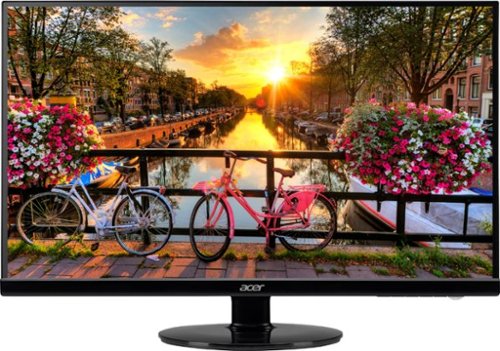
Expand your workspace or gaming experience with this 27-inch Acer widescreen monitor. An antiglare LED backlit screen provides easy viewing from any angle and even in direct light situations, and 1920 x 1080 resolution delivers on graphics. This Acer widescreen monitor features an ultra-slim design that doesn't take up a lot of space.
Customer Rating
4
Oh look at that "Zero Frame"!
on October 12, 2017
Posted by: MarkusKong
from Torrance, CA
Acer S271HL Gbidx 27” Monitor
Setup/Testing/Conclusion
Let me first state that Acer has done an awesome job with this monitor in my opinion. What I would’ve liked to see is perhaps better box design. I know… Box? Yes! I feel like anyone and everyone that releases a product should have some sort of packaging that hooks the customer. It needs to stand out from the competition.
Upon opening the box the monitor is well packaged with styrofoam. You’ll find the monitor of course, along with a VGA cable and the stand to put together. Putting the monitor together was really easy to do. After removing all the protective film, it was time to power on this thing. You have the ability to plug in either HDMI, DVI or VGA as it has all 3 inputs. I went with HDMI of course.
First thing I noticed was how thin the bezel/frame was around the screen of this monitor. Acer does advertise that its “Zero Frame”, I really liked this personally.
As soon as it powered on you are greeted by a yellow Acer logo. After my PC booted up, I immediately changed the refresh rate to the max which was 75Hz. I then proceeded to surf around the web for images to compare colors and images. First off, this monitor produces some very nice looking images and colors. Everything is extremely vibrant and it looks beautiful. One thing that my wife and I noticed though was that there was a slight yellowish undertone. So some of the images we saw were a bit off. But nonetheless I still enjoyed looking at everything on this monitor. Some people may not even notice.
The next thing I did was start a game that people still play… That’s right, Counter-Strike Global Offensive. For the monitor’s response time I couldn’t tell the difference between 4ms and 5ms. From what I was told a 1ms monitor makes a difference though. One thing I can tell you is that the refresh rate of 60Hz compared to 75Hz, you can see the difference here in my opinion. Playing CS:GO was definitely smooth and I really enjoyed the zero frame/small border on this monitor. It made things look… Bigger! My old monitor was a 24” while this Acer is a 27”, this even made a difference. Again… The Zero Frame is where it's at for this monitor. I also didn’t experience any eye fatigue here when gaming for about 2 hours.
Overall the monitor is honestly better than I expected. The base is nice and heavy so it’s sturdy. The build construction on the monitor itself seems normal, nothing crazy out of the ordinary I’d say. I would rate this monitor a 4 out of 5. Why? Because for the price (if you spend a little more) you can get a 144Hz refresh rate monitor with 1ms response time. Does this matter to some folks? Absolutely, especially if you’re going to be gaming. But I’d still recommend this monitor because it's not bad at all. I’ve actually already recommended this monitor to a couple coworkers and my company.
Features & Specs
Full HD LED (Mercury Free)
1920 x 1080 FHD
Zero Frame
ComfyView
Blue Light Filter
Flicker-Less
4ms Response Time
75 Hertz Screen Refresh Rate (max)
1920 x 1080 FHD
Zero Frame
ComfyView
Blue Light Filter
Flicker-Less
4ms Response Time
75 Hertz Screen Refresh Rate (max)
What's in the box?
27” Acer S271HL Gbidx Monitor (with neck and stand)
User Guide
VGA Cable
Power Cable with AC Adapter
User Guide
VGA Cable
Power Cable with AC Adapter
My Best Buy number: 2724175064
Mobile Submission: False
I would recommend this to a friend!


Share this review:


+2points
6of 10voted this as helpful.
MarkusKong's Review Comments
MarkusKong has not submitted comments on any reviews.
MarkusKong's Questions
MarkusKong has not submitted any questions.
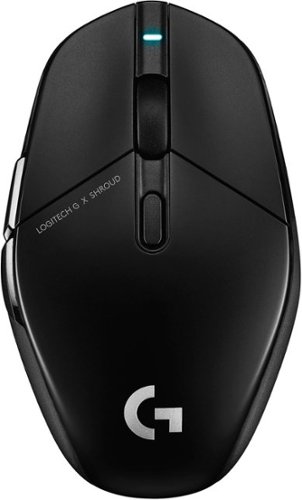
Introducing G303 Shroud Edition~the remaster of our iconic mouse. Featuring LIGHTSPEED, it delivers ultra-low latency and reliable performance. Helping Shroud and you take aim. With HERO 25K Sensor, Shroud~s G303 is built for precision and speed, without sacrificing energy. G303 Shroud Edition weighs 75 grams, made for low-sensitivity DPI and faster aiming. Designed in collaboration with Shroud, the new G303 perfectly matches his specs and includes our latest pro-grade technology.
Does this mouse have a battery included? Is the battery replaceable?
Battery is built in. Rechargeable. Not sure if it’s replaceable
4 years, 9 months ago
by
MarkusKong
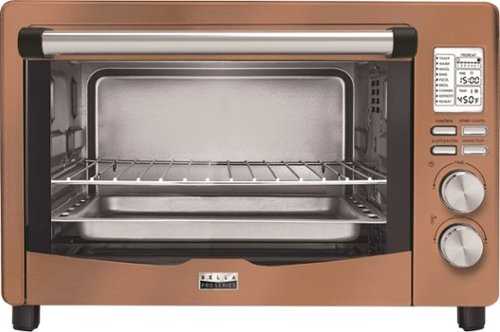
Bake casseroles, reheat leftovers and prepare other foods with this BELLA Pro six-slice digital copper toaster oven. The 1800W power output heats fast to save time, while the digital display provides info that's easy to read. This BELLA Pro six-slice digital copper toaster oven has three rack positions for cooking up to two dishes at once.
What is the material of the interior of the toaster oven? Is it non-stick?
Not quite sure what the interior materials are but it is non-stick
6 years, 1 month ago
by
MarkusKong

Remove hair without wax or razors using the Lumilisse by Conair hair removal device. Rapid pulses of intense light help prevent hair regrowth, delivering permanent results with consistent use. The FDA-cleared device uses sensors to safely activate. Choose between continuous mode for large areas or manual mode to target specific trouble spots. The Lumilisse by Conair hair removal device includes two attachments to ensure perfectly smooth results all over.
Can this be used on Facial and Neck hair?
Yes you definitely can. It comes with 2 different heads. Just use the one for sensitive areas
7 years, 7 months ago
by
MarkusKong
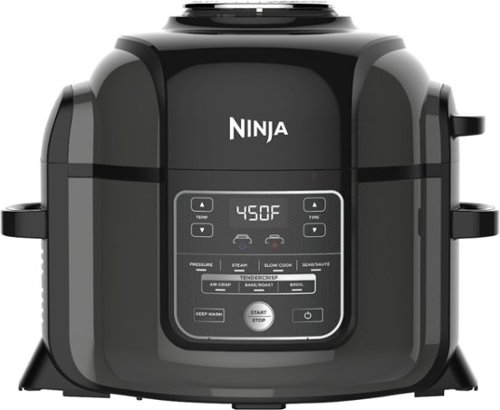
Ninja Foodi's TenderCrisp pressure cooker allows you to achieve all the quick cooking and tenderizing wonders that you love about pressure cookers. The Foodi's Crisping Lid allows you to air fry, bake/roast, and broil. That means you can give your tender, juicy pressure-cooked meals a golden, crispy finish. The secret is TenderCrisp Technology, which produces the perfect combination of heat, fan velocity, and air circulation to give your food even crisping from top to bottom.
can you deep fry chicken with this unit?
You can only "air fry". If you're looking to deep fry with a pressure cooker, you would need a pressure fryer.
7 years, 11 months ago
by
MarkusKong
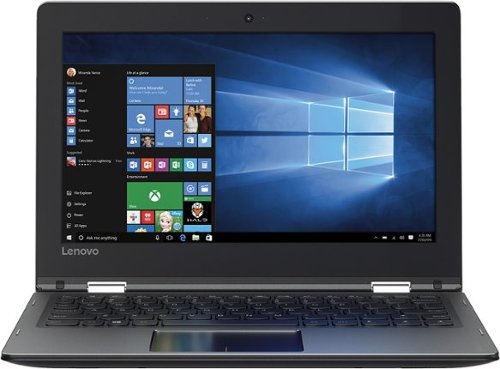
Only at Best BuySupport your mobile computing needs with this 11.6-inch Lenovo Flex touch screen laptop. The Intel Celeron N3350 processor delivers speeds of up to 1.1 GHz for fast web browsing, and the 64GB hard drive stores files and programs securely. This Lenovo Flex touch screen laptop is Bluetooth compatible and connects easily to wireless devices.
Will it support Microsoft office?
You can download Microsoft Office Online in the Web Store. It's built for Chrome
"Built for Chrome – Use Word, Excel, PowerPoint, OneNote, and Sway Online without needing Office installed."
"Built for Chrome – Use Word, Excel, PowerPoint, OneNote, and Sway Online without needing Office installed."
8 years, 10 months ago
by
MarkusKong
Everything you love about Google, for work and play. Google Pixelbook is the first laptop with the Google Assistant* built in. Its super thin, 4-in-1 design includes a long-lasting battery and 7th Gen Intel~ Core~** processor. It also comes with all the apps you already know and love including Youtube, Infinite Painter, Google Play Movies, Evernote, Slack, Lightroom, Google Photos and many more***.*Google Assistant requires Internet connection.**Intel and Intel Core are trademarks of Intel Corporation in the U.S. and/or other countries.***Availability and performance of certain apps and services may vary by region. Subscriptions(s) may be required, and additional terms, conditions and/or charges may apply. Pixelbook and Pixelbook Pen are optimized for selected apps and services only.
How much does is the display quality for the google pixelbook

Energize your workout routine with these Sony wireless sports headphones. Their built-in LDAC enhanced codec support and Bluetooth connectivity let you stream high-quality audio content for an enhanced listening experience while you~re on the move. The included cable adjuster and clip help ensure these Sony wireless sports headphones stay in place.
Do this earphones have bottom on it to adjust the volume and answering phone calls?
Hello Theguy. I'm not sure what you mean by "bottom". But, on the right ear piece you have the ability to adjust the volume and answer phone calls. Its located on the "loop" that goes behind your ear on the right.
9 years, 10 months ago
by
MarkusKong

Simplify your everyday life with the Google Home, a voice-activated speaker powered by the Google Assistant. Use voice commands to enjoy music, get answers from Google and manage everyday tasks. Google Home is compatible with Android and iOS operating systems, and can control compatible smart devices such as Chromecast or Nest."
Is this working off of voice recognition or can others in the home use it also?
Hello Elaine, others in your home can use it too. It does not work off of "your" voice recognition. I tested this.
9 years, 11 months ago
by
MarkusKong
Simplify your everyday life with the Google Home, a voice-activated speaker powered by the Google Assistant. Use voice commands to enjoy music, get answers from Google and manage everyday tasks. Google Home is compatible with Android and iOS operating systems, and can control compatible smart devices such as Chromecast or Nest."
Can google home speak or answer to foreign languages. Google now does speaks multi languages, but I don't know about google home can do this. I know Alexa can't speak foreign languages.
Hello johnnyK, I tried speaking to it with Mandarin just now but it didn't work. When you go into the Google Home app you can see/check the language but there's only English that I could see.
9 years, 11 months ago
by
MarkusKong
Simplify your everyday life with the Google Home, a voice-activated speaker powered by the Google Assistant. Use voice commands to enjoy music, get answers from Google and manage everyday tasks. Google Home is compatible with Android and iOS operating systems, and can control compatible smart devices such as Chromecast or Nest."
I have an android TracFone . Will I be able to use it with the Google home ? Or do I need a Google phone.
If your TracFone can download apps off of the play store (Google Home app) then you should be fine. You don't need a google phone because Google Home even works with an iOS device. If you want to see the system requirements, look here: https://support.google.com/googlehome/answer/7035987
9 years, 11 months ago
by
MarkusKong