


DavidJr's stats
- Review count364
- Helpfulness votes2,401
- First reviewDecember 8, 2015
- Last reviewSeptember 3, 2026
- Featured reviews0
- Average rating4.2
- Review comment count3
- Helpfulness votes2
- First review commentJune 3, 2016
- Last review commentJune 3, 2016
- Featured review comments0
Questions
- Question count0
- Helpfulness votes0
- First questionNone
- Last questionNone
- Featured questions0
- Answer count104
- Helpfulness votes221
- First answerDecember 9, 2015
- Last answerDecember 23, 2021
- Featured answers0
- Best answers34
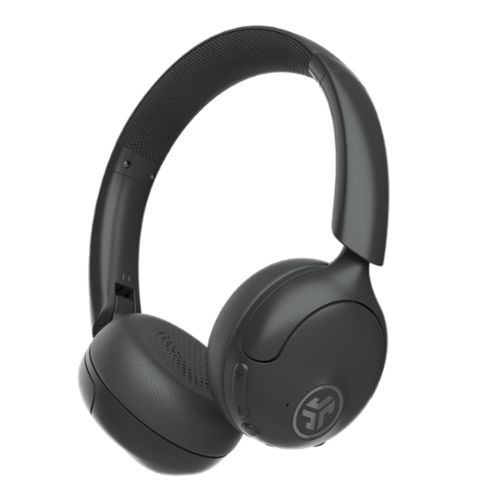
Experience luxurious sound with Go Lux ANC Headphones a new benchmark in audio excellence for on-ear wireless headphones. These sleek and compact headphones seamlessly blend innovation and Lab-quality sound, ensuring an immersive audio experience. Whether you're a city commuter or Zen seeker, Hybrid Active Noise Canceling and personalized sound customization via the JLab App produce an audio sanctuary. Indulge in your favorite tunes or podcasts in ultimate comfort and style with Cloud Foam earcups and headband, ensuring a listening experience that's worth every penny.
Posted by: DavidJr
I’ve had a fair bit of JLAB headphones over the years and one thing is for sure is that JLAB is about trying to give you the best on a budget. Sure, they are not the audiophile quality sound that you might find in something else that is much more pricey, but they do exactly what you want them to do. Play music on the go and not break the pocket.
The battery life on these is one thing that is astounding. You can get nearly 3 days of straight use, pending things like using ANC though. But, still days worth of charge. It’s a good thing though, because the USB-C charging cable that these come with has got to be one of the shortest cables I’ve ever used. Good thing practically everything is using USB-C now, so easy enough to use a different one.
Like several of their other headphones, these come with active noise cancellation and the be aware mode, which helps amplify sounds around you so that you might hear that bell or horn as a bicycle is trying to pass you on the trail. Meanwhile, with the ANC on you can zone out and barely hear anything around you. They changed the button to be down below the headphones instead of the whole side JLAB logo like many of their others do. But, it still functions the same.
On the subject of buttons, there are defaults that the do like 1 tap play/play pause, 2 tap for phone assistant, but you can also change these to your preference with the Jalb app on your Bluetooth connected device. The app also allows you to customize the sound with an EQ use one of the defaults. It also allows settings for options to limit the highest volume settings and spatial audio.
Comfort on these is decent. They are fairly light and on the ear. They manage to keep a pretty decent seal over the ear without adding too much pressure, which adds to the noise cancellation. The material is faux leather, so it makes it easy to wipe away the sweat that these summer days are sure to cause.
It is using Bluetooth 5.4, but I do notice a slight delay when watching videos. It’s not too bad, but is noticeable at times. These also have the option to share your audio with other Labshare devices, but I have not personally tried this option. I did try the Bluetooth multipoint option though and this is nice if you want to listen to say your PC and your phone without needing to constantly swap between them. You can be connected to both at the same time, however, you can only listen to one device at a time as they will basically fight for dominance if you try to play audio from both.
Overall, for budget range headphones, these are pretty amazing. Decent audio, better once modified to your preference with the app, super long battery life, active noise cancellation and capable of being connected to two Bluetooth devices for smooth transfer between them.
I would recommend this to a friend!


Share this review:


+1point
1of 1voted this as helpful.
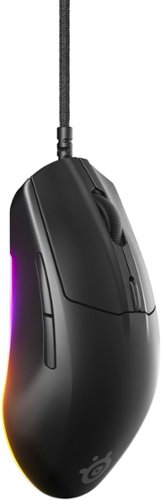
Dominate the competition with the 77gram Rival 3 Gen 2, engineered for near-instant response times with ultra-low latency. The TrueMove Air 8.5K DPI sensor delivers pixel-perfect precision, while hyper-durable switches guarantee up to 60 million crisp clicks. Enhanced with a Super Mesh cable and 100% PTFE feet for effortless gliding.
Customer Rating

5
Simple, light, almost to light
on June 22, 2025
Posted by: DavidJr
The SteelSeries - Rival 3 Gen 2 is nearly as simple as a mouse can come yet is still got a lot to it. By default it is light, has the RGB glow to it and has selectable DPI settings. However, get the SteelSeries GG app and unlock everything else this mouse has to offer.
At first, the default DPI steps felt too slow for me. With the app installed, you can easily change those as high as 8500 or as low as 200. You can even adjust the DPI on independent axis so that left/right is slower than up/down. You can adjust the polling rate and the acceleration and even change the angle snapping so that it instantly goes from point to point when you move. Personally, it felt a little odd changing those settings, but you can mess with them and try ro find exactly what you are looking for.
All of the buttons are programmable, even allowing you to record macros with the button. You can change the lighting to specific patterns or create your own with the 3 different zones. I personally liked the reactive lighting as it changes color based on the DPI selection and then would do a rotation of light on clicks.
As with any mouse, sometimes the feel of it might not be exactly what you prefer. This one feels really low profile, kind of making me get rid of my wrist rest to be able to rest my hand on the mouse comfortably. It is fairly light, thought I have seen lighter, but at times I feel like the mouse is moving on its own just by the weight of the cord barely hanging off the table. I let go to type and my mouse is sliding ever so slightly nearly every time. If the cable it tethered or mostly resting on the table, I don’t have this issue but at times when I click feel I am moving at the same time because I don’t have the weight I am used to.
Overall, this is a simple yet advanced mouse. Being able to get it even more customizable with the SteelSeries GG app is what really makes this thing shine, also literally with the RGB options. It has a really low profile and might not be the best fit for everyone, but certainly worth checking out.
I would recommend this to a friend!


Share this review:


0points
0of 0voted this as helpful.
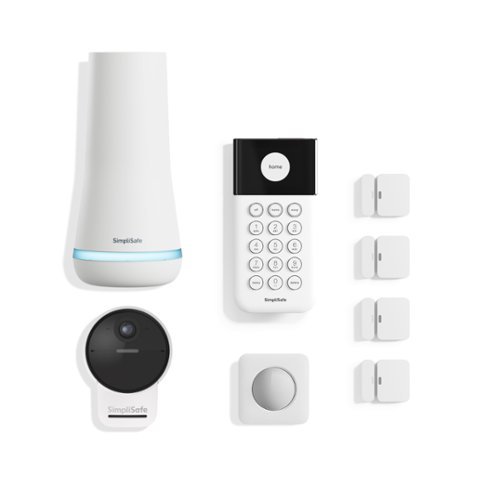
A safer home starts here. SimpliSafe~ delivers advanced security that puts you, your home, and your safety first. With optional 24/7 professional monitoring that features Active Guard Outdoor Protection, SimpliSafe~ combines innovative hardware with advanced AI and live security agents ~ that can proactively prevent crime outside your home and deliver fast emergency response when you need it most. All with no long-term contracts or hidden fees. SimpliSafe~ is effective, easy to use, and affordable. You can protect every inch of your home with sensors for every room, window and door, while HD security cameras keep watch inside and out. This award-winning system even includes smarter ways to detect motion that alert you when a threat is real, hazard sensors that detect floods and other possible emergencies, and powerful sirens that can help stop intruders in their tracks. It~s comprehensive protection and an unmatched combination that separates SimpliSafe~ Home Security from other systems.
Posted by: DavidJr
I have had a couple SimpliSafe systems over the past years and not a whole lot has changed about them. I have always liked the fact that you can pull it all out of the box, set it up and instantly have a home security system. By default, you don’t have to pay for their monthly protection plan, which provides a level of live protection and cell backup service. However, with the addition of the camera, it is nearly useless unless you pay for a plan.
You still get a battery backup base station that helps keep everything connected. It provides a light hue of visual confirmation the system is armed as well as being the siren for the whole system. You still get the wireless keypad which I have always found useful for a security system because you can keep it central in the house, or take it to bed with you at night. You get 4 door sensors which have included sticky pads or you can screw into place. The sticky pads are amazing for people that rent and don’t want to worry about repairs when they leave.
You also get a motion sensor that can be mounted with the sticky tape or screws as well. Some wall textures might not hold up well with the sticky tape though. But, all of this is simple to connect with the app or the touchpad and will all trigger the local alarm system depending on your setting. You can get push notifications from the app, provided your system is connected to an active Wi-Fi signal as well. However, should the power go out, the main hub has a battery backup and you will still get a local siren from the device, but no push notifications unless you subscribe because it won’t have the Wi-Fi/Internet connection.
Now, the camera that comes with it can work wired or wireless. Depending on that connection also depends on what it is capable of, but it really just becomes a 2 way webcam with motion notifications unless you pay for a subscription. There is no local recording, it is only based on your subscription level with up to 30 days of storage. You can however, record with your phone, should you be watching the camera at the time of the notification.
Like most wireless cameras, they are slow to react. They stay in a low power state to conserve battery, so they only cut on after they detect motion, which could be seconds to late for whatever the incident that occured. If you aren’t paying for a subscription and don’t open the push notification the moment you receive it, you may never know what happened other than “Motion detected”. Now, if you are close enough to an outlet, you can use the included USB power cable and adapter which improves its reaction time. Plus, you can take advantage of their AI detection and zone assignments to prevent unwanted motion detection. However, you still won’t have any recordings unless you subscribe.
With all that said though, they do offer 1 free month of their professional services and then depending on the services you want, will range from $9.99 to $49.99 a month at the time of this review. You can cancel any time, there are no long term contracts, and you can change your level of plan right through the app. Oddly enough, I declined the 1 month and now they offer me 3 months free to upgrade my plan from self monitoring to anything else, but that might be a limited and personal offer.
Overall, SimpliSafe is still a good self-installation and self monitoring system. The camera can be good for live monitoring, but if you want to see any missed footage, you have to have at least the minimum subscription to store recordings for up to 30 days. It’s a quick, simple and great option for some piece of mind security.
I would recommend this to a friend!




Share this review:


+1point
1of 1voted this as helpful.
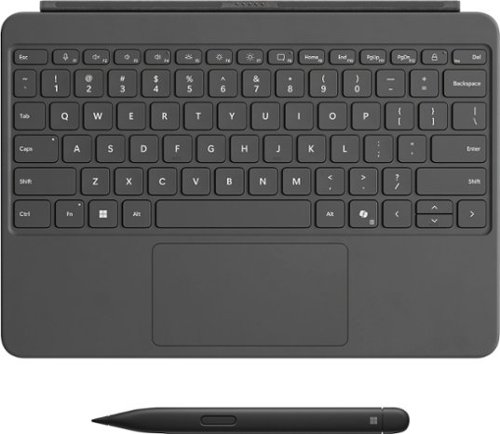
Level up your productivity in a click by easily attaching Surface Pro 12" Keyboard to Surface Pro 12" [1], transforming it into a powerful laptop. Designed by Microsoft, it features a stable and durable design, full size backlit keyboard, a dedicated Copilot key for instant AI access, and dynamic hinge that unlocks new postures. Perfect for your on-the-go lifestyle.
Customer Rating
5
The other half of a laptop
on June 16, 2025
Posted by: DavidJr
The Microsoft Surface Pro 12” is pretty impressive on its own. But, when you snap this backlit keyboard and pen to it, you practically have a complete laptop plus pen. The magnetic connection between the tablet and keyboard is really strong, while the keyboard has some play to it to allow for better positioning and not leave any slack hanging around.
The bottom side has a nice felt covering and the sturdiness of the whole panel is quite impressive for how thin it is. It has a typical touch pad that feels responsive to clicks. You have all the standard keys with function keys by default having various media and brightness buttons for the screen and the keyboard. It also has a lone Copilot button, which is interesting if you want to pull it up quickly instead of using the default key combo.
Closing the keyboard acts like a screen cover and automatically puts the device to sleep. Flipping it behind the tablet also deactivates the keys, so no accidental typing if you don’t want to remove it for tablet purposes.
The pen has to be charged by placing it in the groove on the back of the tablet and then connected through Bluetooth settings. However, once that is done, it works perfectly. The oval shape fits comfortably between fingers and there is a function button that essentially acts as a right click of a mouse. It glides perfectly on the glass surface and with the right applications, it is even pressure sensitive. The pen snaps tight in the groove on the back of the tablet, but it does stick out a bit, leaving a bit of imbalance if intending to lay it flat on the back.
Overall I feel this keyboard and pen combo is essential for the Surface Pro. Not only does it make the tablet into a laptop and adds a protective case, but the pen is perfect for anyone that wants to do some digital art.
I would recommend this to a friend!

Share this review:


0points
0of 0voted this as helpful.
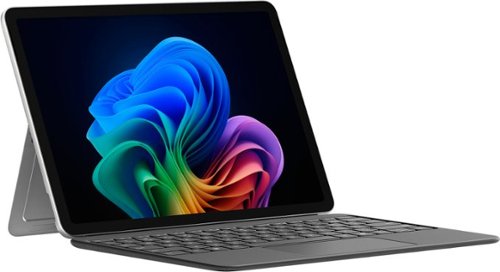
Use the new Surface Pro 12~, a Copilot+ PC, as a powerful tablet with an intuitive touchscreen, touch, voice, and Surface Slim Pen [3] to bring ideas to life, or attach the Surface Pro 12~ Keyboard for a full Windows laptop experience [3]. With built~in AI features, seamless integration across the Windows ecosystem, and an ultra~thin, lightweight design, Surface Pro gives you the freedom and versatility designed for creativity, efficiency and mobility to go beyond what you thought possible.
Customer Rating
5
Familiarity of a home computer on a tablet
on June 16, 2025
Posted by: DavidJr
This finally feels like the competition the other tablets needed. This is basically a Windows 11 computer in a slim, light and fairly capable device. Sure, it isn’t going to play the latest and greatest games directly on it, but if you have Xbox Game Pass then you can play them from the cloud just fine on here. But, it does have 16GB of RAM and an 8 core processor, so it is pretty snappy with most things.
Just like any other Windows computer, you go through the usual setup and it asks for your Microsoft account. With this, you can then make your tablet look like any of your other connected computers with OneDrive. The first thing I found to be beneficial is that it could see all three of the bands my Wi-Fi 7 router provides, 2.4Ghz, 5Ghz, and 6Ghz with no issues. So, plenty of options there for wireless connections. Then you have two USB-C 3.2 ports that can be used for power at 45W and up to two 4K/60hz monitors with DisplayPort 1.4A over USB.
One thing of note, everything is sold separately despite the images you might see. The 45W charger, the keyboard and pen. This is just the tablet device and you will need to charge it. Though the battery does last a good while on a single charge, about 12 hours of regular use, several days of just casual use, you need at least a 27W charger to charge it back up. You can also do all your typing and writing with your fingers, but it makes it into a laptop or drawing pad once you have those. Besides, the device also has a built in magnetic wireless charging indention on the back. It holds the pen super tight, but still leaves a bit of a ledge to catch when sliding in a bag or trying to lay it flat on a surface. Plus, with the pen, it has feedback and is touch sensitive for the artist in you. The kickstand is pretty solid, a bit tight to pull out with the very fine slit for grabbing it, but holds well at just about any angle.
Like all Windows products now, you also have the AI Co-Pilot which can help you through a lot of situations. From asking simple questions to asking it to create an image of your imagination. If you need a better way to word that email you were typing up, Co-Pilot can be there to help you.
Overall, this is a solid Microsoft Windows tablet. Large enough to be a small laptop, big enough to do just about anything you want, even if it is just to be mobile entertainment. Plenty of battery time to get you through those long trips and plenty of capability to make sure you are on top of your business functions.
I would recommend this to a friend!
Share this review:


+1point
1of 1voted this as helpful.
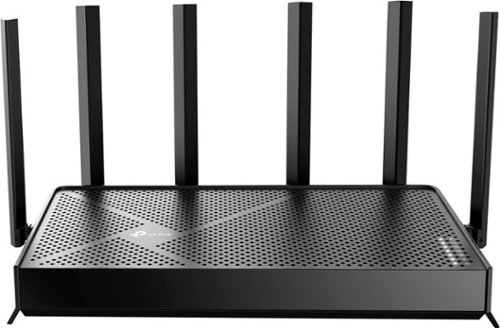
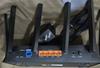
Step into a new era of home Wi-Fi with the TP-Link BE9700 Tri-band Wi-Fi 7 Router. Powered by revolutionary Wi-Fi 7 technology, this tri-band router revolutionizes your home connectivity. It offers expansive wireless coverage and impressive Wi-Fi speeds of up to 9.7 Gbps using Multi-Link Operation across six simultaneous streams spanning the 6GHz, 5GHz, and 2.4GHz bands. Wi-Fi 7 delivers even smoother connections with less interference, lower latency, and enhanced reliability. Plus, enjoy increased capacity to accommodate more devices simultaneously, making it the perfect router for 4K/8K streaming, lag-free online gaming, and seamless smart home connectivity. Designed for ultra high speed, multi-gigabit internet, the Archer BE9700 boasts a 10 Gbps WAN/LAN port, 2.5 Gbps WAN/LAN port, 3~ 2.5 Gbps LAN ports, and a USB 3.0 port, catering to all your high-performance device needs. Experience the future of Wi-Fi today with the TP-Link Archer BE9700. ~~~
Posted by: DavidJr
It’s good to see more routers come out supporting Wi-Fi 7, 6Ghz channels and higher speed LAN ports. Technology is getting faster and all these things help it keep up. However, why are so many security features getting put behind a paywall?
I know it’s not just TP-Link that is doing this, as other companies are doing the same thing. But, it is sad to see that something like DDoS prevention and intrusion prevention isn’t something that the router, that is fully capable of doing, doesn’t do it by default. Then, you have to use the Tether app on a mobile device to try the trial or enable the subscription.
Anyways, despite that, this router has a lot that many other routers don’t bring to the table. This one can be as simple as running the app and getting your network running in a matter of minutes, to breaking it down and having several different networks running through your household. You can have a different SSID per band for regular users, for guest users and a separate for Internet of Things (IoT), so that you can isolate those items from other local network devices. Basically so that random lightbulb doesn’t need to know your regular SSID and password.
You have control over all the typical advanced LAN and WAN settings, you can even make static routes. You can use the router as a VPN client or make it a VPN server with OpenVPN, PPTP VPN, L2TP/IPSec VPN and/or WireGuard VPN. Allowing you to configure client accounts, certificates and manage their connections. You can even isolate specific connected devices so that they can’t see other devices on your network with just a couple clicks. No need for learning network engineering just to keep your kids tablet from being hacked and ruining everything else on your network.
If you are like me and still prefer wired connections, this has a single 10Gbps port that can be switched between WAN/LAN and four 2.5 Gbps ports in which the first one can be swapped between LAN/WAN. So, for example, with 1Gbps internet, you only need the 2.5Gbps port and might have a NAS that can do 10Gbps, so it makes it even better for your local network connected devices.
There are other features I have not used but know others may enjoy. Like using Alexa or Google to enable guest networks or read out the WPA password so that your guests can connect without you having to remember it on your own. If you have a large house you may also have some weak spots for WiFi, so TP-Link makes it easy to get another EasyMesh and OneMesh device to extend your network to that other device. You can even hook up a USB drive directly to the router and treat it as a network storage that can even be accessed externally if you enable that feature.
Despite my complaining of the required subscription for some other security features, they do still include a fair bit of options as they list as “basic”. These include notifications of new connected devices, security scan for router updates, port forwarding issues and wireless password strength. You also get some parental control functions that can do some basic blocking of malicious or restricted content or specific sites and create bedtime to remove access for that device. However, if you want reports of what has been blocked or accessed, that is part of the subscription.
Overall, it’s a simple to set up router that brings a lot of the modern tech to the user and plenty of advanced features. It is fully capable of more, but for a slight monthly or annual fee. It has all the capability to still work with that original wireless device from 10+ years ago to the most modern device you can get.
I would recommend this to a friend!


Share this review:


0points
0of 0voted this as helpful.
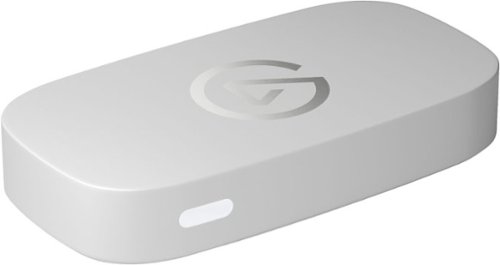
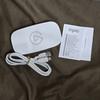
Great content made easy. Play stunning 4K60 HDR games without image quality loss or lag, and record or stream your adventures in beautiful Full HD 1080p60 resolution. Game Capture Neo sends two video signals from your console ~ one to your gaming screen and the other to your laptop, PC, Mac, or iPad. Capture everything you see and hear ~ gameplay, cutscenes, soundtrack ~ without watermarks or time limits, directly to your hard drive, YouTube, or Twitch. Stick to simple QuickTime recordings or develop your streaming expertise in OBS. As your skillset expands, Game Capture Neo evolves with your growing needs. So you can keep growing your community.
Customer Rating
5
1080p60 recording, 4K60 passthrough
on May 21, 2025
Posted by: DavidJr
It’s Elgato, what else do you need to know?
I feel like Elgato is the name that you mention to any gamer/streamer and they already know what it is. You usually don’t have to explain that it is a video capture device to them. However, that is its sole purpose, to capture video and audio from the HDMI connection over USB and pass it through to the device you wanted to watch it on anyways.
Now, the difference is what version you are going for. Depending on what you are capturing it for, what you are watching it on and what your device is capable of is the total decision. The Neo will ONLY capture in 1080p 60/30 or 720p 60/30, however it will allow passthrough up 4K at 60. It can do 1440p 60, 1080p 120/60 and 720p 120/60. So, for example, if you are on an Xbox Series X connected to a 4K TV or monitor that you want the 120Hz refresh on, this is NOT for you.
However, if you are fine with the 60hz refresh, even at 1440p, then it will work fine for you. You can do the 1080p or 720p with the 120 and still capture it at 60. All you need is a computer that meets the minimum specs, a USB-A 3.0 or higher port and capture software. I personally use OBS and didn’t have to install anything extra for it to become usable for me. If you want, Elgato also has its own capture software. For streaming, 1080p60 is usually the most you can do anyways. If you want to record the full 4K footage, you are going to have to find a different version.
Now, the majority of users, you’re probably not trying to push 4K at 120, so all other occasions, this will work for taking video from your console or other device that outputs with HDMI, to a computer over USB perfectly.
Overall, so long as you are not “extreme” gaming or trying to record in 4K, this is perfect. It works great, is simple and doesn't need any special software for the most common recording/streaming PC app out there to recognize it. I just wish it also came with an extra HDMI cable too.
I would recommend this to a friend!
Share this review:


0points
0of 0voted this as helpful.
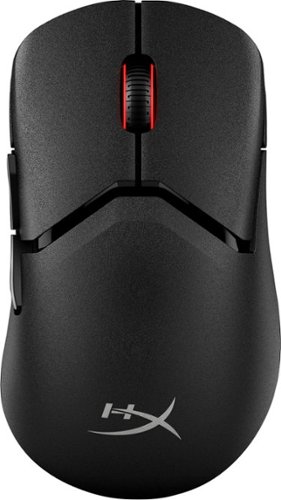
Say hello to HyperX~s most customizable gaming mouse: the Pulsefire Saga Pro. This mouse uses ergonomically designed interchangeable components to adapt to different grip styles with up to 16 comfortable combinations. Simply swap out the magnetically mounted components to find your perfect fit completely tool-free. Whatever configuration you choose, this mouse weighs in at only 72 grams, so you will never have to sacrifice agility for comfort. This mouse is equipped with pro-grade 4k wireless polling so you can game with confidence knowing every click is captured. Long gaming sessions? No problem! With Pulsefire Saga Pro you can game for up to 90 hours1 on a single charge in 1kHz polling mode. The upgrades don~t stop there. Pulsefire Saga Pro is also equipped with HyperX Optical Switches that balance laser-accurate actuation with a tactile click. Unlike traditional switches that require a mechanical contact, optical switches utilize a light-triggered mechanism that translates clicks to immediate actions. No debounce, no delays. Pulsefire Saga Pro also offers dual wireless connectivity, utilizing a high-speed 2.4GHz wireless dongle or Bluetooth with compatible devices. Or ditch the dongle with Instant Pair, connecting to enabled OMEN gaming laptops without any additional components. The customization goes beyond the surface level. Connect to HyperX NGENUITY software to set motion tracking up to 26k DPI, remap buttons, adjust polling rate, set custom RGB effects, and monitor battery life.
Posted by: DavidJr
I don’t think I have ever had a mouse that has had so many different little things you could customize about it. IT comes with two clicker button styles and two palm rest styles and even different side buttons. All of them are magnetically attached and easy to popp of and replace. You can mix and match them as you want and then add the grip stickers of your choice to customize it even more. To top it off with ultimate customization, you can even 3D print your own parts with open source models.
The mouse feels really light. You can use it wired, with the included 2.4Ghz dongle or with Bluetooth. With the Ngenuity software you can even customize the light around the scroll wheel. Along with that you can change things like the button assignments and the DPI steps. The one thing I don’t like about it is where the DPI toggle switch is, on the bottom. For some games, having it readily available is the best option, as most have it right below the scroll wheel. However, you can reassign the two side buttons of the scroll wheel click to be the DPI toggle. However, now you are taking away from other potential options.
This mouse is smooth and responsive. You can change the DPI as low as 100 or as high as 26,000. Compared to the mouse I use regularly though, it felt slightly slower for the DPI number. For instance, 1800 on my old mouse felt about the same as 2000 on this one. But, once I set the steps to my liking, it felt great.
Overall, I absolutely love the customization this mouse has. It is super light, almost too light at times when I have it plugged in and the soft flexible braided cable hanging off my table pulls it away when I let go. But, it is fast, responsive and feels nice with good solid switches.
I would recommend this to a friend!

Share this review:


0points
0of 0voted this as helpful.
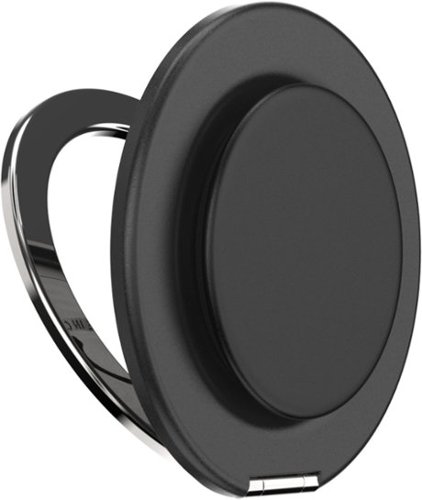
Enjoy effortless versatility with the PopSockets MagSafe Kick-Out Grip & Stand~your go-to for comfort, style, and hands-free convenience. This magnetic grip snaps on and off with ease, offering a secure hold and an adjustable stand for both portrait and landscape viewing. Whether you're streaming, shooting videos, or taking photos, you can set your phone at any angle for the perfect view. Featuring a swappable grip top, you can switch up your style anytime. Designed with strong holding magnets~up to 2x stronger~it~s compatible with all PopSockets magnetic mounts. Works seamlessly with any MagSafe case for iPhone 12 models and newer (including Pro and Pro Max) and includes a magnetic adapter for use with any phone, tablet, or e-reader case.
Customer Rating
5
Simple, comfortable and effective
on May 1, 2025
Posted by: DavidJr
I have a Samsung S24 Ultra and it is a pretty big phone. Sometimes even in my fairly big hands it gets uncomfortable holding it. I also have a MagSafe case, just never really taken advantage of it. However, having this little PopSocket easily snap to the back of it, makes holding or standing the phone up a whole lot easier. It is quick to remove if needed to attach to another device and it is fairly low profile for leaving it on while in your pocket.
The magnets on the ring are fairly strong for their size. They hold really well, but it doesn’t take a whole lot of effort to remove it, so don’t recommend “extreme” activities and expect it to hold tight. The only thing I think that would make it better is if the piece that would be at the bottom of the stand was flat. Couple times now I would have it propped up on the table in the 9:16/portrait orientation and just touch the side and it knocks it over because it has nothing to stop it from rolling. In the wide 16:9, the phone itself has a lot of surface area, so it doesn’t have much of a chance to tip. Still, holds it really well and practically at any angle I need it.
I think the best thing about this thing is that you can turn it and use the kickstand function any way you want to. As shown in the image, that wasn’t the way I thought it would be used, but it worked regardless. Then the pop out function has kind of turned into a “fidget toy” type thing for me, as I constantly pop it in and out. Worst case, if I wear it out, that part can be replaced with any other design choice.
Overall, I really like this simple yet very effective device. It makes scrolling through media more comfortable, It makes holding the phone to the ear more comfortable and it lets you prop it up for any occasion. Then, you aren’t blocking off other functions, like wireless charging or car mounting as it just simple pulls off and you can stick it to anything else that is magnetic.
I would recommend this to a friend!

Share this review:


0points
0of 0voted this as helpful.

Hear everything around you in your favorite games with custom-tuned 50mm drivers and Dolby Atmos Spatial Audio. Stay connected with ultra-fast 2.4GHz wireless* or Bluetooth, and game longer with up to 70 hours of battery life. Quickly charging for just 15 minutes adds 6 more hours of battery life. Designed for PlayStation 5, PC, and more, VOID WIRELESS v2 offers multiplatform compatibility and breathable memory foam ear cushions for all-day comfort. The omni-directional microphone has NVIDIA Broadcast technology* which ensures your communication is clear and noise-free. On-ear controls let you mute, adjust volume, or switch modes instantly, while iCUE software gives you full control over sound and RGB lighting.
Customer Rating

3
Long battery life, mid sound
on April 23, 2025
Posted by: DavidJr
As with anything that has rechargeable batteries, it is subjective to use. Like these, if you have the LED lights on, using the 2.4Ghz and high volume, it won’t last as long. But, on Bluetooth, without the LED you could get 130 hours of usage. This is days worth of use without ever needing a charge. Even on 2.4Ghz you are looking at about 70 hours. With that, you can use a fast charger and in a few minutes have a couple more hours worth of audio.
The headset is pretty light and simple. You have 2 buttons and a volume rocker that can also be pressed for programmed functions. Microphone can be muted with the flip of the mic or programmed on the press of the rocker button through the iCUE software. You can program some other settings through the iCUE software, like the lighting patterns and the EQ but you can’t change the functions of the multi-function button, which will play/pause or change tracks of an audio player if supported and answer/end calls on phones. Despite the headset feeling fairly light, I personally do not like the feel of the fabric they used on the earcups. They are pretty stiff so it keeps the headset from pushing on your ears, but the fabric is rough. It feels a bit softer than a burlap sack but nothing like the micro-fiber used on so many other headsets.
The range of these are hit or miss. If you don’t have a clear line of sight between the 2.4Ghz dongle or the Bluetooth device, it will disconnect often. My computer is a few feet away from me, but if the dongle is on the top of the PC, making it behind the monitor, it becomes practically useless. But, if it is on the side where I can see the dongle, it works fine.
Audio quality is mid. If you enable Dolby Atmos or Windows Sonic you can’t use any of the EQ functions in the iCUE software and for some reason, these headphones lose all bass if it isn’t modified with the EQ. I often use a different brand of headphones with Dolby Atmos and the audio quality always felt really defined and the bass was deep. However, these just feel like they amplify the mids and highs when in either of the other modes. However, without them, you can make it sound better, you just don’t get that spatial audio effect that Dolby Atmos provides.
Overall, they aren’t too bad if you are using them with a PC and use the iCUE software to modify the sound. They clearly intend for these to be for streamers with the LED lights that serve no other purpose other than drain the battery. But, as a gamer that doesn’t stream often, I prefer my other headset that just sounds and feels better than these.
No, I would not recommend this to a friend.

Share this review:


-8points
0of 8voted this as helpful.
DavidJr's Review Comments
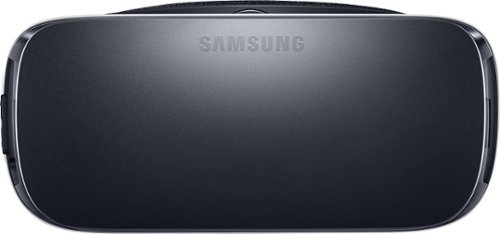
Samsung Gear VR for Select Samsung Cell Phones: Mobile virtual reality is finally here. Watch movies in your own private cinema, be at the center of your favorite games, and socialize with friends in a virtual world all your own. The lightweight design and intuitive touchpad drop you right in the action and allow for hours of immersive entertainment.
Overall 1 out of 5
1 out of 5Very unhappy about not getting the GearVR programs
By Sunshower
I tried many different ways to find out how to download the Gear VR programs by going to Samsung and Oculus online. All unsuccessful!!

DavidJr
Roanoke, VA
June 3, 2016
Once you connect the Gear VR to the phone it starts a download for the software. There appears to be no other way to initiate the install. Once the Oculus software is installed, games and applications can be purchased through the application or from inside the store while wearing the device.
0points
0of 0voted this comment as helpful.
Samsung Gear VR for Select Samsung Cell Phones: Mobile virtual reality is finally here. Watch movies in your own private cinema, be at the center of your favorite games, and socialize with friends in a virtual world all your own. The lightweight design and intuitive touchpad drop you right in the action and allow for hours of immersive entertainment.
Overall1 out of 5
1 out of 5Need certain phones to use this.
By Donna
Wasn't told at time of purchase that certain phones were required to use this device. After purchase was when this was discovered. During this time we purchased a new home and was moving. After the move, tried to return the item because I didn't want to purchase a new phone. The only way the store would accept this return was to give me a gift card. I didn't want a gift card that I would most likely not use. Not happy with this policy at all. Also have made posts to FB in regards to your policy. I will not EVER enter your store again or make another purchase from you online. This is NOT how you treat a customer and expect more business from them.
DavidJr
Roanoke, VA
It is labeled on the box and the site details
June 3, 2016
It says on the front and back of the box, "Compatible with Note5/S6 edge+/S6/S6 edge" and anywhere you look online it says it as well.
+2points
2of 2voted this comment as helpful.
Samsung Gear VR for Select Samsung Cell Phones: Mobile virtual reality is finally here. Watch movies in your own private cinema, be at the center of your favorite games, and socialize with friends in a virtual world all your own. The lightweight design and intuitive touchpad drop you right in the action and allow for hours of immersive entertainment.
Overall 2 out of 5
2 out of 5I have problems getting my phone to sync with this
By Drestyle
When I put my phone in the unit it doesn't seem it. I keep having to pull it out and try again.
DavidJr
Roanoke, VA
June 3, 2016
What phone are you using and is it up to date? The Samsung Gear VR is only compatible with Galaxy S7, Galaxy S7 edge, Galaxy Note5, Galaxy S6 edge+, Galaxy S6, Galaxy S6 edge and a software update from your carrier is required for S6 edge+ and Note 5.
0points
0of 0voted this comment as helpful.
DavidJr's Questions
DavidJr has not submitted any questions.
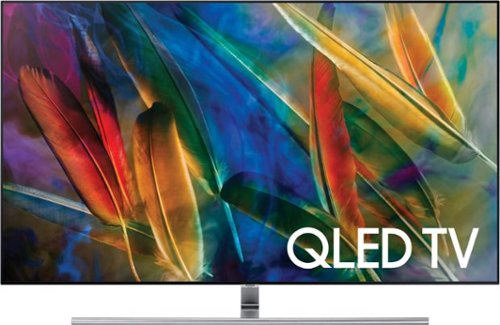
Upgrade your entertainment setup with this stunning 55-inch Samsung QLED smart TV. Enjoy enhanced color and 2160p-resolution playback thanks to the television~s 4K UHD display, which adds realism and vibrance to movies. Stream content wirelessly on demand and connect additional home theater components via the Samsung QLED smart TV~s four HDMI inputs.
Whats the input lag on these new Qleds? are they good for gaming on like a ps4 pro?
A professional ratings site puts the input lag around 24ms in gaming mode, 79ms out of gaming mode. Gaming mode turns of several processing features but playing games in 4K HDR looks great and responsive.
9 years, 4 months ago
by
DavidJr
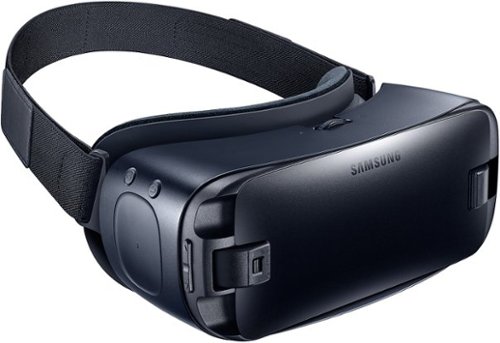
Immerse yourself in virtual reality fun with your Galaxy device and these Samsung Gear VR goggles. Whether you want to experience movies on the big screen or enter your favorite gaming world, simply snap in a smartphone to make it possible. These Samsung Gear VR goggles are also lightweight and padded for comfort.
How much gb does it use with the note 5 and how much ectra does it cost to use ?
The initial install will take up about 30MB, however each application and game varies in size. Anywhere from a few MB to several GB. On average the majority of involved games take up about 400-600 MB each.
9 years, 8 months ago
by
DavidJr
Immerse yourself in virtual reality fun with your Galaxy device and these Samsung Gear VR goggles. Whether you want to experience movies on the big screen or enter your favorite gaming world, simply snap in a smartphone to make it possible. These Samsung Gear VR goggles are also lightweight and padded for comfort.
samsung gear vr blue black sm-r323nbkaxar will this work with Iphone
No, Galaxy S7, Galaxy S7 edge, Galaxy Note5, Galaxy S6, Galaxy S6 edge, or Galaxy S6 edge+ only.
9 years, 8 months ago
by
DavidJr
Immerse yourself in virtual reality fun with your Galaxy device and these Samsung Gear VR goggles. Whether you want to experience movies on the big screen or enter your favorite gaming world, simply snap in a smartphone to make it possible. These Samsung Gear VR goggles are also lightweight and padded for comfort.
Will this work with a Samsung Galaxy S5. SMG900V?
No, Galaxy S7, Galaxy S7 edge, Galaxy Note5, Galaxy S6, Galaxy S6 edge, or Galaxy S6 edge+ only.
9 years, 8 months ago
by
DavidJr
Immerse yourself in virtual reality fun with your Galaxy device and these Samsung Gear VR goggles. Whether you want to experience movies on the big screen or enter your favorite gaming world, simply snap in a smartphone to make it possible. These Samsung Gear VR goggles are also lightweight and padded for comfort.
If I buy this for my grandson, what else do I need to buy.
You have to have a Galaxy S7, Galaxy S7 edge, Galaxy Note5, Galaxy S6, Galaxy S6 edge, or Galaxy S6 edge+ phone. Other than that, nothing is required to play the majority of apps and games. However, some games will require a Bluetooth controller in order to play.
9 years, 8 months ago
by
DavidJr
Immerse yourself in virtual reality fun with your Galaxy device and these Samsung Gear VR goggles. Whether you want to experience movies on the big screen or enter your favorite gaming world, simply snap in a smartphone to make it possible. These Samsung Gear VR goggles are also lightweight and padded for comfort.
Will this work on a Samsung Galaxy S5, thank you 4 ur time
No, Galaxy S7, Galaxy S7 edge, Galaxy Note5, Galaxy S6, Galaxy S6 edge, Galaxy S6 edge+ only.
9 years, 8 months ago
by
DavidJr
Immerse yourself in virtual reality fun with your Galaxy device and these Samsung Gear VR goggles. Whether you want to experience movies on the big screen or enter your favorite gaming world, simply snap in a smartphone to make it possible. These Samsung Gear VR goggles are also lightweight and padded for comfort.
How do you play the games if your phone is connected to the headset? Would I need to buy a Bluetooth controller? Are there controller buttons on the headset?
There is a direction pad on the right side that provides function for the majority of apps and games. touch and direction. However, some games require a Bluetooth controller for full operation and usually state so in the description.
9 years, 8 months ago
by
DavidJr
Immerse yourself in virtual reality fun with your Galaxy device and these Samsung Gear VR goggles. Whether you want to experience movies on the big screen or enter your favorite gaming world, simply snap in a smartphone to make it possible. These Samsung Gear VR goggles are also lightweight and padded for comfort.
Bought this for my friend but he has a Samsung Galaxy S 5 active.... does it work with it?
No, only Galaxy S7, Galaxy S7 edge, Galaxy Note5, Galaxy S6, Galaxy S6 edge, Galaxy S6 edge+.
9 years, 8 months ago
by
DavidJr
Immerse yourself in virtual reality fun with your Galaxy device and these Samsung Gear VR goggles. Whether you want to experience movies on the big screen or enter your favorite gaming world, simply snap in a smartphone to make it possible. These Samsung Gear VR goggles are also lightweight and padded for comfort.
Do you need to purchase any accessories, batteries, etc; before the SamsungGear VR (2016) Blue BLK will work?
No, there are no batteries in the system as it uses your Galaxy S7, Galaxy S7 edge, Galaxy Note5, Galaxy S6, Galaxy S6 edge, or Galaxy S6 edge+ phone directly. However, some games may require a Bluetooth controller to function properly.
9 years, 8 months ago
by
DavidJr
Immerse yourself in virtual reality fun with your Galaxy device and these Samsung Gear VR goggles. Whether you want to experience movies on the big screen or enter your favorite gaming world, simply snap in a smartphone to make it possible. These Samsung Gear VR goggles are also lightweight and padded for comfort.
Will the Samsung Gear Vr work with the Galaxy S7
Yes, Galaxy S7, Galaxy S7 edge, Galaxy Note5, Galaxy S6, Galaxy S6 edge, Galaxy S6 edge+ are supported.
9 years, 8 months ago
by
DavidJr