


ferrari's stats
- Review count169
- Helpfulness votes444
- First reviewOctober 18, 2012
- Last reviewAugust 3, 2026
- Featured reviews0
- Average rating4.7
Reviews comments
- Review comment count0
- Helpfulness votes0
- First review commentNone
- Last review commentNone
- Featured review comments0
Questions
- Question count0
- Helpfulness votes0
- First questionNone
- Last questionNone
- Featured questions0
- Answer count13
- Helpfulness votes16
- First answerAugust 26, 2016
- Last answerSeptember 13, 2020
- Featured answers0
- Best answers2

Outdoor Cam Plus deliver a wide field of view in Retinal 2K video. 1 Mount it wherever. Power it however. And get full-color clarity across your home or business; even in low light.
Customer Rating

5
Great upgrade to the Ring family
on March 30, 2025
Posted by: ferrari
I've had the Cam Plus installed for 5 days now, and doorbells along with a base station around the home, so have had the opportunity to compare it side to side with Ring's latest and greatest.
The quality of the camera is the best I've seen so far. While just about any cam can focus on objects half a dozen feet or so in front of it, the ring has excellent clarity and field of view both near and far. In particular I noticed how it reacts at motion. I also have dash cams in my vehicles; in both my home and my cars, when viewing a clip, when you freeze frame a shot you lose clarity. I'm including a shot below of an Amazon delivery driver tossing my package over my front gate. I was able to freeze the package in midair, and still be able to get a good image of the package. In another long shot of my front porch, the detail is clear both at the front and back of the porch. They really packed some performance in this camera.
Setup was 1-2-3 quick. Snap a photo of the QR or bar code on the back of the camera, and you're in the app and connected to the web. I currently have my router in mixed mode, I've had devices that barked at the, and only wanted to connect to a dedicated 2.4Ghz line, but had no problem with the Ring.
The app has a plethora of choices and settings as to how you want to interact with the device, and what you want to capture, be it all motion, a person, a pet; a package, and what your level of interaction is be it a text notification, image, or clip.
The cam plus is mountable in a variety of configurations, there are mounting posts both on the bottom and back sides. Combined with a swivel and hinge mount, it doesn't matter if the location you want it is vertical or horizontal. If I had to nitpick the mount, it's pretty difficult to unsnap the folding portion from the base, I was quite concerned it would snap off in my hands, but it held.
As I said, I currently have another security system installed, for the moment I'll be using the Ring as a mobile unit for multiple purposes. I've been placing it in a far corner of my yard that's out of my view, so I can see when the dogs are digging up my plants. I've also used it as a temporary baby cam when the grandkids are over. Given my experience so far, I could see myself migrating my total home security over to a Ring system. It works - well!
The quality of the camera is the best I've seen so far. While just about any cam can focus on objects half a dozen feet or so in front of it, the ring has excellent clarity and field of view both near and far. In particular I noticed how it reacts at motion. I also have dash cams in my vehicles; in both my home and my cars, when viewing a clip, when you freeze frame a shot you lose clarity. I'm including a shot below of an Amazon delivery driver tossing my package over my front gate. I was able to freeze the package in midair, and still be able to get a good image of the package. In another long shot of my front porch, the detail is clear both at the front and back of the porch. They really packed some performance in this camera.
Setup was 1-2-3 quick. Snap a photo of the QR or bar code on the back of the camera, and you're in the app and connected to the web. I currently have my router in mixed mode, I've had devices that barked at the, and only wanted to connect to a dedicated 2.4Ghz line, but had no problem with the Ring.
The app has a plethora of choices and settings as to how you want to interact with the device, and what you want to capture, be it all motion, a person, a pet; a package, and what your level of interaction is be it a text notification, image, or clip.
The cam plus is mountable in a variety of configurations, there are mounting posts both on the bottom and back sides. Combined with a swivel and hinge mount, it doesn't matter if the location you want it is vertical or horizontal. If I had to nitpick the mount, it's pretty difficult to unsnap the folding portion from the base, I was quite concerned it would snap off in my hands, but it held.
As I said, I currently have another security system installed, for the moment I'll be using the Ring as a mobile unit for multiple purposes. I've been placing it in a far corner of my yard that's out of my view, so I can see when the dogs are digging up my plants. I've also used it as a temporary baby cam when the grandkids are over. Given my experience so far, I could see myself migrating my total home security over to a Ring system. It works - well!
I would recommend this to a friend!






Share this review:


0points
0of 0voted this as helpful.

Keep your smartphone fully charged with the Insignia 7' USB-C to Right-Angle USB-C Braided Charging Cable. Featuring a unique 90~ right-angle connector, the cable will fit your workspace setup while preventing unnecessary cable strain. The angled connector is also ideal for using your smartphone or tablet in landscape mode while it~s charging. The 7 ft. black and dark gray braided cable provides enough length to reach from the wall outlet to the couch.
Customer Rating
5
Simple solution to a common problem
on February 6, 2025
Posted by: ferrari
I don't know how many times I've come across an issue that this product solves. Dozens of times, both inside and outside the home. Electrical plugs that come straight out, are unbendable, forcing you to make cutouts. shave adapters with a razor, or other potentially unsafe solutions to accommodate a plug that doesn't fit. Either that, or you've used a cable that's just too thick to route around your devices, or worst, so thin that you know it's not going to survive even casual use. Such was the issue I had with several Iphone charging cables that came apart or just stopped working.
This Insignia cable seems just right to purpose. The problem I'm solving with it is simple - the charging cable for my laptop would come out the side of the unit, and since it didn't bend easily, it would reach out 3-4 inches before it would make the bend to go back behind my desk. The Insignia extends out half the amount the previous charging cable did, making for a much neater and simpler solution.
The cable itself is very supple and easy to route whichever direction you need to go with it. The braiding on it is tight, the appearance is somewhat more tech oriented than a simple smooth plastic. I also appreciate the 7 foot length, which gives a little more leeway in the event you need to route it under a desk to a wall outlet. There is a velcro strap attached to neatly wind up any excess cord.
Very happy with this Insignia product, the pricing compared to other major brands is excellent, I'll certainly be looking towards them for future cable purchases.
This Insignia cable seems just right to purpose. The problem I'm solving with it is simple - the charging cable for my laptop would come out the side of the unit, and since it didn't bend easily, it would reach out 3-4 inches before it would make the bend to go back behind my desk. The Insignia extends out half the amount the previous charging cable did, making for a much neater and simpler solution.
The cable itself is very supple and easy to route whichever direction you need to go with it. The braiding on it is tight, the appearance is somewhat more tech oriented than a simple smooth plastic. I also appreciate the 7 foot length, which gives a little more leeway in the event you need to route it under a desk to a wall outlet. There is a velcro strap attached to neatly wind up any excess cord.
Very happy with this Insignia product, the pricing compared to other major brands is excellent, I'll certainly be looking towards them for future cable purchases.
I would recommend this to a friend!

Share this review:


0points
0of 0voted this as helpful.
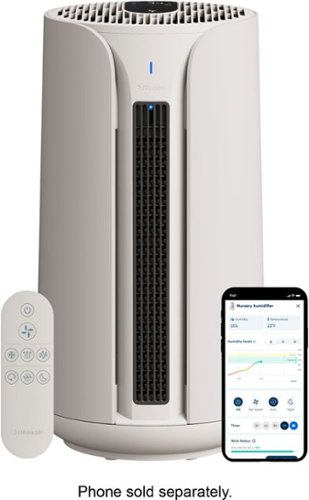
Blueair - ComfortPure Most Powerful 3-in-1 HEPASilent T10i Air Purifier: Heat + Cool + Purify - Gray
Blueair's ComfortPure 3-in-1 is the most powerful* triple-function air purifier designed to look good and perform to your preferred comfort year round. The TripleFlow Hot&Cool Technology features three unique outlets, which are designed to always deliver purified air through all three boosted modes of heating, cooling, and purifying. Independently evaluated for safety standards and third-party tested for performance as part of the AHAM Verifide Program for air cleaners, the fast purification takes only 12.5 minutes to clear the air, removing 99.97%** of all airborne pollutants down to 0.1 microns. Easy control with direct User Interface, app or through the Blueair app; 350 degree oscillation, Night and Eco mode for ultimate personalization and comfort. *Blueair 3-in-1 T10i in Boosted purification mode tested on CADR (AHAM AC-1) vs Dyson & Shark 3-in-1 air purifiers at max fan speed **Tested on PM2.5 up to 90 minutes. Tested on bacteria (S. aureus, K. pneumoniae, P. aeruginosa), virus (MS2) and mold allergen (A.niger) with a minimum reduction rate of 99.8% in 60 min. Blueair does not claim to prevent transmission of airborne illnesses.
Customer Rating
5
Clean air, heat, style, and silence
on December 4, 2024
Posted by: ferrari
As of the moment, I have a number of full size indoor air filters in the home, practically one for every room. My current inventory includes an Idylis, Samsung Bespoke, Dyson, a couple of smaller Honeywells, and now, the Blueair. That is in addition to using a Level 10 air filter for my central air unit. Needless to say, I appreciate clean air, so adding another high level machine like the Blueair ComfortPure makes for a welcome addition.
Setup for the unit was pretty straightforward & hassle free. The unit comes with the filters packed inside the machine, you need to open it up & remove the plastic wrapping. Download the Blueair app, which then searches for the unit via Bluetooth. You then log it into your wifi network.
The first thing I noticed is the filters are very similar in shape & appearance to the Dyson HP10, which was reassuring as the Dyson has been servicing me well for the past 2 years. Filters installed, I turned it on, checking the various speeds & functions including heating, cooling, rotation and night mode. The unit offers a Boosted Purification Mode which delivers the air through the upward air vents. After completing my check of the various modes and options, I set it to Auto mode with 180 degree oscillation which is where it's been for the past week.
The one thing I observed that impressed me was it was virtually silent, even with oscillation on. Of course, if it picks up bad air, smoke, or cooking odors, it will pick up in speed to clear the problem, then return to silent operation. There are colored indicator lights in the front panel that indicate the current air quality.
Note that despite the "cooling" mode; the unit has no air conditioning capability on its own. It simply provides movement of air. I will verify that the heating mode does work, enough so to provide a boost to a room that needs a little help. Please be advised that you should never plug this unit into a power strip, especially if you're using it in heat mode. The unit does provide a "tip over" kill function for safety.
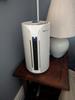
I've included some screen shots below to show the various functions displayed in the app, including a time graph of how it's operated over the past day.
Overall, I'm very happy with the operation of the Blue air, matter of fact, so impressed that after watching it work for the past week, I bought one of their "Dust Magnet" products.
Setup for the unit was pretty straightforward & hassle free. The unit comes with the filters packed inside the machine, you need to open it up & remove the plastic wrapping. Download the Blueair app, which then searches for the unit via Bluetooth. You then log it into your wifi network.
The first thing I noticed is the filters are very similar in shape & appearance to the Dyson HP10, which was reassuring as the Dyson has been servicing me well for the past 2 years. Filters installed, I turned it on, checking the various speeds & functions including heating, cooling, rotation and night mode. The unit offers a Boosted Purification Mode which delivers the air through the upward air vents. After completing my check of the various modes and options, I set it to Auto mode with 180 degree oscillation which is where it's been for the past week.
The one thing I observed that impressed me was it was virtually silent, even with oscillation on. Of course, if it picks up bad air, smoke, or cooking odors, it will pick up in speed to clear the problem, then return to silent operation. There are colored indicator lights in the front panel that indicate the current air quality.
Note that despite the "cooling" mode; the unit has no air conditioning capability on its own. It simply provides movement of air. I will verify that the heating mode does work, enough so to provide a boost to a room that needs a little help. Please be advised that you should never plug this unit into a power strip, especially if you're using it in heat mode. The unit does provide a "tip over" kill function for safety.
I've included some screen shots below to show the various functions displayed in the app, including a time graph of how it's operated over the past day.
Overall, I'm very happy with the operation of the Blue air, matter of fact, so impressed that after watching it work for the past week, I bought one of their "Dust Magnet" products.
I would recommend this to a friend!



Share this review:


0points
0of 0voted this as helpful.
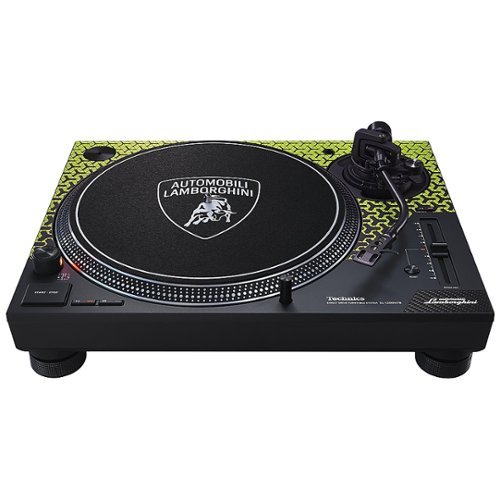
As the go-to choice of DJs the world over, the SL-1200 Series offers the SL-1200M7B, a collaboration between Technics and Lamborghini that brings together the brands~ concepts and sound making initiatives. Includes a special-edition vinyl featuring sounds of five flagship V12 models, a custom-designed slipmat the Lamborghini logo, and Lamborghini and Technics stickers, plus the highest possible sound quality and wide-ranging DJ functions powered by a coreless Direct Drive motor.
Customer Rating
5
The gold standard of turntables - dressed up
on December 4, 2024
Posted by: ferrari
I'm a long time vinyl collector and certified audiophile. This will be my fourth iteration of the SL 1200 series turntables. Two I still own, in separate rooms; the other two have been handed down to friends. The oldest of these is now over 40 years old and still performs solidly with no repairs other than phone cartridge changes.
This is a solidly built table which over the years has earned the moniker "the DJ's table of choice;" and indeed, if you're at an event with a DJ, you're very likely to see them using an SL-1200. I always kind of resented this model being typecast in that fashion, since the SL series build quality and performance rivals that of many audiophile turntables, many of which are in a price range that doubles, trebles, or even more surpasses the cost of the 1200. If I were a novice in the vinyl market looking for a turntable, I might see the Technics identified as "for the DJ", and immediately move on to a product for home enthusiast use.
For example, I've previously owned a VPI aries turntable, highly regarded and also far more expensive than the SL. While it was an eye catcher which earned me many compliments; it also required far more attention to operate. Initial setup was difficult trying to mount, balance, and align the cartridge, being a belt drive there was slippage & wear, not to mention that it requires an expensive power supply to properly regulate the speed. The Technics simplifies much of this using a plugin headshell making it far easier to install a new cartridge, or for that matter, swap cartridges on the fly - not possible on many high end turntables. The onboard stroboscope ensures at a glance that you're operating at the correct speed. I could write a book explaining the many features and options of the SL (and there is much out there documenting this in minute detail.) Suffice it to say that if you want solid performance and want to spend more time listening to your music instead of adjusting your turntable, the Technics has all you want in spades.
As for the Lamborghini Edition, there is no difference in functionality between this and a standard SL-1200. It comes with a Lamborghini logo slipmat and a 33 vinyl record of "the sound of Lamborghini." Whether you want to spend more for the window dressing, that's up to you - it's not going to change the sound or performance of your turntable.
There is one major difference to this model, being that the dust cover is completely detached on the Lamborghini; all previous models I've seen use a flip up. The odd thing is that there are still slots on the dust cover itself to accept the hinges as if it were a flip up. I was searching the box for the hinges, till I noticed there are no slots to accept the hinges on the turntable plinth itself, so you couldn't make it flip if you wanted to. Seems to me they could've supplied a dust cover without the slots in the back, but this is a minor issue to be sure. However, if you do want a dust cover that flips up, be sure to go for one of their other models.
I'm very pleased with the performance of this new SL-1200, and given my prior experience, am sure it will be with me for a long time.
This is a solidly built table which over the years has earned the moniker "the DJ's table of choice;" and indeed, if you're at an event with a DJ, you're very likely to see them using an SL-1200. I always kind of resented this model being typecast in that fashion, since the SL series build quality and performance rivals that of many audiophile turntables, many of which are in a price range that doubles, trebles, or even more surpasses the cost of the 1200. If I were a novice in the vinyl market looking for a turntable, I might see the Technics identified as "for the DJ", and immediately move on to a product for home enthusiast use.
For example, I've previously owned a VPI aries turntable, highly regarded and also far more expensive than the SL. While it was an eye catcher which earned me many compliments; it also required far more attention to operate. Initial setup was difficult trying to mount, balance, and align the cartridge, being a belt drive there was slippage & wear, not to mention that it requires an expensive power supply to properly regulate the speed. The Technics simplifies much of this using a plugin headshell making it far easier to install a new cartridge, or for that matter, swap cartridges on the fly - not possible on many high end turntables. The onboard stroboscope ensures at a glance that you're operating at the correct speed. I could write a book explaining the many features and options of the SL (and there is much out there documenting this in minute detail.) Suffice it to say that if you want solid performance and want to spend more time listening to your music instead of adjusting your turntable, the Technics has all you want in spades.
As for the Lamborghini Edition, there is no difference in functionality between this and a standard SL-1200. It comes with a Lamborghini logo slipmat and a 33 vinyl record of "the sound of Lamborghini." Whether you want to spend more for the window dressing, that's up to you - it's not going to change the sound or performance of your turntable.
There is one major difference to this model, being that the dust cover is completely detached on the Lamborghini; all previous models I've seen use a flip up. The odd thing is that there are still slots on the dust cover itself to accept the hinges as if it were a flip up. I was searching the box for the hinges, till I noticed there are no slots to accept the hinges on the turntable plinth itself, so you couldn't make it flip if you wanted to. Seems to me they could've supplied a dust cover without the slots in the back, but this is a minor issue to be sure. However, if you do want a dust cover that flips up, be sure to go for one of their other models.
I'm very pleased with the performance of this new SL-1200, and given my prior experience, am sure it will be with me for a long time.
I would recommend this to a friend!






Share this review:


0points
0of 0voted this as helpful.
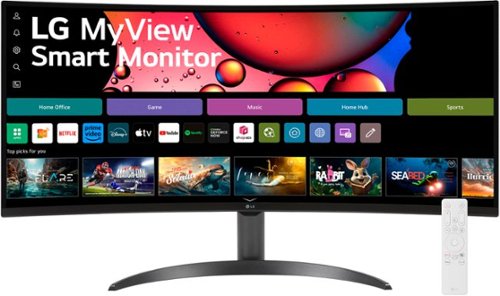
One screen. Endless possibilities. The 21:9 ultra-wide 34~ curved Smart monitor offers stunning widescreen visuals and a sleek design that's perfect for work, play, cinematic viewing, and everything in between. Experience vivid color with up to sRGB 99% coverage, HDR10 support and impeccable clarity with the 21:9 WQHD (3440x1440) screen, bringing every detail to life. Thanks to LG~s streaming platform webOS23~, find your favorites fast with built-in access to Netflix, Prime Video, the Apple TV app, Disney+, HBO Max and instant access to over 300+ free LG Channels with everything from comedy to movies to sports. Apple AirPlay 2 & HomeKit compatibility~ allow you to wirelessly control your monitor plus cast and mirror content from iOS or MacOS devices, no Apple TV necessary. Gaming on the monitor~s wide screen with the 100Hz refresh rate assures ultra-smooth action.
Customer Rating
5
It's not just a monitor
on November 10, 2024
Posted by: ferrari
Whether working, browsing, or gaming, I continually find myself opening tab after tab, and running out of screen space to place them. That's why this LG appealed to me. Setup for the unit went quickly. The mounting flange of the stand cleanly snaps into the back of the screen, and the base of the unit has a captive screw to attach it. To power the unit there's a transformer brick, and unfortunately, the plug is built into it. I wish these things would be abolished, they either cover an entire wall outlet, or take up half of a power strip. Whether it's your TV/Sound system or computer workspace, you end up needing two or three power strips to accomodate all the plugins.
If you plan to use the WebOS services the LG provides, you'll need to download the LG app - this is all done via the setup screens, QR codes are provided to simplify the operation. A remote is provided with quick access buttons for Amazon, Netflix, & Disney+; whatever services you plan to use can be logged into. I thought the whole process was straightforward & intuitive as opposed to what I've experienced with other Smart TV's, tablets, etc.
Picture quality is excellent, and has a multitude of adjustments available; similar to your Smart TV there are tone adjustments for viewing movies, gaming, as well as blue light limitations. Speaker quality is good, it's not soundbar quality, but not tinny either.
I initially set this up outside of the workspace I intended it for, and that left me in a bit of a quandry. Not a bad one, mind you. The problem is, this monitor does too many things! I set it up while watching Sunday football on my big screen tv, and I said, gee, wouldn't this help me make a sports bar out of my media room? Especially given the state of streaming nowadays. You can't switch between watching programs without logging in & out of services. What I figured is I can watch network tv and Thursday Night Football on Amazon at the same time. So, for the rest of the football season at least, I think I'll be leaving this monitor where it is. That's what I told my wife, anyway!
This LG puts a lot of performance & capabilities at a more than reasonable price level, I would recommend it to those looking for more screen real estate, and have the bonus of using it as a supersize tablet/laptop/tv.
If you plan to use the WebOS services the LG provides, you'll need to download the LG app - this is all done via the setup screens, QR codes are provided to simplify the operation. A remote is provided with quick access buttons for Amazon, Netflix, & Disney+; whatever services you plan to use can be logged into. I thought the whole process was straightforward & intuitive as opposed to what I've experienced with other Smart TV's, tablets, etc.
Picture quality is excellent, and has a multitude of adjustments available; similar to your Smart TV there are tone adjustments for viewing movies, gaming, as well as blue light limitations. Speaker quality is good, it's not soundbar quality, but not tinny either.
I initially set this up outside of the workspace I intended it for, and that left me in a bit of a quandry. Not a bad one, mind you. The problem is, this monitor does too many things! I set it up while watching Sunday football on my big screen tv, and I said, gee, wouldn't this help me make a sports bar out of my media room? Especially given the state of streaming nowadays. You can't switch between watching programs without logging in & out of services. What I figured is I can watch network tv and Thursday Night Football on Amazon at the same time. So, for the rest of the football season at least, I think I'll be leaving this monitor where it is. That's what I told my wife, anyway!
This LG puts a lot of performance & capabilities at a more than reasonable price level, I would recommend it to those looking for more screen real estate, and have the bonus of using it as a supersize tablet/laptop/tv.
I would recommend this to a friend!



Share this review:


0points
1of 2voted this as helpful.
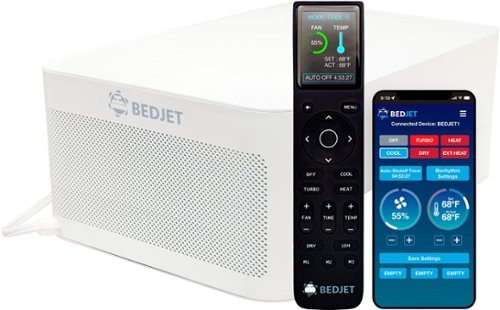
The BedJet 3 is our newest and most luxurious BedJet ever. The BedJet 3 uses air-based convective cooling which is extremely efficient for removing moisture and sweat from the bed, so you sleep cool, comfortable, and dry. Looking for warmth instead? In seconds, BedJet's ultra-rapid warming mode turns your sheets toasty warm in just 60 seconds ~ like they just came out of the dryer! Just want to stay sweat-free? BedJet's unique Dry mode is proven to keep you sleeping drier and fresher all night.
Customer Rating
5
The latest thing I'll never be without
on October 31, 2024
Posted by: ferrari
To be honest, I was quite skeptical about receiving this product. I saw a big box, a big hose, and I'm thinking this is going to be clumsy, noisy, and work no better than a box fan. Boy, was I wrong. Before I even talk about it I'm going to say I'll never be living without one!
I was also concerned that I'd have a problem fitting it to my mattress as I have a King Pillow Top that's a foot thick. That concern was alleviated once I started taking the pieces out of the box. To set up, you take the box with the mechanicals; clear out the shoeboxes from under your bed, attach the air hose, and slide the unit under the bed frame. There's a plastic frame that holds the hose & the jet nozzle; there's a tab on it that slides under your mattress to hold the assembly in place. There are also extension pieces which would accommodate mattress sizes even thicker than a foot (as was mine.)
To be clear, the nozzle goes between the fitted sheet on your mattress and the top sheet.
Next, take the remote, establish a bluetooth connection to the main unit, hook into your wife, and you're ready to go.
While the Bedjet provides cooling, the box itself does not have any air conditioning ability. The air it provides in cooling mode will be the air temperature of the room; however, since it's drawing from the floor that should theoretically be the coolest in the room.
The remote is very well thought out. There are options for heat, cool, dry, or there are up to 3 presets you can program for either the heat or cool function, the airspeed, and how long you want the unit to run (auto shutoff.) I initially started the unit at 50% air speed, and that was able to lift both the top sheet and a fairly heavy comforter in a couple of seconds. Personally, I found a setting of 25% worked well for me, providing a noticeable stream of air as well as having a barely noticeable sound level. Kicking it up to 50% the sound becomes about the volume of a window fan or white noise machine. At 100%, well, that's a mini cyclone in your bed - this unit is powerful. But, as I said, I'm in a king size bed, and setting it at @ 25% was all I needed. That provides a sensation of air moving, but more importantly, it's lifting the sheet to it's not touching your leg. Slide your legs to the left or right, and you'll never run out of a "cool spot."
I'm talking about how much I enjoy the cooling function, if you speak to my wife, she'll be raving about the gentle heat it provides. Again, with the remote, you can set the level of heat you would like in 1 degree increments. And therein lies the rub - if you're like my wife & I, we have diametrically opposed conditions as to how we like to sleep - I like cool, she prefers warmth. I generally will sleep with the top sheet off while she is covered. Bedjet, however, thought of this & optionally available is a dual zone sheet which will provide both heat & cool to separate sides of the bed. (a second unit would be required to do this.) Or, if you're like me, with a another available bedroom, take the second unit and place it there - which is what I did. While I received this unit for promotional consideration, after sleeping with it for 3 days, I decided it was something I didn't want to be without, so I bought another one!
I did have some minor issues - the remote is beautifully designed, all the keys light up as soon as you touch it (i wish all tv remotes were like that), it's all in text, not some undecipherable symbols, and there's a battery indicator. The issue I had was that it sometimes disconnects, and I have to rescan to connect it back to the unit. The other thing was on initial setup, it does not provide a list from which to select your wifi's SSID, you have to do that manually.
So far, I've had a week's worth of great sleep with the Bedjet, good enough to know there'll be one under my bed for the foreseeable future.
I was also concerned that I'd have a problem fitting it to my mattress as I have a King Pillow Top that's a foot thick. That concern was alleviated once I started taking the pieces out of the box. To set up, you take the box with the mechanicals; clear out the shoeboxes from under your bed, attach the air hose, and slide the unit under the bed frame. There's a plastic frame that holds the hose & the jet nozzle; there's a tab on it that slides under your mattress to hold the assembly in place. There are also extension pieces which would accommodate mattress sizes even thicker than a foot (as was mine.)
To be clear, the nozzle goes between the fitted sheet on your mattress and the top sheet.
Next, take the remote, establish a bluetooth connection to the main unit, hook into your wife, and you're ready to go.
While the Bedjet provides cooling, the box itself does not have any air conditioning ability. The air it provides in cooling mode will be the air temperature of the room; however, since it's drawing from the floor that should theoretically be the coolest in the room.
The remote is very well thought out. There are options for heat, cool, dry, or there are up to 3 presets you can program for either the heat or cool function, the airspeed, and how long you want the unit to run (auto shutoff.) I initially started the unit at 50% air speed, and that was able to lift both the top sheet and a fairly heavy comforter in a couple of seconds. Personally, I found a setting of 25% worked well for me, providing a noticeable stream of air as well as having a barely noticeable sound level. Kicking it up to 50% the sound becomes about the volume of a window fan or white noise machine. At 100%, well, that's a mini cyclone in your bed - this unit is powerful. But, as I said, I'm in a king size bed, and setting it at @ 25% was all I needed. That provides a sensation of air moving, but more importantly, it's lifting the sheet to it's not touching your leg. Slide your legs to the left or right, and you'll never run out of a "cool spot."
I'm talking about how much I enjoy the cooling function, if you speak to my wife, she'll be raving about the gentle heat it provides. Again, with the remote, you can set the level of heat you would like in 1 degree increments. And therein lies the rub - if you're like my wife & I, we have diametrically opposed conditions as to how we like to sleep - I like cool, she prefers warmth. I generally will sleep with the top sheet off while she is covered. Bedjet, however, thought of this & optionally available is a dual zone sheet which will provide both heat & cool to separate sides of the bed. (a second unit would be required to do this.) Or, if you're like me, with a another available bedroom, take the second unit and place it there - which is what I did. While I received this unit for promotional consideration, after sleeping with it for 3 days, I decided it was something I didn't want to be without, so I bought another one!
I did have some minor issues - the remote is beautifully designed, all the keys light up as soon as you touch it (i wish all tv remotes were like that), it's all in text, not some undecipherable symbols, and there's a battery indicator. The issue I had was that it sometimes disconnects, and I have to rescan to connect it back to the unit. The other thing was on initial setup, it does not provide a list from which to select your wifi's SSID, you have to do that manually.
So far, I've had a week's worth of great sleep with the Bedjet, good enough to know there'll be one under my bed for the foreseeable future.
I would recommend this to a friend!






Share this review:


0points
0of 0voted this as helpful.

The Shark CarpetXpert HairPro with StainStriker, 2-in-1 upright deep carpet cleaner with built-in spot & stain remover provides unbeatable deep carpet cleaning* and unbeatable tough stain elimination~ for all homes. Shark~s deep-cleaning HairPro innovation is designed to pull up deeply embedded hair from carpet fibers with no clogs, no clumps, and no hair wrap. Instantly eliminates odors - even smoke and pet urine. Disclaimers: *Shark CarpetXpert models vs. consumer carpet cleaners based on ASTM F2828 using included cleaning solution as of May 15, 2024. ~Based on pet stains (TM116) and household stains (TM110) vs. extractor market, using included stain cleaner and best-performing accessory. .
Customer Rating
5
They thought of everything
on October 17, 2024
Posted by: ferrari
I've had dogs my entire life. Always long haired dogs. For the past 30 years I've had multiple dogs at the same time. So, I know about expensive "pet" vacuums. I've seen the wife drag in thousand dollar Miele units that in no time become hopelessly clogged. I got robots running around the house. I don't want to think about the time I've spent unwinding pet hair from the rollers with an Xacto knife. Sound familiar? If you're here reading this, probably so.
I recently lost two dogs after 12 years; the house quickly gets very lonely & empty, so the wife & I got 2 puppies, now aged 6 & 8 months. The training has not gone easy, and we've had multiple in house "accidents." Our battery of pet clean up tools was in need of some new technology. Enter the Shark CarpetXpert Hair Pro Pet with StainStriker. I'll give you the quick review - the management at Shark must've given this problem to a high level AI at IBM or Google with the command "design me the best ever pet clean up tool - on rugs!"
Out of the box, the CarpetXpert gives you the message it's ready for the job. It looks sleek, modern, and has a different appearance to what I was expecting. The add-on tools keep coming out of the box - 4 in total. Everything locks together solidly wih reassuring clicks - no wondering "did that go in all the way?" The machine is solidly built, and has the heft similar to what you would get from a commercial rental machine. Except - you look a little closer and see some differences - like extra solution compartments and controls.
If I were to go through all the functions this machine is capable of, this review would shortly become a novel. I would strongly advise going through the online videos - they're very well done, and not only will they get you up & running quickly, they will show you features that you didn't even think the machine would have - like flipping the contact surface of the hand brushes to better deal with varying problems.
My wife made quick note of the "Rinse & Go" feature. Had a messy cleanup? Disconnect the hose & cleanup tool, and plug it directly into the clean solution tank. Voila! - you're flushing the hose clean, and the dirt goes where it belongs - into the diry water tank. No more cleaning urine, barf, feces and emptying it into your sink/toilet bowl. Super feature.
What other machine on the market gives you a base for the machine to drip dry on after you use it? Or how about the two stage tool? If you're dealing with fecal matter/barf the tool has a bowl that will collect that so that it doesn't go through the main hose & into the tank. Like I said, AI had to design this machine.
If you're wanting to do an entire carpet, the machine will spray & brush as you go forward; vacuum as you go back. Amount of liquid dispensed is infinitely variable by setting or the actual speed of your stroke. The vacuum is powerful enough to leave your carpet slightly damp, capable of a full dry in a couple of hours depending on ventilation & ambient humidity.
I was really impressed with all the features Shark built into this unit, if you're in the market for a new machine, the CarpetXpert is hard to beat.
I recently lost two dogs after 12 years; the house quickly gets very lonely & empty, so the wife & I got 2 puppies, now aged 6 & 8 months. The training has not gone easy, and we've had multiple in house "accidents." Our battery of pet clean up tools was in need of some new technology. Enter the Shark CarpetXpert Hair Pro Pet with StainStriker. I'll give you the quick review - the management at Shark must've given this problem to a high level AI at IBM or Google with the command "design me the best ever pet clean up tool - on rugs!"
Out of the box, the CarpetXpert gives you the message it's ready for the job. It looks sleek, modern, and has a different appearance to what I was expecting. The add-on tools keep coming out of the box - 4 in total. Everything locks together solidly wih reassuring clicks - no wondering "did that go in all the way?" The machine is solidly built, and has the heft similar to what you would get from a commercial rental machine. Except - you look a little closer and see some differences - like extra solution compartments and controls.
If I were to go through all the functions this machine is capable of, this review would shortly become a novel. I would strongly advise going through the online videos - they're very well done, and not only will they get you up & running quickly, they will show you features that you didn't even think the machine would have - like flipping the contact surface of the hand brushes to better deal with varying problems.
My wife made quick note of the "Rinse & Go" feature. Had a messy cleanup? Disconnect the hose & cleanup tool, and plug it directly into the clean solution tank. Voila! - you're flushing the hose clean, and the dirt goes where it belongs - into the diry water tank. No more cleaning urine, barf, feces and emptying it into your sink/toilet bowl. Super feature.
What other machine on the market gives you a base for the machine to drip dry on after you use it? Or how about the two stage tool? If you're dealing with fecal matter/barf the tool has a bowl that will collect that so that it doesn't go through the main hose & into the tank. Like I said, AI had to design this machine.
If you're wanting to do an entire carpet, the machine will spray & brush as you go forward; vacuum as you go back. Amount of liquid dispensed is infinitely variable by setting or the actual speed of your stroke. The vacuum is powerful enough to leave your carpet slightly damp, capable of a full dry in a couple of hours depending on ventilation & ambient humidity.
I was really impressed with all the features Shark built into this unit, if you're in the market for a new machine, the CarpetXpert is hard to beat.
I would recommend this to a friend!





Share this review:


+1point
1of 1voted this as helpful.

Get the perfect cup of coffee faster than your mobile order, from the comfort of your home. The Philips 3300 Fully Automatic Espresso Machine with LatteGo is the easiest way to enjoy your favorite coffees, and with automatic bean-to-cup brewing, it's designed to deliver freshness in every brew. Enjoy 6 hot and iced drinks at the touch of a button, and customize the intensity, volume, and temperature so your drink is always just the way you like it. LatteGo automatically prepares silky smooth milk froth for cafe style drinks, and can be cleaned in as little as 10 seconds*. Whether you're in the mood for a classic espresso, regular black coffee, iced coffee, cappuccino, latte macchiato, or simply hot water for tea, this machine caters to all your beverage needs. Designed for quality and convenience, the 100% ceramic grinders provide long-lasting performance and unlock full coffee flavor. The modern touchscreen display makes selecting your drink a breeze. Upgrade your daily routine or weekend treat with the Philips 3300 LatteGo~effortless, customizable, and always delicious.
Customer Rating
5
A solid machine built to last
on September 18, 2024
Posted by: ferrari
How can I say the Philips 3300 is built to last? Well, I've been in the automatic coffee machine for quite some time now. My first machine was a Saeco, and that had the feature of a cup counter. Over the years I owned it, it racked up 10,000 cups! At that time I bought a new machine for myself for Christmas, and took the Saeco to work for my fellow employees to enjoy some afternoon espresso shots. The reason I mention this is that Saeco is now owned by Philips, and it seems they put the company's experience & knowledge to good use. I also own the prior model of the 3300 which has served me well for about 5 year now, with nothing more than the routine maintenance that's outlined in the manual. If you haven't owned a super automatic, I realize it can be a scary thing to lay out big bucks for an appliance that you fear will break down the day the warranty is up. In my experience, take care of the machine, it'll take care of you.
The first thing is that it comes with a water filter - plug it into the tank. Order a spare so you ready when it needs to be changed. No need to track it on a calendar, a light will come on the panel when it's time. For me, it's about every 3-4 months doing 4 to 6 cups a day.
The next important maintenance item is descaling. It comes as either a powder or liquid, it's basically a citric acid or vinegar variant. Fill the water tank, press a few buttons, the machine will draw the solution in a few ounces at a time and do a soak for a few minutes. The whole process takes about an hour. This takes care of machine's innards, preventing calcium buildup. Most people know about the process as it's pretty routine for all coffee machines. But this is not a $20 Mr. Coffee, so make sure you take care of it. Once again, a light will alert you when it's time to descale.
It's also good practice at this time to take care of the mechanical innards. The whole "brew group" as they call it (basically all the moving parts), slide out the side of the machine very smoothly. You'll see coffee grounds, a film of evaporated coffee on most parts, or any other dirt/debris that has accumulated. Clean it all out using a small brush (a child's toothbrush works well), run it under hot water, and snap it back in and you're ready to go. Oops, one more thing - you get a tube of food safe grease to lubricate the O-rings. I've done all these things regularly to my old Philips, and at 5 years, it's still going strong. I'll just pass it on to a family member to get them hooked on the benefits of a super automatic. If anything, after a few years, the grinder will wear down some. At that point you can adjust the grinder (there's a knob inside the coffee bin.) I always use the finest grind, so that's why I'll appreciate having a new machine.
There's very little that's changed on this model from the prior. Appearance wise, there are now colored icons on the panel to indicate the various drinks, which make the choices easier to see. The panel itself has been prettied up with a chrome look which was previously basic black. But in my opinion, the most important thing is the lid for the coffee bin. It now has a seal, which will help keep the beans in the hopper fresh. This has the added effect of quieting down the bean grinding.
I'm good every day with my morning coffee, perhaps an afternoon or evening espresso. But I love the look on my guest's faces when I set the Latte Go in motion. Pour some milk in the container, press the button, and you've got a 2 minute latte. One thing I'll say, they haven't improved the frother, it is pretty loud.
I've been very happy over the years with my Philips branded coffee machines, not one has ever broken down or required major service. Looking forward to many more years of service from my new 3300.
The first thing is that it comes with a water filter - plug it into the tank. Order a spare so you ready when it needs to be changed. No need to track it on a calendar, a light will come on the panel when it's time. For me, it's about every 3-4 months doing 4 to 6 cups a day.
The next important maintenance item is descaling. It comes as either a powder or liquid, it's basically a citric acid or vinegar variant. Fill the water tank, press a few buttons, the machine will draw the solution in a few ounces at a time and do a soak for a few minutes. The whole process takes about an hour. This takes care of machine's innards, preventing calcium buildup. Most people know about the process as it's pretty routine for all coffee machines. But this is not a $20 Mr. Coffee, so make sure you take care of it. Once again, a light will alert you when it's time to descale.
It's also good practice at this time to take care of the mechanical innards. The whole "brew group" as they call it (basically all the moving parts), slide out the side of the machine very smoothly. You'll see coffee grounds, a film of evaporated coffee on most parts, or any other dirt/debris that has accumulated. Clean it all out using a small brush (a child's toothbrush works well), run it under hot water, and snap it back in and you're ready to go. Oops, one more thing - you get a tube of food safe grease to lubricate the O-rings. I've done all these things regularly to my old Philips, and at 5 years, it's still going strong. I'll just pass it on to a family member to get them hooked on the benefits of a super automatic. If anything, after a few years, the grinder will wear down some. At that point you can adjust the grinder (there's a knob inside the coffee bin.) I always use the finest grind, so that's why I'll appreciate having a new machine.
There's very little that's changed on this model from the prior. Appearance wise, there are now colored icons on the panel to indicate the various drinks, which make the choices easier to see. The panel itself has been prettied up with a chrome look which was previously basic black. But in my opinion, the most important thing is the lid for the coffee bin. It now has a seal, which will help keep the beans in the hopper fresh. This has the added effect of quieting down the bean grinding.
I'm good every day with my morning coffee, perhaps an afternoon or evening espresso. But I love the look on my guest's faces when I set the Latte Go in motion. Pour some milk in the container, press the button, and you've got a 2 minute latte. One thing I'll say, they haven't improved the frother, it is pretty loud.
I've been very happy over the years with my Philips branded coffee machines, not one has ever broken down or required major service. Looking forward to many more years of service from my new 3300.
I would recommend this to a friend!


Share this review:


0points
0of 0voted this as helpful.
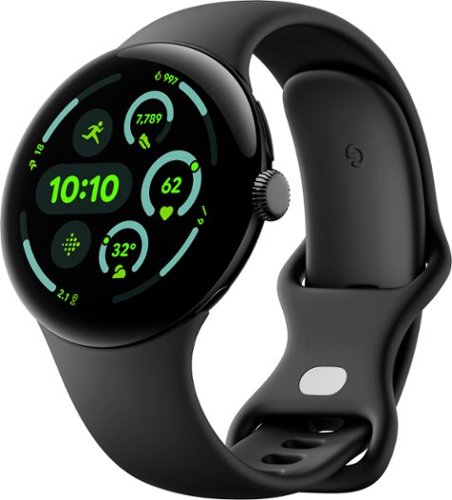
The Google Pixel Watch 3 is designed for performance.~ The cutting-edge Actua display is bigger, brighter, and ultra responsive.~ Beat your best times with advanced running features from Fitbit, then use all-new readiness and cardio load tracking to balance rest. And stay on top of your day with help from Google.
Customer Rating
5
Great companion to the Pixel 9
on September 16, 2024
Posted by: ferrari
With the side by side release of the Pixel 3 along with the Pixel 9, Google has made a strong bid to increase their market share in the highly competitive cell phone field. First and foremost, the new Actua display is stunning. The near bezel free design offers a generous screen, and it's crisp, clear, and more importantly, highly visible even in bright daylight.
The Pixel 3 is loaded with functionality; duplicating near all phone functions on your wrist. Make a call with a few touches, both the speaker & microphone quality are excellent. Photo functions can be controlled remotely with updated camera app (only available with Pixel Phone). Nest & Google Home control are also included.
The setup function was quick & easy. Press the crown for 5 seconds to turn on and fast pair initiates. Allow permissions on your phone and you're up & running. I initially thought I'd be overwhelmed with the functionality included in the P3, Google has done a great job designing the screen controls. Swiping up/down side to side brings you to clear menus. I found the navigation to be quite intuitive.
The obvious draw for many will be the included Fitbit subscription.Build a custom run, get real time guidance. see progress on a dashboard (including map), post run analysis, cardio load, and a plethora of auxiliary functions, all personally customized.
I found battery life to be quite good, for the first couple of days I used the "always on" screen mode; this can be modified with various battery save modes, including a wrist flick to turn on the screen. Battery charge time is 90 minutes from zero to full. I do use a charging stand for my phone, I would like to get one that includes a space for the watch as well. I see some on the market that claim they handle the P3, but given my experience with off brand charging equipment, I'd like to see Google offer an option other than the included magnetic USB C powered clip.
If you're a Pixel owner, the P3 is an outstanding companion for your phone. Day by day, as I become familiar with all the included functions, I find myself handling my phone a lot less when much of it has become available with a flick of my wrist.
The Pixel 3 is loaded with functionality; duplicating near all phone functions on your wrist. Make a call with a few touches, both the speaker & microphone quality are excellent. Photo functions can be controlled remotely with updated camera app (only available with Pixel Phone). Nest & Google Home control are also included.
The setup function was quick & easy. Press the crown for 5 seconds to turn on and fast pair initiates. Allow permissions on your phone and you're up & running. I initially thought I'd be overwhelmed with the functionality included in the P3, Google has done a great job designing the screen controls. Swiping up/down side to side brings you to clear menus. I found the navigation to be quite intuitive.
The obvious draw for many will be the included Fitbit subscription.Build a custom run, get real time guidance. see progress on a dashboard (including map), post run analysis, cardio load, and a plethora of auxiliary functions, all personally customized.
I found battery life to be quite good, for the first couple of days I used the "always on" screen mode; this can be modified with various battery save modes, including a wrist flick to turn on the screen. Battery charge time is 90 minutes from zero to full. I do use a charging stand for my phone, I would like to get one that includes a space for the watch as well. I see some on the market that claim they handle the P3, but given my experience with off brand charging equipment, I'd like to see Google offer an option other than the included magnetic USB C powered clip.
If you're a Pixel owner, the P3 is an outstanding companion for your phone. Day by day, as I become familiar with all the included functions, I find myself handling my phone a lot less when much of it has become available with a flick of my wrist.
I would recommend this to a friend!




Share this review:


0points
0of 0voted this as helpful.
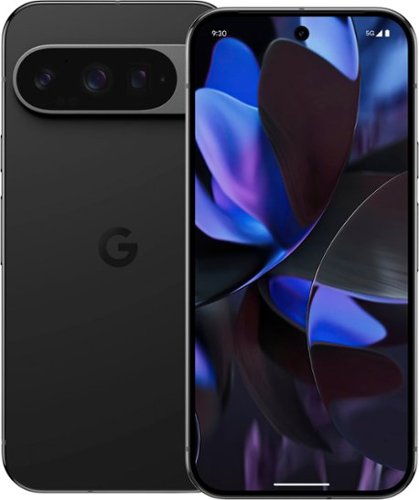
Meet Pixel 9 Pro with Gemini, now in two sizes. It has a sleek, stunning design, and it~s the most powerful Pixel yet. Take pro-level photos and videos with the triple camera system, and make expert edits. And it~s engineered by Google, so it gets the best of Google~s AI first.
Customer Rating
5
King of the Hill - for the moment?
on September 12, 2024
Posted by: ferrari
Competition in the phone market is intense; and dominance is fleeting. A new model comes out with features surpassing the last generation; but before the ink is dry competitors are out declaring their next model will outshine the rest. So, no surprise the Pixel 9 Pro is launched with much fanfare, and the Apple folks are shouting "Hey, hold on - wait'll you see what we got!"
I have to say, out of the box, the 9 Pro was impressive. It's sleek, smart, a definite gem in your hand. Given its size, it's got heft - unexpectedly heavy to the hand. A very impressive build.
Startup was excellent - within 15 minutes it had copied my sim, duplicated all my programs, restarted and was on the job. The hardest part was redoing my passwords - it's really about time I got myself a password app. The "Super Actua" display was brilliant, by default it's not on its highest setting for battery saving, but easily changed in settings if you need the detail.
My first experience with the Tensor G4 chip was offered by the fingerprint reader - it's just flat out instantaneous, as are screen changes and app response.
Over the past few days, my focus has been on the camera features.I was anxious to try the 5X telephoto feature. During the week prior, my wife & I had taken shots of the vent fan on our roof, seeing something that appeared strange. Comparing the 9 Pro's closeup shot against a five year old Samsung, it's as if we jumped an entire generation in processing. It actually caused me to lose control of my phone for the time being! Being a photo buff, my wife took control. She snapped photos of our dogs, and upon blowing them up, was amazed at being able to discern the individual hairs on their coats.
That was the appetizer to the camera's ability. Where the Pixel really shines is in the dark. We started taking side by side shots in low light, and the image quality far surpassed what has been available in the market to date. Our fascination with the camera's abilities continued into the night. My wife took the Pixel for some outside night shots which I've included below. These photos were not taken at dusk, this was dead of night, the only yard lighting are a couple of 60 watt LED's on the house, and garden path lighting. It's just amazing what this camera can see that's invisible to the human eye. There's definition to the clouds in the night sky.
We tried the AI enhanced photo features such as the "Add Me." You basically do a short pan of the area, leaving enough room to fit yourself in the photo. Then hand the camera to someone else in the party, take a shot of you, and the AI will incorporate the new photo into the original. Works well. I used the Magic Editor on a shot of the dog. I have a white dog, I simply said "brown"; and a few seconds later the pup had a very impressive looking dye job.
Other things I noted along the way was the speaker was very good for a phone. Sometimes, when a ring tone comes on, it's almost as if it "throws" the sound.
The Pixel has also been very helpful during the first few days, offering a lot of suggestions of the "do you know we can do this for you type?', highlighting features you may not be aware of.
So yeah, as I said at the start, top of the hill phone features are fleeting, what comes next we'll see. I know I'm not one to change phones with every iteration, so it's nice to know Google has guaranteed updates for this phone for 7 years - I may have to take them up on that!
I have to say, out of the box, the 9 Pro was impressive. It's sleek, smart, a definite gem in your hand. Given its size, it's got heft - unexpectedly heavy to the hand. A very impressive build.
Startup was excellent - within 15 minutes it had copied my sim, duplicated all my programs, restarted and was on the job. The hardest part was redoing my passwords - it's really about time I got myself a password app. The "Super Actua" display was brilliant, by default it's not on its highest setting for battery saving, but easily changed in settings if you need the detail.
My first experience with the Tensor G4 chip was offered by the fingerprint reader - it's just flat out instantaneous, as are screen changes and app response.
Over the past few days, my focus has been on the camera features.I was anxious to try the 5X telephoto feature. During the week prior, my wife & I had taken shots of the vent fan on our roof, seeing something that appeared strange. Comparing the 9 Pro's closeup shot against a five year old Samsung, it's as if we jumped an entire generation in processing. It actually caused me to lose control of my phone for the time being! Being a photo buff, my wife took control. She snapped photos of our dogs, and upon blowing them up, was amazed at being able to discern the individual hairs on their coats.
That was the appetizer to the camera's ability. Where the Pixel really shines is in the dark. We started taking side by side shots in low light, and the image quality far surpassed what has been available in the market to date. Our fascination with the camera's abilities continued into the night. My wife took the Pixel for some outside night shots which I've included below. These photos were not taken at dusk, this was dead of night, the only yard lighting are a couple of 60 watt LED's on the house, and garden path lighting. It's just amazing what this camera can see that's invisible to the human eye. There's definition to the clouds in the night sky.
We tried the AI enhanced photo features such as the "Add Me." You basically do a short pan of the area, leaving enough room to fit yourself in the photo. Then hand the camera to someone else in the party, take a shot of you, and the AI will incorporate the new photo into the original. Works well. I used the Magic Editor on a shot of the dog. I have a white dog, I simply said "brown"; and a few seconds later the pup had a very impressive looking dye job.
Other things I noted along the way was the speaker was very good for a phone. Sometimes, when a ring tone comes on, it's almost as if it "throws" the sound.
The Pixel has also been very helpful during the first few days, offering a lot of suggestions of the "do you know we can do this for you type?', highlighting features you may not be aware of.
So yeah, as I said at the start, top of the hill phone features are fleeting, what comes next we'll see. I know I'm not one to change phones with every iteration, so it's nice to know Google has guaranteed updates for this phone for 7 years - I may have to take them up on that!
I would recommend this to a friend!



Share this review:


+1point
2of 3voted this as helpful.
ferrari's Review Comments
ferrari has not submitted comments on any reviews.
ferrari's Questions
ferrari has not submitted any questions.
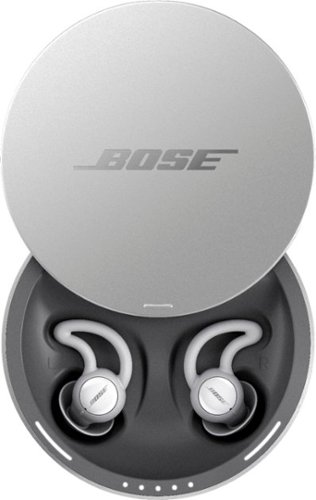
Sleep better. Cover unwanted noise with soothing sounds. Bose noise-masking sleepbuds~ are uniquely designed for sleep. They don~t stream music or have acoustic noise cancellation. Instead, these tiny, wireless earbuds use pre-loaded, soothing sounds to cover up unwanted noises, so you can get to sleep ~ and stay asleep. Plus, unlike traditional earplugs, they~re super comfortable and made to stay in place all night long, even if you sleep on your side. 1. Choose your sound, 2. Set an alarm, 3. Fall asleep without unwanted noise.
Can you listen to music or not? One answer says only the sounds from the app and another answer says yes you can listen to music. I want to listen to music from Youtube? Can I do this?
No - there is no input from anything other than the Bose App it comes with. Maybe on a future update, for now all you get is the built in soundscapes.
8 years, 1 month ago
by
ferrari
Sleep better. Cover unwanted noise with soothing sounds. Bose noise-masking sleepbuds~ are uniquely designed for sleep. They don~t stream music or have acoustic noise cancellation. Instead, these tiny, wireless earbuds use pre-loaded, soothing sounds to cover up unwanted noises, so you can get to sleep ~ and stay asleep. Plus, unlike traditional earplugs, they~re super comfortable and made to stay in place all night long, even if you sleep on your side. 1. Choose your sound, 2. Set an alarm, 3. Fall asleep without unwanted noise.
Can you use these at work to drown out a loud talkative coworker?
No - these don't have noise cancellation built in - I could clearly hear a tv on medium volume while i wore these. Get true noise cancelling headphones instead.
8 years, 1 month ago
by
ferrari
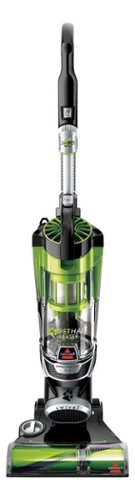
Nothing puts a vacuum to the test quite like a home with pets. That's why the BISSELL~ Pet Hair Eraser~ was developed from the ground up by pet parents for pet parents. Whether it's shedding season for your dog or your cat tracks kitty litter all over the house, this revolutionary vacuum is designed to make cleaning up after pets and the people who love them a breeze~from beginning to end. Say goodbye to hair wrap with its Tangle-Free Brush Roll, remove embedded hair everywhere with specialized pet tools, help capture allergens and eliminate odors with the SmartSeal~ Allergen System, and when you're finished cleaning, enjoy a hands-free tank empty with our patented Cyclonic Spooling System~.BR>
How load is it? I've used an Oreck XL upright and a Eureka Mighty Mite and would hope it's no louder as those. I prefer bagged vacuums but want to try the BISSELL Pet Hair Eraser because of its claims of not getting hair tangled on the roller.
I don't own the units you mentioned, I have a Miele canister, and it's no louder than that. I was surprised at it, as it does have great suction, and would have thought it should've been louder for the power it has. So far happy with the unit.
9 years, 11 months ago
by
ferrari