


ferrari's stats
- Review count169
- Helpfulness votes444
- First reviewOctober 18, 2012
- Last reviewAugust 3, 2026
- Featured reviews0
- Average rating4.7
Reviews comments
- Review comment count0
- Helpfulness votes0
- First review commentNone
- Last review commentNone
- Featured review comments0
Questions
- Question count0
- Helpfulness votes0
- First questionNone
- Last questionNone
- Featured questions0
- Answer count13
- Helpfulness votes16
- First answerAugust 26, 2016
- Last answerSeptember 13, 2020
- Featured answers0
- Best answers2
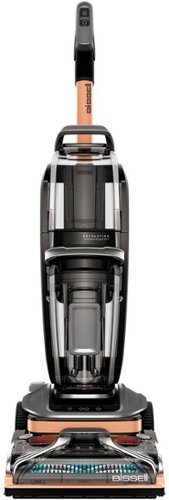
It's never been easier to deep clean carpets with BISSELL Revolution HydroSteam carpet cleaner. It's the ONLY upright deep cleaner with the power of HydroSteam Technology to remove the toughest stuck-on and sticky messes. Each machine comes with three distinct modes of cleaning - Steam Pretreat Mode, SteamWash Max Clean Mode and Quick Dry Mode. Break up sticky, stuck-on messes with Steam Pretreat Mode. SteamWash Max Clean Mode offers 2X Better cleaning.1 And carpets dry fast in about 30 minutes using Quick Dry Mode.2 Plus, each machine comes with two tools: 2-in-1 Pet Upholstery Tool for cleaning both wet and dry messes without steam and a 6" Tough Stain Tool great for cleaning larger furniture and stairs, without steam.
Customer Rating

5
This beats the rental machines hands down!
on June 23, 2023
Posted by: ferrari
Upon receiving this machine for review, decided to go for the gold. I had just replaced the carpet on half the lower level which was almost 20 years old. The other half, just as old, has patio doors leading out to the back yard. As animal lovers, we've always had 2 dogs, currently both Golden Retrievers. Going in & out 5-6 or more times every day, through rain, snow, mud, there's literally a brown path you can follow through you can follow from the door. The carpet is filthy, matted, and on its last leg. We were ready to go for a change-out, but decided to see what the Bissell could do for it.
After a quick assembly (not bad at all, similar to an upright vacuum), set the machine to Steamwash Max Clean Mode, filled the tank with the provided cleaning solution, and set to work. While this is a heavy unit, in operation it glides effortlessly and is easy to use. I thought it would take some time to warm up, but it was pumping steam in under 30 seconds.
This is not our first carpet cleaner, we've had 2 or 3 units before this, but we could tell right away this machine was different just via the amount of filth that was collecting in the dirty tank. At the conclusion it was pretty evident that the Bissell had given the carpet a new lease on life, no doubt due to the Hydrosteam function of the unit.
The unit also comes with a pet upholstery tool and a tough stain tool - very handy for those "oops" moments with the pet. The hose is 8 ft, as opposed to the usual 6 ft, so kudos on that. The tools also come with a nice carry bag that you can hang on the machine. Ever take out the vacuum and wonder what you did with the tools? Thoughtful feature.
I was very pleased with the operation and results, and would strongly recommend the Hydrosteam to anyone looking for professional results.
After a quick assembly (not bad at all, similar to an upright vacuum), set the machine to Steamwash Max Clean Mode, filled the tank with the provided cleaning solution, and set to work. While this is a heavy unit, in operation it glides effortlessly and is easy to use. I thought it would take some time to warm up, but it was pumping steam in under 30 seconds.
This is not our first carpet cleaner, we've had 2 or 3 units before this, but we could tell right away this machine was different just via the amount of filth that was collecting in the dirty tank. At the conclusion it was pretty evident that the Bissell had given the carpet a new lease on life, no doubt due to the Hydrosteam function of the unit.
The unit also comes with a pet upholstery tool and a tough stain tool - very handy for those "oops" moments with the pet. The hose is 8 ft, as opposed to the usual 6 ft, so kudos on that. The tools also come with a nice carry bag that you can hang on the machine. Ever take out the vacuum and wonder what you did with the tools? Thoughtful feature.
I was very pleased with the operation and results, and would strongly recommend the Hydrosteam to anyone looking for professional results.
I would recommend this to a friend!





Share this review:


+3points
3of 3voted this as helpful.

Introducing CZ Smart YouQ, the smarter smartwatch. Citizen CZ Smart Casual 41mm smartwatch is designed to help you be the best version of yourself throughout the day, every day. Inspired by the rich design of Citizen~s iconic sport technical timepieces, CZ Smart marries cutting-edge science and technology with the style and quality you expect from Citizen. CZ Smart YouQ leverages AI Models built with IBM Watson Studio and research pioneered by NASA Ames Research Center to power features within the proprietary YouQ application. CZ Smart YouQ helps you anticipate patterns of fatigue and alertness and offers highly personalized insights and suggested actions to help you improve alertness and promote the building of better habits, readying you to meet whatever the day may bring. Compatible with both iPhone and Android, CZ Smart YouQ features Wear OS by Google. The versatile, customizable menu of dials, designed exclusively for CZ Smart, gives you all the information you need at your fingertips. With a range of interchangeable 22mm bands available for all CZ Smart watches in bracelet, mesh, leather, and silicone, you can dress your CZ Smart watch for any occasion and make the most out of every moment. The Smarter Smartwatch: CZ Smart features the new proprietary wellness app YouQ built using research pioneered by NASA~s Ames Research Center and AI Models built with IBM Watson Studio. YouQ helps wearers maximize their daily potential by learning the wearer~s unique Chronotype and rhythms. YouQ computes HR, SP02, fitness activity, sleep data, and alert scores to offer the wearer a personalized 24-hour forecast of alertness. Aggregating data over time will enable CZ Smart YouQ to cater to wearers personally allowing them to understand their body~s natural rhythms. Meet your self-care advisor: CZ Smart YouQ provides the wearer a daily, brief, and gamified Alert Monitor, designed based on NASA~s PVT+ (Psychomotor Vigilance Task Test), a test used by astronauts to measure alertness. Only CZ Smart YouQ uses Alert Monitor scores and sleep data to identify the wearer~s distinct Chronotype (are you a morning go-getter, steady achiever, high-energy hustler?). CZ Smart YouQ helps you stay on track with an Hourly Power Score, an indicator of your cognitive and physical energy at a particular moment and offers Power Fixes to mitigate the effects of fatigue and improve alertness so the user can optimize themselves for what~s ahead. You may have a napuccino or liquid energy in your future. Preloaded and ready-to-go: Citizen Connected works with phones running on the latest version of Android (excluding Go Edition and phones without Google Play Store) or iOS. Applications available via the Play Store include CZ Smart YouQ App, Google Fit, Strava, Spotify, YouTube Music, and Amazon Alexa. CZ Smart features 24+ hour battery life (varies based on usage) and achieves a full charge in just 40-minutes. Connections include Bluetooth (connect your headphones), Wi-Fi, GPS (head out for a run or hike and leave your phone behind), and NFC (make contactless payments). Sensors include Gyroscope, altimeter, barometer, accelerometer, heart rate sensor, SP02, ambient light sensor, so that you can track activity goals, heart rate monitor, cardio fitness tracking, steps, sleep, and more. Personalization, notifications, and more: The uniquely designed CZ Smart dials give hundreds of options to fully customize your watch face and receive the information you find most important. Stay focused all day while getting notifications on your watch for incoming calls, texts, emails and calendar notifications. The built-in speaker enables you to conveniently answer a call from your smartwatch. With Amazon Alexa built-in, CZ Smart makes it easy to tackle your daily tasks and organization. CZ Smart next generation: Citizen Connected works with phones running on the latest version of Android (excluding Go Edition and phones without Google Play Store) or iOS, 24+ hour battery life, Qualcomm 4100+ chipset, offering the user a seamless connection and quick response and screen changes.
Customer Rating

3
Packed with features - but is it for you?
on June 1, 2023
Posted by: ferrari
I've been using a smartwatch over the past year, particularly for the health and sleep analysis functions, and it's been a constant companion over that time. So I was happy to receive the Citizen CZ for review. The device has a plethora of features - phone, email, digital wallet, just about everything on your phone - and therein resides the problem, at least for me. Do I need all of this technology when I always have a phone with me?
The biggest issue with all of these devices is battery life. You're basically operating a supercomputer off of a coin cell size battery. And the Citizen is no different. Over the past week, I don't think there was a day when it would last a full 24 hours without shutting down on me - and that's with minimal usage.
Being that I want to use the sleep diagnostic function, if I'd forget to charge it at night, it would shut down overnight rendering any data useless.
I did try the phone function. It works remarkably well - listening to it's speech quality, I'd be hard put to know that I was being spoken to through a watch. Question is, do I need that? Or for that matter, why am I reading texts/emails on a tiny screen when my phone is with me?
I don't mean to knock on the device, it's a Citizen, certainly a quality build, and as previously said, packed with features. It's just not for me. I would prefer a dedicated fitness monitor with somewhat better battery life.
The biggest issue with all of these devices is battery life. You're basically operating a supercomputer off of a coin cell size battery. And the Citizen is no different. Over the past week, I don't think there was a day when it would last a full 24 hours without shutting down on me - and that's with minimal usage.
Being that I want to use the sleep diagnostic function, if I'd forget to charge it at night, it would shut down overnight rendering any data useless.
I did try the phone function. It works remarkably well - listening to it's speech quality, I'd be hard put to know that I was being spoken to through a watch. Question is, do I need that? Or for that matter, why am I reading texts/emails on a tiny screen when my phone is with me?
I don't mean to knock on the device, it's a Citizen, certainly a quality build, and as previously said, packed with features. It's just not for me. I would prefer a dedicated fitness monitor with somewhat better battery life.
No, I would not recommend this to a friend.





Share this review:


0points
0of 0voted this as helpful.
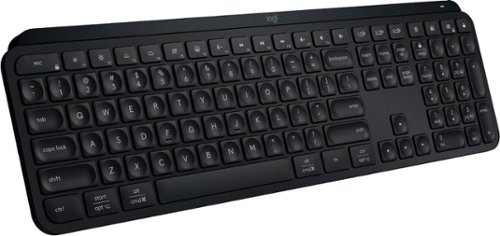
MX Keys S Logitech Wireless Keyboard ~ a low-profile full-size keyboard that offers a fluid, precise typing experience and customizable, time-saving Smart Actions that automate your most repetitive tasks with a single keystroke. The backlit keyboard features smart backlighting that lights up when your hands approach it and automatically adjusts to suit the time of day.
Posted by: ferrari
I've been a user of Logitech product ever since the computer revolution began in the mid 80's. I've abused, spilled liquids, dropped, and worse of all, handed them down to my kids and now, grandkids. When it's time for a new computer, it immediately gets paired with a Logitech keyboard/mouse/trackball, and whatever came with the new pc gets relegated to the junk pile. I don't believe I've ever actually disposed of one of their products - I keep it around, and when someone complains and tells me the keyboard/mouse that came with their pc is junk, I offer them an alternative. For me, their reputation has been impeccable.
That said, I was happy to receive their new Keys device. I've submitted photos, but it really needs to be seen and touched in person to appreciate the quality of the build. They say that the backbone of it is cut from a single piece of metal, and it certainly feels solid to the touch. By doing that, it allows them to create a super thin profile (I've attached a photo side by side with a AAA battery to highlight.)
To me, my favorite feature is the sculpted keys, they have a deep inset that gives you positive feedback as to your finger's spacing; I tend to slide my fingers reaching for the upper keys; I find the design to be very tactile. The keyboard itself is completely silent, if you're a fan of some clickety-clack, then look elsewhere.
The lighting is beautiful, bright, without being obnoxiously so. Combined with the Logitech app, there are various setup features you can use to your personal preference. The proximity sensor for lighting works very well, there's no need to ever turn the unit on/off, it sleeps after 15 minutes and wakes with your hovering hand.
The Keys S can be used with 3 separate devices, your desktop, laptop, pad, or tv. The only downside I see is there's a lack of a slot for storing the dongle for storage/tranport.
My early experience with this unit has been very favorable, and sitting on your desktop the looks are just downright ultra tech business.
That said, I was happy to receive their new Keys device. I've submitted photos, but it really needs to be seen and touched in person to appreciate the quality of the build. They say that the backbone of it is cut from a single piece of metal, and it certainly feels solid to the touch. By doing that, it allows them to create a super thin profile (I've attached a photo side by side with a AAA battery to highlight.)
To me, my favorite feature is the sculpted keys, they have a deep inset that gives you positive feedback as to your finger's spacing; I tend to slide my fingers reaching for the upper keys; I find the design to be very tactile. The keyboard itself is completely silent, if you're a fan of some clickety-clack, then look elsewhere.
The lighting is beautiful, bright, without being obnoxiously so. Combined with the Logitech app, there are various setup features you can use to your personal preference. The proximity sensor for lighting works very well, there's no need to ever turn the unit on/off, it sleeps after 15 minutes and wakes with your hovering hand.
The Keys S can be used with 3 separate devices, your desktop, laptop, pad, or tv. The only downside I see is there's a lack of a slot for storing the dongle for storage/tranport.
My early experience with this unit has been very favorable, and sitting on your desktop the looks are just downright ultra tech business.
I would recommend this to a friend!



Share this review:


0points
0of 0voted this as helpful.
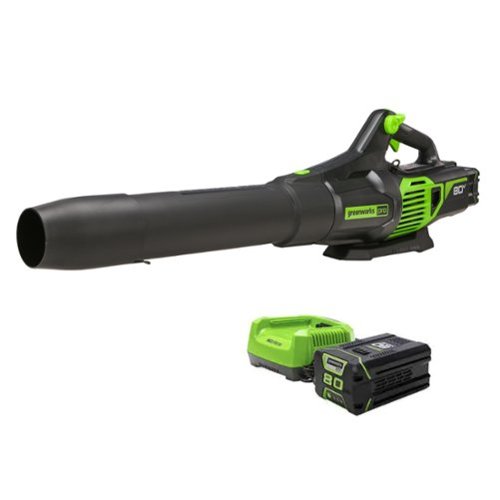
Heavy, wet leaves and other stubborn debris are no match for the Greenworks 80V battery powered handheld leaf blower. The jet fan design provides up to 730 CFM of constant airflow for blasting through heavy, wet leaves and tough debris with ease; and a variable speed trigger delivers on-demand power and up to 170 MPH of high-velocity air speeds. It~s one of the most powerful battery-powered handheld blowers in the industry, with Greenworks exclusive Intelligent Power that combines Brushless motor technology, lithium-ion battery power, and ultra-fast control systems for power output equivalent to a 26cc gas-powered motor. Includes 2.5 Ah battery and rapid charger. Battery is compatible with 75+ Greenworks 80V products. Life. Powered. By Greenworks.
Customer Rating
5
Power without a backpack
on April 18, 2023
Posted by: ferrari
I've been through a number of battery powered blowers; a couple of 18 volt models which were really only good to sweep a sidewalk with, two more 20 volts that could tidy up a lightly leafed patch of lawn, and a 40 volt the motor of which wasn't much more powerful than the 20's - although the battery did last a bit longer.
The Greenworks 80 volt is another animal altogether - the first battery powered handheld that can match the power of a backpack. Unboxing, assembled the unit - which only means clipping the extension tube and nozzle onto the body. The clips were excellent and easy to work as compared to my other blowers which require twisting, turning and requiring some effort to lock in place.
Plugged in the charger, and inserted the battery. The unit comes with a 2.5 AH battery, which has 3 indicator lights. Pressed the charge level button, and 1 LED lit up, indicating a 30% or so charge. I noticed when inserting the battery that the charger has a cooling fan which is audible when charging. I came back 15-20 minutes later, and all 3 LED's were lit showing a full charge. I noticed in the sales brochure that any of the Greenworks batteries over 2.5 AH have 4 indicator lights as opposed to 3.
The throttle switch is variable, going from a gentle breeze to full on and can be set to hold. It also has a nice light touch unlike my other blowers that require a bit of finger tiring pressure.
The top of the handle has a turbo switch which gives a power boost, but there's a cost to that, With a full charge, you'll get about 25 minutes run time with the blower; running it on turbo will easily cut that time in half. But hit the turbo button and you'll immediately feel the unit kick back at you highlighting the power - something I've never experienced in a handheld unit - not even a plug-in.
With the battery attached, this is a heavy unit weighing in at 9+ lbs, so you need to be sure you're comfortable carrying it in one hand (think two bags of sugar in a grocery bag) I did notice however that the unit is well balanced. When holding it in your hand with the battery attached, the nozzle drops down to the natural angle you would use when blowing leaves. This is important since if it were level, or pointed to the air, you'd have to apply downward pressure along with carrying the weight of the unit to properly use it. That would get quite tiring on your wrist. It's also important if you're thinking of buying a spare or replacement battery - if you get a bigger one, that will throw off the balance of the unit.
One other feature I wanted to mention is the flat stand on the bottom of the unit - so it sits exactly as you see it in the picture. Seems simple, but do you see that on any other blowers?
Overall, I'm very impressed with this machine, seems like a quality build, and for sure I'll be checking out the rest of their lineup.
The Greenworks 80 volt is another animal altogether - the first battery powered handheld that can match the power of a backpack. Unboxing, assembled the unit - which only means clipping the extension tube and nozzle onto the body. The clips were excellent and easy to work as compared to my other blowers which require twisting, turning and requiring some effort to lock in place.
Plugged in the charger, and inserted the battery. The unit comes with a 2.5 AH battery, which has 3 indicator lights. Pressed the charge level button, and 1 LED lit up, indicating a 30% or so charge. I noticed when inserting the battery that the charger has a cooling fan which is audible when charging. I came back 15-20 minutes later, and all 3 LED's were lit showing a full charge. I noticed in the sales brochure that any of the Greenworks batteries over 2.5 AH have 4 indicator lights as opposed to 3.
The throttle switch is variable, going from a gentle breeze to full on and can be set to hold. It also has a nice light touch unlike my other blowers that require a bit of finger tiring pressure.
The top of the handle has a turbo switch which gives a power boost, but there's a cost to that, With a full charge, you'll get about 25 minutes run time with the blower; running it on turbo will easily cut that time in half. But hit the turbo button and you'll immediately feel the unit kick back at you highlighting the power - something I've never experienced in a handheld unit - not even a plug-in.
With the battery attached, this is a heavy unit weighing in at 9+ lbs, so you need to be sure you're comfortable carrying it in one hand (think two bags of sugar in a grocery bag) I did notice however that the unit is well balanced. When holding it in your hand with the battery attached, the nozzle drops down to the natural angle you would use when blowing leaves. This is important since if it were level, or pointed to the air, you'd have to apply downward pressure along with carrying the weight of the unit to properly use it. That would get quite tiring on your wrist. It's also important if you're thinking of buying a spare or replacement battery - if you get a bigger one, that will throw off the balance of the unit.
One other feature I wanted to mention is the flat stand on the bottom of the unit - so it sits exactly as you see it in the picture. Seems simple, but do you see that on any other blowers?
Overall, I'm very impressed with this machine, seems like a quality build, and for sure I'll be checking out the rest of their lineup.
I would recommend this to a friend!




Share this review:


+14points
14of 14voted this as helpful.

Mind all your manholes with MANSCAPED Power Duo Plus Package with everything you need to look good from every angle. The Lawn Mower 4.0 takes any man~s groin and body grooming game to the next level while the Weed Whacker 2.0 makes those dangling ear and nose hairs disappear without the ouch factor. To make sure you smell the part, MANSCAPED Crop Cleanser will keep your groin zone so fresh and so clean with a luxurious lather.
Customer Rating
5
Well designed product
on February 28, 2023
Posted by: ferrari
First thing that struck me about this trimmer was how nice it felt to the hand. Very nicely sculpted and heavy for its size. After an initial charge, (the USB-C docking port is nice), gave it a run through the paces. Till now, I've used various electric shavers/trimmers to use in the groin area, and despite being as careful as possible, will always manage to draw some blood. I will say the Lawn Mower is the gentlest I've used. Cutting quickly & cleanly is the key, the sharp blade and 7,000 rpm motor combine to get the job done. I've also used this for an unintended purpose, I do have a short beard, and gave it a few quick strokes to test its strength, it didn't blink an eye. Won't be doing that again, as I don't want to prematurely dull the blade.
I general regard electric shavers as disposable products; sometimes the price of refitting is too close to the actual cost of the product. In this case though, the quality of the product is good enough, and the replacement cost is pretty good - checked the Manscaped website, a new blade is $20 with free shipping. There are also other options for a subscription with added benefits.
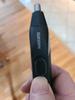
While the body hair trimmer is excellent; not as crazy about the nose trimmer. The replacement blade is $20, which to me is more than I've paid for any nose trimmer I've ever bought. Perhaps you might consider to just purchase the Lawn Mower on its own. Besides, the model i got has a small issue - if you look at the provided picture, the thumb slide on/off button doesn't work, I have to slide my thumb under the button and push the switch up. Interestingly, if you go to the website, you'll see that the nose trimmer pictured has a push type on/off switch as opposed to a slider, so it must've been redesigned.
As far as the wash gel included in the package, don't know that I'll be buying a replacement tube. Sure, it's designed to purpose, has a nice scent; but at a cost of $12/tube, I can get a few bottles of body wash. You might have a different opinion of it; I don't want to intrude on anyone's choice of personal care product, that's why there's a whole aisle of it in your supermarket/drugstore.
I'll just go back to my initial point - I'm giving 5 stars to the trimmer itself, the package I can do without. Given my experience so far with this trimmer, pretty sure I'll be looking at their beard trimmer next.
I general regard electric shavers as disposable products; sometimes the price of refitting is too close to the actual cost of the product. In this case though, the quality of the product is good enough, and the replacement cost is pretty good - checked the Manscaped website, a new blade is $20 with free shipping. There are also other options for a subscription with added benefits.
While the body hair trimmer is excellent; not as crazy about the nose trimmer. The replacement blade is $20, which to me is more than I've paid for any nose trimmer I've ever bought. Perhaps you might consider to just purchase the Lawn Mower on its own. Besides, the model i got has a small issue - if you look at the provided picture, the thumb slide on/off button doesn't work, I have to slide my thumb under the button and push the switch up. Interestingly, if you go to the website, you'll see that the nose trimmer pictured has a push type on/off switch as opposed to a slider, so it must've been redesigned.
As far as the wash gel included in the package, don't know that I'll be buying a replacement tube. Sure, it's designed to purpose, has a nice scent; but at a cost of $12/tube, I can get a few bottles of body wash. You might have a different opinion of it; I don't want to intrude on anyone's choice of personal care product, that's why there's a whole aisle of it in your supermarket/drugstore.
I'll just go back to my initial point - I'm giving 5 stars to the trimmer itself, the package I can do without. Given my experience so far with this trimmer, pretty sure I'll be looking at their beard trimmer next.
I would recommend this to a friend!



Share this review:


+1point
1of 1voted this as helpful.

From America's most trusted printer brand~, the HP Smart Tank 5101 Printer is a smart, connected and refillable tank printer that makes printing seamless for your home with its high capacity and wireless connectivity. Create everyday color documents at a low cost with 3 years of Original HP Ink included in the box~. This Smart Tank printer is an inkjet perfect for high-volume printing. It's also AI-enabled~ to intuitively adapt to your workflow, with wireless and security features that keep your multifunction printer up to date and secure.
Customer Rating

4
No more expensive cartridges!
on January 18, 2023
Posted by: ferrari
Glad to see HP has joined the trend in offering tank filled printers. I'd have to cringe every time I needed an ink cartridge, or heaven forbid 2 or 3 - there goes a $100 bill! Not everything is free, mind you, the upfront cost of these printers is higher, but as time goes on, there are significant savings to be had. Don't forget those cartridge printers generally come with "starter" cartridges, and you're running off for refills in short order.
I'm using this to replace an Epson tank printer which was pretty good aside from the fact that it consistently dropped wifi connection - quite annoying when you're ready to print something. The HP has no such problem, in fact, it boasts "self healing wifi" which seeks & reconnects on it's own if it drops connection.
Out of the box experience went easily, filled the 4 tanks from the provided ink bottles; the hardest part was installing the print heads (one black; one color). Having large hands was a bit difficult to insert your hand into the front slot of the printer while trying to see exactly where it was going.
You must set this up through the HP app, since I have another HP printer this was a real snap. Opened up the app, clicked on new printer, and it picked up the 5101 right off the bat. You're then instructed to print out an alignment sheet, and scan it so that it can align the print heads. It will then print out a test sheet, which was immaculate, clean, crisp text.
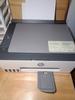
There are a couple of reasons why I didn't give it 5 stars. First, the black & white LCD screen is pathetic; measuring less than three quarters of an inch by one inch. I really would like to see at least a 2" screen which is able to offer some plain text as to what is going on as opposed to trying to decipher miniature hieroglyphics.
At 17" wide by 14" deep, it's probably a little bit larger than it could be. If you're tight on desk space there are other multi-functions that might fit better.
Lastly, there's an output arm (I won't even call it a tray) that pivots out at the bottom. I would prefer a full length tray that slides out and hold the entire sheet.
One more favorable observation - it's probably the quietest inkjet that I've owned. General printing & scanning, while not high speed are more than acceptable for this class of printer.
I'm using this to replace an Epson tank printer which was pretty good aside from the fact that it consistently dropped wifi connection - quite annoying when you're ready to print something. The HP has no such problem, in fact, it boasts "self healing wifi" which seeks & reconnects on it's own if it drops connection.
Out of the box experience went easily, filled the 4 tanks from the provided ink bottles; the hardest part was installing the print heads (one black; one color). Having large hands was a bit difficult to insert your hand into the front slot of the printer while trying to see exactly where it was going.
You must set this up through the HP app, since I have another HP printer this was a real snap. Opened up the app, clicked on new printer, and it picked up the 5101 right off the bat. You're then instructed to print out an alignment sheet, and scan it so that it can align the print heads. It will then print out a test sheet, which was immaculate, clean, crisp text.
There are a couple of reasons why I didn't give it 5 stars. First, the black & white LCD screen is pathetic; measuring less than three quarters of an inch by one inch. I really would like to see at least a 2" screen which is able to offer some plain text as to what is going on as opposed to trying to decipher miniature hieroglyphics.
At 17" wide by 14" deep, it's probably a little bit larger than it could be. If you're tight on desk space there are other multi-functions that might fit better.
Lastly, there's an output arm (I won't even call it a tray) that pivots out at the bottom. I would prefer a full length tray that slides out and hold the entire sheet.
One more favorable observation - it's probably the quietest inkjet that I've owned. General printing & scanning, while not high speed are more than acceptable for this class of printer.
I would recommend this to a friend!





Share this review:


+6points
6of 6voted this as helpful.
![McAfee - McAfee+ Premium (Unlimited Devices) Antivirus Software with Scam Protection (1-Year Subscription with Auto-Renewal) - Windows, Mac OS, Chrome, Apple iOS, Android [Digital]](https://pisces.bbystatic.com/prescaled/500/500/image2/BestBuy_US/images/products/f6c350f3-15a3-4960-8d0d-e5d921228824.jpg)
McAfee+ Premium ~ all-in-one protection for your digital life. In today~s digital world, protecting your personal info and devices from online threats is more important than ever. McAfee+ Premium is an all-in-one solution to protect you online. It gives you peace of mind because you know you~re protected from the latest scams, viruses, and identity theft. McAfee's Scam Detector identifies potential scam texts, emails, and videos to prevent financial fraud and safeguard your personal information. We~ll also monitor your personal info and let you know if anything looks suspicious, so you can take action to protect yourself. We~ll even help you get rid of your personal info from data broker sites that sell it, so you can keep your data private. Our Secure VPN will protect your online privacy by encrypting your internet traffic and hiding your IP address, so you can browse the web privately. Plus our antivirus software will protect all of your devices, including PCs, Macs, smartphones, and tablets, from scams, viruses, malware, and other threats.
Customer Rating
5
A complete premium package
on November 12, 2022
Posted by: ferrari
So far, I've installed McAfee premium on 2 different devices to check out all the features. And this package is loaded - Antivirus with scheduled scans, ID protection, tracker remover, personal data cleanup, and, a secure vpn. All of this comes with - and this is the best part - unlimited devices. I'm in a home with 2 cell phones, laptops, desktops, tablets - both new & old. I have older devices that are used infrequently, so the ability to protect them without paying an additional fee is great.
I'm also paying for a private VPN, so the fact that it's included in this package allows me to cancel an unnecessary subscription.
The interfaces are clean, unobtrusive, and easy to understand. I do have one issue I've encountered so far, in the data security section where you can check when & where your personal data has been breached, I had a list of over 20 instances. Each time I clicked on an event, it would send a separate email with a code. I would have to go back & forth between email & web browser, every time I clicked off the web browser, the window to enter the code would disappear, and I'd have to request to send another code. Very cumbersome. One code should be sufficient to view all the events on the page. Even sending via text might be better than email.
All in all though, as I previously stated, if you own multiple devices, this is a package you should look into.
I'm also paying for a private VPN, so the fact that it's included in this package allows me to cancel an unnecessary subscription.
The interfaces are clean, unobtrusive, and easy to understand. I do have one issue I've encountered so far, in the data security section where you can check when & where your personal data has been breached, I had a list of over 20 instances. Each time I clicked on an event, it would send a separate email with a code. I would have to go back & forth between email & web browser, every time I clicked off the web browser, the window to enter the code would disappear, and I'd have to request to send another code. Very cumbersome. One code should be sufficient to view all the events on the page. Even sending via text might be better than email.
All in all though, as I previously stated, if you own multiple devices, this is a package you should look into.
I would recommend this to a friend!
Share this review:


0points
0of 0voted this as helpful.

Space Q45 noise canceling headphones balance refined design and ergonomic, comfort-enhancing details, with incredible immersive audio performance. Hi-resolution audio takes center stage - these are performance tested to block up to 98% of unwanted noise - but a huge 50 hour playtime makes the Space Q45 a perfect pair of headphones.
Customer Rating
5
Another hit from Anker
on October 18, 2022
Posted by: ferrari
I currently own a number of Anker devices, from phone chargers to USB ports, power banks, & bluetooth speakers. The quality has been top notch throughout their line, so was anxious to try these headphones.
Upon unboxing, I have to say the first thing that impressed me was there was an actual manual, with words! Can't tell you how many times I've been befuddled opening a package and getting nothing but a QR code, or maybe a pamphlet with hieroglyphics.Two thumbs up to Anker. In another concession to clarity, the speakers themselves are imprinted with a L/R logo so you can quickly identify buttons & correct placement. A simple thing, but a nice touch.
I next downloaded the Soundcore app, and powered on the headset, the bluetooth started blinking, and it popped up immediately on my phone. Without me touching a button, it then requested a firmware update, which installed with no issue.
My immediate reaction to putting the headphones on was a comfortable feel; the sound level dropped immediately. Most comfortable pair of phones I've ever owned. Using the app, I set a limit on the sound level so I wouldn't get blasted as sometimes happens when you first power on a device or switch sources.
Started going through my phones playlist, the sound was crisp, clean, and unmuddied. There are 3 modes, noise cancellation, transparent (allowing some awareness of surroundings) and NC off. I have to say, I was not impressed with the noise cancellation off setting, the sound wasn't as clear to me. Not an issue as you'd be defeating the purpose of the set, but maybe it's a setting or equalization I missed somewhere.
Trying out the phone feature was very impressed with the clarity, probably due to the dual microphone this set is equipped with.
Besides the type C charging cord, mini jack is included if you require a plug in experience, was impressed that the jacks were gold plated.
Overall, this is a solid entry from Anker, at an affordable price.
Upon unboxing, I have to say the first thing that impressed me was there was an actual manual, with words! Can't tell you how many times I've been befuddled opening a package and getting nothing but a QR code, or maybe a pamphlet with hieroglyphics.Two thumbs up to Anker. In another concession to clarity, the speakers themselves are imprinted with a L/R logo so you can quickly identify buttons & correct placement. A simple thing, but a nice touch.
I next downloaded the Soundcore app, and powered on the headset, the bluetooth started blinking, and it popped up immediately on my phone. Without me touching a button, it then requested a firmware update, which installed with no issue.
My immediate reaction to putting the headphones on was a comfortable feel; the sound level dropped immediately. Most comfortable pair of phones I've ever owned. Using the app, I set a limit on the sound level so I wouldn't get blasted as sometimes happens when you first power on a device or switch sources.
Started going through my phones playlist, the sound was crisp, clean, and unmuddied. There are 3 modes, noise cancellation, transparent (allowing some awareness of surroundings) and NC off. I have to say, I was not impressed with the noise cancellation off setting, the sound wasn't as clear to me. Not an issue as you'd be defeating the purpose of the set, but maybe it's a setting or equalization I missed somewhere.
Trying out the phone feature was very impressed with the clarity, probably due to the dual microphone this set is equipped with.
Besides the type C charging cord, mini jack is included if you require a plug in experience, was impressed that the jacks were gold plated.
Overall, this is a solid entry from Anker, at an affordable price.
I would recommend this to a friend!





Share this review:


0points
0of 0voted this as helpful.

Capture sweeping views of your surroundings when driving with this Rexing V33 dashcam. The three-channel dash cam records 2K video resolution simultaneously from the car's front, cabin, and rear. The Rexing V33 also comes with Wi-Fi, voice control, and ADAS features. A built-in GPS logger tracks important metrics in case of a driving incident. V33 dashcam uses a temperature-resistant supercapacitor for added reliability as well. ***If a hardwire kit was not included with your purchase, please contact bbyhwk@rexingusa.com.
Posted by: ferrari
Between the wife & I, over the last dozen years or so, we've owned 5 or 6 dash cams. As with phones & other devices, they've gotten better & added features, and the V33 is the latest. Rexing has always had a good reputation in the field, so I felt confident about the new install.
I immediately purchased their Intelligent Hardwire kit; I've hardwired every cam I've owned. First of all, who wants something stuck in the cigarette lighter plug; it makes for a much neater install. Besides, if you don't hardwire, you're unable to get all the features built in to your device, like parking protection - if the unit detects motion, the cam turns on.
I will say I had some initial difficulty setting up - there's a card that comes with the camera containing a QR code to download the companion app. It didn't work, so I had to get in contact with tech support. I received an immediate answer that the app was pulled for a technical error, a new version had been uploaded, and was awaiting approval from the Play store. For the interim, I was directed to the website where I was able to download & install the app without difficulty. I had some other questions as to operation, including the wifi function, and tech support answered them fully. Just mentioning this in case someone else runs into the issue, but I'm sure the app problem will be resolved in short order.
Having had other dash cams, I will say that the V33 boots up pretty quickly; I can put my hand on the door handle to enter, by the time I get in my seat, it's already capturing video. The video quality is outstanding as well as the field of view - the best I've seen yet. The other thing that impressed me is after a drive of about an hour, the unit itself was warm to the touch - not blazing hot as I would've expected capturing 3 different HQ streams.
It's also a nice feature that the memory card is included - I've had cams where I've had to provide my own. One thing I wasn't impressed with was the mount - which amounts to just a simple plastic slide. I would prefer a magnetic mount as I've seen on other units. The other thing I'd like to see is a larger screen.
If you settle on this unit, I would strongly suggest you get the Intelligent Hardwire kit. There are two choices - the simple or intelligent hardwire. With the Intelligent, you get the gravity box you see in one of the photos below, which enables the advanced parking features.
I immediately purchased their Intelligent Hardwire kit; I've hardwired every cam I've owned. First of all, who wants something stuck in the cigarette lighter plug; it makes for a much neater install. Besides, if you don't hardwire, you're unable to get all the features built in to your device, like parking protection - if the unit detects motion, the cam turns on.
I will say I had some initial difficulty setting up - there's a card that comes with the camera containing a QR code to download the companion app. It didn't work, so I had to get in contact with tech support. I received an immediate answer that the app was pulled for a technical error, a new version had been uploaded, and was awaiting approval from the Play store. For the interim, I was directed to the website where I was able to download & install the app without difficulty. I had some other questions as to operation, including the wifi function, and tech support answered them fully. Just mentioning this in case someone else runs into the issue, but I'm sure the app problem will be resolved in short order.
Having had other dash cams, I will say that the V33 boots up pretty quickly; I can put my hand on the door handle to enter, by the time I get in my seat, it's already capturing video. The video quality is outstanding as well as the field of view - the best I've seen yet. The other thing that impressed me is after a drive of about an hour, the unit itself was warm to the touch - not blazing hot as I would've expected capturing 3 different HQ streams.
It's also a nice feature that the memory card is included - I've had cams where I've had to provide my own. One thing I wasn't impressed with was the mount - which amounts to just a simple plastic slide. I would prefer a magnetic mount as I've seen on other units. The other thing I'd like to see is a larger screen.
If you settle on this unit, I would strongly suggest you get the Intelligent Hardwire kit. There are two choices - the simple or intelligent hardwire. With the Intelligent, you get the gravity box you see in one of the photos below, which enables the advanced parking features.
I would recommend this to a friend!


Share this review:


+6points
6of 6voted this as helpful.
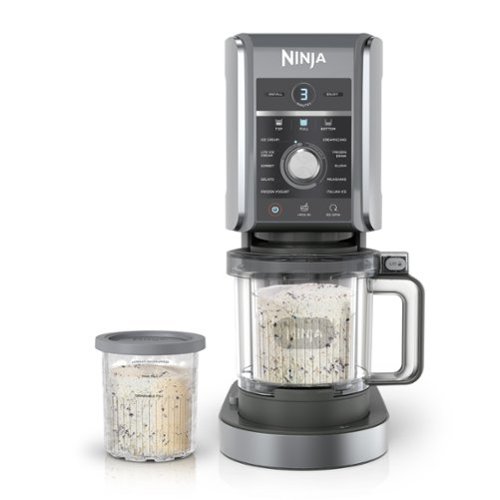
The Ninja CREAMi Deluxe turns almost anything into ice cream, sorbet, gelato, and much more. Go beyond ice cream with 5 new programs including Italian Ice and Frozen Yogurt. Create fun frozen treats for the whole family with 24 oz. XL Tubs~get 50% more ice cream than the original Ninja CREAMi.
Customer Rating
5
Ninja hits the mark - and I got cannoli ice cream!
on October 13, 2022
Posted by: ferrari
I've had great success with Ninja products in my kitchen - have the Foodi, Toaster oven, Smoothie maker, all excellent performers, so was anxious to try out homemade ice cream.
First off, so you realize, this device does not have refrigeration capabilities. The concept is you make the base, then freeze it (24 hours recommended); when you're ready for your treat, put it into the machine which will then churn out your creation. It's amazing to watch, the blades start whirring, and a piston slowly descends, blades slicing through your mixture. A minute or two later, it's ready to go.
There are dozens of recipes that come with the machine, and hundreds more online. Start looking, and I'm sure you'll have quite a list you'd like to try.
For me, I'm one that's disappointed by the lack of appreciation for malt nowadays. Even if you go to a burger place that advertises malt, it's like it's an afterthought. So that was the first thing I wanted to try, and I settled on a dark chocolate malt ice cream - heavy on the malt! I thought that this would work out to be a trial & error affair, improving as I went on. To my surprise, my first creation was excellent!
So I got brave - my next creation was cannoli - real cannoli - whole milk ricotta, marscapone cheese, vanilla bean paste, heavy cream. Couldn't wait to try it -hard to wait the 24 hours, but when it came out, I was ecstatic. I had thought that maybe the ricotta might make it a bit curdy, but the Creami churned it out beautifully - rich, smooth, fantastic flavor, I kept it simple, next time I'll add the mini chocolate chips, and orange zest or citron.
Is there a problem with the Creami - yes. That being, you get two pint containers with the machine. But you're going to want more. And at the moment, they're in very short supply. My thought was to give out 1 or 2 to relatives, let them make their own creation, and when they come over, I'll churn it out for them.
This is a great device. But there is one more problem - I don't know if my waistline can handle all the ideas I have for this machine! Thank you, Ninja!
First off, so you realize, this device does not have refrigeration capabilities. The concept is you make the base, then freeze it (24 hours recommended); when you're ready for your treat, put it into the machine which will then churn out your creation. It's amazing to watch, the blades start whirring, and a piston slowly descends, blades slicing through your mixture. A minute or two later, it's ready to go.
There are dozens of recipes that come with the machine, and hundreds more online. Start looking, and I'm sure you'll have quite a list you'd like to try.
For me, I'm one that's disappointed by the lack of appreciation for malt nowadays. Even if you go to a burger place that advertises malt, it's like it's an afterthought. So that was the first thing I wanted to try, and I settled on a dark chocolate malt ice cream - heavy on the malt! I thought that this would work out to be a trial & error affair, improving as I went on. To my surprise, my first creation was excellent!
So I got brave - my next creation was cannoli - real cannoli - whole milk ricotta, marscapone cheese, vanilla bean paste, heavy cream. Couldn't wait to try it -hard to wait the 24 hours, but when it came out, I was ecstatic. I had thought that maybe the ricotta might make it a bit curdy, but the Creami churned it out beautifully - rich, smooth, fantastic flavor, I kept it simple, next time I'll add the mini chocolate chips, and orange zest or citron.
Is there a problem with the Creami - yes. That being, you get two pint containers with the machine. But you're going to want more. And at the moment, they're in very short supply. My thought was to give out 1 or 2 to relatives, let them make their own creation, and when they come over, I'll churn it out for them.
This is a great device. But there is one more problem - I don't know if my waistline can handle all the ideas I have for this machine! Thank you, Ninja!
I would recommend this to a friend!




Share this review:


+1point
1of 1voted this as helpful.
ferrari's Review Comments
ferrari has not submitted comments on any reviews.
ferrari's Questions
ferrari has not submitted any questions.
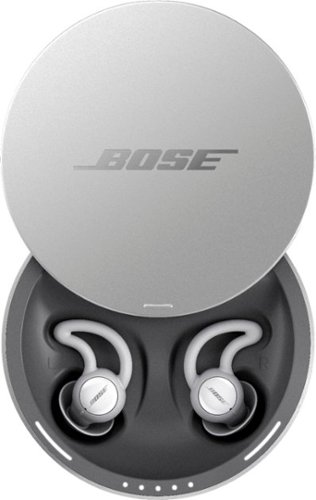
Sleep better. Cover unwanted noise with soothing sounds. Bose noise-masking sleepbuds~ are uniquely designed for sleep. They don~t stream music or have acoustic noise cancellation. Instead, these tiny, wireless earbuds use pre-loaded, soothing sounds to cover up unwanted noises, so you can get to sleep ~ and stay asleep. Plus, unlike traditional earplugs, they~re super comfortable and made to stay in place all night long, even if you sleep on your side. 1. Choose your sound, 2. Set an alarm, 3. Fall asleep without unwanted noise.
Can you listen to music or not? One answer says only the sounds from the app and another answer says yes you can listen to music. I want to listen to music from Youtube? Can I do this?
No - there is no input from anything other than the Bose App it comes with. Maybe on a future update, for now all you get is the built in soundscapes.
8 years, 1 month ago
by
ferrari
Sleep better. Cover unwanted noise with soothing sounds. Bose noise-masking sleepbuds~ are uniquely designed for sleep. They don~t stream music or have acoustic noise cancellation. Instead, these tiny, wireless earbuds use pre-loaded, soothing sounds to cover up unwanted noises, so you can get to sleep ~ and stay asleep. Plus, unlike traditional earplugs, they~re super comfortable and made to stay in place all night long, even if you sleep on your side. 1. Choose your sound, 2. Set an alarm, 3. Fall asleep without unwanted noise.
Can you use these at work to drown out a loud talkative coworker?
No - these don't have noise cancellation built in - I could clearly hear a tv on medium volume while i wore these. Get true noise cancelling headphones instead.
8 years, 1 month ago
by
ferrari
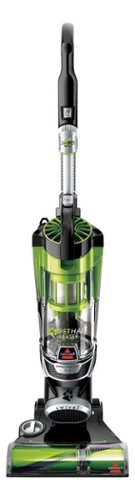
Nothing puts a vacuum to the test quite like a home with pets. That's why the BISSELL~ Pet Hair Eraser~ was developed from the ground up by pet parents for pet parents. Whether it's shedding season for your dog or your cat tracks kitty litter all over the house, this revolutionary vacuum is designed to make cleaning up after pets and the people who love them a breeze~from beginning to end. Say goodbye to hair wrap with its Tangle-Free Brush Roll, remove embedded hair everywhere with specialized pet tools, help capture allergens and eliminate odors with the SmartSeal~ Allergen System, and when you're finished cleaning, enjoy a hands-free tank empty with our patented Cyclonic Spooling System~.BR>
How load is it? I've used an Oreck XL upright and a Eureka Mighty Mite and would hope it's no louder as those. I prefer bagged vacuums but want to try the BISSELL Pet Hair Eraser because of its claims of not getting hair tangled on the roller.
I don't own the units you mentioned, I have a Miele canister, and it's no louder than that. I was surprised at it, as it does have great suction, and would have thought it should've been louder for the power it has. So far happy with the unit.
9 years, 11 months ago
by
ferrari