


lambda100's stats
- Review count110
- Helpfulness votes1,314
- First reviewDecember 20, 2014
- Last reviewSeptember 25, 2026
- Featured reviews0
- Average rating4.7
Reviews comments
- Review comment count0
- Helpfulness votes0
- First review commentNone
- Last review commentNone
- Featured review comments0
Questions
- Question count0
- Helpfulness votes0
- First questionNone
- Last questionNone
- Featured questions0
- Answer count18
- Helpfulness votes115
- First answerNovember 24, 2016
- Last answerDecember 1, 2021
- Featured answers0
- Best answers3
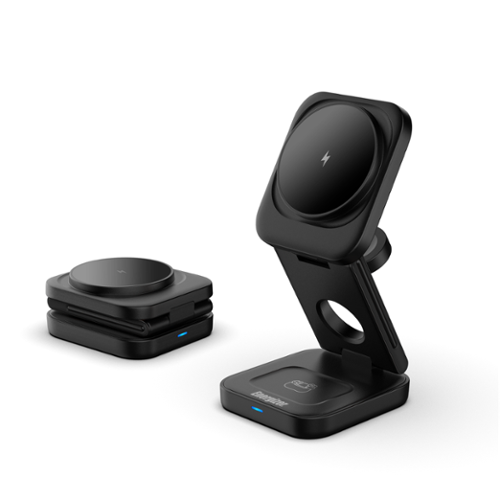
Sleek matte black 3~in~1 wireless charging station with a compact, foldable design for easy storage and travel. Supports simultaneous charging for your phone, earbuds, and smartwatch with fast wireless output up to 15W for compatible devices. Lightweight and travel~friendly, it~s designed to fit effortlessly into bags, desks, and nightstands for a clean, convenient charging setup anywhere. WALL ADAPTER NOT INCLUDED. 30W POWER DELIVERY ADAPTER REQUIRED FOR MAXIMUM SPEED.
Customer Rating

5
Versatile Wireless Charger
on September 25, 2026
Posted by: lambda100
I’ve been charging my phone with the cord directly connected to it for the longest time until recently when the usb-c connector on the phone became so worn out from the thousands of times I connected and disconnected the charging wire that the usb-connector on the phone became loose and refused to charge. Luckily, I found out my phone supports wireless charging, and this Energizer 3 in 1 wireless charger saved my phone from being junked.
I really like the design and functionality of the Energizer wireless charger. It is compact, lightweight, takes up a miniscule amount of desktop space, folds for traveling, and wirelessly charges my phone, smartwatch, and earbuds simultaneously. A blue led light illuminates to let me know that the phone is charging. The magnet where the phone attaches is firm and strong. The charger also functions as a stand for the phone allowing me to stream my favorite shows while also charging it.
My only complaints of the charger are minor. The included usb-c cord could have been longer. It’s only 40 inch in length. It wasn’t long enough to span the distance from my wall outlet to my desktop. The wireless charger also doesn’t include a charging brick, but this is noted on the packaging so there are no surprises. You’ll need to get one with a minimum output rating of 9V/3A.
My only complaints of the charger are minor. The included usb-c cord could have been longer. It’s only 40 inch in length. It wasn’t long enough to span the distance from my wall outlet to my desktop. The wireless charger also doesn’t include a charging brick, but this is noted on the packaging so there are no surprises. You’ll need to get one with a minimum output rating of 9V/3A.
I highly recommend the Energizer Wireless charger. I’m already keeping my eye on it when it goes on sale so I can purchase a few more as gifts.
Here are the specs…
Phone output: 15W / 10W / 7.5W / 5W
Earbuds output: 5W max.
Watch output: 2.5W max.
Phone output: 15W / 10W / 7.5W / 5W
Earbuds output: 5W max.
Watch output: 2.5W max.
I would recommend this to a friend!






Share this review:


0points
0of 0voted this as helpful.
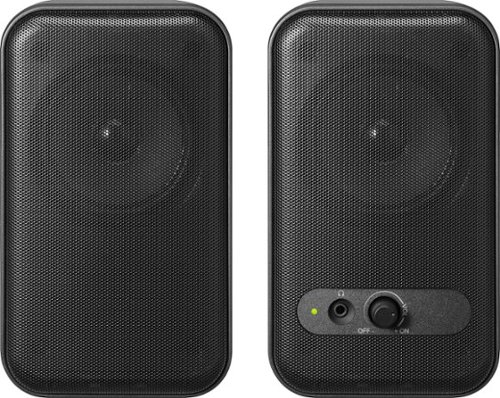
Improve your desktop listening experience with the versatile Insignia Computer Speakers. The minimalistic design makes setup a breeze with built-in 3.5 mm AUX and USB cables. The speakers can play audio aloud or connect to your wired headphones with a 3.5 mm headphone jack for private listening. The 2.0-channel setup delivers stereo sound for your work video calls, music enjoyment, or video games.
Customer Rating
5
Great Sounding Bargain Computer Speakers
on May 9, 2026
Posted by: lambda100
Modern laptops are packed with high performing chips, fancy high resolution OLED displays, and AI capabilities, but the fact remains that the internal speakers are always lacking in audio quality. If you’re ready to step up from the built in speakers, but don’t want to spend a small fortune, then the Insignia computer speakers may be just right for you.
These are wired speakers, with the right speaker being the master unit where the 3.5mm audio cable, power cable, and left speaker wire connect into. A green light illuminates on the right speaker when the power is on. The power cable has a usb A connection which can be powered from the usb A port on a computer or can be plugged into a usb A charging brick. Insignia also supplies a usb A to usb C adapter for computers that only have a usb C port. That’s very thoughtful and nice touch from Insignia.
The front of the right speaker has the volume control knob which also doubles as an on/off switch, and there is also a 3.5mm jack for plugging in a wired headphone. The left and right speakers are connected by a wire approximately 39 inches in length. I was able to comfortably place the speakers to either side of my 34” wide monitor, but this appears to be the maximum monitor size that can be placed between the speakers. The exterior housing of the speakers are constructed of hard plastic. Each speaker has four rubber pads to prevent them from sliding on a desk top. The speakers are rather lightweight and doesn’t take much force to accidentally knock them over. They are also rather compact, with each speaker taking up approximately 4” x 3.25” footprint on the table top and stands shorter than a water bottle. And the fact that these don’t have a subwoofer, there is zero floor area taken up which is another plus if you’re looking for space saving speakers.
The Insignia speakers is a basic 2.0 stereo computer speaker at a bargain price, but sounds great if you temper your expectations. They are lively with plenty of mids and crispy highs. Vocals and mids are the sweet spot of these speakers. The spatial separation of the speakers which create the stereo effect makes the audio much more engaging than the built-in laptop speakers. However, the weak spot of these speakers is the lack of any bass, so don’t expect any low end thumping. At least your apartment neighbors won’t be banging on the wall for you to turn down the bass. These are considered near-field speakers, but the volume can get quite loud to fill a good sized bedroom if you want to throw yourself a one person audio party. In short, these Insignia speakers are plenty for undiscriminating music listening, non-critical streaming and teleconferencing audio.
So who are these speakers for? Someone who is on a budget, looking for a small compact computer audio system that is magnitudes better than even the best built-in laptop speakers, and doesn’t need the bass that 2.1 speaker systems offer. They’re priced lower than similar speaker setups from the competitors, but sound just as good or better. I know because I own several 2.0 computer speakers from one of the large name brand computer accessory companies and these Insignia actually surprised me with their great audio quality for the low price. Highly recommend!
I would recommend this to a friend!




Share this review:


+1point
1of 1voted this as helpful.

Meet Google Pixel 10a. Brilliant photography, helpful AI,~ and a durable design.~ It~s got all the essentials, plus features you~ll love.
Posted by: lambda100
Combining capable hardware with excellent artificial intelligence and a pure android experience, the Google Pixel 10a is nothing short of a superb, feature rich, all-around phone at a great value. I typically use the phone to stream programming, listen to music, take photos, play games casually, and view social media content, things that I think 99% of us phone users do on a daily basis. The Pixel 10a does all these things effortlessly. The phone responds instantaneously to swiping and tapping. Apps load and run without hesitation. The phone is well-balanced, and light, which is perfect when using it with one hand. The back of the phone is flat, no more raised back camera. This is a welcome physical change to the pixel A phones. I love that the display brightness can go up 3,000 nits which makes it easier to see outdoors against bright sunlight. The 6.3” display produces vibrant punchy colors, without being too oversaturated.
This is considered a budget friendly phone, but the Pixel 10a’s camera borders on flagship quality and features. The Pixel 10a makes taking photos so easy. Just point and shoot and the Google software will process the photo to create images that appear natural as our eyes see it. The camera has no trouble with scenes with varying bright and dark areas (dynamic range). I enjoy taking photos, but I usually just snap shots without much thought of improving myself. I don’t have an excuse for taking poorly framed and composed images now. The Pixel 10a is equipped with an AI feature called Camera Coach by providing guidance on framing and composition to help folks like myself improve our picture taking skills. I also love the automatic close up Macro focus of the camera. I was wowed by the rich detail captured by the Macro focusing. I took photos of flowers up close and could see the little furry ends inside the flower. Just amazing that the phone can do this without needing to purchase fancy and expensive camera equipment. Another feature I enjoy using is the Magic Eraser. It’s not exclusive to the Pixel 10a, but it’s such a fun and useful feature to make unwanted objects disappear. There are so many other camera features packed into this little phone that it’s hard to cover everything. With Auto Best Take, group shots become easier as the camera will work its computational magic to create a merged photo from a series of photos to try to get it so that everyone in the group is looking their best. Add Me is another photo merge feature for group photo where the individual holding the camera for the first group photo can also put themself into the finished photo by having someone else take the second photo while the first person positions themself into the second frame. Another feature is Reimagine, where the AI editor will help you reimagine your photographs.
Besides the camera, the battery life is also amazing. There’s plenty of battery to last a full day. I have been using the phone heavily doing various activities like streaming videos and using apps, and still have 30% battery after using it for 10 hours. When it is time to recharge, the phone charges up fast with 30 watts of fast wired charging or 10 watts using wireless charging.
I started dabbling with Gemini Live, the new AI Google assistant. It works well. The Gemini assistant is fluid, conversations are natural as if I’m having a conversation with a real person, and the results produced by Gemini are informative and relevant.
Also, beginning with the Pixel 10a, Google has now equipped the phone with a safety feature called Satellite SOS where you can connect with emergency responders even while out of range of wifi or cellular coverage.
One of the things I like about the Pixel series phones is that you get a pure android experience and without the pre-installed bloatware that comes from other phone manufacturers. You receive the full unadulterated versions of the operating systems, and Google will provide 7 years of software operating system and security updates. (But this is all assuming that your phone battery can last that long. In my experience, a phone’s weakest link is the battery recharge life. After hundreds of recharge cycles, the battery deteriorates to such an extent that it becomes unusable, or it begins swelling up and emitting noxious smells.)
Do I recommend the Pixel 10a? The Pixel 10a is more than capable of running the apps and performing the tasks that most consumers need. It is competitively priced, comes with an excellent camera, has a battery that can run the whole day between recharge, is equipped with a plethora of security and safety features, has a bright and responsive display, and has seven years of updates, I would say the Pixel 10a is a an excellent value and a good buy for anyone in the market looking for a new phone.
I would recommend this to a friend!


Share this review:


0points
0of 0voted this as helpful.
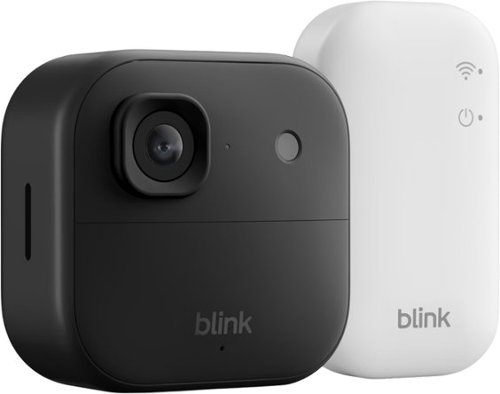
See and hear more - better than ever. Battery-powered Outdoor 2K+ delivers sharp 2K video resolution, detailed 4x digital zoom, and crystal-clear two-way audio with advanced noise cancellation. Mount in minutes with no wires, no worries, no compromises.
Customer Rating

4
Decent Entry Level Security System
on December 6, 2025
Posted by: lambda100
The Blink Outdoor 2K+ with Sync Module Core is a sensible wireless security system for someone looking for an entry level camera system that is easy to set up and use, and doesn’t mind having a subscription plan.
Setting up the Blink Outdoor 2K+ is simple and quick. Download the Blink Home Monitor app, create an account, and then follow the instructions to add the Sync Module Core and the Outdoor 2K+ camera. Within the app, features such as video quality, video recording length, motion detection zones, arm/disarm scheduling, and cloud video viewing can be performed.
I own the previous Blink outdoor 4 1080p camera, and the latest Blink 2K+ camera is definitely much sharper, crisper, and shows greater detail than the Blink 4. I notice that the two way audio communication is also improved as background noises are effectively screened out with the noise cancellation technology. The Blink 2K+ is advertised with “Color Night Vision” that allows the camera to continue to provide color video even in low light. In my testing, I did not notice any difference when compared with the Blink Outdoor 4. The Blink Outdoor 2+ seems to change to black and white video as soon as the light levels dim just like my Outdoor 4.
The Blink Outdoor 2K+ is powered with two AA lithium batteries with a claim that the batteries will last up to 2 years. Of course this will depend on a number of factors such as the video settings and how often the camera is running. I like that AA lithium batteries are used in the camera since they are easy to replace.
The Blink Outdoor 2K+ is shipped with the Sync Module Core which does not have a local storage option. It comes with a 30 day trial of Plus Plan which is the full featured subscription plan that allows for person and vehicle detection, live recording, and cloud recording. With no subscription plan, the system only has motion activated notifications and allows viewing of a live video feed with no ability to record. It is evident that the camera system is only effective if one purchases the subscription plan.
Although the Sync Module Core is shipped with the Blink 2K+ camera, the camera will work fine with the Sync Module 2 and the Sync Module XR, both of which allow local storage, which is a better option for those who want this additional basic feature.
Do I recommend the Blink Outdoor 2K+ with Sync Module Core? The video quality of the camera is a noticeable improvement over the previous generations, and because of this single improvement, I think the 2K+ camera is a worthy purchase. For those that want a no hassle plug and play system, and are okay paying for a monthly subscription plan, this is a good entry level security system. This is a solid 4 out of 5 star system. I am taking off one star only because the security system packaged with the Sync Module Core is almost useless without the subscription plan.
I would recommend this to a friend!



Share this review:


0points
0of 0voted this as helpful.
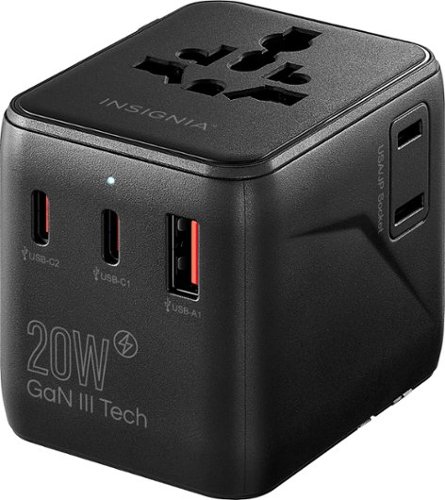
Travel the globe without worry using the Insignia 20W Travel Adapter. It features four plug types (United States, European Union, United Kingdom, and Australia) and is compatible with 13 different outlet types, allowing you to stay charged in more than 200 countries and territories around the world. The adapter offers 2 international AC outlets, 2 USB-C ports and a USB port. The blades and pins retract into the adapter when not in use to easily toss in your bag and take on the go.
Customer Rating
5
A Compact and Useful Travel Charger
on October 18, 2025
Posted by: lambda100
The Insignia 20W travel power adapter will surely get some use on my upcoming trip overseas this year. I like that the unit is so compact and lightweight in a small cube shape that I can simply throw it in my backpack or carry-on. All the adapter prongs are contained in the adapter. Simply slide out the appropriate prong for the country or region. There are three tabbed sliders for EU, USA/AUS, and UK. There are two usb-c ports, one usb-a port, one two prong USA/JP socket, and a multi-prong socket for the different types of sockets you are likely to encounter in different countries and regions of the world. The charger’s maximum power delivery output is 20W using a single usb-c port, 5V/3amp, 9V/2.22amp, and 15W at 5V/3amp using a single usb-c. When using multiple ports, the total power is 5V/3amp, and shared among the usb-c1,c2, and usb-a ports. Keep in mind that this adapter does not convert voltages. Finally, I like that Insignia includes an extra fuse in the adapter. I highly recommend this charger for international travel.
I would recommend this to a friend!






Share this review:


0points
0of 0voted this as helpful.
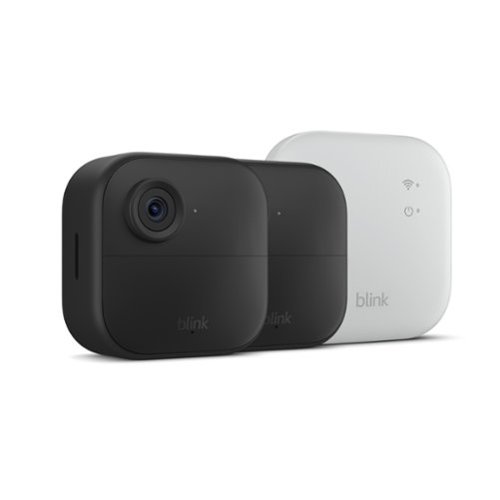
Wireless security camera with extended range, go up to 400 feet from your home. Sync Module XR included ~ 2 camera system
Customer Rating
5
Works Well Even Without a Subscription!
on July 27, 2025
Posted by: lambda100
Blink’s latest Outdoor 4 two camera system is a great basic video camera option offered at an affordable price.
The kit comes with the following:
2 Blink outdoor 4 cameras
2 Mounting kits
4 AA lithium metal batteries
1 Blink Sync Module XR
1 USB cable
1 Power adapter
2 Blink outdoor 4 cameras
2 Mounting kits
4 AA lithium metal batteries
1 Blink Sync Module XR
1 USB cable
1 Power adapter
Setting up the system was a breeze. Download the Blink app, create an account, plug in the Sync Module, install the AA lithium metal batteries in the cameras, follow the step-by-step directions on the app to link the Sync Module to the home wifi, sync the two cameras to the system, and mount the cameras.
The Blink Outdoor 4 comes with a 30 day trial subscription of the Blink Subscription Plus Plan. The options available are the Plus Plan, the Basic Plan, or No Plan. The Blink webpage details what features are available for each option.
The Outdoor 4’s new feature is the Extended Range ‘XR’ capability of the Blink Sync Module when paired with the new Outdoor 4 cameras. With the Blink Sync Module XR and the Outdoor 4 cameras, a maximum of two Outdoor 4 cameras can be positioned up to 250 feet from the Sync Module XR with the Extended Range (XR) option, and up to 400 feet with the Extended Range Plus (XR+) option. In practice, obstructions such as interior walls, materials, and objects will reduce the actual range when using the Extended Range options. It is important to keep in mind that the Extended Range options won’t work for previous generations of Blink cameras.
There are compromises when using either of the two extended range options above. The Extended Range drops the video quality down to a maximum resolution of 720p, while the Extended Range Plus drops it down further to 360p. In addition, the two-way talk function is not available using the Extended Range Plus option.
If the cameras can be located within wifi range, then there is the third option to connect the cameras to the sync module via the wifi connection, which allows for the full HD experience at 1080p resolution.
Also, when using either the XR or the XR+ with two cameras, both cameras have to be set up using the same connection. For example, it is not allowed to have one camera be on an XR+ connection and the second camera be on the XR connection. Both will need to be set on XR or XR+. However, it is okay to have a camera on a wifi connection while another one is on the XR or XR+ connection. Finally, a total of four cameras can be used in XR and XR+, but this will require the purchase of a second Sync Module XR.
The Blink app is user friendly and easy to navigate. There are a number of options to adjust settings. Video is stored in the cloud with a subscription plan. As an alternative, videos can also be stored locally in the Sync Module XR. A micro SD card with a max capacity of 256GB can be inserted to store videos.
I used the camera system with both the Subscription Plus Plan and with No Plan. The motion detection on the cameras were good at detecting motion moving across the frame. The ‘Person Detect’ feature that comes with the subscription plan works well at detecting people. With the subscription plan, the videos were stored in the cloud, and I was able to retrieve the videos almost instantaneously. Night mode using the infrared sensors on the camera was clear, with good contrast and details. Details at 1080p were sharp. The field of view of the camera is 143 degrees, which is limited, but acceptable. When the system is armed, and motion is detected, a notification is sent to the smartphone via the app. Two way communication also worked well.
The subscription plans are affordable. As of the time of this review, the Blink Plus Plan which offers the most features costs $10/month, while the more limited Blink Basic Plan costs $3/month. Again, the comparisons about what features are included in each subscription plan are on the Blink website.
However, what happens when no subscription is purchased? Is the system crippled as to render the Blink Outdoor 4 useless? Thankfully, No. The system without a plan, is still very much an effective security system at its most basic level. These are the features that are still operational:
1. The Blink Outdoor 4 camera system can still be armed and disarmed with the Blink app.
2. Schedules can still be set to arm and disarm according to day of the week and times.
3. Motion Detect push notifications still work.
4. Two Way Communication still work
5. The cameras will still record and store videos when armed.
6. Videos will be recorded locally on the micro SD card. You will need to supply your own micro SD card.
7. Locally stored videos can still be retrieved, viewed, downloaded, and shared from the “Clips” menu of the Blink App. Retrieval of videos from the app is nearly instantaneous in my experience. It will be dependent on the speed of your wifi or your phone data network. Videos that are recorded when the camera detects motion are available for viewing almost immediately after they are recorded.
8. Live View feed still works. However, recording in Live View is disabled.
9. The XR and XR+ range options still work.
2. Schedules can still be set to arm and disarm according to day of the week and times.
3. Motion Detect push notifications still work.
4. Two Way Communication still work
5. The cameras will still record and store videos when armed.
6. Videos will be recorded locally on the micro SD card. You will need to supply your own micro SD card.
7. Locally stored videos can still be retrieved, viewed, downloaded, and shared from the “Clips” menu of the Blink App. Retrieval of videos from the app is nearly instantaneous in my experience. It will be dependent on the speed of your wifi or your phone data network. Videos that are recorded when the camera detects motion are available for viewing almost immediately after they are recorded.
8. Live View feed still works. However, recording in Live View is disabled.
9. The XR and XR+ range options still work.
Under the No Plan option, the essential features at the core of a video security system that are important to me are still there, making the Blink Outdoor 4 Camera system a great, affordable option. For me, the only feature missing which I hoped could have been made available in the No Plan option would be the ability to record in Live View. Other than that, I am happy without the subscription.
In summary here are the things I like about the Blink Outdoor 4 Wireless Security System
In summary here are the things I like about the Blink Outdoor 4 Wireless Security System
+Ease of Use, User friendly Blink App
+AA Lithium Batteries are easy to replace, readily available, and cost effective compared to proprietary batteries
+Affordable purchase price of the Blink 4 Two Camera system
+Affordable subscription plans
+The camera system is still effective with essential core features intact in the No Subscription Plan option
+XR and XR+ options offer the ability to locate the cameras at greater distances from the Sync Module
+Ability to add up to 10 video cameras to the Sync Module
+Local storage with an micro SD card
+AA Lithium Batteries are easy to replace, readily available, and cost effective compared to proprietary batteries
+Affordable purchase price of the Blink 4 Two Camera system
+Affordable subscription plans
+The camera system is still effective with essential core features intact in the No Subscription Plan option
+XR and XR+ options offer the ability to locate the cameras at greater distances from the Sync Module
+Ability to add up to 10 video cameras to the Sync Module
+Local storage with an micro SD card
There are no cons that I can think of. The Blink Outdoor 4 two camera system is remarkably a great value given its price and features offered. I highly recommend that this be on the short list for anyone considering a security camera system.
I would recommend this to a friend!



Share this review:


0points
2of 4voted this as helpful.
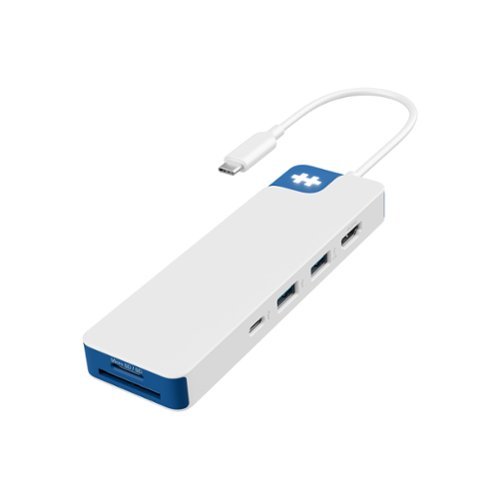
Your desk, your creativity, your rules. Whether you're editing videos, designing, or simply setting up your home desk, the HyperDrive Flex 8 Port USB-C Hub gives you everything you need to stay connected and create without limits. Enjoy crisp 4K monitor support whenever you're editing videos, designing graphics, or streaming content. Power up fast with 100W Power Delivery, access files instantly with SD and USB ports, and plug in all your devices with confidence~all while keeping your sound crystal clear through the 3.5mm Audio Jack. Featuring a sleek design that~s been made using 75% post-consumer recycled plastics this hub merges your need for style and functionality, into one bold accessory.
Customer Rating
5
An Excellent Portable Docking Station
on June 3, 2025
Posted by: lambda100
Ultraportable laptop manufacturers skimp on the port selection, often only providing one or two usb-c ports, and leaving much to be desired for the occasions when I need to use an hdmi port for an external monitor, a usb-a port to connect peripheral devices, or an sd card to view photos from my camera. The HyperDrive Flex 8 port USB-C Hub fulfills the need for port expansion, while being compact, space-saving, and portable, for those times when I don’t need to have a full featured docking station.
The HyperDrive flex has the following 8 ports: 2x usb-c ports, 2 usb-a ports, 1x micro SD card slot, 1x SD card slot, 1x HDMI, and 1x 3.5mm audio jack. I included the port specifications in one of my photographs. It is simple to use, just plug it into your laptop’s usb-c port. The HyperFlex logo lights up and you’re ready to plug in your peripheral devices. The hub allows pass through power delivery (PD) to transmit power to your laptop.
The hub works well. There are a few things I would like to see improved, though. (1) The hub’s usb-c cable is permanently hardwired to the hub. It would be better if it also had a removable usb-c end so that the cable can be replaced if damaged. (2) The hdmi port only supports 30Hz, which is fine, but 60Hz would be a nicer upgrade. (3) If we have to keep with 8 ports, I would have preferred to have an ethernet port over the 3.5mm audio jack.
The hub works well. There are a few things I would like to see improved, though. (1) The hub’s usb-c cable is permanently hardwired to the hub. It would be better if it also had a removable usb-c end so that the cable can be replaced if damaged. (2) The hdmi port only supports 30Hz, which is fine, but 60Hz would be a nicer upgrade. (3) If we have to keep with 8 ports, I would have preferred to have an ethernet port over the 3.5mm audio jack.
In summary, if you need to have more ports than what your current laptop supplies, I highly recommend checking out the HyperDrive Flex 8 port usb-c hub.
I would recommend this to a friend!






Share this review:


0points
0of 0voted this as helpful.
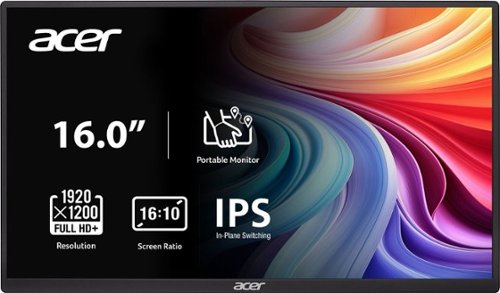
In meetings, in the classroom and anywhere in between, Acer~s PM Series portable monitor is the go-to choice for people on the move! Just fire it up and enjoy High-Definition entertainment~anywhere! Its accurate, vivid colors come to life from any viewing angle on the 16.0~ IPS display that features WUXGA (1920x1200) resolution and 16:10 aspect ratio. Its slim design (0.52") and ultra-light weight (1.43 lbs.) allows it to easily fit in your laptop bag! Perfect for use as a secondary monitor for dual-monitor presentations, it~s powered by a single USB Type C cable, giving you the freedom to connect it to your laptop, smartphone or tablet~quickly and easily! Get fast refresh rates thanks to the Adaptive-Sync Support product that matches the refresh rate of your monitor with your graphics card.
Customer Rating

3
Average at Best with a Few Shortcomings
on May 23, 2025
Posted by: lambda100
I already own too many portable monitors, but couldn’t resist trying the latest 16” WUXGA offering from Acer. My review is focused on the pros and cons to assist in your decision making.
Here are the things that I think Acer got right with this monitor.
+A solidly constructed and sturdy fold-out stand: I have to be careful with my other portable monitors since they have such a flimsy stand that the slightest bump would knock them over. Not so with this Acer portable monitor, however. It can withstand accidental bumps and jostles and still remain evenly planted on my table. Moreover, you can adjust the stand angle as you desire, and not be limited to only a few predetermined positions.
+Decent, matte display: It’s a matte, non-glossy, non-reflective 16” display that pairs well with 15.6” and 16” laptop screens. The wide 170 degree viewing angle is great for sharing content. It is well suited for indoor use, but the display just doesn’t get bright enough for outdoor viewing.
+ VESA Mountable: There are 100mm x 100mm holes for mounting.
+Average color reproduction: Colors aren’t vibrant, but aren’t that washed out either. Colors appear lighter than what I am accustomed to. Please refer to one of the photographs I took comparing the portable monitor with my laptop monitor as an example. For the non-discriminating user who will mainly use this for office productivity work, browsing the web, and streaming videos, the color reproduction on this monitor be sufficient. Color reproduction is on par with my other portable monitors.
+Plenty of on-screen menu controls to make adjustments.
+Choice of connections: You can either connect via a usb-c to usb-c cable or a mini-hdmi to hdmi cable, both included.
+Integrated speaker is surprisingly acceptable. I was expecting a tinny sounding speaker from the portable monitor, but it sounded a little better than some of my other portable monitors. It doesn’t get very loud even at maximum volume. Given the choice, I would stick to my laptop’s internal speakers.
+Includes a 3.5mm audio jack because, hey, why not? I suppose this can be useful if your laptop doesn’t already have an integrated 3.5mm audio jack.
And here’s where I thought Acer had some missteps.
-The physical control buttons on the right edge are a bit recessed behind the monitor’s frame. This makes it hard to press the buttons with your fingers. I could barely get the tips of my finger to press those buttons. Acer needs to relocate them so they are easier to access and press. Once you’re able to get to the buttons to the on-screen menu, the on-screen arrows don’t line up with the physical buttons, so it makes it harder to navigate and the button selection isn’t intuitive.
-Landscape Mode only. Unless the display is VESA mounted and turned 90 degrees to portrait, you can only use the Acer monitor in landscape mode with the built-in stand. My other portable monitors can be positioned in both landscape and portrait positions with the built-in stands. I find that the ability to place a secondary monitor in portrait mode is especially useful for reading long documents and displaying emails. So, this Acer monitor loses some points in my book.
-Inability for pass-through power delivery. My other portable monitors allow the laptop power cable to be connected to the portable monitor’s usb-c port and then have another cable run from the monitor’s second usb-c port to the laptop, while still being able to charge the laptop. This is good for cable management so cables don’t get as cluttered. Unfortunately, the Acer portable monitor disappointingly does not support pass-through power delivery charging to the laptop. It loses a few more points.
-Does not include a protective cover. Acer saved a few dollars here, but it is glaringly noticeable that it loses some portability value if the display isn’t protected during transit. Many other portable monitor manufacturers include a sleeve or case. So, plan to spend a few more dollars for one.
Conclusion: Acer is a well known, reputable brand, but it should not rely on its branding alone, given that there are plenty of portable monitors in the market that have more features at a similar price or lower price point. I have many Acer products and think they are outstanding, but this offering from Acer fails to stand out from the competition. If you can live with the shortcomings that I have listed, then the monitor may be worthy of consideration. I give it 3 stars, average rating, with a lukewarm recommendation if you can find it for the right price.
I would recommend this to a friend!





Share this review:


+3points
3of 3voted this as helpful.
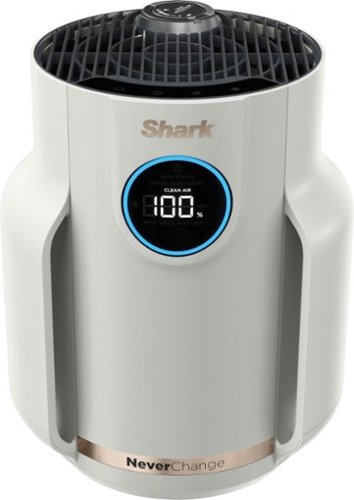
The Shark NeverChange Air Purifier Compact Pro delivers all-day clean air with powerful, long-lasting HEPA filtration. Watch your air quality improve in real time and breathe easier as Shark's PureShield Anti-Allergen* filtration captures dust, pet dander, smoke, irritants, and more. Plus, with up to 5 years of long-lasting filtration,** you can save big on pricey filter replacements. *Allergen refers to non-living matter. ** vs. cost of replacing filters over a 5-year period on top 10 leading competitor units under $150. Source: Based on market share data as of Nov. ~23 to Oct ~24.
Posted by: lambda100
The Shark Compact Air Purifier is one of those “set it and forget it” devices that simply works quietly cleaning the surrounding air in the background.
The first question on my mind was “Does this thing work?” To determine how effective it was in cleaning the air in my home, I tested it in my kitchen and dining area which meets the 250 square foot limit for the air purifier. For this non-scientific test, I made sure all my windows were shut and all the room doors were closed, and proceeded to cook an oil filled, smoky stir fry dinner for my family. I turned on the Shark Compact Air Purifier immediately after cooking and it displayed a 0% air quality reading which was to be expected as the air was full of particulate matter from all the cooking. With the device set on Auto cleaning, the fan whirred away at its maximum setting, and began its task of cleaning the air. It took about an hour, but the Shark air purifier managed to clear up the air and reach a 95% reading within 1 hour. The air quality percent slowly crept up, moving from the red, orange, and green colors that signify poor, fair, and good air quality, respectively. The included optional deodorizer, while very strongly fragrant since it was newly opened out of the package, had a strong soapy fragrance that was effective in masking all the cooking smells. I was impressed by the performance of the air purifier.
The next question I had was whether or not it would be distracting to use in a bedroom overnight while trying to sleep. I’m a light sleeper and easily get bothered by sounds and lights. The Shark purifier’s fan is quiet. The fan speeds can be adjusted from 1 (slowest) thru 5 (fastest), and an Auto setting. Even at level 5, the fan wasn’t any louder than a regular fan. At its slowest speed of 1, the fan is very quiet. Next, the display can be dimmed or entirely turned off so that it does not illuminate in the dark. I’m thankful to report this purifier passes my test for use in a bedroom while also quietly getting the air cleaned.
The other question was about how often I would need to change the filter? The Shark air purifier has two filters that perform different functions. The first filter is a washable one that filters out large debris. The second filter is a HEPA filter that captures particulate matter. Although the Shark air purifier is marketed as “Never Change”, this is an marketing gimmick since all filters will eventually need to be replaced at some point. In fact, the guideline from Shark is that the filter can be used for up to five years without needing to be replaced.
Next is how compact is this air purifier? The cylindrical air purifier measures approximately 9” in diameter at its base and a height of approximately 11.5”. It will take up some space on a table or countertop, but not much.
Finally, do I recommend the Shark Compact air purifier? Yes, I do! Shark crafted a highly effective air purifier that seamlessly cleans and deodorizes the air while doing so unobtrusively in the background. Plus, without needing to replace air filters as often as some other purifiers, there is a real savings realized in long term maintenance costs. I just hope they still make the filters five years from now when I need them!
I would recommend this to a friend!


Share this review:


+2points
2of 2voted this as helpful.

Meet Pixel 8a, engineered by Google. Take amazing photos with the Pixel Camera. And do more, even faster with Google AI. All at a great price.
Posted by: lambda100
The Pixel 8a is the latest iteration to Google’s ‘A’ series phone, building upon its past success to bring feature rich functions and added security at a budget conscious price. I’m no power user; I’m just your average joe who likes to use the phone for emails, taking photos and videos of family and friends, and streaming content. The Pixel 8a fits the bill for me and here are the reasons why:
+It’s the perfect size for one-handed use. The 6.1” size is perfect for someone like me with smaller hands. The phone is well balanced and I’m able to reach anywhere along the display with my thumb when using it with one hand. Plus, being a smaller sized phone, it fits easily in my pockets. This is great since I, much like many of us these days, have to carry two phones with me (company phone and personal phone…lol).
+Smooth swipes, fast performance. Without getting into any specs, just on qualitative feel alone, swipes on the Pixel 8a are silky smooth, instantaneous responsiveness, and just plain fast.
+Fantastic camera and great built-in photo editor. Great vivid, colorful, and bright photos. It can pick the best shots from a group of photos, reduce photo blur, and take night and low-light photos with the really cool ‘night sight’ function. And if you’re into astrophotography, you can get some awesome star filled skies using the astrophotography setting. No need to drag expensive camera gear around. Google already has a set of built-in photo editing features, my favorite of which is the Magic Eraser that can delete unwanted objects in your photos. With the Pixel 8a, Google is also adding a new tool called Magic Editor that lets you select objects in a photo and manipulate them like resizing the object or moving it around within the picture. Finally, a new feature that I find handy on the Pixel 8a is the Audio Magic Eraser that reduces distracting sounds from a video such as wind, construction, or vehicular noises.
+All day battery power. The Pixel 8a has kept up with me so far in terms of needing it to last throughout my busy workday. The specs list the battery as having 4,492mAh of juice. Plenty for what I need, but of course it will depend on how you use your phone.
+Worry Free Operating Software Updates. Google plans to keep updating the Pixel 8a for seven years from the date the phone first became available on the Google Store. Lots of laugh here. Most of us won’t even keep the phone for seven years to see all the updates. We would have already upgraded to the next latest and greatest phone. Even so, the battery will be long dead, rendering the phone unusable, before the seven years is up.
+Plenty of Security Features. I feel protected. I don’t have an iota of knowledge about phone security, but I am glad Google is touting this as having the highest-rated security features with Google Tensor G3 and Titan M2 security chip.
Do I recommend the Pixel 8a? Google packs a lot of features and function into the Pixel 8a, too many to list here. The pixel inherits all the useful features from its predecessors and brings new ones to the table. If you have last year’s Pixel 7a, you’ll have a harder time deciding if it is worth the upgrade. But if you need a new phone now, then the Pixel 8a is hard to beat especially with the guaranteed seven years of updates and the pure android experience.
Do I recommend the Pixel 8a? Google packs a lot of features and function into the Pixel 8a, too many to list here. The pixel inherits all the useful features from its predecessors and brings new ones to the table. If you have last year’s Pixel 7a, you’ll have a harder time deciding if it is worth the upgrade. But if you need a new phone now, then the Pixel 8a is hard to beat especially with the guaranteed seven years of updates and the pure android experience.
I would recommend this to a friend!

Share this review:


0points
0of 0voted this as helpful.
lambda100's Review Comments
lambda100 has not submitted comments on any reviews.
lambda100's Questions
lambda100 has not submitted any questions.

Listen to your playlist in peace with these Sony headphones. They have a 40mm dome driver to deliver the full depth of audio, and the noise cancelling feature minimizes outside disturbances for a better listening experience. These Sony headphones have a battery life of up to 30 hours for extended jam sessions.
Are this headphones are waterproof ?
No, the headphones are not waterproof. The Sony 1000XM2 are not advertised with an IPX rating.
8 years, 11 months ago
by
lambda100
Listen to your playlist in peace with these Sony headphones. They have a 40mm dome driver to deliver the full depth of audio, and the noise cancelling feature minimizes outside disturbances for a better listening experience. These Sony headphones have a battery life of up to 30 hours for extended jam sessions.
The earmuffs can help to reduce more noises than ANC maybe can't do (high frequencies)? How is the passive noise reduction compared with QC35?
I have both the Bose QC35 and the Sony 1000XM2. I qualitatively tested the passive noise reduction for both, and can conclude that passive noise reduction is similar on both. The Sony headphones press tighter onto my ears and gives the perception that they offer better passive noise reduction, but they really do not.
8 years, 11 months ago
by
lambda100
Listen to your playlist in peace with these Sony headphones. They have a 40mm dome driver to deliver the full depth of audio, and the noise cancelling feature minimizes outside disturbances for a better listening experience. These Sony headphones have a battery life of up to 30 hours for extended jam sessions.
I read that the ANC technology don't works well to cancell the high frequency noises (fireguns, fireworks). However, these headphones they have a passive isolation around the ear. The passive isolation, ANC and music combination can help to reduce it?
The passive isolation on the 1000XM2 and all audio headphones on the market for that matter are insufficient at effectively reducing high frequency noises. Of course, if you turn on the volume loud enough, you will be able to block out most of the noise at the expense of your hearing. With that said, please use proper, dedicated earmuffs rated for firearm and industrial use for your specific purpose.
8 years, 11 months ago
by
lambda100
Listen to your playlist in peace with these Sony headphones. They have a 40mm dome driver to deliver the full depth of audio, and the noise cancelling feature minimizes outside disturbances for a better listening experience. These Sony headphones have a battery life of up to 30 hours for extended jam sessions.
What walkman are compatible with these headphones?
The Sony 1000XM2 comes with a standard 3.5mm audio cable. These headphones will work with any walkman that has the standard 3.5mm audio input.
8 years, 11 months ago
by
lambda100
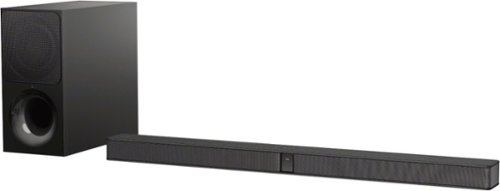
Immerse yourself in rich, vibrant sound with this 2.1-channel Sony sound bar. It has a two-way wireless subwoofer that delivers booming bass and an S-Force PRO front surround for a theater-like audio experience. This Sony sound bar uses Bluetooth connectivity to pair easily with home theater and other audio devices.
Is this entire sound bar wireless or are there any cords to attach to the TV? What's the sound output?
The connection between the soundbar and the subwoofer is wireless. Listening devices can also be connected wirelessly via bluetooth. The soundbar is attached to the TV via HDMI arc or optical cable. The optical cable is included in the packaging. Sound output is rated at 300 watts.
9 years, 3 months ago
by
lambda100
Immerse yourself in rich, vibrant sound with this 2.1-channel Sony sound bar. It has a two-way wireless subwoofer that delivers booming bass and an S-Force PRO front surround for a theater-like audio experience. This Sony sound bar uses Bluetooth connectivity to pair easily with home theater and other audio devices.
how big is the sub woofer on this set
The sub woofer on the Sony HT-CT290 measures 6 3/4" wide x 13 1/2" high x 14 3/8" deep.
9 years, 3 months ago
by
lambda100
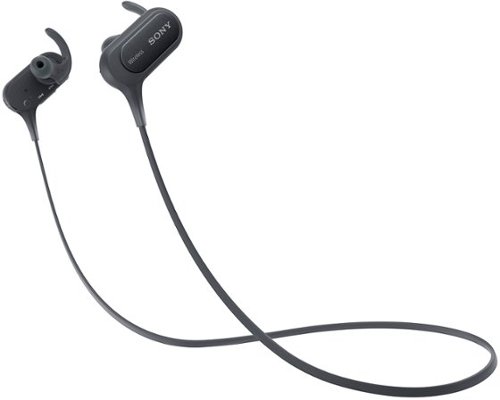
Make hands-free calls and listen to music with these Sony wireless in-ear sport headphones. The wireless design frees your range of motion, and the microphone makes conversations more convenient. Listen to music for over 8 hours on a single charge with these Sony wireless in-ear sport headphones, which are moisture-resistant for use during strenuous workouts.
Can you skip songs on Android phones with these?
Yes, you can skip songs on Android phones with the Sony MDR-XB50BS headphones by pressing and holding down the volume button for two seconds. The volume button is located on the right side of the headphone.
9 years, 10 months ago
by
lambda100
Make hands-free calls and listen to music with these Sony wireless in-ear sport headphones. The wireless design frees your range of motion, and the microphone makes conversations more convenient. Listen to music for over 8 hours on a single charge with these Sony wireless in-ear sport headphones, which are moisture-resistant for use during strenuous workouts.
Do these have a blinking light on them while in use?
Yes, there is a blue blinking light when in use.
9 years, 10 months ago
by
lambda100