
Share MHP777's profile


MHP777
MHP777's stats
- Review count20
- Helpfulness votes23
- First reviewApril 24, 2015
- Last reviewJune 29, 2018
- Featured reviews0
- Average rating4.6
Reviews comments
- Review comment count0
- Helpfulness votes0
- First review commentNone
- Last review commentNone
- Featured review comments0
Questions
- Question count0
- Helpfulness votes0
- First questionNone
- Last questionNone
- Featured questions0
- Answer count1
- Helpfulness votes4
- First answerMarch 19, 2016
- Last answerMarch 19, 2016
- Featured answers0
- Best answers0
![Close Encounters of the Third Kind [Blu-ray] [1977]](https://pisces.bbystatic.com/prescaled/500/500/image2/BestBuy_US/images/products/bdf7da50-e414-4cd3-bd0c-b9e54552c9d6.jpg)
Customer Rating

5
Finally, the theatrical version, and in HD!
on December 29, 2017
Posted by: MHP777
Verified Purchase:Yes
I watched this movie many times when it first came out in theaters. Then they updated it to include extra stuff at the end, but they took out some of the best parts from the middle! Now, finally, here is a set that gives me back the original--I would MUCH rather have the funny middle scenes than see what's inside the spaceship in the updated version. This set is worth the price for the theatrical version alone, and in HD!
My Best Buy number: 2345734954
My Best Buy number: 2345734954
Mobile Submission: False
I would recommend this to a friend!
Share this review:


0points
0of 0voted this as helpful.

This special box set celebrating the 50th anniversary of Star Trek includes all four of the Next Generation films, which were released between 1994 and 2002 and starred Patrick Stewart, Jonathan Frakes, LeVar Burton and the rest of the original USS Enterprise-D crew. All films have been digitally remastered and this set includes behind-the-scenes bonus features
Customer Rating
5
Finally, Generations and First Contact in HD!
on December 29, 2017
Posted by: MHP777
Verified Purchase:Yes
I've always enjoyed Generations because it crosses over between the two captains, and we get to see one more great fight scene and lots of humor from Captain Kirk. I've watched First Contact I don't know how many times, the acting from Picard and Lily are just incredible. But over the years, I'd had to settle with old VHS quality. Now I got this Bluray set and got amazing picture and sound, as well as special features. I'm not crazy about the last two movies in the set, but this set is a keeper and well worth the price for the first two!
My Best Buy number: 2345734954
My Best Buy number: 2345734954
Mobile Submission: False
I would recommend this to a friend!
Share this review:


0points
0of 0voted this as helpful.
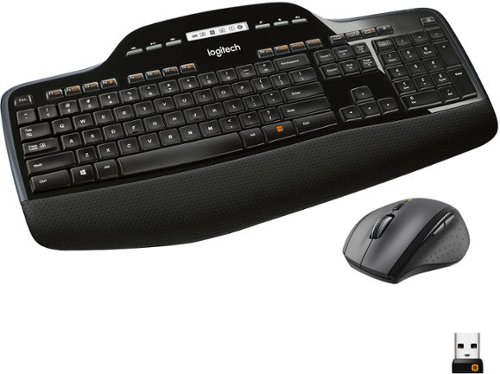
The Logitech Wireless Desktop MK710. Where comfort and productivity go hand-in-hand. This low-profile keyboard features Logitech Incurve keys, which are so comfortable you~d think they were custom-made to fit your fingers, and a cushioned palm rest. Up to three-year battery life for both keyboard and mouse practically eliminates the need to replace batteries.
Customer Rating

4
Great combo, slight tactile problems
on April 19, 2017
Posted by: MHP777
Verified Purchase:Yes
PROS: This combo has full product software support from Logitech (unlike the MK535 combo, which I originally purchased and then returned in order to purchase the MK710). Both keyboard and mouse work without noticeable interruption from the wireless connection, and the software sits in the Windows tray and even monitors the battery levels.
PROS + CONS: The keyboard's wrist rest allows comfortable hand positioning, however the tactile press of the keys is somewhat gummy, i.e., it is not easy to tell if you have actually pressed the key or not. Also, the left Shift key has completely lost its gummy feel and instead gone over to a clackity-clack feel, after less than a month of use. The mouse is ergonomically balanced and has a good feel, but it is important to go into the software and turn off the tiny left-side button that sits near the bottom left of the mouse, otherwise it is extremely easy to accidentally press it and trigger whatever the software has it set up to do--by default this is to show all open windows, which is extremely annoying if you are, for example, in the middle of a game and moving the mouse rapidly and then accidentally squeeze the mouse at its base, which then causes you to press that button, which then causes the game to pause and all open windows to pop up in miniature across the screen so you can select from them.
My Best Buy number: 2345734954
My Best Buy number: 2345734954
I would recommend this to a friend!
Share this review:


0points
0of 0voted this as helpful.
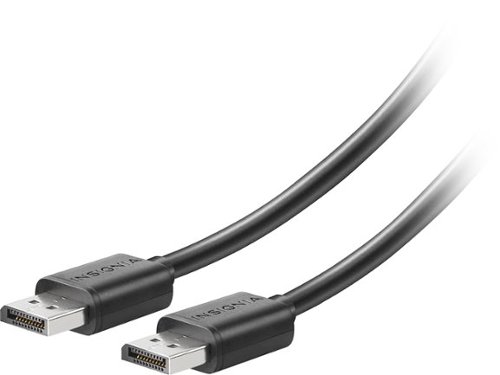
Make the most of your audio and visual displays with this Insignia 6-foot DisplayPort to DisplayPort, which features a shielded design to keep out interference from other devices. The 6-foot length makes connections simple, and this Insignia 6-foot DisplayPort to DisplayPort has a max bandwidth of 21.6 Gbps for faster refresh rates.
Customer Rating
5
Good, functional cable in the right length
on April 7, 2017
Posted by: MHP777
Verified Purchase:Yes
When I purchased my UHD monitor, it came with a short DP cable. For my computer setup, I needed a longer cable. This one fit the bill, giving me plenty of cable for when I need to pull out my tower from my computer cart. And it works great, no artifacts of any kind on my monitor.
My Best Buy number: 2345734954
My Best Buy number: 2345734954
I would recommend this to a friend!
Share this review:


0points
0of 0voted this as helpful.
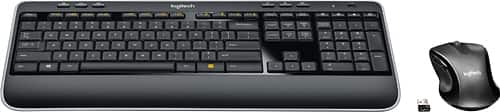
Control your computer with this Logitech wireless keyboard and optical mouse set. Both devices transfer through a single USB port, freeing one up, ideal for laptops so that you can enjoy the convenience of wireless connectivity. Reliable wireless connectivity keeps this Logitech wireless keyboard and optical mouse set linked to your device throughout the day.
Customer Rating

2
OK unit, but not entirely manufacturer-supported
on April 7, 2017
Posted by: MHP777
Verified Purchase:Yes
I originally purchased this combo (MK530, actually sold at Best Buy as MK535) from a near-half-price sale discount that applied when I purchased a monitor. The keyboard was about as tactile as expected for a new keyboard, but the mouse was not comfortable (i.e., it was awkward) to grip and move around. The topping on the cake was that when I installed the software for it - the software for assigning keys, buttons, etc., direct from Logitech's Web site - not only did the Web site not even list this combo, the primary software only recognized the keyboard and it told me I had to install a separate download for the mouse. Two pieces of software to run a combo? Meh. I took this back and got an MK710 instead; for just a little more money, I got a wrist pad, a comfortable-grip mouse, a recognition on the Web site of this combo number, and primary software that recognizes both pieces. Recommendation: Skip the 530/535 and get the 710.
My Best Buy number: 2345734954
My Best Buy number: 2345734954
No, I would not recommend this to a friend.
Share this review:


0points
0of 0voted this as helpful.
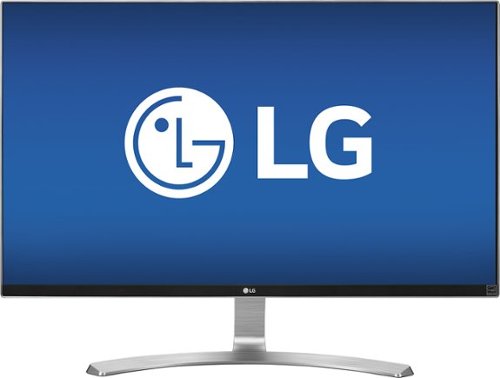
This LG 27-inch UHD 4K monitor provides ergonomic flexibility with a tilt stand. Refresh rates reduce ghosting and blurring, keeping the picture smooth. Enjoy 4K multiscreen convenience for gaming, email and applications tiled for convenience. The frameless design and sleek styling let you save space with this LG 27-inch UHD 4K monitor.
Customer Rating
5
Great monitor at a great price
on April 7, 2017
Posted by: MHP777
Verified Purchase:Yes
I wanted a high-quality 4K UHD monitor that (a) fits far more information on the screen real estate than a 1080p monitor, (b) doesn't take up too much physical space, and (c) is at a reasonable price point, and this one fits the bill. I'm not picky about outside edges being dark, even though other reviewers have alluded to low-price monitors having that problem, but to me, I don't see that problem on the unit I received. I have it ramped up to 125% size in Windows (100% is tiny), so with programs like Premiere Pro I have lots of room to adjust track heights and widths and effects panes and still see a large version of my video as I edit it. The only trouble I have had is that the first one I purchased got an LED-blowout thin, pink, vertical stripe within two weeks after I started using it, so I had to take it back, but I had also purchased a 4-year Geek Squad on it so it was no problem to exchange it right away. For a price that is half what other, similar monitors cost, I am fine with that if it happens again.
My Best Buy number: 2345734954
My Best Buy number: 2345734954
I would recommend this to a friend!
Share this review:


0points
0of 0voted this as helpful.

Safeguard your files with this WD My Passport Ultra 3TB external hard drive, which features a variety of security measures and is designed for fast, efficient performance. WD Backup software allows you schedule regular file backups to a Dropbox account.
Customer Rating
4
Outstanding space, good software
on October 1, 2016
Posted by: MHP777
Verified Purchase:Yes
I bought this to replace a 1TB Book. I saw from the reviews that it had 3x the space and also USB3, but with compatibility to USB2. I needed both the extra space and the compatibility, and this drive gives both for a great price. So far, the drive has worked flawlessly, with zero problems under Windows 10. I give the drive itself two thumbs up. The software is also good, but not great. I use the drive for local backup, so I was hoping the backup software would help out with backing up changed files. It does that, but unfortunately it does not mirror renames or deletes; that is, if I have changed file names or deleted files from my main computer, the backup software does not accommodate for that but instead backs up the changed files as though new and retains the deleted files on the drive. So, I have gone back to doing manual backups without the WD software, so I can mirror my files precisely.
My Best Buy number: 2345734954
My Best Buy number: 2345734954
I would recommend this to a friend!
Share this review:


0points
0of 0voted this as helpful.
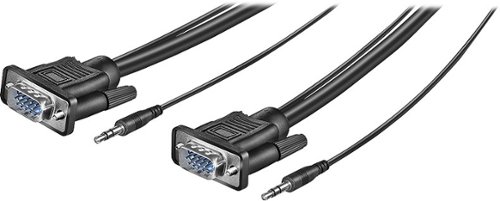
Easily connect your PC to a VGA monitor or TV with this 12' Insignia~ NS-PV12531 cable that supports most VGA video resolutions and 3.5mm stereo audio for optimal performance.
Customer Rating
5
Ideal for the job
on August 13, 2016
Posted by: MHP777
Verified Purchase:Yes
I needed a VGA cable that was long enough to set my laptop in the front of the room, where I would be giving the presentation, and yet place the portable projector in the middle of the room so it would be close enough to fill the screen at the front yet out of the way of the attendees. 12 feet was the perfect length, and this cable performed flawlessly!
My Best Buy number: 2345734954
My Best Buy number: 2345734954
I would recommend this to a friend!
Share this review:


0points
0of 0voted this as helpful.
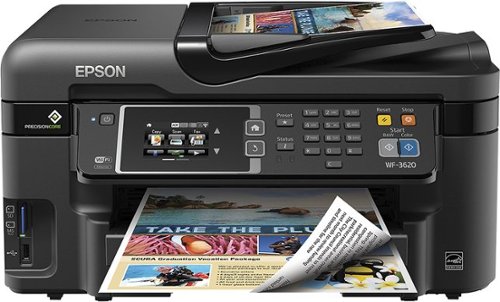
Epson WorkForce WF-3620 All-In-One Printer: Create lasting memories with this all-in-one printer, which allows you to produce borderless photos in the comfort of your home. You can also print, copy, scan and fax important documents. Just connect your computer or mobile device to the printer via built-in Wi-Fi.
Customer Rating
5
Great if you need scanning presets
on March 19, 2016
Posted by: MHP777
Verified Purchase:Yes
My context: I scan a lot of documents (of many sizes), and I need software that allows me to save scanning presets. My previous all-in-one printer (HP) was excellent for this, but they changed the software and eliminated the scanning presets, which made it very difficult for me to use. I researched other brands, and Epson seemed to be the only one with a strong software package that allows scanning presets. So Epson was the way to go for me. After reviewing several Epson all-in-ones, including playing with them at a physical Best Buy store, I decided on this WorkForce model because it has a solid construction - the Expression series has higher specs, both in scanning and printing, but the construction is flimsy. This WorkForce model does just what I need - print well enough, scan fast enough, and a solid construction - with the software that I need. And, the auto-update software is professionally built and occasionally gives me firmware updates. And, the printer is wireless, and I have no trouble connecting to it from any of my computers. And, the printer allows me to VERY easily send a printout to it from my smartphone by simply sending it an email - it has its own email address, so I can literally print to it from any device. Two thumbs up!
My Best Buy number: 2345734954
My Best Buy number: 2345734954
I would recommend this to a friend!
Share this review:


+2points
2of 2voted this as helpful.

Celebrate the 50th Anniversary of the most beloved family film of all time! Rodgers & Hammerstein's cinematic treasure stars the incomparable Julie Andrews as Maria, the warmhearted young woman who brings joy and music to Captain von Trapp(Christopher Plummer) and his children. Experience this magnificent movie musical filled with unforgettable songs, including Do-Re-Mi, My Favorite Things and The Sound of Music.
Customer Rating
5
Gorgeous clarity
on April 24, 2015
Posted by: MHP777
Verified Purchase:Yes
We have been watching this movie on VHS since time immemorial. We finally buckled down and got the Blu-ray. What a difference! I am not always happy with Blu-ray purchases, because some companies (aka Disney) often add extra scenes that we simply don't want. This Sound of Music disc is the original movie, but in gorgeous clarity, both sound and video. And you don't even have to switch tapes! Plus, you get the special feature of Julie Andrews back in Vienna. Worth every penny!
My Best Buy number: 2345734954
My Best Buy number: 2345734954
I would recommend this to a friend!
Share this review:


0points
0of 0voted this as helpful.
MHP777's Review Comments
MHP777 has not submitted comments on any reviews.
MHP777's Questions
MHP777 has not submitted any questions.
MHP777's Answers
Epson WorkForce WF-3620 All-In-One Printer: Create lasting memories with this all-in-one printer, which allows you to produce borderless photos in the comfort of your home. You can also print, copy, scan and fax important documents. Just connect your computer or mobile device to the printer via built-in Wi-Fi.
will this work with windows 10
No problem! I have three computers running Windows 10, and all print to it with no problem. They keep their software up-to-date.
10 years, 2 months ago
by
MHP777