
Share HankW's profile


HankW
HankW's stats
- Review count27
- Helpfulness votes34
- First reviewApril 13, 2015
- Last reviewMarch 18, 2025
- Featured reviews0
- Average rating3.7
Reviews comments
- Review comment count0
- Helpfulness votes0
- First review commentNone
- Last review commentNone
- Featured review comments0
Questions
- Question count0
- Helpfulness votes0
- First questionNone
- Last questionNone
- Featured questions0
Answers
- Answer count0
- Helpfulness votes0
- First answerNone
- Last answerNone
- Featured answers0
- Best answers0
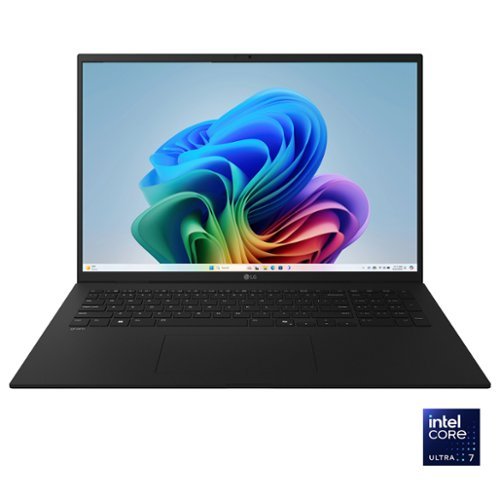
The Power of AI in an Ultra-Light Laptop. Achieve new levels of productivity with the LG gram, designed for those who demand both power and portability. Weighing just 3.2 lbs. and measuring a mere 0.7 inches thin, this ultra-light laptop is built for effortless mobility without compromise. The 17~ anti-glare touch display provides ample screen space for multitasking, delivering stunning visuals whether you're managing multiple projects or streaming your favorite content. At gram~s core, the Intel~ Evo Edition Intel Core Ultra 7 processor (Series 2) ensures seamless performance for AI-driven tasks and demanding workloads.

Posted by: HankW
This is more of a basic laptop than a high-end laptop. Its’ 32 GB of RAM and 1 TB SSD allowed for quick boot ups. The amount of RAM that comes with it should help with using Co-Pilot if you are so incline to do so. The graphics and sound were decent and having Microsoft Teams video meetings were not a problem for the laptop. I was able to use it for two days of work without having it plugged in and still had some battery life remaining. All in all, it does what it supposed to do and that’s all there really is to say about it.
The laptop is relatively light and thin, so it is easy to carry around. One thing I really appreciated was that the charger is via usb-c cable connected to a 65w wall charger. No more carrying heavy charging bricks. These slim features also result in the laptop not having an optical drive. That is okay but I would have expected at least a SD card reader but that too is a missing feature. Still, I believe the laptop is good for everyday use as these missing features is an annoyance but not a deal breaker in my opinion.
I would recommend this to a friend!
Share this review:


0points
2of 4voted this as helpful.

The SharkPOWERDETECT upright vacuum has the most powerful suction and the most advanced cleaning technology to deliver the best overall cleaning of any vacuum*. It features Shark~s most advanced cleaning technologies in the new DuoClean Detect nozzle which includes a network of proprietary Intelli-Sense sensors that automatically sense and react to hidden dirt by boosting suction and brushroll speed when you need it most across floor type, corners, edges, and it even detects direction for powerful suction in forward and reverse to grip-& capture- dirt, debris & hair. Large piles, fine dust, and & pet hair are no match for DuoClean Detect. For above-floor cleaning, you can Lift Away the detachable pod and take your cleaning to stairs, furniture, windowsills, and more. In addition, when you lift away the pod, you transform your vacuum into a stick, for easy motorized cleaning under furniture. Shark~s Odor Neutralizer Technology guards against bad odors inside your vacuum to help freshen your home. Plus, Anti-Allergen Complete Seal with HEPA filtration seals and traps 99.99%** of dust, dander, and allergens inside of the vacuum, and out of the air you breathe. *Based on a geomean of combined tests -IEC62885-2 Sec 5.3 FWD, IEC62885-2 Sec 5.3 REV, IEC62885-2 Sec 5.5 FWD, IEC62885 Sec 5.5 REV vs. upright market. **Based on ASTM F1977, down to .3 microns. Allergens refers to non-living matters.
Posted by: HankW
The Shark PowerDetect is an awesome vacuum that was able to suck up dog hair and dirt much better than my other vacuums. It just amazes me how much of my hairy friend's hair got vacuumed up. The pretty large canister was practically full after going over my 9x12 size rug. My other vacuums with much smaller canister wouldn't be full until after a few days of vacumming the entire house. The vacuum's floor detect automatically detects the type of floor its being used on but takes time for it to determine so I just basically set it manually instead.
The vauum also is supposed to have self-cleaning brushroll to eliminate hair wrap. Although the vacuum design does a great job of not having hair wrapped up on the roller with the rubberized fins, the front soft roller still does get hair wrapped around it. But overall, it does a great job.
I also really like the odor neutralizer that comes with the vacuum but over time it might make the operating cost of the vacuum much higher than need be. So, once the odor neutralizer loses its affectiveness, I'll most likely not replace it.
I would recommend this to a friend!
Share this review:


0points
0of 0voted this as helpful.

Acer unveils an ultralight 16-inch OLED Laptop. Designed for mobile professionals with active and fast-paced lifestyles. The Swift Edge 16 is a perfect blend of performance, security and durability. Powered by the latest AMD Ryzen 7040 Series Processor with Radeon 780M graphics this PC showcases a brilliant 3.2K OLED display supporting 100% of the DCI-P3 color gamut and 400 nits peak brightness for cinema-grade visuals. It also incorporates Microsoft Pluton security processor, helping defend against increasingly sophisticated attacks - keeping you at ease.
Posted by: HankW
In the short time that I’ve had the Acer Swift Edge laptop, I’ve mainly used it for simple everyday activities. That is, surfing the web, e-mails, streaming videos, and listening to music. How well does it meet expectations? Well, it functions as expected and that’s all there really is to say about it. The graphics is decent as is the battery life. The video graphics is really nice with the 16” OLED screen as well as having good audio. Being a new set-up, boot up is rather quick. Since this laptop is really only going to be used at home, I have not quite figure out how to set it up so that I don’t have to log-on or unlock the laptop every time that I turn it on or wake it from sleep. Perhaps it’s a limitation of Windows 11 Home.
It is amazingly light in weight but features are not compromised. A bonus protective sleeve was included and was much appreciated. The only negatives are that due to the thinness, it doesn’t have an optical drive and that it only accommodates a micro-SD card. These, however, are only minor nit-noids.
I would recommend this to a friend!
Share this review:


0points
0of 0voted this as helpful.
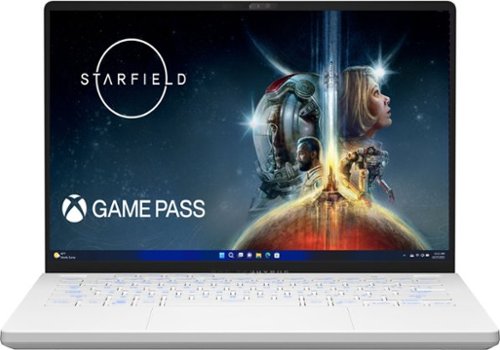
Game like a pro on Windows 11 with this ROG Zephyrus G14. Double up on AMD firepower with Ryzen 9 7940HS CPU and RTX 4060 GPU featuring exclusive AMD SmartShift and Smart Access Memory technology that dynamically boosts performance for any task. Be confident in screen quality with an ROG Nebula 165Hz Display. Leap into the next generation of memory and storage with 8GB of DDR5 RAM, and 512GB of PCIe 4.0 SSD storage.

Posted by: HankW
Coming in at a small 14” screen, the ASUS ROG is certainly a spectacle to behold. The ROG comes in a meticulous box, unlike most generic packages, with the intent of creating a “luxury gaming” aesthetic. Upon the initial booting, there was quite a noticeable amount of time for the screen to turn on, which is not ideal. Subsequent boot up times were also long. The charging, utility, and gaming ports, unlike most laptops, are at the center of the lefthand side which perhaps makes it easier since you won’t have wires wrapping around the laptop. The interior finish of the ROG has a matte feel which further distinguish it from their gaming laptop competitors. Additionally, there are three color options for the keyboard backlight in regards to brightness which is a nice touch. However, these features are ultimately trivial. The keyboard is as equally compact as the screen, making it difficult for everyday utility use such as writing but that nay simply be a personal preference.
Before launching any game, the laptop already felt quite warm so it would be best to play on a flat and cool surface to prevent any issues. What was realized later when playing a game was that the ROG never quite escalated in processing which, in turn, never caused it to overheat. The graphics on the games were incredibly low fidelity, coupled with a small screen, making it a very unenjoyable experience. Although the ROG is certainly capable of displaying UHD, it does not appear to be a defaulted option. In terms of quietness, the ROG is fairly silent and the fans are not too noticeable but as mentioned before, it is likely the low processing power is the reason behind these qualities. Upon a second attempt at gaming after a reboot, the graphics were a lot better but it still falls short of expectations given the cost of the ROG and effort placed to make it appear as a luxury gaming machine.
With adjustable settings, processing power can be altered to improve the graphics and framerate; however, even at its best, it falls short of the larger more powerful gaming laptops. While small, the ROG does have appeal for a more casual gamer who uses it for everyday activities and the occasional gaming every now and then. But without the addition of add-ons to aid with the processing and RAM, this laptop is not ideal for the more hardcore gamer. In addition, the 512 Gig storage is relatively low and will limit the amount of modern games you can have on hand to just a few.
No, I would not recommend this to a friend.
Share this review:


-1point
2of 5voted this as helpful.
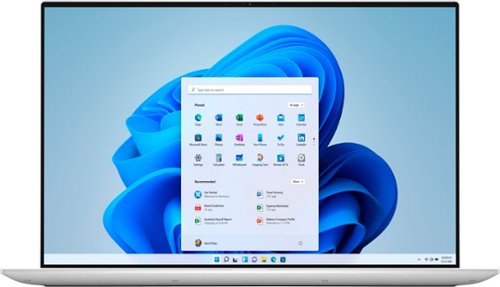
The Dell XPS 15 laptop features a stunning, new 4-sided InfinityEdge OLED display that shows off a 5% larger 16:10 screen and 92.9% screen to body ratio. All the power and features to maximize prodcutivity - Core i7 processor, 16GB of RAM, a 1TB solid state drive, and NVIDIA GeForce GTX 3050 Ti graphics. A premium 15" touch laptop with a thin and light design.
Posted by: HankW
from Boston, MA, USA
I am currently using the Dell XPS 15 laptop as my day-to-day laptop. In the short time that I’ve had it, I’ve just been using it for web browsing, e-mail, zoom meetings, and video streaming.
As a stand-alone laptop, it functions as expected. The positives are that it boots up quickly and the video graphics are really nice. I would have never guessed that an OLED display would make that much of a difference but my perception of the video quality is that OLED made viewing my streamed videos really stand out when watching it on the laptop. Although I am not an audiophile, the sound coming out of the speaker also seems to be really high quality and I didn’t ever feel like I needed to utilize external speakers to boost the audio.
The only con that I have with the laptop is that it only comes with USB-C type ports due to its slim form factor. Connecting the laptop to a larger display or TV would require the use of the provided HDMI/USB-A dongle. It’s not that big of a deal but one would need to make sure to bring the dongle with you if you intent to connect anything that requires an HDMI or USB-A connector. A minor hassle that should not detract from the positives of the laptop.
Mobile Submission: False
I would recommend this to a friend!
Share this review:


+1point
1of 1voted this as helpful.

The Dell G5 15" Gaming Laptop: With Next Generation AMD Ryzen 7 4800H Mobile Processor with Radeon Graphics, you can revel in powerful performance without interrupting your gaming, streaming or videos. AMD Radeon RX 5600M graphics allow you to game on your 15" Dell gaming laptop at higher settings with crystal-clear detail and smooth gameplay. The Dell 15" gaming laptop - AMD R7 - built for gamers.
Posted by: HankW
from Boston, MA, USA
Getting the laptop set up was a bit frustrating as it did not come with any manuals. Had to search online to get info on customizing. If you are not tech savvy this might be a daunting effort. Another aspect of the laptop that was quite infuriating was that my Bluetooth function and mouse pad function stopped working for no reason and I had to go search for drivers to update and restore functionality. If drivers need updating then they should all be done at once and not piecemeal. Setting up a laptop shouldn’t be this difficult.
The built in speaker is not the greatest and suffered as it competed with the fan blower. Get yourself a pair of earbuds or a headset, you’ll appreciate the sound much better. The fan is noisy and is constantly kicking on since the laptop runs hot. It runs hot even when doing mundane things such as surfing the web or doing some Word document writing. Playing games on it will definitely challenge its’ cooling abilities. Although I have only played Fortnite on it so far, the system did get pretty hot so I can only imagine the laptop temperature if I was to play something more graphics challenging like Far Cry. The graphics were smooth and the laptop didn’t experience any lag when there were multiple webpages opened and other programs running concurrently.
Not the best but it is a moderate priced gaming system so if you don’t want to spend the big bucks on a system for gaming, it is really not that bad and a good value. Once you get pass its warts and configure it the way you want it, it is a decent laptop.
Mobile Submission: False
I would recommend this to a friend!
Share this review:


+1point
1of 1voted this as helpful.

Enhance your viewing experience when watching TV with this Sony mini sound bar. The front-facing speakers deliver clear top-range and midrange tones so you can hear voices more clearly, while the built-in subwoofer adds resounding bass for a full-bodied sound. This Sony mini soundbar supports USB and Bluetooth connectivity for music playback.
Posted by: HankW
from Boston, MA, USA
I paired this soundbar with a 32” Panasonic TV so the relative small size (23” length) was perfect for the TV aesthetically. But more importantly, did the soundbar improve the sound quality when compared to the small 10W per channel TV speaker. To this point, I have to admit that I am not an audiophile and a bit tone depth so can’t tell you whether the sound coming out of the soundbar is acoustically correct or not but I can say that it is less tinny than the TV speaker and the “voice” feature does seem to make voices a bit clearer. However, the surround sound feature seems to have a less expansive soundstage than what the TV can produce when simulating 3D surround sound. It should be noted that the built-in bass speaker is only about 2.5” in diameter so don’t expect heart-thumping bass coming out of the soundbar. The soundbar allows you to minimally adjust the bass level up/down one level but frankly speaking, I couldn’t hear or feel the difference when toggling to more bass. I watched Saving Private Ryan using the soundbar and although the sound is fuller and more vibrant than the TV speakers, the bass was lacking. In summary, if you are looking to improve the sound of your TV then this soundbar is worth a look for the price but if you are seeking or expecting sound reproduction of a high-end home theater system then this soundbar will disappoint you.
Mobile Submission: False
I would recommend this to a friend!
Share this review:


+1point
1of 1voted this as helpful.
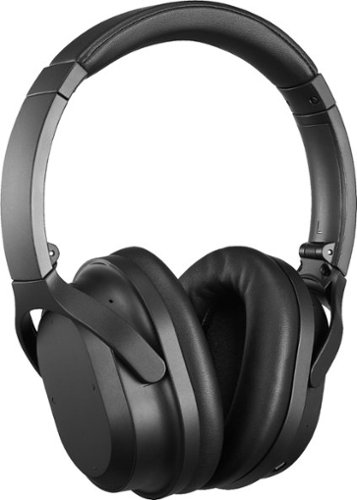
Block out ambient sound with these Insignia noise-cancelling over-the-ear headphones. A built-in microphone lets you take and make hands-free calls, while Bluetooth technology pairs seamlessly with mobile devices for access to your favorite playlists. These Insignia noise-cancelling over-the-ear headphones come equipped with a rechargeable battery, which delivers up to 20 hours of playback on a single charge.
Posted by: HankW
from Boston, MA, USA
I wanted to like these wireless noise canceling headphones but can’t bring myself around to giving it thumbs up to them.
The positives, it was fairly easy to pair up to Bluetooth devices; adequate level of noise reduction (if I had to guess, I would say it reduces about 85% of the lower frequency noises and droning – definitely can’t compare to my Bose QC15); don’t need batteries or headphones turned on to simply function as headphones; and also fairly comfortable even when wearing it for 4+ hours – my ears didn’t feel hot nor did I feel like I was underwater.
On the negative side, you can’t wear these headphones to just cancel out noise as it needs to detect input signals or else it automatically shuts off after 5 minutes. I guess it is a good feature for ensuring that you don’t accidentally leave the headphones on and drain the battery. However, if you intend to, like I wanted, just to use it to block out office droning so that you can concentrate, then these won’t work for you. As for listening to music, although I am not an audiophile, I find that the sound reproduction was scratchy and taking away from the enjoyment of the music. I also detected a hissing sound when noise canceling is activated.
The positives, it was fairly easy to pair up to Bluetooth devices; adequate level of noise reduction (if I had to guess, I would say it reduces about 85% of the lower frequency noises and droning – definitely can’t compare to my Bose QC15); don’t need batteries or headphones turned on to simply function as headphones; and also fairly comfortable even when wearing it for 4+ hours – my ears didn’t feel hot nor did I feel like I was underwater.
On the negative side, you can’t wear these headphones to just cancel out noise as it needs to detect input signals or else it automatically shuts off after 5 minutes. I guess it is a good feature for ensuring that you don’t accidentally leave the headphones on and drain the battery. However, if you intend to, like I wanted, just to use it to block out office droning so that you can concentrate, then these won’t work for you. As for listening to music, although I am not an audiophile, I find that the sound reproduction was scratchy and taking away from the enjoyment of the music. I also detected a hissing sound when noise canceling is activated.
So bottom line, a very average noise canceling headphones that may work for you if you are price conscious but really not the best noise canceling headphones out there although decent enough.
Mobile Submission: False
No, I would not recommend this to a friend.
Share this review:


+2points
2of 2voted this as helpful.
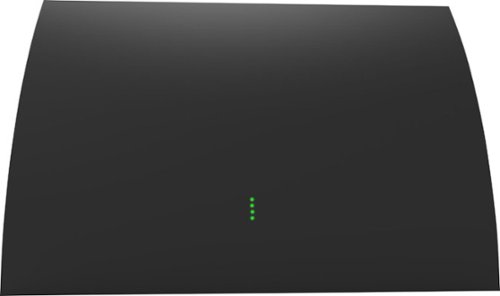
Enjoy major networks without paying a monthly fee with this Mohu Arc Pro indoor HDTV antenna. An integrated signal indicator helps you to find the optimal signal location, while the LED lights let you adjust antenna placement in real time for a more stable connection. This Mohu Arc Pro indoor HDTV antenna uses FirstStage amplifier technology which results in less distortion and stunning picture quality.

Posted by: HankW
from Boston, MA, USA
Tested the Mohu Arc-Pro against a non-amplified SilverSensor in a very challenging area in my house. The TV that was used to test the antennas are located in the lower level of my house which is situated in a valley with dense trees and houses around it. So there are plenty of signal multi-paths and blockages that would be a challenge for TV reception. The SilverSensor is supposedly a directional antenna and the Mohu Arc-Pro is an amplified omni-directional antenna that supposed to receive channels up to 60 miles away. According to AntennaWeb, I should be able to receive 56 channels, four being on the Hi-VHF frequencies. The SilverSensor is an UHF-only antenna and I was able to receive 46 out of 52 possible channels (less the four Hi-VHF channels). The TV’s signal meter all showed that the signal strength to be in the 38% range. The good thing about digital TV reception is that as long as you have a good enough of a signal, the picture is clear.
When the Mohu Arc-Pro was connected to the TV, I was still not able to receive any of the Hi-VHF channels. After much fiddling around with antenna placement, I was finally able to spot the antenna in a location that gave me the most channel reception. What I was able to receive was only 39 of the possible 56 channels albeit that the signal strength for these channels were in the 80% range.
So overall, I was totally disappointed with the Mohu Arc-Pro since I was hoping that it would do much better than the SilverSensor and also be able to receive the Hi-VHF channels that the SilverSensor could not. I can’t rate this antenna highly since it did not live up to its billing and performed worse than a non-amplified antenna. It should be noted that many UHF channels will be remapped to Low-VHF and Hi-VHF frequencies since FCC had auctioned off some of the UHF TV frequencies for wireless communication usage. This repacking of frequencies is all supposed to be completed by early 2020 so it will even be more challenging for some to receive over-the-air TV reception in the very near future. I know of at least 6 of the UHF channels that I am currently able to receive to be repacked to VHF frequencies so the Mohu Arc-Pro will not be an antenna solution for me. Obviously although this antenna didn’t and won’t work for me, your situation will be different and you may get better results from this antenna.
Mobile Submission: False
No, I would not recommend this to a friend.
Share this review:


+1point
2of 3voted this as helpful.
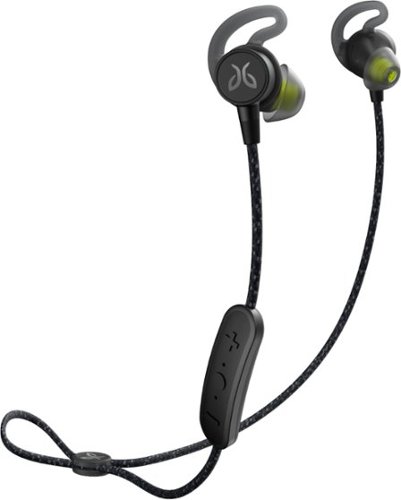
Exercise to a soundtrack with these Jaybird Tarah Pro wireless sport headphones. Featuring a comfortable secure-fitting design and reliable waterproofing, these headphones stay in place during vigorous activity and stand up to sweat and bad weather. These Jaybird Tarah Pro wireless sport headphones last through the longest workouts with up to 14 hours of battery life per charge.
Posted by: HankW
from Boston, MA, USA
A very comfortable earphone that has a long battery life. My casual use allowed me to just charge it once a week but your mileage may differ. I liked how it automatically turns off after detecting no motion after fifteen minutes. I also liked hoe the earphones magnetically clipped in place so that it can be strapped around neck without it flinging around or need to wrap around the ears when not in use.
Mobile Submission: False
I would recommend this to a friend!
Share this review:


0points
0of 0voted this as helpful.
HankW's Review Comments
HankW has not submitted comments on any reviews.
HankW's Questions
HankW has not submitted any questions.
HankW's Answers
HankW has not submitted any answers.