
Share Harbinger50's profile


Harbinger50
Harbinger50's stats
- Review count13
- Helpfulness votes4
- First reviewNovember 27, 2015
- Last reviewJune 3, 2018
- Featured reviews0
- Average rating4.5
Reviews comments
- Review comment count0
- Helpfulness votes0
- First review commentNone
- Last review commentNone
- Featured review comments0
Questions
- Question count0
- Helpfulness votes0
- First questionNone
- Last questionNone
- Featured questions0
- Answer count2
- Helpfulness votes1
- First answerNovember 27, 2015
- Last answerJanuary 27, 2016
- Featured answers0
- Best answers1

This WD Red~ Plus 4TB internal hard drive is designed for NAS systems with 1-8 drive bays in both 3.5" form factors. Its 4TB capacity provides plenty of space to house files, and the Serial ATA interface lets you connect your laptop or desktop. Packed with power to handle the small- to medium-sized business NAS environments and increased workloads for SOHO customers, WD Red~ Plus is ideal for archiving and sharing, as well as RAID array rebuilding on systems using ZFS and other file systems. Built and tested for up to 8-bay NAS systems, these drives give you the flexibility, versatility, and confidence in storing and sharing your precious home and work files.
Customer Rating

5
Working like a champ.
on June 3, 2018
Posted by: Harbinger50
Verified Purchase:Yes
Needed this to replace a dead WD green that was in one of the external "book" cases. Case board died, drive died and i had to send it out to a recovery service (a really cheap and good one that starts at $300 for anyone that's interested, just search $300 Recovery as part of the name, they are in CA) and needed this new Red one as a replacement. So far so good and now running a continuous backup service online. No more losing data for me.
My Best Buy number: 0039279460
My Best Buy number: 0039279460
Mobile Submission: False
I would recommend this to a friend!
Share this review:


+2points
2of 2voted this as helpful.

Are you sharp-shooting assassin? Do you seek glory on the gridiron? Can you devise the most cunning of strategies in open combat? When you're a gamer, there's no such thing as "Game Over." Ensure you never run out of gaming Steam by fueling the action with this Steam Wallet Card.Your key to a world full of gaming possibilities, this Steam Wallet Card provides you with $50 to spend on the content you crave. Whether you're a soldier, athlete or explorer, one thing's for sure ~ you're a gamer. Are you ready for some Steam-powered action?
Customer Rating
5
It's a gift card for Steam
on December 16, 2016
Posted by: Harbinger50
Verified Purchase:Yes
I mean, other than the title, what do you need me to say? It worked. It credited $50 to my Steam wallet and then I used that money to buy games on steam. There ya go. The most stupidly long review you will ever read for a gift card haha
My Best Buy number: 0039279460
My Best Buy number: 0039279460
I would recommend this to a friend!
Share this review:


0points
0of 0voted this as helpful.
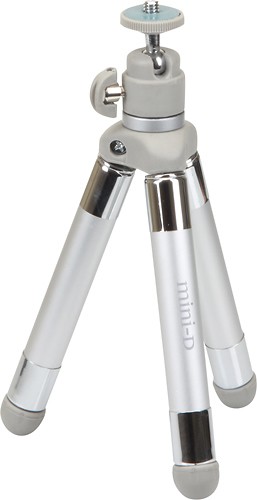
Stabilize your compatible camera or camcorder on a tabletop using this Sunpak PlatinumPlus Mini-D 620-120BB tripod, which features 2 extendable leg sections and a locking ball head, so you can easily adjust the position of your device.
Customer Rating

3
Handy but a little shaky
on December 16, 2016
Posted by: Harbinger50
Verified Purchase:Yes
It's a decent little tripod. Good range of height for what it is, but the legs are just a little too flimsy for my liking. I trust my web cam on it, but NOT my DSLR. No way. Also, be sure to realize that the legs twist to tighten once you pull them out to your desired height. Was getting mad at this thing before I realized that haha. It's okay, but there are probably better options out there in other places...
My Best Buy number: 0039279460
My Best Buy number: 0039279460
No, I would not recommend this to a friend.
Share this review:


0points
0of 0voted this as helpful.
![Hardwired...To Self-Destruct [CD]](https://pisces.bbystatic.com/prescaled/500/500/image2/BestBuy_US/images/products/6d25544a-80c7-4300-8690-ee1cad77e452.jpg)
Customer Rating
5
Best MetallicA in years
on December 16, 2016
Posted by: Harbinger50
Verified Purchase:Yes
Man! One of my first CDs back when THOSE first came out was Metallica . . . And Justice For All. Been a fan ever since. This album is probably the best one they've put out since that one . . . At least since the Black Album. Don't get me wrong, I like Death Magnetic too, but this one is better. And Freaking LONG. 2 CDs! 80 something minutes. None of this 40 minute CD junk for our hard earned money. THANK YOU METALLICA. Keep it going!
Oh, and they put up music videos for every single track. Pretty cool, but definitely give the album a few listens before watching those so you can interpret them for yourself before seeing someone else's ideas about them.
Oh, and they put up music videos for every single track. Pretty cool, but definitely give the album a few listens before watching those so you can interpret them for yourself before seeing someone else's ideas about them.
My Best Buy number: 0039279460
My Best Buy number: 0039279460
I would recommend this to a friend!
Share this review:


0points
0of 0voted this as helpful.
![X-Men and the Wolverine Collection [6 Discs] [Blu-ray]](https://pisces.bbystatic.com/prescaled/500/500/image2/BestBuy_US/images/products/304b2327-370a-41e7-956a-951dd4939472.png)
This collection of a half-dozen films that transpire in the universe of the X-Men includes X-Men, X2: X-Men United, X-Men The Last Stand, X-Men Origins: Wolverine, X-Men: First Class, and The Wolverine.
Customer Rating
5
Great if you don't compare them to comics
on July 15, 2016
Posted by: Harbinger50
Verified Purchase:Yes
Look, I grew up on the xmen comics of the 90s with Jim Lee and the blue and gold teams and the Wolverine solo series. If you go in expecting that, yeah, you're going to have issues. But overall, as the movies have gone on, they have gotten better and better. They are pretty consistent to themselves and viewed with that perspective, they are good. Not MCU great, but that I blame on FOX and too much influence from bryan singer and his outspoken near-disdain for comics. But this collection gets 5 stars because its all the movies (minus days of future past and the latest Apocalypse). Funny thing is, I watched them with my son (he's almost 13) and we were just going to watch the first one . . . ended up doing a marathon and watching the whole set through the night. Good stuff.
My Best Buy number: 0039279460
My Best Buy number: 0039279460
I would recommend this to a friend!
Share this review:


+1point
1of 1voted this as helpful.

Winner of over thirty Xbox 'Game of the Year' AwardsExperience the game that launched one of the most celebrated sagas in entertainment with Gears of War: Ultimate Edition. The shooter that defined the first generation of HD gaming has been painstakingly remastered in 1080P and modernized for Xbox One, and is packed full of new content including five campaign chapters never released on Xbox.The story of "Gears of War" thrusts gamers into a deep and harrowing battle for survival against the Locust Horde, a nightmarish race of creatures that surface from the depths of the planet. Players live and breathe the role of Marcus Fenix. A disgraced former war hero, Marcus seeks personal redemption as he leads his fire team against an onslaught of merciless warriors from below.
Customer Rating
5
Great game remade in HD!
on July 14, 2016
Posted by: Harbinger50
Verified Purchase:Yes
Maybe my memory isn't what it used to be or maybe updating the game with HD graphics really made that much difference, but this felt like a new game and I really didn't remember a lot of the story line as I played through it for the first time since the original version came out. I remember liking it then and nothing changed about that this time around. Good story and characters in this single-player (co-op available) game which is sadly lacking in many games these days as all the publishers abandon story modes and single player options for the massive online multiplayer deathmatches where creativity is unneeded. Looking forward to Gears of War 4 coming out this year too. I put my gameplay of THIS game on the old tube of you, name there is Harbinger50. Check it out.
My Best Buy number: 0039279460
My Best Buy number: 0039279460
I would recommend this to a friend!
Share this review:


0points
0of 0voted this as helpful.
Customer Rating
5
Best StarWars movie since the originals!
on July 14, 2016
Posted by: Harbinger50
Verified Purchase:Yes
This is basically what everyone who grew up with the original StarWars trilogy had been hoping for when those disappointing prequel garbagefests came out. THIS movie is what we wanted. This one had good acting, dialogue, action and PROPER use of CGI for special effects (the filmmakers used a lot of actual props and models which, being made of real materials, always is a better option for that life-like feeling). Sure the overall plot is not too creative/original, but after the prequels, this movie is what we the fans and the franchise needed to restore our faith that the StarWars universe is alive and well and can be looked forward to once again. Highly recommend this movie.
My Best Buy number: 0039279460
My Best Buy number: 0039279460
I would recommend this to a friend!
Share this review:


0points
0of 0voted this as helpful.
Customer Rating

4
Better than expected, fun movie
on July 14, 2016
Posted by: Harbinger50
Verified Purchase:Yes
I really didn't know what to expect from this movie, never having read too much of the old Antman comics, but since the comics really only serve as a template for the Marvel Cinematic Universe, I guessed it wouldn't matter that much. The pacing of the movie was decent with action and exposition well balanced. The comedy element was never overly pushed, but made this MCU movie probably the most "light-hearted" of them all and fun. Overall a good movie that I would recommend. No requirement of having seen any other comic movies really needed.
My Best Buy number: 0039279460
My Best Buy number: 0039279460
I would recommend this to a friend!
Share this review:


0points
0of 0voted this as helpful.
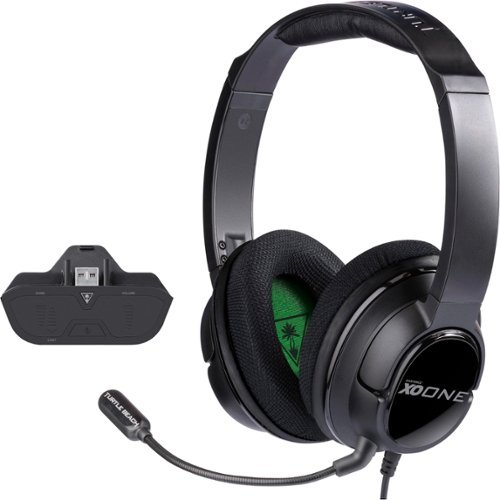
Give your gaming experience a boost with the all-new Ear Force XO ONE Stereo Gaming Headset. Featuring powerful 50mm speakers, this headset from Turtle Beach delivers high-quality Xbox One game and chat audio right to your ears, so you can lose yourself in the intricacies of your favorite games, movies, music and more. Easily fine-tune the sound with the Ear Force XO Headset Audio Controller that places game and chat controls right at your fingertips. With its lightweight and comfortable design, the XO ONE is ready for your marathon gaming sessions.
Customer Rating
4
Great sound and comfort
on May 21, 2016
Posted by: Harbinger50
Verified Purchase:Yes
The headphones are very comfortable and the sound is great. Mic works well and adjustment is easy. Added bonus of being able to remove mic when not in use is always handy. Highly recommended. Only drawback is the length of the cord. If you're plugging it into an xbox controller (or the like) it's not an issue, but even plugging it into my keyboard's headphone jack keeps me sitting a little too close (can't lean back and relax) when plugged in there. So yeah, designed for controller use, but would have been nice for a little forethought given to using it BEYOND that.
My Best Buy number: 0039279460
My Best Buy number: 0039279460
I would recommend this to a friend!
Share this review:


0points
0of 0voted this as helpful.

With Xbox Live Gold, you're part of the world's premier gaming community. Play with friends on the most advanced multiplayer network, get free games, and receive exclusive discounts. Experience games like Halo and Minecraft on a network powered by hundreds of thousands of servers that maximize performance and reduce lag. Get free games every month, worth up to $700 a year. With millions of gamers worldwide, and so many games to play, now's a great time to go Gold.
Customer Rating
5
It's a 12 month membership for xbox live gold
on January 27, 2016
Posted by: Harbinger50
Verified Purchase:Yes
It's a 12 month gold membership for xbox live card. And here's some more characters to meet the minimum. I mean, I guess I could review the membership itself, maybe. I think it's totally worth it for the various games that require it for online multiplayer, but it goes above and beyond the cost after just a couple months with the two full free games a month. You literally don't have to spend money on games any more and you'll get new ones every month. What's not to like? Sure, some months it's some arcade style game, but other months its full on triple A titles like Assassins Creed or Thief. Sure they're a year or two old, but free vs the $20-$30 you still pay in stores for these, and that's used games too, well, again, can't beat free. If you have an xbox 360 or xbox One, you'd be silly (to be nice) NOT to buy this.
My Best Buy number: 0039279460
My Best Buy number: 0039279460
I would recommend this to a friend!
Share this review:


0points
0of 0voted this as helpful.
Harbinger50's Review Comments
Harbinger50 has not submitted comments on any reviews.
Harbinger50's Questions
Harbinger50 has not submitted any questions.
Harbinger50's Answers
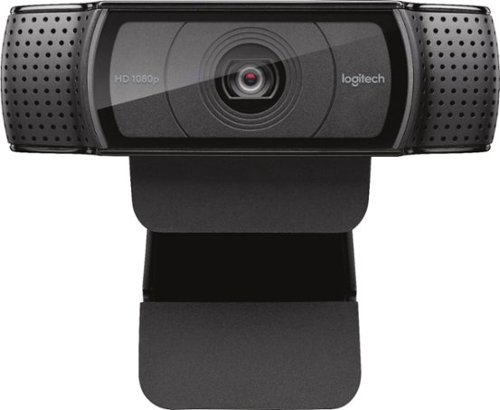
Stay connected with this Logitech C920 Pro webcam that features 1080p resolution when video chatting via Skype and 15.0-megapixel still image capture for crisp visuals. The built-in microphone offers stereo sound for video chatting with loved ones.
Can this webcam be used for live stream?
I am having an event at school that not every student can attend. But I would like to send a live stream to the classrooms so they can still watch. Can I do that with this cam?
It's not so much the camera that you should be worried about, but the software running the streaming. The camera will work and actually has better audio than I expected (I still use a separate mic (Yeti) ), but research your streaming app or service. I think youtube has streaming available now, so I imagine that's free to try out.
10 years, 4 months ago
by
Harbinger50

With the Logitech C270 Webcam, you can confidently join any video meeting knowing you~ll always have quality audio and video. Our most affordable camera, the C270 Webcam is an upgrade for your laptop or desktop with practical features that outperform most built-in laptop cameras. It supports crisp HD 720p/30 fps video calls with diagonal 55~ field of view. Logitech~s RightLight technology adjusts to your lighting conditions, producing brighter images to help you look good even in low-light and backlit situations. And the noise-reducing mic makes sure your voice comes across clearly, even in busy environments.
I know it records with software but I need more info please!
I read earlier it does record with the right software. But how exactly do I do this? I'm new at all this and just knowing "I can get software to do this" is not enough for a new person like me. Help! What software? What is this software called? Any specific recommended? I have Windows 7. Does Win 7 come with something already I can use for this? If not, then what do I use? I need specifics if possible. Also, I am assuming this records my side of the conversation on Skype (which I've never used but plan on using wth this) but can I record the person I am conversing with? That is what I am interested in since this will be used to speak with my niece who is moving far from me. Thank you so much.
I'm sure there are many options for software out there that work with many webcams, but Logitech offers their own Logitech Webcam Software that is just one application (of probably many) that works with this device. It's a decent universal webcam application (downloadable from their site) and allows you to see what the camera sees in a window and allows control over lighting, focus, sound and zoom depending on the webcam's abilities/functions. If you're sitting and recording yourself with the webcam, then this is all you really need for great recordings (not perfect, but really good, coming from a webcam). I haven't used it with Skype and I think the recording would depend on Skype's functionality as I would assume only one application could control the webcam at a time and Skype (if that's what you're wanting to use) would be in control. If skype can record a conversation with any webcam, that's going to be up to Skype and not the webcam. Worse case scenario- you buy the webcam, and Skype doesn't record. You might need to look for different video chat software for that, not a different webcam. And if you don't like the quality of the webcam, you can always return. But trust me, this thing is really a great webcam. High video quality and better than I expected on sound as well. Hope that helps.
10 years, 6 months ago
by
Harbinger50