
Share Harbinger50's profile


Harbinger50
Harbinger50's stats
- Review count13
- Helpfulness votes4
- First reviewNovember 27, 2015
- Last reviewJune 3, 2018
- Featured reviews0
- Average rating4.5
Reviews comments
- Review comment count0
- Helpfulness votes0
- First review commentNone
- Last review commentNone
- Featured review comments0
Questions
- Question count0
- Helpfulness votes0
- First questionNone
- Last questionNone
- Featured questions0
- Answer count2
- Helpfulness votes1
- First answerNovember 27, 2015
- Last answerJanuary 27, 2016
- Featured answers0
- Best answers1
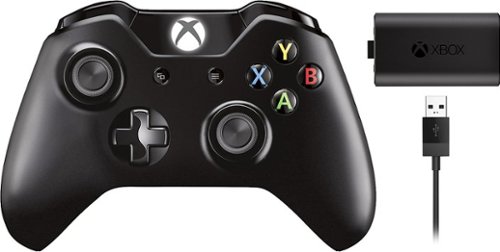
Experience the action like never before with the Xbox One Wireless Controller. Impulse Triggers deliver fingertip vibration feedback, so you can feel every jolt and crash in high definition. Responsive thumbsticks and an enhanced D-pad provide greater precision. And with the 3.5mm stereo headset jack, you can directly plug in any compatible headset. Keep the action going with the Play & Charge Kit, featuring a battery that recharges while you play or afterwards, even when your Xbox is in standby.
Customer Rating

5
It is what it is- a controller with headphone jack
on January 27, 2016
Posted by: Harbinger50
Verified Purchase:Yes
Well, it's like the summary says- it's your standard xbox one controller and has the standard headphone jack that the originals lacked. That's what I was looking for and that's what I got and it works perfectly. Can't complain. Oh and it came with the rechargeable battery pack which, again, should have been standard from the beginning. Better late than never, eh, Microsoft?
My Best Buy number: 0039279460
My Best Buy number: 0039279460
I would recommend this to a friend!
Share this review:


0points
0of 0voted this as helpful.
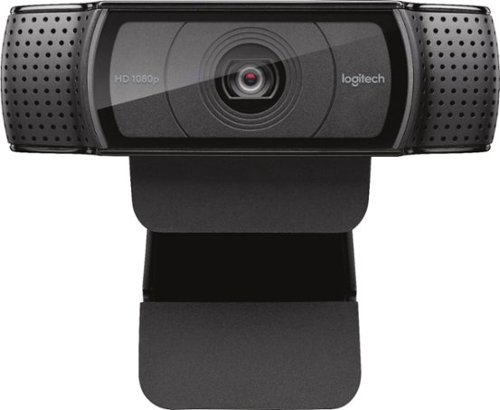
Stay connected with this Logitech C920 Pro webcam that features 1080p resolution when video chatting via Skype and 15.0-megapixel still image capture for crisp visuals. The built-in microphone offers stereo sound for video chatting with loved ones.
Customer Rating

4
Nice high resolution webcam option
on November 27, 2015
Posted by: Harbinger50
Verified Purchase:Yes
Small and light weight. Glad it has a universal size adapter screw hole so it can mount on any regular tripod, big or small since the monitor clip option that is ubiquitous on these devices I find to be pretty useless and obviously leaves very little room for adjustment. Having manual control over focus, lighting, and zoom (to some degree) through software is a definite plus. Sound pickup on this is surprisingly good. A decent backup source if you're recording a pod cast or youtube vid.
My Best Buy number: 0039279460
My Best Buy number: 0039279460
I would recommend this to a friend!
Share this review:


0points
0of 0voted this as helpful.
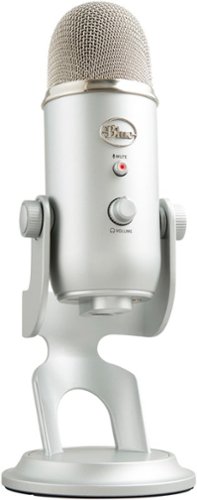
Yeti is the premium USB mic professionals trust worldwide, producing clear, powerful, broadcast-quality sound and enhanced Blue VO!CE vocal effects for gaming, streaming, podcasting, YouTube videos and more. Thanks to Yeti~s proprietary three-capsule technology and four pickup patterns, you can produce professional recordings and streams with legendary ease. Yeti also features studio controls for headphone volume, pattern selection, instant mute, and microphone gain that put you in chargeof the recording process. Set up in seconds with the included desktop stand or connect directly to a mic stand or boom arm.
Customer Rating
4
Great USB microphone option
on November 27, 2015
Posted by: Harbinger50
Verified Purchase:Yes
Great sound, solid build. My only complaint might be that it's a bit bigger and heavier than I expected and comes with no pop/wind screen filter. That would be a nice and cheap extra. The headphone option is a nice plus as are the adjustable microphone pickup patterns available with the flick of a switch.
My Best Buy number: 0039279460
My Best Buy number: 0039279460
I would recommend this to a friend!
Share this review:


+1point
1of 1voted this as helpful.
Harbinger50's Review Comments
Harbinger50 has not submitted comments on any reviews.
Harbinger50's Questions
Harbinger50 has not submitted any questions.
Harbinger50's Answers
Stay connected with this Logitech C920 Pro webcam that features 1080p resolution when video chatting via Skype and 15.0-megapixel still image capture for crisp visuals. The built-in microphone offers stereo sound for video chatting with loved ones.
Can this webcam be used for live stream?
I am having an event at school that not every student can attend. But I would like to send a live stream to the classrooms so they can still watch. Can I do that with this cam?
It's not so much the camera that you should be worried about, but the software running the streaming. The camera will work and actually has better audio than I expected (I still use a separate mic (Yeti) ), but research your streaming app or service. I think youtube has streaming available now, so I imagine that's free to try out.
10 years, 4 months ago
by
Harbinger50

With the Logitech C270 Webcam, you can confidently join any video meeting knowing you~ll always have quality audio and video. Our most affordable camera, the C270 Webcam is an upgrade for your laptop or desktop with practical features that outperform most built-in laptop cameras. It supports crisp HD 720p/30 fps video calls with diagonal 55~ field of view. Logitech~s RightLight technology adjusts to your lighting conditions, producing brighter images to help you look good even in low-light and backlit situations. And the noise-reducing mic makes sure your voice comes across clearly, even in busy environments.
I know it records with software but I need more info please!
I read earlier it does record with the right software. But how exactly do I do this? I'm new at all this and just knowing "I can get software to do this" is not enough for a new person like me. Help! What software? What is this software called? Any specific recommended? I have Windows 7. Does Win 7 come with something already I can use for this? If not, then what do I use? I need specifics if possible. Also, I am assuming this records my side of the conversation on Skype (which I've never used but plan on using wth this) but can I record the person I am conversing with? That is what I am interested in since this will be used to speak with my niece who is moving far from me. Thank you so much.
I'm sure there are many options for software out there that work with many webcams, but Logitech offers their own Logitech Webcam Software that is just one application (of probably many) that works with this device. It's a decent universal webcam application (downloadable from their site) and allows you to see what the camera sees in a window and allows control over lighting, focus, sound and zoom depending on the webcam's abilities/functions. If you're sitting and recording yourself with the webcam, then this is all you really need for great recordings (not perfect, but really good, coming from a webcam). I haven't used it with Skype and I think the recording would depend on Skype's functionality as I would assume only one application could control the webcam at a time and Skype (if that's what you're wanting to use) would be in control. If skype can record a conversation with any webcam, that's going to be up to Skype and not the webcam. Worse case scenario- you buy the webcam, and Skype doesn't record. You might need to look for different video chat software for that, not a different webcam. And if you don't like the quality of the webcam, you can always return. But trust me, this thing is really a great webcam. High video quality and better than I expected on sound as well. Hope that helps.
10 years, 6 months ago
by
Harbinger50