
Share jazzmang's profile


jazzmang
jazzmang's stats
- Review count1
- Helpfulness votes2
- First reviewJanuary 9, 2014
- Last reviewJanuary 9, 2014
- Featured reviews0
- Average rating5
- Review comment count1
- Helpfulness votes0
- First review commentNovember 20, 2016
- Last review commentNovember 20, 2016
- Featured review comments0
Questions
- Question count0
- Helpfulness votes0
- First questionNone
- Last questionNone
- Featured questions0
- Answer count20
- Helpfulness votes0
- First answerJanuary 20, 2011
- Last answerJanuary 9, 2014
- Featured answers0
- Best answers0
jazzmang's Reviews
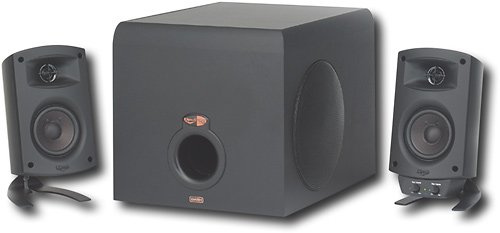
Use this Klipsch ProMedia 3-piece speaker system to enjoy brilliant sound when playing games, listening to music or watching videos on your computer.
Customer Rating

5
Nothing else in its class performs like it!
on January 9, 2014
Posted by: jazzmang
from GA
Coming from my other pro-audio equipment and studio monitors, I was pleasantly surprised to hear what this system was capable of.
The system is equipped with a powerful sub and 2 very capable satellite speakers.
Subwoofer sounds great and commands quite a lot of power and heft in its sound! It's not going to outperform a 10" HT sub or anything, but it's stellar considering its size (and price, of course).
The satellites sound pretty great! Nice clarity and they have the ability to set up a very convincing soundstage where vocals are seamless and give the 'vision' of the vocalist being dead-center in the soundscape.
A couple of things to be aware of:
-The system can be super loud. Surprisingly loud. Prepare yourself to never turn the volume above 40% without fear of upsetting neighbors.
-Subwoofer is also super loud. My subwoofer level is at about 20%, which is where it sounds best in my setup. Try and place the sub in a left-side corner so the woofer can fire to the right and the port is facing frontwards.
-You may get hissing or buzzing, BUT THIS IS NOT DUE TO THE SYSTEM. If you get hissing or buzzing, remember the old tale from physics: Always have your signal wires crossing your power wires at 90-degree angles. I had buzzing when the system was first set up and was a bit disappointed. Then I went and looked at where the signal wire (headphone line w/ green jack) was routed and noticed it was alongside the control wire that goes from the satellite to the sub for most of its path. This added an awful buzzing sound. I properly routed the headphone line to cross all wires perpendicularly and ALL BUZZING WAS GONE. Proper cable management wins again!
-At first glace, the system has high THD ratings compared to pro-audio and Home Theater solutions, but that has nothing to do with the inherent quality of the sound. Just b/c it isn't 100% accurate to the signal being input doesn't imply that it sounds bad. Usually this is b/c of custom EQ, DSP, speaker coloring that is present in the manufacturer design.
-The system can be super loud. Surprisingly loud. Prepare yourself to never turn the volume above 40% without fear of upsetting neighbors.
-Subwoofer is also super loud. My subwoofer level is at about 20%, which is where it sounds best in my setup. Try and place the sub in a left-side corner so the woofer can fire to the right and the port is facing frontwards.
-You may get hissing or buzzing, BUT THIS IS NOT DUE TO THE SYSTEM. If you get hissing or buzzing, remember the old tale from physics: Always have your signal wires crossing your power wires at 90-degree angles. I had buzzing when the system was first set up and was a bit disappointed. Then I went and looked at where the signal wire (headphone line w/ green jack) was routed and noticed it was alongside the control wire that goes from the satellite to the sub for most of its path. This added an awful buzzing sound. I properly routed the headphone line to cross all wires perpendicularly and ALL BUZZING WAS GONE. Proper cable management wins again!
-At first glace, the system has high THD ratings compared to pro-audio and Home Theater solutions, but that has nothing to do with the inherent quality of the sound. Just b/c it isn't 100% accurate to the signal being input doesn't imply that it sounds bad. Usually this is b/c of custom EQ, DSP, speaker coloring that is present in the manufacturer design.
Things that rock:
Soundstage and imaging
Powerful, solid sound
Incredible amount of headroom for high volume situations
Aux-in and headphone jack on the satellite speaker panel (super useful!)
Soundstage and imaging
Powerful, solid sound
Incredible amount of headroom for high volume situations
Aux-in and headphone jack on the satellite speaker panel (super useful!)
Things that I'd like to see in an improved version:
Adjustable crossover
True system on/off switch on the satellite speaker panel
Replaceable 3.5mm stereo cable (so you could use a better-shielded one)
-10dB pad for loud sources
Adjustable crossover
True system on/off switch on the satellite speaker panel
Replaceable 3.5mm stereo cable (so you could use a better-shielded one)
-10dB pad for loud sources
All-in-all, this speaker set is totally recommended. There is nothing else that is near its performance in this class.
My Best Buy number: 562680160
What's great about it: Sound quality, system power, ease of use/setup
What's not so great: No adjustable LP crossover on the subwoofer. Wonky control cable choice by Klipsch.
I would recommend this to a friend!
Sound Quality

5
Share this review:


+2points
2of 2voted this as helpful.
jazzmang's Review Comments
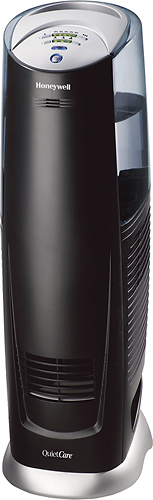
Breathe easy with this 3-gallon humidifier that cleanses the air in your home of dust and pollen while doing away with dry, itchy skin.
Overall 3 out of 5
3 out of 5Empties fast
By JasonReh
It works great. Only draw back is how often it needs emptying. Also would be nice if you could turn off the humidifier feature and use it only as a fan.

jazzmang
GA
You can
November 20, 2016
Take out the filter and don't put water in the tank. When you first turn on the unit, it is in 'constant on' mode. Just pick your fan speed and you're off!
0points
0of 0voted this comment as helpful.
jazzmang's Questions
jazzmang has not submitted any questions.
looking for a wireless internet booster for my laptop. It plugs into a USB port and increases the signal strength for a weak wireless network.
That doesn't really exist, but what may be a better option is to purchase a laptop wireless card (PCMCIA or ExpressCard, depending on your laptop).
Some laptops come with inferior wireless cards. You can either replace the component (technicians only) or buy a new laptop wireless card like the types I mentioned above.
Some laptops come with inferior wireless cards. You can either replace the component (technicians only) or buy a new laptop wireless card like the types I mentioned above.
15 years, 4 months ago
by
jazzmang
GA
What capture cable should I get?
I already have Pinnacle Studio Ultimate. Most of the capture cards I see come with more software (which I don't need).
Unfortunately, you won't see many bare cables sold. The software that comes with it, while possibly not needed, still includes the proper drivers, etc... that is needed to make the capture card work with the majority of capture software.
15 years, 4 months ago
by
jazzmang
GA
Do you sell modem replacements for window computer
Sure, but they are external USB modems. I am assuming you are talking about a dial-up modem and not a cable or DSL modem.
Products from my answer
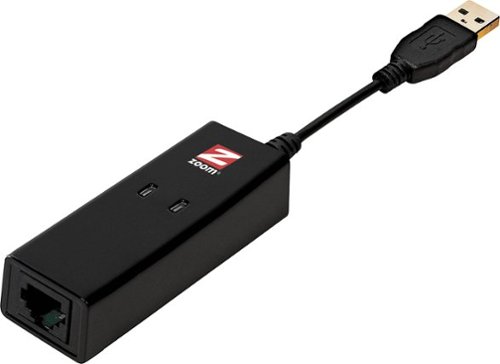
Zoom - 56K V.92 USB Mini External Data/Fax Modem - Black
 (139)
(139)15 years, 4 months ago
by
jazzmang
GA
which motherboard from best buy can i use for a hp dv9815nr?
None. Consumer-level branded laptop motherboards can only be replaced by the exact replacement model. In this case, an HP motherboard and labor will probably put you back about $600.
15 years, 4 months ago
by
jazzmang
GA
What device can double the outputs of an HD signal (1 input to 2 outputs)?
I have a businessman who wants to have an employee work up live demos in an office that will require 2 1920X1080 monitors, but have the results be displayed immediately in an adjacent conference room on a pair of 60" HD monitors. I don't care what connectors are used (HDMI, DP, DVI, VGA others?).
What device can double the outputs of an HD signal? (HDCP is superfluous).
What device can double the outputs of an HD signal? (HDCP is superfluous).
If the employee is doing this on a PC, simply having a true (non-integrated) video card with dual outputs will be exactly what you need.
You'd likely use DVI, although you can just as easily change this to HDMI with some connectors/adapters. Be weary of how long your cables are though. Most cables show signal attenuation at about 20-30 feet of length. You may need a repeater or powered switch, probably available through bestbuyforbusiness.com
You'd likely use DVI, although you can just as easily change this to HDMI with some connectors/adapters. Be weary of how long your cables are though. Most cables show signal attenuation at about 20-30 feet of length. You may need a repeater or powered switch, probably available through bestbuyforbusiness.com
15 years, 4 months ago
by
jazzmang
GA
Is there any way of connecting a videocard to a laptop, if so what would I need
No, there isn't any way of directly doing this.
Check newegg and tigerdirect online for their external laptop video cards. If you meet the minimum requirements, you can use one of these, but your performance will still be limited.
Check newegg and tigerdirect online for their external laptop video cards. If you meet the minimum requirements, you can use one of these, but your performance will still be limited.
15 years, 4 months ago
by
jazzmang
GA
i would like to know if its possible to change the graphic card of a sony vaio VGN-AR830E
You can't. All consumer-level laptops don't have an upgrade path for graphics cards. The graphics card is on the motherboard and is not upgradeable.
15 years, 4 months ago
by
jazzmang
GA
external graphics card...available here?
No. Check an online vendor like newegg or tigerdirect for a huge selection of specialty PC parts.
15 years, 4 months ago
by
jazzmang
GA
can best buy special order a 1 m memory upgrade kit for my mac mini?
If its not on Bestbuy.com, they cannot order it.
15 years, 4 months ago
by
jazzmang
GA
Graphic cards
Can a PCI-E Graphic cards work well if I plug it into PCI slot(White) (Not PCI-E) ??
No. It will not fit or work at all.
15 years, 4 months ago
by
jazzmang
GA