


RedScorpion's stats
- Review count234
- Helpfulness votes1,564
- First reviewJune 21, 2012
- Last reviewJune 11, 2026
- Featured reviews0
- Average rating4.5
Reviews comments
- Review comment count0
- Helpfulness votes0
- First review commentNone
- Last review commentNone
- Featured review comments0
Questions
- Question count0
- Helpfulness votes0
- First questionNone
- Last questionNone
- Featured questions0
- Answer count14
- Helpfulness votes42
- First answerMay 13, 2016
- Last answerSeptember 30, 2020
- Featured answers0
- Best answers5
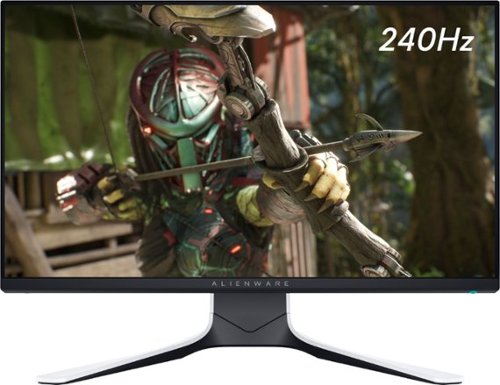
Enjoy a smooth gaming experience with this Dell Alienware gaming monitor. The 24.5-inch Full HD display delivers high-resolution images, while the 240Hz refresh rate and 1ms response time (GtG) ensures real-time display for eliminating image shatters and tearing. This Dell Alienware gaming monitor features DisplayPort, HDMI and USB ports for flexible connectivity, and the ergonomic design allows for tilting, swiveling and pivoting for more vibrant gaming. For an immersive gaming experience, the AW2521HFL is equipped with AlienFX lighting that is fully customizable using Alienware Command Center (separate download required*).
Posted by: RedScorpion
from Oklahoma City, OK
The Dell Alienware AW2521HFL monitor is amazing. That's it. End of review. Pick it up now!
Okay, it isn't quite that simple, but thanks to its tremendous refresh rate, low response time, excellent build quality, and great on screen color reproduction, the Dell Alienware AW2521HFL monitor is the monitor to make all your gaming friends jealous. This is my favorite monitor. This monitor provides the speeds of a TN monitor with the color reproduction and viewing angles of an IPS display. It is the best of both. The higher refresh rates and Freesync technologies lead to smoother frame rates in FPS and strategy games while the improved color reproduction of the IPS display keeps everything looking great in the process.
Assembly: The monitor comes with two HDMI cables, a Display Port cable, and a USB cable to connect the built in USB hub. Important to make sure you plug the USB cable into a high speed USB port on the computer. Connecting the two base pieces to the monitor is simple. If you decide later that you want to wall mount the monitor to a VESA compatible wall mount, the base stand is easily detached via the alien head button on the back of the stand. Front cable management and an optional rear panel, help keep cables tidy. The stand does take up a decent footprint on the desk (in my experience about ten inches for depth), but the stability is great and everything just feels solid.
Setup: Windows will detect this as a pnp compatible monitor on start up. Drivers can be downloaded by googling DELL Alienware AW2521HFL. The included QR code in enclosed pamphlet did not work for me, but googling the product ID will take you to a DELL page where you can download Alienware Command Center and the display driver. You can use the Alienware Command Center to change the lighting profile for the back lighting on the monitor, or you can use the preset lighting options included with the monitor itself.
Make sure you go into your display adapter properties and set the monitor refresh rate to 240hz. By default, I found that the monitor was set on 59hz out of the box.
I tested the monitor on three different computers. Two with AMD freesync and another with an NVIDIA set up. The monitor looked and performed great with all the computers. In my experience, AMD Radeon Software detected and enabled Freesync and G-Sync by default.
Unfortunately, some light bleed was noticeable around the top of the screen in the model I tested and black reproduction wasn't quite as rich as monitors that featured HDR, but on the whole, the color reproduction still won me over. To notice any light bleed, the screen would have to be totally black and even then you have to really look for it. It's possible that this was just a variance among monitors and that it could be nearly eliminated with just some more tweaking. (For what it's worth, I prefer the initial preset and the gaming preset profiles on the monitor.)
This is a very good gaming monitor. Purists might quibble a bit with the slight light bleed / leak, but I'm in love with this monitor. It's truly the best gaming monitor I have ever had. I highly recommend it.
Mobile Submission: False
I would recommend this to a friend!


Share this review:


+2points
7of 12voted this as helpful.
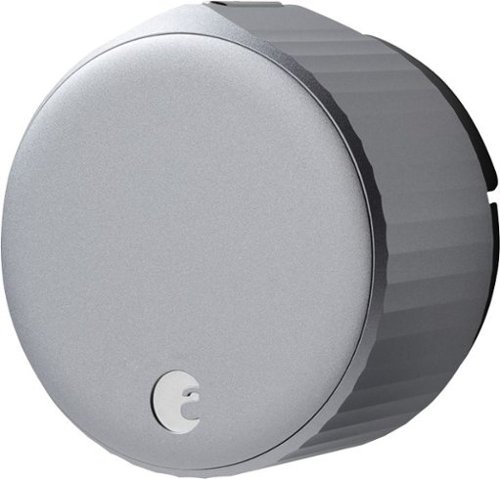
Secure your home with this silver August Wi-Fi Smart Lock. Compatibility with popular virtual assistants lets you lock and unlock your door using voice commands, and the supported iOS and Android app offers easy remote operation. This August Wi-Fi Smart Lock has an auto-unlock function that automatically undoes the deadbolt when you come home.
Posted by: RedScorpion
from Oklahoma City, OK
So, picture this: coming home from the grocery store, your arms full, and the front door just unlocks automatically as you approach. This is the best kind of tech innovation: a device I never knew I needed, but now I can't imagine living without. The August Wi-Fi Smart Lock is great and I'm recommending it to everyone.
Installation: Installation was a breeze. I had it installed in less than 30 minutes. The kit includes: the lock, a mounting plate, a cover plate, adapters to attach the lock to your existing set up, and adhesive tape. The August Home app guides you through the installation process. You secure the outside of your existing lock with the tape, and then, using the screws for your lock, replace the back twist with the August Smart Lock. August also includes an entry door sensor. The sensor can be installed on the outside of the door frame, or it can be installed inside the door provided you are okay with drilling a 5/8 hole into your door. Because I'm renting, I just used the external mounting option.
And that't it. Installation was a breeze. The included adapters work with a large variety of locks. Just make sure your lock operates as a deadbolt.
Features: As mentioned above, the lock can auto unlock as you approach. The lock senses when your phone is back on your home Wi-Fi and unlocks when you approach. You can set up the app to provide notifications for when the door has been left open or if someone unlocks the door manually.
It's easy to send guest keys to friends and family. I can see people who run AirBnB's using this lock and sending keys to guests.
Google integration is great. I have a Google Assistant in the car and it's nice being able to ask my Google Assistant what the status is of the front door lock or tell the Google Assistant to lock the door.
Security Measures: There's two step authentication built in to the app. Users have to pass phone and email checks. In addition, if you use Google or Alexa, you have to provide security codes to unlock the device. If you lose your phone, August has an online tool to report the device loss and disable virtual keys.
Conclusion: The lock works as I expected and I have really enjoyed it. I can't recommend it enough.
Mobile Submission: False
I would recommend this to a friend!


Share this review:


+3points
7of 11voted this as helpful.
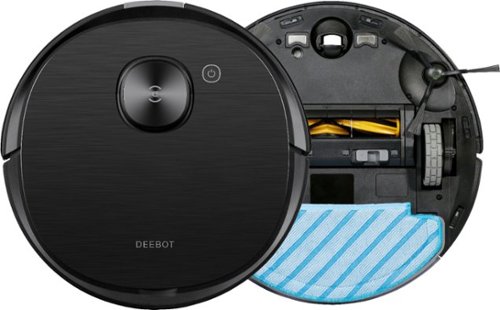
Clean floors with this ECOVACS DEEBOT OZMO vacuuming and mopping robot. The 240ml water tank supports simultaneous mopping and vacuuming, while the carpet detection feature prevents wetting carpets. This ECOVACS DEEBOT OZMO vacuuming and mopping robot works with a mobile app that lets you customize cleaning schedules from your smartphone conveniently.

Posted by: RedScorpion
from Oklahoma City, OK
The DEEBOT OZMO T8 AIVI robot vacuum is a mixed bag. I've been using the vacuum for a week, and on the one hand, it's my favorite robot vacuum. The sensors work great. I think the mapping software did a good job tracing my two bedroom apartment and setting up zones. The Google Assistant and Alexa voice controls worked great and were easy to set up. But the mopping feature on my model is currently broken. I tried tech support, but didn't get much help. The online tech told me the problem I had should not be occurring, and I couldn't understand the phone tech, but she didn't seem to have much to offer. Until the firmware is updated or software is fixed, I can't recommend this robot as a mopping solution, but as a vacuum, I really like it. The vacuum does a good job protecting furniture and picking up household debris, but in its current state, I can't say the product works as advertised and I find that very disappointing.
The good: The robot looks polished. It adjusts vacuuming modes based on surface. It did a great job picking stuff up off of my living room and kitchen floor. The tray was full upon the vacuum's return to dock. The included tools helped me get any stray hairs wrapped around the rollers. Cleaning and maintenance of the vacuum is pretty easy.
The bad: Set up was more confusing than it needed to be. I am using an Android Samsung Galaxy phone with the EcoVacs Home app version 1.4.3. The software got WiFi information from my phone in order to connect the robot to the router. (Maybe I misinterpreted the steps, but that seemed to be what it was doing.) The robot will only communicate over the 2.4 ghz WiFi frequency. So, to set up the WiFi on my robot, I had to first connect my phone to the 2.4ghz frequency. Then I had to connect to the WiFi on the robot. The entire process involved going in and out of my phone's settings and the app. The process created confusion. Instead of having login information and drop down boxes in the app, I was left tabbing in and out and then hitting back tabs to go back to previous screens. First time I tried connecting to WiFi, it didn't work . Second time it stuck, but I just kept thinking my parents or friends who are tech adverse wouldn't have made it that far.
Once that's done and the vacuum is charged, you are ready to run an initial session so the vacuum can map its space. So, I did that. The map came back and was very impressive. However, when I went in to draw virtual barriers, I learned that I should have run an advanced scan and not a basic one. I don't understand what the difference in advanced and basic was except that the basic scan didn't let me use the features of the app while the advanced mode did. The vacuum sessions for both mode was near identical on time. So, if you get this vacuum and plan on using the advanced barriers and locations, make sure you run a scan in advanced mode instead of basic.
I'm not sure if this is a good / bad / or tbd, but the vacuum has a camera and software that allows you to remotely control the vacuum and, using the included software, spy on your friends and family. Ecovacs includes a camera cover and you do have to first give the app permission, but because the device can be shared and it is constantly connected to my WiFi, I had some black mirror / big brother concerns. Do I have to suffer functionality from the vacuum to protect my privacy?
Finally, the mopping. To engage your Deebot in mopping mode, you must add water (I chose distilled to keep hard water sediments out of the device) and attach the mopping plate. Ecovacs provides one washable mopping pad and several disposable mopping pads. Adding water and the mopping plate is easy, but this is when I started having all sorts of problems with my device. Once the Deebot detects that the plate is installed, it will not cross carpet. When I put the plate on, placed the Deebot back on the charging station, and told Deebot to conduct an automatic cleaning, the robot just went in reverse until it crashed into the wall and it kept trying to reverse even though it could go no further. If I picked the robot up and placed it on a hard surface, it would mop as expected, but when it finished that room and wanted to return to the charging station, it would detect the carpet again and refuse to cross. That error goes against the materials provided and the functionality promised for the vacuum. If I have to pick up the robot and physically take it to each room I want mopped, I would be better off with a swifter. If that's a bug that will be patched out, I would like to know. If there is a toggle in app that would fix this problem, I couldn't find it. I tried different types of carpets and rugs. I tried everything I could think of, but once that mopping plate is installed, the robot will malfunction unless it's placed on a hard surface. The phone tech seemed to suggest that the shag carpeting was causing the problem. So, I put the robot with a plate on a large rug, I had the same problem regardless.
Conclusion: I really liked this vacuum. Once I got the software set up and ran an advanced scan (as opposed to the basic one), I really liked it. But the mopping feature is currently broken and doesn't perform as promised. I really hope that Ecovacs fixes this problem soon. I intend to keep using this robot as a vacuum and if a software update fixes the mopping problem, I will gladly add a comment to this review and let others know.
Mobile Submission: False
No, I would not recommend this to a friend.


Share this review:


+11points
11of 11voted this as helpful.
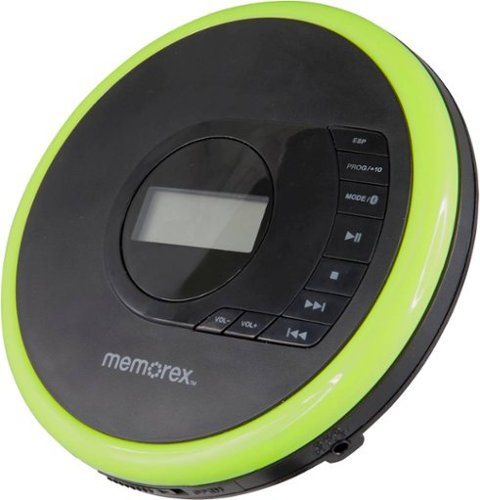
Listen to your favorite albums and audiobooks on the go with this Memorex portable CD player. The 40-second anti-skip protection function for CDs ensures smooth, uninterrupted listening, while the dynamic bass boost system delivers rich sound. This Bluetooth Memorex portable CD player features an LCD screen and digital control buttons for conveniently choosing tracks and adjusting volume.
Customer Rating

4
Let's Party Like It's 1990
on April 17, 2020
Posted by: RedScorpion
from Oklahoma City, OK
Gas prices are under $2.00 and I'm reviewing a CD player. What year is it!?!? But, to be fair, this isn't quite like the CD players of the 90's. This CD Player has Bluetooth and far better electronic skip protection than my old CD players did back in the day. It isn't a flawless experience, but if you're looking to add a CD player to your car or want to connect without wires to your Bluetooth speakers and headphones, then dust off your CD wallet and prepare for a blast from the past.
Bluetooth: So, the big selling feature of this CD player is the included Bluetooth connectivity. With Bluetooth, you can connect this player to your portable speakers and wireless headphones. Connection isn't without problems, though. To get Bluetooth to work, you have to turn on the feature each time you start the CD player. It isn't enabled by default. Second quirk is I found myself constantly having to re-pair devices after I had either shut down the CD player or the Bluetooth device. It wasn't a consistent problem; some headphones stayed connected while some speakers did not. But it was a bit more difficult than turning on the devices and having a solid connection each time.
Features: Everything works well. Volume control is digital. The electronic skip protection worked well for my walks and car rides. The buttons on the top of the player are easy enough to use.
The player comes with 2 AA batteries, but no power cable. You can hook up a 4.5v AC adapter, but you will need to buy that separately. With the added feature of Bluetooth connectivity, it would have also been nice to have had a micro or mini USB power port, too. But, I guess that would have been asking too much.
As I said above, anti-skip works well. If you want, you could easily hook this player up to a car's auxiliary audio port. Many vehicles today are foregoing CD players in lieu of huge tablet like displays. If you are looking for an automotive solution, this worked well for me. I didn't experience skips, and the controls on the top of the drive were easy enough to access without taking my eyes off the road.
So, in conclusion, while Bluetooth works, it is a bit more quirky than I would like. As a portable CD player, the drive works well and Bluetooth does work if you are okay with constantly re-enabling and syncing devices.
Mobile Submission: False
I would recommend this to a friend!


Share this review:


+60points
65of 70voted this as helpful.

HYPERBOOM rocks a supermassive sound and extreme bass that takes your party into the stratosphere. Its phenomenal dynamic range brings your tracks to life, rendering every sound level in gorgeous detail. The brainy adaptive EQ reads the room~or patio, or rooftop~and automatically customizes the speaker~s sound until it~s utterly perfect for the space. Two Bluetooth, one auxiliary and one optical inputs let you and your friends connect four devices and easily switch between them, so the music never has to stop! With a rechargeable up to 24 hour battery, HYPERBOOM goes all night~and anywhere~from your living room dance-off to the ragin~ roof party.
Posted by: RedScorpion
from Oklahoma City, OK
If a speaker is judged by the number of noise complaints you get, then the UE Hyperboom is a good one.
I really like this speaker. The bass can shake the walls, but I felt the highs and the mid-range sounds still came through well.
The speaker is meant for the party. It has a USB port built-in to charge your wireless devices. It charged my phone with the speaker not even on.
I charged the speaker the first night I had it, and since then, I haven't had to charge it even with pretty consistent daily usage. UE claim this speaker gets 24 hour battery life, and I believe it.
Connecting to two smart phones via Bluetooth is as easy as a button press. The aux and optical connections are simple and work well. If I had a complaint with the included connections, I wish I could do more with the USB port. As it is, that port is only to power devices and doesn't allow you to say transfer mp3s via USB or hook up to a PC or laptop for audio playback. Minor quibble, but could be useful info for some folks.
From the ultimate ears app, you can set your EQ settings. With adaptive EQ, the sliders will adjust a bit to match the space. You can also manually adjust sliders or place in heavy bass, normal, or cinema modes.
The app experience worked well, but isn't perfect. I couldn't get Amazon music to work correctly with the quick play feature, but Spotify worked well.
I really like this speaker. In general, I have enjoyed my products from UE. They sound great and feel built to last. Easily recommend to folks looking for a speaker that sounds as good at a pool as it does in your bedroom.
Mobile Submission: True
I would recommend this to a friend!


Share this review:


+2points
2of 2voted this as helpful.
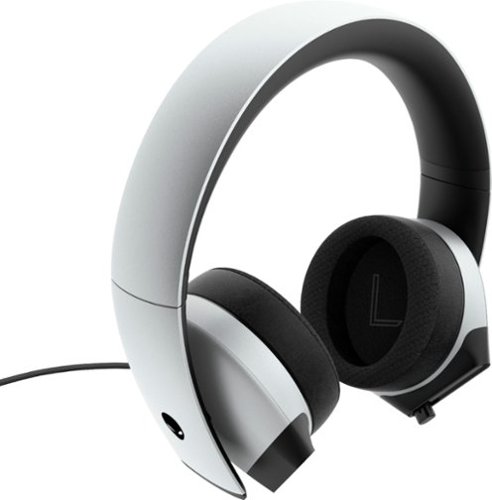
Enjoy outstanding sound clarity with this Dell Alienware gaming headset. The 7.1 stereo surround sound technology delivers a fully immersive listening experience, while the uni-directional noise-canceling retractable microphone blocks background noise for crisp, clear audio. This Dell Alienware gaming headset has earcups made of memory foam, sports fabric and leatherette combined with a cushioned headband for comfort during extended gaming sessions.
Customer Rating
4
Good Stereo Headphones Held Back by Poor Software
on February 6, 2020
Posted by: RedScorpion
from Oklahoma City, OK
First, it should be noted that these are stereo headphones. They are not truly 7.1 headphones. The headphones aren't recreating 7.1 channels of sound. There is no mini-sub in the headphones. They are stereo headphones that produce 7.1 effects through software. I also don't think they are truly noise cancelling. They provide enough suction around the ear to keep outside noises to a minimum, but there's no active noise cancellation as far as I can tell.
As stereo headphones, they sound pretty good. The drivers provide good detail. To me the bass could have been stronger, but the midrange notes were good. The uni-directional microphone sounds great in game chat. The headphones come with an adapter to hook up to either a PC via USB or an analog 3.5 mm cable. Both options include volume controls on the cable. I feel like you could use these headphones on a gaming PC or a PS4 / XBOX One without much compromise.
One note, my head got hot.
However, the software is awful on PC. I ran into problems with four computers. It seems the ideal way to install the software on non Dell or Alienware PC's is to plug the device into an open USB port and then have windows software update auto detect the device and download the appropriate Alienware Command Center through the Microsoft Store. However, that method doesn't always work. On one PC, I followed those steps and everything installed only to have the Command Center software tell me it could not detect my device.
On another PC, I tried installing the software straight from Dell.com. That didn't work either as then the Command Center software would glitch out trying to download a required update from the Microsoft Store.
And, a quick Google search, informed me that I wasn't the only one having these problems. The only solution I found that worked was to do the following: install the headphone driver and the command center software from Dell.com. When that method eventually fails and produces error in the windows store, uninstall the command center software from add/remove programs in the Windows Control Panel. THEN... Go into the Microsoft store App. Look for purchased software, find previously purchased AlienWare Command Central and install from Microsoft Store.
That overally complicated procedure was the only thing that worked for me on at least two of my four computers. On the other machines, I am still trying to get command center to work. I am so disappointed in this software.
These software problems are a huge issue because it is the only way to achieve the advertised 7.1 surround. ... Well... There are other options. You could use spatial sound built into Windows with either the Dolby Atmos for Headphones, DTS Unbound, or Windows Spatial sound. But without any of that, these are just good sounding stereo headphones. And, Dolby Atmos and DTS Unbound are not free.
I'm just incredibly disappointed in this software. The headphones deserve better software support. There is no documentation for installation that I could find in the box. The entire process was overly complicated for a part that I should be able to just plug in and use.
So, I'm recommending the headphones for console gamers and PC gamers if they are willing to use Dolby Atmos for Headphones or some other spatial software for surround sound support. Stay away from Alienware Command Center. The hassle just isn't worth it and mars what would otherwise be a great experience.
Mobile Submission: False
I would recommend this to a friend!


Share this review:


+4points
4of 4voted this as helpful.
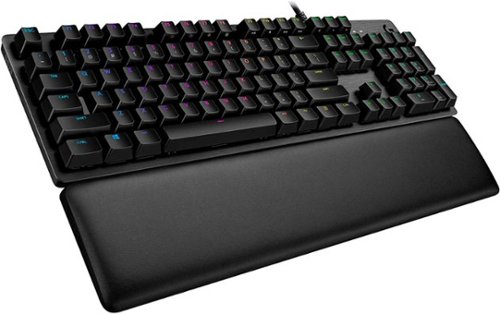
G513 is a high performance RGB mechanical gaming keyboard that features advanced technologies in a modern and sleek design. G513 includes full spectrum ~16.8M color RGB per key lighting with LIGHTSYNC technology, choice of mechanical switches, and a memory foam palmrest to deliver utmost comfort. G513 is the perfect blend of performance, advanced technologies and features, and unparalleled build quality and comfort.
Customer Rating
4
Good Keyboard, Horrible Software
on January 17, 2020
Posted by: RedScorpion
from Oklahoma City, OK
I like the keyboard. It has a good response. The brown switches have been great at giving a quiet, yet discernible resistance when I type. I wish the G513 had a volume slider that wasn't reliant on using a function key, but I like the response rate and the resistance of the keyboard. Switching keys out with the included tool is easy, and the extra USB port on the keyboard is convenient (assuming you still have a free USB port on the back of your computer...)
I'm just going to say it: I hate G-Hub. G-Hub is the software that Logitech wants you to use to customize your keyboard's lights and macro keys. It's awful. Drop down menus would show multiple lighting options, but most would not work. I would click, but the lighting selection would not switch over. Using a Logitech G-603 mouse, G-Hub reconfigured all settings from Logitech Gaming Software and I had problems with my mouse's DPI randomly switching when it should have been locked. My Caps-Lock and G-Shift lights never worked while G-Hub was operating. The entire program is awful. Maybe I'm having more problems because this computer had been using Logitech Gamer Software and not G-Hub, but they both have the Logitech name. Logitech, please patch your software. I had this problem on a desktop computer and a laptop.
The Logitech software recognizes when I start a game, but I didn't see any change in the lighting profiles custom to the game I was playing. I'm not sure if that's another feature that is just not working yet or what.
While I hate G-Hub, I did find a work around. if I re-download and install the older Logitech Gaming Software (circa 2018). the software that G-Hub replaced, the keyboard works fine. The interface isn't as polished and everything feels a bit dated, but it's all there and works.
But again, I like the keyboard. Typing works great. G-Hub was awful, but I did love turning on the audio visualizer (it exists in Logitech Gaming Software as a separate APP) and listening to Spotify.
I'm recommending the keyboard, but the software is awful.
Mobile Submission: False
I would recommend this to a friend!

Share this review:


+1point
1of 1voted this as helpful.
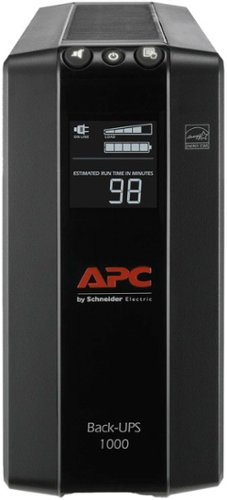
High Performance Computer and Electronics UPS for Premium Power ProtectionThe Back-UPS Pro family offers guaranteed power protection for high performance computer systems, routers/modems, external storage devices, game consoles and other electronics in your home or business. These UPSs supply electronics with abundant battery backup during outages and stabilize unsafe voltage levels. They also provide power protection from damaging surges and spikes, and allow the use of management software so you get the most out of your UPS. Premium features of this family may include Automatic Voltage Regulation (AVR), an LCD display, Smart Outlets, energy saving functions that reduce electricity use, network manageability, Watchdog, or configurable outlets. Together with the rest of the Back-UPS Pro's standard features, they are the perfect choice to protect your data and keep your system available.
Posted by: RedScorpion
from Oklahoma City, OK
Short Review: On a gaming PC with a 800 watt PSU, a high refresh monitor, speakers, and networking equipment, I got close to 24 minutes of extra power on a full charge. That's nowhere near 90 minutes, but I didn't realistically expect that and most people won't have a PSU that large. Granted, during part of that time my machine switched to power saver mode realizing it was on a battery, but 24 minutes is a good amount of time to finish up some work and shut down a machine and it's way more time than I had before with a APC-UPS 600. The APC Back-Ups Pro serves its purpose well.
Without extra software, the screen does a good job of showing the charge and estimating the remaining battery life. The ability to turn off the alarm with a button press was nice, too.
But a lot of what sets this unit apart from my older Back-Ups are the integrated circuit breaker and the automatic voltage regulation.
You can adjust the sensitivity of the unit to decide when it will switch over to battery power. At my current location, I find the power to be relatively stable, but if you have frequent voltage fluctuations, the back up gives you the option to change sensitivity and switch over to the battery more often.
The Back-UPS estimated it could run my machine for 30 minutes on battery power, but I was only on a half of a load. This is definitely a device where your experience will vary based on the load. Unlike prior Back-UPS Pros, this Back-Ups does not have a separate USB port to charge a phone or device, but I can't say I needed that. There is still a data port you can connect to a PC's USB port.
I like and recommend the Back-UPS pro. I wish I got closer to 90 minutes of life, but I will take the 25.
Mobile Submission: True
I would recommend this to a friend!


Share this review:


+2points
5of 8voted this as helpful.
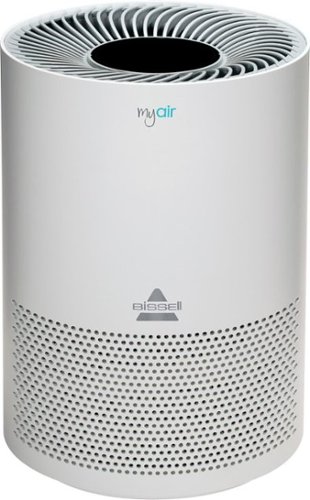
Ensure the air you breath is clean with this BISSELL MyAir personal air purifier. The compact size lets you place it almost anywhere, while the activated carbon eliminates common household odors. This BISSELL MyAir personal air purifier boasts a three-in-one filtration system to capture 99.7 percent of 0.3-micron particles such as dander, pollen and dust.
Customer Rating

5
Bigger Than Expected, But Works Great
on December 4, 2019
Posted by: RedScorpion
from Oklahoma City, OK
This fall has been very rough on my allergies. Both my girlfriend and I have been struggle for a few weeks with coughs and congestion. Within a few days of using this filter, we both have been breathing much better.
On low, the filter is nearly silent. On high, there is audible white noise, but I find it relaxing. The night light is a good touch, but I wish I could have the buttons illuminated without turning on the night light.
Set up is easy. Note: you must take the bottom of the unit off to take the bag off of the included filter.
The unit is a bit bigger than I expected. With a diameter of 8.25 inches and a height of roughly a foot, it is a bit bigger than I expected.
But, I like it. It works great and I want another one for the office.
Mobile Submission: True
I would recommend this to a friend!
Share this review:


+2points
2of 2voted this as helpful.
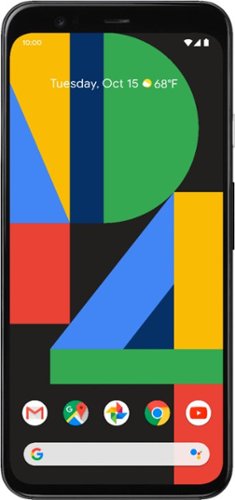
Google Pixel 4 is the phone made the Google way. Its camera takes a perfect shot every time, even when it's dark out. The new Google Assistant helps you do things, such as control your phone and multitask between apps - with just your voice. Pixel 4 is also the first phone with Motion Sense, letting you use gestures to get things done without having to touch your phone. Google Pixel 4 is built around Google software you know and love that's always getting better.
Customer Rating
5
Feature Packed and Ready to Roll
on November 4, 2019
Posted by: RedScorpion
from Oklahoma City, OK
I am almost surprised at how much I have enjoyed the Pixel 4. If you want the simple, clean interface of an iPhone, but the freedom of an Android device, Google has provided a good phone at a good price.
Switching from an iPhone 8 was easier than I had expected. During the initial set up process, you plug your old phone into the new Pixel using the included adapter. A few minutes later, and most of my iPhone apps, pictures, music, and contacts were securely in place. I was even surprised to see my wallpaper from the iPhone 8 made the transition.
If you are getting an unlocked phone, make sure to get a new sim from your carrier of choice. Trying to plug a SIM registered for an iPhone into a Pixel can, I discovered, create a few headaches during activation and attempts to set up voice mail.
I am new to Android devices. Whereas I had been with iPhones since the iPhone 4. But, I haven’t struggled with the new interface. Everything is explained incredibly well. The Pixel has such a snappy, clean interface, that I felt right at home rather instantly.
I just like how this phone works. The refresh rate on the display helps keep the interface fluid. The screen was bright and clear. I really like how this phone fits in my hand. It's just a comfortable phone to use. The gesture controls work well. You can adjust the amount of pressure, but just a gentle squeeze on the bottom of the device brings up the google assistant which, let’s be honest, is much more advanced and integrated with the phone than Siri or Bixby.
Battery life has been good. I can go a couple of days on my battery with moderate use. Charging is fast with the included USB-C charger. Wireless charging works well.
Battery life has been good. I can go a couple of days on my battery with moderate use. Charging is fast with the included USB-C charger. Wireless charging works well.
Google loves to brag about the camera on the Pixel, and I think they are wise to do so. The camera rivals those of much more expensive phones. I love the nighttime pictures we got of our jack-o-lanterns.
If I had to pick a fault with the phone, it would be the amount of storage included with the device. 64GB and 128GB options seem rather limiting. Google is hoping that people will offload the pictures onto their cloud service. That is doable, but if you want to keep the pictures in their original quality, you will need to pay a subscription fee to Google. I would have preferred to just have a micro SD slot or greater storage options from launch.
But outside of the storage, I can’t say I have missed the iPhone 8. Apple had made it difficult to use non-apple accessories. I have a Fossil Venture Smart Watch. My iPhone would constantly lose connection with the watch and features didn’t work very well. With the Pixel, everything works, and I never lose watch connection. My Roav Google Assistant works much better. With the Pixel 4, I can start and continue Text conversations from my phone, my tablets, my Windows 10 PC.
I read some mixed reactions to the Pixel 4, but I really like it. I would recommend this phone to someone who wants to get out of the Apple Eco System, but still wants a clean user experience. I have had an excellent experience with the Pixel 4, and I highly recommend it!
Mobile Submission: False
I would recommend this to a friend!


Share this review:


+1point
3of 5voted this as helpful.
RedScorpion's Review Comments
RedScorpion has not submitted comments on any reviews.
RedScorpion's Questions
RedScorpion has not submitted any questions.
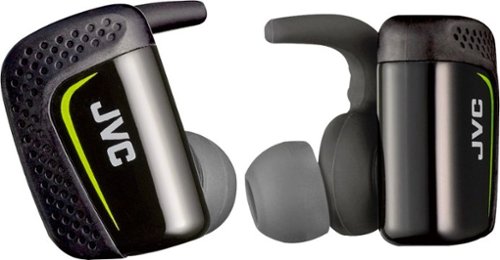
Play cool music while performing your fitness routines with these water-resistant JVC wireless sport headphones. The Pivot Motion Fit provides a secure hold during rigorous workouts, and the JVC Headphones Manager app lets you control audio settings. These JVC wireless sport headphones come with a lightweight charging case that provides three hours of battery life on a single charge.
Hi, how is the sound quality for talking? Do the buttons hurt your ears when you push them in?
I didn't think they sounded that good and the person I called said I sounded very static-y.
8 years ago
by
RedScorpion

Automatically go from hundreds of mystery folders to a visual view in the photo and video Organizer. See your best photos thanks to auto-curation. Effortlessly extract candid photos from your raw footage. Make photos and videos look amazing with automated photo editing and video creation options. And create and share beautiful printed artwork, new dynamic slideshows, photo and video collages, animated GIFs*, and full-length movies. Being creative is even easier with the Elements bundle.
Do you have to purchase a monthly or annual subscription in addition to the software?
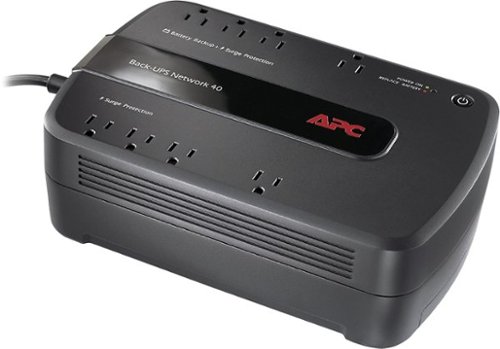
Keep your home networking equipment working when the electricity goes out with this APC Back-UPS Network 40 BN4001 UPS that features 4 battery-backup and surge-protection outlets to ensure electronics remain powered during outages.
Where do I get a new Battery for this?
I'm sure my battery didn't last three years and I need a new one. What size am I looking for and where can I get one?
You can find replacement battery information on APC's website at:
http://www.apc.com/tools/upgrade_selector/
http://www.apc.com/tools/upgrade_selector/
10 years ago
by
RedScorpion
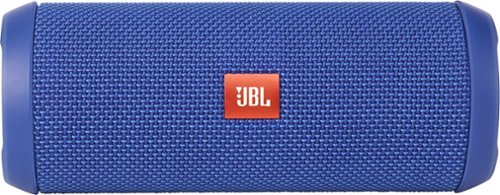
JBL Flip 3 Speaker: Stream your favorite songs and Internet radio stations from your compatible audio device using this speaker, which offers extensive playback with the rechargeable battery. Dual external bass radiators offer booming low tones, and you can enjoy clear phone calls with the integrated speakerphone.
can it be connected to a ipod nano
Yes.
If your iPod Nano has blue-tooth (which the newer models do), then you can connect this to your Nano that way. If your Nano does not have blue-tooth, you can always connect the Flip 3 with an auxiliary 3.5mm audio cable.
If your iPod Nano has blue-tooth (which the newer models do), then you can connect this to your Nano that way. If your Nano does not have blue-tooth, you can always connect the Flip 3 with an auxiliary 3.5mm audio cable.
10 years ago
by
RedScorpion