


RedScorpion's stats
- Review count234
- Helpfulness votes1,564
- First reviewJune 21, 2012
- Last reviewJune 11, 2026
- Featured reviews0
- Average rating4.5
Reviews comments
- Review comment count0
- Helpfulness votes0
- First review commentNone
- Last review commentNone
- Featured review comments0
Questions
- Question count0
- Helpfulness votes0
- First questionNone
- Last questionNone
- Featured questions0
- Answer count14
- Helpfulness votes42
- First answerMay 13, 2016
- Last answerSeptember 30, 2020
- Featured answers0
- Best answers5

The Mason Luxe digital photo frame pairs simple design elements with meticulous craftsmanship for a striking sculptural effect. Its Ultra HD 9.7~ display presents your memories with vibrant colors and brilliant clarity. Simply download the free app, pair your frame and start adding your photos. With unlimited storage, you can easily upload 10,000+ images, never having to choose between your favorites. Invite your friends and the entire family to share their photos too! It~s never been easier to stay connected to loved ones and enjoy all the amazing photos stuck on your phone. Changing the orientation of the frame from portrait to landscape is as easy as turning it on its side; our smart technology rotates the photo for you. Use the integrated touch bar to scroll through your images or customize the playback settings using the Aura app.
Customer Rating

4
Great Frame, but Android App Experience is Lacking
on October 15, 2021
Posted by: RedScorpion
from Oklahoma City, OK
The Aura - Mason Luxe 9.7'' LCD Wi-Fi Digital Photo Frame is the best digital photo frame I have ever laid my eyes on. The image is crisp and sharp. Colors and details look great in a variety of light levels. Aura's cloud servers provide unlimited storage and make it easy to upload pictures from a variety of users and devices which are then downloaded onto the frame. This frame is a great way to present your favorite photos and with the built-in gifting feature, it will also make for a nice gift this holiday season.
Set up: I decided to put Aura's gifting feature to the test. Aura includes a code on the outside label of the box. After downloading the Aura app to my phone, I scanned the code and my wife and I were able to upload over 100 photos from our phones in minutes. Once we had the frame set up and connected to our WiFi, our pictures were on the frame, waiting for us.
The frame itself is pretty thick. There is no way I could see to wall mount the frame.
Technical Issues: I struggled a bit to get the frame running and connected to my WiFi. I had to unplug and re-plug the frame in a few times to get everything working. Not sure why, but it didn't want to connect to my WiFi or my Android phone's Bluetooth. After a few restarts, I had the frame online and connected, but the set up struggles were a bit bewildering.
A huge chunk of your Aura experience will be dependent on your Android or iOS app. However, you can upload photos via email and a web based uploader. Currently, the web uploader supports JPEG, PNG, or TIFF photos that are a max of 10MB. Videos are not supported via the web uploader.
Oh yeah, with a firmware update, the Maxon Luxe will support video playback up to 30 seconds. However, the feature is currently only supported from the iOS app. Android support should be coming later.
iPhones and iPads can take live photos. With live photos, the phone records 1.5 seconds before and after the photo. Live photos gives your photos a moving image effect. The Mason Luxe supports playback of iOS live photos, but Android's motion photos will not work. Apparently, there is no standard across Android phones when it comes to their version of moving photos which makes playing them back difficult.
From the Aura app, you can crop photos to fit the frame. The app automatically adjusts photos for best fit and I found that it did a good job. Most of my cropped photos properly focused on the photo's subject matter.
The frame has motion controls on the top and side of the frame. And they worked well, but sometimes I found myself bringing up meta data or accidentally liking a picture when I just wanted to scroll to the next picture.
You can display your pictures in either chronological order or shuffle. Once the photos are uploaded to the server, there is no way to create photo groups or a set play back. The problem with chronological order is it's dependent on the photo's metadata which may or may not still be there depending on how many times your photos have moved from device to cloud and back to other devices. So, in my case, photos I had taken on my old phone before I purchased my new phone, did not transfer to my new phone with the necessary meta data to properly display date and time.
I used the Aura app on my iPad and my Samsung and Google phones. In my experience, the experience on the Apple app was way better. Occasionally, I would tell the Android app to display a particular photo and the app would just hang and do nothing. The Apple app didn't suffer from the same problems.
Conclusion: This is an amazing photo frame and I think it would make a great gift this holiday season. But, I think the experience was much better when I was using my Apple device versus my Android devices. I have no doubt many of these bugs and the Android video upload will be resolved in a future patch. With some software tweaks to the motion controls and some server side tweaks to allow for customization of photo grouping and display order, I think this frame can be amazing.
As it is, the experience for Android users can be a bit frustrating and buggy. I could not get the Google Assistant integration to work. It's still a great frame, but the better Apple app experience shows how good this frame could be. Still, I recommend the frame. I like it. I hope some of the Android bugs get worked out soon. 4.5/5
Mobile Submission: False
I would recommend this to a friend!


Share this review:


+3points
4of 5voted this as helpful.
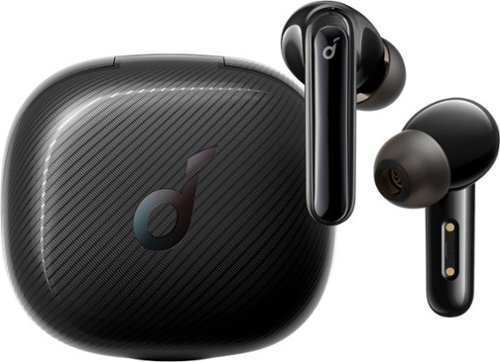
Enjoy sound with clear treble and powerful bass that~s enhanced in real-time by BassUp technology. 3 targeted modes are individually tailored to cancel out the most distracting sounds in each environment. Voice pickup is free from background noises thanks to Life Note 3~s 6 microphones that use Soundcore~s exclusive algorithm to enhance call quality. Get 7 hours from a single charge and up to 35 hours with the charging case. Choose from the variety of included eartips to find a fit that~s perfect for your ears. Life Note 3~s ergonomic design fits in your ear comfortably and remains stable even when listening on the move. Enhances and emphasizes the sound of footsteps, gunfire, and more for a more immersive playing experience.
Customer Rating

5
Amazing Sound in a Small Package
on October 9, 2021
Posted by: RedScorpion
from Oklahoma City, OK
The Life Note 3 XR sound great. I've had my share of earbuds and I'd put the audio quality of these up against any of them. They're comfortable in my ear. They've had good battery life. The charging case is small enough to comfortably keep the buds in my pocket when I'm not wearing them. Pairing was easy. Add to that an easy to use app with configurable noise cancellation modes and I think Anker has a winner with these buds.
Inside the box you get a USB-C to A charging cable, additional bud fits (but I thought the default fit the best), the case, and ear buds.
Pairing out of the box was easy. If you need to re-pair your headset later, keep your buds in the case and hold the button inside the case for three seconds.
Regarding the built-in microphones, I took several phone calls while using the buds. Even outside, I was told that I sounded clear. The six microphones really work.
I highly recommend the Anker Life Note 3 XR. HD audio has sounded amazing. Sound is loud, clear, and detailed. I'm impressed.
Mobile Submission: False
I would recommend this to a friend!


Share this review:


-3points
1of 5voted this as helpful.
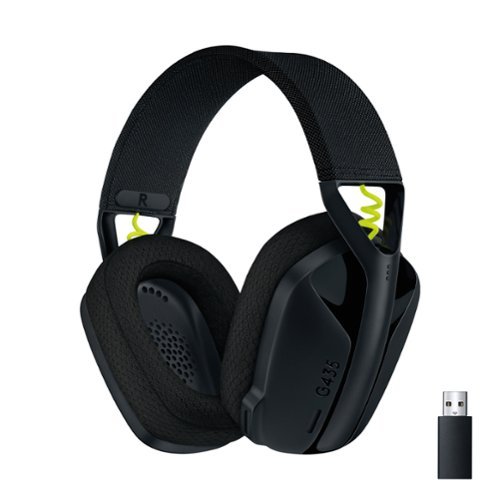
Play doesn~t end when the game does. You play games, play music, and play with friends. It~s who you are. All the time. That~s why we designed the G435 Headset for every aspect of your life. The combo of gaming-grade LIGHTSPEED wireless and Bluetooth give you the freedom to wirelessly connect to your PC, phone and other devices. Its 40 mm drivers deliver incredible sound while the dual beamforming mics eliminate the mic arm and background noise. Play never ends with G435.
Customer Rating
5
Sounds Good, Feels Great
on September 28, 2021
Posted by: RedScorpion
from Oklahoma City, OK
The Logitech G435 headphones feel like a return to simplicity. There's no complicated software to set up. No RGB lights to configure. The headphones are light. There's no bulky microphone hanging off the side of my face. After a while, I forget I'm even wearing a gaming headset. I've owned many headsets and these might be the most comfortable headsets I have ever owned. Audio has been clear with no pops, hisses, or distortions. These headphones are very easy to recommend. They're light, they're comfortable, and they sound good.
Setup: The headset package comes with a charging USB-C to USB-A cable, the lightspeed USB-A adapter, and the headphones. The headset has three buttons, a power button, volume button, a mic / on off button that also doubles as a toggle for bluetooth or lightspeed audio.
Pairing with a computer using the light speed adapter is truly plug-and-play. Plug the adapter into your PC and turn on the headset and you're good to go. If you want to pair with a PC or phone via bluetooth, you switch the toggle and an indicator light will flash blue letting you know it is in pairing mode.
Note: You can't receive lightspeed and bluetooth audio at the same time. You have to switch the headphones over to either bluetooth or lightspeed mode.
If you decide you want to pair the headset with another bluetooth device, you hold the power button and the mute button to get the headset into pairing mode.
Audio Quality: The headset has sounded very good in my trials. I can tell a quality difference between some other headphones that have 50mm drivers. (The G435 have 40MM drivers) But, I still think these headphones sound very good. I think they will sound very good for most users. Playing music and games, I thought they sounded good. The audio has been very well balanced.
On PC you can use spatial audio such as Windows Sonic for Headphones or Dolby Atmos. To activate spatial audio, right click on the volume icon on the bottom right side of the taskbar. (usually right next to the clock / date). The Dolby Atmos plug-in can be purchased from the Microsoft Store, but I believe Windows Sonic is free with Windows 10.
One of the things that impressed me about this headset was the dual beamforming microphones. On my phone calls and online sessions, I was told I sounded good. I have a fan going in my room and nobody picked up on that noise.
If I had a nitpick, it might be the buttons. The volume button and the power button are okay, but trying to use the mute button as a multi-tool, felt a bit awkward sometimes. I like to know I have actually activated mute and with the audio cue the headset gives off, it is kind of hard to tell if I am muted or not. There is a red light off and green light on effect on the headset, but I can't see that if I press while I have the headset on my head.
Battery life has been great. I've only charged it once so far and I've been using it for several days at the computer.
Conclusion: I really like this headset. I love how simple it was to set up and use. Not every peripheral needs lighting effects, software to download, and half a dozen buttons. Sometimes, less is more and these lightweight headphones sound good and have great battery life. I really like this headset. I think Logitech did a great job and I highly recommend the G435.
Mobile Submission: False
I would recommend this to a friend!


Share this review:


0points
6of 12voted this as helpful.
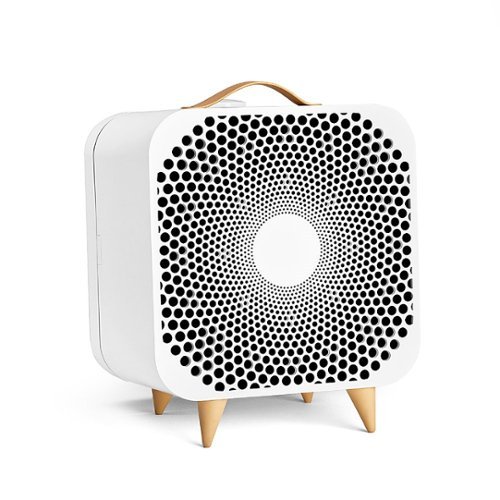
Designed in Sweden for expert removal of airborne allergens. Unlike a standard fan, Pure Fan Auto cleans the air of pollutants as it cools. Customizable to fit your needs, the fan features a colorful fabric pre-filter and Auto mode setting to auto-adjust to your real-time room conditions. Pure Fan Auto delivers more clean air than Dyson purifying fans~ and removes over 99%~ of airborne allergens like dust and pollen with Blueair's signature HEPASilent~ filtration technology. The unique combination of electrostatic and mechanical filtration effectively removes airborne allergens like dust, pollen, and pet dander with low noise and energy consumption. The fan works by pulling in dirty room air from the back through a pre-filter and particle filter using patented fan technology to deliver a gentle stream of clean, cooling air back into your room. Provides cool comfort by distributing air into the room at a 90-degree angle, so there's no need for oscillation. Upgraded features from the original Pure Fan offer simple air quality management. Set to Auto mode, the fan will automatically increase speed when particle pollution levels rise in your indoor environment and return to a lower rate once the air is clean. The air quality indicator (AQI) located on the top left of the fan keeps you up to date on the current status of your air. The LED displays one of three colors to indicate that room conditions are good, moderate, or polluted based on real-time measurements of fine particle (PM2.5) concentrations. Customize to your space with unique machine-washable fabric pre-filters available in five colors. Designed to catch larger particles to extend the primary filter's life, pre-filters in Arctic Trail and Night Waves come standard with the Pure Fan Auto. ENERGY STAR~ certified for energy efficiency, Pure Fan Auto uses less energy than a light bulb.~ The fan utilizes HEPASilent~ filtration technology to clean the air as it cools with noise levels quieter than a whisper on low (25 dB) and less noise than a normal conversation on high (54 dB).~ Minimalist features are a breath of fresh air. Use the fan's two buttons to turn on/off, cycle through three-speed settings, set Auto and Night mode. Plus, the filter indicator light alerts you when it's time to replace the filter. Filter replacement is recommended about every six months. The Pure Fan Auto fits in well on a tabletop or directly on the floor in any area of your home. The balanced design is light enough to move easily, yet the low center of gravity makes it difficult to knock over. As an added benefit, unlike standard fans that use blades that get covered with dust and require disassembly to clean, Pure Fan Auto captures airborne dust before it has a chance to stick to the fan blades, using pre-filters that can be cleaned with a quick vacuum. At Blueair, our Swedish heritage inspires sustainability and quality at the heart of everything we do. Like our air purifiers, Pure Fan Auto is AHAM Verifide for Clean Air Delivery Rate (CADR), certified by ENERGY STAR for energy efficiency, and certified by the California EPA Air Resources Board (CARB) for safe ozone emissions. ~ Comparing dust and pollen CADR (AHAM AC-1) on high to Dyson purifying fans (TP01, TP02, TP04, HP01, HP04, DP04) ~ Based on third-party testing of removal rate of particles, pollen particles (5-11~m) in less than 20 minutes and dust particles (0.5-3~m) in 30 minutes according to AHAM AC-1-2019 standard. ~ On lowest speed, according to GB/T18801-2015 standard. "Light bulb" is defined as an LED light bulb with 40 W energy consumption. ~ Sound pressure according to GB/T18801. A whisper is about 30 dB; normal conversation is about 60 dB.
Customer Rating
5
Simple and Effective
on September 22, 2021
Posted by: RedScorpion
from Oklahoma City, OK
The Blue Pure Fan Auto is my first air purifier that doubles as a room fan. And, I really like it. It does a great job keeping the air circulating. On its lower settings, the Pure Fan Auto is barely audible. Night mode keeps the lights and fan from distracting at night. Plus I just like the Scandinavian chic design aesthetics. It looks slick. If you're looking for an air purifier that doubles as a room fan, I highly recommend the Pure Fan Auto by Blueair.
Setup: There's no real assembly. It was all pretty much ready to go out of the box. Blueair recommends the Pure Fan Auto in rooms under 350 square ft. The dimensions are 15.5'H x 12.9'W x 11.2'D in. The fan has a handle and legs for easy movement and placement. In my experience, they worked well. The fan is about ten pounds. Not as light as some, but not very heavy, either.
Experience: The fan works well. The auto sensor did a good job picking up on high pollen days and if a candle was burning. Installing replacement filters and pre-filters is easy and straight forward. The Pure Fan Auto came with two pre-filters. You can purchase more filters and pre-filters on the Blueair website. Filters run around $25 and pre-filters are around $7.00. Blueair sells the pre-filters in a variety of colors, but in my experience, it didn't matter as the pre-filter is on the back of the unit and I wasn't looking at it much. Blueair has a subscription service for filters that does knock the price down a bit.
I don't believe the filter is a HEPA filter. The particle filter captures large and fine particles, like pollen, dust, and pet dander, but it probably won't be as effective with particles smaller than that.
Conclusion: I've been using my Pure Fan Auto for several weeks and I really like it. It's done a nice job cooling me off, is relatively quiet, looks great, and it helps purify the air.
Mobile Submission: False
I would recommend this to a friend!
Share this review:


+2points
3of 4voted this as helpful.
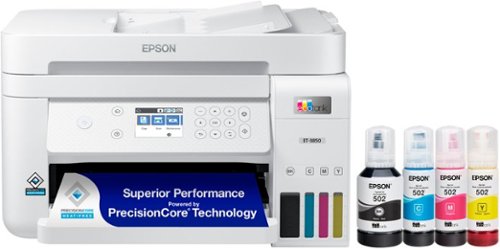
Your busy office needs a printer that~s fast, affordable, easy to use, and has great features. That~s why we developed the EcoTank ET-3850 ~ an innovative cartridge-free solution that uses high-capacity, easily refillable ink tanks. So you~ll worry less about running out of ink, and save a lot on replacement ink (1). The ET-3850 features an auto document feeder, fast printing with outstanding print quality, productive paper handling, a high-resolution flatbed scanner, and a large color display ~ making it the perfect printer for your home office.
Customer Rating
5
Great Printer for the Home Office
on September 17, 2021
Posted by: RedScorpion
from Oklahoma City, OK
The Epson EcoTank ET-3850 printer has ink for years. That's not hyperbole, it really does have ink for years. And, when that ink runs out, you could replace the black and color cartridges for around $60 on BestBuy.com. If you can get past the initial expense, the EcoTank ET-3850 is an economical printer that does a good job with daily prints, photo prints, and scanning. For those reasons, I recommend the ET-3850.
Setup:
Epson includes a compact disc with drivers and software, but as my PCs no longer have disc drives, I had to download PC software from epson.com/support. Look for drivers and software for the ET-3850.
After installation, the software found additional updates on check.
Epson includes a compact disc with drivers and software, but as my PCs no longer have disc drives, I had to download PC software from epson.com/support. Look for drivers and software for the ET-3850.
After installation, the software found additional updates on check.
But, if you choose to go the mobile route, the Epson Smart Panel software was easy to use and provides a simple interface to set up, print, scan, or troubleshoot the printer. Smart Panel was an easy and convenient way to print documents or queue photo prints directly from my phone.
The printer can connect via WiFi on the 2.4ghz band (wifi-direct or over a router), LAN, or USB. There is no included USB or Lan cable. I chose to hook the printer up via WiFi. As long as I was connecting straight to the router, the setup was easy. If I tried to hook up to a WiFi extender, the printer had trouble connecting and communicating with my devices. Not sure if that was a problem with my extender or the printer, but, if you can, your best bet is to hook up to your primary router.
Installing the 502 ink was easy and I didn't have any mess. There's a locking system in place to keep the ink from spilling before the tube docks with the printer. But I'm not sure what would keep someone from putting the wrong ink into the wrong slot. I couldn't tell if the colors and black were uniquely keyed. Maybe they are, but I wasn't about to test and find out. Long story short, make sure you match up the colors to the right dock.
Also, I should point out that in addition to the ink, the printer requires a maintenance box, part number T04D100, which wears out over time. Price for the maintenance box varied, but it seems to run between $15 and $25 depending on retailer.
Experience:
The printer is fast with regular prints. Dual sided printing worked, but did experience more of a delay. I printed photos on Epson Premium 4X6 and 5X7 photo paper. I thought the prints came out great. I love the color from Epson printers and the ET-3850 was great in that regard. Blues and purples really popped and lines looked crisp and sharp
Cons:
Not enough to ding the review, but there are a few design decisions that I wish where changed or improved upon. First, there is no USB or SD Card input. As a result, you won't be able to print directly from a USB stick.
There's only one paper tray (or paper cassette). If I want to switch from printing standard documents to printing envelopes or photos, I have to take out the existing paper and make adjustments to the tray and the software on the printer.
The auto document feeder was a bit of a struggle. Thinner paper wasn't picked up as easily and I found myself working to get some documents through. But on the whole scanning worked well and looked good.
Conclusion:
All of that aside, I like the printer. It's nice seeing the physical ink levels from the front of the device. I like how the photos look. Document prints have been done well and single sided prints have come out fast. All-in-all, the ET-3850 is a solid printer for any home office.
Mobile Submission: False
I would recommend this to a friend!


Share this review:


+22points
24of 26voted this as helpful.
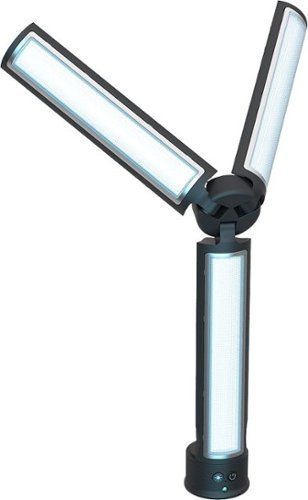
Rechargeable 3 Arm Adjustable 162 LED light. 2850mah Li-ion Battery. Provides up to 16 hours of continuous use. 162LEDs, 5 brightness settings & 3 color temperature modes. Includes magnetic wireless remote (works up to 30ft).
Posted by: RedScorpion
from Oklahoma City, OK
The Digipower Trimate video call vlogging light has been my gateway into a world of video lighting. It’s convenient, portable, bright, and has a long-lasting battery. The Trimate’s ease of use and portability makes it great for vlogging or video conferencing. It’s an easy recommendation provided you’re okay with a few finicky features. Also, I highly recommend a tripod for stability. I should say upfront that I received the Trimate for the purposes of providing a fair and unbiased review.
Included with the kit, you get the charging cable, the magnetic remote, and the light unit. I found that the device did not want to charge correctly unless I used the included USB-A to USB-C cable. Not sure why that is, but I wouldn’t recommend losing the cable.
The light is surprisingly customizable. With 162 LED lights, the Trimate gets very bright. For me, it was almost too bright on most settings. You’ll have to play around and find the settings that work best for you and your filming area, but by default it was too bright and would wash me out. I used it primarily as a key light, but you could probably easily use it for filler or backlighting.
Unfortunately, settings don’t save between power on and off. Every time I turned the Trimate on, I had to re-click through the various settings to get back to the setting I liked. The light really needs a good tripod so you can get the right height. It obviously works without a tripod, but a solid tripod really does wonders for stability and helping to achieve the right effect. I like the remote, but it's small. Not all the features can be controlled without the remote. So, make sure you don't lose that magnetic remote.
Battery life has been good. It took a few hours to fully charge, but I left it running for four hours on the default setting and it was still running when I came back. It doesn’t get particularly hot or warm.
In conclusion, I feel like this light is nice for vloggers and folks needing more illumination during video conferencing. The controls and the need to click through all the settings each time I turn it on are a bit annoying, but it’s functional. The whole thing works and it functions well enough for me to easily recommend it.
Mobile Submission: False
I would recommend this to a friend!


Share this review:


0points
0of 0voted this as helpful.
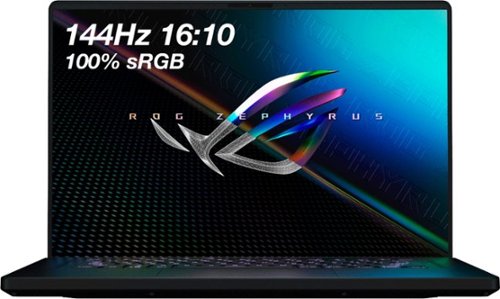
ASUS ROG Gaming Laptop. Enjoy everyday gaming with this ASUS notebook PC. The 11th Gen Intel Core i7 processor and 16GB of RAM let you run graphics-heavy games smoothly, while the potent NVIDIA GeForce RTX 3050 Ti graphics produce high-quality visuals on the new fast 16-inch 144hz WUXGA display. This ASUS notebook PC has 512GB SSD that shortens load times and offers ample storage.
Customer Rating

3
A Frustrating Gaming Laptop
on August 7, 2021
Posted by: RedScorpion
from Oklahoma City, OK
I should say upfront that I received the ASUS - ROG 16" WUXGA 144Hz Gaming Laptop for the purposes of providing honest feedback and an unbiased review. I want to like this computer. It plays some games better than my current gaming desktop computer. But some games don't play well at all. And then, there are the bugs. I probably spent more time over the past month squashing bugs through updates and tweaks than I have gaming. When it's working great, I love this laptop. But when it isn't working, I am pretty frustrated with the machine. Right now, I am more frustrated.
The good: I like the build. I like the keyboard. I like the fast refresh rate of the display. I really like having a thunderbolt 4 port and WiFi6 built in. The trackpad is huge. The computer isn't a fingerprint magnet.
For gaming, this machine is a mixed bag. It has a solid i7 processor, but the 3050Ti with just 4GB of RAM struggles a bit. Some games like "Red Dead Redemption 2" and "Apex Legends" would average around 70FPS with nearly every setting cranked. I found that really impressive. But, some games like "Control" would barely play at all. And that performance on "Red Dead Redemption 2" came with a lot of graphical glitches that I am struggling to fix. The takeaway was that if the game was optimized for NVIDIA, it would probably run well. If it was optimized for AMD, all bets were off.
As a gaming computer, the machine isn't terribly practical. With a 500GB hard drive, you can only have one or two games loaded at any given time. The laptop gets hot and it gets loud. I ended up purchasing a riser with built in fans to keep the laptop cooler. The riser helps. Without it, the machine was getting too hot to touch.
Us gamers like our gaming headsets and this laptop makes gaming headphones a buggy experience. I have multiple USB headsets and the included Intel Smart Sound USB driver would mess them all up. On my Logitech headphones, I couldn't change lighting or surround sound settings. On my Corsair headphones, I couldn't set spatial audio. The only solution was to go into device manager and uninstall and delete drivers for the Intel USB device. Although, on reboot, I would have to run the process all over again. If you use 3.5MM headphones or Bluetooth headphones, this probably won't be a concern.
That bug was annoying. Then there was the audio popping over speakers when the laptop was on battery mode. That required a realtek driver update from within the "My Asus App". Then there was the windows key that did not work. That bug required an update from "Armory". Then other updates would run through Windows Updates. There have been a lot of updates over the course of the last five weeks and for every bug squashed, another seemed to take its place.
Armory could be annoying with various pop-ups. Built-in lighting software was a mixed bag. It also could be finicky and of course it isn't compatible with non-Asus hardware.
The laptop was advertised as VR ready. If you have an Oculus Rift or Quest 2, you should know that VR will not work for you. Oculus software will detect your machine does not meet the requirements. I thought that could just be a glitch with Oculus, but I forced performance mode within the applicable Oculus apps and I could get some VR apps to run, but they didn't run well. They were glitchy and stuttery.
The machine comes with some updates and features that I found impressive. For one it has a Thunderbolt 4 port. You could, in theory, hook this laptop up to an external graphics enclosure like the ones from Razer. That and hard drive and memory upgrades could keep this laptop working and gaming well into the future. I believe it comes with an extra NVME slot for additional storage.
The laptop has a thumbprint reader, but it only worked half the time. I had to rescan my thumb print several times and it never got any better.
But right now, it's a frustrating mess. I want to love this laptop and I have times where I do, but then I have times where I just want to throw it out the window. I see a lot of promise in this computer. But man has it been frustrating. If I told a friend or relative to buy this computer, I would be providing tech support 24/7. I can't recommend anyone go through that. It's possible this laptop will improve with updates. It's changed a lot just in the last month. But in its current state, I can't recommend this laptop.
Mobile Submission: False
No, I would not recommend this to a friend.


Share this review:


+6points
12of 18voted this as helpful.
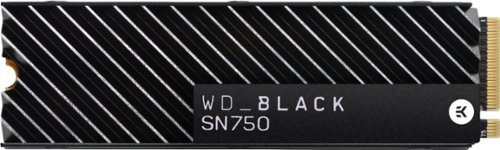
The WD_Black SN750 NVMe SSD delivers top-tier performance for gaming and hardware enthusiasts who are looking to build or upgrade their PC. This SSD rivals some of the best performing drives on the market to help give gamers that competitive edge. An integrated heatsink feature helps push consistent sustained performance. Read and write speeds of 3,470MB/s and 3,000MB/s enable fast loading of large applications. The SSD has an M.2 2280 form factor for minimal footprint in complex systems.
Customer Rating
5
Fast, Stable, and Compatible
on July 28, 2021
Posted by: RedScorpion
from Oklahoma City, OK
I should say upfront that I received the WD Black SN750 Solid State Drive w/ Heatsink for the purposes of providing an honest and unbiased review. I'll try to keep it honest, but my bias shows as I like this drive so much I now have three of them. It's great. It's stable. It's fast. It keeps cool. And, importantly for me, it runs on nearly every desktop computer I put it in. As such, I obviously recommend it. I've never gotten a bad one or had one fail. It will speed up your computer immensely. Startup times and game load times will decrease a lot.
Your mileage may vary, but I find that the heatsink does help cool down the SN750. It's hard to get a straight comparison, but it is consistently cooler. Now, whether or not that temperature difference truly matters in the long run, I can't say, but it does run cooler under load. What's more, in prebuilt machines by Lenovo and other manufacturers, I often find that there isn't much internal cooling. As such, the added heatsink really helps regulate the drive and minimize my fears of overheat. For me, the drive tended to sit at around 38C on idle. It got a bit hotter during game load, but it isn't near as hot as some of my other drives.
I mentioned compatibility. I put this drive in an AMD Ryzen based Lenovo desktop. As a way of upgrading that machine, this drive did wonders. It was out of the box compatible with the Lenovo computer. Now, I don't get the full 4 lanes on that AMD machine, but it's much faster than what had been in there before. On my newer machines, it runs great. I've included read right times in the photos.
For my machines, installation involved making sure there was an NVME slot on the motherboard. Because this drive comes with heatsinks, it won't be compatible with any motherboard heatsinks that may have come with your board. The heatsink doesn't come off the SN750 and I wouldn't try to pry it off.
I guess it goes without saying that the heatsink means this drive is relegated to desktops. I doubt most laptops would have the space for it.
Western Digital has their Western Digital Dashboard. It gives device stats, but could be more user friendly and useful. As is, it provides decent snapshots of temperature and drive health, but that's it. There's a game mode, but I couldn't tell that it did much. I downloaded Acronis True Image to clone an existing drive onto the SN750. You can get that software for free from Western Digital's website.
Installation took a matter of minutes. Because every computer manufacturer is different, there is no mounting screw included with the kit. My gaming desktop came with the screw built-in and my Lenovo system used a proprietary mounting bracket and clip.
Not sure what else I can really say about this drive. I really like this drive. I recommend Western Digital to my friends and family. I've been building computers with Western Digital drives for nearly 30 years. With or without heatsink, the SN750 is a solid drive. Even as PCIe Gen 4 drives begin rolling out, the SN750 remains a great value for the price.
5/5 Recommend
Mobile Submission: False
I would recommend this to a friend!


Share this review:


+1point
1of 1voted this as helpful.
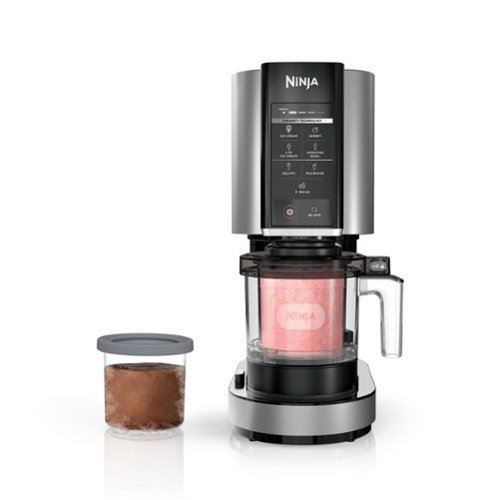
The Ninja CREAMi transforms frozen solid bases into ice cream, sorbets, milkshakes, and more at the touch of a button. From healthy to indulgent, the Ninja CREAMi can create frozen treats as unique as you are!
Customer Rating
4
Fun Frozen Treats. One Pint at a Time
on July 18, 2021
Posted by: RedScorpion
from Oklahoma City, OK
I should say up front that I received the Ninja CREAMi for the purposes of providing a fair and unbiased review. And, I must say, I love reviewing items by Ninja. I always eat well when a Ninja product comes into the kitchen. For the past week and a half, I have had ice cream, sorbets, and a few milk shakes. The Ninja CREAMi is a fun way to make ice cream and frozen deserts at home. However, instructions can be a bit contradictory, and the device doesn’t always behave as you would expect. Limitations with the design meant frozen bits of fruit or undissolved bits of cocoa got stuck to the sides or the bottoms of the pints. My milkshakes were an outright disaster.
However, despite any setbacks, I still had a lot of fun with the CREAMi. Most of the deserts tasted great. For those reasons, I am recommending the Ninja CREAMi.
However, despite any setbacks, I still had a lot of fun with the CREAMi. Most of the deserts tasted great. For those reasons, I am recommending the Ninja CREAMi.
SETUP: The Ninja CREAMi comes with three pints and lids, the base unit, a creamerizer paddle, and an outer bowl and lid. Detailed instructions are hard to come by at the moment, but the quick start and recipe guide do a good job explaining set up. All the components except for the base are top shelf dishwasher safe.
EXECUTION: I started with a pint of the vanilla ice cream from the recipe guide and a mango sorbet. Both recipes were easy enough to execute. The sorbet was just placing canned fruit into the pint and topping with juice until you reached the predesignated fill line. Most recipes require the pint and their contents be frozen for 24 hours. You then remove the lid from the pint, lock the pint into the outer bowl and lid, place bowl onto the base, twist to raise the bowl up, and then select which frozen desert you want to make on the device.
I made up a few pints of vanilla and let them sit in the freezer. They still tasted great a few days after processing. It seemed most recipes could keep for up to two weeks in a freezer.
This device is loud. It sounds like you are running a blender or a garbage disposal. If you have any sensitive neighbors or pets, probably best to not run the CREAMi too late at night. When making ice cream, your ice cream may come out looking crumbly. If that is the case, you simply place the bowl back on the stand and select re-spin from the front panel.
This device is loud. It sounds like you are running a blender or a garbage disposal. If you have any sensitive neighbors or pets, probably best to not run the CREAMi too late at night. When making ice cream, your ice cream may come out looking crumbly. If that is the case, you simply place the bowl back on the stand and select re-spin from the front panel.
Over the course of the last week, I have made chocolate ice cream, plain vanilla ice cream, chocolate chip cookie dough ice cream, strawberry ice cream, mango sorbet, mandarin orange sorbet, and two milk shakes. Most of those recipes came out well. I have another pint of vanilla freezing in the fridge right now. I followed the instructions that came with the device for each recipe because everything felt like it had to be extremely specific for risk of damaging the machine. Ninja warns against using pints that froze at an angle. They warn against using certain ingredients unless they are properly frozen in advance.
With rules against using unlevel pints, I found myself a bit surprised by the milk shake recipe which just uses store bought ice cream and milk. When I tried making milkshakes, the paddle would catch the ice cream at an angle and spin the CREAMi around on the cabinet. It made a mess. I am sure Ninja would just say my freezer is too cold, the ice cream was too hard, and that’s why the milkshake feature didn’t work very well. And that might be. But even if the milkshake feature had worked better, it still did not make very much.
In fact, that is probably one of my biggest complaints with this setup. It is great to be able to make your own pint of ice cream, but it’s just a pint. It was perfect for two or three people, but if you have a family of four or five, you best be ready to make several pints.
The other design flaw is that the paddle does not fully reach the sides of the pints. That makes sense as the paddle would then be scraping up the pint. But the result was, I had hard, icy mango pieces that froze to the side of the container. The outer sides of the sorbet were not near as creamy as the center.
Ninja has a promotion in the quick start guide offering a free pint container as a condition for registering the CREAMi online. A lot of the QR codes and offers were not quite live at the time of my testing, but I look forward to picking up more pints and trying my hand at more treats in the future. Individual pint containers sell on Ninja’s website for $14.95 a piece or $19.99 for two. You can also buy replacements for all the components from Ninja’s website.
SUGGESTIONS: If you want to make Strawberry, be sure to slice up and freeze some strawberry pieces to incorporate as mix-ins later. Also, if you make chocolate, I suggest straining out the mixture as you pour it into the pint. You know how you can have undissolved cocoa when you try to make hot cocoa? Well, that can happen with the chocolate ice cream recipe as well.
CONCLUSION: it is not a perfect execution, but I still really like the CREAMi. I probably would not use the CREAMi to make another milkshake when I have a perfectly good blender, but the pints of vanilla, strawberry, and chocolate all tasted good. I wish the device had done a better job fully incorporating the edges of the pints, but as it is, I thought everything I made tasted good. The vanilla with chocolate chips and cookie dough tastes amazing. It is nice to be able to make ice cream and frozen deserts knowing full well what is going into it. Making sorbet is a simple and healthy way to make up a frozen desert. I am looking forward to trying out the gelato.
I recommend the CREAMi. I have had a lot of fun with it. Just make sure you are aware of the limitations of the device going into it.
Mobile Submission: False
I would recommend this to a friend!


Share this review:


+42points
52of 62voted this as helpful.
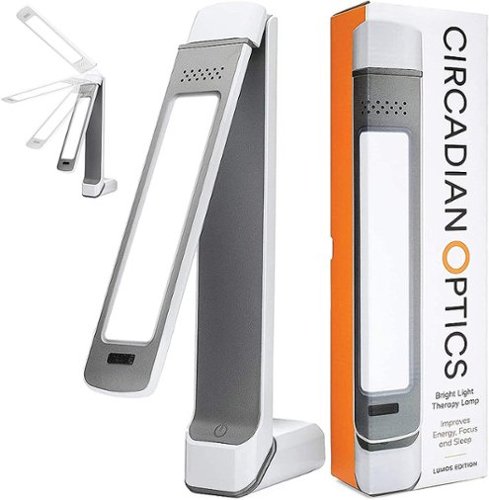
Circadian Optics is a maker of bright light therapy lamps that mimic daylight. Our designer lamps allow you to get the light you need, right at your desk. Lumos is our slimmest lamp, measuring just 2 1/4" wide. Eminently adjustable, 3 hinges and a rotating light panel give this lamp excellent flexibility, allowing you to angle the light panel in a multitude of ways.
Posted by: RedScorpion
from Oklahoma City, OK
I should say upfront that I received the "Circadian Optics - Lumos Light Therapy Lamp" for purposes of providing an honest and unbiased review. As part of the review I agreed to use the lamp for a week and share my experience after using the lamp for that period. And you know what, this actually works. I say that somewhat surprised as I have reviewed a few devices that proved to simply be gimmicks, but this works. I'm planning on picking up a few more because mine is now on my wife's desk. She loves it, too. She's admitted that it's helped her feel more alert and energetic in the mornings.
Whether you are working from home or are still working in an office settings, the Lumos is a small light therapy box that can easily fit on most any desk. The ability to swivel and position the lamp make it incredibly versatile.
If I had a nitpick, it would be the brick AC adapter takes up a fair amount of space on a surge or outlet. But, that's really my only complaint. The lamp cable is long. The three lighting options work well.
I think this is an excellent lamp and highly recommend it.
5/5 Easy Recommend.
Mobile Submission: False
I would recommend this to a friend!
Share this review:


+1point
1of 1voted this as helpful.
RedScorpion's Review Comments
RedScorpion has not submitted comments on any reviews.
RedScorpion's Questions
RedScorpion has not submitted any questions.
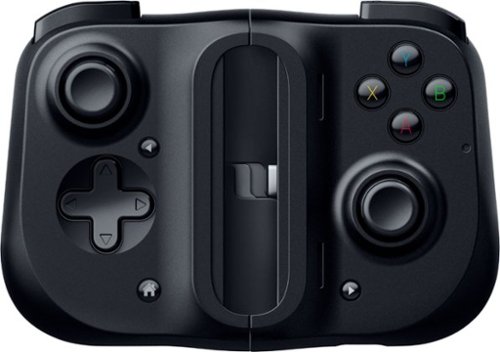
Bring your A-game anytime, anywhere. Introducing a universal mobile gaming controller that fits most smartphone devices, designed to bring console-level control to your on-the-go gaming. With this controller by your side, wherever you go, victory will follow.
Will it fit my phone? I have the samsung s10e and I know it will work with the connection but I don't know if it will fit the s10e.
Yes, I am using it to play Halo on my S10e.

5 years, 8 months ago
by
RedScorpion
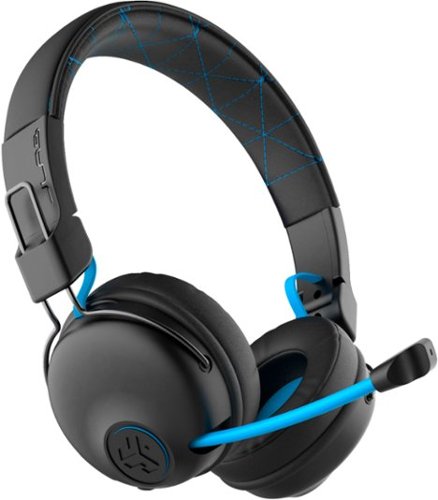
Hear all your games in high-quality sound with this JLab Play wireless gaming headset. With an increased mid to high frequency response and super-low 60 ms latency, this headset is able to deliver clear vocals and enhance spatial awareness without lag. JLab~s Play wireless gaming headset delivers over 22 hours of playtime and compatibility with PCs, consoles and mobile devices to handle every session.
where is the micro phone? can it be used for a call center?
The headset features a retractable boom mic on the right ear piece. In my opinion, the headset would work well in a call center or home based call center. There is a mute button built in to the headset and the mic works in either Bluetooth or the wired 3.5mm mode.
5 years, 10 months ago
by
RedScorpion
Hear all your games in high-quality sound with this JLab Play wireless gaming headset. With an increased mid to high frequency response and super-low 60 ms latency, this headset is able to deliver clear vocals and enhance spatial awareness without lag. JLab~s Play wireless gaming headset delivers over 22 hours of playtime and compatibility with PCs, consoles and mobile devices to handle every session.
Is it compatible with ps4 & xbox?
Yes.
But it is not wireless on PS4 and XBOX. To use with your XBOX or PS4, you will neeed to use the included 3.5MM AUX console cord.
But it is not wireless on PS4 and XBOX. To use with your XBOX or PS4, you will neeed to use the included 3.5MM AUX console cord.
5 years, 10 months ago
by
RedScorpion
Hear all your games in high-quality sound with this JLab Play wireless gaming headset. With an increased mid to high frequency response and super-low 60 ms latency, this headset is able to deliver clear vocals and enhance spatial awareness without lag. JLab~s Play wireless gaming headset delivers over 22 hours of playtime and compatibility with PCs, consoles and mobile devices to handle every session.
Will these headphones work with I buy power computers
Yes, if the computer has Bluetooth built-in. If the computer does not have Bluetooth built-in, you will need to purchase a separate USB Bluetooth Adapter *(they tend to run between $10 and $20).
5 years, 10 months ago
by
RedScorpion
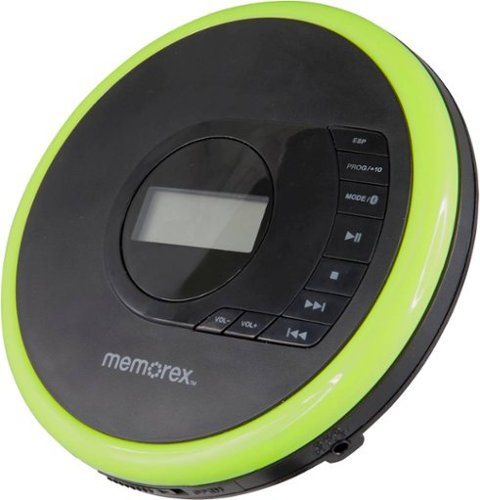
Listen to your favorite albums and audiobooks on the go with this Memorex portable CD player. The 40-second anti-skip protection function for CDs ensures smooth, uninterrupted listening, while the dynamic bass boost system delivers rich sound. This Bluetooth Memorex portable CD player features an LCD screen and digital control buttons for conveniently choosing tracks and adjusting volume.
Can you play audio books on this CD player? And What accessories will I need to buy?
If your audio book comes on CD or MP3 CD, you can play it on this player. It doesn't come with a power cord. It includes 2 AA batteries.
6 years, 1 month ago
by
RedScorpion
Listen to your favorite albums and audiobooks on the go with this Memorex portable CD player. The 40-second anti-skip protection function for CDs ensures smooth, uninterrupted listening, while the dynamic bass boost system delivers rich sound. This Bluetooth Memorex portable CD player features an LCD screen and digital control buttons for conveniently choosing tracks and adjusting volume.
iS THIS AN MP3 CD?

Listen to your favorite albums and audiobooks on the go with this Memorex portable CD player. The 40-second anti-skip protection function for CDs ensures smooth, uninterrupted listening, while the dynamic bass boost system delivers rich sound. This Bluetooth Memorex portable CD player features an LCD screen and digital control buttons for conveniently choosing tracks and adjusting volume.
Can it be used with or without the earbuds?
Yes?
Without the included earbuds, you can use your own or connect via Bluetooth. There is no built in speaker on the player if that's what you are asking.
Without the included earbuds, you can use your own or connect via Bluetooth. There is no built in speaker on the player if that's what you are asking.
6 years, 1 month ago
by
RedScorpion
Listen to your favorite albums and audiobooks on the go with this Memorex portable CD player. The 40-second anti-skip protection function for CDs ensures smooth, uninterrupted listening, while the dynamic bass boost system delivers rich sound. This Bluetooth Memorex portable CD player features an LCD screen and digital control buttons for conveniently choosing tracks and adjusting volume.
have a 2019 mazda cx3 w/bluetooth capability. Will this work? Is a usb power cord available?
It should pair with your car, but there is no USB power cord. It still relies on an older ac or dc adapter.

6 years, 1 month ago
by
RedScorpion
Listen to your favorite albums and audiobooks on the go with this Memorex portable CD player. The 40-second anti-skip protection function for CDs ensures smooth, uninterrupted listening, while the dynamic bass boost system delivers rich sound. This Bluetooth Memorex portable CD player features an LCD screen and digital control buttons for conveniently choosing tracks and adjusting volume.
Will this work with Apple Bluetooth earbuds?
I don't see why it wouldn't. I paired it with Bluetooth headphones from Samsung, Sony, and JVC without problems. The only quirk is you have to make sure to turn on the Bluetooth feature each time you start the CD player. Also, sometimes the devices have to be re-synced every time you power on. My headphones kept the connection, but some of my Bluetooth speakers did not.
6 years, 1 month ago
by
RedScorpion
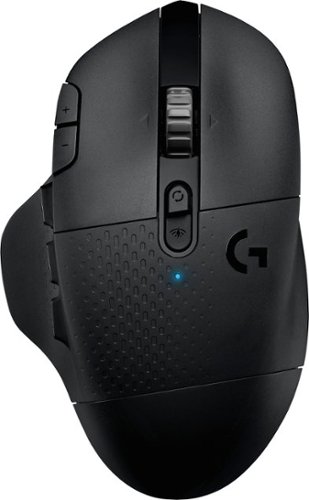
With 15 programmable controls, LIGHTSPEED wireless technology, hyper-fast scroll wheel, and the revolutionary HERO 25K sensor, G604 offers both versatility and high-performance with endless possibilities to play with mastery. Dual connectivity lets you toggle between Bluetooth and ultra-fast 1 ms LIGHTSPEED advanced wireless technology~even on separate machines. Extremely accurate tracking and class-leading power efficiency enables up to 240 hours of high-performance gaming with one AA battery.
I read online that this mouse doesnt work with windows 10?
I am using Windows 10 ver. 1903. It works fine. It works on Windows 10 over Bluetooth and with the included USB light speed receiver.
6 years, 7 months ago
by
RedScorpion