


RedScorpion's stats
- Review count234
- Helpfulness votes1,564
- First reviewJune 21, 2012
- Last reviewJune 11, 2026
- Featured reviews0
- Average rating4.5
Reviews comments
- Review comment count0
- Helpfulness votes0
- First review commentNone
- Last review commentNone
- Featured review comments0
Questions
- Question count0
- Helpfulness votes0
- First questionNone
- Last questionNone
- Featured questions0
- Answer count14
- Helpfulness votes42
- First answerMay 13, 2016
- Last answerSeptember 30, 2020
- Featured answers0
- Best answers5

Cut the competition down to size and dazzle them all with the Razer Cobra Pro~a wireless gaming mouse powered by Razer Chroma RGB. Featuring Razer HyperSpeed Wireless and 11 individually programmable lighting zones, color your play with an illuminating level of freedom and immersion.
Customer Rating

4
Fast Gaming Mouse with Impressive RGB Lighting
on August 12, 2023
Posted by: RedScorpion
I have been a fan of Razer keyboards for years, but I must admit that I haven’t had much experience with Razer mice. So, I was incredibly excited to get my hands on The Cobra Pro. Initial impressions are good. The mouse is light. The lighting effects are fantastic. Movement and button responsiveness have been right on the money. If it weren’t for some quibbles over battery life, software, and a rather difficult to access storage bay for the 2.4ghz receiver, I would say the mouse was near perfect for gaming.
Setup: Inside the box you get the mouse, a charging cable, a 2.4ghz nano receiver, and an adapter / extender for the 2.4ghz receiver. You will need Razer Synapse to tweak features and set up mouse lighting. Best to download that and have it ready to go. Out of the box, my mouse had around 72% charge. Plenty enough charge to set it up and it took me less than 30 minutes to then top the mouse off.
I paired the mouse with a Windows 11 PC with a 12th Gen Intel i7 processor, an AMD 6750XT video card, and a Razer Black Widow Elite keyboard.
Experience: The Cobra Pro is a light mouse. It smoothly glides across my hard mouse mat. Buttons are responsive. DPI toggles are easy to use. The Cobra Pro is not the lightest mouse I have ever used, but it is pretty light.
It’s also a bit smaller than I expected. If you are the type to prefer smaller mice, this won’t be a problem. If you prefer the “claw” type of mouse hold, this won’t be a problem. But, if you prefer your mouse bigger or have particularly big hands, this could be an issue. For me, it was just big enough. I really like the textured grip. The buttons are super responsive.
It’s also a bit smaller than I expected. If you are the type to prefer smaller mice, this won’t be a problem. If you prefer the “claw” type of mouse hold, this won’t be a problem. But, if you prefer your mouse bigger or have particularly big hands, this could be an issue. For me, it was just big enough. I really like the textured grip. The buttons are super responsive.
I tested the mouse using the 2.4ghz nano receiver and over Bluetooth. I was glad that lighting effects worked over both connections. I noticed no additional latency over Bluetooth. The mouse remained fast and responsive regardless of which wireless standard I used.
I really appreciate the button placement of this mouse. I never found myself accidentally clicking buttons during gameplay. Buttons are super responsive.
I really appreciate the button placement of this mouse. I never found myself accidentally clicking buttons during gameplay. Buttons are super responsive.
Razer was my first experience with keyboard lighting. I still think Razer’s software is some of the easiest for setting up lighting effects. Many games come with custom lighting profiles, and it was cool having my mouse and my keyboard syncing up their light displays while gaming. However, if I let the mouse go idle and then reawakened it during a game, it didn’t always sync back up with the lighting effect and would instead default to a rainbow display.
Battery life was a bit of a mixed bag. I got more battery life with lighting turned off, but with lighting on, I got around 22 to 23 hours of battery life. That’s not awful, but it was a bit disappointing. The lighting is such a huge selling point to the mouse.
There is a storage bay on the bottom of the mouse where you can keep the nano receiver. I’m used to magnetic covers for those storage bays. This mouse uses a twist cover. I found it a little difficult to open. It’s functional but seemed needlessly difficult in my opinion.
Conclusion: This is a well-designed gaming mouse. It looks and feels good. I wish it had better battery life with RGB lights enabled. That’s really my only real gripe with the mouse. Everything else is a nitpick. So, in conclusion, I recommend the Cobra Pro. It’s a solid gaming mouse. Just know that battery life may be a bit shorter than expected with lights enabled.
I would recommend this to a friend!






Share this review:


0points
0of 0voted this as helpful.

Make scanning simple with the affordable, compact and lightweight Epson Perfection V39 II. Featuring an optical resolution of 4800 dpi, this easy-to-use photo scanner delivers amazing clarity and detail at a great value. With the included Epson ScanSmart software, you can scan photos, artwork, illustrations, books, documents and more to cloud storage services as well as stitch together oversized images. Moreover, if your photos have faded, you can bring back the color in one click with Easy Photo Fix technology. The V39 II delivers high-quality letter-sized scans in as fast as 10 seconds. It also includes convenient one-touch scanning with easy-to-use buttons, so you can scan directly to PDF or email with just the touch of a button. In addition, you can create editable Microsoft Word, Excel and PowerPoint files using optical character recognition (OCR) software. The V39 II is USB powered for portability, includes a built-in kickstand for space-saving vertical placement and storage, and features a high-rise, removable lid to accommodate bulky items such as books and photo albums. Meet the nexus of stunning image quality and great value with the Epson Perfection V39 II.
Customer Rating

5
Great Scans in a Convenient Package
on July 19, 2023
Posted by: RedScorpion
It’s been a long time since I have had a dedicated flatbed scanner. The Epson Perfection V39 II photo scanner has surprised me with its versatility, quality, speed, and ease of use. Photos I have scanned in have come out very well. Colors are well preserved. I can get enough details from the scans to touch up and create larger prints. It has been an excellent addition to my office setup, and I highly recommend it.
Setup: Inside the box you get a USB 2.0 cable. It’s a USB-A to USB-Micro B cable. I wish the scanner was using USB-C. USB-C is such a common standard. But Epson is using the older standard. On the plus side, there is no separate power cable. The scanner is powered by the USB cable alone which is nice.
Epson recommends installing the recommended software from their website before connecting the scanner to the PC. I am running a Windows 11 laptop. I downloaded the software from Epson’s website and followed the prompts. The scanner was set up quickly and easily.
Experience: Epson’s software can be a bit clunky. I prefer Epson Scan 2 to Epson ScanSmart. ScanSmart is for newer users. It tries to simplify the scanning process, but I like seeing the DPI and related settings and Scan 2 was closer to what I was used to. Neither application crashed. They just weren’t quite as intuitive as I would have liked.
The scanner has simplified buttons on the front of the scanner. They all worked except for the scan to e-mail. It looks like that feature may only work if you are using Outlook as your default email application. If you are just using the included Live Mail that came with your Windows 10 or 11 PC, you will likely be out of luck.
The scanner lid separates from the scanner if you pull straight up by the hinges while holding the lid parallel to the base. This was a nice feature if you are wanting to scan in something thick from a textbook. There is also a kickstand. The kickstand can help shrink the footprint on your desk, but I found opening the lid at an angle to be a bit odd for me.
The scanner fits well on my shelf. It’s small and light enough to carry around a room. Yet, the glass space is big enough to fit large photographs or pages.
I have been scanning older photos that my wife had loose in a box. The photos were scratched and damaged. Using Photoshop, I am restoring the photos. My scans have come out looking exceptionally good. Detail and colors have looked sharp. Scans at 600 and 1200 dpi are quick. I have more than enough detail to re-crop and touch up the older pics.
Conclusion: I wish there was a tool to scan in film negatives and slides. But, beyond that, my expectations have been more than met. I have a few nitpicks with the software, but the scanner has done a good job. I have been using it for over a week now and it has given me excellent scan results time after time. If you are in the market for an affordable scanner that delivers good results and is small enough to store easily on a bookshelf, then I think this scanner is an easy recommendation.
4.5/5
I would recommend this to a friend!



Share this review:


0points
1of 2voted this as helpful.
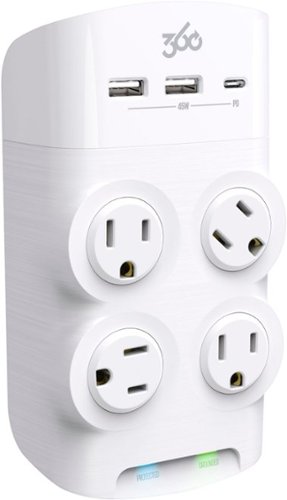
Protect your sensitive electronics and direct-charge everything from smartphones to laptops with the new Revolve45. Turn any standard wall outlet into a seven-point power center with one USB-C, two USB-A and four patented rotating AC outlets. In addition to adding industry-leading power capability, Revolve45~s striking design looks beautiful on the wall. Subtle and fluid surfacing as well as the use of unique textures and finishes, work together to convey thoughtful and considered attention to every detail.
Posted by: RedScorpion
With the shapes of electrical equipment plugs today, the 360 Electrical - Revolve45 surge protector makes a lot of sense. I've lost track of times when my four or six outlet surge protector becomes a two outlet surge protector whenever a tech device with an unwieldy power cord blocks other outlets. Now, I can use all the outlets. It's super convenient. Add to that the excellent joule rating, the USB connectivity for fast charging devices, and built-in power filtration, and I think this is a surge protector that I can easily recommend.
I tried the USB-C port with a Samsung Galaxy S22. The S22 supports Samsung Super Fast power delivery. Unfortunately, I was only able to get fast delivery with the Resolve45. But I haven't found a surge protector with USB ports yet that supported Samsung's Super Fast standard.
Also, there is a lip on the top of the unit that allows the user to use the surge protector as a rack to keep their phone off the ground while charging. It works, but just barely for my phone. If I tipped my phone on its side, I could rest it. Otherwise, it kept falling. I'm not sure how often I will use that feature, but it's nice to have.
In conclusion, I have been using this surge protector for a week now. It has worked well. The rotating ports have been super convenient. I appreciate the little touches 360 Electrical have given us here. It works great. Easy to recommend.
5/5
I would recommend this to a friend!


Share this review:


0points
1of 2voted this as helpful.
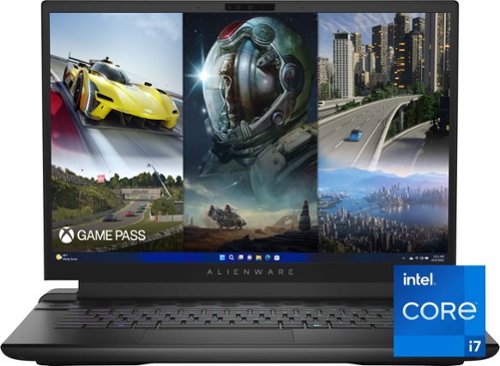
The new Alienware m16 is 16-inch high-performance gaming laptop with the latest CPU and GPU offerings and thermals that harness its power for smooth and stable performance. Get innovative and powerful performance with the latest 13th generation Intel Core processors and NVIDIA GeForce RTX 40 Series graphics cards.
Customer Rating
5
A Desktop Replacement Gaming Computer
on June 20, 2023
Posted by: RedScorpion
The Alienware M16 that I received was a bit of a first for me. I’ve had Dell laptops before, but never an Alienware laptop. I’ve had gaming laptops before, but this is the first time I’ve felt like I had a true desktop gaming experience on one. The 165hz has excellent color reproduction with zero light bleed. The 4070 graphics card produces excellent framerates on most games I tested. So, if you’re looking for a gaming laptop, I think this laptop more than fits the bill.
Unboxing: I should state upfront that I was using the model with a 4070 graphics card, a 165hz display, and 16GB of RAM.
The laptop is squarer than I thought it would be. Its design almost reminds me of the old Compaq and HP laptops of the early 2000’s. It’s all more polished and I really like the finish. This is, understandably, a heavy laptop. But the piece that got the “biggest” reaction from me was the huge power brick. This is the first power brick that could double as a real brick. It’s huge and weighty. If I had one complaint about the laptop, it probably would be this huge, heavy power brick.
The laptop has two USB-A 3.2 ports, two Thunderbolt 4 ports, a display port, an HDMI port, an ethernet port, a 3.5mm headphone jack, and a 2.5gbps Killer ethernet port. This laptop isn’t hurting for connectivity.
The laptop has two USB-A 3.2 ports, two Thunderbolt 4 ports, a display port, an HDMI port, an ethernet port, a 3.5mm headphone jack, and a 2.5gbps Killer ethernet port. This laptop isn’t hurting for connectivity.
Experience: Initial setup was easy enough. Users should prepare themselves for a few hours’ worth of Windows, Nvidia, and system updates to download.
There are a few specific Alienware applications that you will use with this laptop. The biggest for me was “Alienware Command Center”. From there, you can change lighting, monitor fan speeds, and CPU and GPU temperatures. Speaking of lighting, this laptop has the most lighting options of any laptop I have ever used. However, it could be a bit finicky to apply lighting changes to certain sections of the laptop. For some reason, getting lights to change was a bit of trial and error. Sometimes it was flawless, but for some reason the Alienware logo gave me more than a few fits whenever I tried to change the color.
Command Center recognized my installed games. It would then, while playing games, change the lighting to different solid configurations depending on the game I was playing. You could also configure an in-game pop-up that would stay on the left side of the screen and provide information about system temps and fan speeds.
Video game performance was great. I ran Time Spy to benchmark right away. The laptop earned a 12,480 Time Spy score. As you can see in my attached screenshots, I let NVidia, through the NVidia Experience adjust game settings to get the game performance to optimal. With the recommended settings, I achieved an average FPS of 88.28 on Cyberpunk 2077.
Visuals on the included monitor were surprisingly good. The monitor wasn’t the brightest laptop display, but the color representation was good. I had no light bleed to speak of. Dark screens looked appropriately dark. Game images looked good. This is a good display.
I should mention the noise. The speakers in the laptop sound good to me. Running an ATMOS audio test, I truly felt the spatial audio worked. But unfortunately, the speakers aren’t the only thing you will hear. This laptop sounds like a jet engine. If you intend to game on this device, I recommend a cooling stand and headphones. This laptop gets hot, and its fans get loud. But, having said that, the fan noise is more the sound of a jet engine than an annoying grinding sound. With a good set of headphones, I didn’t really notice the noise all that much. A good cooling stand can also help bring temps down a bit in my experience.
The laptop comes with 16GB of DDR5 RAM and a 1TB NVME drive. At some point, I plan on upgrading the RAM to 32GB and adding another NVME drive. Dell sells compatible heatsinks for NVME drives for under $20 on their website. I would highly recommend you pick one up if you intend to add storage later.
Conclusion: As I said in the beginning, this is the first laptop I have owned that truly felt like a desktop replacement. It’s fast enough that I can ditch the desktop without guilt. It’s big and heavy, but it packs a punch. At the moment, I have it docked to an external Dell monitor, keyboard, and mouse. It truly feels like a desktop experience in a portable package. Alienware delivered. I love this laptop.
Easy recommendation.
5/5
I would recommend this to a friend!





Share this review:


+1point
1of 1voted this as helpful.
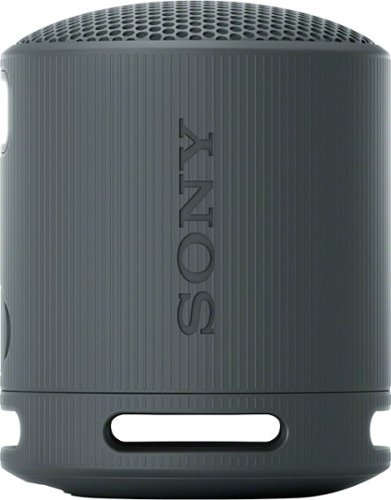
Enjoy big sound with the super-compact SRS-XB100 wireless speaker, offering powerful, clear sound, an updated IP67 waterproof and dustproof design1,2, and up to 16 hours of battery life.3 Small enough to fit in a bag or cupholder, the XB100 also features a versatile strap to take with you wherever you go.
Customer Rating
5
Excellent Sound in the Size of a Pop Can
on May 26, 2023
Posted by: RedScorpion
The Sony XB100 is a small speaker that, for its size and price point, produces pretty good sound. I like it. Its audio fills a room, it sounds good while outside, and its small size makes it incredibly portable. I can set the speaker down or hang it from a hook on the wall. It’s light. It’s easy to use. It has great volume. The ability to use the XB100 as a speakerphone or to pair it with another XB100 for stereo sound makes the speaker even more impressive. In short, it’s a solid little gadget.
Initial impressions out of the box are pretty good. This is another stylish Sony speaker. The upward firing speaker has a rubberized texture on the outside. It fits like a pop can in my hand. It stands around 3.3 inches tall. The strap is easy to adjust.
The Sony XB100 comes with a a USB-C charging cable. However, I should point out that the charging cable is short. It’s only about a foot long. The USB port appears to only be for charging. Don’t expect audio over a wired connection. There also is no 3.5mm AUX input. There is no Wi-Fi connection, companion app, or Alexa / “Hey Google” integration.
The Sony XB100 is IP67 rated. IP stands for ingress protection. The first number is a range of 0 to 6 representing how well the item protects against solids. The second number is presented in a range of 0 to 9 and represents how well the item protects against liquids of various volumes and temperature. The XB100 has a rating of 67. As such, it’s rated for up to thirty minutes in water as deep as a meter or 3.3 feet.
Sony advertises battery life at around 16 hours. I seemed to get around that mark in my testing.
Audio quality is incredibly subjective. I think it sounds very good, especially considering its size and price point. It’s never going to replace my portable party speaker, but it’s not supposed to.
However, having said that, the speaker produces some thump for its small size. There’s a good amount of bass here. Podcast / audiobook vocals were loud and clear. Sometimes, mids got a bit drowned out. But, on the whole, I would say the audio quality is very good. I’m going to pick up another speaker for stereo mode as soon as I can.
Audio quality is incredibly subjective. I think it sounds very good, especially considering its size and price point. It’s never going to replace my portable party speaker, but it’s not supposed to.
However, having said that, the speaker produces some thump for its small size. There’s a good amount of bass here. Podcast / audiobook vocals were loud and clear. Sometimes, mids got a bit drowned out. But, on the whole, I would say the audio quality is very good. I’m going to pick up another speaker for stereo mode as soon as I can.
Conclusion: The XB100 is a great little speaker. If you’re looking for a Bluetooth speaker in this price point, the XB100 is easy to recommend.
5/5
I would recommend this to a friend!




Share this review:


0points
0of 0voted this as helpful.
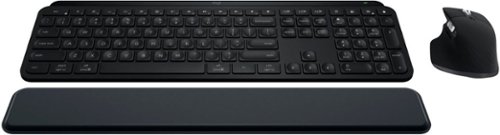
Master your flow with the MX Keys S Combo Wireless Mouse and Keyboard ~ the ultimate combo that combines the power of the fluid, fast precision typing of MX Keys S Wireless Keyboard with the precise, fast scrolling experience of MX Master 3S Wireless Mouse.
Customer Rating
5
Stylish PC Peripherals Look and Perform Great
on May 22, 2023
Posted by: RedScorpion
I have a history with Logitech MX mice. Some of my favorite mice of the last twenty years are the Logitech MX 1000 and the Logitech Performance Mouse MX. I wore those mice out over thousands of hours. Getting my hands on the MX Master 3S has felt like the best trip down memory lane, ever. Both the MX Master 3S Mouse and the MX Key S Keyboard look and perform great. After a week with the MX Keys S Combo, I feel I can easily recommend the package to productivity users or any PC user who wants stylish peripherals that work and look great.
Experience:
Inside the box, you get the keyboard, the mouse, a wrist rest for the keyboard, a USB-C to USB-A cable, and the Bolt Unifying USB receiver.
Initial impressions are that this package looks great. They’re stylish. They make a good impression on a desk. I really like their sleek, minimalist design. And yet, everything I want, including some keys and features I didn’t even know I wanted, are here.
After plugging the Logitech Bolt Receiver into my Windows 11 PC, I received a pop-up notification prompting me to install Logi Options+. I get the impression that Logitech is trying to keep gaming hardware and productivity hardware separate, but it feels a bit ridiculous to have GHUB on my computer and Logi Options+ when both pieces of Logitech software perform similar roles. But, having said that, Logi Options+ is my favorite of the two apps. It’s much simpler and way more intuitive to use.
I love this mouse. It looks impressive on a desk. It performs well. I had a smooth glide on cloth and hard mouse mats. It fits my hand great. I love the weight. I love the button layout. Not only can you customize mouse buttons, but you can customize them for specific applications within the Logi Options+ app.
Gesture controls are built into the mouse. They're also customizable. It's taken me a bit to get used to them, but now, I can't imagine my day without them. Pressing the thumb rest while moving the mouse up, down, left, or right triggers a variety of customizable key presses.
There is no DPI toggle. Instead, you get a toggle for the scroll wheel, a horizontal scroll wheel, and back and forward buttons above the thumb rest.
The MX Master 3 and the MX Master 3S are very similar mice. The MX Master 3S utilizes the Bolt receiver whereas the MX Master 3 relied on the Logitech Unifying Receiver. Both receivers are tiny USB-A dongles that allow you to easily connect your devices with your Windows PC. The Bolt Receiver utilizes some Bluetooth security features and performs like Bluetooth in terms of latency. If you are wanting a gaming mouse, this may not have the response time you are seeking. But, if you’re like me and enjoy strategy games or work with photoshop and other productivity applications, I think you’ll find this a very enjoyable experience. I like it so much I’m ordering another Bolt Receiver to keep on my gaming PC. Then, I can just switch between computers with the press of a button.
But, again, this is a trip down memory lane for me. I like this form factor because it reminds me of my favorite mice of the last twenty years. Your mileage may vary. If you like lighter, smaller mice, or have a smaller hand, this may not be the mouse for you.
Battery life has been good. You can easily get several days of battery life. In the last week, I have only had to charge it once. Out of the box, my keyboard and mouse were at 45% charge. It took around an hour to get both devices back to 100%.
I have been on a mechanical keyboard kick for the last few years. I’ve been surprised by how much I like the MX Key S. It looks like a polished laptop keyboard in a desktop keyboard form factor. Keys are comfortable. I rarely found myself mistyping or duplicating key presses. That’s probably due in part to the key travel.
Over the last week, I have found myself using every one of the function keys. And just like the mouse, the function keys are highly customizable within the Logi Options+ app. The entire experience has been super easy and intuitive. I appreciate the dictation, screen snip, and emoji keys way more than I thought I would. Plus, with the ability to pair with three devices, I can easily use these devices on my Surface, my desktop, and my Chromebook with the press of a button. It all works great. The software is intuitive and easy to use.
This combo has worked well with my Chromebook, Galaxy Tablet, and my iPad. My only complaint, I wish I could run Logi Options+ from my Chromebook. Currently, the full software features are only available on Windows and MAC OS.
Conclusion:
I really like this package. I wish the latency on the mouse were a bit better. If the latency were a tad better, this would be my perfect mouse. As it is, it’s a very good mouse that is a must for productivity users and good for gamers. The keyboard performs and looks great. I’m very happy with this mouse and keyboard combo and I think it’s very easy to recommend.
5/5
I would recommend this to a friend!




Share this review:


0points
0of 0voted this as helpful.
Design meets function with the Bespoke Jet Cordless Stick Vacuum. Innovative design combines a Clean Station, charging stand and powerful Jet Stick into one show-stopping vacuum. Available in contemporary colors and premium finishes to beautifully fit your d~cor and lifestyle. Built-in Clean Station lets you empty the dustbin at the press of a button while also charging your vacuum. The Bespoke Jet is a powerful Jet Stick, so you can tackle any mess across multiple floor types such as carpets, hardwood floors and tile. The Bespoke Jet is engineered around a lightweight, maneuverable design, plus a multistage filtration system that maintains cleaner air in your home.
Customer Rating
5
A Stylish Stick Vacuum with Power to Spare
on May 19, 2023
Posted by: RedScorpion
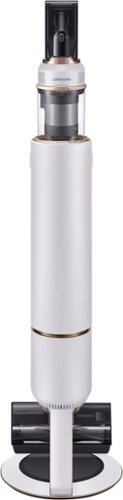
For the last week, I have been using the Samsung - Bespoke Jet Cordless Stick Vacuum with All-in-One Clean Station. My impressions have been very good. The Bespoke Jet is light, powerful, and stylish. The auto empty station is easy to use and does a good job getting debris out of the vacuum. I tested the vacuum on carpet and tile. The vacuum feels technologically advanced, but it’s intuitive enough that without instruction, my wife or parents can easily pick it up and use it. Overall, I have really enjoyed it and can easily recommend it.
Experience: The Bespoke Jet is a stylish and “techie” stick vacuum. For the most part, it does a good job picking up debris such as dirt, dog food, and cereal off of hard surfaces. Using the vacuum and changing out attachments feels intuitive and simple. The on-screen display does a good job keeping you up to date at runtime and will even flash errors if the vacuum encounters a problem such as a clogged roller.
Battery life has been a bit of a mixed bag. With the roller attached and on the default “mid” setting, the vacuum will only run for about 25 minutes. I was a little disappointed with that run time at first, but in my experience, it has been more than enough to clean two or three rooms. The battery life lasts longer if you aren’t using the roller and are instead using the “crevice tool” or “combination tool” attachments.
This vacuum stands out in a room. The pictures always have the vacuum sliding in behind the station. I thought it was easier to slide it in at the side. You can reroute the cable on the bottom of the waste station to set the unit up how you see fit. When plugged in to the station, the entire thing stands about four feet tall.
The dual brush works well on every surface type I put in front of it. I thought it worked well on both carpet and tile without having to adjust height while vacuuming. Cleaning the brush rolls is easy. The main roller slides out from the side of the dual brush casing with a click of a button. There was some resistance putting it back into the case, though. The rubber on the roller wanted to catch and rub as I put the roller back into place.
Note: when you use the auto empty station to clean out the bin on the Vacuum, there will be an open flap on the bottom of the vacuum when you take the vacuum off the station. I don’t know why, but that always catches me off guard and I worry I might catch that flap if I’m not careful when picking the vacuum up.
Nitpicks: I wish there was a case for the attachments. There’s no real way to store them on the waste station that I can see. As it is, I have them in a plastic bag in the closet. I wish there was a way to keep the attachments on or near the auto empty station.
Conclusion: Nitpicks aside, I really have enjoyed this vacuum. It works well. It feels stylish. The onscreen display is a nice touch. The auto empty station is great. I think it’s important to be realistic about battery life expectations, but I haven’t been disappointed with battery life, either. I have really liked the Bespoke Jet Cordless Stick Vacuum and highly recommend it.
5/5
I would recommend this to a friend!


Share this review:


0points
0of 0voted this as helpful.
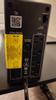
The APC Back-UPS Pro BN1050M mini-tower model is designed to power your critical electronics during blackouts and protect them from the dangers of surges, spikes, lightning, and power outages. By powering your critical electronics during blackouts, you ensure personal and professional connectivity when it matters most. Improvements in size and surge protection come at an affordable price, making the Back-UPS ProBN1050M mini-tower model a perfect solution for your power protection needs.
Posted by: RedScorpion
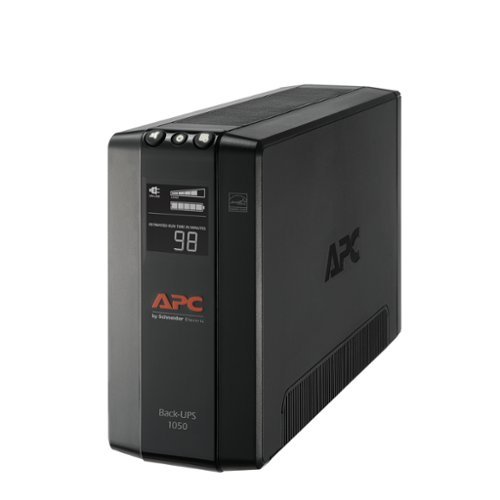
The Back-UPS Pro BN1050M is a capable battery back-up with solid surge protection. If you're looking for a 1000VA / 600W system, it's hard not to recommend the BN1050M.
Some things you should know, the APC comes with a cable that you can hook-up via USB-A to your computer. When hooked up to a Windows 10 / 11 PC, you can see the battery status and adjust your PC's power settings for battery use. The surge is rated for 1103 joules. In addition, the unit comes with a 3 year warranty, $250,000 Equipment Protection Policy. Should you need to replace the battery down the road, you can take out the internal battery and recycle it very easily.
Unlike some prior APC Back-UPS, there is no connection for LAN, COAX, or phone / fax. I can't say I ever used this feature, and I gather APC assumed most users wouldn't miss it.
Performance: I am running a Windows 11 PC with a 750W PSU and a 32" gaming monitor. With my current power usage, the battery got me close to thirty minutes. A far cry from the 98 minutes runtime shown on the box, but well within the fine print on the top. It was more than enough time to protect against brief interruptions in power and to effectively save my data and shut down my PC.
Cons: As I previously mentioned, there is no COAX or LAN port. I wish APC had utilized the back of their unit to provide wider plug spacing. Unfortunately, PC hardware is notorious for having bricks, or wall plugs with odd shapes. As a result, I struggled to get two devices plugged in to the battery-backup and three devices on the surge only connection. Granted, I can't entirely blame APC for this as the device manufacturers determine what their plugs will need. But since there is more space, having spaced out ports would have been nice.
Conclusion: The APC - Back-UPS Pro BN1050M is a solid battery back-up. It's a workhorse that is easy to recommend. I got close to thirty minutes on battery alone. If you need more time, then you might want to look at a more powerful model, but for my usage, the BN1050M works great.
Easy to recommend. 5/5
I would recommend this to a friend!


Share this review:


0points
0of 0voted this as helpful.
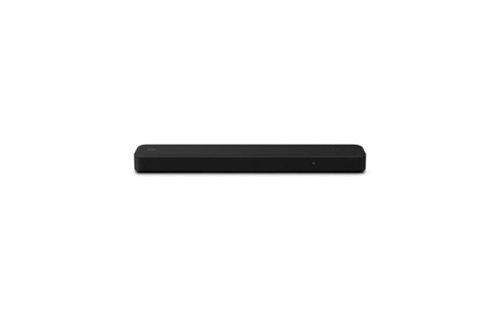
The HT-S2000 soundbar delivers high-quality audio and an upscaled cinematic surround sound experience for all your content. Built for the Sony ecosystem, this compact soundbar solution is compatible with Sony SA-SW3, SA-SW5 subwoofers and, SA-RS3S rear speakers and integrates fully with BRAVIA XR TVs.
Customer Rating
5
Sony Delivers Rich Spatial Audio
on April 28, 2023
Posted by: RedScorpion
The Sony HT-S2000 is a soundbar that takes aim at similar offerings from Sonos and Boss, and more than stood its ground. The soundbar impressed me with its sound range and ease of use. Whether connected to the eARC on my TV or connected via Bluetooth, the sound quality was always top notch. Audio was clear and rich enough to fool my dog into thinking he needed to spring into action and defend me. Spatial audio surprised me. Dolby Atmos effects worked well. Add to this speaker the ability to pair a wireless subwoofer and rear channel speakers, and Sony has a winner.
Setup: Inside the box, Sony includes the AC adapter, the speaker, a remote, mounting documentation, and a high-speed HDMI cable. I really appreciate having the HDMI cable included. The AC adapter will not take up more than one space on your power strip.
I plugged my speaker into the eARC port on my TV and set up was truly plug-in play. The television remote controls the volume on the soundbar.
TIP: When given the option, I do not recommend having the TV decode the audio. On my TV, having the TV decode the audio created stutters and lag in video playback. Instead, put the audio in passthrough and let the soundbar do the heavy lifting. That’s what you got it for.
Experience: As previously noted, audio sounds great. The bass has a surprising amount of punch to it. There’s depth to the audio. Spatial audio works well and did an excellent job tricking my ears. The speaker can simulate Atmos and DTS-X effects. However, you will need to make sure “Sound Field” is enabled for that feature to fully work.
I recommend that you download the Sony Home Entertainment app from the Google Play or Apple App Store to get the most out of your speaker. Most features are also included on the bundled remote control. But I liked the app because it did give me an indicator of the source audio quality. The speaker itself will only show a small amount of text, but the app will show for instance if your source audio is Dolby Atmos, Dolby 5.1, or DTS-X.
I recommend that you download the Sony Home Entertainment app from the Google Play or Apple App Store to get the most out of your speaker. Most features are also included on the bundled remote control. But I liked the app because it did give me an indicator of the source audio quality. The speaker itself will only show a small amount of text, but the app will show for instance if your source audio is Dolby Atmos, Dolby 5.1, or DTS-X.
I only have a few nitpicks. I like that the speaker has a “nighttime” mode, but I must enable that setting each time I turn the speaker on. I wish the speaker remembered my setting after powering back on from standby. The other settings are saved such as sound field and voice enhancer, but not nighttime mode. But, again, that really is just a nitpick.
Conclusion: I really like this speaker. It sounds great. Most flat screen TVs have awful audio. While I will always love having a receiver and individual speakers, soundbars like the Sony HT-S2000 are slowly converting me. This speaker is simple to use, and it sounds great. I know that audio quality is subjective, but my wife and I are extremely impressed with this speaker. Hopefully, I can add the rear channel speakers and the wireless subwoofer at some point.
5/5 Easily Recommend.
I would recommend this to a friend!


Share this review:


+1point
1of 1voted this as helpful.
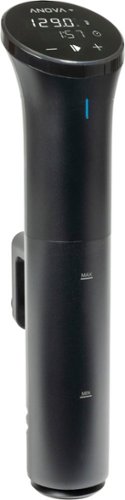
Intro-level price. Pro-level results. For food nerds, by food nerds. Our most compact cooker is still huge on results. This latest iteration of our entry-level sous vide circulator adds key improvements as requested by food nerds, for an even sweeter deal on perfect meals.
Customer Rating
5
Small Cooker, Great Results
on April 25, 2023
Posted by: RedScorpion
The Anova Precision Cooker Nano 3.0 has been my gateway to the cooking world of sous vide, and I am really enjoying my time here. Wi-Fi built-in means I can keep an eye on temps and timers all while stopping or starting the cooking process from anywhere in my house. So far, I have made a few dishes, and they have all come out perfectly. The Nano 3.0 is easy to use, easy to setup, and very easy to recommend.
Setup: The Precision Cooker Nano 3.0 looks to me like a glorified hair curling iron. There’s not a lot in the box, but you will need to download the Anova app and download a firmware update if you wish to use the Nano 3.0 with your phone. The screen controls also work, but I must admit that I enjoyed using my phone. The app makes it easy to find a recipe and then start that recipe with the Nano 3.0. That means the app sends the temps and timers to the cooker.
Experience: I used a 12 quart pot with my Nano 3.0. Now, you can use zip-lock bags, but I chose to use vacuum sealed bags. After making a few recipes and talking with friends, you don’t need vacuum sealed bags. But, it does help to get all the air out and keep things sealed.
TIP: I know clips aren’t technically required, but I would recommend them. In my early goings, I had a few errors where the bags would float too close to the Nano thus interfering with the Nano. Clipping the bags to the side of the pot helped to make sure that didn’t happen.
The first recipe I tried was a maple glazed salmon that I got from the Anova app. That might have been the best salmon I have ever had. The meat was cooked perfectly. I have since experimented with some chicken recipes, and I am dying to try making some steaks. So far, everything has worked really well.
Cons: My only nitpick is that it can take quite a while for the Nano 3.0 to preheat the water. Be prepared, it might take anywhere from thirty minutes to an hour to get the water to temp. The app only starts its timer when the water is at temp. If you put the food in before the water is preheated, it will cook longer. But I never noticed any problems with that as meat was never overdone.
I wish it were easier to take the unit apart for cleaning purposes. I can take an end cap off and drain water, but I can’t really clean anything else out. I guess since I’m only putting this in water and I’m not getting food on the Nano, it should be fine. Time will tell.
Conclusion: I’m looking into a plastic container and am scouring the net for recipes. I’m hooked. Sous vide is a lot of fun and the Nano 3.0 works great. The wi-fi features are intuitive and easy to use. The app does everything I want to do. If you give yourself plenty of time, I think you will really enjoy the Anova Precision Cooker Nano 3.0. I highly recommend it.
5/5
I would recommend this to a friend!




Share this review:


+2points
2of 2voted this as helpful.
RedScorpion's Review Comments
RedScorpion has not submitted comments on any reviews.
RedScorpion's Questions
RedScorpion has not submitted any questions.
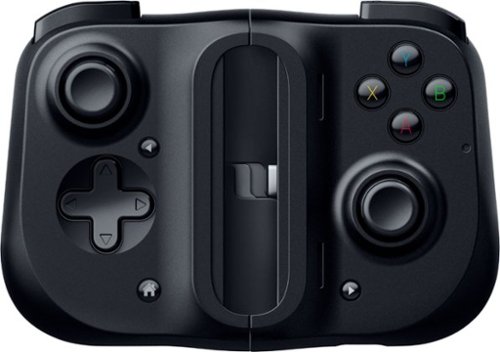
Bring your A-game anytime, anywhere. Introducing a universal mobile gaming controller that fits most smartphone devices, designed to bring console-level control to your on-the-go gaming. With this controller by your side, wherever you go, victory will follow.
Will it fit my phone? I have the samsung s10e and I know it will work with the connection but I don't know if it will fit the s10e.
Yes, I am using it to play Halo on my S10e.

5 years, 8 months ago
by
RedScorpion
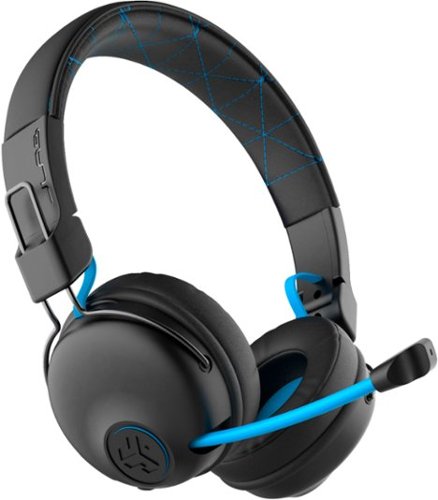
Hear all your games in high-quality sound with this JLab Play wireless gaming headset. With an increased mid to high frequency response and super-low 60 ms latency, this headset is able to deliver clear vocals and enhance spatial awareness without lag. JLab~s Play wireless gaming headset delivers over 22 hours of playtime and compatibility with PCs, consoles and mobile devices to handle every session.
where is the micro phone? can it be used for a call center?
The headset features a retractable boom mic on the right ear piece. In my opinion, the headset would work well in a call center or home based call center. There is a mute button built in to the headset and the mic works in either Bluetooth or the wired 3.5mm mode.
5 years, 10 months ago
by
RedScorpion
Hear all your games in high-quality sound with this JLab Play wireless gaming headset. With an increased mid to high frequency response and super-low 60 ms latency, this headset is able to deliver clear vocals and enhance spatial awareness without lag. JLab~s Play wireless gaming headset delivers over 22 hours of playtime and compatibility with PCs, consoles and mobile devices to handle every session.
Is it compatible with ps4 & xbox?
Yes.
But it is not wireless on PS4 and XBOX. To use with your XBOX or PS4, you will neeed to use the included 3.5MM AUX console cord.
But it is not wireless on PS4 and XBOX. To use with your XBOX or PS4, you will neeed to use the included 3.5MM AUX console cord.
5 years, 10 months ago
by
RedScorpion
Hear all your games in high-quality sound with this JLab Play wireless gaming headset. With an increased mid to high frequency response and super-low 60 ms latency, this headset is able to deliver clear vocals and enhance spatial awareness without lag. JLab~s Play wireless gaming headset delivers over 22 hours of playtime and compatibility with PCs, consoles and mobile devices to handle every session.
Will these headphones work with I buy power computers
Yes, if the computer has Bluetooth built-in. If the computer does not have Bluetooth built-in, you will need to purchase a separate USB Bluetooth Adapter *(they tend to run between $10 and $20).
5 years, 10 months ago
by
RedScorpion
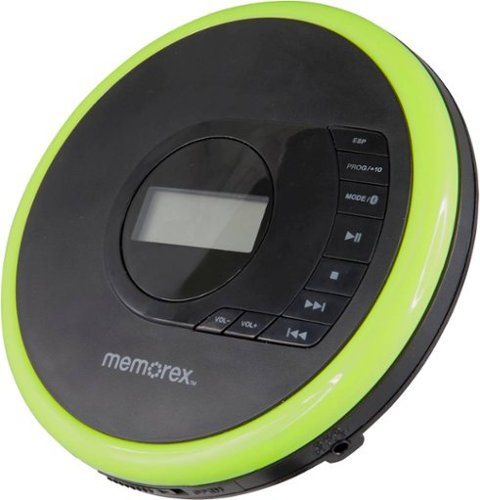
Listen to your favorite albums and audiobooks on the go with this Memorex portable CD player. The 40-second anti-skip protection function for CDs ensures smooth, uninterrupted listening, while the dynamic bass boost system delivers rich sound. This Bluetooth Memorex portable CD player features an LCD screen and digital control buttons for conveniently choosing tracks and adjusting volume.
Can you play audio books on this CD player? And What accessories will I need to buy?
If your audio book comes on CD or MP3 CD, you can play it on this player. It doesn't come with a power cord. It includes 2 AA batteries.
6 years, 1 month ago
by
RedScorpion
Listen to your favorite albums and audiobooks on the go with this Memorex portable CD player. The 40-second anti-skip protection function for CDs ensures smooth, uninterrupted listening, while the dynamic bass boost system delivers rich sound. This Bluetooth Memorex portable CD player features an LCD screen and digital control buttons for conveniently choosing tracks and adjusting volume.
iS THIS AN MP3 CD?

Listen to your favorite albums and audiobooks on the go with this Memorex portable CD player. The 40-second anti-skip protection function for CDs ensures smooth, uninterrupted listening, while the dynamic bass boost system delivers rich sound. This Bluetooth Memorex portable CD player features an LCD screen and digital control buttons for conveniently choosing tracks and adjusting volume.
Can it be used with or without the earbuds?
Yes?
Without the included earbuds, you can use your own or connect via Bluetooth. There is no built in speaker on the player if that's what you are asking.
Without the included earbuds, you can use your own or connect via Bluetooth. There is no built in speaker on the player if that's what you are asking.
6 years, 1 month ago
by
RedScorpion
Listen to your favorite albums and audiobooks on the go with this Memorex portable CD player. The 40-second anti-skip protection function for CDs ensures smooth, uninterrupted listening, while the dynamic bass boost system delivers rich sound. This Bluetooth Memorex portable CD player features an LCD screen and digital control buttons for conveniently choosing tracks and adjusting volume.
have a 2019 mazda cx3 w/bluetooth capability. Will this work? Is a usb power cord available?
It should pair with your car, but there is no USB power cord. It still relies on an older ac or dc adapter.

6 years, 1 month ago
by
RedScorpion
Listen to your favorite albums and audiobooks on the go with this Memorex portable CD player. The 40-second anti-skip protection function for CDs ensures smooth, uninterrupted listening, while the dynamic bass boost system delivers rich sound. This Bluetooth Memorex portable CD player features an LCD screen and digital control buttons for conveniently choosing tracks and adjusting volume.
Will this work with Apple Bluetooth earbuds?
I don't see why it wouldn't. I paired it with Bluetooth headphones from Samsung, Sony, and JVC without problems. The only quirk is you have to make sure to turn on the Bluetooth feature each time you start the CD player. Also, sometimes the devices have to be re-synced every time you power on. My headphones kept the connection, but some of my Bluetooth speakers did not.
6 years, 1 month ago
by
RedScorpion
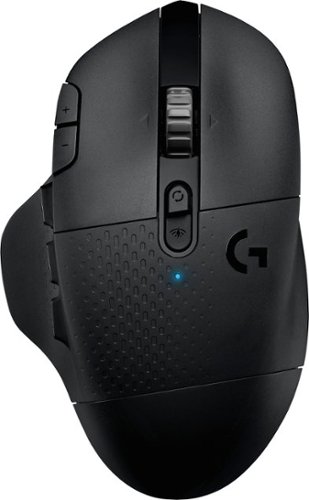
With 15 programmable controls, LIGHTSPEED wireless technology, hyper-fast scroll wheel, and the revolutionary HERO 25K sensor, G604 offers both versatility and high-performance with endless possibilities to play with mastery. Dual connectivity lets you toggle between Bluetooth and ultra-fast 1 ms LIGHTSPEED advanced wireless technology~even on separate machines. Extremely accurate tracking and class-leading power efficiency enables up to 240 hours of high-performance gaming with one AA battery.
I read online that this mouse doesnt work with windows 10?
I am using Windows 10 ver. 1903. It works fine. It works on Windows 10 over Bluetooth and with the included USB light speed receiver.
6 years, 7 months ago
by
RedScorpion