


KKCNIck's stats
- Review count423
- Helpfulness votes436
- First reviewOctober 20, 2010
- Last reviewJune 10, 2026
- Featured reviews0
- Average rating4.5
- Review comment count1
- Helpfulness votes0
- First review commentOctober 2, 2014
- Last review commentOctober 2, 2014
- Featured review comments0
Questions
- Question count0
- Helpfulness votes0
- First questionNone
- Last questionNone
- Featured questions0
- Answer count17
- Helpfulness votes5
- First answerJune 17, 2009
- Last answerNovember 7, 2020
- Featured answers0
- Best answers2
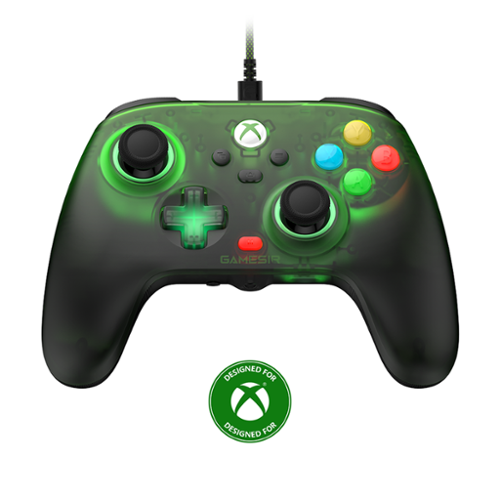
Embrace elegance and comfort with the GameSir T7 Pro Floral, featuring a stunning floral-patterned matte shell. Its semi-transparent design and dynamic RGB lighting create a mesmerizing visual experience. Shine with the T7 Pro Floral and elevate your gaming setup!
Customer Rating

5
Great controller with no battery requirement
on April 29, 2026
Posted by: KKCNIck
Unboxing was pretty simple. Removed the stick foam pads and plugged in the USB a to C braided cable. It was a nice 10’ length considering it is a wired controller.
Then I connected it to my Xbox and it worked instantly. There is a nice green translucent glow that comes from the controller that is nice but not too much. In game play I found the feedback to seem just as responsive as the newer first party controllers. When playing Fortnite I found the buttons handled building without feeling like the sticks were going to snap off. Everything was accurate and could keep up. When playing Forza I found the controls worked well and I did not have any drift that I noticed which was nice. I did play with the adjustable trigger and while it worked I did not find it game me any better game play for what I play on Xbox. I could see it being useful for COD if I played something that would benefit from a tighter control on the trigger and speed. I like the feel of the controller and performance for the money and the fact that I can connect it from my console to my PC makes it versatile without needing batteries. That makes this really good since the wireless can chew through batteries. I know you can reprogram the back buttons but I did not find any good uses for it but again depending on the game it surely is a nice to have.
Then I connected it to my Xbox and it worked instantly. There is a nice green translucent glow that comes from the controller that is nice but not too much. In game play I found the feedback to seem just as responsive as the newer first party controllers. When playing Fortnite I found the buttons handled building without feeling like the sticks were going to snap off. Everything was accurate and could keep up. When playing Forza I found the controls worked well and I did not have any drift that I noticed which was nice. I did play with the adjustable trigger and while it worked I did not find it game me any better game play for what I play on Xbox. I could see it being useful for COD if I played something that would benefit from a tighter control on the trigger and speed. I like the feel of the controller and performance for the money and the fact that I can connect it from my console to my PC makes it versatile without needing batteries. That makes this really good since the wireless can chew through batteries. I know you can reprogram the back buttons but I did not find any good uses for it but again depending on the game it surely is a nice to have.
I would recommend this to a friend!
Share this review:


0points
0of 0voted this as helpful.
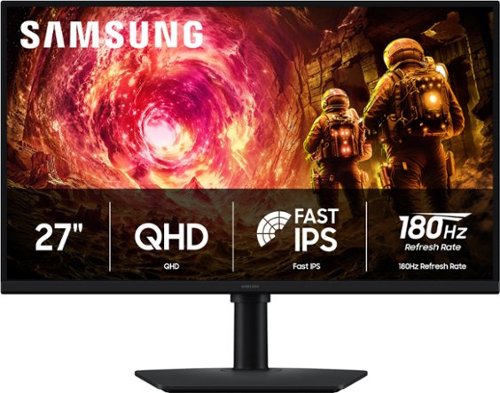
Samsung~s 27" Odyssey G5 QHD Gaming Monitor delivers brilliant visuals for exhilarating gameplay that~s more immersive than ever before. QHD resolution (2560 x 1440), with more than 1.7 times the pixel density of Full HD, boasts incredibly detailed, pin-sharp images. The fast IPS panel, with its 178~ viewing angle, provides an engaging gaming experience by consistently delivering crisp, clear hues from various viewpoints. 180Hz Refresh Rate and 1ms response time (GtG) allow ultimate speed for ultra-smooth gaming precision, while G-Sync compatibility syncs the GPU and panel to reduce choppiness, screen lag, and image tearing. Scenes feel more realistic with HDR10, which provides brighter highlights and nuanced shadows for added depth. Black Equalizer improves visibility in the deepest shadows, while Virtual Aim Point increases the accuracy of the player~s aim when the action peaks. Auto Source Switch+ allows instantaneous switching between connected devices without having to flip through multiple inputs. Maintain winning streaks in total comfort with the height-adjustable Ergonomic Stand that easily pivots, tilts, and swivels for the perfect view.
Customer Rating
5
Good Value gaming monitor
on April 28, 2026
Posted by: KKCNIck
I think this monitor offers good value for people wanting a sharp, fast display for gaming and home office use without spending the money on premium monitors.
The Quad HD resolution is sharp but still legible since not all gaming computers can perform 180fps with 4k so this gives a good compromise on higher resolution gaming but not so much that it requires only a top gaming machine. When playing with the smoothness from the 180hz makes it a strong choice for everyday gaming and general usage. Since it is an fast IPS display the viewing angles are not the best and the blacks are not as deep as say an OLED but it does have vivid colors for gaming. If needed for photo/video editing this may not be the monitor for you since the colors are limited. The contrast was not the best but still good. For the money it is definitely a good buy. I noticed an immediate difference once I switched out my other monitor for this one.
I would just say that the bezel is glossy so when tilting or adjusting the screen it shows fingerprints easily. The size is good for being a 27” and having this resolution. When using for non-gaming things are easy to read and you can easily use split screen in Windows and everything lays out well.
The Quad HD resolution is sharp but still legible since not all gaming computers can perform 180fps with 4k so this gives a good compromise on higher resolution gaming but not so much that it requires only a top gaming machine. When playing with the smoothness from the 180hz makes it a strong choice for everyday gaming and general usage. Since it is an fast IPS display the viewing angles are not the best and the blacks are not as deep as say an OLED but it does have vivid colors for gaming. If needed for photo/video editing this may not be the monitor for you since the colors are limited. The contrast was not the best but still good. For the money it is definitely a good buy. I noticed an immediate difference once I switched out my other monitor for this one.
I would just say that the bezel is glossy so when tilting or adjusting the screen it shows fingerprints easily. The size is good for being a 27” and having this resolution. When using for non-gaming things are easy to read and you can easily use split screen in Windows and everything lays out well.
I would recommend this to a friend!
Share this review:


0points
0of 0voted this as helpful.
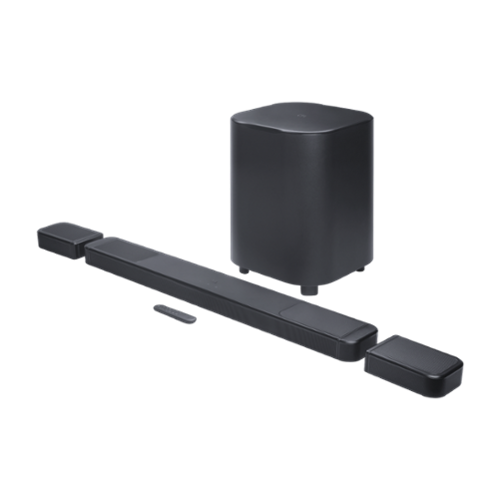
Get ultimate 3D spatial sound in seconds ~ without the wires. You can get a cinematic sound experience in seconds. One that fills your entire room with true Dolby Atmos and DTS:X for vivid, immersive 3D spatial audio that you can customize to fit any moment. Just pick up the detachable wireless speakers from either end of the JBL BAR 1300MK2 soundbar and put them behind where you~re sitting. Far apart for family movie night with the new superhero hit or closer for a cozy romantic playlist~ chosen from hundreds of available streaming services. Feel deep, punchy bass from a mighty 12~ subwoofer and enjoy the widest, most cinematic soundstage with MultiBeam 3.0. When you~re not watching TV, pair one or both of the detachable speakers to any Bluetooth device for portable and powerful sound anywhere in your home. And all of this works seamlessly with your TV. Your TV just can~t offer the rich, powerful sound you deserve, but JBL has meant great sound for cinemas, recording studios, and concert halls for nearly a century. Bring our level of craft to your own home.
Customer Rating
5
Premium sound and bass with wireless surrounds
on April 14, 2026
Posted by: KKCNIck
The unboxing was very easy. There was a QR code on the inside of the packaging guiding me to the quick start guide. After unpacking everything the setup steps were pretty easy. There is a main soundbar, sub and accessories for mounting on a wall if needed. Also included is a basic remote.
Use: The Quick start guide was easy to follow buy connecting the power and sliding the satellite speakers on the main bar. I chose the HDMI earc connection. Both power cables were the same, which was nice since I was not confused which to use for the sub vs bar. After installed and on. I did install the JBL One app. Once it was connected there was a firmware update which was pretty easy. This app has useful stull like adjustable equalizer and a smart mode for the satellite speakers or you can customize their behavior if you like.
I did like when watching Batman Vs Superman that the sound was detailed and the performance did make me feel like a pretty full surround sound effect. However, the satellite speakers are pretty soft and the up firing Atmos just do not have enough punch to fill my 16 x 22 room. In order to make the sound fill the room I needed to really turn up the volume which made it feel immersive but not everyone in my family likes the sound as loud. Now the bass from the sub was very good and any voice dialogue was very clear.
I played a few games like Forza and Fortnite and when the volume was above 15 the sound felt loud and immersive. I did play some rap and punk audio, and the sound was very good and adaptive to both styles of music.
Pros:
The sound is very good for a soundbar
All the accessories needed are included
The Sub is a good size and power for the money
Wall mount included
Cons:
The app did not always connect to the soundbar so I would have to reboot it.
The satellite speakers can sound low for surround sound effects when the volume is lower.
The satellite speakers did not come with Usb-C Cables to allow powering them on a more permanent basis requiring reconnecting for charging every few days.
Pricy for an all in one soundbar.
Summary: I think this is one of the best soundbars for a 65” or larger TV where you want a quality surround sound experience without the need for an individual component system. Still my component-based system sounds more complete. These soundbars are getting really close and I would say it should please 95% of users looking for that great sound without the full investment with a receiver and speakers.
I would recommend this to a friend!
Share this review:


0points
0of 0voted this as helpful.
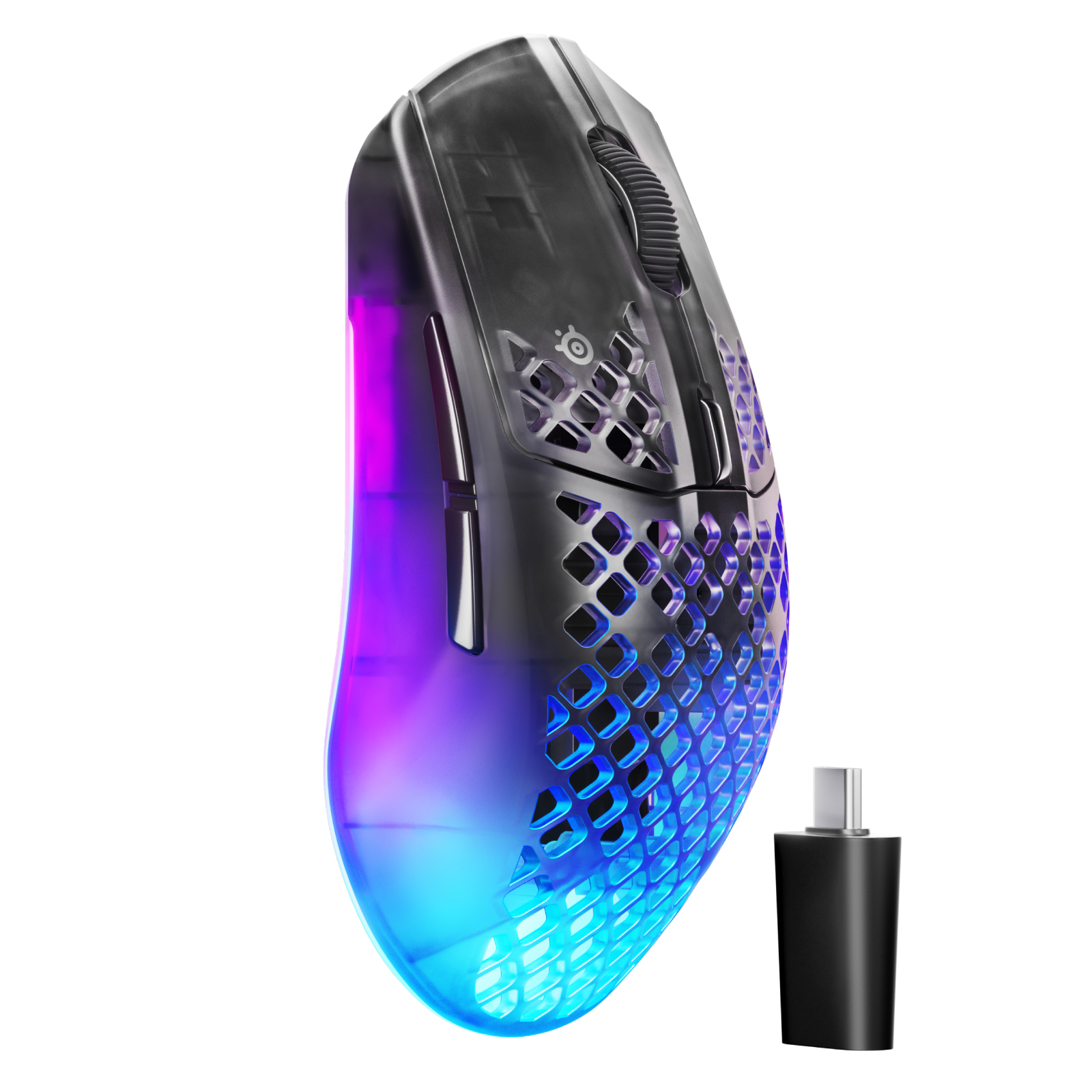
The SteelSeries Aerox 3 Wireless Gen 2 combines 4K wireless polling, ultra-fast 1.2ms clicks, a TrueMove 26K optical sensor, dual 2.4GHz and Bluetooth connectivity, AquaBarrier™ protection, RGB lighting, and long‑lasting battery life up to 200 hours all in an ultra‑lighweight 68g design for uncompromising competitive play.
<br/><br/>
QUANTUM 4K WIRELESS<br/>
Seamlessly switch between ultra-fast 2.4GHz gaming wireless and Bluetooth 5.0, giving you low-latency performance for competitive play and easy connectivity across multiple devices.<br/>
4K FAST<br/>
4K Wireless Polling gives you 4x the speed of the previous generation (0.25ms vs 1ms) with ultra-fast clicks for more headshots.<br/>
TRUEMOVE 26K SENSOR<br/>
26,000 DPI precision with 400 IPS speed and 40G acceleration for ultra-fast flicks, smooth tracking, and zero skips.<br/>
80M CLICK DURABILITY<br/>
Built with durable mechanical switches rated for 80 million clicks, delivering crisp, consistent actuation that holds its feel and performance over time.<br/>
UP TO 200 hr BATTERY<br/>
Game, grind, and scroll for up to 200 hours on Bluetooth or up to 120 hours on 2.4GHz wireless.<br/>
ULTRA-LIGHT, WATERTIGHT<br/>
AQUABARRIER™ rated IP54 to protect from water splashes, dust, and dirt getting inside the mouse, and it only weighs 68g.<br/>
PERSONAL AIMING TOOLS<br/>
Sensitivity Finder Improves your aim and instantly converts your settings for the same feel across different games.<br/>
SCROLL WHEEL<br/>
Aerox 3 Wireless Gen 2 Features A Clickable Scroll Wheel With A Grippier Rubber Pattern For More Precise Control In Gaming And Web Browsing.<br/>
WIDELY COMPATIBLE GAMING MOUSE<br/>
Aerox 3 Wireless Gen 2 works with Windows 10+, Xbox X|S, PS5, Android, and iOS. Install SteelSeries GG software to easily adjust performance settings, get the latest updates, take advantage of Moments game capture, and practice with 3D Aim Trainer.
Customer Rating
5
Good software that is included.
on April 6, 2026
Posted by: KKCNIck
The packaging was very premium, and the mouse came with the usb receiver and extender cable needed to use it for all of the configuration options. I just needed to download the steel series software that was clearly spelled out via web url.
The setup was pretty simple. The part about the software that I found was unique was the FPS shooting practice games. I found it pretty entertaining to build my skills with this mouse vs the game in practice. In fact, that was the most fun I had with setting up a wireless mouse in a long time. Typically, you’re just setting up the profile, reaction times, rgb color settings. This added a real value to the use of the mouse.
Use:
I found the response very fast with the Aerox 3 and the battery life fair given the rgb lighting in such a light package. After several hours of gaming on this mouse, I found the web pattern on the palm part of the mouse to leave a mark in my palm and after extended use this just was not comfortable. I just feel the mouse is too open here and it would have been better if there was more even palm support. I assume they were going for breathability when gaming, but this led to an uncomfortable use. In fact, that was the largest con of this mouse was after about 30 minutes I was just not comfortable using it. I wish they just added some texture if the goal was for it to allow your hand to breath since there is no work around for this design for me. As for the extreme lightness of the mouse. I did not feel after time that it added anything to my gaming advantage vs my previous mouse. I think since your just moving it slightly in any direction I did not notice the weight difference.
Summary:
I like the setup and software Steel Series provided here and the looks and performance of the mouse are top notch. I just wish the design was more comfortable and the battery life was longer. Overall, it is a great mouse for the money if you can get past the feel in your hand. Something I think is a personal decision.
I would recommend this to a friend!
Share this review:


0points
0of 0voted this as helpful.
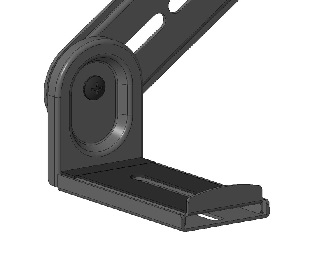
Must own a soundbar and a mounted TV. The soundbar mount is attached to an existing TV mount. **Customer will need to be willing to take their mounted TV off the wall to access the back and attach the soundbar mount to the existing TV mount bracket.**
About This Item
It’s just a wall mount—until it saves you space and elevates your soundbar audio. The Insignia Rear/Bottom Soundbar Wall Mount for Most 15 lb. Soundbars has a steel construction that delivers a sleek appearance. It attaches to an existing TV mount, so you can comfortably set up your soundbar without drilling additional holes into the wall. Holding up to 15 lbs., this wall mount supports both bottom- and rear-mounted soundbars, granting wide compatibility. And it’s backed by Best Buy, so we’ve provided everything you need for an effortless installation, ensuring your soundbar will be securely attached. Let us help give your living space a modern look with support and materials you can trust.
Features
• Attaches to an existing TV mount
Hangs your soundbar without drilling holes in your wall.
• 15 lb. max capacity
Works with most soundbars weighing up to 15 lbs.
• Sturdy steel construction
Delivers years of dependable use.
• Versatile compatibility
Secures rear- or bottom-mounted soundbars to your TV mount.
• Ideal placement
Sits flush between the bottom of your TV and the soundbar.
• Compatible with most TV wall mounts
Supports VESA patterns up to 400 x 400.
• Simple installation
Comes with everything you need, including adjustable brackets (2), a hardware kit and a User Guide.
• Backed by Best Buy
For quality and reliability that you can trust.
Customer Rating
5
Super Easy Install Even on an Already Mounted TV
on March 24, 2026
Posted by: KKCNIck
Unboxing was very easy. Just mount arms and 2 metal trays that hold the soundbar with a slight lip to prevent it from sliding off. For the money it is a solid mount. I would not recommend anything more expensive as it is not needed for this application.
Use:
I had a chance to try the Insignia rear/bottom soundbar mount for my wall mounted TV, and installation was surprisingly Simple. My TV was already on the wall, but All I had to do was remove the bottom screw from my existing bracket and attach the new soundbar mount using the screws provided. The whole process took maybe 15 minutes from start to finish.
I had a chance to try the Insignia rear/bottom soundbar mount for my wall mounted TV, and installation was surprisingly Simple. My TV was already on the wall, but All I had to do was remove the bottom screw from my existing bracket and attach the new soundbar mount using the screws provided. The whole process took maybe 15 minutes from start to finish.
Having a second person definitely helped since my TV is a 77 inch, but overall, the setup was straightforward and hassle free. The mount feels sturdy, lines up well, and made adding a soundbar a breeze.
I was able to fit a 2.1 LG soundbar that was just below 4" deep, and it does not move. I like that it moves with the tv vs sitting on a shelf or tv stand. I highly recommend if you want a clean, integrated look without taking your TV off the Wall.
I would recommend this to a friend!
Share this review:


0points
0of 0voted this as helpful.

Fly smarter and lighter with the Contixo F29, a professional-grade drone in a compact 249g frame~no FAA registration required. Ideal for creators and travelers, it features a 4K UHD camera, 105~ wide-angle lens, and 70~ adjustable tilt for capturing stunning aerial footage. A precision 3-axis gimbal ensures smooth, stable shots even in high-speed or windy conditions, while the included 5" HD touchscreen remote offers full control without needing a phone. With GPS-powered features like one-key return to home, auto-return on low battery or signal loss, and intelligent flight modes such as follow-me and orbit, flying is both safe and intuitive. Tap a few points on-screen to guide your drone~s flight path and capture everything from spiraling ascents to sweeping landscapes. Enjoy up to 23 minutes of flight per battery, a 3KM control range, and top speeds of 25km/h. Built with brushless motors and app control, the F29 delivers pro-level performance in a lightweight, travel-ready design.
Customer Rating

3
Nice if you want an all-i kit for video.
on February 28, 2026
Posted by: KKCNIck
The unboxing was very easy. This drone came with 2 batteries and charges. Also a nice carrying bag and extra accessories like propeller blades. Also included was a nice remote and landing pad. I charged both batteries and the controller. I charged at night and just took it out the next day so I cannot say how fast it charges but it all was fully charged in the am.
Use: The Quick start guide was hard to follow but after about 20 minutes I did get the drone properly calibrated and flying. I had issues with the control and it hit my roof fortunately so I was able to retrieve it. I did have to replace 2 blades but the included screwdriver made that a simple process.
Next steps are something you need to try a few times to get used to. I found I was turning on the drone first then the remote. Actually, I found the remote then drone to be better. Also you want the antenna parallel to the drone, so I start with them sticking out but inflight I pull them up so they are always pointing to the drone. I like the options to have it hover to record video or take pictures. I did not find the pictures real clear but they were 4k. I did think the video was pretty good during the day and steady as if flew. It was pretty amazing how professional it looked just floating around my house. I like the option to push to return home which allows me to get the drone back when I am finished.
Pros:
Video Is clear during the daylight
All the accessories needed are included
Button for take-off and landing
Cons:
Sometimes the controller loses connection with the drone and not all features work
Blades are hard to find online
Some build quality feels cheap and less durable
Stills are low quality
Summary: I will say you do not want to fly this with any wind since that makes it harder to control and you should take it out to a field or park the first time just to get used to the controls. On another flight I lost connection to the drone in that I was unable to get it to fly toward me and land. Even though I was using the controls correctly. I had to force it to hit a try to stop vs flying away.
Otherwise this is a nice drone for your first time and the lack of needing the flight registration is a bonus.
Use: The Quick start guide was hard to follow but after about 20 minutes I did get the drone properly calibrated and flying. I had issues with the control and it hit my roof fortunately so I was able to retrieve it. I did have to replace 2 blades but the included screwdriver made that a simple process.
Next steps are something you need to try a few times to get used to. I found I was turning on the drone first then the remote. Actually, I found the remote then drone to be better. Also you want the antenna parallel to the drone, so I start with them sticking out but inflight I pull them up so they are always pointing to the drone. I like the options to have it hover to record video or take pictures. I did not find the pictures real clear but they were 4k. I did think the video was pretty good during the day and steady as if flew. It was pretty amazing how professional it looked just floating around my house. I like the option to push to return home which allows me to get the drone back when I am finished.
Pros:
Video Is clear during the daylight
All the accessories needed are included
Button for take-off and landing
Cons:
Sometimes the controller loses connection with the drone and not all features work
Blades are hard to find online
Some build quality feels cheap and less durable
Stills are low quality
Summary: I will say you do not want to fly this with any wind since that makes it harder to control and you should take it out to a field or park the first time just to get used to the controls. On another flight I lost connection to the drone in that I was unable to get it to fly toward me and land. Even though I was using the controls correctly. I had to force it to hit a try to stop vs flying away.
Otherwise this is a nice drone for your first time and the lack of needing the flight registration is a bonus.
I would recommend this to a friend!
Share this review:


-1point
0of 1voted this as helpful.
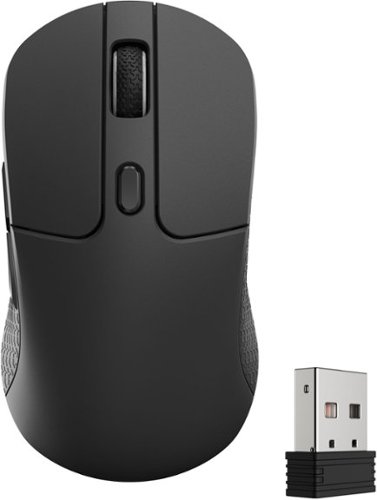
Keychron M3 has all the best features in a lightweight body that supports wireless 2.4 GHz and Bluetooth connection. It is ideal for any scenario, whether at work, gaming, or even on the go. It offers you the best performance and maximizes your productivity.
Posted by: KKCNIck
The unboxing was very easy. They included a USBC cable and USBA to USBC adapter. Also, the mouse and USBA low latency adapter. The setup was a little odd in that I first looked for software but then realized it was just a web url and I could change the settings there. Obviously, it is very cool to have customizations to apply that do not require any software. I did change some of the shortcut buttons, for example I have the middle button on top for a screen shot and the left buttons are cut/paste. That helps me be more productive.
Use: I had trouble getting the Bluetooth mode to show up in my laptop, so I had to use the USBc cable since I only had USBC ports, so I was not able to use the adapter or any other way to use the mouse. That being said I did try to change the polling mode to 8000 and the dpi from 1600-3200 was extremely responsive. I found beyond that the mouse was so sensitive it just moved too fast. In use when gaming I found the mouse to be nice and light and it can be set so high that it is extremely responsive but for me that was too high. I preferred polling 8000 and the dpi 1600 which is about the pace I move. Yeah, it can be more responsive, but it made the game play so fast my eyes could not keep up. I asked my son to try, and he was able to keep up with the max polling and dpi, but he is younger and has faster reactions. I guess it depends on who is using the mouse. Regardless, this is a good mouse, and I did not have any need to charge it, so the battery life is good. The grip pattern is also a nice touch to ensure the mouse stays put in your hand.
Use: I had trouble getting the Bluetooth mode to show up in my laptop, so I had to use the USBc cable since I only had USBC ports, so I was not able to use the adapter or any other way to use the mouse. That being said I did try to change the polling mode to 8000 and the dpi from 1600-3200 was extremely responsive. I found beyond that the mouse was so sensitive it just moved too fast. In use when gaming I found the mouse to be nice and light and it can be set so high that it is extremely responsive but for me that was too high. I preferred polling 8000 and the dpi 1600 which is about the pace I move. Yeah, it can be more responsive, but it made the game play so fast my eyes could not keep up. I asked my son to try, and he was able to keep up with the max polling and dpi, but he is younger and has faster reactions. I guess it depends on who is using the mouse. Regardless, this is a good mouse, and I did not have any need to charge it, so the battery life is good. The grip pattern is also a nice touch to ensure the mouse stays put in your hand.
Summary: I like the mouse for some office with light gaming, but I think there are other options that have more gaming value like RGB and other connectivity via Bluetooth or USBc. Still for the money it is a great mouse.
I would recommend this to a friend!
Share this review:


0points
0of 0voted this as helpful.
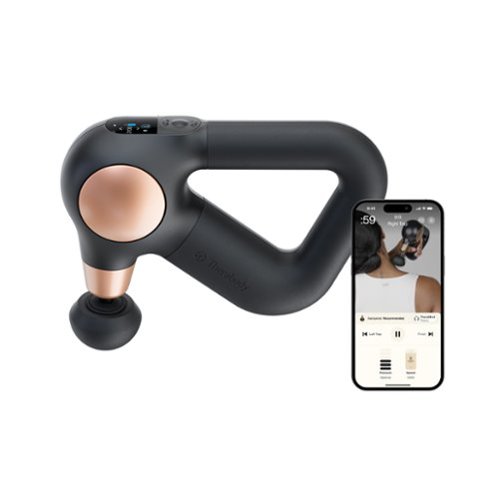
Theragun Sense is the only Theragun designed for stress relief ~ now more intuitive than ever. Combining scientifically proven percussive therapy with built-in guided routines, it helps relieve daily tension, pain, stress and sleep issues with ease. The device features an enhanced LCD screen that shows exactly where to massage, for how long, and with how much pressure. Choose from 4 expert-designed routines preloaded on the device, or customize your experience by saving up to 5 of your favorite routines from the Therabody app. Live pressure feedback helps you to apply the right intensity every time. Simplified controls let you adjust speed across 5 levels and fine-tune pressure to match your needs ~ whether you~re looking for a relaxing touch, moderate for built-up stress, or deep tension release. The patented triangle grip makes it easy to reach hard-to-access areas without straining your hands or wrists. Lightweight and whisper-quiet, Theragun Sense takes the guesswork out of your treatment for maximum relaxation every time.
Posted by: KKCNIck
The packaging and unboxing felt very premium. There was a clear QR code to scan prior to continuing setup. Then after the setting up of the app. It told me to turn on the massager and proceed with the setup. I liked the fact that it asked what activities I did like running and strength training. There were several in there from Yoga to Pickleball. Once done it did serve up a few modes to understand how it works. The nice part was the fact that the app stopped the massager between modes which made it seamless. After several days I have not felt like this made an impact on my sleeping since there are wellness modes, but it is nice to try. I just think this is too harsh of a massager to calm you down for bedtime. For example, it has you run in near your neck and shoulders and that is not comfortable since there is bone there and my head vibrates from the unit. I did like the tailored massing modes for say my right calf and it stops with a countdown to proceed to the left calf. Then it has you move to the quad in an organized manner. This made the specific routines easy to follow.
Daily use:
I found the use of this daily for pre workout and recovery helpful, but I have not felt an significant relief other than I feel it working the muscles deep which hurts but feels good at the same time. The modes seem to be either really light or too hard. There just does not seem to be any in between modes it offers. As for the wellness modes like tech neck. I like the concept but then again, the vibrating of my next and collarbone make it uncomfortable. Also trying to get your back is hard. There are different ways to hold this for a better grip but still getting to your back is hard.
Summary:
I think this has a lot of promise to offer a versatile tailored massage along with wellness options. I did think the product worked well and the battery life was good. Also, it did include carrying pouch and cable so the product is complete. I just wish some of the harder to reach or sensitive areas had a different mode or different attachment to hit your back and neck better.
Daily use:
I found the use of this daily for pre workout and recovery helpful, but I have not felt an significant relief other than I feel it working the muscles deep which hurts but feels good at the same time. The modes seem to be either really light or too hard. There just does not seem to be any in between modes it offers. As for the wellness modes like tech neck. I like the concept but then again, the vibrating of my next and collarbone make it uncomfortable. Also trying to get your back is hard. There are different ways to hold this for a better grip but still getting to your back is hard.
Summary:
I think this has a lot of promise to offer a versatile tailored massage along with wellness options. I did think the product worked well and the battery life was good. Also, it did include carrying pouch and cable so the product is complete. I just wish some of the harder to reach or sensitive areas had a different mode or different attachment to hit your back and neck better.
I would recommend this to a friend!
Share this review:


0points
0of 0voted this as helpful.

Experience your legacy content on modern displays with the help of this Insignia RCA to HDMI Converter. The unidirectional converter sends RCA input signals to an HDMI output, allowing you to watch old home movies or DVDs on your modern TV screen.
Customer Rating
5
Great Legacy bridge to newer monitor/TV
on January 27, 2026
Posted by: KKCNIck
Unboxing this was pretty simple. There was an included converter, USB cable and power brick. This did not come with an HDMI cable.
Use:
I connected this to my monitor with an existing HDMI cable and was able to connect a all in one gaming device to this that had a yellow and white connector. They yellow was the video and the white mono audio. Once connected the resolution was about what I would expect for older games like Super Mario and Galaga. This allowed me to play with another family member with the bigger monitor where this otherwise would not be possible with the small 3.5” display it comes with. Also, I did not experience any issues with lag or performance. I do wish there was a way to mount it to the back of the monitor, but I understand they cannot include all scenarios. I also have a VCR and connected this up with some old VHS family movies and again they played just fine. Of course, the newer tv’s can only display old content so well.
Cons:
None. The fact that this can allow legacy devices to connect to a newer monitor or tv with a very low investment is amazing.
Use:
I connected this to my monitor with an existing HDMI cable and was able to connect a all in one gaming device to this that had a yellow and white connector. They yellow was the video and the white mono audio. Once connected the resolution was about what I would expect for older games like Super Mario and Galaga. This allowed me to play with another family member with the bigger monitor where this otherwise would not be possible with the small 3.5” display it comes with. Also, I did not experience any issues with lag or performance. I do wish there was a way to mount it to the back of the monitor, but I understand they cannot include all scenarios. I also have a VCR and connected this up with some old VHS family movies and again they played just fine. Of course, the newer tv’s can only display old content so well.
Cons:
None. The fact that this can allow legacy devices to connect to a newer monitor or tv with a very low investment is amazing.
I would recommend this to a friend!
Share this review:


0points
0of 0voted this as helpful.
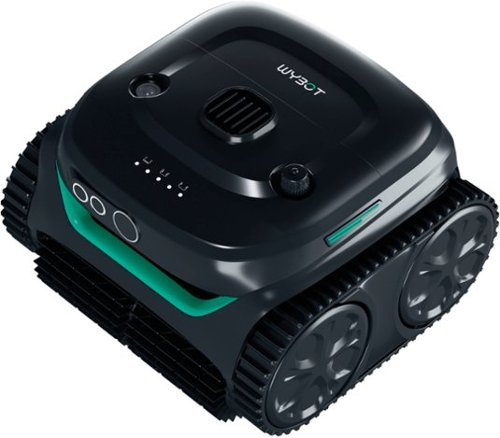
Cordless robotic pool cleaner with smart path planning, powerful suction, and wall-climbing capability. Designed for in-ground pools, it efficiently cleans floors, walls, and waterlines with extended runtime and quick charging.
Posted by: KKCNIck
I’ve been considering going with a battery-powered pool cleaners instead of a traditional suction and corded models for my gunite, irregular oval pool. I wanted something easy to drop in whenever the pool needed a quick cleaning, without dealing with hoses or cords. The Wybot C2 has been a great fit for that.
Setup was simple: unbox, charge, and it was ready to go. The instructions and the app aren’t the best, but they’re good enough to get you running. Since I don’t need wall cleaning every time, I switched the unit to Floor Mode in the app. One tip: when you first power it on, leave the cleaner on the pool deck to make any adjustments. The instructions tell you to put it in the water after turning it on, but the app can’t connect over Bluetooth once it’s submerged.
My first cleaning cycle was about 90% thorough and it picked up everything in its path. For some reason, the default floor pattern is set to “Star” (misspelled as “Start” in the app), which didn’t seem ideal, so after the first run I changed it to the Cross pattern for the floor and the N pattern for wall cleaning.
Because I have a screened enclosure, I mainly deal with pine needles and dirt, no heavy leaf debris. The unit ran for about two hours before it returned to a wall, where I could easily hook it with the included attachment for my pool pole. The filter basket removes effortlessly and is simple to clean.
After another full charge, I tested it in wall-and-floor mode. The cleaner climbs the walls all the way up to the tile line with ease, which was genuinely impressive.
Overall, I’m very happy with the Wybot C2. It’s simple, effective, and best of all, no hoses or wires to mess with.
Overall, I’m very happy with the Wybot C2. It’s simple, effective, and best of all, no hoses or wires to mess with.
I would recommend this to a friend!
Share this review:


+1point
1of 1voted this as helpful.
KKCNIck's Review Comments
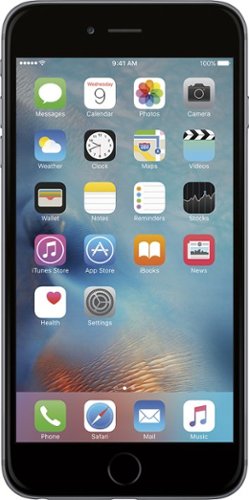
iPhone 6 Plus isn't just bigger ~ it's better in every way. Larger yet thinner. More powerful, yet power efficient. It's a new generation of iPhone.
Overall5 out of 5
5 out of 5Best Iphone Yet
By KKCNIck
from montgomery, il
It is a huge step up from the original IPhone. Each Year they get better and better. This year finally the most needed thing (larger Display). I only wish the 2 features in the plus were in this and it would have been perfect. Full 1080p display and the optical Image Stabilization. The Plus is nice but its practically a tablet and really should have been able to have those features in both. Otherwise very happy with the upgrade.

KKCNIck
montgomery, il
I wish I put the review on the correct phone
October 2, 2014
Was meant for the iphone 6 sorry
0points
0of 0voted this comment as helpful.
KKCNIck's Questions
KKCNIck has not submitted any questions.
WHAT LAB TOP IS GOOD FORDOWN LOADING MOVIES AND MUSIC THAT IS CHEAP
anything with a good wireless n card and a 500gb hard drive. Look at Gateway for that one.
15 years, 8 months ago
by
KKCNIck
montgomery, il
i just bought the Toshiba - Satellite Laptop with Intel® Pentium® Processor - Gold Onyx. does anyone know how to activate the 15 months of norton av?
step by step instruction would be most appreciated. thanks :)

Yes there should be a cert in the box with a key.
16 years, 1 month ago
by
KKCNIck
montgomery, il
Which laptop would be best to run Quickbooks Pro 2010?
any with a dual core intel processor and at least 2gb of ram is ideal.
16 years, 1 month ago
by
KKCNIck
montgomery, il
How do I pick a new laptop?
Need to buy a laptop. will use at home (home office). Will download CD's and Itunes (up to 5,000 songs)
Well any laptop will do that. It is a matter of hard drive space. I would look at the Toshiba A305-6916 if you can find one because they are priced right and have great speakers for playback. Also has a 320gb hd which is pleanty of room.
16 years, 11 months ago
by
KKCNIck
montgomery, il
Is bestbuy selling the Asus G51?
I heard that some people have bought it instore but i cannot find anything online. I have yet to call my nearest BB to see but i'm just checking.
Yeah I just saw one for $999 and it has p7450 processor and a 1gb nvidia gt260 card. It also comes with a free upgrade to windows 7 when released. I would find the G50vt that they are clearancing if you can because there is not much difference and you will save money.
16 years, 11 months ago
by
KKCNIck
montgomery, il
Which is the best processor?
Intel Celeron? AMD Athalon X2? Intell Pentium?
Intel Core 2 Duo or quad. Go with Centrino 2 when choosing a laptop.
16 years, 11 months ago
by
KKCNIck
montgomery, il
is the Toshiba laptop good for a graphic designer ?
please see this link ,its for a Toshiba laptop is it good for me as a graphic designer???
(((the link ))):http://www.bestbuy.com/site/olspage.jsp?skuId=9164343&type=product&id=1218040476937
and am not thinking about the MacBook because i cant afford it.
(((the link ))):http://www.bestbuy.com/site/olspage.jsp?skuId=9164343&type=product&id=1218040476937
and am not thinking about the MacBook because i cant afford it.
Yeah great graphics card and plenty of ram and hd space. Buy it.
16 years, 11 months ago
by
KKCNIck
montgomery, il