


KKCNIck's stats
- Review count423
- Helpfulness votes436
- First reviewOctober 20, 2010
- Last reviewJune 10, 2026
- Featured reviews0
- Average rating4.5
- Review comment count1
- Helpfulness votes0
- First review commentOctober 2, 2014
- Last review commentOctober 2, 2014
- Featured review comments0
Questions
- Question count0
- Helpfulness votes0
- First questionNone
- Last questionNone
- Featured questions0
- Answer count17
- Helpfulness votes5
- First answerJune 17, 2009
- Last answerNovember 7, 2020
- Featured answers0
- Best answers2
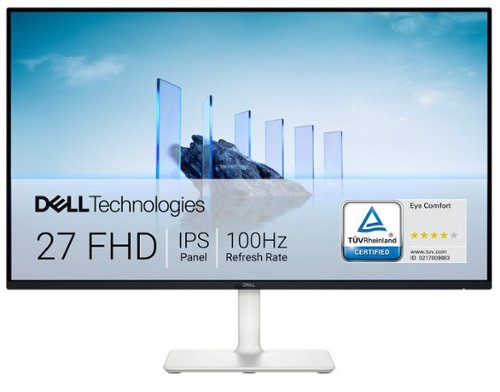
Dell 27 Monitor - S2725H. Made to be seen. And heard. With clear FHD resolution, high 100Hz refresh rate, integrated dual 5W speakers and subtle texture on the back inspired by Japanese sand raking, any activity becomes an immersive experience.
Customer Rating

5
Good Mult-Purpose Entry Monitor
on May 23, 2025
Posted by: KKCNIck
Unboxing and Setup:
Unboxing the Dell S2725H was pretty easy. I just needed to plug the included standard power cord. It is nice that Dell did not get proprietary with the power cord like other monitors that can use a smaller barrel connector. The built in cable management is nice for the Hdmi connection to my laptop however it is in the back of the monitor so I am not sure if it really was innovative but still nice to hide the cables.
My experience:
I found the monitor to be a good blend of content creation, gaming and media consumption. I liked that there are decent internal speakers which sound pretty full and you can hear audio from voices to bass from games/movies. I found the color accuracy very good, and I like the fact that it displays all of the sRGB color spectrum since I do use Adobe Lightroom and it made my photo editing at least more accurate. The 100hz refresh rate allowed for smooth scrolling and a overall better experience from the standard 60hz monitors. I can see a difference. However, for gaming I would want more frames since I was limited by the 100hz when gaming since my laptop can go much higher. Understandable for the price point of this monitor. I do like the white color as it seems like a cleaner looking monitor. However, I am not sure over time if that will be yellow or stay white. The monitor was just ok for brightness and since it is edge lit the contrast was just ok. Again, above average for a monitor at this price point but I was not expecting OLED quality from this screen. I also liked the additional HDMI since I was able to connect my Apple TV to this to be able to watch content when I was not using my laptop.
In summary this is a very good multipurpose monitor, and I would recommend it if you do not need high frame rate gaming or need the best picture quality. I do wish they sold a bold on webcam since I still had to mount my after market and that would have made the screen more functional.
Unboxing the Dell S2725H was pretty easy. I just needed to plug the included standard power cord. It is nice that Dell did not get proprietary with the power cord like other monitors that can use a smaller barrel connector. The built in cable management is nice for the Hdmi connection to my laptop however it is in the back of the monitor so I am not sure if it really was innovative but still nice to hide the cables.
My experience:
I found the monitor to be a good blend of content creation, gaming and media consumption. I liked that there are decent internal speakers which sound pretty full and you can hear audio from voices to bass from games/movies. I found the color accuracy very good, and I like the fact that it displays all of the sRGB color spectrum since I do use Adobe Lightroom and it made my photo editing at least more accurate. The 100hz refresh rate allowed for smooth scrolling and a overall better experience from the standard 60hz monitors. I can see a difference. However, for gaming I would want more frames since I was limited by the 100hz when gaming since my laptop can go much higher. Understandable for the price point of this monitor. I do like the white color as it seems like a cleaner looking monitor. However, I am not sure over time if that will be yellow or stay white. The monitor was just ok for brightness and since it is edge lit the contrast was just ok. Again, above average for a monitor at this price point but I was not expecting OLED quality from this screen. I also liked the additional HDMI since I was able to connect my Apple TV to this to be able to watch content when I was not using my laptop.
In summary this is a very good multipurpose monitor, and I would recommend it if you do not need high frame rate gaming or need the best picture quality. I do wish they sold a bold on webcam since I still had to mount my after market and that would have made the screen more functional.
I would recommend this to a friend!
Share this review:


+1point
1of 1voted this as helpful.
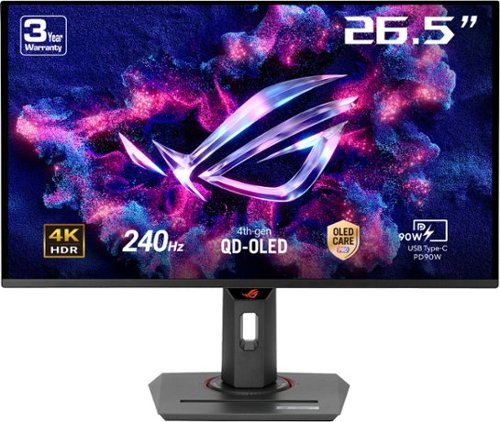
The ROG Strix OLED XG27UCDMG is a 27-inch, 240Hz 4K gaming monitor that boasts the latest fourth-generation QD-OLED technology to deliver supersharp visuals and crisp text. The cutting-edge QD-OLED panel offers greater longevity compared to previous OLED technologies and minimal flicker~even when frame rates fluctuate. With the addition of the Neo Proximity Sensor in the new ROG OLED Care Pro suite, the monitor transitions to a black screen when no user is detected, guarding against burn-in.
Posted by: KKCNIck
Unboxing was straightforward. Included was well packaged Monitor, stand and Vesa Wall mount. Also, where included DP, HDMI and USBC Cables.
Set up and use:
Setup was easy. I removed the plastic and connected the monitor and stand together. It feels solid. Also, the thinness of the monitor is amazing for the picture quality.
Use:
I am just flat out impressed with everything I threw at this. I started by connecting via USBC my laptop to extend out for productivity and the monitor was just amazing to look at. The colors and brightness are on another level from my current setup. There was no lag, and the color accuracy is very close to my calibrated monitor.
Next was Photo/Video Editing. Again, the colors were so diverse that I needed to sometimes drag the photo to my other screen to make sure I was still editing correctly. The monitor is excellent for this except I needed to keep in mind that this displayed in such a wide color space, and everything seems so saturated that I do not need to color correct beyond that since most users are not going to view on anything like this screen.
On to Gaming:
I moved over to DP and connected my Gaming laptop. I found Forza, Fortnite and Marvel Rivals to be capped by my laptop’s GPU. I have an RTX 4090 Mobile and even that I was not able to tap into the 240 FPS with 4k. This is actually a huge benefit. Not only is the screen super responsive with no lag or ghosting. I just know the next upgrade will still have room to use the speed of this display.
Movies and content:
I watched several Movies and Shows over the past few days, and everything looked better than my flagship OLED TV. This is a truly premium do it all monitor. The HDR is not eye burning but really good in that I was able to make out dark scenes in certain shows.
In summary, I think this monitor is phenomenal. I just wish that they made larger options, and the price was cheaper but given this is the latest tech. I understand why the price is where it is at. I do also wish the display was not as glossy since there were some reflections depending on where I was sitting when viewing the screen. The fact that you can have multiple devices connected to it makes it versatile, from productivity to gaming. Also, I like how at some point soon I can Vesa mount this on the wall to free up space on my desk.
Set up and use:
Setup was easy. I removed the plastic and connected the monitor and stand together. It feels solid. Also, the thinness of the monitor is amazing for the picture quality.
Use:
I am just flat out impressed with everything I threw at this. I started by connecting via USBC my laptop to extend out for productivity and the monitor was just amazing to look at. The colors and brightness are on another level from my current setup. There was no lag, and the color accuracy is very close to my calibrated monitor.
Next was Photo/Video Editing. Again, the colors were so diverse that I needed to sometimes drag the photo to my other screen to make sure I was still editing correctly. The monitor is excellent for this except I needed to keep in mind that this displayed in such a wide color space, and everything seems so saturated that I do not need to color correct beyond that since most users are not going to view on anything like this screen.
On to Gaming:
I moved over to DP and connected my Gaming laptop. I found Forza, Fortnite and Marvel Rivals to be capped by my laptop’s GPU. I have an RTX 4090 Mobile and even that I was not able to tap into the 240 FPS with 4k. This is actually a huge benefit. Not only is the screen super responsive with no lag or ghosting. I just know the next upgrade will still have room to use the speed of this display.
Movies and content:
I watched several Movies and Shows over the past few days, and everything looked better than my flagship OLED TV. This is a truly premium do it all monitor. The HDR is not eye burning but really good in that I was able to make out dark scenes in certain shows.
In summary, I think this monitor is phenomenal. I just wish that they made larger options, and the price was cheaper but given this is the latest tech. I understand why the price is where it is at. I do also wish the display was not as glossy since there were some reflections depending on where I was sitting when viewing the screen. The fact that you can have multiple devices connected to it makes it versatile, from productivity to gaming. Also, I like how at some point soon I can Vesa mount this on the wall to free up space on my desk.
I would recommend this to a friend!
Share this review:


0points
0of 0voted this as helpful.
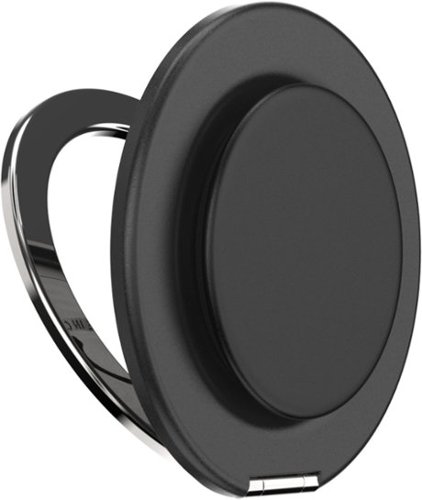
Enjoy effortless versatility with the PopSockets MagSafe Kick-Out Grip & Stand~your go-to for comfort, style, and hands-free convenience. This magnetic grip snaps on and off with ease, offering a secure hold and an adjustable stand for both portrait and landscape viewing. Whether you're streaming, shooting videos, or taking photos, you can set your phone at any angle for the perfect view. Featuring a swappable grip top, you can switch up your style anytime. Designed with strong holding magnets~up to 2x stronger~it~s compatible with all PopSockets magnetic mounts. Works seamlessly with any MagSafe case for iPhone 12 models and newer (including Pro and Pro Max) and includes a magnetic adapter for use with any phone, tablet, or e-reader case.
Customer Rating

4
Better for those watching content
on May 2, 2025
Posted by: KKCNIck
Unboxing was straightforward. Included was the Pop Socket and a spare Mag Safe aftermarket part. The Pop Socket/stand was easy to attach to my phone. I did not need the MagSafe connector since my phone has that already.
Set up and use:
Setup was easy. Remove from packaging and attach. The Mag Safe add on would be nice if my phone was an older model so I could take advantage of the product. I did like how easy it was to take on and off. It did not slide or feel like my phone would fall off when attached. I still do not like that I have to remove it for my drive home and charging at night since I have wireless charging there. Also, when in my pocket you can feel it there and it makes the phone that much thicker.
Use:
I found it useful to hold the phone when I was playing certain games since I needed my other hand to touch a certain part of the screen. The Stand function was nice, but I found it sometimes extra work to slide it around on the phone to get the landscape or portrait stand to be solid and not wobbly. I wish this was something what worked no matter how you connected it.
Ultimately after several days I like it, but I use my phone all day and do not find the added weight and thickness to be worth it. I would probably like it more if there was a way to pass through the wireless charging without removing it.
Set up and use:
Setup was easy. Remove from packaging and attach. The Mag Safe add on would be nice if my phone was an older model so I could take advantage of the product. I did like how easy it was to take on and off. It did not slide or feel like my phone would fall off when attached. I still do not like that I have to remove it for my drive home and charging at night since I have wireless charging there. Also, when in my pocket you can feel it there and it makes the phone that much thicker.
Use:
I found it useful to hold the phone when I was playing certain games since I needed my other hand to touch a certain part of the screen. The Stand function was nice, but I found it sometimes extra work to slide it around on the phone to get the landscape or portrait stand to be solid and not wobbly. I wish this was something what worked no matter how you connected it.
Ultimately after several days I like it, but I use my phone all day and do not find the added weight and thickness to be worth it. I would probably like it more if there was a way to pass through the wireless charging without removing it.
In summary, I think this would be better on the larger model of the phone or if the user watched a lot of content while it was sitting on a desk, bed, etc.
I would recommend this to a friend!
Share this review:


0points
0of 0voted this as helpful.
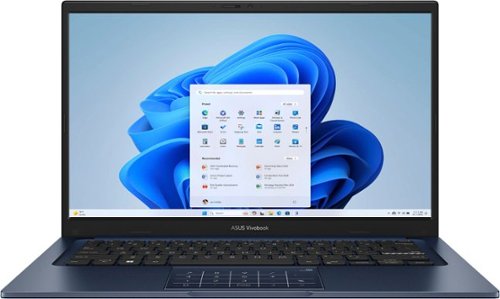
Turn everyday tasks into something special with Vivobook 14, your essential tool for getting things done easier, anywhere. It~s completely user-friendly too, with its 180~ lay-flat hinge and physical webcam shield. Make all your days more enjoyable with Vivobook 14!
Customer Rating
4
Good but low-end display hurts value
on April 5, 2025
Posted by: KKCNIck
Unboxing was straightforward. Included was the laptop and charging cable.
Set up and use:
I found the setup pretty straightforward. I did encounter a smooth Windows 11 login experience but assume that is mostly the operating system. I did not like the barrel connector provided. I feel like for this price point they could have included a USBC charger just for ease of compatibility. Otherwise, everything else was smooth. I did find it frustrating to have to set up an Asus account for special updates. I wish this was optional.
Use:
I found the laptop good for schoolwork and home use. I feel like the build quality is mid-range for this price point. I found the keyboard to be accurate and have minimal flex. I do feel like they cut corners on the HD screen. It is very washed out and seems to be more of a TN panel vs the IPS type. The Number Pad function built into the trackpad seems good but in practice it is very odd to type on the keyboard then lift your hands to type on the trackpad and back to the keyboard. I just stopped using it. I think they could have included just an optional Bluetooth one which would have felt more natural. I do like the color vs the standard black/silver colors that are normally available. I did find the keyboard unresponsive a few times but just rebooting it fixed the issue, and it has not returned so maybe it was from a Windows update or something. The battery life is good for the size of the laptop. I found a solid 4hrs of use with everything on best performance which is how I use laptops. When put on balanced I was able to get through 6.5hrs with it sleeping occasionally. I found the wireless connection solid and the 12gb of ram more than enough.
The webcam and ports were pretty standard. Not fantastic but not horrible. Just enough to get through web meetings and connect my peripherals without feeling like I needed a dock or usb hub. The weight was just ok. I feel like they could have saved some more weight here since 3lbs still felt heavy.
Set up and use:
I found the setup pretty straightforward. I did encounter a smooth Windows 11 login experience but assume that is mostly the operating system. I did not like the barrel connector provided. I feel like for this price point they could have included a USBC charger just for ease of compatibility. Otherwise, everything else was smooth. I did find it frustrating to have to set up an Asus account for special updates. I wish this was optional.
Use:
I found the laptop good for schoolwork and home use. I feel like the build quality is mid-range for this price point. I found the keyboard to be accurate and have minimal flex. I do feel like they cut corners on the HD screen. It is very washed out and seems to be more of a TN panel vs the IPS type. The Number Pad function built into the trackpad seems good but in practice it is very odd to type on the keyboard then lift your hands to type on the trackpad and back to the keyboard. I just stopped using it. I think they could have included just an optional Bluetooth one which would have felt more natural. I do like the color vs the standard black/silver colors that are normally available. I did find the keyboard unresponsive a few times but just rebooting it fixed the issue, and it has not returned so maybe it was from a Windows update or something. The battery life is good for the size of the laptop. I found a solid 4hrs of use with everything on best performance which is how I use laptops. When put on balanced I was able to get through 6.5hrs with it sleeping occasionally. I found the wireless connection solid and the 12gb of ram more than enough.
The webcam and ports were pretty standard. Not fantastic but not horrible. Just enough to get through web meetings and connect my peripherals without feeling like I needed a dock or usb hub. The weight was just ok. I feel like they could have saved some more weight here since 3lbs still felt heavy.
In summary I like the laptop but just wish the display and charger were better and more to the standards of a $6-800 laptop price point.
I would recommend this to a friend!
Share this review:


0points
1of 2voted this as helpful.

Shark CryoGlow is the only MedSpa-inspired under-eye cooling + LED anti-aging & acne clearing mask in the US for clinically tested results starting with the touch of a button. Only CryoGlow combines high-energy LEDs, deep-penetrating infrared, and under-eye cooling. Complete with 4 unique treatments. Developed with dermatologists, backed by clinical testing, and FDA-cleared.
Customer Rating
5
Revolutionary for skin care and anti-aging
on March 13, 2025
Posted by: KKCNIck
Unboxing and Setup:
Unboxing the Shark CryoGlow was pretty easy. Just needed to plug the included USBC charger in and charge the control handle. Then after reading the instructions, I tried the Better Aging Treatment, Skin Clearing and Under-Eye Revive.
After 4 weeks of use:
I found the Better Aging Treatment a fast 6 min every day while I am either playing a game on my phone or watching some evening tv. It goes quick. The feeling is a nice light cooling under my eyes and the light noise of the fans but nothing too loud. Initially I did not see much but over time I could see the skin in the corner of my eye’s showing less visible lines. It makes me feel younger.
Unboxing the Shark CryoGlow was pretty easy. Just needed to plug the included USBC charger in and charge the control handle. Then after reading the instructions, I tried the Better Aging Treatment, Skin Clearing and Under-Eye Revive.
After 4 weeks of use:
I found the Better Aging Treatment a fast 6 min every day while I am either playing a game on my phone or watching some evening tv. It goes quick. The feeling is a nice light cooling under my eyes and the light noise of the fans but nothing too loud. Initially I did not see much but over time I could see the skin in the corner of my eye’s showing less visible lines. It makes me feel younger.
I liked the Under-Eye Treatment since you can adjust the time from 5-15 min, and it is a nice cooling also. After that is done my eyes seem less puffy and not so dark. Really it works. Obviously, the next day it seems to fade but that is why you use this daily.
My Daughter used the Skin treatment and this was her experience.
When it comes to skin cleaning treatment, she found that it is a very helpful tool to help with breakouts and acne scars. As a 17-year-old female with a new struggle of hormonal acne she had started a new skin medication in November 2024 so when she started using the mask she was in the middle of my skin purging from that medication in February 2025. When she started using the mask four weeks ago, she had bad scaring and cystic acne on her cheeks mainly. Now her skin is smooth with still some scars, but she finds that the mask cools down her inflamed skin and helps her to clean it before she goes to bed. She may truly never know if the mask was the reason for her skin cleaning up so quickly or if it was the effects of her new Benzoyl peroxide medication, or if it could be a mix of the two. Either way the Shark Cyroglow Face Mask has brought a positive impact to our skin. While using the mask she sat on her phone and there really is no comfortable way to lay down or use the mask while on your phone since the eye holes are so small. Also, the cooling eye pieces inside the mask tend to dig into her cheeks and leave red marks since the only comfortable way to wear the mask is propped on a pillow sitting up. She has only used the mask for about 4 weeks as of right now but even during those four weeks she saw visible changes and look forward to using it for the full 12 weeks to truly see the difference.
One negative for is the comfort of it, when it comes to winding down at the end of the day. If you weren’t looking at your phone or even watching tv instead I could see how it can probably be more comfortable to use. Also, just something to note is the loud fan the mask has, I didn’t truly notice it but when spending the night with friends they complained of the noise of the mask being very loud, so just something to think about.
In summary this is a very neat product, and we found it very useful and innovative. I would recommend it and hopefully the fans can get quitter, and an App could track the progress to remind you to use it. Nice that multiple members of the family can use. Also only over long term use can we determine how effective this is if not used daily.
When it comes to skin cleaning treatment, she found that it is a very helpful tool to help with breakouts and acne scars. As a 17-year-old female with a new struggle of hormonal acne she had started a new skin medication in November 2024 so when she started using the mask she was in the middle of my skin purging from that medication in February 2025. When she started using the mask four weeks ago, she had bad scaring and cystic acne on her cheeks mainly. Now her skin is smooth with still some scars, but she finds that the mask cools down her inflamed skin and helps her to clean it before she goes to bed. She may truly never know if the mask was the reason for her skin cleaning up so quickly or if it was the effects of her new Benzoyl peroxide medication, or if it could be a mix of the two. Either way the Shark Cyroglow Face Mask has brought a positive impact to our skin. While using the mask she sat on her phone and there really is no comfortable way to lay down or use the mask while on your phone since the eye holes are so small. Also, the cooling eye pieces inside the mask tend to dig into her cheeks and leave red marks since the only comfortable way to wear the mask is propped on a pillow sitting up. She has only used the mask for about 4 weeks as of right now but even during those four weeks she saw visible changes and look forward to using it for the full 12 weeks to truly see the difference.
One negative for is the comfort of it, when it comes to winding down at the end of the day. If you weren’t looking at your phone or even watching tv instead I could see how it can probably be more comfortable to use. Also, just something to note is the loud fan the mask has, I didn’t truly notice it but when spending the night with friends they complained of the noise of the mask being very loud, so just something to think about.
In summary this is a very neat product, and we found it very useful and innovative. I would recommend it and hopefully the fans can get quitter, and an App could track the progress to remind you to use it. Nice that multiple members of the family can use. Also only over long term use can we determine how effective this is if not used daily.
I would recommend this to a friend!
Share this review:


0points
0of 0voted this as helpful.

Professional-grade wireless gaming headset featuring 50mm graphene-coated drivers, 2-Mic AI Noise Cancellation and Active Noise Cancellation. Engineered with input from professional esports athletes.
Customer Rating
4
Good Sound but just ok on looks.
on March 11, 2025
Posted by: KKCNIck
Unboxing was straightforward. Included were the headset and mic, a USB-A/C along with a USB-C-to-USB-C cable. I like the minimal packaging, but at this price point, there could be a bag included to carry the accessories and headphones.
Setup was simple when connecting to my Nintendo Switch. I plugged in the USB-A dongle, and it paired immediately. Playing Mario Kart and Fortnite, I found the gameplay full and clear. I enabled the ANC, so I was able to play and still hear my surroundings in transparency mode. I did not like how the headphones would go to sleep and require me to turn them off and then on to reconnect. I am not sure why, but when you put them back on your head, they should wake up, but these did not. I found the controls comfortable once I learned by memory where they are. These are pretty comfortable, and there is plenty of padding on the earphones and headband. The style is really lacking, being that they are Alienware. I figured a more prominent light-up logo would have been more premium, and the mic has a foam end which feels cheap. I was not able to flip the mic up to mute it, which was a disappointment.
As far as on PC, there were the same benefits and shortcomings. I did install the Alienware Command Center, which was not mentioned anywhere in the documentation. I learned about it from looking online. Unfortunately, it only allowed me to mess with Dolby Atmos profiles but nothing regarding the settings of the headphones.
In summary, I like the overall sound and versatility since these work on all the major platforms. I just think they are okay, and there was nothing revolutionary that made them stand out from the competition. The lack of wake from sleep was kind of annoying. However, due to the 50mm drivers, these definitely can hold up to all of the high and low sounds with clarity, which is actually the main point of them. So, for function, they are 5/5.
Setup was simple when connecting to my Nintendo Switch. I plugged in the USB-A dongle, and it paired immediately. Playing Mario Kart and Fortnite, I found the gameplay full and clear. I enabled the ANC, so I was able to play and still hear my surroundings in transparency mode. I did not like how the headphones would go to sleep and require me to turn them off and then on to reconnect. I am not sure why, but when you put them back on your head, they should wake up, but these did not. I found the controls comfortable once I learned by memory where they are. These are pretty comfortable, and there is plenty of padding on the earphones and headband. The style is really lacking, being that they are Alienware. I figured a more prominent light-up logo would have been more premium, and the mic has a foam end which feels cheap. I was not able to flip the mic up to mute it, which was a disappointment.
As far as on PC, there were the same benefits and shortcomings. I did install the Alienware Command Center, which was not mentioned anywhere in the documentation. I learned about it from looking online. Unfortunately, it only allowed me to mess with Dolby Atmos profiles but nothing regarding the settings of the headphones.
In summary, I like the overall sound and versatility since these work on all the major platforms. I just think they are okay, and there was nothing revolutionary that made them stand out from the competition. The lack of wake from sleep was kind of annoying. However, due to the 50mm drivers, these definitely can hold up to all of the high and low sounds with clarity, which is actually the main point of them. So, for function, they are 5/5.
I would recommend this to a friend!
Share this review:


0points
0of 0voted this as helpful.

The Epic Mechanical Keyboard is your go-to productivity tool for a seamless workday. The quiet mechanical switches provide a satisfying tactile typing experience, keeping you focused and engaged, while the illuminated backlight guides your way. Seamlessly switch between your laptop, phone, and tablet, maintaining your flow and productivity. With a long-lasting rechargeable battery and customizable features through the desktop app, the Epic Mechanical Keyboard is your ultimate productivity companion, empowering you to conquer any task with confidence and finesse, no matter which operating system you use.
Customer Rating
5
Awesome wireless keyboard
on March 6, 2025
Posted by: KKCNIck
Unboxing and Setup:
Unboxing the Jlab Epic Mechanical Wireless Keyboard had me feeling like a kid on Christmas morning. I have loved the idea of a wireless mechanical keyboard that looks less flashy so I can use it for work/play. The unboxing process was straightforward, and I just inserted the USBC dongle in my laptop dock and it paired quickly.
I did find it challenging to get the Jlab work software since it was hard to find and even if you register the product the software is not offered. They only show IOS/Android options. In my case this was for a Windows Laptop.
After installation the software was pretty basic. I was able to change the brightness, backlight time and what the 3 custom functions do. However, the list was not that long. I ended up just leaving them at what a normal keyboard layout would be.
Unboxing the Jlab Epic Mechanical Wireless Keyboard had me feeling like a kid on Christmas morning. I have loved the idea of a wireless mechanical keyboard that looks less flashy so I can use it for work/play. The unboxing process was straightforward, and I just inserted the USBC dongle in my laptop dock and it paired quickly.
I did find it challenging to get the Jlab work software since it was hard to find and even if you register the product the software is not offered. They only show IOS/Android options. In my case this was for a Windows Laptop.
After installation the software was pretty basic. I was able to change the brightness, backlight time and what the 3 custom functions do. However, the list was not that long. I ended up just leaving them at what a normal keyboard layout would be.
First Impressions and Use:
The initial feel of the keyboard was impressive. It had some weight to it and felt like a blend of metal and plastic. The key travel is deep and smooth. The quiet keys are fairly quiet but just enough to give that mechanical sound. I found the accuracy perfect. I did not like how the default behavior of the Function row is the F1-12 vs the other settings that I use more. There unfortunately was no way to change the defaults. You can customize them though to other functions which are nice. I found the battery life all week to still be strong. It did not require a recharge. I do like the option to connect via Bluetooth so I can use it on my mobile devices and other items like my Xbox. This makes the keyboard extremely more flexible. Finally, the volume knob is a nice touch in the corner and was accurate. The button presses down, however that does not serve as a mute function which is a letdown.
Final Thoughts:
All in all, I found this keyboard extremely nice and quality. If you can live with the Function buttons and do not need RGB lighting, then this is an excellent choice for business and gaming. I did find the accuracy in a few games to keep up just fine with no issues.
The initial feel of the keyboard was impressive. It had some weight to it and felt like a blend of metal and plastic. The key travel is deep and smooth. The quiet keys are fairly quiet but just enough to give that mechanical sound. I found the accuracy perfect. I did not like how the default behavior of the Function row is the F1-12 vs the other settings that I use more. There unfortunately was no way to change the defaults. You can customize them though to other functions which are nice. I found the battery life all week to still be strong. It did not require a recharge. I do like the option to connect via Bluetooth so I can use it on my mobile devices and other items like my Xbox. This makes the keyboard extremely more flexible. Finally, the volume knob is a nice touch in the corner and was accurate. The button presses down, however that does not serve as a mute function which is a letdown.
Final Thoughts:
All in all, I found this keyboard extremely nice and quality. If you can live with the Function buttons and do not need RGB lighting, then this is an excellent choice for business and gaming. I did find the accuracy in a few games to keep up just fine with no issues.
I would recommend this to a friend!
Share this review:


+1point
1of 1voted this as helpful.

Enhance your home's security and convenience with the ULTRALOQ Bolt Fingerprint Smart Lock. This advanced smart lock offers 3D live fingerprint identification, allowing you to unlock your door with just a touch. The ULTRALOQ Bolt integrates seamlessly with major smart home platforms, including Alexa, Google Assistant, and Apple HomeKit. The sleek black design complements any door, providing both functionality and style. With easy DIY installation, robust battery life, and weather-resistant construction, this smart lock is built for long-term reliability and security.
Customer Rating
5
Great smart lock with Fingerprint, Key and Code
on February 9, 2025
Posted by: KKCNIck
Unboxing was straightforward. Included is was the lock and installation parts. I liked the quick start guide and QR code to scan for installation instructions and the app needed to set up the lock. Then the instructions were simple. Remove the old lock and strike plate and you are ready to install. I have a newer home, so I did not have to make any adjustments to the lock like moving the locking mechanism or removing the lock plate for a smaller lock opening. You then install the front which connects to the back and plugs in. I screwed it in then installed the 8 AA batteries that were included. Finally slide on the batter cover and install the new strike plate. There is also a Door sensor for when the lock auto locks. It will only lock when the door is closed. I did not have that on my old lock, so we left it off. Then the instructions talk about running a calibration and such, however I installed the app which was just an easy account creation and creating a master password. Then I proceeded to set up the Apple Home feature and there is a QR code you scan for that. Then it showed in my Apple Home app. From there I added more users and set up their individual codes and fingerprints. What is nice about this is that the family can walk to the door and hold their finger for just a second and you see a green check mark. The lock opens. I prefer this over just a code since the numbers can wear out and people behind you can technically see. I could not get my watch to auto unlock when I walk to the door but if I pull up the app on my watch I can remotely unlock the door. Also included are 2 physical keys that are a good backup as my wife feels like it is good to have in case the batter fails or dies. I could not find how to get the lock keyed to my other house keys but I really did not dig that hard. There was also an update to the firmware of the lock and that was pretty fast and painless.
In summary I like the lock a lot compared to my previous smart lock. I think the price is very fair for all that it offers. I just wish that the lock was offered in other colors like all black and either bronze/gold. Also, I feel like the deadbolt on the back is unusually thin compared to a standard lock. Finally, it seems loud for a lock but again that is just picking out a minor detail. The fingerprint is fast, and it performs well. I would buy more locks or products from this company. I just wish they offered complimentary Doorbell Cam, lighting and other items to operate under the same app.
I would recommend this to a friend!
Share this review:


0points
0of 0voted this as helpful.

Ultra-fast DOCSIS 3.1 performance modem allows you to Stream, game, conference and more with confidence. DOCSIS 3.1 supports speeds up to 10x faster with higher efficiency. Backwards compatible with 32x8 DOCSIS 3.0 so you can future proof your network.
Customer Rating
5
Great must have for speed and savings
on February 1, 2025
Posted by: KKCNIck
Unboxing was straightforward. Included is modem, patch cable and power adapter. I followed the easy-to-use instructions and disconnected my current modem. I then proceeded to connect the new modem to the cable and plugged in the power. I waited for the few min for the white light to appear. Then I went into my Spectrum app and was unable to locate the modem. I then called Spectrum, and they took my “MAC Address” from the bottom of the modem or box. Then after 15 min it was activated. I then plugged in an ethernet cable to my router/wireless. The included cable was only Cat 5e and short. I am not sure since the spec is at most 1GB and this is able to handle up to 2.5GB. I installed just a 1GB (Cat6) cable. Then I ran a speed test on my 1GB connection. I was able to still get the same speeds as my previous modem. I like the fact that when greater speeds are released this can accept it without hardware change. Also, I like the $5.99mo I can now have removed from my bill. More importantly I like the look of this since it looks more discrete and looks like a small blue tooth speaker vs and ugly old school piece of plastic. Since mine sits on my desk it is more visually appealing. I do wish there was a smoother activation but that could have been on Spectrum’s side and not the fault of Motorola. Also, I do wish they had other colors like White or Blue to blend more with the surroundings.
I would recommend this to a friend!
Share this review:


+1point
1of 1voted this as helpful.

Stay cool when things heat up with the Razer Laptop Cooling Pad ~ a smart stand that dynamically controls fan speeds based on your laptop~s temperature. Featuring an airtight pressure chamber, customizable fan curves, and a 3-port USB A hub for maximum connectivity, give your laptop the boost it needs for better performance.
Customer Rating
5
Cooler that actually works.
on January 29, 2025
Posted by: KKCNIck
The packaging was well made, and everything seemed premium. The main cooler is made of nice plastic and included a frame to fit my 14” laptop and when I remove the frame it fit my 16” laptop. Definitely read the instructions since you need to plug in the power cable to run the cooler fan and RGB lighting. I liked the buttons on the right side for easy access. I found the fan loud initially but if really pushed some air to cool my laptop. After I plugged it into my USB port and ran the multiple Razer installers. I was unable to log into the Synapse 4 easily. I reset my password, and it never came so I just ran this as a guest. Then was prompted to update the firmware which required downloading an updater from Razer’s website. Once I updated it then it said the Hyperboost feature is now available. Finally, I was able to run the Synapse software and I really liked that the fan can read the Computers CPU and GPU temp. You can set it for Quiet, Balanced, Performance mode. This is really helpful since I have never used a cooler that was this advanced. Also, you can set different RGB color patterns based on your preference. When playing games and Advanced Photo editing on my laptop with Intel 14th gen and Integrated GPU it helped prevent throttling. I was able to still play low/medium settings, but the gameplay was more fluid. On My 16” Gaming laptop it really kept the laptop cool, and I was able to get about 15% more FPS out of the games I play like Forza, Fortnite and Flight Sim. I also liked that the balanced cooler was more dynamic so if it was not working the fan was quiet. The only major con is that this is not something easily moved around the house or traveling since it is really thick, and the power cable has me plugged close to the wall since it is really short. I just added a small extension cord, but it takes away from the premium experience.
I would recommend this to a friend!
Share this review:


0points
0of 0voted this as helpful.
KKCNIck's Review Comments
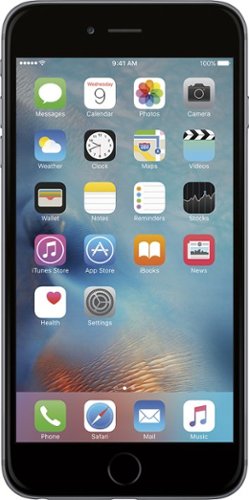
iPhone 6 Plus isn't just bigger ~ it's better in every way. Larger yet thinner. More powerful, yet power efficient. It's a new generation of iPhone.
Overall5 out of 5
5 out of 5Best Iphone Yet
By KKCNIck
from montgomery, il
It is a huge step up from the original IPhone. Each Year they get better and better. This year finally the most needed thing (larger Display). I only wish the 2 features in the plus were in this and it would have been perfect. Full 1080p display and the optical Image Stabilization. The Plus is nice but its practically a tablet and really should have been able to have those features in both. Otherwise very happy with the upgrade.

KKCNIck
montgomery, il
I wish I put the review on the correct phone
October 2, 2014
Was meant for the iphone 6 sorry
0points
0of 0voted this comment as helpful.
KKCNIck's Questions
KKCNIck has not submitted any questions.
WHAT LAB TOP IS GOOD FORDOWN LOADING MOVIES AND MUSIC THAT IS CHEAP
anything with a good wireless n card and a 500gb hard drive. Look at Gateway for that one.
15 years, 8 months ago
by
KKCNIck
montgomery, il
i just bought the Toshiba - Satellite Laptop with Intel® Pentium® Processor - Gold Onyx. does anyone know how to activate the 15 months of norton av?
step by step instruction would be most appreciated. thanks :)

Yes there should be a cert in the box with a key.
16 years, 1 month ago
by
KKCNIck
montgomery, il
Which laptop would be best to run Quickbooks Pro 2010?
any with a dual core intel processor and at least 2gb of ram is ideal.
16 years, 1 month ago
by
KKCNIck
montgomery, il
How do I pick a new laptop?
Need to buy a laptop. will use at home (home office). Will download CD's and Itunes (up to 5,000 songs)
Well any laptop will do that. It is a matter of hard drive space. I would look at the Toshiba A305-6916 if you can find one because they are priced right and have great speakers for playback. Also has a 320gb hd which is pleanty of room.
16 years, 11 months ago
by
KKCNIck
montgomery, il
Is bestbuy selling the Asus G51?
I heard that some people have bought it instore but i cannot find anything online. I have yet to call my nearest BB to see but i'm just checking.
Yeah I just saw one for $999 and it has p7450 processor and a 1gb nvidia gt260 card. It also comes with a free upgrade to windows 7 when released. I would find the G50vt that they are clearancing if you can because there is not much difference and you will save money.
16 years, 11 months ago
by
KKCNIck
montgomery, il
Which is the best processor?
Intel Celeron? AMD Athalon X2? Intell Pentium?
Intel Core 2 Duo or quad. Go with Centrino 2 when choosing a laptop.
16 years, 11 months ago
by
KKCNIck
montgomery, il
is the Toshiba laptop good for a graphic designer ?
please see this link ,its for a Toshiba laptop is it good for me as a graphic designer???
(((the link ))):http://www.bestbuy.com/site/olspage.jsp?skuId=9164343&type=product&id=1218040476937
and am not thinking about the MacBook because i cant afford it.
(((the link ))):http://www.bestbuy.com/site/olspage.jsp?skuId=9164343&type=product&id=1218040476937
and am not thinking about the MacBook because i cant afford it.
Yeah great graphics card and plenty of ram and hd space. Buy it.
16 years, 11 months ago
by
KKCNIck
montgomery, il