


KKCNIck's stats
- Review count423
- Helpfulness votes436
- First reviewOctober 20, 2010
- Last reviewJune 10, 2026
- Featured reviews0
- Average rating4.5
- Review comment count1
- Helpfulness votes0
- First review commentOctober 2, 2014
- Last review commentOctober 2, 2014
- Featured review comments0
Questions
- Question count0
- Helpfulness votes0
- First questionNone
- Last questionNone
- Featured questions0
- Answer count17
- Helpfulness votes5
- First answerJune 17, 2009
- Last answerNovember 7, 2020
- Featured answers0
- Best answers2
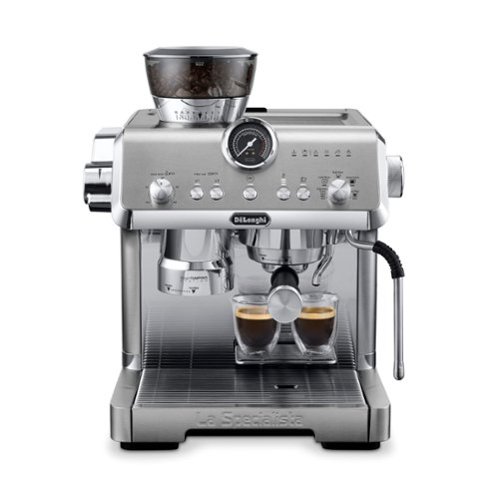
Craft espresso effortlessly with the intuitive La Specialista Opera from De~Longhi. Created for the at-home barista, this stylish machine equips you with the tools to craft custom espresso drinks all while keeping you in control of the process. The Italian-made burr grinder has 15 precise grind settings, developed to expertly grind all bean varieties in a single or double dose, ensuring a precisely brewed espresso, every time. The La Specialista Opera comes equipped with Smart Tamping technology, helping you achieve an even tamp and consistent extraction eliminating the guesswork and the mess. The Active Temperature Control allows you to select one of 3 temperature settings to match water infusion temperature to beans for optimal extraction, allowing you to get the best flavor. De~Longhi~s proprietary Cold Extraction Technology allows you to enjoy the refreshing cold brew and espresso cool recipes in under 5 minutes. This innovative technology utilizes precisely measured water flow and pressure rates, along with specific extraction temperatures, to create a delicious cold brew beverage. Finally, the powerful, commercial-style steam wand heats up quickly, delivering the right steam pressure needed to create consistently smooth microfoam for latte art. Save time with the five beverage presets - espresso, americano, cold brew, espresso cool, and hot water. Craft espresso at home, effortlessly, with La Specialista Opera from De'Longhi.
Customer Rating

5
Great but steep learning curve
on October 29, 2024
Posted by: KKCNIck
Unboxing was easy and straightforward. I removed the well packed machine. Also was a box with the other attachements.
Setup was somewhat complex. I read the included quick start guide. After cleaning the water reovoir and other attachments it was ready to go. I did process the steam cleaning function 4 times since it was suggested in the manual. Then after filling the water to the max line. I put some espresso beans in the top hopper.
Use: I tried the initial settings of 10 (Dose), 2/3 temp, Middle Grinding, 2 shots and espresso. I hit the ok button and some espresso ground. Then I pulled the Tamper down and removed it. I connected it to the espresso side and hit the OK button and the espresso was very little and watery. I proceeded to play with the dose until I finally was able to dial in 20, 2/3 temp, Fine Grinding, 2 shots and espresso. Then the color came out like the manual shows. The taste was good and full. I proceeded to try the same settings for the cool espresso to make and iced Americano. Also used the included cup to froth some milk and while that was nice. I typically like espresso and Americano’s. I typically use other cream for flavor. I like the entire machine and build quality.
Pro’s:
• 2 shot espresso at home
• Cool espresso option
• Sealed grinder of fresh beans
• Water container holds a lot of water
• Build quality good
Con’s
• The machine was complicated and took a lot of trial and error to dial in settings
• Can be a lot of work for a quick shot of espresso
• Can vibrate when in operation and seems loud
• No included espresso cups
In conclusion I highly recommend this machine if you want to make quality espresso drinks at home. So far I am very happy with the machine and feel like it will last a long time. I do wish they had more details to the dialing in of settings. Also wish an set of espresso glasses where included.
Pro’s:
• 2 shot espresso at home
• Cool espresso option
• Sealed grinder of fresh beans
• Water container holds a lot of water
• Build quality good
Con’s
• The machine was complicated and took a lot of trial and error to dial in settings
• Can be a lot of work for a quick shot of espresso
• Can vibrate when in operation and seems loud
• No included espresso cups
In conclusion I highly recommend this machine if you want to make quality espresso drinks at home. So far I am very happy with the machine and feel like it will last a long time. I do wish they had more details to the dialing in of settings. Also wish an set of espresso glasses where included.
I would recommend this to a friend!




Share this review:


+1point
1of 1voted this as helpful.
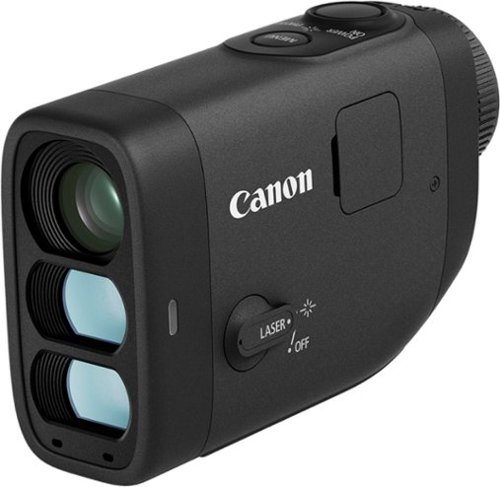
It~s time to lower your golf score! Introducing the PowerShot GOLF Digital Laser Rangefinder from Canon. Able to quickly measure distance and slope to the pin, you~ll now have the tools you need right in the palm of your hand to improve your game. The PowerShot GOLF is small, lightweight and water resistant, making it perfect to easily carry around the course, even in a little sprinkle. Plus, you can take photos and record video to review after the game to keep learning and improving even off the course.
Customer Rating

4
Good Brand but expensive
on October 26, 2024
Posted by: KKCNIck
Unboxing was simple and straight forward. Just charged and inserted the included SD card.
Pros:
• Viewfinder: The viewfinder is clear and bright, making it easy to reach targets even in challenging lighting conditions.
• Features: Beyond basic ranging, this offers slope calculation, image stabilization, and a digital zoom for enhanced accuracy.
• Accuracy: I found the accuracy to be consistent within a yard or two of my playing partners on the other device.
• Weight: It's compact and was easy to carry throughout the round without adding bulk to my bag.
• Battery Life: I used it for an entire 18-hole round without any battery concerns.
Cons:
• Lack of Magnet: A built-in magnet for easy attachment to a cart would be a welcome addition.
• Color Choice: The current color makes it a bit difficult to spot in a cluttered golf bag or cart cubby.
• Price Point: It's relatively expensive compared to other rangefinders on the market.
• Limited Photo/Video Integration: While the photo and video features are interesting, their usefulness is limited without GPS tagging or integration with golfing apps for course mapping and shot tracking.
• Lack of SD Card reader: I was unable to take the images off without an SD card reader.
Overall:
The Canon PowerShot is a solid rangefinder. The image and video capture capabilities hold potential but fall short of any benefit since there is no app and gps integration to find out where I took that shot in the future. Hopefully this can be addressed in Gen 2.
Final thoughts:
If you're looking for a rangefinder with excellent optics and basic features, the Canon PowerShot is a good option. However, if you prioritize value or require advanced features like GPS and app integration, you might consider exploring alternatives.
Pros:
• Viewfinder: The viewfinder is clear and bright, making it easy to reach targets even in challenging lighting conditions.
• Features: Beyond basic ranging, this offers slope calculation, image stabilization, and a digital zoom for enhanced accuracy.
• Accuracy: I found the accuracy to be consistent within a yard or two of my playing partners on the other device.
• Weight: It's compact and was easy to carry throughout the round without adding bulk to my bag.
• Battery Life: I used it for an entire 18-hole round without any battery concerns.
Cons:
• Lack of Magnet: A built-in magnet for easy attachment to a cart would be a welcome addition.
• Color Choice: The current color makes it a bit difficult to spot in a cluttered golf bag or cart cubby.
• Price Point: It's relatively expensive compared to other rangefinders on the market.
• Limited Photo/Video Integration: While the photo and video features are interesting, their usefulness is limited without GPS tagging or integration with golfing apps for course mapping and shot tracking.
• Lack of SD Card reader: I was unable to take the images off without an SD card reader.
Overall:
The Canon PowerShot is a solid rangefinder. The image and video capture capabilities hold potential but fall short of any benefit since there is no app and gps integration to find out where I took that shot in the future. Hopefully this can be addressed in Gen 2.
Final thoughts:
If you're looking for a rangefinder with excellent optics and basic features, the Canon PowerShot is a good option. However, if you prioritize value or require advanced features like GPS and app integration, you might consider exploring alternatives.
I would recommend this to a friend!
Share this review:


0points
0of 0voted this as helpful.
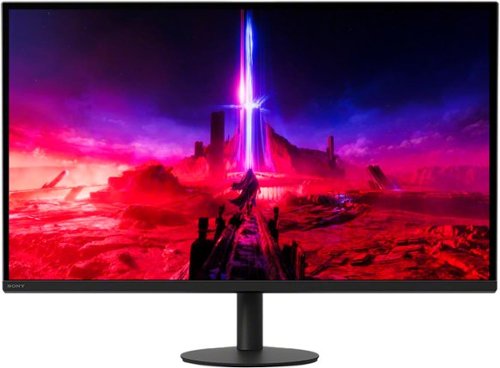
Discover a more immersive gaming experience with deep blacks and higher brightness, through Full Array Local Dimming display. 4K resolution,* coupled with a 160Hz refresh rate and backlight scanning technology, delivers smooth detailed visuals to ensure every moment is accurately reproduced in stunning detail.
Customer Rating
5
Excellent V2 of a premium 4k gaming monitor.
on October 18, 2024
Posted by: KKCNIck
The Sony Inzone M9 II is a great monitor. With two Display Ports and one HDMI, there are plenty of ports for any of the various devices you may need it for. The unboxing was pretty straightforward with two big pieces of Styrofoam holding everything snuggly in place. The setup was also pretty easy, with the standard monitor arm-to-screen clips. The monitor looks great on my desk with its simple but elegant design, and it looks great next to my other monitor; one I hope to replace with another one of these when I get the chance. I didn’t use the previous model but from what I read, I’m glad they changed the stand design. The 4K resolution is a bit smaller than I’d like but adjusting the zoom fixed that issue. The only other issue I had was with my dual Display Port KVM, the signal was not making it to the monitor until I plugged it directly into my desktop, I suspect due to the refresh rate, so be aware if you use one of those. Overall, fantastic looking and, so far, a performing addition to Sony’s lineup. As for Gaming I played Forza Horizon and while my laptop cannot use the entire 160hz of the display at 4k I did experience a smooth and detailed experience. I can see much more detail compared to the 1440p monitor I had. When I played Fortnite which requires a faster screen. I was again not able to fully utilize the display refresh rate at the native resolution, but it performed flawless, and the detail was amazing. I just feel like finally a screen that is waiting for the next generation of Gaming pcs since there is not much out there that can max this out. That actually makes me feel better about the investment for the future. When I loaded Adobe Lightroom and edited photo’s I found the color fidelity accurate and the accuracy of the SRGB really close to D6500. I was not able to feel like there is a huge difference from the multiple zones this has. I can just say it is a phenomenal picture but when compared to another screen I did not see a huge contrast difference between dark and light scenes. I highly recommend this premium monitor if you want either high refresh 4k gaming or Photo/video editing capabilities. I do however wish it was 32” since it is a 4k monitor if I were to give a con.
I would recommend this to a friend!

Share this review:


0points
0of 0voted this as helpful.
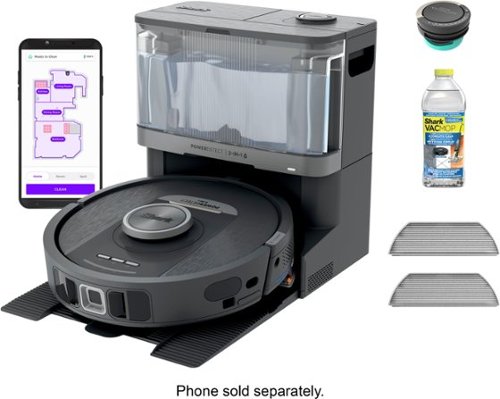
The PowerDetect NeverTouch robot vacuum and mop system is designed to capture more, reach farther, and need you less (vs. Shark Matrix 2-in-1). Its five powerful cleaning technologies help to target hidden debris, stuck-on stains, edges and to optimize cleaning for every floor type, handling the toughest cleaning challenges. Whether vacuuming or mopping, the PowerDetect robot does the dirty work, so you don't have to. It deep-cleans and mops your floors, while the NeverTouch Base means you don~t have to worry about cleanup or maintenance for weeks at a time. After every cleaning run, the robot will return to the base to empty dry debris, refill the water tank, and dry the mopping pad so it~s always ready for its next clean. With NeverStuck Technology, the robot lifts itself over obstacles and across thresholds to avoid getting stuck. When mopping, it keeps the pad above carpets to prevent wet messes and deliver whole-home coverage. While the robot handles your cleaning chores for you, the bagless base with Anti-Allergen Complete Seal captures and traps 99.97% of dust and allergens (down to .3 microns, allergens refers to non-living matter).
Customer Rating
5
One of the best automatic Vacuum and Mop around.
on October 17, 2024
Posted by: KKCNIck
Unboxing - No unnecessary packaging. It came with a Quick Start Poster with simple graphics instructions. This Shark Vacuum was easy to assemble. It took approximately 15 minutes to setup the basics to be ready to connect to the wireless network.
Setup - The App allowed quick pairing to Wi-Fi. You can personalize it, naming the Robot. At first it maps your home, the sensors will identify corners, and it's slim enough to get under your sofa or around your furniture it begins scanning from walls to the center of the house. The wheels can swiftly climb from hardwood floors to carpet. It will drive in reverse if encounters no access.
Vacuum and Mopping - It surprised me that it works quite well, and it will go back to recharge on its own. A female voice announces, the task, if refilling, recharging or when it’s done.
Pros - I do like the fact I can remote from the app to have my house clean while I'm away.
Cons – It is loud but bearable. I just decided to run this while at work, so I do not need to hear it. When I come home the house is clean which is awesome. It does drive my dogs a little crazy when it is running and they are in their crates but I just need to balance that with my work time.
Recommendation - May need to have it mop individual rooms rather than the whole house, as it can leave small areas without cleaning but once you do it room by room it becomes more thorough. Saves lots of time cleaning and it does a pretty decent job. Also, it detects debris but is not so good at removing tough stains on the floor unless you select the spot option. Strongly advise cleaning room by room as best practice. Wish it had direct voice control.
Setup - The App allowed quick pairing to Wi-Fi. You can personalize it, naming the Robot. At first it maps your home, the sensors will identify corners, and it's slim enough to get under your sofa or around your furniture it begins scanning from walls to the center of the house. The wheels can swiftly climb from hardwood floors to carpet. It will drive in reverse if encounters no access.
Vacuum and Mopping - It surprised me that it works quite well, and it will go back to recharge on its own. A female voice announces, the task, if refilling, recharging or when it’s done.
Pros - I do like the fact I can remote from the app to have my house clean while I'm away.
Cons – It is loud but bearable. I just decided to run this while at work, so I do not need to hear it. When I come home the house is clean which is awesome. It does drive my dogs a little crazy when it is running and they are in their crates but I just need to balance that with my work time.
Recommendation - May need to have it mop individual rooms rather than the whole house, as it can leave small areas without cleaning but once you do it room by room it becomes more thorough. Saves lots of time cleaning and it does a pretty decent job. Also, it detects debris but is not so good at removing tough stains on the floor unless you select the spot option. Strongly advise cleaning room by room as best practice. Wish it had direct voice control.
I would recommend this to a friend!

Share this review:


+1point
1of 1voted this as helpful.
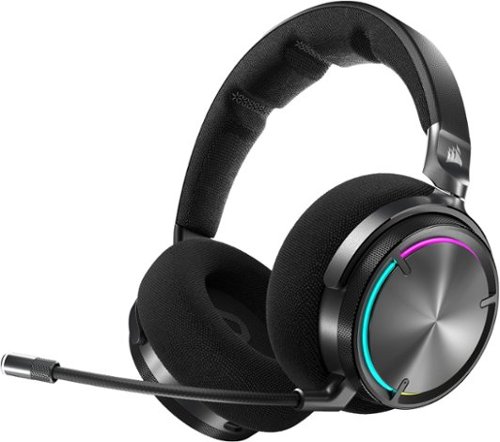
Sound worth obsessing over. VIRTUOSO MAX harnesses the passion of audio experts and the power of cutting-edge technology to produce immersive harmonics on Xbox and more. State-of-the-art Graphene drivers produce spectacularly clear and precise audio, broadening the highs and lows of every soundscape. Dolby Atmos expands the play past the screen and into your world, with each conflict, conversation, and cutscene unfolding around you. Band together with friends and strategize over voice channels with the broadcast-grade omni-directional microphone. Perfectly balance in-game sound and team chat with on-ear audio controls. Active noise cancellation eliminates all other distractions, leaving you with all-encompassing gaming audio that sounds so good.
Customer Rating
5
Best Xbox wireless Gaming headset to date.
on October 17, 2024
Posted by: KKCNIck
Unboxing was easy and straightforward. It included the headphones in a nice hard zipper case, USB a to USBC cable, Mic and Xbox usb adapter. I charged it but the usb ports in my outlets was not enough so I used a usb power brick and that worked. I also downloaded the corsair Icue software only for Windows/MAC not mobile app here.
Setup was pretty straight forward. I connected the headset into my Xbox and pushed the power button and per the instructions had to double press the custom button on the headset. Now I was connected.
I like to spin the dial on the right ear to control the volume. It feels more satisfying to increase/decrease the volume. After several days of gameplay, the sound was incredible. I found the volume at about 50% to be loud enough and you could hear an amazing amount of detail in FPS. Also, when in matches everyone heard me crystal clear. When my family was nearby, and the dogs barked, the team on the other side could not hear anything.
I slid the power button over on the left ear and put it in Bluetooth and paired to my phone and was able to hear very clear audio, movie/tv shows and played some mobile games. The quality was just as good. I did place a few video calls, and they were crystal clear both sides both audio and video. I even went to the loudest part of the house where the kids were playing, and I did not hear anything as far as outside noise. Also, the person I was talking to could not hear anything but me.
As far as the ANC. I like the active as it blocks all sound outside of the game/movie, etc. that I am listening to. Transparent ANC is awesome so I could hear my surroundings while playing a match in Fortnite and not feel like I am closed off to the world. Same goes for listening to a show when I do not want to watch what my family is watching. The benefit is I can still hear them when they talk to me.
Sound profiles: I liked the pure direct for mostly everything except for when playing FPS games. I found that sound profile just a little bit more sensitive to the high’s so I could hear my enemies easier. You can program the custom button so that I can switch between them but unfortunately, I need to rotate all the sound profiles so in the end I was not always sure I was on the correct profile.
I do like also that you can adjust the RGB lighting colors and brightness along with how fast the headset goes to sleep.
I did have some trouble getting the headset to show up in Icue which was frustrating but eventually got it to show. Also, when turning it on and connecting to Bluetooth you need to slide the power switch over which is not that user friendly. The Xbox connection is seamless, so it is best to get this headset for that primary use.
I slid the power button over on the left ear and put it in Bluetooth and paired to my phone and was able to hear very clear audio, movie/tv shows and played some mobile games. The quality was just as good. I did place a few video calls, and they were crystal clear both sides both audio and video. I even went to the loudest part of the house where the kids were playing, and I did not hear anything as far as outside noise. Also, the person I was talking to could not hear anything but me.
As far as the ANC. I like the active as it blocks all sound outside of the game/movie, etc. that I am listening to. Transparent ANC is awesome so I could hear my surroundings while playing a match in Fortnite and not feel like I am closed off to the world. Same goes for listening to a show when I do not want to watch what my family is watching. The benefit is I can still hear them when they talk to me.
Sound profiles: I liked the pure direct for mostly everything except for when playing FPS games. I found that sound profile just a little bit more sensitive to the high’s so I could hear my enemies easier. You can program the custom button so that I can switch between them but unfortunately, I need to rotate all the sound profiles so in the end I was not always sure I was on the correct profile.
I do like also that you can adjust the RGB lighting colors and brightness along with how fast the headset goes to sleep.
I did have some trouble getting the headset to show up in Icue which was frustrating but eventually got it to show. Also, when turning it on and connecting to Bluetooth you need to slide the power switch over which is not that user friendly. The Xbox connection is seamless, so it is best to get this headset for that primary use.
Pros:
Build quality
Sound profile
Volume control is really quality in the headset
Sound quality very detailed
Build quality
Sound profile
Volume control is really quality in the headset
Sound quality very detailed
Cons:
Not that comfortable
Icue finicky
Switching sound profiles does not show which profile you’re on
Bluetooth switching from Xbox mode is not super easy
Not that comfortable
Icue finicky
Switching sound profiles does not show which profile you’re on
Bluetooth switching from Xbox mode is not super easy
Overall, this is the best Xbox Gaming headset I have used to date.
I would recommend this to a friend!


Share this review:


0points
0of 0voted this as helpful.
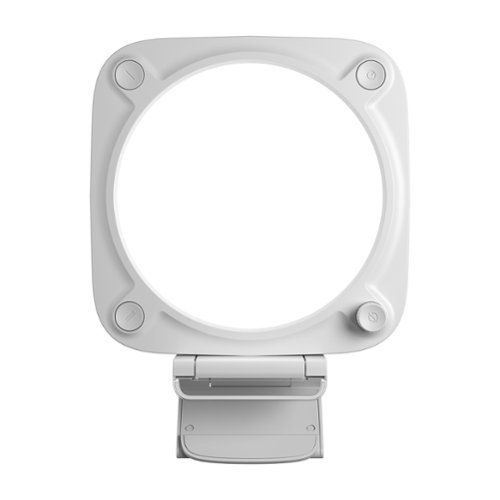
Great impressions made easy. Introducing Key Light Neo, a tiny but mighty light that makes you glow with confidence the moment you turn it on. Unlike desktop lamps or ceiling lights, Key Light Neo plays beautifully with webcams. Grainy image? Turn up the brightness. Color seem off? Dial in the perfect hue for your skin tone. Our iconic edge-lit design eliminates glare, so you can stream or video call for as long as you want. Then switch to desktop lighting when showtime~s over. No complicated setup. Just connect Key Light Neo to your laptop, plop it on your monitor, and look pro every time you~re online.
Customer Rating
5
Great Video light for work use.
on October 15, 2024
Posted by: KKCNIck
Unboxing was easy and straightforward. I connected the USB to the extender and to my USB hub. Then I pushed the power button, and I had light. I downloaded and installed the control center software. However, this is only for Windows/Mac and not for mobile platforms.
Setup: Was straightforward. I clipped it on my monito next to my webcam for support. I did find the clip very weak so when I wanted to lean the light more forward to me it tipped over. For this you would need to get a small flash stand for your desk or floor depending on setup.
Use: I found this helpful for my video (Teams/Zoom) meetings since it gave my face an overall brighter image to the attendees. I prefer the cooler tone since the warmer tone made me look like I had a tan. The software made it easy to hop in a meeting and click the power button in my taskbar vs reaching up to the light in general. I did find it plenty bright to cover me from a 12” distance.
Pros:
• Adds useful light to video meetings
• Can be controlled within Windows
• Can be set up on a flash stand for other configurations.
• Remembers last settings when turned on again
Cons:
• Too bright after long meetings in my eyes. Can give me a headache
• Clamp too weak to allow me to setup the light for off angle for less direct light in my eyes.
• Wish it was in other colors to match my setup.
Overall, I really like this product and find it extremely useful for its intended use.
Pros:
• Adds useful light to video meetings
• Can be controlled within Windows
• Can be set up on a flash stand for other configurations.
• Remembers last settings when turned on again
Cons:
• Too bright after long meetings in my eyes. Can give me a headache
• Clamp too weak to allow me to setup the light for off angle for less direct light in my eyes.
• Wish it was in other colors to match my setup.
Overall, I really like this product and find it extremely useful for its intended use.
I would recommend this to a friend!




Share this review:


-1point
0of 1voted this as helpful.
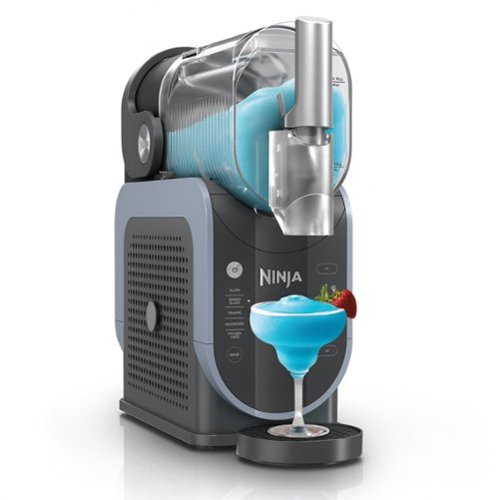
The Ninja SLUSHi Professional Frozen Drink Maker is the easiest way to make frozen drinks at home. No ice needed, no blending, no hassles. Create tons of drinks with as few as one ingredient. Premium XL Capacity unlocks the ultimate party starter so you can make fun, flavorful drinks for everyone. No more watered-down, tasteless drinks. SLUSHi works quickly and keeps drinks frozen for up to 12 hours.
Posted by: KKCNIck
Setup was pretty simple. Just a few items to connect before it was connected. We tried the slushy feature first. Pretty simple. Poor your soda of choice in the top till you reach the minimum or maximum fill line. Then turn it in to slush mode. Then walk away. About 20 min or so later it beeps which means it is done. Then put a cup under and tilt the handle toward you. This is where we had trouble. The slushy would get stuck and we stuck a for inside to push it back and then it worked again. Then slushy was good but struggled with a normal straw. They should have included thicker straws. Cleaning was easy. Just fill with warm water and run the rinse cycle. Then remove and wash the components.
I tried the frozen coffee and lemonade smoothy. Also attempted to make a chocolate shake. All worked. I just wish they had better recipe cards for ease of use in the family.
Overall I like the machine but found the slushy getting stuck removing from the experience. Also the lack of thick straws had me using a spoon which is not the experience I was hoping for.
Finally there was no clear recipe’s for non alcoholic Pina Colada’s which would have been nice to try. There was one but I could not find the brand of mix the suggested. Also I wanted to make some energy slushy’s but they need minimum 4g of sugar and most I drink are sugar free.
I would recommend this to a friend!



Share this review:


-4points
2of 8voted this as helpful.
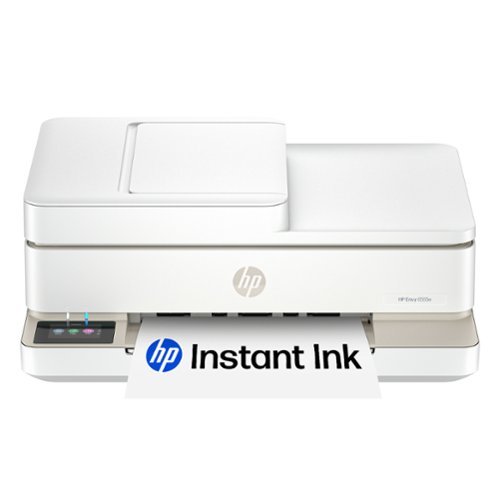
From America's most trusted printer brand, the HP Envy 6555e All-in-One delivers color printing, scanning and copying, plus a 35-sheet auto document feeder and 100-sheet paper capacity. It's AI-enabled to intuitively adapt to your workflow, with wireless and security features that keep your multifunction printer up to date and secure, and prints high-quality documents and photos every time with true-to-screen tech. This inkjet printer also lets you easily navigate print jobs with its intuitive color touchscreen.
Customer Rating
5
Great with a few small flaws
on September 28, 2024
Posted by: KKCNIck
Unboxing was pretty standard. One thing that was odd was that the printer was shrink wrapped in plastic which for an eco friendly design was odd. However, the printer is shorter that similar models while maintain the main features such as display panel and ADF. I connected it to power and was greeted with a QR code that prompted me to connect to the HP+ app which I already had. IT immediately saw the printer and offered to connect to my wireless while getting the password from my phone. After that it was simple I could start a new trial for this printer or replace an existing. I like the progression of this setup since eventually your printer will die and with this app you can just add a new printer. This allows your scan and print settings to remain coming from the cloud vs programming the printer each time. After that a simple alignment page was printed and scanned. Finally you can then text or email yourself/family the install link. This is where things where not as smooth. I was given a link but it was just a prompt to the HP+ app on my windows laptop. From here I could select documents thru the app which is not how I use my printing in Windows. I needed to search online for the true Windows HP Easy Start exe that installed more than just the printer driver which is frustrating. That was a lot of work, and I feel a less tech savvy user would be frustrated. Finally, I was printing and scanning. The speed and quality are great and clear. I can send a 5-page job, and it prints fairly quick. A few more notes on this printer. The Ink cartridges are super small and hard to install. The paper tray holds only a small amount of paper. The lid closes down hard after installing the ink and I pinched my fingers since there was nothing to grip when it was closing that would avoid my fingers. Besides those few cons this is another decent printer for home use.
I would recommend this to a friend!
Share this review:


+1point
1of 1voted this as helpful.
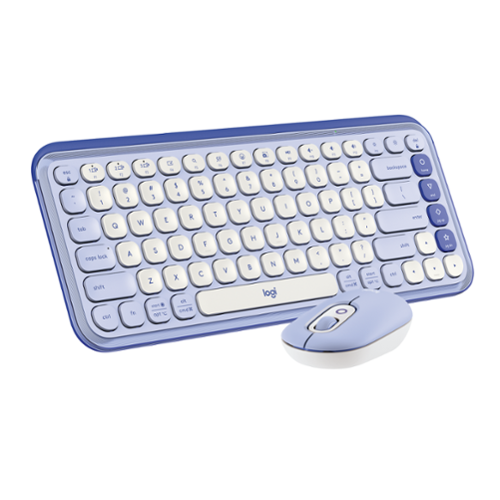
Add an extra pop to your desk with the POP Icon Combo, a contoured design with customizable Action Keys and Buttons. The low-profile keys give you a comfy typing experience. POP Mouse boosts productivity by 30%, compared to a trackpad. The Smartwheel speed scroll takes you where you need to go, fast.
Customer Rating
4
Nice but still too big for tablet use
on September 28, 2024
Posted by: KKCNIck
Review
Unboxing and setup was pretty simple. I was able to connect it via bluetooth to my Ipad and laptop. It was pretty simple to move between both devices. But the way the keyboard is advertised promotes it to be used with keyboards and even phones. While that is nice in theory I found that when using the large keyboard on such a small device that it made typing even harder. The keyboard is way larger than the average iPad and is not easy to travel around with. I tried to type on my iPad and it was hard due to the size difference. As well as if you wanted to bring your iPad or laptop around the house with you the keyboard would not work, it requires a desk or table. Therefore, this is the perfect satisfying modern keyboard for a desktop/laptop but overall would not recommend for other devices. One more thought on the color is the purple is ok but there should be more choices. I did however like the home shortcuts for when using the Ipad which made navigation easier. I just wish they made this able to connect to the size of the Ipad while also working with other devices.
Unboxing and setup was pretty simple. I was able to connect it via bluetooth to my Ipad and laptop. It was pretty simple to move between both devices. But the way the keyboard is advertised promotes it to be used with keyboards and even phones. While that is nice in theory I found that when using the large keyboard on such a small device that it made typing even harder. The keyboard is way larger than the average iPad and is not easy to travel around with. I tried to type on my iPad and it was hard due to the size difference. As well as if you wanted to bring your iPad or laptop around the house with you the keyboard would not work, it requires a desk or table. Therefore, this is the perfect satisfying modern keyboard for a desktop/laptop but overall would not recommend for other devices. One more thought on the color is the purple is ok but there should be more choices. I did however like the home shortcuts for when using the Ipad which made navigation easier. I just wish they made this able to connect to the size of the Ipad while also working with other devices.
No, I would not recommend this to a friend.
Share this review:


0points
0of 0voted this as helpful.
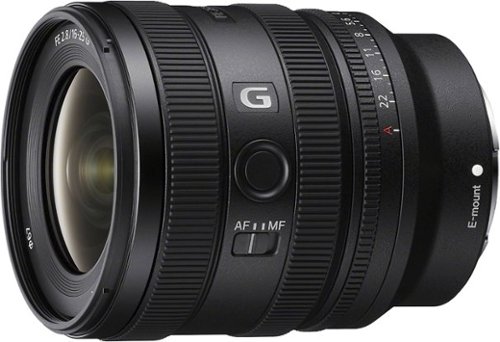
This compact full-frame F2.8 wide-angle zoom lens is an excellent match for ~-series cameras, with advanced technology ensuring that camera performance is fully realized from ultra-wide 16 mm to wide 25 mm focal lengths. Outstanding G Lens resolution and bokeh are available throughout that range, and precision AF means fast, sharp focus. Great for wide-angle stills as well as movies.
Customer Rating
5
Excellent UWA for video and stills
on September 14, 2024
Posted by: KKCNIck
Unboxing:
This lens was packaged well and there was not much to unbox if you have a Sony E-Mount camera already then, your familiar with what the experience is like.
Use:
The Lens is small and light. I love the 2.8 constant aperture especially in low light such as an indoor scene or at evening sporting events. I found this lens to produce sharp video for a wide scene of an entire football team at the end of game. This is huge since my standard 24-70 lens is typically not wide enough. Also, the marching band can be hard to photograph and record. This lens was able to accomplish that very easy since it had a much wider focal range. When playing back the video I did not hear the lens focusing and when zooming in/out of a scene there was a little noise but not much. If I pull focus just a little slower, you do not even hear the lens at all. I feel like this is a huge pro since my use of the lens is handheld at events. The combination of the light lens and camera body was just amazing compared to my other lenses.
Lens performance of pictures. I like the range however beyond group or tight indoor settings. I find this lens more of a special use focal length. I personally use the 24-70, 70-200 and 16-25 (last) as far as my order of most used lenses. It is not because the lens is bad but just that the range of my photo/video style is more the traditional to telephoto range. There is a significant amount of vignetting from 16mm through 25mm. Same applies for barrel distortion as some is present. Fortunately, all can be fixed in post such as Adobe Lightroom. After the lens correction is applied everything came out perfect. I did test another 2.8 lens and these both seem to perform very well wide open. This can be an issue on some lenses but not here. I found everything to focus fast and remain sharp. There was no percieved focus shift or struggling with focus even in low light.
Build Quality: I found the lens to be built well. They included caps and a lens hood. The controls are tight and well made. I love the weight of the lens for a 2.8 G series lens.
Final Summary:
I think Sony hit this out of the park with this lens. It performs excellent for stills and video. There is no noise from the focus motor and very little when zooming, which makes it excellent for video. The colors and sharpness are there 100% of the time. The only concerns are the slight vignetting and distortion which is expected with a lens for this price and wide focal range. I highly recommend it.
This lens was packaged well and there was not much to unbox if you have a Sony E-Mount camera already then, your familiar with what the experience is like.
Use:
The Lens is small and light. I love the 2.8 constant aperture especially in low light such as an indoor scene or at evening sporting events. I found this lens to produce sharp video for a wide scene of an entire football team at the end of game. This is huge since my standard 24-70 lens is typically not wide enough. Also, the marching band can be hard to photograph and record. This lens was able to accomplish that very easy since it had a much wider focal range. When playing back the video I did not hear the lens focusing and when zooming in/out of a scene there was a little noise but not much. If I pull focus just a little slower, you do not even hear the lens at all. I feel like this is a huge pro since my use of the lens is handheld at events. The combination of the light lens and camera body was just amazing compared to my other lenses.
Lens performance of pictures. I like the range however beyond group or tight indoor settings. I find this lens more of a special use focal length. I personally use the 24-70, 70-200 and 16-25 (last) as far as my order of most used lenses. It is not because the lens is bad but just that the range of my photo/video style is more the traditional to telephoto range. There is a significant amount of vignetting from 16mm through 25mm. Same applies for barrel distortion as some is present. Fortunately, all can be fixed in post such as Adobe Lightroom. After the lens correction is applied everything came out perfect. I did test another 2.8 lens and these both seem to perform very well wide open. This can be an issue on some lenses but not here. I found everything to focus fast and remain sharp. There was no percieved focus shift or struggling with focus even in low light.
Build Quality: I found the lens to be built well. They included caps and a lens hood. The controls are tight and well made. I love the weight of the lens for a 2.8 G series lens.
Final Summary:
I think Sony hit this out of the park with this lens. It performs excellent for stills and video. There is no noise from the focus motor and very little when zooming, which makes it excellent for video. The colors and sharpness are there 100% of the time. The only concerns are the slight vignetting and distortion which is expected with a lens for this price and wide focal range. I highly recommend it.
I would recommend this to a friend!
Share this review:


0points
0of 0voted this as helpful.
KKCNIck's Review Comments
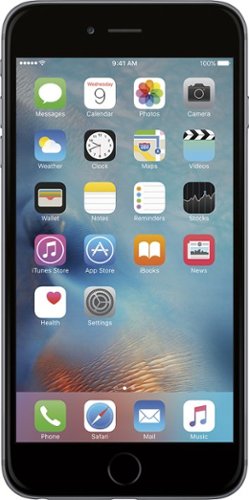
iPhone 6 Plus isn't just bigger ~ it's better in every way. Larger yet thinner. More powerful, yet power efficient. It's a new generation of iPhone.
Overall5 out of 5
5 out of 5Best Iphone Yet
By KKCNIck
from montgomery, il
It is a huge step up from the original IPhone. Each Year they get better and better. This year finally the most needed thing (larger Display). I only wish the 2 features in the plus were in this and it would have been perfect. Full 1080p display and the optical Image Stabilization. The Plus is nice but its practically a tablet and really should have been able to have those features in both. Otherwise very happy with the upgrade.

KKCNIck
montgomery, il
I wish I put the review on the correct phone
October 2, 2014
Was meant for the iphone 6 sorry
0points
0of 0voted this comment as helpful.
KKCNIck's Questions
KKCNIck has not submitted any questions.
WHAT LAB TOP IS GOOD FORDOWN LOADING MOVIES AND MUSIC THAT IS CHEAP
anything with a good wireless n card and a 500gb hard drive. Look at Gateway for that one.
15 years, 8 months ago
by
KKCNIck
montgomery, il
i just bought the Toshiba - Satellite Laptop with Intel® Pentium® Processor - Gold Onyx. does anyone know how to activate the 15 months of norton av?
step by step instruction would be most appreciated. thanks :)

Yes there should be a cert in the box with a key.
16 years, 1 month ago
by
KKCNIck
montgomery, il
Which laptop would be best to run Quickbooks Pro 2010?
any with a dual core intel processor and at least 2gb of ram is ideal.
16 years, 1 month ago
by
KKCNIck
montgomery, il
How do I pick a new laptop?
Need to buy a laptop. will use at home (home office). Will download CD's and Itunes (up to 5,000 songs)
Well any laptop will do that. It is a matter of hard drive space. I would look at the Toshiba A305-6916 if you can find one because they are priced right and have great speakers for playback. Also has a 320gb hd which is pleanty of room.
16 years, 11 months ago
by
KKCNIck
montgomery, il
Is bestbuy selling the Asus G51?
I heard that some people have bought it instore but i cannot find anything online. I have yet to call my nearest BB to see but i'm just checking.
Yeah I just saw one for $999 and it has p7450 processor and a 1gb nvidia gt260 card. It also comes with a free upgrade to windows 7 when released. I would find the G50vt that they are clearancing if you can because there is not much difference and you will save money.
16 years, 11 months ago
by
KKCNIck
montgomery, il
Which is the best processor?
Intel Celeron? AMD Athalon X2? Intell Pentium?
Intel Core 2 Duo or quad. Go with Centrino 2 when choosing a laptop.
16 years, 11 months ago
by
KKCNIck
montgomery, il
is the Toshiba laptop good for a graphic designer ?
please see this link ,its for a Toshiba laptop is it good for me as a graphic designer???
(((the link ))):http://www.bestbuy.com/site/olspage.jsp?skuId=9164343&type=product&id=1218040476937
and am not thinking about the MacBook because i cant afford it.
(((the link ))):http://www.bestbuy.com/site/olspage.jsp?skuId=9164343&type=product&id=1218040476937
and am not thinking about the MacBook because i cant afford it.
Yeah great graphics card and plenty of ram and hd space. Buy it.
16 years, 11 months ago
by
KKCNIck
montgomery, il