


TechEnthusiast's stats
- Review count209
- Helpfulness votes894
- First reviewAugust 16, 2014
- Last reviewJune 2, 2026
- Featured reviews0
- Average rating4.1
Reviews comments
- Review comment count0
- Helpfulness votes0
- First review commentNone
- Last review commentNone
- Featured review comments0
Questions
- Question count0
- Helpfulness votes0
- First questionNone
- Last questionNone
- Featured questions0
- Answer count13
- Helpfulness votes17
- First answerAugust 25, 2016
- Last answerJanuary 22, 2022
- Featured answers0
- Best answers2
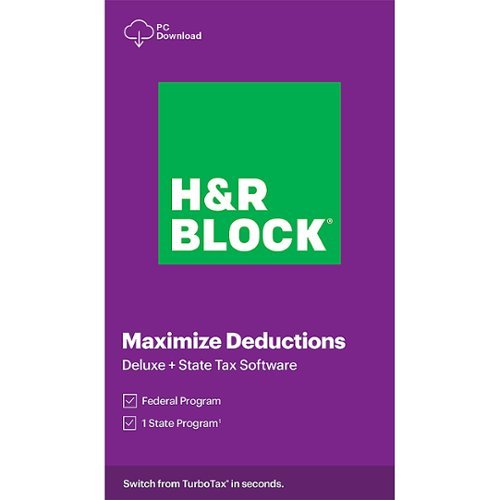
This H&R Block Deluxe + State Tax software offers everything homeowners and investors need to easily complete federal taxes. It includes a free online chat with a tax professional, step-by-step guidance on hundreds of credits and deductions, in-person representation in the unlikely event of an audit, and reporting assistance on income from investments, home sales and more.
Customer Rating

3
Worked well enough with some odd quirks
on February 11, 2021
Posted by: TechEnthusiast
from Elgin, IL
I don't think I'm alone when I say that I hate doing my taxes. It's stressful, confusing, time-consuming, and full of hidden fees.
I picked up this H&R Block software in the hopes that it would make doing my taxes easier.
Ultimately, my taxes got done, but it wasn't the smooth experience that I'd hoped for.
First off, the software does not seamlessly sync with H&R Block's online tax service. I did my taxes through H&R Block's website last year, and I'd hoped it would just transfer all of my data over from their site.
It didn't.
I had to download last year's taxes as a PDF and then import them into the software.
That leads me to my next problem.
My taxes included a combination of digital forms and scanned documents. The scanned documents all imported surprisingly well (it recognized the numbers correctly and input them appropriately), but the purely digital forms imported with errors.
At one point, I was dancing for joy because the software was telling me that I was getting thousands back. When I double checked the figures though, I saw that it had misinterpreted a period on one of the digital forms as a comma (making it seem that I'd spent a hundred thousand more in property taxes).
The software also consistently clicked a checkbox saying that I had charitable donations to declare (I didn't).
When we got to the point of submitting my taxes to the IRS, I was unpleasantly surprised to get charged a submission fee for my state taxes (despite this product saying that it includes state). I was also charged a (not insignificant) transaction fee for taking the submission fee out of my return.
So much for avoiding hidden fees.
Ultimately, my taxes got done. And despite the issues, I'm fairly confident that my taxes are correct. I take comfort in the fact that H&R Block is standing by my tax return.
That being said, I can't really recommend this product. The glitches were too numerous, and the surprise fees were a little too galling.
Mobile Submission: False
No, I would not recommend this to a friend.
Share this review:


0points
0of 0voted this as helpful.

Unleash the power of AI~ with the Epson RapidReceipt RR-60 mobile business scanner. Driven by Epson ScanSmart AI PRO technology, you~ll quickly and intelligently convert scanned information into smart digital data ~ making your documents AI-ready for Microsoft Copilot, Apple Intelligence, ChatGPT workflows and more. Going beyond simple document capture, the RapidReceipt RR-60 mobile scanner utilizes an extensive data model of various invoices and receipts to quickly turn stacks of unorganized paperwork into categorized digital data that easily integrates into financial applications such as QuickBooks and TurboTax~. The smallest and lightest mobile single-sheet document scanner in its class~, weighing under 10 oz, the RapidReceipt RR-60 mobile scanner offers productive features, including the ability to create searchable and editable PDFs, in a conveniently portable design. Plus, this portable scanner can be charged via USB for added convenience. One of the smartest investments you can make for your business, the Epson RapidReceipt RR-60 mobile business scanner, powered by ScanSmart AI PRO, enables you and your business to stay organized and efficient by unleashing the power of AI.
Customer Rating

4
Great scanner but a little unintuitive
on February 7, 2021
Posted by: TechEnthusiast
from Elgin, IL
The Epson RR60 scanner is very portable and convenient, but the software for using it is a bit finicky to install and unintuitive.
First, make sure you read the instructions prior to installing this scanner. You will need to go to Epson’s site to download a driver and software package before you’ll be able to get this to work.
I initially tried just plugging this in to my laptop to see if it was plug and play, and I was going to try scanning a document into Photoshop using this as a generic TWAIN scanner. Unfortunately, it was completely and totally unresponsive.
(Side note: the scanner uses the older USB type-A to micro-USB cable connection rather than a more modern type-C connection)
Once I downloaded the software and drivers from Epson’s site, I walked through the install and was prompted to install several individual components (such as OCR functionality) . Of course I was going to install everything, so I was a little annoyed that it was asking for user input for a small 50ish MB component.
After everything was done installing, I was left with three new programs on my desktop:
Epson Software Updater
Epson ScanSmart
Epson Scan 2 Utility
Epson Software Updater
Epson ScanSmart
Epson Scan 2 Utility
Honestly, I don’t understand why they didn’t bundle all of this into one program. The updater auto-ran after installation and installed a firmware update (and hasn’t done anything since), and ScanSmart runs when I push the button on the scanner to initiate a scan. I can only assume that Scan 2 Utility is just the driver itself.
The scanner comes with a software code that is non-replaceable and should be kept in a secure location.
I have no idea why it comes with this.
At no point was I prompted to enter this code, and I can only assume that I’m missing a software component somewhere. No other software was available on Epson's site at the time of this review, and I can only assume that I was supposed to have gotten it from a 3rd party site somewhere.
Scanning documents is quick and easy. Just lineup the edge of the document to the far left edge of the scanner, and push the button on the scanner to start the scan.
After scanning, you’ll be presented with a variety of different options.
The one that I’m using the most is the invoice management function. This is kind of awesome.
The scanner uses optical character recognition (OCR) and automatically detects the invoice amount, due dates, invoice numbers, and company name (among other things). For some reason, the OCR struggled when trying to differentiate between my gas and water bills (probably because my gas company uses a graphic logo as part of their company name on the invoice). But aside from that, it works beautifully.
Once all of my bills were scanned and cataloged, I was given the option to export them to QuickBooks, a CSV file (for Excel), image (jpeg or PDF), and a few other options.
I’m thrilled that I’ll be able to digitize all of my hardcopy bills and get rid of some of the paper clutter. The fact that I can export to an Excel file format is terrific as it will allow me to sort and search through my bills digitally (rather than having to read through dozens of scanned pages).
I’m very happy with this scanner, but I think Epson could have done a much better job with the software. I’m not a fan of cluttering my system with unnecessary icons and files, and this install just felt messy.
I would recommend this scanner if you’re looking to get your finances organized and want something portable that can be used at the local coffee shop.
Mobile Submission: False
I would recommend this to a friend!
Share this review:


0points
0of 0voted this as helpful.
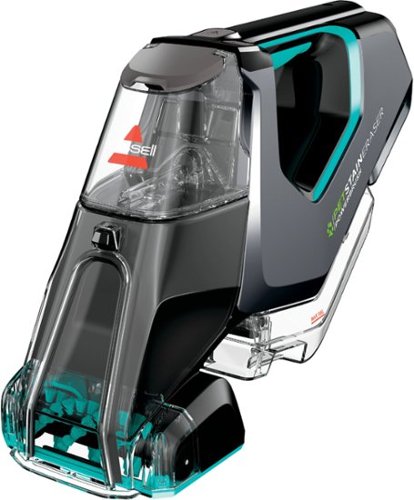
BISSELL Pet Stain Eraser PowerBrush Plus cordless portable carpet cleaner is always ready to remove tough pet messes on the go, making it perfect for families in the little mess maker phase of pet parenthood and beyond. The powerful rotating DirtLifter PowerBrush helps loosen, lift and remove tough pet stains while the lithium-ion battery provides an extended run time for cordless cleaning. Unlike many other portable carpet cleaners, this machine allows you to store the formula in the tank when it's not in use, so there's no water, no mixing and no hassle. Get instant pet stain removal with the included OXY formula and enjoy grab-and-go cleaning for pet messes and other stains on carpet, stairs, upholstery, area rugs, car interiors, and more, right when they happen. BISSELL has products that make cleaning messes in any stage of pet parenthood easy. Plus, every purchase helps save pets. BISSELL proudly supports BISSELL Pet Foundation and its mission to help save homeless pets. When you buy a BISSELL product, you help save pets, too. We~re proud to design products that help make pet messes, odors and pet homelessness disappear.
Posted by: TechEnthusiast
from Elgin, IL
I'm a cat owner who routinely has to clean up messes on light colored carpet. I have an upright carpet cleaner, but it's a pain to setup, and it doesn't have a hose attachment for upholstery.
I picked up this unit to supplement my upright because I thought that it would be good for quick cleaning jobs and for deep cleaning my couch and mattress.
After using it for a few weeks, my general impression of it is . . . "meh."
The cordless portability is great, the build quality feels solid and well constructed, the battery life is fantastic, and the suction is pretty good. But the brush action is pretty terrible, and the spray is tricky to aim and necessitates lifting the unit up and angling it at the spot (versus just spraying as it's in operation).
Honestly? This works about as well as a spray bottle of carpet cleaner and a wet-dry hand-vac. It wasn't the miracle stain lifting machine that I'd been hoping for. I blame the lack of brush action and the oddly angled sprayer for that. The brush assembly is just too far recessed to do any real good.
The machine gets brownie points for being a compact solution for cleaning up messes, but it's not that impressive. I recommend it only because it's a more compact and efficient solution than having a separate spray bottle and a great big wet-dry vac.
Mobile Submission: False
I would recommend this to a friend!
Share this review:


+3points
3of 3voted this as helpful.
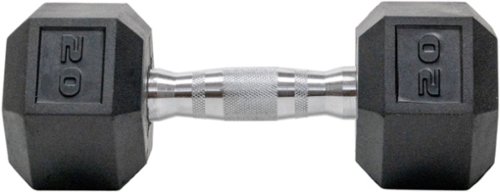
Dumbbells are made with heavy-duty rubber heads to minimize noise, mitigate typical wear & tear to the equipment and your floor. Rubber hex design prevents the dumbbell from rolling and chrome plated handles are ergonomically fit for any grip or hand type. 35mm diameter handle.
Customer Rating

5
Well constructed dumbbells
on December 3, 2020
Posted by: TechEnthusiast
from Elgin, IL
These dumbbells are really well constructed.
The hexagon shape doesn't roll around on the floor, the rubberized ends don't scuff up the floor or generate a ton of noise when setting them down, and there are no moving parts jostling around as you life and lower the weight.
In short, these are excellent weights.
The only complaint I have is that they stank something awful when I first unboxed them. It was a very strong, chemical odor. It took a good four days for the odor to fade.
Aside from that though, these have been terrific.
Mobile Submission: False
I would recommend this to a friend!
Share this review:


+1point
1of 1voted this as helpful.
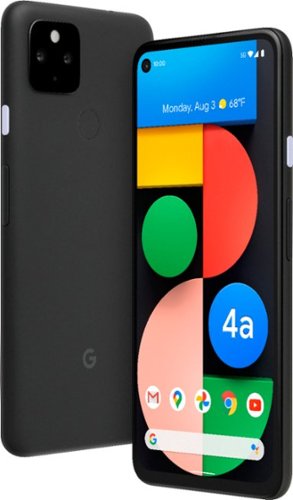
Pixel 4a with 5G is the budget-friendly, super fast phone from Google. It has the helpful stuff you need in a phone, with an extra boost of 5G speed.*
Posted by: TechEnthusiast
from Elgin, IL
I'll confess that I typically buy budget phones. This is by far the most "premium" phone that I've ever owned.
So far, I'm very impressed by it.
Setup was an absolute breeze. The phone comes with a USB type-C to type-A adapter, and it guides you through hooking up your old phone to migrate everything over. With the exception of needing to log into a few apps, the transition was seamless. Even my custom wallpaper and ringtone carried over.
The camera quality is fantastic. The lens angle is a bit wider than I was expecting, but it's very user friendly. It's an absolute joy to use.
This latest version of android has NO navigation buttons at the bottom of the screen. I was managing well enough with this, but I was having an awful time trying to switch apps. The whole "press the bottom of the screen (but not the middle or far right) + hold + swipe + hold" to switch between apps is awful. Why they couldn't have just set it up as a 3-finger swipe up is beyond me. Fortunately, you can bring the buttons back by going into settings and searching for "gestures." Once I did that, things went much more smoothly.
The only other "problem" I've had with this phone is with its screen during calls. The screen automatically blacks out while you're in a call to prevent you from accidently dialing things with your face. This is generally a good thing. I find that the phone is slow to wake back up when you pull it away from your face though. I'll be ready to hang up the call, but it's a good couple seconds before the screen wakes up for me to do that.
This is more an annoyance than anything.
Call quality is phenomenal. Everything sounds great on my end, and I've received no complaints from the people that I talk to.
I live in an area with solid 5G coverage, and the data speeds are quite good as well.
I live in an area with solid 5G coverage, and the data speeds are quite good as well.
This is a great phone.
Mobile Submission: False
I would recommend this to a friend!
Share this review:


+10points
10of 10voted this as helpful.
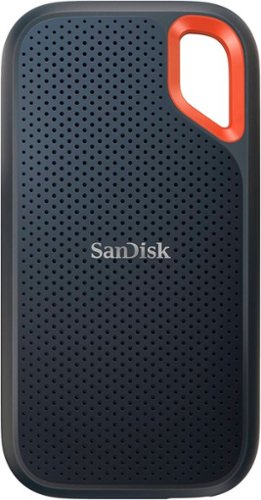
Your life~s an adventure. To capture and keep its best moments, you need fast, high-capacity storage that accelerates every move. With up to 1050MB/s read and 1000MB/s write speeds, store your content and creations on a fast drive that fits seamlessly into your active lifestyle. Up to three-meter drop protection, with IP65 water and dust resistance, a carabiner loop for securing the drive, and a 5-year limited warranty give you the peace of mind to take it with you on travels near and far. From a brand trusted by professional photographers, the SanDisk Extreme Portable SSD provides fast solid state performance in a tough, reliable storage solution.
Customer Rating
5
Wow, this thing is fast.
on November 23, 2020
Posted by: TechEnthusiast
from Elgin, IL
The very first thought I had when opening the package was "Wow, this thing is small."
I'm used to dealing with traditional 2.5" hard drives, and I wasn't quite prepared for how small this tiny little external drive would be.
The drive comes with an adapter for using it with a traditional USB type-A port. That being said, my laptop has a USB type-C port with Thunderbolt; and I was able to plug it in without the adapter.
I was absolutely floored by the speed at which it transferred files.
I moved roughly 5GB of files INSTANTLY. I mean that quite literally. There was no delay, no loading bar, no indication of any type of file movement whatsoever. I initially thought that something had gone wrong with the transfer since everything was so silent. It wasn't until I started actually opening some of the transferred files that I realized that it had simply worked insanely fast.
I love the soft touch feel to the drive. This is going to sound silly, but it's extremely "comfortable" to hold in one's hand. The lightly rubberized surface makes it very "grippable" for lack of a better term.
I would strongly recommend this drive for anyone with a USB type-C port looking for fast, compact storage.
Mobile Submission: False
I would recommend this to a friend!
Share this review:


+2points
2of 2voted this as helpful.
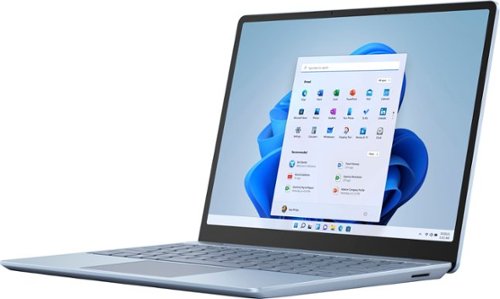
Make the most of every day with the sleek style, performance, and all-day battery life~ you need in the lightest Surface Laptop, all at an exceptional value. Ultra-light and portable profile, the apps* you use every day, premium materials, and a choice of must-have colors will make this your go-to laptop. ~Up to 13 hours of battery life based on typical Surface device usage. Testing conducted by Microsoft in September 2020 using preproduction software and preproduction configurations of Surface Laptop Go Testing consisted of full battery discharge with a mixture of active use and modern standby. The active use portion consists of (1) a web browsing test accessing 8 popular websites over multiple open tabs, (2) a productivity test utilizing Microsoft Word, PowerPoint, Excel and Outlook, and (3) a portion of time with the device in use with idle applications. All settings were default except screen brightness was set to 150nits with Auto-Brightness disabled. Wi-Fi was connected to a network. Battery life varies significantly with settings, usage and other factors.
Customer Rating
4
Perfect for some users but not for others.
on October 23, 2020
Posted by: TechEnthusiast
from Elgin, IL
This laptop was received as part of the Best Buy Tech Insider program. Reviewers in this invitation-only program are provided products for the purpose of writing honest, unbiased reviews. Neither Microsoft nor Best Buy had any input in this review. The thoughts and impressions being shared are solely my own.
The Surface Laptop Go is something of a paradox. It’s beautiful hardware that works well, but it’s also extremely limited on several fronts. Whether or not this is the right laptop for you depends on your individual needs.
The Surface Laptop Go is an absolute joy to type on. While the keyboard isn’t backlit (except for the fingerprint reader / power button), the keys have pretty good travel; and the keys are very well-spaced. This is honestly one of the best laptop keyboards that I’ve ever used.
The trackpad glides smoothly and accepts gestures without issue. Pinch to zoom, three finger swipe up . . . all of these work fine.
The build quality in general is very good. This laptop feels “sleek.”
My only complaint about the hardware is the lack of an SD card slot. There really isn’t any way to upgrade this laptop at all. Whatever storage and/or RAM configuration that you buy is what you’ll be stuck with forever. Sure, you can supplement your storage with a flash drive (the computer has 1 USB type-A port and 1 USB type-C port), but that’s not nearly as seamless as just popping in a micro-SD card for secondary storage. The lack of a SD card slot kinda sours this laptop for me. Sure, 256GB of storage is fine for now, but a year from now? Two years from now?
Because of this, I wouldn’t recommend getting this laptop as your primary machine.
It should also be noted that this laptop is not compatible with the surface pen.
One weird glitch, after turning the laptop on, Windows Hello seems like it’s trying to look for my face (even though this computer isn’t equipped with a facial recognition camera). It only does this for a couple seconds before stopping and accepting the finger-print login, but it’s weird. This may be corrected by a software update in the future.
By default, this laptop comes with Windows S mode. Windows S mode is a super secure version of Windows that only allows you to install apps from the Windows App Store. No apps (or viruses) from outside of the app store can be installed on a computer that is running in S mode.
Windows S mode . . . is still a barren wasteland. The Windows App Store isn’t getting any better. If all you need is a computer that can run Microsoft Office and browse the web, then S mode might work for you. If you need / want to do much of anything else? You’ll have to switch out of S mode.
Fortunately, switching out of S mode is still a free process (WARNING: While this process is free, it’s also completely irreversible. Once you switch out, your computer will be just as vulnerable to viruses as any other Windows PC. Switch out at your own risk).
For the purposes of this review, I kept the laptop in S mode for an entire day before switching out of it. I felt that I had to switch out as I’m a heavy Google Chrome user, and Chrome isn’t available in the Windows App Store.
In S mode, the laptop is snappy and responsive. The hardware wasn’t stressed at all by anything that I threw at it. That being said, the Windows App Store is so barren that I struggled to find anything to use on this laptop at all.
Out of S mode, the laptop was still snappy and responsive. I installed a handful of my “go to” programs on it, and I didn’t encounter any issues with any of them. That being said, I did temper my expectations some since I knew what this laptop hardware could and couldn’t do.
Gaming . . . isn’t really going to happen with this laptop. Between the lack of a GPU and the limited storage, this computer isn’t really able to handle traditional gaming. It’s a real shame because the CPU and RAM are otherwise more than sufficient for most games. That being said, if you absolutely HAVE to game on this, there are a number of cloud gaming services out there that would work fine with this (assuming that you have really good internet service).
As a productivity machine, this laptop is great. Again, the lack of a GPU limits you in terms of photo and video editing, but this machine is great for writing reports, filling out spreadsheets, and taking conference calls. For a college student or a business executive, this machine is probably sufficient for most (if not all) of your needs. For a graphic designer or engineer? . . . maybe not so much.
Mobile Submission: False
I would recommend this to a friend!
Share this review:


+3points
3of 3voted this as helpful.

Automate your home lighting with this Peace by Hampton smart color LED light bulb. A full spectrum of colors and shades of white deliver custom ambiance. The Peace By Hampton app lets you control, dim, create scenes and automations from anywhere. Use vacation mode for security when you~re away. You can even use Amazon Alexa or Google Assistants to control the lights with your voice.
Customer Rating
3
Not the easiest things to setup
on October 1, 2020
Posted by: TechEnthusiast
from Elgin, IL
These bulbs aren't the easiest things to setup.
It took me multiple attempts for my phone to "discover" the bulbs. Further complicating the issue was that I was trying to install two bulbs into the same overhead fixture.
I finally got the one bulb to recognize and install, inserted the second bulb, and then ended up resetting the first bulb in my efforts to get the second bulb to install.
Ultimately, I did get them to install, and they seem to work well. Using the app, you can make fine adjustments to the color and white point of the bulbs. The colors seem quite a bit dimmer than the standard white light, but it will still make for a fun little accent during holidays and the like.
I accidently flipped the power switch after installing, and I was terrified that they'd struggle to reconnect to my network like some other smart bulbs that I've tried. Fortunately, they managed to reconnect themselves just fine after only a couple minutes.
I'm pleased enough with the quality of these bulbs, but the installation really isn't for the faint of heart.
Mobile Submission: False
I would recommend this to a friend!
Share this review:


+2points
2of 2voted this as helpful.
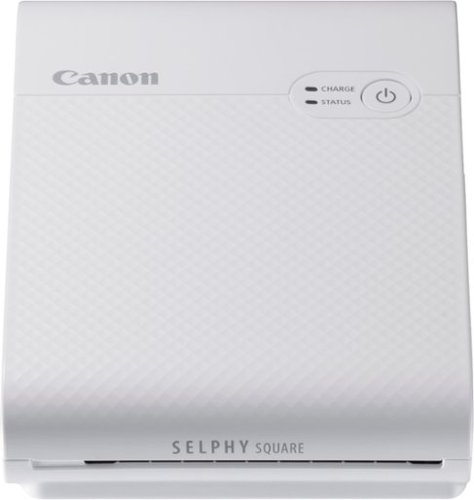
Print your memorable photos with this Canon SELPHY Square QX10 compact photo printer. The compact, lightweight design offers easy portability, while the dye-sublimation technology delivers quality quick-drying 2.7 x 2.7-inch prints that last for a long time. This Canon SELPHY Square QX10 compact photo printer has a built-in battery for cordless hassle-free printing.
Customer Rating
4
Great device. Great quality.
on September 24, 2020
Posted by: TechEnthusiast
from Elgin, IL
I was really impressed with how simple and easy to use this printer was.
Setup was a little tricky only because it wasn't clear that the QR code was hidden inside of the device. Fortunately, the app called this out before I wasted too much time searching for it.
Once setup, the device worked beautifully.
The app is intuitive, and the pictures are sharp and vibrant. The photos look a lot like old school Polaroid instant photos, but they're a fair amount smaller.
I wish that the app had more options for stamps and borders, but overall I'm happy with it.
Mobile Submission: False
I would recommend this to a friend!
Share this review:


+1point
1of 1voted this as helpful.
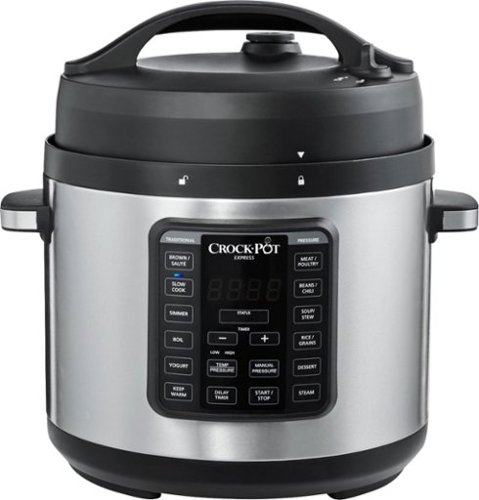
Pressure cook, slow cook, sear, saut~, boil, simmer, and steam with the Crock-Pot Express Easy Release. The Easy Release Multi-Cooker lets you pressure cook foods up to 70% faster than a conventional oven but also lets you drop in your favorite ingredients for a delectable slow-cooked meal. It features 3 innovative functions that will take your cooking to the next level. Manual Pressure lets you customize recipes by setting any cook time plus high or low pressure. Simmer Function cooks gently and slowly and helps thicken sauces, and Boil allows you to create more one-pot dishes, such as pasta, poached eggs, and more. When used as a pressure cooker, it features a front steam release dial to keep your hand safe and away from the hot steam being released. The nonstick cooking pot removes for easy cleanup and 6-quart capacity can serve over 7 people, perfect for family meals or large gatherings. The Crock-Pot Express also includes a recipe book, steaming rack, and spoon.
Customer Rating
5
Niche product, but it works well
on September 16, 2020
Posted by: TechEnthusiast
from Elgin, IL
I really like this crock-pot, but it really fills a very niche need.
This crock-pot functions as a pressure cooker, a slow cooker, a steamer, a rice cooker, and a traditional pan.
The recipe book that comes with it includes recipes such as Pad Thai, baked potatoes, garlic beef, and bundt cake (just to name a few).
Is this device the best way to cook these items? . . . No, not really. A traditional oven could probably do a much better job with the baked potatoes and bundt cake at the very least.
That being said, if space is at a premium in your kitchen (or if you're cooking in an odd setting - like a conference room or event space), having a single device that can perform a wide array of functions is an absolute godsend.
You should really consider this crock-pot as more of a "portable kitchen." No, it isn't as good as a traditional kitchen, but if you're trying to cook in an unfamiliar or unusual setting, this one device can fill a lot of different needs.
The non-stick interior cleans up very easily. Learning when to use the lid and what to set the pressure is going to take some time. I've been using it for a few days now, and I'm clinging desperately to the little recipe book that came with it. Over time, I expect that I'll get more comfortable experimenting with it.
I would strongly recommend this if you participate in a lot of pot-lucks or holiday parties at the office.
Mobile Submission: False
I would recommend this to a friend!
Share this review:


0points
1of 2voted this as helpful.
TechEnthusiast's Review Comments
TechEnthusiast has not submitted comments on any reviews.
TechEnthusiast's Questions
TechEnthusiast has not submitted any questions.
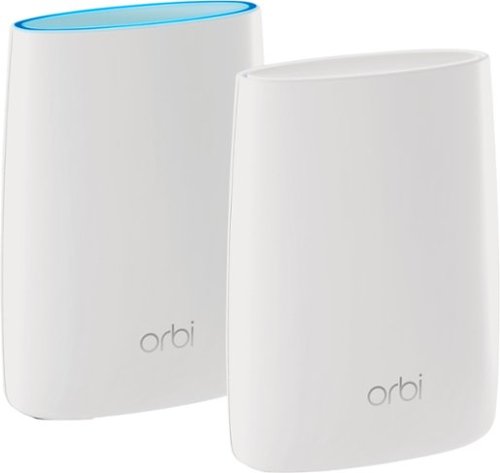
Orbi Whole Home WiFi System delivers up to 3.0Gbps high-performance WiFi. Sleek, modern design with high-gain internal antennas for up to 5,000 square feet of coverage. FastLane3 Technology creates a dedicated Tri-Band WiFi for seamless 4K streaming and gaming everywhere in your home. Keep a single WiFi name for uninterrupted connections as you move from room-to-room. Circle Smart Parental Controls runs on Orbi Routers for a smart way for families to manage content and time online, on any connected device. Provide internet access to guests without sharing your personal network password. Orbi is ready right out of the box and compatible with your ISP. Just use the Orbi app to get started with better WiFi, everywhere in minutes.
Can you use with comcast.
Yes. I'm using it with Comcast myself.
You plug the Ethernet cable from your modem to the Orbi router the same as you would any other router. The big difference between the Orbi and other routers is that it comes with a separate satellite unit to extend your wireless range. The satellite unit hooks up to the router wirelessly. Installation and pairing takes about ten - fifteen minutes to complete.
You plug the Ethernet cable from your modem to the Orbi router the same as you would any other router. The big difference between the Orbi and other routers is that it comes with a separate satellite unit to extend your wireless range. The satellite unit hooks up to the router wirelessly. Installation and pairing takes about ten - fifteen minutes to complete.
9 years, 8 months ago
by
TechEnthusiast
Orbi Whole Home WiFi System delivers up to 3.0Gbps high-performance WiFi. Sleek, modern design with high-gain internal antennas for up to 5,000 square feet of coverage. FastLane3 Technology creates a dedicated Tri-Band WiFi for seamless 4K streaming and gaming everywhere in your home. Keep a single WiFi name for uninterrupted connections as you move from room-to-room. Circle Smart Parental Controls runs on Orbi Routers for a smart way for families to manage content and time online, on any connected device. Provide internet access to guests without sharing your personal network password. Orbi is ready right out of the box and compatible with your ISP. Just use the Orbi app to get started with better WiFi, everywhere in minutes.
So if it comes with two, I'm assuming you have one that internet is linked to by cable and the other is used as a extender? Or do you have to have both units hooked to cable?
The router portion is connected to your modem via an Ethernet cable, but the satellite / extender unit links up to the router wirelessly. The only wire that you need to have connected to the extender is the power cord.
9 years, 8 months ago
by
TechEnthusiast
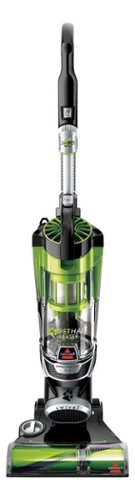
Nothing puts a vacuum to the test quite like a home with pets. That's why the BISSELL~ Pet Hair Eraser~ was developed from the ground up by pet parents for pet parents. Whether it's shedding season for your dog or your cat tracks kitty litter all over the house, this revolutionary vacuum is designed to make cleaning up after pets and the people who love them a breeze~from beginning to end. Say goodbye to hair wrap with its Tangle-Free Brush Roll, remove embedded hair everywhere with specialized pet tools, help capture allergens and eliminate odors with the SmartSeal~ Allergen System, and when you're finished cleaning, enjoy a hands-free tank empty with our patented Cyclonic Spooling System~.BR>
How load is it? I've used an Oreck XL upright and a Eureka Mighty Mite and would hope it's no louder as those. I prefer bagged vacuums but want to try the BISSELL Pet Hair Eraser because of its claims of not getting hair tangled on the roller.
I haven't tried the two vacuums that you mentioned, but I can say that I was surprised that this vacuum wasn't terribly loud.
Given it's size and the number of vents coming out of it, I expected it to be deafening. Upon turning it on, I was surprised by just how mild the sound was. It'll definitely drown out a television or radio some, but you'll still be able to hear people talking over it.
Given it's size and the number of vents coming out of it, I expected it to be deafening. Upon turning it on, I was surprised by just how mild the sound was. It'll definitely drown out a television or radio some, but you'll still be able to hear people talking over it.
9 years, 9 months ago
by
TechEnthusiast