


TechEnthusiast's stats
- Review count209
- Helpfulness votes894
- First reviewAugust 16, 2014
- Last reviewJune 2, 2026
- Featured reviews0
- Average rating4.1
Reviews comments
- Review comment count0
- Helpfulness votes0
- First review commentNone
- Last review commentNone
- Featured review comments0
Questions
- Question count0
- Helpfulness votes0
- First questionNone
- Last questionNone
- Featured questions0
- Answer count13
- Helpfulness votes17
- First answerAugust 25, 2016
- Last answerJanuary 22, 2022
- Featured answers0
- Best answers2

Logitech C920s is a budget-friendly, work-from-anywhere webcam that delivers a professional video meeting experience. It includes features designed to make you look and sound great in your next meeting. A 78~ diagonal field of view perfectly frames you and your space, while autofocus adjusts smoothly and precisely. RightLight 2 technology automatically adjusts to your lighting situation even in low-light or backlit conditions. And dual integrated mics accurately capture your voice from multiple angles for greater nuance. If you~re streaming or recording, use Logitech~s Capture app to edit and customize. Flip down the lens cover at any point to protect your privacy.
Posted by: TechEnthusiast
from Itasca, IL
This Logitech C920s Pro webcam is crazy sharp.
I’m used to laptop webcams and their fuzzy resolution. This webcam’s sharpness was a very pleasant surprise
The included privacy cover was a nice little addition. That being said, I had thought it was something integrated into the camera itself from the product description. It’s not. Instead, it’s a separate little plastic clip that snaps into place in front of the camera. Not a big deal, but I thought it worth noting.
The camera itself has a respectable amount of heft to it. This is not some cheap, hollow plastic thing.
Installation was a breeze. I plugged it in . . . the end. No software or drivers needed to install. I just plugged it into my desktop, and it immediately began working using Windows 10’s camera app.
Cord length is respectable. I had no problems positioning the camera on my desk while plugging it into my computer tower on the floor. The cable had plenty of slack, and I was able to move the camera around fairly easily.
The camera has a variety of different positioning options. It can sit on its own base and rest on your desk, it has a tripod mounting hole on the base if you want to attach it to a tripod, and it can rest on top of your monitor by unfolding the base. This last one didn’t work too well for me as my monitor was too thin to properly support the camera at any usable angle. I did manage to get it balanced just right once, but I thought it was a mite too precarious at that angle. I found the camera worked best for me when positioned on my desk and resting on its base.
The microphone quality was excellent. The person on the other end of my web chat had no difficulty understanding me whatsoever. I was also able to use the microphone on the camera with Cortana to issue voice commands to my desktop.
It should be noted that this camera is NOT Windows Hello compatible. That technology requires infrared sensors and other bells and whistles that this camera is not equipped with.
All in all, I’m very impressed by this little camera. I would definitely recommend it for anyone who makes frequent video calls.
Mobile Submission: False
I would recommend this to a friend!
Share this review:


+2points
2of 2voted this as helpful.
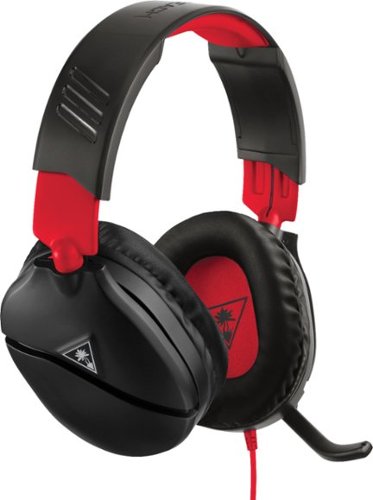
Built for your next victory, your latest achievement and much more is the Turtle Beach Recon 70 gaming headset for Nintendo Switch Featuring Turtle Beach~s latest lightweight and comfortable headset design for hours of play, with high-quality 40mm speakers and over-ear premium synthetic leather cushions that let you hear every crisp high and thundering low while blocking noise. Turtle Beach~s renowned high-sensitivity mic to ensure you are heard clearly on Switch games that support in-game chat capability and easily flips up to mute. Finally, the versatile 3.5mm connection makes it perfect for swapping between PlayStation and Xbox controllers, as well as PC and compatible mobile devices.
Customer Rating

5
Headphones with a very "gamer aesthetic"
on March 24, 2019
Posted by: TechEnthusiast
from Itasca, IL
The Turtle Beach Recon 70 is a stylish set of gaming headphones.
They’re made completely out of plastic, and the build quality is fairly solid (for plastic). My set is primarily black with red accents along the upper pad, extendable frame, and cable. It coordinates very well with my black and red gaming laptop. The cable is firmly attached to the headphones and can’t be removed as these headphones don’t have any wireless capabilities, and it can’t be replaced should it get damaged. The cable is also fairly short, so don’t expect to use these while gaming on the TV (unless you’re sitting two feet away from your television). This is unfortunate as a removable aux cable that could be swapped out for a longer cable when working with the Switch in docked mode would have been appreciated. That being said, there are cable extenders on the market that can fill this gap as well.
The headphones are fairly comfortable to wear, but it did take several days for me to break them in. When I first got them, they pinched my head uncomfortably; and I was all set to toss in the towel and declare that I hated them. They seemed to loosen up with repeated use though, and they now fit my head quite comfortably for extended gaming sessions.
The headphones plug in via a standard aux cable connection. This means that they can function as headphones for any device with a standard headphone port (i.e. laptops, desktops, [some] phones, handheld consoles . . . etc.). In order to use the integrated microphone, you have to have either a microphone / headphone combo port (standard on the Nintendo Switch but inconsistently available on other devices – alas, my gaming laptop doesn’t have a combo port; but my desktop does for some reason) or a special splitter cable to connect to both the microphone and headphone port to a single input.
Sound quality is good. It’s not the best I’ve ever head, and hardcore audiophiles will probably want something better, but it’s perfectly adequate for gaming or casual media consumption. The headphones do a good job of blocking out ambient noise by simple dint of completely covering your ears with large amounts of padding. With the headphones on, but no sound playing, I was able to make out only a dull murmur from the people sitting next to me at the coffee shop.
One feature that I really liked about these headphones is the physical volume dial on the left ear cup. The dial feels good for making fine adjustments to the volume. It’s much preferable to touchscreen volume controls or a volume rocker.
In summary, The Recon 70 headphones are solid headphones with a good “gamer aesthetic” and some bonus perks in the form of an integrated microphone and physical volume dial. I would recommend these to a friend.
Mobile Submission: False
I would recommend this to a friend!


Share this review:


+30points
30of 30voted this as helpful.
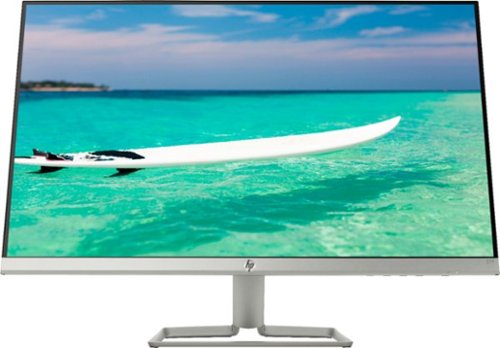
Enjoy crisp, colorful picture quality with this Full HD HP monitor. The ultrathin bezel on the 27-inch screen provides an expansive viewing area so you can stay productive, and its AMD FreeSync technology reduces input lag and screen tearing. This HP monitor has two HDMI ports for connecting gaming consoles and other devices.
Customer Rating
5
Awesome monitor; don't forget to buy speakers
on August 23, 2018
Posted by: TechEnthusiast
from Itasca, IL
This HP monitor is really nice.
It's very thin, has two HDMI ports, and has a nice sharp image.
Setup was quick and painless. I had a little trouble adjusting the monitor's angle at first, but I managed to wrangle it into a comfortable position.
It should be noted that there don't appear to be any VESA mounting holes on the back of this. I don't believe that this monitor would be compatible with 3rd party stands or mounting solutions.
My only real complaints about it are that the buttons are hidden underneath the screen and it doesn't appear to have built-in speakers.
I doubt that I'll have much need to press the buttons on the monitor (except for the power button at the far right), so this is far from a deal breaker.
The lack of speakers is a little more problematic, but a set of external speakers solved this nicely. It should be noted that my computer shows this monitor on the list of playback devices, but I checked everything that I could think of, and I'm 90% certain that this model doesn't include any kind of speaker. I think that it's just showing up because I'm using an HDMI connection for the display.
Al in all, I'm very happy with this monitor; and I'd totally recommend it to a friend.
Mobile Submission: False
I would recommend this to a friend!
Share this review:


+1point
2of 3voted this as helpful.
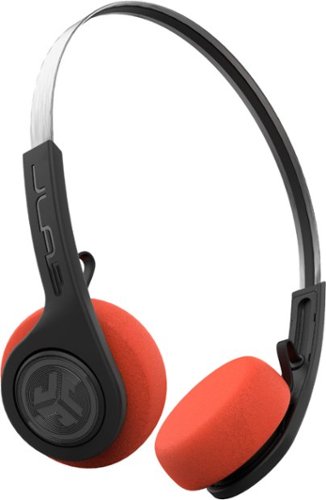
Put a vintage twist on your private listening with these retro-style JLab Rewind wireless headphones. Their Signature, Balanced and Bass Boost EQ settings provide flexible listening options, and the built-in microphone lets you carry out voice commands through Siri or Google Assistant. Enjoy nonstop music playback for up to 12 hours with these JLab Rewind wireless headphones.
Customer Rating

4
Simple headphones with nifty bonus features
on July 29, 2018
Posted by: TechEnthusiast
from Itasca, IL
Pros:
Headphones are wireless
Headphones are rechargeable
Headphones let you talk to your Google Assistant with a double tap to the button.
Comfortable fit without jamming things into your ear canal.
Sound quality is nice.
Headphones are wireless
Headphones are rechargeable
Headphones let you talk to your Google Assistant with a double tap to the button.
Comfortable fit without jamming things into your ear canal.
Sound quality is nice.
Cons:
Charging port is hard to find.
Only one button controls everything. Accidental presses can result in unintended results.
The packaging on these headphones was so secure that it took a sharp pair of scissors AND a box cutter to get them free.
The fact that these are marketed as "Retro" makes me feel old.
Charging port is hard to find.
Only one button controls everything. Accidental presses can result in unintended results.
The packaging on these headphones was so secure that it took a sharp pair of scissors AND a box cutter to get them free.
The fact that these are marketed as "Retro" makes me feel old.
These headphones pack a lot of bang for the buck. These come with a lot of really nice features that you wouldn't expect to find in headphones in this price range.
Unboxing the headphones was a truly horrible experience.JBL spared no expense in making sure that nobody but Wolverine could get these open without considerable effort.
Once free, the setup process was quick and easy. The headphones are lightweight and completely wireless. The charging port was a little hard to find as you need to slightly pull the pad away and angle the earpiece just right to reveal the micro-usb port.
The headphones charge fairly quickly and seem to hold a charge well. They lasted a full 8 hour shift at work without issue.
These headphones also allow you to access the Google Assistant on your phone with a quick double tap. Google responded well, but I did find that it seemed to stop listening to me rather quickly, so I had to keep my voice prompts short.
The one button is both a blessing and a curse. It keeps things simple, but I did find that I got confused and inadvertently skipped tracks or triggered the assistant without meaning to rather often. This will probably get better in time as I get more used to the headphones.
The sound quality . . . isn't going to impress a hardcore audiophile. The sound is great for the casual music lover, but even with the equalizer options it's a little "tinny" and lacking in "punch."
These headphones are great for a college student on a budget or as something casual to wear at the gym.
Mobile Submission: False
I would recommend this to a friend!
Share this review:


0points
0of 0voted this as helpful.
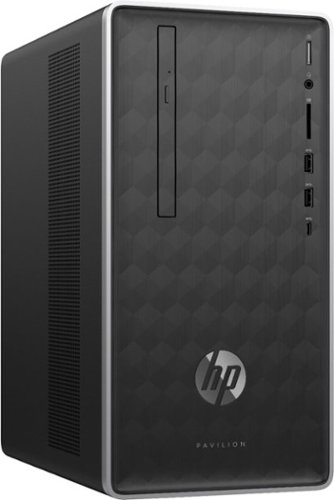
Enjoy hours of reliability and speed with this HP Pavilion desktop. Its AMD Ryzen 5 processor and 12GB of RAM let you accomplish multiple tasks at the same time, and its 1TB hard drive provides plenty of space for file storage. This HP Pavilion desktop comes with a wired keyboard and mouse for interacting with Windows 10 Home.
Customer Rating
4
Solid home theater PC; mediocre gaming PC
on July 27, 2018
Posted by: TechEnthusiast
from Itasca, IL
Pros:
Compact case
Comes with HDMI
USB Type-C port
Ample RAM
Optical (DVD) drive
Compact case
Comes with HDMI
USB Type-C port
Ample RAM
Optical (DVD) drive
Cons:
Mediocre gaming performance
Seemingly no microphone (even though the computer kept encouraging me to talk to it during setup).
Mediocre gaming performance
Seemingly no microphone (even though the computer kept encouraging me to talk to it during setup).
I haven't used an AMD machine since the early 2000s. I've been hearing great things about Ryzen, and I was very eager to try this computer for myself.
All in all, I found this to be a very solid computer. Not exceptional, but not half bad either.
Setup went fairly smoothly. It was a fairly typical Windows 10 setup. I did find it a little odd that the computer kept prompting that I could speak my responses to it when it seemingly doesn't have a mic. I was two inches away from the tower and screaming my lungs out, and I got no reaction whatsoever. Aside from that, setup was uneventful.
Word of advice for anyone getting this machine: Run Windows Update right away and let it run without interruption for a day or two. My tower was apparently boxed up before the last big Windows update (the Spring / Fall / Creator's / "?" thing).
The computer ran as slow as molasses the first two days I had it because of all the updates downloading in the background.
I finally just let the computer run overnight without interruption, and it was like night and day the next morning. Performance improved significantly.
This computer handles basic media very well. Netflix, Hulu, local video, Spotify, . . . etc. all play very well.
Video games, were a little more "eh."
I tried playing my current MMORPG of choice at the highest settings, and the computer couldn't keep up. I had stuttering, dropped frame rates, and general instability. Dropping the graphics settings to medium and/or low seems to have fixed the issue. It should be noted that this tower doesn't have a dedicated graphics card. Adding one would probably improve the game performance immensely.
If you're looking for a computer to hook up to your TV for streaming media, word processing, and light photo editing; then this is an excellent choice.
If you're looking for a gaming beast, then you should probably look elsewhere unless you're willing to invest in a graphics card too.
Mobile Submission: False
I would recommend this to a friend!
Share this review:


+11points
11of 11voted this as helpful.
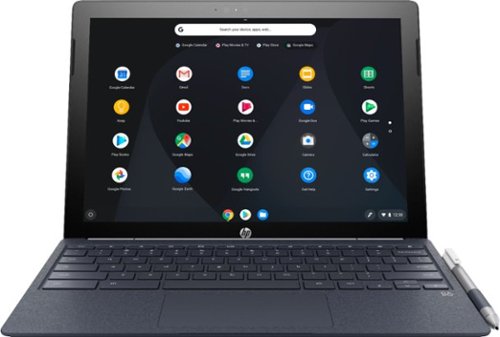
Run programs on this 12.3-inch HP Chromebook convertible laptop. Its detachable touch-screen display lets you enjoy brilliant 2K content, and you can write and draw on it with the included Active Pen. This HP Chromebook convertible laptop has 32GB of storage, and its Intel Core m3 processor and 4GB of RAM provide smooth performance.
Customer Rating
5
It simply works and works well.
on June 27, 2018
Posted by: TechEnthusiast
from Itasca, IL
Pros:
Beautiful screen
Responsive
Access to Android Apps
Comfortable keyboard
Pressure sensitive pen
Lightweight in tablet mode
Beautiful screen
Responsive
Access to Android Apps
Comfortable keyboard
Pressure sensitive pen
Lightweight in tablet mode
Cons:
Default resolution
Aspect ratio when watching movies
Quality control
Mismatched color scheme between keyboard and tablet.
“Pleather” finish to keyboard
Limited storage on the device itself
Default resolution
Aspect ratio when watching movies
Quality control
Mismatched color scheme between keyboard and tablet.
“Pleather” finish to keyboard
Limited storage on the device itself
The HP Chromebook x2 is pretty much a joy to use.
The screen is lovely and can get quite bright. It has a 3:4 aspect ratio which makes it comfortable to use in both laptop and tablet mode. My only complaint about this aspect ratio is that it leaves absolutely massive black bars along the top and bottom of the screen when viewing movies. By default, the screen resolution was 800x600, but this felt comically large to me. I changed it to 1350x900, and I’m much happier with the result. I also had to change the scrolling to “Australian” as the scroll was going in the wrong direction from my point of view. All of the device specific settings can be adjusted via the settings menu. There’s a header for “device” roughly ⅔ of the way down the screen.
They device itself is fast and responsive. In a week’s worth of use, I only experienced one crash while playing a graphically intensive video game. I was able to keep several tabs open at once while playing music from the Pandora app with no difficulty.
Speaking of apps, this device has access to the Google Play Store by default. This is my first experience with a Chromebook that has this capability. I was thrilled by all of the possibilities that this opens up, but I was also a little disappointed by the number of apps and games that weren’t compatible. I saw that Google Assistant wasn’t included, and I tried installing it from the Play Store (since it didn’t have a warning that it wasn’t compatible). I thought it would be cool to try and talk to my computer the way I do with my Google Home. Let me save you some time . . . it isn’t compatible. App availability seems to be a little hit or miss.
The downside to having access to the Play Store is that you become acutely aware of just how little storage you have. After downloading two dozen apps and games, I was down to just 6GB of storage. I quickly dialed it back to just a dozen, and I’m hanging out around 11GB free at the moment. Android apps on Chrome OS can’t currently see or use external storage, but that’s supposedly something that they’re working on. Suffice it to say, I’m going to try and keep as much in Google’s cloud drive as I can to free up device storage space. I am thrilled to report that the tablet does have a micro-SD slot. If you absolutely have to have documents, photos, music, or other files on your device instead of the cloud; you can store them on a micro-SD to keep the internal memory free.
The keyboard IS NOT BACKLIT. Apparently, when this device was first teased, the demo unit had a backlit keyboard. The actual device does not have a backlit keyboard. My hope is that HP might release a backlit keyboard later that can be purchased separately (assuming that it’s affordable). As it stands, the keyboard is responsive and comfortable to type on. I hate the “pleather” finish to the keyboard. A smooth, lightly rubberized texture or solid metal would have been much more appreciated. The trackpad is nice, large, and responsive.
The pen is included with the device for no additional charge. It is pressure sensitive and runs on a single battery. The pen is very basic with no buttons or anything on it. It doesn’t add a lot to the user experience as a whole, but I’m very happy that they chose to include it.
The tablet is held onto the keyboard via a pair of crazy strong magnets. I found myself struggling some to put the tablet back since the magnets kept grabbing the tablet before I could line it up on the pins. The tablet is lightweight and comfortable to hold in tablet mode. I had no trouble reading an ebook with the keyboard detached.
Now for the nitpicky complaints . . .
Despite being made with premium components, I see evidence that the quality control was somewhat lacking. Part of the rubber gasket behind the screen is partially exposed on the top of my tablet. It doesn’t affect functionality at all, but it’s annoying constantly seeing these two black bumps along the top of my bezel.
I also don’t understand their design choice in having a navy blue keyboard with a black and white tablet. They don’t look like they belong together at all. A solid black or white keyboard would have made a lot more sense (and this is coming from someone whose favorite color is blue).
All in all, I’m very happy with this device. Chrome OS is a joy to use in that it “just works.” I enjoy having Windows computers for gaming and the like, but keeping up with their updates and general maintenance is a bit of a hassle. It’s nice to have a device to turn to that simply does what it’s intended to without any effort on my part.
I would definitely recommend this device.
Mobile Submission: False
I would recommend this to a friend!
Share this review:


+6points
7of 8voted this as helpful.
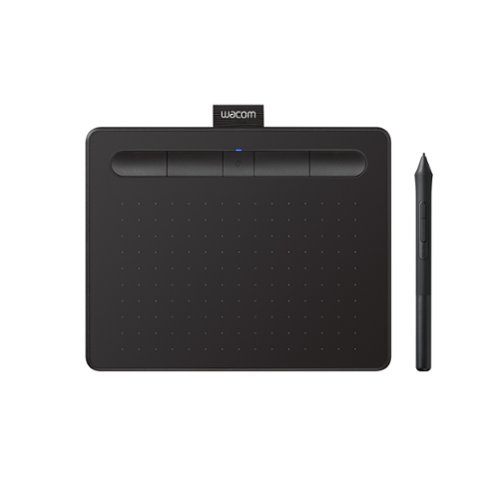
Transform your creative ideas into digital reality with Wacom Intuos drawing tablets. Perfect for casual or aspiring artists this compact graphics tablet delivers reliable Wacom-quality precision at an accessible price. The battery-free, pressure-sensitive pen provides natural, responsive drawing with no charging needed - just pick up and draw, with smooth, jitter-free lines and consistent pressure response. Get started immediately with over $240 in included downloadable creative software and trials, including 2 years of Clip Studio Paint Pro, 12 months of Boris FX Optics, and much more. The paper-like surface texture and four customizable ExpressKeys make digital art, photo editing, illustration, and design feel natural and efficient. Select models (CTL4100WL, CTL6100WL) offer Bluetooth wireless connectivity, letting you create freely at your desk, sofa, or anywhere in the room - with the option to switch to wired mode for ultimate flexibility. The wireless freedom is especially popular with educators and presenters who use the drawing tablet to control their computer while moving around a classroom or conference room. Certified to work with Chromebook and compatible with Windows and Mac, Wacom Intuos seamlessly integrates with Adobe, Corel, and all major creative applications. Backed by Wacom's 40+ years of industry leadership, you're choosing the same pen technology trusted by professional studios worldwide - at a creator-friendly price.
Customer Rating
4
Good product. Worst registration process EVER
on June 17, 2018
Posted by: TechEnthusiast
from Itasca, IL
I really like this drawing tablet, but the registration process to get the free software it came with was absolutely awful.
The instructions that came with this drawing tablet are very inconsistent and misleading. The included pictogram clearly instructs you to plug the tablet in first and THEN download drivers from the website. Meanwhile the website indicates that you should download the drivers first, and then plug in the tablet. The website indicates that plugging in the tablet will activate the automated registration process.
Unfortunately, plugging in the tablet first seems to throw the registration off.
I could not get the automated registration to trigger. I tried manually registering the tablet on the website using the serial number, but the website informed me that this product MUST be registered via the automated process.
After multiple driver installations, several unplug and replugs, and two reboots; the automated registration FINALLY triggered. I'm subtracting a star from my review just because this process was so horrible.
After getting through the registration, the tablet seemed to be working; but pressure sensitivity wasn't working. After yet another reboot, this resolved itself.
I was very impressed with how customizable this drawing tablet. was. The included software allows you to change the functionality of the buttons on the pen and the buttons on the pad. Even better, you can customize the buttons for particular programs. Being able to map my keyboard shortcuts to individual buttons is a huge assist to my workflow.
The included software is . . . okay. Honestly, I was a little surprised by how simplistic it was. It certainly wasn't worth the aggravation I went through registering this device to get it. It should be noted that two of the three software offerings are unlimited use while the third is only good for two years (and you can only select two of them). I opted for the two unlimited use programs.
I used the tablet for a few days to do some light sketching and photo touch up. Learning to aim the pen tip takes some practice, but the feel is very natural. The pressure sensitivity is a little hit or miss depending on the program.
Al in all, I'm very pleased with this drawing tablet.
Mobile Submission: False
I would recommend this to a friend!


Share this review:


+48points
54of 60voted this as helpful.
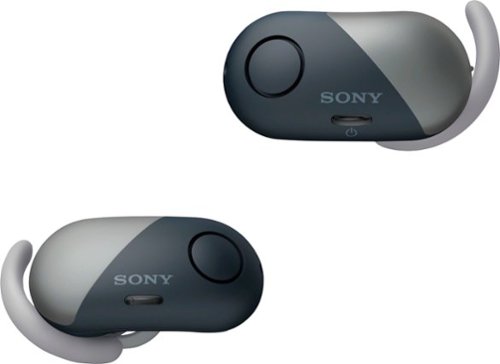
Listen to your favorite playlists with these Sony wireless noise-cancelling headphones. They're equipped with the Google Assistant for instant help with a range of tasks, and their silicon support fittings keep the headphones in place while you're active. Use these Sony wireless noise-cancelling headphones' Ambient Sound Mode when you need to stay aware of your environment.
Customer Rating
5
I've grown to love these
on June 1, 2018
Posted by: TechEnthusiast
from Itasca, IL
Pros:
Good sound
Comfortable fit
Light-weight
Holding a charge well
Syncs quickly and simply
Good sound
Comfortable fit
Light-weight
Holding a charge well
Syncs quickly and simply
Cons:
Finicky case
Taking phone calls on them is awkward
Noise canceling is "meh"
Finicky case
Taking phone calls on them is awkward
Noise canceling is "meh"
I'll confess, when I first got these earbuds, I wasn't thrilled. The earbuds themselves looked big and clunky and the case looked awkward and overly complex.
Once I actually started using them though, I quickly grew to love them.
While the ear buds may look quite a bit larger than their wired cousins, they are every bit as light and comfortable. I was expecting that they'd be falling out of my ears all the time, but that hasn't been the case. The fit is both snug and comfortable.
The syncing process was simple and intuitive. The ear buds started the pairing sequence the moment I took them out of the case. Once paired, the earbuds will automatically turn on and pair every time they are removed from the case (and turn off every time they're put back into the case).
In about a week's worth of daily use, I've only lost connection once. It was a weird experience. First the audio went slightly out of sync between the left and right ear, and then one ear went silent, and then both ears went silent. I wasn't even done fumbling for my phone when the connection re-established itself and it skipped to the next track. This only happened the one time so far.
Taking phone calls on these ear buds can be done, but I wouldn't recommend it. Since both of your ears are physically plugged up, your voice will be muffled as you speak to the person on the other end. That being said, the person on the other end of my call didn't even realize that I was answering them from the ear buds. They said that the connection was as crisp and clear as my phone.
The noise canceling isn't magic. You WILL be able to hear people talking around you with it on. It does do some good, but it really only cancels out ambient noises like the AC running or the hum of a car engine.
The case is both aesthetically pleasing and physically awkward. The case is kind of a flattened sphere with a swivel top. It charges via Micro-USB (not type-c). In order to charge the ear buds, you have to carefully position them at an angle when inserting them, and then press down to lock them in place. This isn't something that you're going to be able to do quickly in the dark. Also, the indicator lights are actually concealed by the ear buds themselves. You have to view the edge of the case at a 90 degree angle to see whether or not things are seated properly and if the lights have turned red to indicate that they are charging.
The ear buds have lasted well throughout my work day. My day is interspersed with meetings and conference calls. I generally get an hour of continuous usage in before having to hop on an hour long conference call. While in conference calls, I've been letting the ear buds charge in their case. Working in this fashion, the ear buds have lasted my entire 8 hour shift.
All in all, I've been very happy with these ear buds. If you're looking for something simple and unobtrusive to listen to music with during your work day, these will do the job nicely.
My Best Buy number: 2115535767
Mobile Submission: False
I would recommend this to a friend!
Share this review:


+1point
1of 1voted this as helpful.
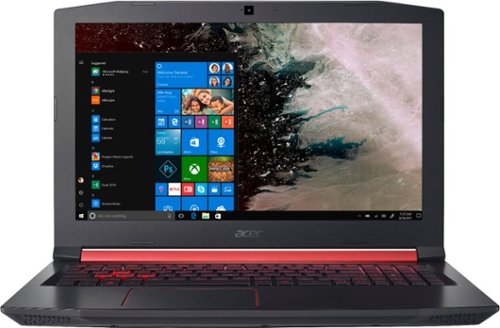
Only at Best BuyEnter the RPG arena with this Acer Nitro 5 gaming laptop. It has 1TB of storage, and its NVIDIA GeForce GTX 1050 graphics card loads dynamic in-game visuals and Full HD movies smoothly. The quad-core Intel Core i5 processor and 8GB of DDR4 RAM let this Acer Nitro 5 gaming laptop perform efficiently.
Customer Rating
5
Excellent budget gaming device
on May 1, 2018
Posted by: TechEnthusiast
from Itasca, IL
Pros:
Big screen
Big track pad
Backlit Keyboard
Ample ports
Big screen
Big track pad
Backlit Keyboard
Ample ports
Cons:
Slow hard drive
Odd freezes
Mediocre battery life
Cramped number pad
Some light bleed at the top of the screen
Slow hard drive
Odd freezes
Mediocre battery life
Cramped number pad
Some light bleed at the top of the screen
I love the Acer Nitro 5 laptop a lot. It hasn't improved my gaming performance at all, but it's a joy to play on.
First, this laptop is an absolute beast. It's a 15.6 inch screen, but the body is so bulky that it's frame is more akin to a 16.5 inch. Your average 15.6 inch laptop bag will not comfortably fit this device. I actually just ordered a 17 inch laptop bag to house this. I'm hoping that the included sleeve in conjunction with the padding of the bag will be enough to keep this safe.
The laptop is glossy black plastic with red accents. The lid has a brushed look to it, but it's obviously plastic as well. The chassis is a little creaky, but it's solid enough that I don't think the laptop is going to fall apart in my backpack. The keyboard has well spaced letter keys, but the number pad to the right is more than a little cramped. The keyboard is back-lit with red lighting.
The screen is nice and big. Viewing angles are good, and color is "not bad." I personally would have preferred a more saturated display as some of the colors look a little washed out, but the color certainly isn't bad. It should be noted that this model is a traditional laptop and doesn't have a touchscreen or swivel hinge. I also noticed some light bleed in the upper right hand corner of my display. This could be a QC issue with my particular unit though.
I did encounter some odd freezes and stutters when I first got this laptop. I think it might have been because Windows wasn't done updating in the background yet. I was also surprised that the dedicated graphics card didn't appear to be doing anything at all. Going into the Nvidia settings and adjusting the global 3D options to default to the graphics card (instead of "auto") appears to have fixed this. There was a noticeable boost in game performance after this, but some of my older titles suddenly stopped working. Adding them to the exception list (and forcing them to use the Intel integrated graphics instead) appears to have fixed a lot of the issues though.
Battery life was awful at about 2 and a half hours of active use with the power mode set to "performance." I'm not too surprised by this as this is fairly customary for gaming laptops. Charging is done via a proprietary charging cable and not through the USB type-C port. This was a little bit of a disappointment. Fortunately, the charging cable is quite long.
The hard drive is nice and large, but it's a little slow. Switching from a SSD (or even an EMMC) to this is an adjustment. The laptop takes a few minutes longer to boot up than I'm used to.
All in all, I'm quite happy with this laptop. Once you're past the initial setup and a brief adjustment period, it performs quite nicely.
My Best Buy number: 2115535767
Mobile Submission: False
I would recommend this to a friend!
Share this review:


+2points
4of 6voted this as helpful.

Streamline your cleaning routine with the CrossWave Pet Pro Multi-Surface Wet Dry Vac. Eliminate pet messes and debris from tile, sealed wood, rubber floor mats, rugs, and more.
Customer Rating
4
Great for tile flooring, "okay" on low carpet.
on April 19, 2018
Posted by: TechEnthusiast
from Itasca, IL
Pros:
Easy to fill and use.
Good suction.
Detergent goes a long way.
Works really well on hard floors and “okay” on low carpeting.
Easy to fill and use.
Good suction.
Detergent goes a long way.
Works really well on hard floors and “okay” on low carpeting.
Cons:
Cleaning the machine after use is time consuming and messy.
The plastic guard over the brush is a pain to put back on.
Cleaning the machine after use is time consuming and messy.
The plastic guard over the brush is a pain to put back on.
I enjoyed the Bissell Crosswave. For such a small machine, it does a really good job cleaning.
Assembly was very quick and easy (insert the handle until it clicks and shove the detergent / water bottle in its slot on the back). I was up and running in under five minutes.
I have a small apartment with tile and short carpeting. I only filled the detergent bottle up to the “small area” mark as I wasn’t sure how far it would stretch. I’m glad I did as that was sufficient to clean my entire living room and my tiled entryway.
The machine did a pretty good job of cleaning the carpet. I was worried that it wasn’t putting out enough fluid, but stepping on the area being cleaned with my sock covered foot revealed that it was indeed quite wet. It managed to pull up a fair amount of cat hair, and it successfully erased some stubborn pet stains. At times, I did feel like the machine was struggling some on the carpeting. When they say "area rug" I think they really did mean "rug" and not carpet.
The machine really did a great job on my tile. Pressing the button to switch to the hard floor mode, the machine did a great job of scrubbing the floor to a nice polished shine. Honestly, my tile has never looked this good (even after mopping). The low pile runner I have running down the length of my entry way also cleaned very nicely (using the area rug mode).
Cleaning the machine after use was a bit of a bear. The dirty “water” bin had surprisingly little water in it. Don’t get me wrong, it had some (maybe a quarter of a cup?), but the bin was mostly full of cat hair and dirt. Scrubbing it clean took some doing, and I would strongly recommend doing this in a utility sink. With so many little parts and crevices, cat hair managed to get stuck just about everywhere.
The plastic shield over the brush came off easily, but it was an absolute bear to put back on. I found the trick was to line up the plastic overhangs on both the left and right sides and then rotate it backwards so that it pivots over them and fits onto the pegs. Shoving it straight down onto the two pegs won’t do you any good. I did not feel any kind of satisfying “click” when reattaching the guard, but the guard appears to be flush to the machine and securely attached.
I would strongly recommend this machine (particularly if you have hard floors).
My Best Buy number: 2115535767
Mobile Submission: False
I would recommend this to a friend!
Share this review:


0points
0of 0voted this as helpful.
TechEnthusiast's Review Comments
TechEnthusiast has not submitted comments on any reviews.
TechEnthusiast's Questions
TechEnthusiast has not submitted any questions.
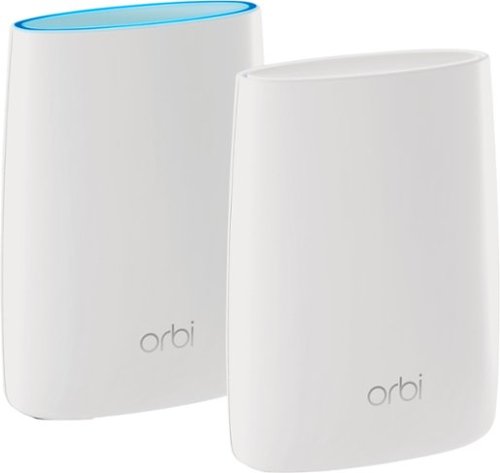
Orbi Whole Home WiFi System delivers up to 3.0Gbps high-performance WiFi. Sleek, modern design with high-gain internal antennas for up to 5,000 square feet of coverage. FastLane3 Technology creates a dedicated Tri-Band WiFi for seamless 4K streaming and gaming everywhere in your home. Keep a single WiFi name for uninterrupted connections as you move from room-to-room. Circle Smart Parental Controls runs on Orbi Routers for a smart way for families to manage content and time online, on any connected device. Provide internet access to guests without sharing your personal network password. Orbi is ready right out of the box and compatible with your ISP. Just use the Orbi app to get started with better WiFi, everywhere in minutes.
Can you use with comcast.
Yes. I'm using it with Comcast myself.
You plug the Ethernet cable from your modem to the Orbi router the same as you would any other router. The big difference between the Orbi and other routers is that it comes with a separate satellite unit to extend your wireless range. The satellite unit hooks up to the router wirelessly. Installation and pairing takes about ten - fifteen minutes to complete.
You plug the Ethernet cable from your modem to the Orbi router the same as you would any other router. The big difference between the Orbi and other routers is that it comes with a separate satellite unit to extend your wireless range. The satellite unit hooks up to the router wirelessly. Installation and pairing takes about ten - fifteen minutes to complete.
9 years, 8 months ago
by
TechEnthusiast
Orbi Whole Home WiFi System delivers up to 3.0Gbps high-performance WiFi. Sleek, modern design with high-gain internal antennas for up to 5,000 square feet of coverage. FastLane3 Technology creates a dedicated Tri-Band WiFi for seamless 4K streaming and gaming everywhere in your home. Keep a single WiFi name for uninterrupted connections as you move from room-to-room. Circle Smart Parental Controls runs on Orbi Routers for a smart way for families to manage content and time online, on any connected device. Provide internet access to guests without sharing your personal network password. Orbi is ready right out of the box and compatible with your ISP. Just use the Orbi app to get started with better WiFi, everywhere in minutes.
So if it comes with two, I'm assuming you have one that internet is linked to by cable and the other is used as a extender? Or do you have to have both units hooked to cable?
The router portion is connected to your modem via an Ethernet cable, but the satellite / extender unit links up to the router wirelessly. The only wire that you need to have connected to the extender is the power cord.
9 years, 8 months ago
by
TechEnthusiast
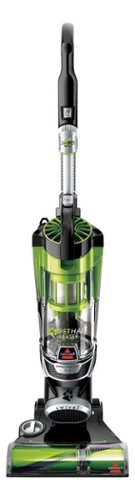
Nothing puts a vacuum to the test quite like a home with pets. That's why the BISSELL~ Pet Hair Eraser~ was developed from the ground up by pet parents for pet parents. Whether it's shedding season for your dog or your cat tracks kitty litter all over the house, this revolutionary vacuum is designed to make cleaning up after pets and the people who love them a breeze~from beginning to end. Say goodbye to hair wrap with its Tangle-Free Brush Roll, remove embedded hair everywhere with specialized pet tools, help capture allergens and eliminate odors with the SmartSeal~ Allergen System, and when you're finished cleaning, enjoy a hands-free tank empty with our patented Cyclonic Spooling System~.BR>
How load is it? I've used an Oreck XL upright and a Eureka Mighty Mite and would hope it's no louder as those. I prefer bagged vacuums but want to try the BISSELL Pet Hair Eraser because of its claims of not getting hair tangled on the roller.
I haven't tried the two vacuums that you mentioned, but I can say that I was surprised that this vacuum wasn't terribly loud.
Given it's size and the number of vents coming out of it, I expected it to be deafening. Upon turning it on, I was surprised by just how mild the sound was. It'll definitely drown out a television or radio some, but you'll still be able to hear people talking over it.
Given it's size and the number of vents coming out of it, I expected it to be deafening. Upon turning it on, I was surprised by just how mild the sound was. It'll definitely drown out a television or radio some, but you'll still be able to hear people talking over it.
9 years, 9 months ago
by
TechEnthusiast