


TechEnthusiast's stats
- Review count209
- Helpfulness votes894
- First reviewAugust 16, 2014
- Last reviewJune 2, 2026
- Featured reviews0
- Average rating4.1
Reviews comments
- Review comment count0
- Helpfulness votes0
- First review commentNone
- Last review commentNone
- Featured review comments0
Questions
- Question count0
- Helpfulness votes0
- First questionNone
- Last questionNone
- Featured questions0
- Answer count13
- Helpfulness votes17
- First answerAugust 25, 2016
- Last answerJanuary 22, 2022
- Featured answers0
- Best answers2
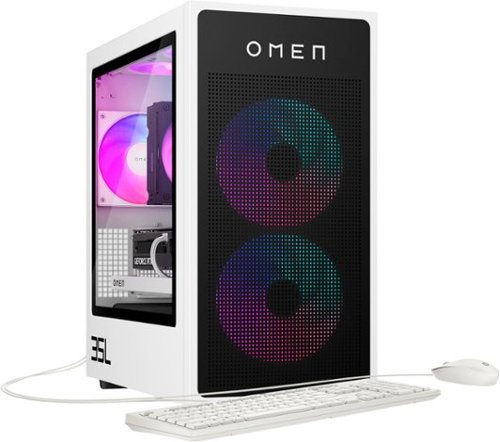
Customizable performance awaits. Play with an AMD Ryzen processor and NVIDIA RTX graphics for powerful performance. Plus, toolless access and an industry standard form factor make it easy to upgrade and customize.
Customer Rating

4
Great computer - needs a bigger hard drive
on October 8, 2024
Posted by: TechEnthusiast
This is a great computer, but it really needs a bigger hard drive.
The computer is fast, stylish, clean looking, and quiet. The ports at the top of the case are easily accessible, and overall the computer just runs great.
The RGB is bright and fun, and the computer gives off a clean looking "gamer vibe."
The graphics card is a little odd in that it has multiple DisplayPort outputs and a single HDMI output. Not all of my monitors have DisplayPort, but HDMI is fairly common. I would have expected it to have two HDMI outputs (though I do understand that it's easier to split a DisplayPort signal between multiple outputs than an HDMI signal).
I'm not sure, but I think the power cable might be something proprietary too. It looks like a standard PC power cable layout, but it looks a bit smaller than normal (maybe 80-90% the size?).
I only have one real complaint about this computer, and it's that the hard drive is too small. My personal opinion is that 1TB isn't enough space for a modern gaming computer. With modern games averaging 50-70GB each, it won't take much to fill up this drive.
It's not immediately clear to me if the storage on this computer can be upgraded. I'm assuming that there's another NVME or SATA port somewhere on this motherboard, but I'm not seeing them right off, and I haven't been able to find a hardware guide for this computer on HP's site yet. I do see that there appears to be a bay for a 3.5" hard drive at the bottom of the case. That gives me hope that there's at least a SATA port hiding somewhere.
Worse case scenario, you can always purchase an external hard drive and install some of your games to it to free up some space. This desktop does have ample USB ports.
The HP Omen software also integrates nicely with GeForce Now, and the computer comes with a trial of XBox Game Pass. You can always use one of these cloud gaming services to free up some storage space too.
I would recommend this to a friend!




Share this review:


+2points
2of 2voted this as helpful.

Unlock your digital world with this powerhouse Next Gen AI PC. Hustle hard, ignite inspiration, and game on with this sleek and powerful laptop that will see you through it all, and still be future-ready for more tomorrow.
Customer Rating

5
A premium, AI focused laptop
on September 26, 2024
Posted by: TechEnthusiast
As a productivity machine, the HP OmniBook is great.
Typing on it is extremely comfortable, the port selection is good, the screen quality if fantastic, the storage is more than adequate, the general speed and ease of use are superb, and the battery life is nothing short of exceptional.
I'm quite fond of this machine.
The build quality is also quite nice. It comes with a backlit keyboard and a nice, large trackpad.
I'm pretty sure that the lid is made out of some kind of metal; though I'm not so sure about the keyboard deck and palm rest. They don't stay cool to the touch, and I get a slightly plasticky / rubbery feel when running my finger along the deck. The keyboard deck is quite solid feeling despite this though.
I'm pretty sure that the lid is made out of some kind of metal; though I'm not so sure about the keyboard deck and palm rest. They don't stay cool to the touch, and I get a slightly plasticky / rubbery feel when running my finger along the deck. The keyboard deck is quite solid feeling despite this though.
This machine is very much AI oriented. It has a dedicated Copilot key and also comes with HP's "AI Companion." I asked the AI Companion what the difference was between it and Copilot, and it tells me that it's an AI with stronger integration with HP's products and services. I put this to the test by asking it for instructions on adjusting my keyboard backlight. Sure enough, it was able to guide me to the appropriate key for adjusting the backlight.
At present, the AI functionality is mostly an entertaining novelty. But eventually, I expect that it will be a more prominent feature. I look forward to the day when I'm able to ask AI to decompress batches of zip files in bulk or automatically rename all of the files in a folder without my direct intercession. We're not quite there yet, but it certainly looks like this is the direction in which we're heading.
I wouldn't want to use this laptop as a dedicated gaming machine (the storage isn't THAT impressive). But as a productivity machine, I have absolutely no complaints. So far, this laptop has been fantastic.
I would recommend this to a friend!





Share this review:


+4points
4of 4voted this as helpful.

Samsung's 34" Odyssey OLED G8 Ultra-WQHD Gaming Monitor features OLED technology for a wider color spectrum and vibrant images. 175Hz refresh rate, 0.03ms response time (GtG), and AMD FreeSync Premium Pro allows for faster, exhilarating gameplay without image tearing. 34" 21:9 Ultra-WQHD display with 110 pixels per inch for stunning detail and clarity. Glare Free technology significantly reduces glare from external light sources, so the OLED screen~s perfect black and color experience are presented without distractions. OLED Safeguard includes Thermal Modulation System, Logo and Taskbar Detection & Screen Saver to help prevent burn-in. A Slim Metal Design and Ergonomic Stand provides unparalleled style and comfort, with connectivity that enables access a variety of input options. Gaming Hub offers instant access to streaming with Smart TV Apps for access to mustsee shows and free live content. 3-Year warranty.
Customer Rating
5
Great picture quality and lots of features
on September 15, 2024
Posted by: TechEnthusiast
I've had gaming monitors before, but this is my first curved, ultra-wide. So far, I'm extremely impressed.
Image quality is phenomenal, the colors are nice and saturated, and the curved screen really does help with immersion in games like Overwatch. The wider screen is also great for productivity. I've had two applications open side by side, and it doesn't feel like I'm compromising on screen real-estate at all.
The setup was a little more involved than I was expecting. This monitor has some additional built-in features allowing it to stream content from Prime Video and other services. It can also use a voice assistant independent of any other device. I wasn't expecting these features, but they're very nice to have. The monitor also has built-in speakers.
In a lot of respects, this monitor is almost more of a TV than a monitor.
Settings can be navigated via an included remote. The remote itself isn't terribly intuitive (it took me an embarrassingly long time to figure out how to control the volume (the left button with a "+" and "-" on it rocks up and down to control volume), but I had no issues with the monitor registering button presses from the remote.
The monitor has two HDMI ports and a Displayport for connecting to your devices. It also has a USB hub for you to connect to your PC (allowing you to connect your peripherals to the monitor instead of your tower).
The monitor also comes with a "SmartThings" app for controlling your Samsung home devices.
This really is a VERY impressive monitor.
I would recommend this to a friend!



Share this review:


+1point
1of 1voted this as helpful.

Your favorite new health and wellness companion is here ~ Galaxy Watch7. Enhanced with Galaxy AI,~ this Watch has everything you need to keep you moving toward your health goals. Wake up on the right side of the bed every morning with an Energy Score1 that helps you understand your well-being better. Hit your morning workout while staying in touch with your world ~ make calls from your Watch and quickly respond to texts on the go with Suggested Replies.~ Then hone in on your heart health during your workout with improved Heart Rate Tracking,~ and improve each day with personalized Wellness Tips~ viewable right on your Galaxy smartphone.~ Plus, stay in the zone by streaming your favorite playlist or podcast from your Watch to your Galaxy Buds.~ Your ultimate fitness partner is now on your wrist ~ Galaxy Watch7.
Customer Rating
5
Takes time to setup, but it's a great smart watch
on August 17, 2024
Posted by: TechEnthusiast
The Galaxy Watch 7 is a nice watch with loads of features.
First, the hardware. The Galaxy Watch 7 has a metallic body, with a round glass face, and a rubbery strap. The strap has orange and baby blue threads wrapped around a set of cutouts on each strap in an asymmetrical fashion (I’m personally not a fan of this and wish they hadn’t done it). The strap itself is a curious shade of green that’s right on the edge of being a dark grey.
The back of the watch has a sensor array for tracking things like your heart rate, and the buttons along the right-hand side of the watch face (outlined in orange and white - again, not my first choice for colors) also contain sensors for body composition scanning.
Battery life isn’t impressive. I get about a day and a half per charge. I’m not using this to track my sleep (having things on my wrist actually keeps me from getting to sleep), so I’m just charging it overnight each night.
Setting up the watch was a bit of a challenge for me.
The setup prompts you to install not just one, but several apps. I’m not even certain if all of them were necessary. The “Smart Switch” app prompted me to connect two phones together to transfer data and apps. I think it was referring to my watch, but I opted to just skip past this step completely. Skipping it doesn’t appear to have negatively impacted my experience at all. One of the apps that was referenced appeared to only be for Samsung phones. Again, skipping this one didn’t negatively impact my experience at all.
By default, I wasn’t receiving any notifications on my Pixel phone. I found that I was able to go into the watch and app settings and manually turn on notifications for all of the apps that I care about. Notifications on this watch are handled very subtly. When you get a notification, you get a short little vibration (adjustable in the settings) followed by an orange dot on the left side of the screen. You can then flick left to view your notifications. I’m not sure if I prefer this to the “in your face” auto-displayed notifications or not.
The watch face can be customized within the app, and there are a variety of options to choose from (including making your own).
The watch comes with a fair amount of bloatware. I’m still figuring out what can be removed and what I need to keep. I installed Google Fit for monitoring my fitness as it was compatible, and I already have an account setup and am familiar with the interface.
My preferred music streaming service seemingly isn’t compatible with this watch yet.
At the time of this review, a lot of the third party watch face apps that I found weren’t compatible with this watch yet either.
The body composition scanning isn’t great. I found that 4 out of 5 times, it gets to exactly 67% complete and then fails. When it does work, the results are radically different from my body composition scale (I WISH the watch’s body fat percentage was correct - I’d look absolutely shredded).
Steps appear to be fairly accurate, and I haven’t noticed any anomalies with the heart rate monitoring.
The auto-workout detection is great. Within a few minutes of light jogging on the treadmill, the watch prompts that I’m exercising and starts monitoring. It tries to retroactively record when I started, but I found that it was a little overly generous (giving me an additional five minutes of exercise - probably the time I spent walking across the gym and getting onto the treadmill).
The assistant function seems to work well. I swapped the assistant from the default Bixby to Google without any issues. I have it setup to trigger with a long press of the top button, and it seems to work well and understand me clearly. By default, the volume was very VERY low, but I turned it up to a reasonable volume in settings.
I also like the fact that I’m able to pair my calendar with this watch to keep track of appointments and tasks.
In summary, this is a very nice and feature-rich smart watch. The initial setup is a little overly complicated. But once setup, this is a great watch for fitness tracking and day to day productivity.
I would recommend this to a friend!




Share this review:


+1point
1of 1voted this as helpful.

The first XPS CoPilot+ PC has powerful on-device AI that delivers cutting-edge responsiveness and unmatched speed for navigating demanding creative and multitasking workloads with efficiency.
Customer Rating
5
Very premium looking laptop for productivity.
on August 11, 2024
Posted by: TechEnthusiast
The XPS 13 with Snapdragon X Elite is a remarkably stylish laptop.
Everything about it screams “modern” and “premium.”
The seamless trackpad is eye catching and only took a day or two to get used to. The flat, blocky keys are very clean looking and comfortable enough to type on. The buttonless, digital function row is also very clean and modern looking. I don’t typically hit these buttons from muscle memory anyway, so I had no issues glancing down at the keyboard to press them.
The laptop body is a well constructed slab of metal. Again, simplicity and modernity are the driving force behind the aesthetic.
The screen is extremely vivid, and the colors are nice and saturated.
The laptop comes with both facial recognition and a touch sensor. The touch sensor (and power button) are somewhat “hidden.” It’s the slightly recessed, blank rectangle to the right of the “backspace” key. There is no iconography to identify this. I had to Google to figure it out.
The port selection on this laptop is pretty paltry with just two USB-C ports on the entire laptop. There is no micro-SD slot for storage expansion, and the laptop comes with a disappointing 480GB drive (475GB usable).
I do a lot of graphic design work, and this frankly isn’t enough space. I’m going to be relying heavily on external drives and cloud storage.
Battery life was impressive, but it was not as impressive as I was expecting. In my experience, the battery will last your full work day fairly easily (8-10 hours with moderate use). Beyond that though . . .
I was under the impression that the Snapdragon processor would allow for multi-day battery life. This wasn’t the case for me.
The battery life is sufficient enough that I would have no concerns about getting through a presentation if I forgot my charger at home.
The battery life is not sufficient enough that I wouldn’t be concerned if I had to run out of town for an overnight trip and forgot my charger at home.
In terms of software, I had no significant issues with compatibility. The biggest issue I had was remembering to select the ARM option when it was available. Legacy, Intel based software seemed to run just fine. I didn’t notice any lag or other issues.
Copilot and the other AI functions feel rather gimmicky right now. I had it assist me with a drawing of a blue cat playing with a red ball of yarn in Paint. First, Paint wouldn't be my first choice for making something like this. I'd much rather use Illustrator. Second, it DID successfully create my image, but it took a fair amount of adjusting with the creativity slider to get it to work. It defaulted to the most extreme range of the creativity slider and generated a picture that ignored my scrawled reference drawing completely. The cat was facing the wrong direction, and the red ball of "yarn" was replaced with something that looked like a rubber ball on the opposite side of the screen. Reducing the creativity resulted in it eventually following the general contour of my scrawl to generate a cat facing the correct direction with something that resembled yarn.
I can see this feature having some merit if you don't have access to a clipart library, don't have time / skill to draw something properly yourself, and you just need a quick image to use on a newsletter or something.
I didn’t even bother trying to install games on this. With the rather paltry storage, there didn’t seem to be much point. This laptop clearly wasn’t designed for gaming. It is an excellent productivity laptop though and handles word processing, web browsing, and photo editing without any issues.
I would recommend this to a friend!
Share this review:


+5points
5of 5voted this as helpful.

Say goodbye to wiring limitations and frequent battery recharges. Our solar panel kit offers flexibility: install it separately with a 13 ft extra-long cable or alongside the camera, empowering you to discover optimal spots for seamless monitoring. Embrace wire-free convenience thanks to the ultra-large battery capacity of 10,000mAH. Delight in crystal-clear 2K QHD resolution for unmatched clarity.
Customer Rating
4
Tricky setup. Works well once it is setup though.
on June 17, 2024
Posted by: TechEnthusiast
Setting these up was quite difficult and took multiple attempts.
The hardware itself is well thought out and well made.
The solar panel can be affixed to the same mount as the camera, or it can be separated and mounted independently. The kit comes with cables for either option.
The solar panel mount is extremly adjustable and can be setup at a variety of different angle to maximize exposure to sunlight.
The kit comes with little silicone gaskets to place around the charging ports to prevent moisture from getting into them.
Speaking of ports, the camera comes with a micro-SD card slot right on the camera itself (no base stations or subscriptions required).
The camera angle can be adjusted to a remarkable degree.
TP-Link appears to have done everything right as far as hardware goes.
As for software . . . I did not have a great experience.
First, the app prompts you for the exact model of camera that you purchased (it's TC85 - noted in tiny print in a bright yellow oval on the front of the box). This required some frantic shuffling of the box and paperwork to figure out.
Second, the app simply would not connect to the camera for me. I had to reset the camera twice before it would properly connect (initially, I thought that I'd selected the wrong camera model since it was giving me such grief).
Third, the app is a little pushy when it comes to physically mounting the cameras and solar panels. I'd allotted fifteen minutes to set these up one afternoon, and I wasted about ten of that with connection issues. No sooner do I get the camera connected that it starts a countdown for physically mounting the camera (why?!?). I had mere seconds to go into my garage, pull out my ladder, grab my drill, insert a micro-SD card, and mount the camera to the side of my house.
Suffice it to say, I didn't. I instead backed out of that step, set the camera aside, and decided to revisit this entire endeavor when I had more time. I was already a little flustered by the connection issues, and a completely unnecessary countdown just ratcheted up my anxiety level even more.
I have to say that the image quality is superb. The image is nice and sharp, and the camera feels fairly responsive.
If they could streamline the setup process some, I think this camera would be just about perfect.
I would recommend this to a friend!
Share this review:


+1point
1of 1voted this as helpful.
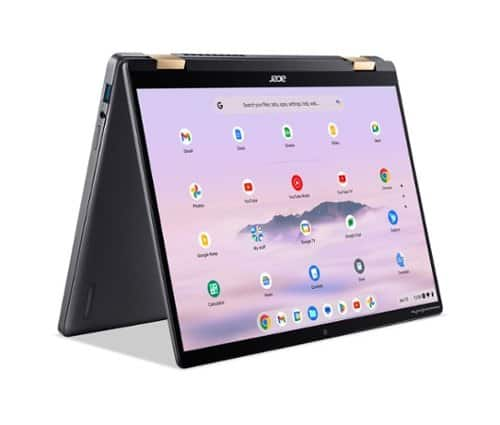
Google AI on Chromebook Plus will help users connect with AI-powered audio and video enhancements, create whatever you can imagine, with the power of generative AI and collaborate with AI to stay organized and be more productive than ever. Empower your productivity with the 2-in-1 Acer Chromebook Plus Spin 714 thanks to its Intel Core Ultra 5 processor and spacious 14.0~ WUXGA touch display. An impressive QHD Webcam, fast wireless connectivity and long-lasting battery life let you transition smoothly between work, home, and personal projects ~all day long. And with up to double the speed, memory and storage ~ plus popular apps ~ you have the power to do more.
Customer Rating

3
Premium device but more than a little buggy
on June 14, 2024
Posted by: TechEnthusiast
I have to confess, I'm not impressed by "Chromebook Plus."
I've been a casual Chromebook user since the Acer C710 (released in 2012), and I've seen a lot of different iterations of the Chrome OS operating system.
The Chromebook Plus devices are supposed to utilize AI to do more than your average Chromebook. While I can see a lot of possibilities with Google's Project Gemini, I also feel like a lot of the features and functions are somewhat "half baked" right now.
The first thing I noticed after setting up the Spin 714 was that the icons for all of my installed websites broke. Attempting to reinstall them to restore the icons has failed, and I'm basically just stuck with a bunch of grey icons right now.
I then tried to use the AI wallpaper generator. It failed. It failed repeatedly. As of the time of this review, I have not been able to get it to work once.
Gemini itself worked a little better. I asked it an array of questions, and it responded coherently and largely correctly. In a couple instances, it even expressed some doubt about its own answers and cautioned me to double check the results.
As far as hardware goes, the Spin 714 feels like a premium device. The keyboard is backlit, the trackpad is large and smooth, and the hingle mechanism feels sturdy (and is super shiny). Screen bezels along the left and right edge are very thin, the camera has a physical switch for turning it off, and the screen is both bright and vivid.
I think Google has some major bugs to iron out where these Chromebook Plus devices are concerned, but I definitely see the potential. I'd recommend maybe holding off a few months while Google figures things out and then re-evaluating if this is the device for you.
I would recommend this to a friend!



Share this review:


+7points
8of 9voted this as helpful.

Enjoy everyday activities with this ASUS notebook PC. The Intel Celeron processor and 4GB of RAM let you run programs smoothly.
Customer Rating
3
Not powerful but sufficient for the right use case
on June 13, 2024
Posted by: TechEnthusiast
It's important to understand what this laptop is and what this laptop isn't.
This is not a powerful laptop.
This is not a laptop designed for photo or video editing.
This is not a laptop that's particularly good for media consumption.
This is most definitely not a laptop for gaming.
This is not a laptop designed for photo or video editing.
This is not a laptop that's particularly good for media consumption.
This is most definitely not a laptop for gaming.
This is an inexpensive laptop that's sufficient for students on an extreme budget to do their homework with or people who need a laptop that's for all intents and purposes disposable.
I got this laptop to serve as my "command station" for my maker space.
I have a small maker space consisting of a 3D printer, a laser engraver, and a vinyl cutter (and if I'm really good next year, Santa might be bringing me a CNC router).
While I keep it clean, I have dust particles, various fumes, and all sorts of vibrations happening in this space. I don't want to inflict this type of environment on my nicer laptop, and I don't want to have to clean out the case of a desktop computer every few months.
I could setup Raspberry Pis with Octoprint and other software to control my machines, but I'm a heavy Windows user and would prefer to just stick with what I know.
Enter the ASUS VivoBook Go.
Plugged into a USB hub, I can have this hooked up to control all of my devices. I'm still going to do most of my design work on my nicer computers, but the VivoBook is perfectly adequate for sending the pre-made g-code to my machines.
As an added bonus, this laptop is sufficient for playing music while I work or doing some light work in a web browser.
I had some reservations about this laptop's storage. 64GB gets eaten up very quickly once all of my programs are installed, and I was horrified to discover that this laptop doesn't have any type of SD slot for expanding storage.
Fortunately, the laptop does appear to have an open NVME slot internally. I should be able to find a cheap NVME drive to supplement the built-in EMMC, and I can use that to store any files that I want to re-use. In the meantime, I can use flash drives and/or cloud storage to store my files.
This laptop's screen isn't good. Colors are washed out, and it feels like you're viewing everything through a thin layer of fog. This is why I wouldn't recommend this device for any type of media consumption unless you have no other recourse.
The track pad also feels pretty bad. It's very "plasticky," and I feel like my finger is dragging against it as I use it. I'm probably just going to use a wireless mouse instead.
If you just need a laptop that works in the most very basic sense, then this would be a good option for you.
I would recommend this to a friend!
Share this review:


+2points
3of 4voted this as helpful.

Crucial DDR5 Memory has the blazing speed and massive bandwidth needed for the next generation of multi-core CPUs. This innovative technology empowers your system to multitask better, load, analyze, edit, and render faster, game with higher frame rates, uncover data insights faster, enhance productivity to save time and money, significantly reduce lag for heavy workloads and optimize power efficiency over the previous generation. Crucial DDR5 Memory can enable your computer to harness performance that was once only possible with extreme performance memory.
Customer Rating
5
Good option for future proofing your laptop
on June 11, 2024
Posted by: TechEnthusiast
I used this upgrade kit to upgrade my Acer Predator Helios Neo 16's RAM from 16GB to 32GB. 16GB is perfectly adequate for most of my day to day activities, but I am conscious of the fact that technology becomes outdated within minutes of being released, and I wanted to try and future proof my laptop to keep it working for years to come.
The upgrade process was relatively painless. I had some difficulty getting into my laptop (some of the decorative angles on the back of my laptop were hard to detach), but a YouTube video and some patience eventually got me into it. I also had a terrifying moment in which my laptop booted to a solid black screen for several minutes. After about 5 minutes of nothing but my keyboard backlight shining and my fans running, the screen eventually proceeded to boot as normal.
Since upgrading, my laptop has been working great. I'm able to keep more Chrome windows open at once, and I'm now confident that I'll be able to run some of the newer games coming out.
I'm very pleased with this upgrade, and I plan to purchase a crucial SSD upgrade to further future proof this laptop.
Yes, I would recommend this RAM upgrade kit to anyone looking to future proof a gaming laptop or improve their laptop's productivity.
I would recommend this to a friend!
Share this review:


+2points
2of 2voted this as helpful.

The Turtle Beach Stealth 500 wireless amplified gaming headset for Xbox Series X|S, Xbox One redefines what an ~entry-level~ wireless headset is capable of. Equipped with low-latency, 2.4GHz wireless for gaming on Xbox consoles plus Bluetooth 5.2 connectivity for use on PC, & mobile, the Stealth 500 is designed for versatile gaming on console & mobile. Easily toggle back-and-forth between 2.4GHz wireless & Bluetooth connections using the QuickSwitch button located right on the bottom of the headset. An ultra-lightweight design with a floating headband eliminates any pressure points for a perfect fit and leatherette-wrapped memory foam ear cushions provide non-stop comfort and enhanced noise isolation. A staggering battery life of up to 40 hours is best in its class, plus it features quick charge so you can get back in the game right away. Precision-tuned 40mm drivers are amplified to deliver renowned Turtle Beach audio quality, optimized for spatial audio right out of the box. And to dial in your audio quality even further use the Swarm II desktop software for PC, or mobile app for iOS & Android devices to adjust EQ settings, activate Superhuman Hearing, toggle EQ presets and more. Lead your team to victory with ultra-clear voice accuracy thanks to a flip-to-mute omni-directional microphone. Plus, you can activate mic monitoring using the Swarm II app so you can hear the level of your own voice to avoid shouting.
Customer Rating
4
Connects via dongle, otherwise great headphones
on May 28, 2024
Posted by: TechEnthusiast
The Turtle Beach Stealth 500 wireless headphones are far more finicky than I expected.
These are my first pair of wireless Turtle Beach headphones, and I was curious to see how they’d measure up against a wired pair that I used to own and love.
When I saw that these were both wireless and compatible with Xbox, PC, and Switch; I hopped on them. I have all three of these devices, and I was in the market for a single headset that I could easily swap between all of these devices.
Unfortunately, it wasn’t as simple as that.
Even though they supposedly have Bluetooth, the headphones actually connect to Xbox, PC, and Switch via an included dongle. Try as I might, I couldn’t get the headphones to connect using just Bluetooth (the instructions indicate that Bluetooth is only for connecting to one’s phone - I guess this is for taking calls during gaming sessions?).
This is disappointing as physically moving a dongle between devices is a lot more cumbersome than just connecting via Bluetooth. The dongle is also quite large (a little smaller than a standard flash drive), and I can’t see myself just leaving it plugged into my gaming laptop.
Now that being said, I can’t complain about the quality of the connection using the dongle. Pairing the headphones to my devices via dongle was a quick and painless experience. Sound quality was great, and the connection was nice and stable. I experienced no crackling or dropped audio. At one point, I had to take the headphones off just to make sure that the audio was really coming from them (I thought it might have been coming from my TV because it was just so clear). Sure enough, the headphones just sounded that good.
I like that the microphone swings out of the way when not in use. I also like the fact these have a physical dial on the earpiece for controlling volume. I did find that I had to resort to using the dial instead of my PC's volume control to adjust the volume in Windows. For whatever reason, adjusting the volume in software just went between two extremes: very loud and silent. Using the dial resolved this issue and gave me a nice range of volume to work with.
In terms of comfort, these headphones are everything that I’d hoped for. I wore them for two hours straight during a long gaming session, and I experienced no discomfort whatsoever. The headphones didn’t pinch my head, and I didn’t feel like my ears were sweating in the earcups. I could easily have gone another hour wearing them.
I’m disappointed that these don’t work purely over Bluetooth, but I’m generally happy with these headphones.
I would recommend this to a friend!
Share this review:


+1point
1of 1voted this as helpful.
TechEnthusiast's Review Comments
TechEnthusiast has not submitted comments on any reviews.
TechEnthusiast's Questions
TechEnthusiast has not submitted any questions.

Orbi Whole Home WiFi System delivers up to 3.0Gbps high-performance WiFi. Sleek, modern design with high-gain internal antennas for up to 5,000 square feet of coverage. FastLane3 Technology creates a dedicated Tri-Band WiFi for seamless 4K streaming and gaming everywhere in your home. Keep a single WiFi name for uninterrupted connections as you move from room-to-room. Circle Smart Parental Controls runs on Orbi Routers for a smart way for families to manage content and time online, on any connected device. Provide internet access to guests without sharing your personal network password. Orbi is ready right out of the box and compatible with your ISP. Just use the Orbi app to get started with better WiFi, everywhere in minutes.
Can you use with comcast.
Yes. I'm using it with Comcast myself.
You plug the Ethernet cable from your modem to the Orbi router the same as you would any other router. The big difference between the Orbi and other routers is that it comes with a separate satellite unit to extend your wireless range. The satellite unit hooks up to the router wirelessly. Installation and pairing takes about ten - fifteen minutes to complete.
You plug the Ethernet cable from your modem to the Orbi router the same as you would any other router. The big difference between the Orbi and other routers is that it comes with a separate satellite unit to extend your wireless range. The satellite unit hooks up to the router wirelessly. Installation and pairing takes about ten - fifteen minutes to complete.
9 years, 8 months ago
by
TechEnthusiast
Orbi Whole Home WiFi System delivers up to 3.0Gbps high-performance WiFi. Sleek, modern design with high-gain internal antennas for up to 5,000 square feet of coverage. FastLane3 Technology creates a dedicated Tri-Band WiFi for seamless 4K streaming and gaming everywhere in your home. Keep a single WiFi name for uninterrupted connections as you move from room-to-room. Circle Smart Parental Controls runs on Orbi Routers for a smart way for families to manage content and time online, on any connected device. Provide internet access to guests without sharing your personal network password. Orbi is ready right out of the box and compatible with your ISP. Just use the Orbi app to get started with better WiFi, everywhere in minutes.
So if it comes with two, I'm assuming you have one that internet is linked to by cable and the other is used as a extender? Or do you have to have both units hooked to cable?
The router portion is connected to your modem via an Ethernet cable, but the satellite / extender unit links up to the router wirelessly. The only wire that you need to have connected to the extender is the power cord.
9 years, 8 months ago
by
TechEnthusiast
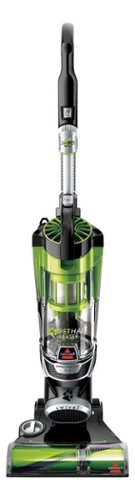
Nothing puts a vacuum to the test quite like a home with pets. That's why the BISSELL~ Pet Hair Eraser~ was developed from the ground up by pet parents for pet parents. Whether it's shedding season for your dog or your cat tracks kitty litter all over the house, this revolutionary vacuum is designed to make cleaning up after pets and the people who love them a breeze~from beginning to end. Say goodbye to hair wrap with its Tangle-Free Brush Roll, remove embedded hair everywhere with specialized pet tools, help capture allergens and eliminate odors with the SmartSeal~ Allergen System, and when you're finished cleaning, enjoy a hands-free tank empty with our patented Cyclonic Spooling System~.BR>
How load is it? I've used an Oreck XL upright and a Eureka Mighty Mite and would hope it's no louder as those. I prefer bagged vacuums but want to try the BISSELL Pet Hair Eraser because of its claims of not getting hair tangled on the roller.
I haven't tried the two vacuums that you mentioned, but I can say that I was surprised that this vacuum wasn't terribly loud.
Given it's size and the number of vents coming out of it, I expected it to be deafening. Upon turning it on, I was surprised by just how mild the sound was. It'll definitely drown out a television or radio some, but you'll still be able to hear people talking over it.
Given it's size and the number of vents coming out of it, I expected it to be deafening. Upon turning it on, I was surprised by just how mild the sound was. It'll definitely drown out a television or radio some, but you'll still be able to hear people talking over it.
9 years, 9 months ago
by
TechEnthusiast