


rtbestbuy's stats
- Review count182
- Helpfulness votes217
- First reviewNovember 22, 2014
- Last reviewJune 2, 2026
- Featured reviews0
- Average rating4.5
Reviews comments
- Review comment count0
- Helpfulness votes0
- First review commentNone
- Last review commentNone
- Featured review comments0
Questions
- Question count0
- Helpfulness votes0
- First questionNone
- Last questionNone
- Featured questions0
- Answer count11
- Helpfulness votes29
- First answerAugust 15, 2017
- Last answerOctober 5, 2021
- Featured answers0
- Best answers3
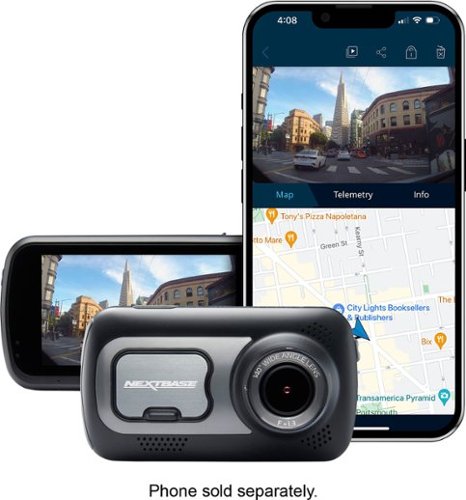
Capture up to 1440p video with this Nextbase 522GW dash camera. Alexa enables hands-free control through voice commands, and Bluetooth 4.2 and Wi-Fi technologies sync with compatible smartphones for quick access to important footage. This Nextbase 522GW dash camera has ports for connecting compatible camera modules for easy expansion.
Customer Rating

5
Pricey, High Quality Choice
on July 3, 2019
Posted by: rtbestbuy
from Bay Area, CA
Having tried cheap dashcams, I was ready for an upgrade. The NextBase 522GW definitely provided that! It really represents a significant step up in dashcams, but it's not without some minor foibles.
Open the box and the first thing you notice is that the construction quality of everything is excellent. The camera has a great feel to it and the mounts are solid with no wiggle. Setup is easy, very straightforward and intuitive. Two mounts are included in the package, one 'permanent' with an adhesive patch, and one 'transient' with a suction cup, which works better than any others I've used. The camera attaches to the mount by a (really, really strong) magnet. This is one of the first foibles you will note however; there is no MicroSD card included. You will have to supply one separately. The second foible is that although NextBase provides a tool to help route the power cable under the trim, they only provide a power port (cigarette lighter, for all of you old enough to remember) connector. A hardwire kit is available separately, which if you're going to go to the trouble of shoving the power line under the trim makes a lot of sense. Once the camera is set up, affix the mount, plug in the power cable, and you're ready to start recording. The camera automagically starts when the car starts and stops shortly after the power is turned off. The touchscreen is very bright, viewable even in bright light, and very responsive. The menus are intuitive and easy to figure out. The camera has an internal rechargeable battery, so the camera can be removed and used outside the car.
The video quality is excellent, absolutely first rate. The default recording is 1440p@30hz, but you can record 1080p@60hz if you feel the need for higher frame rates. I didn't experience any problem with the 30hz recording. The lens is a wide angle (140 degree) with minimal fisheye distortion and is very sharp. License plates are easily read. It deals with high contrast scenes (eg., coming out of a tunnel into bright sunlight) very well without blooming or flare). There is no problem with night recording either. The camera records both GPS coordinates and G-shock movements. Although there is no advertised stabilization, there was no problem even on bumpy roads. The NextBase pc/mac video playback program shows gps, speed, G-shock(accelerometer), and map location in addition to the playback video. It may be using the accelerometer data to stabilize the playback, but in any case there doesn't seem to be any problem with vibration.
NextBase made the rear-facing camera optional with three separate modules depending on your particular needs. Only one module can be attached at a time. There is a rear window mount camera, and two that mount directly on the camera (one regular and one telephoto). Any of the modules are an additional $100. Although it's nice to have the versatility of the different types of rear facing cameras, I would have expected at least one to be included at this price point.
There are several features tied to the phone app or Alexa integration, included a optional crash detector that will dial for help in case of an accident. It works with the phone app and will dial for help if you don't respond to a notification. NextBase does seem to be looking to find additional functions to add to their products.
In summary, the NextBase 522GW is a bit pricey, but is feature packed and more importantly, does an excellent job of video recording. It's solidly constructed and hopefully you'll never need it. But if you do, you can count on it.
Mobile Submission: False
I would recommend this to a friend!
Share this review:


+4points
4of 4voted this as helpful.
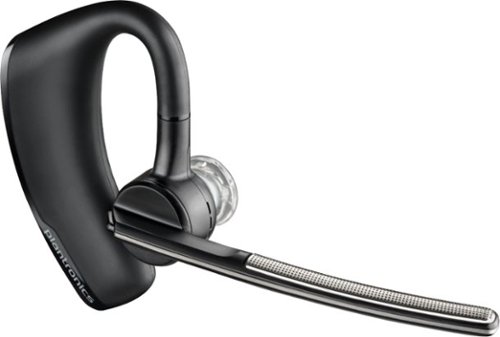
Enjoy the versatile headset for Hybrid work and beyond with the Poly Voyager Legend Wireless Noise Cancelling Bluetooth Headset. Featuring a multi-mic design with noise cancellation technology, this Bluetooth headset improves call quality by filtering out distracting background noise. This Plantronics Voyager Legend Bluetooth headset has built-in controls that let you change volume, mute calls and activate voice-controlled functionality with a single touch.
Customer Rating

4
Fast Setup, Excellent Battery Life and Sound
on June 18, 2019
Posted by: rtbestbuy
from Bay Area, CA
I needed a new headset to replace one that was dying. I decided to try the Plantronics Voyager Legend with its over the ear mount as I find the earbud style units uncomfortable after a while. The unit is very light, considering its bulk, and quite comfortable. I wear glasses (wire frames) and was concerned that the over the ear wouldn't work for me, but I haven't had any issues. If you wear glasses, you should try it first for fit.
The battery life and voice quality are excellent. The noise cancellation on the microphone end is also excellent. I tried both window open and fan on high in the car, and was understandable to the person on the other end. For an inexpensive headset, the Voyager Legend comes with a bunch of higher end features, most of which I don't use. However, it will pair simultaneously with two devices(eg., a mobile and a laptop). This is really nice with a soft voip client or skype and a mobile. Speaking of pairing, it was the simplest and fastest I've experienced. The unit is supposed to be sweatproof and combined with the over the ear design should be usable when running, bike riding, hiking or other activities.
Controls are via audio commands ("answer", "pair", "ignore"), motion sensors, or buttons. The voice commands work well, which is good because the control buttons are small, poorly placed, and difficult to use.
Which brings me to the negatives. The charging cable is a usb cable with a proprietary magnetic connector for the headset. This means carrying another cable when traveling and, more importantly, trying to find another when it breaks. Why not a micro-usb or usb-c connector? There is an optional ($29) charging case that uses a micro-usb connector and it is looking like required accessory. The control buttons can be used once you're used to them, but really should have been designed for easier reach. And finally, the actual earpiece cushion doesn't form a good audio seal against your ear, so I found it necessary to have the volume up.
Relatively minor annoyances, although it prevented me from giving the Plantronics Voyager Legend five stars. Still, its performance and features make it well worthy of consideration.
Mobile Submission: False
I would recommend this to a friend!
Share this review:


0points
0of 0voted this as helpful.
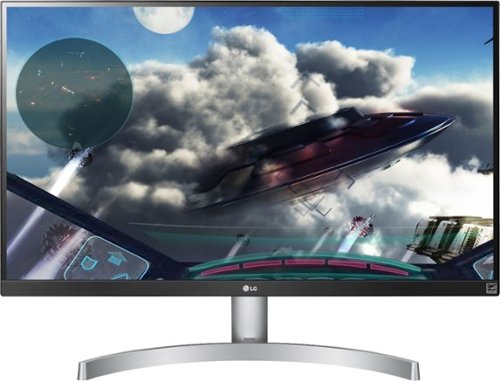
Enjoy a stunning LED display with this 27-inch LG monitor. The 4K UHD resolution and VESA DisplayHDR deliver vivid scenes to keep you captivated by your favorite shows and movies, and IPS technology maintains consistent colors at various viewing angles. This LG monitor's Radeon FreeSync matches your graphics card's frame rate for a stutter-free experience.
Customer Rating
5
Excellent UHD Monitor!
on June 14, 2019
Posted by: rtbestbuy
from Bay Area, CA
My needs were a little different than most in that I'm a casual gamer, but have started doing a lot of video processing and photo processing lately. I wanted a monitor that would support full UHD playback with accurate color representation and be a good general monitor without the ultra high end pricetag. The LG 27UL600 was an excellent fit. NOTE: This was being connected to a Windows 10 system, I7-7700, Nvidia 2060.
The build quality is excellent. The LG uses a bezel-less form factor and feels solid coming out of the box. The stand is a thin 'U' shape that takes up very little deskspace. I wasn't sure about the stand initially, but it does seem to take up less space than the platform stands and seems quite stable. Also included are a HDMI cable, DisplayPort cable, power brick, and CD/quickstart guide. The included cables are a particularly nice touch. The monitor ONLY supports DP and HDMI inputs, and has an audio output for headphones or powered speakers. The power brick is a brick, not a wall wart, which is nice in that it will not block multiple outlets on a power strip.
A mini joystick in the center at the bottom of the monitor doubles as an on-off switch and menu navigator. I had to grope around to find it initially, it's recessed a bit towards the back of the monitor. The menu system was intuitive and easy to navigate and initial setup went very quickly. One very, very nice feature is that the color schemes are not fixed, you can adjust them to suit your taste and needs.
Performance is absolutely excellent! The image is sharp all the way to the corners, color saturation and accuracy are both excellent. The 27UL600 is very bright, with excellent blacks even in SDR mode. Which is good, because Windows 10 HDR support doesn't work very well yet. Video performance is stellar, with excellent picture quality on video playback and editing. The high resolution allows video editing frame by frame without image reduction, reducing video artifacting and errors. Although I'm not a avid game, I noticed no blurring playing games (eg, Witcher 3) at high frame rates and the monitor was very sharp for both gaming and office applications. Make sure you enable freesync/gsync even though the monitor is fixed at 60hz; it will help prevent frame tearing. As for office applications, the UHD resolution and 27" screen let you view an amazing amount of data at once; it's really quite surprising home much more usable screen space it provides over a 1080P monitor.
This is a very impressive UHD monitor. If you're thinking of making the leap to a 4K monitor, the LG 27UL600-W should definitely be at the top of your list to consider.
Mobile Submission: False
I would recommend this to a friend!
Share this review:


0points
0of 0voted this as helpful.
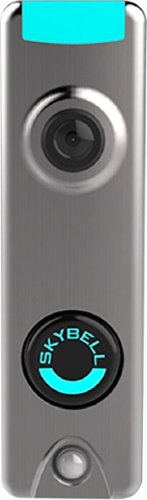
See who's at the door on your smartphone with this SkyBell Trim Plus home-security doorbell. It sends HD video and two-way audio and can detect and record a visitor's presence via live monitoring and a motion sensor. This rugged SkyBell Trim Plus home-security doorbell has full-color night vision and withstands inclement weather.
Customer Rating
4
Doorbell For The Modern World
on May 21, 2019
Posted by: rtbestbuy
from Bay Area, CA
With online shopping and next day delivery a way of life, we felt we needed a way to monitor the front porch. The ability to answer the door from a phone anywhere seemed like a good idea as well. Our initial checklist for a video wifi bell was 1080p or better resolution, phone integration, motion sensing and capture, two way audio, and free cloud storage. The SkyBell Trim Plus was a good fit, and it didn't require a separate battery.
Installation:
Installation was pretty easy: remove the old doorbell button, drill a couple of holes, screw in the baseplate, attach the two wires, snap on the unit, and tighten the locking screw. Complete setup. But the doorbell doesn't work, wait, WHAT! Ok, turns out that older homes used 10V transformers (lucky us!), and the SkyBell (and almost all video doorbells, by the way) need a minimum 16V. Find the transformer hidden in your house somewhere (google this!), buy a new one at the hardware store, swap in the new one, and everything is fine. But if you're not comfortable playing with 110VAC naked wires, hire a professional! NOTE: if you have a digital doorbell, you will also need the SkyBell digital doorbell adapter.
Installation was pretty easy: remove the old doorbell button, drill a couple of holes, screw in the baseplate, attach the two wires, snap on the unit, and tighten the locking screw. Complete setup. But the doorbell doesn't work, wait, WHAT! Ok, turns out that older homes used 10V transformers (lucky us!), and the SkyBell (and almost all video doorbells, by the way) need a minimum 16V. Find the transformer hidden in your house somewhere (google this!), buy a new one at the hardware store, swap in the new one, and everything is fine. But if you're not comfortable playing with 110VAC naked wires, hire a professional! NOTE: if you have a digital doorbell, you will also need the SkyBell digital doorbell adapter.
Setup:
Setup was simple: download the app, follow the step by step procedure in the app, and you're up and running. Very easy! By default, the unit is configured in 720p, so go through the configuration screen to change it to 1080p. While you're there, you can configure notifications, illumination color, motion sensing sensitivity, etc. Lots of options! Access to the SkyBell notifications and videos can be shared among several phones, making it very household friendly.
Setup was simple: download the app, follow the step by step procedure in the app, and you're up and running. Very easy! By default, the unit is configured in 720p, so go through the configuration screen to change it to 1080p. While you're there, you can configure notifications, illumination color, motion sensing sensitivity, etc. Lots of options! Access to the SkyBell notifications and videos can be shared among several phones, making it very household friendly.
Performance and Features:
Performance is great(NOTE: I have an android S8)! With the phone on wifi or LTE, the video is excellent and there in no noticeable lag in notification and the video is very near real time. There is some fisheye effect, but it's not objectionable. The night vision is color and is really excellent. The motion sensing is adjustable and works very well, at least in our orientation, which is on a wall at 90 degrees to the door. Reducing the sensitivity may be a consideration if you have a doorbell facing out from the door.
Performance is great(NOTE: I have an android S8)! With the phone on wifi or LTE, the video is excellent and there in no noticeable lag in notification and the video is very near real time. There is some fisheye effect, but it's not objectionable. The night vision is color and is really excellent. The motion sensing is adjustable and works very well, at least in our orientation, which is on a wall at 90 degrees to the door. Reducing the sensitivity may be a consideration if you have a doorbell facing out from the door.
SkyBell provides seven days of free video cloud storage as part of the purchase which is very convenient. Videos may be individually deleted, shared, or downloaded and the entire day's videos can also be deleted at once. There isn't any documentation on the app, but swiping left on an individual video in the activities screen brings up the "share, download, delete" menu.
Two things that are missing, from my perspective, are a web interface to the videos and integration with Google's Home Hub. According to SkyBell customer service, both of these features have been heavily requested and are up for future development. And, by the way, SkyBell tech support has been excellent, very responsive and helpful in my two calls.
All in all, I'm very happy with my SkyBell video doorbell and recommend it.
Mobile Submission: False
I would recommend this to a friend!
Share this review:


0points
0of 0voted this as helpful.

Logitech C920s is a budget-friendly, work-from-anywhere webcam that delivers a professional video meeting experience. It includes features designed to make you look and sound great in your next meeting. A 78~ diagonal field of view perfectly frames you and your space, while autofocus adjusts smoothly and precisely. RightLight 2 technology automatically adjusts to your lighting situation even in low-light or backlit conditions. And dual integrated mics accurately capture your voice from multiple angles for greater nuance. If you~re streaming or recording, use Logitech~s Capture app to edit and customize. Flip down the lens cover at any point to protect your privacy.
Customer Rating
4
Good Webcam for Video Chatting
on April 14, 2019
Posted by: rtbestbuy
from Bay Area, CA
I got the Logitech C920S webcam to replace an aging 720p webcam on a desktop that was beginning to fail. It's a huge upgrade over the old camera, but not quite state of the art and not without some shortcomings.
The camera is a low, wide design, about one inch tall and four inches wide. The two microphones are one either end of the camera, making for acceptable separation. The mount is rather clever, allowing the camera to be used on skinny laptops, thicker monitors with curved backs, or desks mounted. It also has a tripod mount screw. There is no physical pan or tilt adjustment. A clip on flip up privacy shield privacy shield is included.
Installation was simple(Windows). Mount the camera on the top of the monitor (or laptop screen), or put it to the side. Plug it into a USB port, it auto-installs and pops up a link to download the Logitech Capture, which is control software. The Logitech Capture control panel is also simple, with adjustments for resolution, white-balancing, autofocus, various filters, etc. Buttons for video record and snapshots.
The image frame is quite wide angle and can be zoomed. The video quality is excellent, as is the audio. The image is sharp all the way to the edges, the color is nicely saturated, and the color balancing is excellent. The falloff in video quality between 1080p and 720p is minimal, which is nice for video on lower bandwidth links. There is some lag between the subject and the displayed image, but it's not objectionable. There is a software pan and tilt, but only when zoomed in and only to the edges of the full image frame.
As a webcam for video chatting or other fairly static presentations, this is a great choice. However, for more dynamic presentations, this webcam has some limitations. The autofocus hunts a bit when the subject is moving around the frame and it is very noticeable. Also, the lack of support for 60hz at 1080p or 720p (spec'ed at 720p, but not available in the software,) makes dynamic scenes (eg., lab experiments, music videos, etc) seem a bit jerky. Also, it's too bad that Logitech didn't choose an oversize sensor that could offer tilt and pan at full frame.
Overall, a very nice webcam for chatting and conferencing, but the lack of 60hz support even at 720p and the autofocus performance make is a less desireable choice for many dynamic streaming applications.
Mobile Submission: False
I would recommend this to a friend!
Share this review:


+9points
9of 9voted this as helpful.
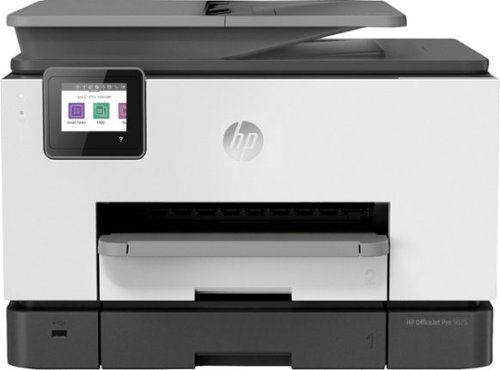
A revolutionary smart printer - even for high-volume jobs. Help save time with Smart Tasks shortcuts. Rapid speeds, full-ream paper capacity, Borderless print, and easy mobile printing. Count on seamless connections, and enhanced security. Save up to 50% on ink with HP Instant Ink. Prints up to 24 ISO ppm*, up to 20 ppm* in color.
Customer Rating
5
Excellent Small Office All-in-One Printer
on March 6, 2019
Posted by: rtbestbuy
from Bay Area, CA
The HP OfficeJet Pro 9025 All in One printer was clearly designed for small office use and pretty much perfectly hits the mark. It offers the speed, paper handling, and features and functions usually found in more expensive color laser printers. It could easily and cost-effectively be installed instead of a mono laser printer and color printer combo.
Did I say fast? It's really fast. Single sided black only documents print well above the 24pg/minute stated speed, I would guess closer to 30-35pgs/min. Text quality is excellent, even in draft mode. Color printing slows it down a bit, but it's still well within the spec'ed 20pg/min. Again, the color print quality is excellent. Rather elite performance for an inkjet printer. Didn't try a mac or iphone, but printing from Android, ChromeOS, or Windows was equally easy.
With two 250 sheet trays, the 9025 provides excellent paper capacity. Both trays expand to handle up to legal size paper, and one tray can be dedicated to envelops or photo stock, while the other handles everyday printing paper. I tried printing on #10 envelopes, photo stock, 3x5 index cards, and larger 7x10 envelopes, all without problem.
Copying and scanning are equally fast and versatile. The scanner scans both sides of the sheet in one pass, so there is no slowdown for duplex scanning. The 35 sheet ADF took both regular documents and a photo stack without issue. Scans can be stored as jpgs or pdfs and can be sent to a connected computer, email address, or a USB stick in the front facing USB port.
Didn't really try the fax function as I don't really have much use for it anymore. Faxes can be printed or stored locally in the printer and printed later. There is an option to forward faxes to an email address or store to a network folder, which really makes it much more usable in a small office.
Setup was a breeze. Control is through a 3" touchscreen with a very intuitive menu system. WiFi connected as soon as the SSID/Password was set, no problem, and the 9025 supports both 2.4 and 5Ghz bands, Yay!. The printer can also be connected through Ethernet or USB. The touchscreen can be used for standalone operation of the fax, scanner, printer and copier. There is an app, HP Smart, that is available for Android, IOS, Windows, and MacOS to control, monitor, and operate all the printer functions. And speaking of Android (my choice of phone os), the Smart app integrates nicely to make anywhere printing a reality.
HP has done a really nice job of 'Cloudifying' the printer, so that it can directly access network folders, Google drive, Dropbox, and some others. I suspect the list will grow. It supports a 'print from anywhere' function through an email address which I did not configure or try; not too sure I like the idea of opening a spam portal, but it can be locked down to only certain source email addresses. There is also a 'Smart Tasks' facility which is kind of a macro facility. It allows common tasks with multiple actions to be automated into a single command (see, think "Macro"). There is also an 'apps' interface that I suspect may be used to provide even more functionality.
The ink cartridges are high capacity. The 'xl' cartridges are about $90 a set list, and provide 1600 pages color or 2000 pages black, so about the same as a laser printer. HP has instituted an "Instant Ink" program, for a fixed monthly fee, you get so many pages/month printed, then they send you replacement cartridges. They claim it's up to half the cost of buying cartridges outright and certainly more convenient, but your mileage may vary.
Overall, the HP OfficeJet Pro 9025 All in One printer really sets the bar for small office printers. Highly recommended, I don't think you will be disappointed.
Mobile Submission: False
I would recommend this to a friend!
Share this review:


+6points
6of 6voted this as helpful.
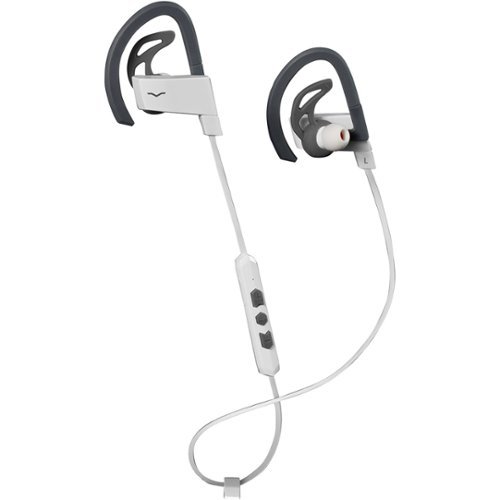
The V-MODA BassFit Wireless sport headphones have the juice to power you through the most demanding work outs. With over 11 hours of playback time, these lightweight, wireless headphones deliver heart~pumping bass and unparalleled clarity in a featherweight, sweat-proof package. The patent-pending TriFit design gives you the choice of 3 different fits, using sport fins, ear hooks or a combination of both to create the perfect fit for you and your active routine.
Customer Rating
4
Great Workout Phones, Good Sound, a Few Flaws
on January 26, 2019
Posted by: rtbestbuy
from Bay Area, CA
Right off the bat, let me say that I wanted to make this 4 and 1/2 stars, but it's whole stars only. I felt there were a couple of flaws that kept these Sportphones from real excellence. The V-Moda Bassfit bluetooth sportphones are necklace style in-ear earbuds that offer a comfortable and secure fit for working out and decent sound. Workout sportbuds have to be sweatproof and have to stay in your ear during exercise movement. This is where the Bassfit excel. They come with 4 different size eartips, 3 different size sport fins, and 1 pair of over-ear hooks. If these don't fit and stay in place, nothing will!
I got these for working out and they don't disappoint! Using them at the gym for stretching, cycling, stairmaster, and weights (both free & machines), they stay put and have never fallen out or even required pushing back into my ear. I wear glasses and the earhooks, which are flat, are comfortable through the session. I just recently tried using the sport fins instead of the hooks and the they also worked very well.
Pairing was very easy and the Bassfit can pair with two devices simultaneously, which I haven't tried. The controls are the best I've seen. There are 3 very well differentiated buttons with very positive feedback. The on-off button (push for on, hold 5 sec for off) also controls play/pause(1 push), ff/skip (2 push), rew/replay(3 push). It sounds complicated, but works really well and is easy. The other two buttons are strictly volume control and special functions (eg., pair with new device) in combination with the on/off button. The control module contains the microphone and is located only a few inches from the right earbud. This made it possible to drape the wire behind my neck. The buttons are easy to find by feel even when running.
The sound quality is good; Clear highs, decent bass, but the midrange seems to be lacking. I listen to rock or metal usually while working out and some of the punch just seems to be missing. The whole package is very light although the earpieces are a little more bulky than many earbuds. Volume can go very loud, and there is no ambient awareness. For the gym that's fine, but for running, cycling, or other outdoor activities they may be a bit isolating. The microphone doesn't provide sound isolation, but it's location close to the mouth made phone conversations very intelligible to the remote party.
Battery life is stellar. There is no indicator of battery level until you need to recharge (beeps), but I'm consistently seeing about 12 hrs out of a charge. One nice thing, the quick charge will give you 2-3 hours of playback with a 15 charge, which is about right for a workout.
The earpieces are magnetic, so you can stick them together around your neck like a necklace. Nice for getting to and from the gym, or when you stop to listen to something or someone.
The biggest downside, to me, was no app for controls or equalization. The sound quality was certainly adequate for workouts, but not stellar. The isolation from ambient noise is a concern for any activity where ambient awareness is a necessity, such as hiking or running. But for the gym, the V-Moda Bassfit really can't be beat.
Mobile Submission: False
I would recommend this to a friend!

Share this review:


+2points
3of 4voted this as helpful.
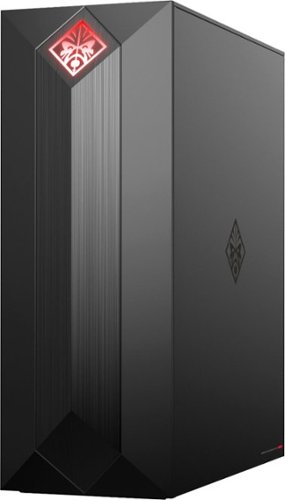
Experience great gaming with this OMEN Obelisk desktop computer. Its NVIDIA GeForce graphics and Intel Core i7 processor are suitable for virtual reality games, and the 1TB hard drive and 256GB solid-state drive provide extensive storage and fast boot times. This OMEN Obelisk desktop computer's case opens without tools for easy expansion.
Customer Rating
4
Decent, If Flawed, Gaming Computer
on December 16, 2018
Posted by: rtbestbuy
from Bay Area, CA
The HP Omen Obelisk Desktop is a really fast, capable computer with some significant limitations, as shipped, for gaming. This is the first off the shelf gaming system I've gotten; all my previous gaming systems have been custom built. It specs out nicely with an Intel I7-8700 and 16 gig of ddr4 ram, wireless-AC, Bluetooth 4.2, and lots of USB 3.1 ports. The power supply is an upgraded 500W unit which is adequate for this system, but don't plan on upgrading to a higher performance video card.
The case is a mostly metal mini-tower, with a glass side panel that lets the completely ornamental interior light shine through. The side panel drops down for interior access by pushing a button on the back. The front is a monolithic, angular styled (think obelisk) plastic piece with NO external bays. There is no internal DVD/BluRay player, which was my first surprise. Second surprise was the ridiculous keyboard and mouse supplied with the unit (see the pictures). Seriously, HP?!? Bring up the system, go through the Windows initial configuration and update procedure, remove the bloatware and system is ready to go. Bring up was really quick, the SSD really speeds up the boot and load times. It also makes uninstalling the bloatware really quick!
So, hook up an external USB DVD player that I had for my laptop and loaded up some older games (I'm an older gamer), along with Witcher 3 for testing. Replaced the keyboard and mouse with ones more to my liking. Monitor is a FHD(1920x1080) gaming monitor at 144HZ. Everything ran smoothly, Witcher 3 managed about 80 fps at the ultra setting, so the system handles current state of the art very nicely. Video editing, the other reason I got the system, was very fast and smooth. The processor, ram, ssd, and video card combination made for a very powerful system.
So why not five stars? The Obelisk is built on a microATX board with only two m.2 interfaces, one for the SSD and one for wireless; no expansion there. There are NO pci-e slots available for expansion; only the one pci-e 16 for the video card. No options to add a second video card, sound card, or network card. No DVD/BluRay drive and no front facing drive bays for a DVD/BluRay drive or other device. Only one unused internal SATA connector, which I guess is ok because there is only one open internal drive bay. It's a good thing there are lots of high speed USB ports available because that is the only expansion that is readily available.
There are only two memory slots, one open and one with the single 16GB module; so single channel memory access by default and not clear if dual channel can be enabled. I guess that it's good that you can expand past 16GB, but a motherboard with four simm slots and dual 8GB simms configured for dual channel access would have been preferable. The Nvidia card is a 3GB model, which has slightly lower performance than the 6GB model and 128 fewer CUDA cores.
Finally, the mouse is just a mouse and keyboard, in particular, was really disappointing. The keyboard is a compact keyboard with chiclet style keys, and the function keys REQUIRE that you press a fn key to get f1-f12. By default they perform the media control functions like a laptop, making it completely useless for gaming and annoying for any program which used the function keys. Plan on replacing the keyboard first thing.
These are not just minor annoyances with what could be a really fine system. As long as you can live with the minimal expandability, the system should perform at a reasonably high level for gaming or video editing.
Mobile Submission: False
I would recommend this to a friend!

Share this review:


-1point
1of 3voted this as helpful.
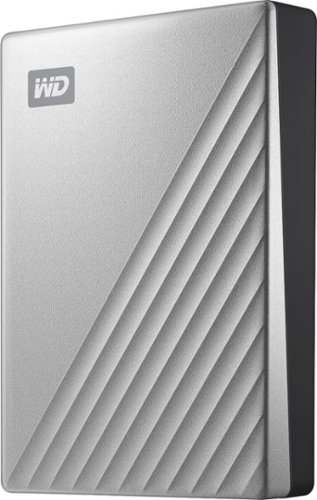
Move essential data across devices efficiently with this Western Digital My Passport Ultra External Portable Hard Drive. The drive uses USB 3.0 technology for quick read and write speeds, and the USB-C connector offers effortless plug-in options while boosting transfer rates. Abundant storage space for all types of media and applications. The backup software lets you automatically save works in progress at your preferred intervals. Password protection and 256-bit AES hardware-based encryption for added security.
Customer Rating
4
Hardware is Great, Software Unexceptional
on December 7, 2018
Posted by: rtbestbuy
from Bay Area, CA
The WD My Passport Ultra 4TB drive is an excellent piece of hardware for backup and archival storage. Unfortunately the provided software doesn't really measure up, which is a shame.
This is a commodity priced drive in a small, solid-feeling enclosure about the size of a double high 2.5" drive. The enclosure is sealed and appears very rugged. WD doesn't publish any specs on the actual hard drive itself, but it is pretty fast. It's a good choice for backup and archival secondary storage. The single connector is a USB-C connector that also powers the drive; no separate power brick. The supplied cable is a USB-C to USB-C cable with a USB-C-USB-A plug adapter.
I tested the drive with Atto and it quickly peaked out at about ~115MB/sec write and ~130MB/sec read, with encryption on. In comparison, the internal 7200rpm SATA drive peaked at ~150MB/sec write and ~165MB/sec read with no encryption. Using file explorer to copy directories of photos, videos, and music yielded similar results. So, all things considered, performance is quite good for an external drive.
Encryption requires a utility be installed to input the password for the encryption key and is currently available on Windows and IOS; Linux and Chrome users are currently out of luck. One very nice feature, the drive appears to be very low power for a performance drive; running it on my laptop didn't significantly shorten the battery life of the laptop. Very impressive.
The supplied software was a distinct disappointment (NOTE: This is a windows only review, for IOS your mileage may vary). The WD Discovery program ran extremely slowly on both the desktop and laptop on which I installed it. It's really a system tray app manager, allowing you to access the utility, security, and backup apps. It took a long time to launch, and once launched, started the other apps sluggishly. The utility and security apps let you see the drive status, put it to sleep, set the key password, etc. The Backup utility was atrocious. The initial backup took almost 2hrs to complete, for a drive containing about 400GB. By contrast, a full backup using Acronis (my backup manager of choice) took about 35min backing up the same drive to the Ultra 4TB. The WD Backup utility can then be run on a scheduled basis, copying any new or modified files to a separate archive on the drive. I'll stick with Acronis. WD makes a older version of Acronis available for download (for free) and I recommend this over the supplied backup utility; it's far faster and more versatile. BTW., the backup utility is supposed to be able to back up some cloud stores, but it seems to have problems with the Facebook authentication protocols and fails. Hopefully that will get fixed soon.
All in all, the hardware is a very solid drive that provides excellent performance with or without encryption. The supplied software was disappointing, but there are so many alternatives it really didn't detract much from the purchase. What with upgrading hardware, malware attacks, and simple laptop theft, the investment in this quality backup unit is well worth it.
Mobile Submission: False
I would recommend this to a friend!
Share this review:


+2points
2of 2voted this as helpful.
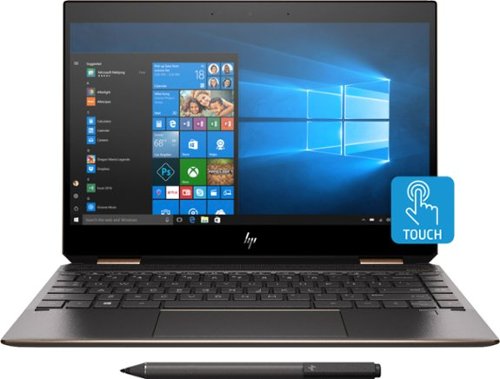
Experience smooth performance and flexibility with this 13.3-inch HP Spectre x360 convertible laptop. Featuring a 13.3-inch Full HD touch display and HP Digital Pen, this flexible laptop lets you write, draw and navigate the interface with precise touch controls. This HP Spectre x360 convertible laptop easily handles a variety of software with the power of an Intel Core i7 processor and 8GB of RAM.
Customer Rating
5
Leader of the Pack!
on November 28, 2018
Posted by: rtbestbuy
from Bay Area, CA
Over the last couple of years, HP has completely rethought their laptop line. The Spectre 360, a premium convertible ultrabook, has seen incremental improvements over the last couple of years that have resulted in a true leader. I've been using this laptop daily for the last 10 days and feature for feature, I don't think there is anything that compares to the new HP Spectre x360 13" 2-in-1.
First thing you notice out of the box is the beautiful, solid construction. There is nothing about this laptop that feels cheap or fragile. The next thing you notice is the weight, or lack thereof! At under about 2.7 lbs, it's easy to carry around all day. The multi-touch touchscreen is beautiful, bright and ultrasharp and protected by Gorilla Glass. It stretches edge to edge with no ugly plastic bezel. The keyboard has full size keys and is very usable. It is backlit with a couple of different levels of lighting, a nice touch.
The battery life is absolutely phenomenal! My usual routine involves about five to six hours actively on the computer daily. With the Spectre 360, I would do my usual routine, just close the lid between sessions to sleep the cpu. At the end of the day, I still had over half a battery left! HP claims 14 hours of battery life and I don't doubt it. As an experiment, I went two days without recharging overnight, and made it through with about 15% battery to spare.
I didn't think I would use the tablet mode much (a 13", 2.7 lb tablet? really?), but it was surprisingly useful. Window tablet mode actually works pretty well, although I haven't used the included pen much other than to try it out. However, for apps like Kindle and Flipbook, putting it into tablet mode and using the touchscreen interface worked very nicely.
The display is a full HD (1920x0180) touchscreen. The display scaling came default set to 125%. Setting back to 100% allowed the same scaling as my desktop screen with lots of room for program windows. The display was complete usable and readable by me even with the 13" screen.
Performance is definitely not an issue, with an eighth gen I7-8565U (4 cores, 8 threads) running up to 4Ghz. 8GB on board ram is more than enough for most uses, and the SSD (256GB) is very fast. One note however; as with almost all ultrabooks, the ram and disk are not user upgradeable. You should select the sizes that you feel you need without thinking you can upgrade later.
The keyboard has a fingerprint reader built-in which can be used with Windows hello for login instead of a passphrase. There is also a full HD camera, which has excellent video for chatting, that can also be used for facial recognition for login. The camera has a power switch on the side of the chassis if you're paranoid about someone using it to see you.
There are two USB-c connectors and either one can be used for charging the laptop, which is very convenient. Additonally, HP added a USB3.0-A connector for legacy (really most) usb devices rather than having to carry a usb-c to a converter cable. There is the ubiquitous mini-jack for audio and a slot for a micro-sd card rounds out the list of connectors. Bluetooth works very well with headphones, phone, speakers, and a couple other devices. The latest bluetooth version, 5.0, is supported, which enables multiple device connections at once and higher transfer speeds.
All in all, I am really, really pleased with the new HP 360 Spectre 13 2-in-1 ultrabook and highly recommend it.
Mobile Submission: False
I would recommend this to a friend!
Share this review:


+1point
1of 1voted this as helpful.
rtbestbuy's Review Comments
rtbestbuy has not submitted comments on any reviews.
rtbestbuy's Questions
rtbestbuy has not submitted any questions.
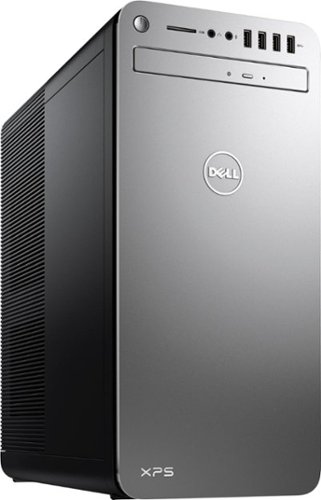
XPS Desktop - Intel Core i7 - 16GB Memory - NVIDIA GeForce GTX 1050 Ti - 2TB Hard Drive + Intel Optane Memory
Since there is no graphics card, I'm curious to the max resolution. My Dell monitor is capable of 2560x1440. Will I need an add on card to get this resolution?
Max resolution of the Intel HD 620 video controller is 4096x2304.
8 years, 10 months ago
by
rtbestbuy