


rtbestbuy's stats
- Review count182
- Helpfulness votes217
- First reviewNovember 22, 2014
- Last reviewJune 2, 2026
- Featured reviews0
- Average rating4.5
Reviews comments
- Review comment count0
- Helpfulness votes0
- First review commentNone
- Last review commentNone
- Featured review comments0
Questions
- Question count0
- Helpfulness votes0
- First questionNone
- Last questionNone
- Featured questions0
- Answer count11
- Helpfulness votes29
- First answerAugust 15, 2017
- Last answerOctober 5, 2021
- Featured answers0
- Best answers3
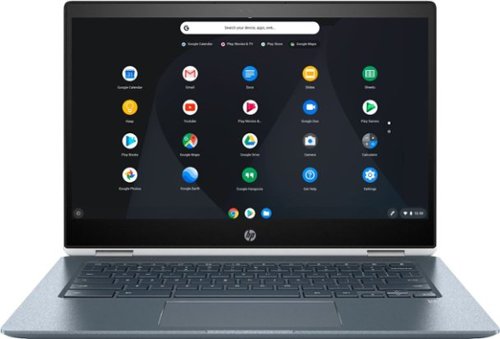
Stream your favorite media on the go with this HP Chromebook touchscreen laptop. The notebook has 8GB of RAM and an Intel Core i3 processor so it's easy to use Google Play apps for everyday productivity. This HP Chromebook touchscreen laptop has a modern 360-degree design and 13-hour, 30-minute battery life for work on the go.
Customer Rating

5
Chromebook With A Future!
on November 21, 2018
Posted by: rtbestbuy
from Bay Area, CA
I've been using the HP Chromebook x360 Convertible 14 for about 2 weeks. As a longtime Windows and Linux user, I was always somewhat skeptical of Chromebooks. They were small, cheap tablets with keyboards, useful for limited web browsing, playing some simple games, and that was about it. Boy, has that changed!
Right out of the box, I was impressed with the solid construction. Very thin chassis, solid hinges, metal top and bottom, very durable. HP obviously carried over a lot of their midrange laptop experience into this Chromebook. There are two usb-c ports, either can be used for charging, and a usb-a port which is really nice for legacy device connections without an adapter. Buttons for up-down volume control, a headset jack, and slot for a micro sd card round out the external connections.
Powered it up, it came up very quickly (more on this later) with a absolutely gorgeous screen. The keyboard uses full size, backlit keys, really nice. Logged into my Google account and I was off and running. One really nice thing, there were absolutely no crapware or trial packages preloaded on the Chromebook. No waiting for updates or unistalling all the junk you don't want. Once up and running, I started loading apps from the Google play store and the Chrome store. Lots of office, utility, and entertainment apps later, I still have plenty of disk left and I'm doing 95% of what I do on a Windows machine.
ChromeOS is very fast to power up and down and especially fast on this device. Open the lid and (literally) 10 seconds later you're logging in. Close the lid, it goes to sleep. Open it again and you're right where you left off. Flip the screen all the way around and you have a 14 inch Android(ish) tablet.
In 'laptop' mode you can have multiple windows open scattered all over the screen. I scaled the display back from the default so that it looks like a 1920x1080 display. With a 14 inch screen the fonts are small, but quite usable, even with my old eyes. The combination of an eighth gen Intel I3 and 8 gig of ram made this thing feel like a Windows machine running on an I7. I had about 20 Chrome tabs open, Caret (great Notepad++ clone!), Outlook, and Word all open and not a hiccup. And even a Linux virtual machine running! The builtin camera and microphones worked well for video chatting. Netflix looked great, we tented the Chromebook and used the builtin speakers. Just for grins, I bluetoothed a wireless speaker and used that for the audio playback.
I only used it a little in tablet mode as I almost always found it easier to type on the keyboard and the touchscreen worked equally well in either mode. In tablet mode, it follows the Android paradigm where everything is full screen, which is fine on a phone, but is kinda wasted on a 14 inch tablet.
The negatives are pretty minor. I would have liked to see a larger local disk, maybe 128Gig. Google gives new Chromebook purchasers 100Gig of storage free for 2 years, and adding a 128 or 256 gig microsd card to store music and videos is always a possibility. The only other negative was the lack of a pen. I really hope they add that as an option, it would have made the tablet mode much more agreeable.
Summary:
After two weeks, I'm sold. At about 3.5 lbs, it's very carryable, the 14 inch screen is really the perfect size, and the keyboard is great. I never ran into a situation where I couldn't use the Chromebook to do what I wanted to do. Battery life is stellar, I would go two days (about 12 hrs of use) before charging and never shut down, just put it to sleep in between use. Most notably, I never had a crash or hang in the entire two weeks.
After two weeks, I'm sold. At about 3.5 lbs, it's very carryable, the 14 inch screen is really the perfect size, and the keyboard is great. I never ran into a situation where I couldn't use the Chromebook to do what I wanted to do. Battery life is stellar, I would go two days (about 12 hrs of use) before charging and never shut down, just put it to sleep in between use. Most notably, I never had a crash or hang in the entire two weeks.
Mobile Submission: False
I would recommend this to a friend!
Share this review:


+11points
20of 29voted this as helpful.

Dive right in and do something amazing with your photos. Auto-generated photo and video slideshows and collages are created just for you and delivered upon launch. Get up and running quickly with the new home screen - see what's new since your last version, discover fun things to try, and get inspiring ideas, help, and tutorials. Effortlessly organize, edit, and create thanks to photo and video automation powered by Adobe Sensei AI technology. Try artistic techniques and effects with 73 step-by-step guided edits. Easily make movies in the redesigned Quick Edit mode. And share your favorite memories in everything from fun memes and animated GIFs to printed artwork and full-length movies.
Customer Rating

3
Good Automation, But Some Serious Deficiencies
on November 7, 2018
Posted by: rtbestbuy
from Bay Area, CA
First, the disclaimer, this is a Windows only review, running on a relatively high end system(I7, 16gig ram, Nvidia 1060, ssd). Premier Elements and Photoshop Elements (2019) are available for both Macs and Windows. There are some differences between the two versions.
Adobe has long split it's product line into the home/consumer version (Elements) and the pro/Creative Cloud version. Adobe's pricing for Elements ($100 for either, $150 for the bundle) makes the bundle a no-brainer, especially now with the mix of video and stills produced by phones and action cams. The previous version I've used was several years and versions removed. A lot has changed and there are a lot of new features.
The user interface is pretty consistent across the product line, once you figure it out. As with all things Adobe, there's the Windows way, the Mac way, and the Adobe way. The new home screen provides access to all functions and apps, which is very convenient. The new Quick Edit feature streamlines a lot of tedious editing tasks. You can select Smart Trim or SceneLine. Smart Trim can automagically select the most interesting clips in a video stream, which really cut down processing time. The Auto Creations also worked well for me, but it seems to be focused on faces and action. Videos with little motion or face recognition seem to bore it. SceneLine allows you to bring in clips and photos to create a single move and is extremely well done. The built in asset manager app, Organizer, provides a nice way to sort and organize media.
The package is not without warts however. It now requires an Adobe Creative Cloud account and login, or it reverts to a trial, which is both intrusive and annoying. It's especially annoying if you use other Creative Cloud apps with a different corporate ID. A couple of codecs (HEIF and HEVC) are missing from the Windows version, which makes GoPro editing a two step process (convert with another program, then edit). There is no 360/VR support or file support for either spherical or rectilinear video. This is a serious failing considering the consumer 360 cameras available (eg., GoPro, Rylo, Insta360, Samsung). There is no support for multicam editing (eg., synchronized video streams from different angles) which would be nice. There is no screen capture or video stream capture capability. And finally, the performance is on the slow side, even with a relatively high powered system.
Overall, what the Elements package does, it does well, if a bit slowly. Hopefully, Adobe will address the deficiencies in an update soon and make this a real winner.
Mobile Submission: False
I would recommend this to a friend!
Share this review:


+3points
3of 3voted this as helpful.
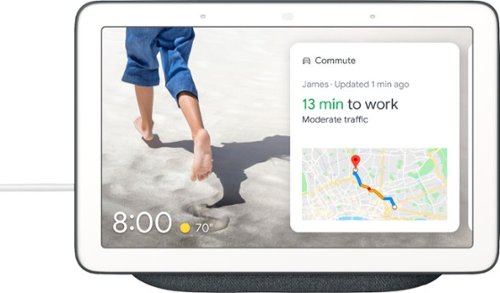
Enjoy interactive streaming with this Google Nest Hub. With the built-in Google Assistant, you can view your calendar, receive alerts and reminders, and control devices from the single dashboard, and voice control lets you access other smart features. This Google Nest Hub lets you listen to music from Spotify and Pandora and view YouTube content. "
Customer Rating
5
Google Home Hub - I really like it!
on November 3, 2018
Posted by: rtbestbuy
from Bay Area, CA
The Google Home Hub basically adds a touchscreen display to the Google Home speaker and really significantly expands it's functionality. The Hub ties the increasing smarter Google Assistant to the Google Home app on your IOS or Android phone to present a simple way to control and monitor your home. All the voice control of Google Home plus camera monitoring, reminders, alarms, alerts, recipes, weather, news, traffic and directions, and of course, YouTube. It's also a great digital photo frame, scrolling through (configuration dependent) your Google photos or stock images.
It's small enough to put just about anywhere without being intrusive, easily fitting on a counter, desktop, or headboard. While I've seen some criticism of the screen size, I found it just about perfect; I have TVs or tablets for movies. It thankfully does not have a camera, so there is no worry over being spied upon, and you can even turn the microphone off with a physical switch (for the uber paranoid). While the lack of a camera precludes video calls, most of the competitors with cameras can only use their proprietary video calling, so you can only call to other similar devices. The Google Home Hub does allow you to make standard voice calls.
The home control interface is dead simple: Add the devices you want to Google Home, put them in the appropriate room, then you can say "turn on the bedroom lights", or "view the front porch". The latter is really useful, being able to see who's at the door from the kitchen or bedroom. Google Assistant really works well. Setup was equally simple, controlled by the Google Home app on your phone or tablet. Very quick and straightforward.
The negatives:
The speaker is really not audiophile quality, although it is pretty good, certainly good enough for casual listening. If you really want audiophile, simply Cast to your really good speakers.
The capabilities are expanding, but the Hub is not a generic Android device that can download apps from the Play store, so what you see is what you get.
While I don't miss the built in camera (at all!), some may like a device with video calling.
Overall, Google has a winner on their hands. After a week I found myself using it more and more, and wishing I had another one or two scattered around the house. I'm sure I'll find it even more indispensable as more features are added.
The speaker is really not audiophile quality, although it is pretty good, certainly good enough for casual listening. If you really want audiophile, simply Cast to your really good speakers.
The capabilities are expanding, but the Hub is not a generic Android device that can download apps from the Play store, so what you see is what you get.
While I don't miss the built in camera (at all!), some may like a device with video calling.
Overall, Google has a winner on their hands. After a week I found myself using it more and more, and wishing I had another one or two scattered around the house. I'm sure I'll find it even more indispensable as more features are added.
Mobile Submission: False
I would recommend this to a friend!
Share this review:


+1point
1of 1voted this as helpful.
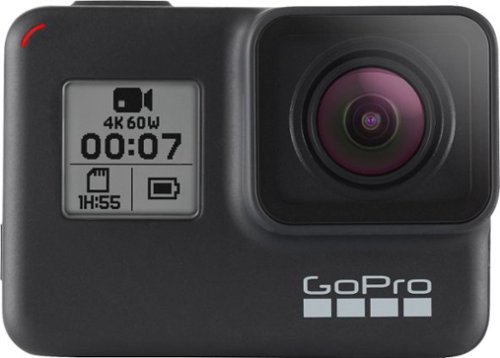
Film underwater scenes in 4K with this 12-megapixel GoPro HERO7 action camera. Its HyperSmooth stabilization feature lets you capture shake-free videos, and it withstands submersion up to 33 feet without a waterproof case. Stream captured videos from this rugged GoPro HERO7 action camera on Facebook Live via the companion app.
Customer Rating
5
Hero7 Black: Feels Like a Giant Leap Forward
on October 2, 2018
Posted by: rtbestbuy
from Bay Area, CA
The GoPro Hero7 Black looks a lot like the Hero6, uses the same image sensor and processor, same solid construction and waterproofing, but feels like a whole new camera. The hardware has been changed very little, but the changes make for a significant improvement in capabilities. There are a whole host of new features that make this a significantly more powerful and useful camera.
Top of the list is "Hypersmooth", a new image stabilization mode that provided near gymbal quality stabilization. It really does provide a much smoother video image. It was truly stunning. While we're at it, the video quality is improved with much better color saturation and sharpness. The latest firmware update added 4K/60fps hypersmooth stabilization, making 4K/60fps video actually usable(unlike the Hero6). Yay! There are some new resolutions available as well, with some odd choices for 4:3 video. But the default 1440P/60fps worked very well and seemed an excellent compromise.
The new TimeWarp video, which everyone else calls hyperlapse, works much better than the Hero6 time-lapse, and eliminates the frame by frame strobe effect. There is also a new UI which is much simpler and more intuitive. In the new UI GoPro has added a Timed Clip feature, to record a short 15 or 30 second clip. They have added a self timer for photos that has been a feature in cameras for the last 50 years, but missing until the Hero7. And, Thank You!, they added a portrait orientation, turn the camera 90 degrees and the image rotates just like a smart phone. Still photos seem much more saturated and color true, and there is a new SuperPhoto mode that is kinda like HDR on steroids. It doesn't smear action photos the way HDR can. Pretty cool.
The audio is also much improved, there was almost no wind noise while recording on a road bike and seems much clearer. The voice command response seemed to improve with each firmware update.
I didn't try the livestreaming, but it is available in 720p only, with backhaul through your phone or a wifi network. But it's there. And the Hero7 Black really is black, with a big 7 on the side; the funky grey is gone. Battery life was between an hour to an hour and a half, using the same batteries as the Hero6.
I should say I was using it with the Android app, which worked very well. The in app advertising is a little annoying, but can be ignored.
The only real negative for me was having to remove the Hero7 from its mounting frame to change or charge the battery. Would have been nice to be able to at least charge without disassembling things.
Overall, GoPro has a winner on their hands. The Hero7 is a lot of fun, easy to use, versatile, and with significant improvements over the Hero6. Some really big features and lots of little tweaks make this the new action cam standard to beat..
Mobile Submission: False
I would recommend this to a friend!
Share this review:


+3points
3of 3voted this as helpful.
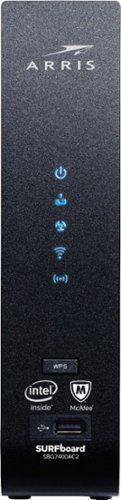
The SURFboard SBG7400AC2 combines a DOCSIS 3.0 Cable Modem with an AC2350 Wi-Fi Router. The SBG7400AC2 is equipped with four 1-Gigabit Ethernet ports and provides Wi-Fi speeds up to 2350 Mbps. It is compatible with major US Cable Internet providers including Cox, Spectrum, Xfinity and others. It's best for cable internet speed plans up to 400 Mbps. Setup is quick and easy with the SURFboard Central app.
Customer Rating

4
Excellent Cable Router, But Security - Not So Much
on September 10, 2018
Posted by: rtbestbuy
from Bay Area, CA
Arris has done a good job with the SBG7400AC2 hardware and functionality. In the past, I have avoided all in one modem/routers as they just don't provide the range of features available in discrete devices. With one exception, the SBG7400AC2 does an excellent job of marrying the two devices without feature loss.
It is very easy to set up and configued easily with my cable provider (Comcast). Once connected, I initially set it up in bridge mode (as a cable modem only) to test the speed against my older modem using my existing router. It provided about a 10% improvement on a 250mb line, so pretty excellent. Once configured as a router, it was very quick, about on a par with the mesh router against which it was being tested. Speed is definitely not an issue with the SBG7400AC2.
Configuration using a (Windows) laptop was very intuitive and actually pretty well documented with help bubbles using the web interface. The router supports IPv4 and IPv6 very nicely and is very quick. The wireless coverage was surprising, actually on a par with an external antenna unit that I was able to test against. It was not quite as quick as the mesh router that is currently installed, and of course the mesh wireless routers were able to provide a much more solid signal to the far corners of the house.
The utilities include the usual network test tools and a wifi analyzer that provides a graphical display of channel usage and all the wireless networks SSIDs around you. Very nice. There is a USB port on the front that is convenient for temporary devices, like a memory stick. A USB port on the back for permanent devices, like a printer or drive would have been nice as it would keep the cable clutter down.
The one place where it falls down is in security. The basic firewall functions can be configured from the web interface, but the parental controls and the McAfee Home functions require you install a phone (IOS or Android) app. The app didn't work on two different Android phones I tried. From the Google Play page, I could see I wasn't the only one to have this problem. The McAfee Home is a bit of a scam as well in that the McAfee client licenses are only good for 90 days. There is an additional security issue that is not as obvious. There is no auto update or update check. Updates are controlled by the cable provider, Arris has no real control over it.
Overall a really fast all in one unit with a very nice, very capable user interface. Too bad the Android app kind of soured things.
Mobile Submission: False
I would recommend this to a friend!
Share this review:


0points
2of 4voted this as helpful.
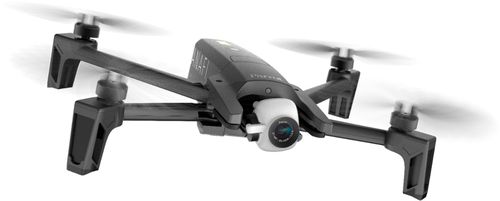
Take in the scenery with this Parrot ANAFI drone. The robust, compact design lets you carry it wherever the trail takes you, and the drone unfolds easily when it's time for flight. The camera captures beautiful 4K images and video, and this Parrot ANAFI drone keeps your footage smooth with its three-axis image stabilization.Fly Responsibly:Before takeoff, update all software and firmware, and read the instructions thoroughly.See the FAA website for registration requirements and information about flying a drone safely: https://www.faa.gov/uas/getting_started/. Additional state or local requirements may apply. Check your local jurisdiction. The following websites may help you make informed decisions about flying your drone: www.knowbeforeyoufly.org and www.modelaircraft.org.
Customer Rating
4
Good Photo Drone, Really Superior Camera
on September 7, 2018
Posted by: rtbestbuy
from Bay Area, CA
Parrot has done a good job of packing the Anafi with features found in more expensive drones, but with a couple of odd compromises. It has an absolutely stellar 4K camera, probably the best in this price category. The camera has excellent stabilization and is HDR capable. Parrot is actively improving it with updates and adding to it's capabilities. It's definitely the strength of the platform. The camera is capable of 180 degrees of swivel vertically allowing photos and video from underneath (think bridges) as well as above, which is also unique in this class. The zoom is not an optical zoom, but it is 'lossless', meaning that they use the oversize image sensor to provide digital zoom without any image loss. It's very effective.
The Anafi is relatively small and lightweight, but very sturdy. The weight reduction is the result of a lot of carbon fiber construction, which should hold up well. It seemed to handle wind pretty well. In winds gusting 10-15mph, it barely drifted at all. Which is good, because it doesn't have any obstacle avoidance built in and wind drift would limit it's ability for close inspection. The light weight also contributes to it's long flight time, with at (claimed) 25 min is also best in class. I was able to get a 20 min test flight before taking it in for landing. The Anafi is also pretty quiet, a lot quieter than other drones that I've experienced. And it's more of a whoosh than a roar. At 50 ft, it's barely noticeable, which should make for happier neighbors.
The Anafi has a lot of configuration options. By default, it comes in a 'beginner' mode which limits speed, climb, banking, and tilt. As you get more confident with the controls, you can change the limits to increase performance, making it a good choice for the beginner or experienced drone pilot. Which brings us to the controls: There is a the traditional controller which connects to a smart phone/tablet. I use a Samsung S8 and Android, so I can't speak to the IOS app except that Parrot provides it. The Android app can be used with the controller or standalone, which is kind of nice. The range on the controller and video feed worked well up to about 300', I didn't really try to go past that. I really liked the controller, it felt good in my hands.
The downsides to the Anafi are few, but notable. There is no obstacle avoidance, which is surprising in this price class. The battery is fixed in a removable part of the body and proprietary. An additional battery (almost a necessity) is expensive ($100). A USB-C charger is required and is NOT included. Parrot has chosen to make some features (so far, follow along and planned flight) in-app purchases for $17.50 each, although they seem to go on sale for $.99 every once in a while. The included case fits the drone only, which maybe enough room for a memory card and extra propellors. You'll need to buy a separate case for the controller and (not supplied) extra battery, charger, etc. And it's good that an extra set of blades (supplied with the drone) fits in the case, because the lack of obstacle avoidance pretty much ensures you'll need them.
In short, the Parrot Anafi is definitely worth your consideration. For a blogger, action photographer, real estate photographer, or just a hobby flier, this would be an excellent fit in spite of it's shortcomings.
Mobile Submission: False
I would recommend this to a friend!
Share this review:


+1point
1of 1voted this as helpful.
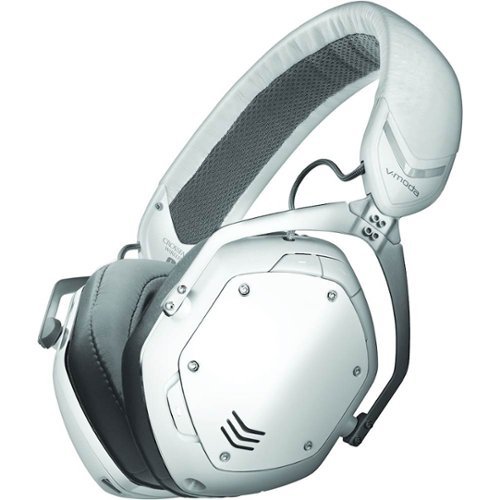
Listen to your favorite songs, get immersed in your favorite video game, and even interact with your classmates/coworkers over video chat with the V-MODA Crossfade 2 Wireless CODEX headphones. The durable metal-core headband provides all-day wearable comfort, and the 50mm dual-diaphragm drivers deliver a wide soundstage with balanced sound signature. Lastly, experience up to 14 hours of wireless freedom in CD quality audio, and unlimited playback in wired mode to fuel your creativity. Gaming System compatibility: Xbox Series X|S (wired), Xbox One (wired), Playstation 4 (wired), Playstation 5 (wired), Nintendo Switch (wired), PC and Mac
Customer Rating
4
Good Headphones, Pricey, Missing Modern Features
on August 28, 2018
Posted by: rtbestbuy
from Bay Area, CA
Sound quality is the ultimate deliverable for headphones and is the one aspect where the Crossfade 2 excels, especially when used wired. The clarity, crispness, and detail are all absolutely excellent. Bass is somewhat pronounced, but not enough to overwhelm the mids and treble. The sound quality using bluetooth is excellent, and wired is even better. The wired connection bypasses all the codex processing and connects directly to the drivers. I was surprised that the difference was detectable.
Build quality is very good, and the headphones should be plenty durable. The earpads are replaceable (although not easily) which is good because I suspect a number of purchasers will opt for the XL earpads. The standard earpads are rather small. Comfort is so-so, I managed to go about an hour max before I had to take them off and take a break, partly due to the weight and partly due to the pressure on the side of my head. These just felt heavy on my head, especially when used as wired headphones.
The controls are located on the right earphone, are logical and well differentiated, probably the best set of controls I've experienced on a headset. I don't understand why so many headphone makers insist on tiny, flat, nearly identical buttons, or worse, touch sensitive controls. The buttons are large, easy to find, and simple to use.
The problem with the Crossfade 2 headphones is all the features that it is missing, and these are rather numerous in this price category. The specifications are non-existent for the bluetooth version or the ipx (moisture resistance) ratings. I would guess the bluetooth is either 3.0 or 4.0, but a bit antiquated. The documentation doesn't list the number of pairings it supports, but implies that it can support only two, which is rather weak. Although there are 'moisture vents' in the case, I would not use these for serious workouts. There is no claim of 'sweat proof' or 'sweat resistant'.
The 'Passive Noise Cancellation' really means that the earpads seal out external sounds. There is no means to 'tune' the noise cancellation to allow sounds like local conversations or the horn of the car that almost hit you. There is no app to provide controls, or tune the equalization curve, or to update the firmware. There is no auto power off timer or auto pause when the headphones are removed. The usb port is a charging port only, it can't be used as a data/audio connection.
Call audio was quite good and sounds in both ears, but the microphone has no noise cancellation and picks up everything. Be prepared to go find a quiet, wind free corner to have an intelligible conversation. This also means that if you're gaming at home, you're probably good, but if you're gaming in a group (friends, tournament), chat will be a problem.
I'm giving the Crossfade 2s four stars largely due to the sonic performance, which is absolutely top of the line. If you're looking for great sounding wired headphones that can be used with bluetooth devices occasionally, you should definitely consider the V-Moda Crossfade 2s.
Mobile Submission: False
I would recommend this to a friend!
Share this review:


+4points
4of 4voted this as helpful.

Watch classic and modern flicks on this Samsung Blu-ray player. It supports 4K televisions and monitors for enjoying exceptional picture quality, and its HDR technology delivers deeper contrast and improved details. The built-in Bluetooth on this Samsung Blu-ray player lets you watch content on your mobile device while it's playing on another display.
Customer Rating
5
Media Hub With a UHD Blu-ray Built In
on August 1, 2018
Posted by: rtbestbuy
from Bay Area, CA
The Samsung UBD-M9700 may seem a bit pricey, but it offers an amazing array of options and replaces an array of devices. The first measure of any player is the video quality and the M9700 doesn't disappoint. This is the first Blu-ray player I've seen that makes the UHD discs worthwhile. The improvement in playback of UHD media and upscaling quality of FHD media was quite noticeable.
Setup is very simple, even simpler since I was connecting to a Samsung UHD tv. Connect power and HDMI, go through the initial setup routine to connect wifi (or ethernet), and you're pretty much ready to go. You can create a Samsung account, which allows you to save password across accounts. Setup your streaming apps and accounts and you're done. There are a couple hundred apps for video and music streaming services, so the need for another box pretty much goes away. As is typical these days, only a quick start guide is included in the box. Make sure to download the full manual from Samsung. Construction quality is solid.
The M9700 can also play CDs, mirror your Android phone or tablet's screen, and play videos (and photos) from either a USB stick or network store. It features Control4 SSDP and integrates nicely into home automation schemes. One really nice thing, if you have a 360 camera, such as the Samsung, Insta360 or Rylo, it will allow you to play back and pan through the video using the remote.
Cons: The only minuses are that it doesn't support 3D and it doesn't include Dolby Vision, opting instead for HDR10+. 3D never really caught on, but the lack of Dolby Vision may prove to be a minus.
Overall, an incredibly satisfying, if somewhat overwhelming, selection for a media hub/Blu-ray player!
Mobile Submission: False
I would recommend this to a friend!
Share this review:


+8points
8of 8voted this as helpful.
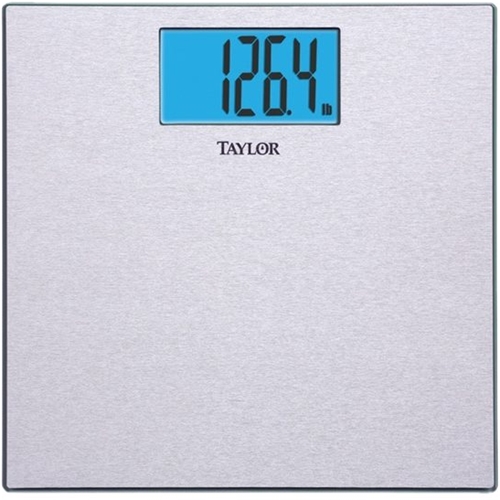
Manage your health with this Taylor digital scale. It has a textured, nonslip surface for safety, and the tempered glass is strong and durable. The device accommodates up to 400 lbs. and displays accurate readings on a large LCD screen. The instant-on function on this Taylor digital scale makes it simple to weigh yourself.
Customer Rating
5
Accurate, Inexpensive Digital Scale
on July 9, 2018
Posted by: rtbestbuy
from Bay Area, CA
Verified Purchase:Yes
This is your basic digital scale. The display is bright, readable, and doesn't stay on forever, or take forever to get to your weight. There's no memory or bluetooth, or anything like that. The weight is accurate, at least as accurate as the gym and my Dr's office. It seems well constructed, no obviously flimsy parts.
If what you want is to weigh yourself in the morning or evening and know that the reading is true, and don't need/want to track it on your phone or fitness device, this is the scale for you.
My Best Buy number: 2013577562
Mobile Submission: False
I would recommend this to a friend!
Share this review:


0points
0of 0voted this as helpful.

Philips Avance Collection Airfryer XXL, Twin TurboStar with Fat Removal Technology- Fry healthy with up to 90% less fat
Customer Rating
3
Almost Excellent Air Fryer, One Serious Flaw
on July 2, 2018
Posted by: rtbestbuy
from Bay Area, CA
The Philips Airfryer XXL is almost perfect. The exterior stays cool enough to touch even during high temperature cooking, it's large enough to cook for four easily, it cooks very evenly, and everything that gets dirty goes into the dishwasher. It is large, but takes up a reasonable amount of space on the counter. I liked the idea of 'analog' controls (set the temperature you want, turn the timer knob to the minutes to cook, done). Simple, easy, peasy.
Well, almost. Turn the timer knob too far, say 30 min. instead of 20, and your only option is to either wait 10 min or pull the food drawer out with 10 min left. There is no other way to turn the unit off, or to reduce the time to cook, short of unplugging the unit. Unplugging the unit appears to stop the timer as well, so any time is left for the next cooking session. Sigh... This is a safety issue as well as an inconvenience and, I think, a serious design flaw. I might be willing to forgive this in a unit costing (much) less, but considering the relatively small difference in price I would opt for the digital version of the Philips Airfryer. Too bad because it did an otherwise good job.
Mobile Submission: False
No, I would not recommend this to a friend.
Share this review:


+3points
3of 3voted this as helpful.
rtbestbuy's Review Comments
rtbestbuy has not submitted comments on any reviews.
rtbestbuy's Questions
rtbestbuy has not submitted any questions.
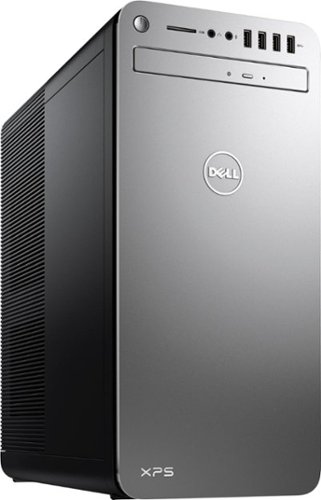
XPS Desktop - Intel Core i7 - 16GB Memory - NVIDIA GeForce GTX 1050 Ti - 2TB Hard Drive + Intel Optane Memory
Since there is no graphics card, I'm curious to the max resolution. My Dell monitor is capable of 2560x1440. Will I need an add on card to get this resolution?
Max resolution of the Intel HD 620 video controller is 4096x2304.
8 years, 10 months ago
by
rtbestbuy