


rtbestbuy's stats
- Review count182
- Helpfulness votes217
- First reviewNovember 22, 2014
- Last reviewJune 2, 2026
- Featured reviews0
- Average rating4.5
Reviews comments
- Review comment count0
- Helpfulness votes0
- First review commentNone
- Last review commentNone
- Featured review comments0
Questions
- Question count0
- Helpfulness votes0
- First questionNone
- Last questionNone
- Featured questions0
- Answer count11
- Helpfulness votes29
- First answerAugust 15, 2017
- Last answerOctober 5, 2021
- Featured answers0
- Best answers3
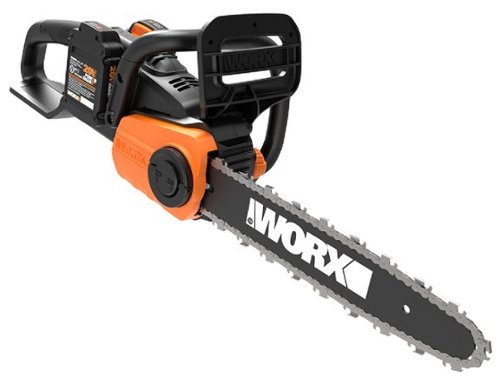
Gas-like performance without all the drawbacks of gas. That~s what the Worx 40V Power Share 14~ Cordless Chainsaw gives you. We~ve doubled the volts of our standard Power Share tools and made a chainsaw powered by two 20V batteries. Double the run time and upgraded performance but still with cordless convenience and without the smell or expense of gasoline. We~re able to achieve this on account of the saw~s high-efficiency brushless motor. As part of the Power Share platform, it uses the same batteries as every other tool, outdoor power and lifestyle product in that family. It~s more durable and uses less battery than a motor based around a brush design. It spins the 0.043~ gauge chain, with a 3/8~ pitch, at 26ft/s. So you~ve got all the power you need to perform every regular chainsaw job. Cut 26~ diameter logs on the ground or 13~ diameter trees that are still standing, for instance. Auto-tensioning and auto-oiling systems keep the bar and chain running at peak performance throughout the entire life of this tool. And on-board battery charge indicators, and oil-tank markings, let you know when you~ll need to recharge or refill the oil. Plus, the quick-stop chain brake adds an extra level of safety to this saw, so you~ll know you can always shut it down at a moment~s notice.
Customer Rating

5
Nice Little Chainsaw!
on October 24, 2023
Posted by: rtbestbuy
The Worx 14" cordless chainsaw is a pretty nice package. It is self-lubricating and auto tensioning. It comes complete with two 20v/2AH batteries and a charger. There is no case or storage bag. I've used gas and corded electric chainsaws in the past, but this was my first cordless chainsaw. We have about a dozen fruit trees and a couple of shade trees, so I don't need a chainsaw often, maybe once or twice a year. Gas chainsaws are noisy, smell, and gum up if you don't start them often. Corded electric are quiet, but you have to deal with a cord.
Out of the box, you get the two batteries charging, run out and get some chain oil which is not included, grease the bar, add oil to the lubrication reservoir, set the chain tension and you are set to go. You will need appropriate safety equipment, goggles, and gloves. Safety first! First thing you'll notice is that the Worx is quiet. You hear the chain, but that's about it. Your neighbors will appreciate it.
Out to the trees, I was able to thin the trees, branches to about 3" thick, on one battery charge. I was surprised at how long the batteries were able to power the saw. I was out for over an hour going from tree to tree and the saw kept running. The saw is lighter than a comparable gas chainsaw and balances nicely. The next day I helped a neighbor cut back their mulberry tree, which had grown tall enough to shade our roof and solar. A hand saw wasn't going to do it...
The only downsides to the Worx is that the batteries are proprietary, as with all battery powered tools. The good news is that the batteries can be used across the Worx line. The batteries do take about an hour to charge from fully depleted. Overall, though, I'm very pleased with the Worx cordless chainsaw. If you're considering a cordless chainsaw, definitely add the Worx to your short list.
I would recommend this to a friend!
Share this review:


0points
0of 0voted this as helpful.
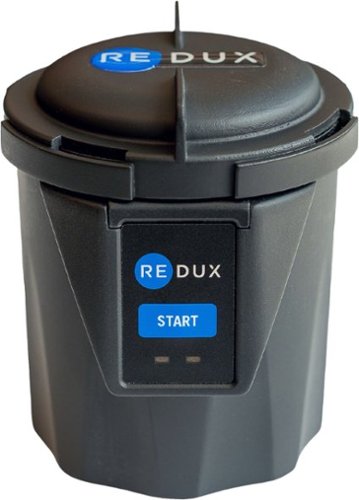
Moisture presence is inevitable in your hearing devices. This is proven to impact the sound quality and word understanding for those impacted with hearing loss. Moisture is also the #1 reason hearing devices need repair. Redux is a science based complete moisture removal system, backed by 70 patents and used by thousands of Hearing Care Professionals worldwide. Redux Home brings professional-grade drying to your home, so you can be most proactive in maintaining your devices' performance and longevity. Whether you just bought your first devices or have used them for years; hear how Redux makes your hearing devices sound brand new by purchasing today!
Customer Rating

4
Simple, Effective, Pricey for Active Individuals
on October 17, 2023
Posted by: rtbestbuy
Summary: Redux Professional Grade Home Hearing Aid Dryer is simple to use, compact, and very pricey. For active individuals who wear hearing aids and sweat, it may be very beneficial.
I'm old and I've been wearing hearing aids for several years. More of my friends are getting them. I've also noticed more people in their 30's and 40's getting them as well. I am a cyclist and a gym rat and wear hearing aids during both activities. The Redux Professional Grade Home Hearing Aid Dryer looked like a really good option for prolonging both the performance and life of my hearing aids.
I've had the Redux Dryer for a little over a week and have used it twice. I've also invited a few friends to try it for comparison. We have all used either the dessicants or the cheap home dryers (disclaimer: this is my first dryer), but the results have been less than stellar. NOTE: all our hearing aids are over-the-ear, and only one had non-rechargeable batteries. All of us are active indiviuals (eg., all of us sweat).
The Redux setup is easy. In the box, there is a wall wart power supply, instructions, and the dryer. Set it on the counter, plug it in and you're ready to go. The dryer is roughly cylindrical, about four inches wide and about five inches tall. It operates by creating a slight vacuum and heating the hearing aids in a sealed chamber for two hours. There are two ports for air circulation and Redux suggests putting the receivers (the earplugs) in them. To use, twist off the top, put the hearing aids in, twist the top back on to seal, push the start button, and come back in two hours. If the chamber needs cleaning, wipe with isopropyl (I use the same alcohol wipes I use on my hearing aids.)
The results: I tried it twice, and three friends each tried it once. The one set of replaceable battery hearing aids seemed to notice the most improvement, probably because they offered the poorest seal against water intrusion. We all felt that the sound quality was improved a little bit after drying, especially with the higher frequencies, but again, this was very subjective. I guess the fact that one friend is considering getting her own, and the other two friends are asking to use mine again says something.
The price is a definite sticking point and I did drop the rating one star because I felt it was performing at the price point. However, I am glad that I got the Redux Dryer and will continue to use it once a week as recommended by Redux. I do recommend it for your consideration, especially if you are an active hearing aid wearer like me.
I would recommend this to a friend!


Share this review:


-1point
0of 1voted this as helpful.

Feel better throughout the day with Theragun Relief, your go-to percussive massage device for everyday comfort. Comfortable and light, Theragun Relief is our most easy-to-use device using scientifically proven percussive massage therapy to provide fast and effective relief from daily aches, pains, tension and stiffness. The patented triangle grip helps get to those hard-to-reach spots, and 3 specialized attachments help treat everything from large muscles to tender, sensitive areas. Theragun Relief makes it easier than ever to feel better and stay active.
Customer Rating
5
Simple, Effective, Affordable Pummeling Massager
on October 10, 2023
Posted by: rtbestbuy
Therabody Theragun has always been the top tier pummeling massager. With the Theragun Relief, you get all the advantages with none of the frills that you never use anyway. The biggest difference between the Relief and the higher priced models is that the Relief is not 'app-enabled'. You can use the app for help and massage programs, but it doesn't control the gun. It comes with a smaller assortment of massage heads than the more expensive models and the throw is slightly shorter (10mm vs 16mm). There are three heads included. The dampener for massage around bones (ie., knees or hips) or where you want a softer touch, the standard head for general massage, and the thumb head for simulating a thumb massage (ie., back and neck).
I am a cyclist and ride upwards of 100 miles in a day. Over a weekend I might double that. The Theragun Relief is a welcome end to the ride, especially when I'm riding distance two or three days in a row. I use the Relief on my quads and calfs after a long ride to relax and stretch the muscles, which seems to really speed recovery. I use the recommended two minute interval on each muscle group. I've also used it after weight training sessions where I'm really more apt to overdo it.
The Relief is dead simple to use. Charge it up via the usb-c port and pick a massage head. There is one button to start, stop, and select speed. Hold it for three seconds to start, touch again to select the speed, and go. When you're done, hold the button again to stop. It's small enough to easily pack for trips, or to carry with you to the gym.
Overall, I'm really glad I got the Theragun Relief, it's perfect for my needs and I find it really makes a difference. The small size and battery operation make it good for both extended travel and day trips. Definitely recommend it for your consideration.
I would recommend this to a friend!

Share this review:


+5points
5of 5voted this as helpful.
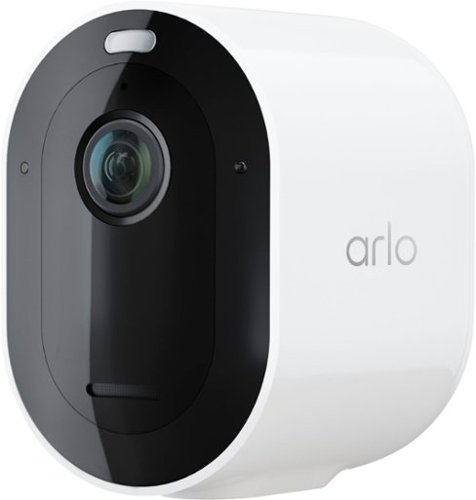
Leave your worries at the door with cutting-edge clarity and powerful protection with the Arlo Pro 5S 2K Wireless Security Camera. Installation is easier than ever with a wire-free setup. Plus, the camera's smart Wi-Fi with dual-band connection automatically connects to either the 2.4 or 5 GHz network, whichever is stronger, for faster video loading and less buffering. See details that matter with 2K HDR video that~s twice the resolution of HD cameras, 12x zoom to make out details like faces or license plates, and a wide 160~ field of view to see the bigger picture. Never miss a detail with clearer video, even at night, with color night vision and enhanced low light video with an advanced image sensor. You can also spend less time charging and more time protecting with additional rechargeable batteries and a dual battery charging station.~ Your cameras will also always stay secured with the included anti-theft mounts, and you can send a message that you~re protected with the included yard sign. The Pro 5S 2K is also built to work with the Arlo Home Security System, providing enhanced battery life, a more robust connection with Arlo SecureLink, and image verification when power or Wi-Fi is down.~ Get smarter notifications on your phone when the Pro 5S 2K spots people, vehicles, animals, or packages, and view live or recorded video clips directly from your phone with a free 30-day trial of Arlo Secure service included.~ Personalize your notifications and create custom activity zones to ensure you only get alerts for what matters most, reducing less important notifications.
Customer Rating
5
Premium Security At A Price
on October 7, 2023
Posted by: rtbestbuy
The Arlo Pro 5 is everything you love about the Pro 4 plus better battery life, better low light imaging, and dual band WiFi. The new sensor provides both better daytime video and color night vision using the spotlight. Although the resolution is the same as the Pro3 and Pro4 cameras, the image quality seems better.
My installation is a mix of Arlo security lights, Pro3, and Pro4 cameras, along with a old Pro2, all connected to an Arlo Smart Hub. The Pro2 was finally being retired in favor of the new Pro5. Setup was easy, delete the old camera, add a Pro 5 camera, and decide how to connect it. Due to the location, I opted to add the Pro5 directly to my wifi network rather than the Arlo hub.
Video quality is excellent, with good color saturation. The full duplex audio is also clearer and the latency(lag) seems better, although that might be due to the direct connection. In addition to the better battery life, there is a new power saver mode that will take a series of snapshots rather than full video.
The downside of the Arlo system is that you really have to have a monthly plan with Arlo to get full utility. The basic plan adds 30 day video storage in the cloud, various object and motion detections, audio detection, auto tracking and zoom, activity zones, notifications and some other capabilities. While I find the cost quite reasonable, it does need to be figured into the overall cost.
Overall, the Arlo Pro5 camera really is the gold standard for wire free security cameras. Arlo does provide regular updates to the app and seems to be actively expanding their capabilities. As a starter or an addition to an existing system, the Arlo Pro5 is well worth your consideration.
I would recommend this to a friend!
Share this review:


0points
0of 0voted this as helpful.
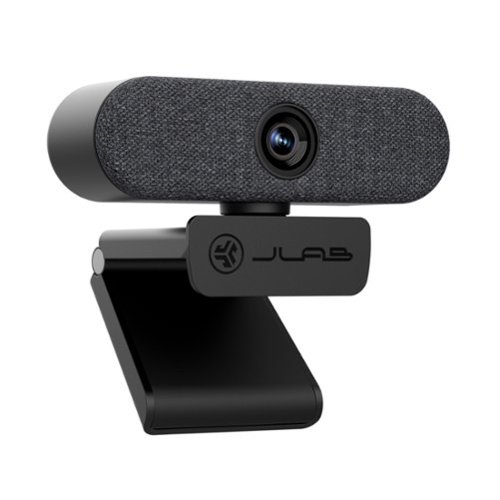
Jlab Epic USB Webcam. The Epic HD Webcam gives you pro-level image quality and sound to match whether you~re hopping from video calls or recording the latest installment of your webinar. In addition to high definition video and photos, auto focus, adjustable exposure, and an adjustable zoom will ensure every frame is picture perfect~whether you want to show off your space or keep the other half of your room off camera
Customer Rating
5
'Epic' Video Quality
on October 3, 2023
Posted by: rtbestbuy
The Jlab Epic Cam HD is a great choice for video chatting or presentations, and pretty much a bargain to boot. Native resolution is 2160/30fps or 1080/60fps with four levels of brightness control and four zoom presets. The mount can be used on a monitor or laptop edge with minimal intrusion, or can be folded for use on a desk or other flat surface. It also has a tripod screw mount. One nice touch, the camera is on a ball swivel so the can be panned or tilted. The camera is a low, wide design, about one and a half inches tall including the mount and three inches wide. The two microphones are on either end of the camera, making for acceptable separation. There is an activity light which indicates the camera is active, but there is no privacy shield.
Video quality is excellent and adapts to different lighting levels very well. The autofocus was very fast and didn't seem to hunt like some webcams seem to do. I used the Epic Cam for both video conferencing and an imprompto live presentation where I was moving around quite a bit. Looking at the recording afterwards, I was surprised by how well the autofocus tracked me.
The image frame is quite wide angle, spec'ed at 90 degrees, but can be zoomed in, I would guess between 1.5x and 2x. The image is sharp all the way to the edges with no apparent curvature, the color is nicely saturated, and the color balancing is excellent. I switched to 1080p/60fps during an impromptu presentation and I was bouncing around the frame a bit. The higher frame rate helped out with minimal falloff in video quality.
Installation was simple(Windows). Position the camera, plug it into a USB port, it auto-installs. There is no proprietary control app or software, the brightness and zoom controls are buttons on the top of the camera. Any other controls (white balance, resolution, etc.) are handled by whatever video app you're using or the native Windows controls.
Overall, a very nice webcam for chatting, conferencing,and presentations. Might even be good for vlogging and livestreaming, but I'm not quite there yet. At the price point, it's a bargain and definitely worth your consideration.
I would recommend this to a friend!

Share this review:


0points
0of 0voted this as helpful.

When you brandish this Predator Helios Neo gaming laptop, you~re holding the key to unlocking your ambitions ~ your curiosities ~ and endless possibilities. Suit up, strap in ~ and let Helios Neo pave the way. Equipped with superior cooling technology and a trove of performance like NVIDIA GeForce RTX 4050 laptop graphics and the latest 13th Gen Intel Core i5 processor with new performance hybrid architecture~ this gaming laptop will be your guide to gaming bliss. With the 16" 1920 x 1200 IPS panel, 165Hz Refresh, NVIDIA Advanced Optimus, NVIDIA G-SYNC technology and 3ms Overdrive response time you can say farewell to blur and hello clear, crisp, high-octane gameplay.
Customer Rating
4
Decent Midrange Gaming Laptop
on September 19, 2023
Posted by: rtbestbuy
The Acer Predator Helios Neo 16 is really a family of gaming laptops that range from mid level to powerhouse, depending on how much you want to spend. This particular build is the mid level build with a 13th gen i5-13500HX, Nvidia GTX 4050 with 6gb vram, 16gb of ddr5 sdram, and 512gb of NVMe ssd. The back can be removed (carefully) and the memory can be upgraded as well as adding a second NVMe m.2 drive.
Opening the box, the first thing you notice is that the laptop is very large and very heavy. It's pushing 6lbs and over an inch thick. The power brick is huge and also heavy. There is also a nice padded sleeve for carrying the laptop. The build quality is excellent, everything fits together tightly. Opening the lid, there is a standard full size keyboard with separate number keys and a huge trackpad. Starting up, the 16in IPS screen comes to life and it is also excellent with deep saturated colors. Battery life is two to three hours, maybe less with intense gaming, so the power brick is going to accompany the laptop most places.
Starting up goes through the Windows standard install, update, and reboot cycles, then off to the races. Gameplay was actually quite good, the 165hz, 3ms screen showed no tearing or sparkles during quick motions. The 16in screen works really well at 1080p, large enough to provide a more immersive experience. It just felt so much larger than a 15 in screen. I was pleasantly surprised how well the I5/GTX4050 combo handled games at 1080p even with the graphics settings maxxed. So far, since it's new, I've only played Diablo 4, Horizon Zero Dawn on this laptop. I've also used it with a Zwift trainer. I will say that I've had it plugged in and sitting on a desk since it does get pretty warm and as noted above, the battery life is not stellar. The fan can also get pretty loud, so for gaming I've been using headphones. I was also using it to do some video editing on GoPro clips and some content creation. It performed quite well, handling large video files easily.
Overall, th Acer Predator Helios Neo 16 configured at the low end of the build range lsupplies a suprisingly satisfying gaming experience. It boots quickly, games load fast, and visuals are just short of stunning. The built in speakers are quite good and can be made quite loud before distorting. Ram and hard drive can both be upgraded, although Acer provided 16gb in the base unit rather than the 8gb of comparable units. It does have it's faults, it's heavy, the battery life is unremarkable, and can run hot and noisy. Overall, though, I'd put it in the bargain end of the spectrum and would definitely add it to a short list if you're looking for a gaming laptop.
I would recommend this to a friend!
Share this review:


+1point
1of 1voted this as helpful.
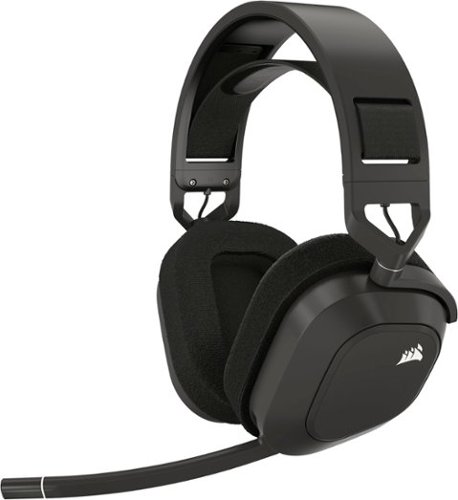
Enhance your audio with the CORSAIR HS80 MAX multiplatform gaming headset. Enjoy true audio immersion via high-fidelity 2.4GHz wireless, and activate Dolby Atmos on PC to place yourself in the middle of the game with detailed, three-dimensional sound cues. The HS80 MAX includes Bluetooth support to connect to a myriad of devices. A high-performing omni-directional microphone boasts exceptional dynamic range, so you can have a clear, commanding presence on the battlefield. Listen up to 65 hours on a single charge in cushioned comfort thanks to plush memory foam ear pads and a stress-free floating headband. Sonarworks SoundID Technology personalizes your headset~s sound to match your unique hearing profile, so you can forge your own legacy with the HS80 MAX.
Customer Rating
4
Good Midrange Headset With Bling
on August 15, 2023
Posted by: rtbestbuy
The Corsair HS80 Max wireless gaming headset comes in at the $100-$200 pricepoint that seems to be the midpoint these days. It offers good sound, negligible audio lag, a reasonably comfortable fit, long battery life, and a lot of bling for the money.
The HS80 Max can connect via USB, proprietary wireless, or Bluetooth. Out of the box, it comes with a USB cable for charging and audio and a proprietary wireless dongle. There is no carrying case. There is the usual Warranty and Safety enclosures. Instructions are online only. Construction is mostly plastic, but the hinges are all metal. There are two apps to install from the Windows Store, iCUE and Dolby Access. iCUE allows you to control the RGB lighting and has a 10 band equalizer. Dolby Access adds ATMOS sonic imaging.
NOTE: I'm using this in a Windows only environment. I did initial testing using the USB cable to charge it while I was trying it out. Fit is pretty good, Corsair uses an elastic suspended headband to adjust fit. It was too tight initially, but could be adjusted by moving the velcro tabs (see picture). The earcups were roomy and plush, but covered in velour and very warm. Might get a bit rank after a long session. They also don't appear to be replaceable, which is unfortunate. The weight seems to be on par with other wireless headsets.
Switched to Bluetooth after a while. I didn't notice any real difference in sound quality, (my) voice quality, or audio lag. Sound is good, if a bit weak on the high end. Equalizer let me set it to my preferences. The 3D sonic imaging was less successful. Dolby ATMOS did add depth to the sound and some degree of 3D'ness, but wasn't quite as successful as I'd hoped.
Additional features are of course the RGB lighting, and a selection of equalization seetings by the double duty volume control. Roll it for volume, press it to select one of the equalization presets or the user programmed one. Didn't play much with this other than to set my own equalization. I really liked the flip up mute option on the mike; flip it up to mute, flip it back down to talk again. Really convenient, nice not to have to go hunting for a buttone. Battery life appears to be excellent. I've used the HS80 Max for several days so far without issue. One feature that appears to be missing is multipoint connectivity. It would be really nice to be able to connect to phone and computer and switch back and forth as necessary.
Overall, the Corsair HS80 Max is a decent headset for the money and pretty feature rich. It appears to be upgradeable, so perhaps some more features may be added in the future. It's certainly comfortable enough for a long gaming session and versatile enough to use as a general listening headset.
I would recommend this to a friend!

Share this review:


+1point
1of 1voted this as helpful.
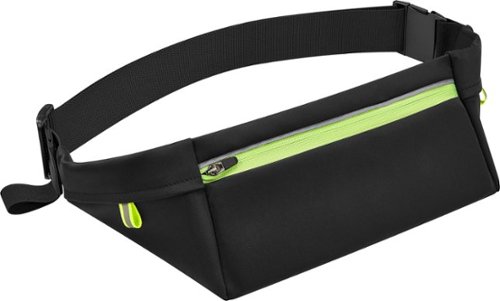
Don~t sacrifice contact with your family or friends when you~re walking or jogging ~ try the Insignia NS-RNGBLT Running Belt for Phone Screens up to 7". This belt keeps your phone and other items within reach, freeing up your hands. The belt has a zippered main pocket and two side pockets to provide plenty of storage options. It keeps your keys securely in place with an interior hook, and reflective trim helps you to stay visible even in the dark. A fully adjustable strap offers a comfortable fit. Don~t leave the house without your phone and this Insignia running belt.
Customer Rating
5
Nice Running Belt
on July 30, 2023
Posted by: rtbestbuy
Summary: The Insignia Running Belt provides convenient, low profile, ergonomic storage for your phone, ID, credit card, keys and some cash during almost any type of athletic activity.
I wanted something minimalist that could carry a phone, ID, credit card, keys, and some emergency cash while I was out walking, running, on the gravel bike, or going to the gym. Arm bands and shorts pockets just don't work for me, that stuff is always getting banged around, or worse, banging into me. The Insignia Running Belt works really well. It's flat, holds my phone snugly, has a couple of credit card size pockets in the main section, and a couple of small side pockets for keys and a $20 bill. It's black, with a neon stripes and reflective accents for visiblity. Construction and quality seem to be pretty good. I don't know if it's waterproof, but it is splashproof. It does seem to be breathable, or at least it doesn't induce a sweat spot like my larger fanny packs do. It also stays put on my waist without cinching too tightly, so I'm not continually pulling it back up.
All in all, I'm very happy with the running belt. If you're looking for a solution to keeping your stuff together without affecting your posture or gait, definitely look at the Insignia Running Belt.
I would recommend this to a friend!

Share this review:


0points
0of 0voted this as helpful.
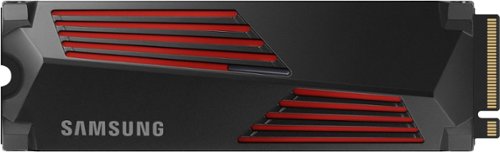
Designed for tech enthusiasts, hardcore gamers and heavy-workload professionals who want blazing fast speed. The integrated heatsink disperses heat to maintain speed, power, efficiency and thermal control, preventing downtime overheating on consoles and PCs. For console gaming, compatible only with PlayStation 5. Sequential read/write speeds up to 7,450/6,900 MB/s
Customer Rating
5
Samsung Makes It Really Fast and Easy
on July 26, 2023
Posted by: rtbestbuy
I have used Samsung M.2 SSD drives in the past in increasing sizes as the prices come down. The Samsung 990 Pro 2TB replaced a smaller drive and added much need space. I use that system primarily for games and video/photo editing, so space was becoming precious. I like Samsung SSDs because they seem to be more trouble free and have a longer warranty than other brands.
Installation was pretty easy. This time it was a two stage process, first duplicating the older M.2 drive onto an unused SATA drive. Then I swapped the new 990 Pro in for the old M.2 drive and moved the boot drive onto the 990 Pro. Samsung's Magician software made this all pretty straightforward.
I expected the performance to improve a bit, but was surprised at the difference the new drive made. In addition to the increased free space, both the write and read times for the 990 Pro are faster than the old drive. Windows booted faster and load times for most of my games decreased pretty noticeably. Video editing also loaded faster
That's about it. If you're looking for more space and a boost in performance, this is not a bad way to go. Everything is a bit faster and you have a lot more room. The Samsung M.2 990 Pro 2TB drive is highly recommended for anyone looking for more storage and a performance boost at a nice price.
I would recommend this to a friend!
Share this review:


0points
0of 0voted this as helpful.
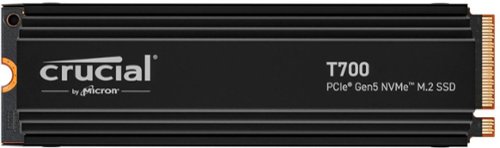
Are you ready to feel the rush of extreme performance? The Crucial T700 PCIe 5.0 NVMe SSD offers speeds of up to 12,400MB/s sequential reads and up to 11,800MB/s sequential writes (up to 1,500K IOPS random reads/writes) for faster gaming, video editing, 3D rendering and heavy workload applications. Built with Micron 232-layer TLC NAND and featuring a premium aluminum and nickel-plated copper heatsink that dissipates heat without noisy fans or liquid cooling, the Crucial T700 Gen5 SSD is optimized for performance, takes full advantage of Microsoft DirectStorage, and is backward compatible with Gen3 and Gen4 motherboards. A non-heatsink SKU is also available for use with an integrated motherboard heatsink. With SSD speeds nearly 2x faster than Gen4 in your PC, you~ll never look back from the Crucial T700!
Customer Rating
5
Wow, Blazingly Fast!
on July 8, 2023
Posted by: rtbestbuy
Short answer: Blazingly fast storage, even compared to other SSDs, if a bit pricey.
The Crucial T700 NVME SSD replaced a much smaller original SSD in a (Windows 11) deskside I use for games and more recently for editing video from a GoPro. I decided to try the gen5 NVME SSD with its promise of higher speed and wasn't disappointed. The difference was noticeable from the start with consistently faster boot times and application load times. I didn't notice much difference in game play itself, but the three games that currently occupy my time all started up faster. I suspect that the games had sufficient buffering to mask any differences in SSD speed.
Where the Crucial T700 really shines is in video editing. I expected some difference just give the capacity difference of the two SSDs (2GB T700 vs original 500MB), but this was way beyond just extra space. The T700 sped up loading of my editor and during editing there was no noticeable skipping or other lag effects. Saving the final cut was also faster. All-in-all, video editing was the big win.
Installing the T700 consisted of duplicating the original boot drive and physically swapping it in. Crucial(well, Micron) makes Acronis True Image available for disk cloning and backup later on. This is a very easy package to use and provides the additional benefit of a follow on, easy to use backup solution. The only holdup for me was having a single M.2 slot in the computer, so I had to buy a usb-c to M.2 adapter cable, not a big deal. Cloned the original SSD, swapped it out for the new T700, and done.
The downsides to the T700 are that it is a bit pricey, and it comes with rather massive (1/2" tall) heat sink that may not fit in all systems. Otherwise it's a great way to add storage and add a little more speed to a system, especially for disk intensive operations. Everything disk is faster and you have a lot more room. What's not to like? Highly recommended!
I would recommend this to a friend!
Share this review:


0points
0of 0voted this as helpful.
rtbestbuy's Review Comments
rtbestbuy has not submitted comments on any reviews.
rtbestbuy's Questions
rtbestbuy has not submitted any questions.
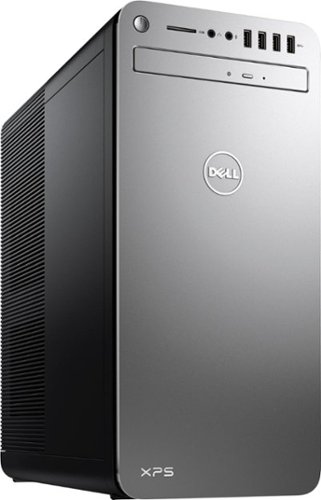
XPS Desktop - Intel Core i7 - 16GB Memory - NVIDIA GeForce GTX 1050 Ti - 2TB Hard Drive + Intel Optane Memory
Since there is no graphics card, I'm curious to the max resolution. My Dell monitor is capable of 2560x1440. Will I need an add on card to get this resolution?
Max resolution of the Intel HD 620 video controller is 4096x2304.
8 years, 9 months ago
by
rtbestbuy