
Share Rayviator's profile


Rayviator
Rayviator's stats
- Review count64
- Helpfulness votes213
- First reviewOctober 18, 2018
- Last reviewAugust 19, 2025
- Featured reviews0
- Average rating4.6
- Review comment count5
- Helpfulness votes3
- First review commentOctober 31, 2020
- Last review commentOctober 9, 2023
- Featured review comments0
Questions
- Question count0
- Helpfulness votes0
- First questionNone
- Last questionNone
- Featured questions0
- Answer count32
- Helpfulness votes15
- First answerOctober 20, 2018
- Last answerOctober 9, 2023
- Featured answers0
- Best answers4
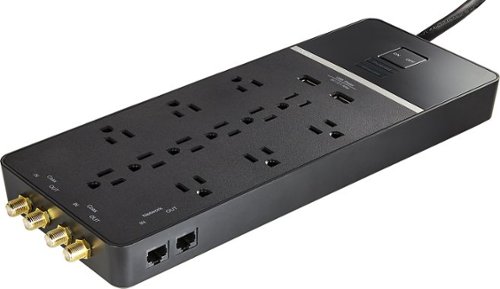
Plug electronic equipment into a single power source with this Rocketfish 12-outlet surge protector. It has two USB charging ports and two coaxial cable connections to support additional electronics. The surge protecotr has 12 outlets to connect wall chargers, and its 6-foot cord with a right-angle plug lets you can customize the placement of equipment easily.
Customer Rating

5
Great quality product
on October 20, 2018
Posted by: Rayviator
from Virginia
Verified Purchase:Yes
I got this on sale, great value overall and I’m very satisfied with my purchase.
Mobile Submission: True
I would recommend this to a friend!
Share this review:


0points
0of 0voted this as helpful.
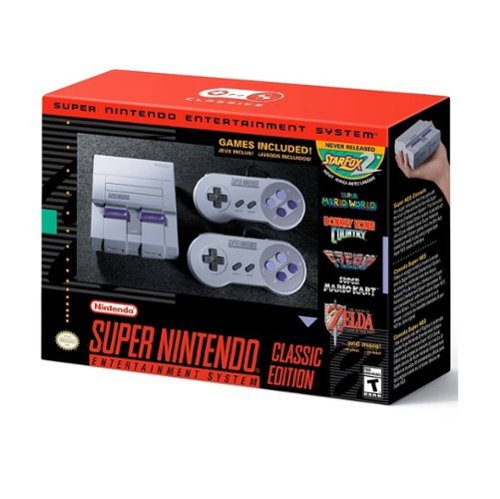
Turn back the clock to your gaming youth with this Super NES Classic Edition gaming console. An exact replica of the original console in compact size, this fun blast from the past includes two 90s-style controllers. Twenty games on this Super NES Classic Edition console let you relive your memories, and you can finally play the never-released Star Fox 2.
Customer Rating

4
Great family fun
on October 20, 2018
Posted by: Rayviator
from Virginia
Verified Purchase:Yes
Overall this retro game is very fun and my kids love it as well. I have two complaints, the first being the micro usb power option. It’s very flimsy and we have had to replace the cable at least twice now. Next, I have issue with the length of the controller cords. They are so short! Wish they were at least 10ft long instead of the 3ft. We bought wireless controllers from a major online retailer and it’s a much better way to play. Overall I am happy with this product.
Mobile Submission: True
I would recommend this to a friend!
Share this review:


0points
0of 0voted this as helpful.
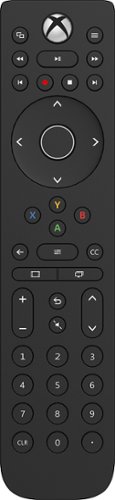
Take on your favorite gaming titles with this PDP Talon media remote for Xbox One, and enjoy an enhanced experience with nonslip grips. Textured trigger and shoulder buttons keep your fingers where you need them to dispatch the enemy. This PDP Talon media remote for Xbox One features an 8-foot detachable cable for simple storage.
Customer Rating
5
Excellent quality and value
on October 20, 2018
Posted by: Rayviator
from Virginia
Verified Purchase:Yes
If you have an Xbox One, this remote is for you. The quality seems to be on par with the OEM Microsoft media remote, but with much more functionality. The backlighting is very good and only comes on when the remote detects movement.
Mobile Submission: True
I would recommend this to a friend!
Share this review:


0points
0of 0voted this as helpful.
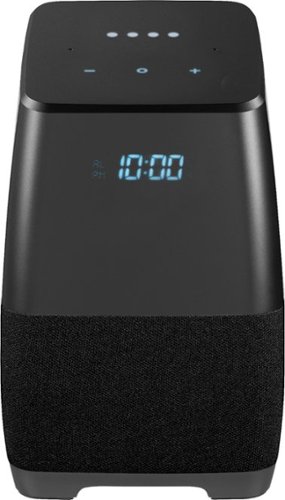
Insignia - Voice Smart Portable Bluetooth Speaker and Alarm Clock with Google Assistant - Gray/Black
Only at Best BuyAnswer all your questions and share your playlist with this Insignia portable wireless speaker. Featuring Google Assistant, this compact speaker lets you search the internet or set your schedule with just the sound of your voice. Bluetooth compatibility on this Insignia portable wireless speaker allows sharing and casting to multiple devices, including phones, tablets and even other speakers.
Customer Rating
5
Great product
on October 18, 2018
Posted by: Rayviator
from Virginia
Verified Purchase:Yes
First off, I got this today on sale, I did the updates and I was able to make a call no problem, I was also able to broadcast to my other google home device. So far I am very satisfied with this product.
Mobile Submission: True
I would recommend this to a friend!
Share this review:


+1point
1of 1voted this as helpful.
Rayviator's Review Comments
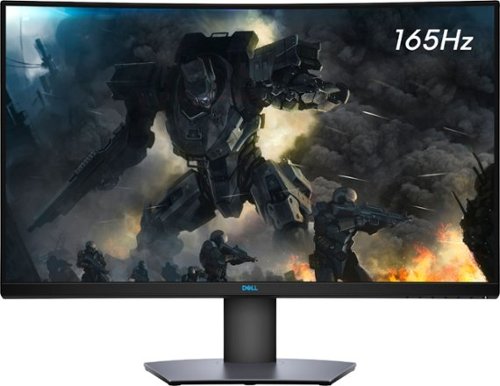
Enjoy stunning panoramic views during gameplay with this Dell 32-inch curved gaming monitor. A vibrant 2560 x 1440 resolution coupled with a contrast ratio of 3000:1 delivers precise colors for an immersive gaming experience. This Dell 32-inch curved gaming monitor has AMD FreeSync 2 to reduce screen tearing and splitting, and a 165Hz refresh rate keeps the action smooth.
Overall5 out of 5
5 out of 5Great specs for the price
By grizzlyone95
This monitor provides a lot of value for the price, especially on sale! It goes down to 350 or even 330 I saw once, and at that point it's a steal. You get 1440p, 165 hz, HDR, 32" of glorious Freesync goodness.
The colors are very good, much better than my previous TN panel. I do not notice the 4ms response time causing issues playing online, though I usually play single player anyway.
The only main issue I had with it, is this monitor is not actually compatible with G Sync. All the official reviews do say it's compatible with G Sync, but it technically is not. I was able to get it working, but only after tweaking some settings via Custom Resolution Utility. Basically you need to set the FPS limit for Freesync to around 75 - 165 instead of the default 48 - 165. And you also need to adjust this in the right spot depending on if you have DisplayPort connection or HDMI connection.
After I did this the monitor did work with G Sync without flickering or other bugs. So I am very happy with it now! HDR is amazing when games support it, like Doom Eternal. I say on sale you can't find a better monitor for gaming and productivity.

Rayviator
Try a Display Port 1.4 cable
October 31, 2020
Make sure your firmware is updated on your monitor and try getting a new DP 1.4 cable. The cable that comes in the box is only a 1.2 cable. Also, make sure your free sync is turned on from the monitor and G-sync is turned on. Also, your graphics card needs to be a 10 series or newer. The updated DP 1.4 cable has worked for many.
+1point
1of 1voted this comment as helpful.
Enjoy stunning panoramic views during gameplay with this Dell 32-inch curved gaming monitor. A vibrant 2560 x 1440 resolution coupled with a contrast ratio of 3000:1 delivers precise colors for an immersive gaming experience. This Dell 32-inch curved gaming monitor has AMD FreeSync 2 to reduce screen tearing and splitting, and a 165Hz refresh rate keeps the action smooth.
Overall 3 out of 5
3 out of 5Flickering Issue.
By AsadFlickeringVictim
Overall, it is pretty good and decent Monitor.
However, it has a wired issue- it will do randomly Flickering. it just randomly black-out and come back for 1~2s. (its just like Alt-Tab out) 1~2 times a day. I tried both with/without Freesync. Same issue.
However, it has a wired issue- it will do randomly Flickering. it just randomly black-out and come back for 1~2s. (its just like Alt-Tab out) 1~2 times a day. I tried both with/without Freesync. Same issue.
https://www.reddit.com/r/Monitors/comments/epk6dw/dell_s3220dgf_flickering/
This is the same topic reddit. After reading that, i am still not sure how to fix this issue.
I am using the DP port with in-box DP cable.
Rayviator
Get a DP v1.4 cable
November 27, 2020
You need to buy a DP v1.4 cable. As I mentioned in my review, the cable in the box is a v1.2. The new cable should stop the flickering.
0points
0of 0voted this comment as helpful.
Enjoy stunning panoramic views during gameplay with this Dell 32-inch curved gaming monitor. A vibrant 2560 x 1440 resolution coupled with a contrast ratio of 3000:1 delivers precise colors for an immersive gaming experience. This Dell 32-inch curved gaming monitor has AMD FreeSync 2 to reduce screen tearing and splitting, and a 165Hz refresh rate keeps the action smooth.
Overall5 out of 5
5 out of 5Great picture and build quality.
By Rayviator
This is an excellent monitor and especially at the Black Friday price. I was able to get G-Sync to work with my RTX 2070-Super no problem. Like others have stated you need to buy a v1.4 DisplayPort cable as the one that comes in the box is only a v1.2 which will cause flickering issues with G-sync turned on. Also, be sure to check the box and make sure you get the REV A03 or A04 model.
Rayviator
G-Sync "compatible" with the right cable/settings
February 3, 2021
To expand on my review, I know that G-Sync is "Officially" support by Dell, but it DOES work. Again, the Display Port cable that comes in the box is a v1.2 and will NOT work properly and WILL cause flickering when you try to enable G-Sync. I had to buy a verified Display Port v1.4 cable and only then did it work without flickering issues and continues to work no problem. I have been playing COD Cold War without any G-Sync issues what so ever. When I go into the NVIDIA Control Panel, under the "Display" menu, "Set up G-SYNC" becomes available. I then check the box that says, "Enable G-SYNC, G-SYNC Compatible". The button below it, I have it selected on "Enable for full screen mode". Hopefully this additional information helps.
0points
0of 0voted this comment as helpful.
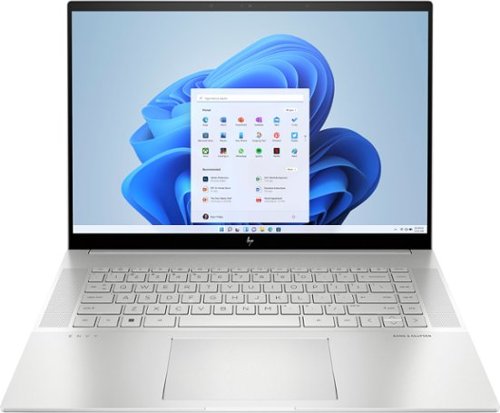
To stay up and creating on the run, you need power, mobility and seamless connectivity between all your creative tools. Power your ideas wherever they take you.
Overall5 out of 5
5 out of 5Excellent value when on sale
By Rayviator
I have put in weeks of research to find a laptop that could meet my needs as a video creative for 4k and 5k Drone videos and photos. I am coming from a 2018 i5 MacBook Pro with 16 GB Ram and 512 GB hard drive. I was dead set on getting either an M2 Max 14 inch MacBook Pro or M1 Max 16 Inch MacBook Pro which would have cost me about $2,600 from the Refurb Apple Store. I decided to see what 13th Gen Intel had to offer and research various benchmarks and YouTube reviews of different laptops with 13th Gen i9 processors.
Then I found this HP Envy 16 Inch on sale for $1,299. The benchmarks for the i9 13900H is on par if not better than the M1 Max and with the RTX 4060 GPU on this HP Envy 16, it exceeds the performance of the integrated M1 MAX GPU. This laptop has the power and performance for a lot less than it’s Apple competition. Where this falls short is the overall brightness which is 400 nits where the Apple is 500 nit average and up to 1000 nit peak. Also, the battery life is about 6 to 7 hours of watching content, productivity, email, surfing the web, etc. If you are gaming or doing power intensive tasks, the battery last about 2 to 3 hours. The MacBook Pro is going to be closer to 16 hours or more. You will have to determine if spending an extra $1,000 or more is worth a brighter screen and better battery life.
A couple things to mention that is not clear in the product description, YES you can easily upgrade this laptop. It is NOT based on the Evo platform where the RAM is soldered on. You can upgrade this RAM to 64 GB of DDR5, and you can add a second NVME Drive. The included drive is a MICRON 3400 with a Read of 6,600 MB/s and a Write of 5,000 MB/s. You can also swap out the Wi-Fi/Bluetooth adapter if you want. This has the Intel AX211 NGW. Another thing is, you CAN charge this laptop via USB-C and I was able to get 91 watts of charge consistently. You will probably get a message saying to use a higher watt power adapter for full performance though. So don’t expect to get full CPU/GPU power using USB-C charging.
I do want to highlight the following, Windows Hello works great and reminds me of how well Face ID works. Start up from power off to being logged in using Windows Hello takes about 15 seconds. When you restart from power on, it takes about 25 seconds to be logged back in. The speakers for me were TERRIBLE at first. Be sure to go to the HP website and download all of the latest drivers and update the BIOS to the latest version. That fixed the speaker problems for me which was low volume. Last thing I want to mention again is that if you want the FULL power this laptop has to offer, you will need to have it plugged in to outlet using the included 200W adapter. Apple products give you the full power plugged in or not. Hopefully this review gave you the insight you were looking for.
Rayviator
USB-C Charging Reply
June 24, 2023
I didn't do anything special to get USB-C charging to work. When powered on, USB-C charging is not enough, you will still see the battery drain. If you have the laptop off or in sleep mode, the battery will charge with no problem. I will say, I am using a 120-watt power brick so it's possible if your power brick is not 100-watt or more, it could struggle with USB-C charging.
-1point
1of 3voted this comment as helpful.
To stay up and creating on the run, you need power, mobility and seamless connectivity between all your creative tools. Power your ideas wherever they take you.
Overall5 out of 5
5 out of 5Excellent value when on sale
By Rayviator
I have put in weeks of research to find a laptop that could meet my needs as a video creative for 4k and 5k Drone videos and photos. I am coming from a 2018 i5 MacBook Pro with 16 GB Ram and 512 GB hard drive. I was dead set on getting either an M2 Max 14 inch MacBook Pro or M1 Max 16 Inch MacBook Pro which would have cost me about $2,600 from the Refurb Apple Store. I decided to see what 13th Gen Intel had to offer and research various benchmarks and YouTube reviews of different laptops with 13th Gen i9 processors.
Then I found this HP Envy 16 Inch on sale for $1,299. The benchmarks for the i9 13900H is on par if not better than the M1 Max and with the RTX 4060 GPU on this HP Envy 16, it exceeds the performance of the integrated M1 MAX GPU. This laptop has the power and performance for a lot less than it’s Apple competition. Where this falls short is the overall brightness which is 400 nits where the Apple is 500 nit average and up to 1000 nit peak. Also, the battery life is about 6 to 7 hours of watching content, productivity, email, surfing the web, etc. If you are gaming or doing power intensive tasks, the battery last about 2 to 3 hours. The MacBook Pro is going to be closer to 16 hours or more. You will have to determine if spending an extra $1,000 or more is worth a brighter screen and better battery life.
A couple things to mention that is not clear in the product description, YES you can easily upgrade this laptop. It is NOT based on the Evo platform where the RAM is soldered on. You can upgrade this RAM to 64 GB of DDR5, and you can add a second NVME Drive. The included drive is a MICRON 3400 with a Read of 6,600 MB/s and a Write of 5,000 MB/s. You can also swap out the Wi-Fi/Bluetooth adapter if you want. This has the Intel AX211 NGW. Another thing is, you CAN charge this laptop via USB-C and I was able to get 91 watts of charge consistently. You will probably get a message saying to use a higher watt power adapter for full performance though. So don’t expect to get full CPU/GPU power using USB-C charging.
I do want to highlight the following, Windows Hello works great and reminds me of how well Face ID works. Start up from power off to being logged in using Windows Hello takes about 15 seconds. When you restart from power on, it takes about 25 seconds to be logged back in. The speakers for me were TERRIBLE at first. Be sure to go to the HP website and download all of the latest drivers and update the BIOS to the latest version. That fixed the speaker problems for me which was low volume. Last thing I want to mention again is that if you want the FULL power this laptop has to offer, you will need to have it plugged in to outlet using the included 200W adapter. Apple products give you the full power plugged in or not. Hopefully this review gave you the insight you were looking for.
Rayviator
USB-C Charging follow-up
October 9, 2023
The only way to get USB-C charging to work is when the laptop is either turned off completely or when it is in sleep mode. It will not charge via USB-C when you are using the laptop. I am using a 65-watt charging brick with a thunderbolt cable to get this to work.
+1point
1of 1voted this comment as helpful.
Rayviator's Questions
Rayviator has not submitted any questions.
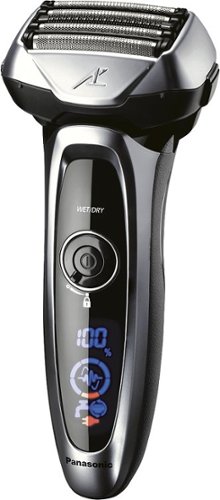
Know you are getting the closest shave possible with this Panasonic Arc5 shaver. The shaving sensor monitors the density of your beard and adjusts power to the five ultrasharp Nanotech blades. This waterproof Panasonic Arc5 shaver works wet or dry and has a sonic vibration cleaning mode for easy maintenance.
Is it made in Japan?
Turn back the clock to your gaming youth with this Super NES Classic Edition gaming console. An exact replica of the original console in compact size, this fun blast from the past includes two 90s-style controllers. Twenty games on this Super NES Classic Edition console let you relive your memories, and you can finally play the never-released Star Fox 2.