
Share NicoR's profile


NicoR
NicoR's stats
- Review count103
- Helpfulness votes51
- First reviewMay 30, 2023
- Last reviewNovember 25, 2023
- Featured reviews0
- Average rating4.7
Reviews comments
- Review comment count0
- Helpfulness votes0
- First review commentNone
- Last review commentNone
- Featured review comments0
Questions
- Question count0
- Helpfulness votes0
- First questionNone
- Last questionNone
- Featured questions0
- Answer count48
- Helpfulness votes110
- First answerJune 2, 2023
- Last answerSeptember 22, 2023
- Featured answers0
- Best answers10
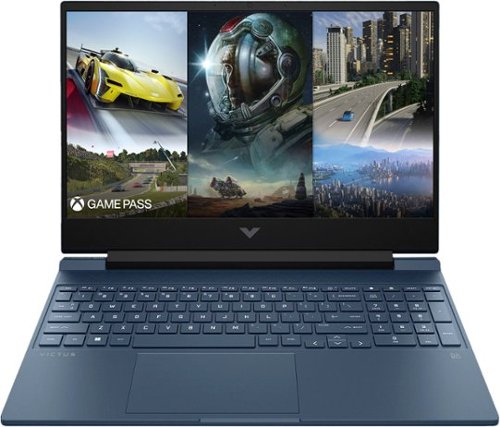
The HP Victus Laptop is made for peak PC gaming. This sleek machine touts a 13th Gen Intel Core processor~ and a modern graphics card. This laptop~s design is just as impressive as its hardware with plenty of color options~, updated thermals and an HD camera with Temporal Noise Reduction.
Customer Rating

4
Sleek and Powerful: A Winning Combination
on June 2, 2023
Posted by: NicoR
Verified Purchase:Yes
I have been using the HP Victus 15.6" Full HD 144Hz Gaming Laptop, and I must say, it left quite an impression. From its sleek design to its powerful performance, this laptop is a solid contender in the gaming laptop market. Here's my review based on my experience with the product.
Let's start with the design. The HP Victus boasts a visually appealing aesthetic with its Performance Blue color, giving it a unique and stylish look. The laptop's build quality is excellent, offering a sturdy and durable feel. It's clear that HP has put a lot of thought into the design, making it a laptop you'll be proud to show off.
The 15.6" Full HD display with a 144Hz refresh rate is an absolute delight for gaming. The visuals are crisp and vibrant, and the high refresh rate ensures smooth gameplay without any noticeable lag or stuttering. Whether you're immersing yourself in the vast landscapes of open-world games or engaging in fast-paced action, this laptop's display won't disappoint.
One of the standout features of the HP Victus is its powerful hardware. Equipped with an Intel Core i5-13420H processor and 8GB of memory, it delivers snappy and responsive performance, allowing you to multitask effortlessly. The NVIDIA GeForce RTX 3050 graphics card is an absolute beast, capable of handling graphically demanding games with ease. It ensures a seamless gaming experience with stunning visuals and fluid frame rates.
The inclusion of a 512GB SSD provides ample storage space for your games, applications, and multimedia files. The SSD not only ensures fast boot times and quick file transfers but also contributes to the overall responsiveness of the system.
The backlit keyboard is a standout feature for me. It not only enhances the aesthetic appeal of the laptop but also serves a functional purpose. The keys are well-spaced, providing a comfortable typing experience. The backlighting can be customized to suit your preference, allowing you to game or work in dimly lit environments without any hassle.
In terms of connectivity, the HP Victus offers a decent selection of ports, including USB Type-C, USB Type-A, HDMI, and an SD card reader. These ports provide flexibility when it comes to connecting peripherals and external devices, making it a versatile machine for various needs.
Battery life is where the HP Victus falls slightly short. While it's not terrible, heavy gaming sessions will drain the battery relatively quickly. It's advisable to keep the laptop plugged in for extended gaming sessions to ensure uninterrupted gameplay.
In conclusion, the HP Victus 15.6" Full HD 144Hz Gaming Laptop impresses with its sleek design, sturdy build quality, and powerful hardware. The high-quality display, excellent graphics card, and responsive performance make it a great choice for gamers. The customizable backlit keyboard adds a touch of flair and convenience. Despite its slightly shorter battery life, this laptop delivers an overall outstanding experience for both gaming and general use.
If you're in the market for a reliable gaming laptop that doesn't compromise on performance or style, the HP Victus 15.6" Gaming Laptop is definitely worth considering.
Length of ownership: 2
Mobile Submission: False
I would recommend this to a friend!
Battery Life

3
Speed

5
Display
5

Share this review:


+1point
20of 39voted this as helpful.
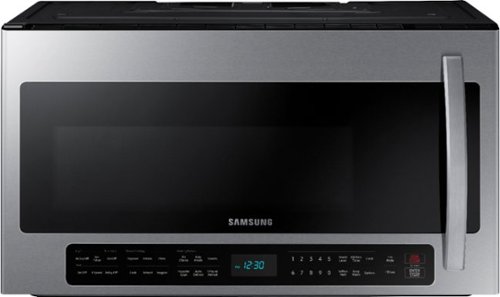
This 2.1 cu. ft. extra-large capacity over-the-range microwave makes preparing multiple dishes effortless by accommodating even your biggest dishes. The Sensor Cook technology automatically adjusts your cooking time for optimal results. Additionally, the ceramic enamel interior features a durable, scratch-resistant, and easy-to-clean surface, making everyday maintenance simple.
Customer Rating

5
Super Sleek and Modern!
on June 2, 2023
Posted by: NicoR
Verified Purchase:Yes
I recently had the pleasure of using the Samsung 2.1 Cu. Ft. Over-the-Range Microwave with Sensor Cook, and I must say it has exceeded my expectations in multiple ways. This sleek stainless steel microwave not only performs exceptionally well, but it also offers some fantastic modern features that enhance its overall functionality.
First and foremost, the design of this microwave is simply stunning. The stainless steel finish adds a touch of elegance to my kitchen, effortlessly blending with my other appliances. The clean and sleek appearance gives it a modern and sophisticated look that is sure to complement any kitchen decor. It's not just a kitchen appliance; it's a statement piece.
One standout feature of this microwave is its built-in Wi-Fi connectivity. This cutting-edge addition allows me to control and monitor the microwave from my smartphone or tablet through the Samsung SmartThings app. I can easily adjust settings, start or stop cooking, and even receive notifications when my food is ready. The convenience of controlling the microwave remotely is a game-changer, especially when I'm busy multitasking in the kitchen.
Another highlight is the sensor cook technology. With this feature, the microwave automatically detects the moisture and humidity levels in the food and adjusts the cooking time and power accordingly. This results in perfectly cooked meals every time, without any guesswork or constant monitoring. Whether it's reheating leftovers, defrosting, or cooking a full meal, the sensor cook feature ensures consistent and delicious results.
In terms of performance, the Samsung 2.1 Cu. Ft. Over-the-Range Microwave delivers excellent cooking power. The 2.1 cubic feet capacity provides ample space for larger dishes and allows me to cook multiple items simultaneously. The microwave heats up quickly and evenly, thanks to its powerful cooking elements. I appreciate that it also offers a variety of preset cooking options, making it easy to cook common dishes with just a touch of a button.
Cleaning this microwave is a breeze as well. The interior is designed with a ceramic enamel coating, which is not only durable but also effortless to wipe clean. I no longer have to spend excessive time scrubbing away stubborn stains or dealing with lingering odors.
In conclusion, the Samsung 2.1 Cu. Ft. Over-the-Range Microwave with Sensor Cook is an exceptional appliance that combines style, convenience, and powerful performance. Its sleek stainless steel design adds a touch of elegance to any kitchen, while the built-in Wi-Fi capabilities and sensor cook technology elevate the user experience. If you're looking for a reliable and visually appealing microwave that offers modern features, this model from Samsung is definitely worth considering.
Length of ownership: 12
Mobile Submission: True
I would recommend this to a friend!
Cook Settings

4
Performance
5
Quality
5

Share this review:


+1point
1of 1voted this as helpful.
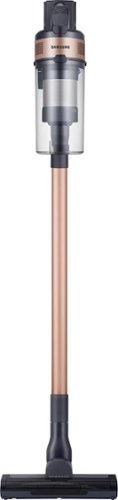
The Samsung Jet 60 Pet Cordless Stick Vacuum features a lightweight and maneuverable design plus a removable battery for extended cleaning time up to 40 minutes. The mini motorized tool is perfect for cleaning up pet dander and allergens. Compatible with the Samsung Clean Station.
Customer Rating
5
East to use!
on May 30, 2023
Posted by: NicoR
Verified Purchase:Yes
Great vaccum design and cordless does last for the use of multiple rooms or quick pickup
Length of ownership: 30
Mobile Submission: True
I would recommend this to a friend!
Cleaning Quality
5
Ease of Assembly
5
Maneuverability
5
Share this review:


0points
0of 0voted this as helpful.
NicoR's Review Comments
NicoR has not submitted comments on any reviews.
NicoR's Questions
NicoR has not submitted any questions.

Everything you need is right in your screen. Watch, work and chat - all without connecting a separate PC - with Smart Monitor. Your favorite content, productivity and video call apps are built-in for a simpler and more stylish desk setup that~s a joy to use every time.
Speakers seam to be not so good my 32" smart TV is amazing what happened to sound quality how can it be fixed. As it was open box maybe displayed and speakers could be bad I'm not sure. Maybe I'm supposed to get a new soundbar for good sound ....
There are a few things you can do to improve the sound quality of your Samsung 32" smart TV:
Check the audio settings. Make sure that the volume is turned up and that the audio mode is set to the best setting for your content. You can also try adjusting the equalizer settings to improve the sound quality.
Move the speakers. If the speakers are placed in a corner or against a wall, the sound quality may be muffled. Try moving them to a more open area.
Get a soundbar. A soundbar is a great way to improve the sound quality of your TV. It will provide you with richer, fuller sound that will make your movies and TV shows more enjoyable
Check the audio settings. Make sure that the volume is turned up and that the audio mode is set to the best setting for your content. You can also try adjusting the equalizer settings to improve the sound quality.
Move the speakers. If the speakers are placed in a corner or against a wall, the sound quality may be muffled. Try moving them to a more open area.
Get a soundbar. A soundbar is a great way to improve the sound quality of your TV. It will provide you with richer, fuller sound that will make your movies and TV shows more enjoyable
2 years, 9 months ago
by
NicoR
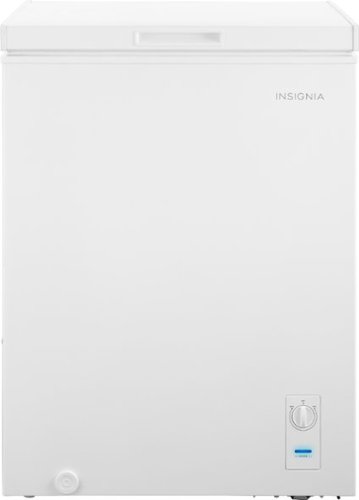
The Insignia 5.0 Cu. Ft. chest freezer has a removable storage basket to keep your food organized so you can find all your items. Have confidence that your food is stored correctly by adjusting the temperature control panel.
Our power went out. Do I need to reset? Or should I unplug the freezer and plug it back in?
If the power outage was brief, you do not need to reset your freezer. Just keep the door closed and the food inside will stay safe.
However, if the power outage was longer, you may need to unplug the freezer and plug it back in. This will help to reset the freezer's temperature control.
Here are the steps on how to reset your freezer after a power outage:
Unplug the freezer from the power outlet.
Wait for a few minutes.
Plug the freezer back in.
Close the freezer door.
The freezer will take a few hours to reach its normal temperature. During this time, do not open the door unless absolutely necessary.
However, if the power outage was longer, you may need to unplug the freezer and plug it back in. This will help to reset the freezer's temperature control.
Here are the steps on how to reset your freezer after a power outage:
Unplug the freezer from the power outlet.
Wait for a few minutes.
Plug the freezer back in.
Close the freezer door.
The freezer will take a few hours to reach its normal temperature. During this time, do not open the door unless absolutely necessary.
2 years, 9 months ago
by
NicoR
The Insignia 5.0 Cu. Ft. chest freezer has a removable storage basket to keep your food organized so you can find all your items. Have confidence that your food is stored correctly by adjusting the temperature control panel.
Can I order extra baskets? What is the size of the basket?
Yes, you can order extra baskets for the Insignia 5 cu ft garage ready chest freezer. The baskets are not sold separately by Insignia, but you can find them on Amazon and other online retailers.
The baskets are 20.4 x 16.7 x 27.7 inches (518 x 425 x 705 mm) and have a capacity of 2.5 cubic feet. They are made of wire mesh and have a black powder-coated finish.
To order extra baskets, you can search for "Insignia 5 cu ft chest freezer baskets" on Amazon or other online retailers. The baskets typically cost around $20 each.
The baskets are 20.4 x 16.7 x 27.7 inches (518 x 425 x 705 mm) and have a capacity of 2.5 cubic feet. They are made of wire mesh and have a black powder-coated finish.
To order extra baskets, you can search for "Insignia 5 cu ft chest freezer baskets" on Amazon or other online retailers. The baskets typically cost around $20 each.
2 years, 9 months ago
by
NicoR
The Insignia 5.0 Cu. Ft. chest freezer has a removable storage basket to keep your food organized so you can find all your items. Have confidence that your food is stored correctly by adjusting the temperature control panel.
I just noticed there are 2 screw-in pegs on the (front and back corner) underneath/ bottom left side only. For balance purposes? Anyway, are there 2 more screw holes on the underneath/ bottom right. And can I buy 4 caster wheels and just screw them in?
Yes, there are two more screw holes on the bottom right side of the Insignia 5 cu ft garage ready chest freezer. You can buy four caster wheels and screw them into these holes to make the freezer more portable.
The screw-in pegs on the bottom left side of the freezer are for balance purposes. They help to prevent the freezer from tipping over. If you screw in the caster wheels, you can remove the pegs.
When choosing caster wheels, make sure that they are the right size for the freezer. The wheels should also be rated for the weight of the freezer.
Here are the steps on how to install caster wheels on the Insignia 5 cu ft garage ready chest freezer:
Remove the two screw-in pegs on the bottom left side of the freezer.
Screw in the caster wheels into the holes.
Make sure that the caster wheels are level.
Here are some safety tips to keep in mind when installing caster wheels:
Make sure that the freezer is unplugged and empty before you start.
Be careful not to overtighten the screws, as this could damage the freezer.
Test the freezer to make sure that it is stable on the caster wheels.
With the caster wheels installed, you can easily move the freezer around your garage or other storage area. This can be helpful for cleaning or making space for other items.
The screw-in pegs on the bottom left side of the freezer are for balance purposes. They help to prevent the freezer from tipping over. If you screw in the caster wheels, you can remove the pegs.
When choosing caster wheels, make sure that they are the right size for the freezer. The wheels should also be rated for the weight of the freezer.
Here are the steps on how to install caster wheels on the Insignia 5 cu ft garage ready chest freezer:
Remove the two screw-in pegs on the bottom left side of the freezer.
Screw in the caster wheels into the holes.
Make sure that the caster wheels are level.
Here are some safety tips to keep in mind when installing caster wheels:
Make sure that the freezer is unplugged and empty before you start.
Be careful not to overtighten the screws, as this could damage the freezer.
Test the freezer to make sure that it is stable on the caster wheels.
With the caster wheels installed, you can easily move the freezer around your garage or other storage area. This can be helpful for cleaning or making space for other items.
2 years, 9 months ago
by
NicoR
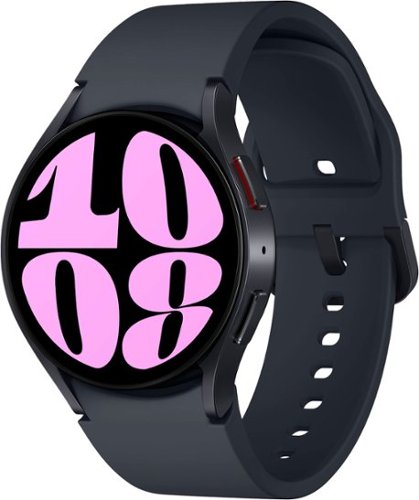
It~s your day ~own it with Samsung Galaxy Watch6. From the gym to the office, our large display keeps you in the know with simple navigation and a super easy-to-read screen. Work out smarter with personalized heart rate zones, and get insights for better rest with Advanced Sleep Coaching. Stay connected by using Galaxy Watch6 to call, text, play music and get notifications on the go. Plus, wherever the day takes you, own your look with a variety of customizable Watch bands and faces. Unlock your day~s full potential with Galaxy Watch6.
Does this have the elliptical workout option? I have an old Active that has it and I use it regularly and track it in Samsung Health. Thanks!
Yes, the Samsung Galaxy Watch6 Aluminum Smartwatch 40mm BT has an elliptical workout option. To start an elliptical workout on your watch, follow these steps:
Open the Samsung Health app on your watch.
Tap Workout.
Scroll down and tap Elliptical.
Tap Start.
The watch will start tracking your workout and will display your heart rate, calories burned, and other metrics. You can also pause or stop the workout at any time.
The elliptical workout option is available on both the Bluetooth and LTE models of the Galaxy Watch6. It is also available on other Samsung smartwatches, such as the Galaxy Watch4 and Galaxy Watch5.
Open the Samsung Health app on your watch.
Tap Workout.
Scroll down and tap Elliptical.
Tap Start.
The watch will start tracking your workout and will display your heart rate, calories burned, and other metrics. You can also pause or stop the workout at any time.
The elliptical workout option is available on both the Bluetooth and LTE models of the Galaxy Watch6. It is also available on other Samsung smartwatches, such as the Galaxy Watch4 and Galaxy Watch5.
2 years, 9 months ago
by
NicoR
It~s your day ~own it with Samsung Galaxy Watch6. From the gym to the office, our large display keeps you in the know with simple navigation and a super easy-to-read screen. Work out smarter with personalized heart rate zones, and get insights for better rest with Advanced Sleep Coaching. Stay connected by using Galaxy Watch6 to call, text, play music and get notifications on the go. Plus, wherever the day takes you, own your look with a variety of customizable Watch bands and faces. Unlock your day~s full potential with Galaxy Watch6.
Does this watch connect to the Galaxy Fold4?
Yes, the Samsung Galaxy Watch6 Aluminum Smartwatch 40mm BT can connect to the Galaxy Fold4. Both devices use Bluetooth to connect to each other. To connect the watch to the phone, follow these steps:
Make sure that both devices are turned on and Bluetooth is enabled.
On the watch, open the Settings app.
Tap Connections > Bluetooth.
Tap the name of the phone to connect to it.
Once the watch is connected to the phone, you can use it to control the phone, receive notifications, and make and answer calls.
Here are some of the features that you can use with the Galaxy Watch6 Aluminum Smartwatch 40mm BT - Cream and the Galaxy Fold4:
Make and answer calls: You can use the watch to make and answer calls if the phone is nearby.
Control the phone: You can use the watch to control the phone's music playback, volume, and settings.
Receive notifications: You can receive notifications from the phone on the watch, such as text messages, emails, and social media updates.
Track your fitness: You can use the watch to track your steps, calories burned, and heart rate.
Pay for things: You can use the watch to pay for things with Samsung Pay if the phone is nearby.
I hope this helps!
Make sure that both devices are turned on and Bluetooth is enabled.
On the watch, open the Settings app.
Tap Connections > Bluetooth.
Tap the name of the phone to connect to it.
Once the watch is connected to the phone, you can use it to control the phone, receive notifications, and make and answer calls.
Here are some of the features that you can use with the Galaxy Watch6 Aluminum Smartwatch 40mm BT - Cream and the Galaxy Fold4:
Make and answer calls: You can use the watch to make and answer calls if the phone is nearby.
Control the phone: You can use the watch to control the phone's music playback, volume, and settings.
Receive notifications: You can receive notifications from the phone on the watch, such as text messages, emails, and social media updates.
Track your fitness: You can use the watch to track your steps, calories burned, and heart rate.
Pay for things: You can use the watch to pay for things with Samsung Pay if the phone is nearby.
I hope this helps!
2 years, 9 months ago
by
NicoR
It~s your day ~own it with Samsung Galaxy Watch6. From the gym to the office, our large display keeps you in the know with simple navigation and a super easy-to-read screen. Work out smarter with personalized heart rate zones, and get insights for better rest with Advanced Sleep Coaching. Stay connected by using Galaxy Watch6 to call, text, play music and get notifications on the go. Plus, wherever the day takes you, own your look with a variety of customizable Watch bands and faces. Unlock your day~s full potential with Galaxy Watch6.
Does this watch show, receive, read & send RCS text
The Samsung Galaxy Watch6 Aluminum Smartwatch 40mm BT can show, receive, read, and send RCS text messages if the phone it is paired with has RCS enabled. RCS stands for Rich Communication Services, and it is a more advanced messaging protocol than SMS. RCS messages can include features such as typing indicators, read receipts, and high-quality photos and videos.
To enable RCS on your phone, you will need to use the Messages app from Google. Open the Messages app and tap on the three dots in the top right corner. Then, select Settings > Chat features > Turn on chat features.
Once RCS is enabled on your phone, it will be enabled on your watch as well. You can then send and receive RCS messages from your watch just like you would from your phone.
However, it is important to note that not all carriers support RCS. If your carrier does not support RCS, you will not be able to use these features on your watch.
Here are the steps on how to check if your carrier supports RCS:
Open the Messages app on your phone.
Tap on the three dots in the top right corner.
Select Settings > Chat features.
If you see the message "Chat features are unavailable," then your carrier does not support RCS.
If your carrier does not support RCS, you can still use your watch to send and receive SMS messages. However, you will not be able to use the more advanced features that are available with RCS.
To enable RCS on your phone, you will need to use the Messages app from Google. Open the Messages app and tap on the three dots in the top right corner. Then, select Settings > Chat features > Turn on chat features.
Once RCS is enabled on your phone, it will be enabled on your watch as well. You can then send and receive RCS messages from your watch just like you would from your phone.
However, it is important to note that not all carriers support RCS. If your carrier does not support RCS, you will not be able to use these features on your watch.
Here are the steps on how to check if your carrier supports RCS:
Open the Messages app on your phone.
Tap on the three dots in the top right corner.
Select Settings > Chat features.
If you see the message "Chat features are unavailable," then your carrier does not support RCS.
If your carrier does not support RCS, you can still use your watch to send and receive SMS messages. However, you will not be able to use the more advanced features that are available with RCS.
2 years, 9 months ago
by
NicoR
It~s your day ~own it with Samsung Galaxy Watch6. From the gym to the office, our large display keeps you in the know with simple navigation and a super easy-to-read screen. Work out smarter with personalized heart rate zones, and get insights for better rest with Advanced Sleep Coaching. Stay connected by using Galaxy Watch6 to call, text, play music and get notifications on the go. Plus, wherever the day takes you, own your look with a variety of customizable Watch bands and faces. Unlock your day~s full potential with Galaxy Watch6.
Is this watch for women or for men?
he Samsung Galaxy Watch6 Aluminum Smartwatch 40mm BT is a unisex watch. It is designed to fit both men and women. The 40mm case size is considered a smaller size, so it may be a better fit for women with smaller wrists. However, ultimately the best way to determine if the watch is right for you is to try it on and see how it feels.
Here are some of the factors to consider when choosing a smartwatch:
Case size: The case size is the diameter of the watch face. Smaller case sizes are typically better for women with smaller wrists, while larger case sizes are better for men with larger wrists.
Band size: The band size is the width of the watch band. It is important to choose a band size that is comfortable and does not feel too tight or too loose.
Style: The style of the watch is also an important consideration. Choose a watch that you think looks good and that you will be happy to wear.
If you are still not sure if the Samsung Galaxy Watch6 Aluminum Smartwatch 40mm BT is right for you, I recommend trying it on at a local store. This will give you a chance to see how it looks and feels on your wrist.
Here are some of the factors to consider when choosing a smartwatch:
Case size: The case size is the diameter of the watch face. Smaller case sizes are typically better for women with smaller wrists, while larger case sizes are better for men with larger wrists.
Band size: The band size is the width of the watch band. It is important to choose a band size that is comfortable and does not feel too tight or too loose.
Style: The style of the watch is also an important consideration. Choose a watch that you think looks good and that you will be happy to wear.
If you are still not sure if the Samsung Galaxy Watch6 Aluminum Smartwatch 40mm BT is right for you, I recommend trying it on at a local store. This will give you a chance to see how it looks and feels on your wrist.
2 years, 9 months ago
by
NicoR
It~s your day ~own it with Samsung Galaxy Watch6. From the gym to the office, our large display keeps you in the know with simple navigation and a super easy-to-read screen. Work out smarter with personalized heart rate zones, and get insights for better rest with Advanced Sleep Coaching. Stay connected by using Galaxy Watch6 to call, text, play music and get notifications on the go. Plus, wherever the day takes you, own your look with a variety of customizable Watch bands and faces. Unlock your day~s full potential with Galaxy Watch6.
Can you swim while wearing this watch?
Yes, you can swim while wearing the Samsung Galaxy Watch6 Aluminum Smartwatch 40mm BT -. It is water resistant up to 50 meters, which means it can withstand water pressure equivalent to being 50 meters underwater for up to 10 minutes.
However, there are a few things to keep in mind when swimming with the watch:
Turn on Water Lock mode before swimming. This will prevent the touchscreen from being activated accidentally and will also prevent water from getting into the speaker and microphone.
Do not use the watch in saltwater or hot tubs. Saltwater can corrode the watch's components, and hot water can damage the seals that make it water resistant.
After swimming, rinse the watch with fresh water and dry it thoroughly. This will help to prevent the growth of mold and mildew.
By following these simple tips, you can safely swim with your Samsung Galaxy Watch6 Aluminum Smartwatch 40mm BT and enjoy all of its features, even underwater.
Here are some additional tips for swimming with your smartwatch:
Choose a watch band that is made of a material that is not absorbent, such as silicone or nylon.
Avoid wearing any jewelry while swimming, as this could scratch the watch or get caught on something.
If you are going to be swimming in a pool, make sure that the pool is properly chlorinated. Chlorine can damage the watch's seals.
With a little care, you can enjoy swimming with your smartwatch without any problems.
However, there are a few things to keep in mind when swimming with the watch:
Turn on Water Lock mode before swimming. This will prevent the touchscreen from being activated accidentally and will also prevent water from getting into the speaker and microphone.
Do not use the watch in saltwater or hot tubs. Saltwater can corrode the watch's components, and hot water can damage the seals that make it water resistant.
After swimming, rinse the watch with fresh water and dry it thoroughly. This will help to prevent the growth of mold and mildew.
By following these simple tips, you can safely swim with your Samsung Galaxy Watch6 Aluminum Smartwatch 40mm BT and enjoy all of its features, even underwater.
Here are some additional tips for swimming with your smartwatch:
Choose a watch band that is made of a material that is not absorbent, such as silicone or nylon.
Avoid wearing any jewelry while swimming, as this could scratch the watch or get caught on something.
If you are going to be swimming in a pool, make sure that the pool is properly chlorinated. Chlorine can damage the watch's seals.
With a little care, you can enjoy swimming with your smartwatch without any problems.
2 years, 9 months ago
by
NicoR
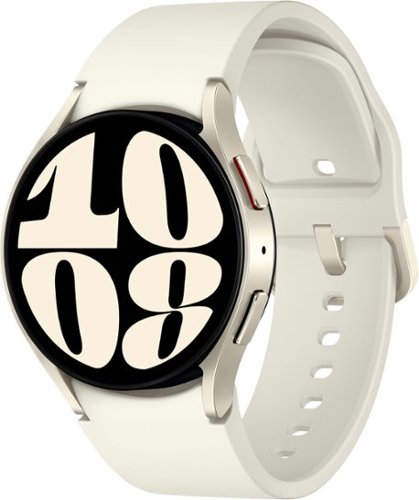
It~s your day ~own it with Samsung Galaxy Watch6. From the gym to the office, our large display keeps you in the know with simple navigation and a super easy-to-read screen. Work out smarter with personalized heart rate zones, and get insights for better rest with Advanced Sleep Coaching. Stay connected by using Galaxy Watch6 to call, text, play music and get notifications on the go. Plus, wherever the day takes you, own your look with a variety of customizable Watch bands and faces. Unlock your day~s full potential with Galaxy Watch6.
What does it mean by carrier GPS? I thought the watch is not carrier locked, isn't it?
The term "carrier GPS" refers to the type of GPS used by the watch. There are two types of GPS: standalone GPS and carrier GPS. Standalone GPS uses its own satellite network to determine your location. Carrier GPS uses the satellite network of a cellular carrier, such as AT&T, Verizon, or T-Mobile.
The Samsung Galaxy Watch6 Aluminum Smartwatch 40mm BT - Cream has a built-in GPS sensor, but it does not have carrier GPS. This means that it can only use standalone GPS to determine your location. If you want to use carrier GPS, you will need to purchase a model that is specifically designed for that carrier.
The watch is not carrier locked, which means that you can use it with any cellular carrier. However, if you want to use carrier GPS, you will need to purchase a model that is specifically designed for that carrier.
The Samsung Galaxy Watch6 Aluminum Smartwatch 40mm BT - Cream has a built-in GPS sensor, but it does not have carrier GPS. This means that it can only use standalone GPS to determine your location. If you want to use carrier GPS, you will need to purchase a model that is specifically designed for that carrier.
The watch is not carrier locked, which means that you can use it with any cellular carrier. However, if you want to use carrier GPS, you will need to purchase a model that is specifically designed for that carrier.
2 years, 9 months ago
by
NicoR