
Share NicoR's profile


NicoR
NicoR's stats
- Review count103
- Helpfulness votes51
- First reviewMay 30, 2023
- Last reviewNovember 25, 2023
- Featured reviews0
- Average rating4.7
Reviews comments
- Review comment count0
- Helpfulness votes0
- First review commentNone
- Last review commentNone
- Featured review comments0
Questions
- Question count0
- Helpfulness votes0
- First questionNone
- Last questionNone
- Featured questions0
- Answer count48
- Helpfulness votes110
- First answerJune 2, 2023
- Last answerSeptember 22, 2023
- Featured answers0
- Best answers10
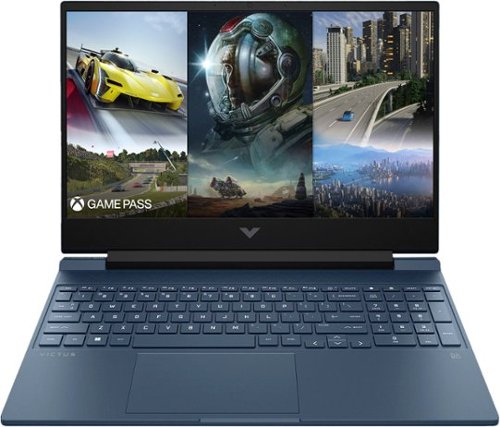
The HP Victus Laptop is made for peak PC gaming. This sleek machine touts a 13th Gen Intel Core processor~ and a modern graphics card. This laptop~s design is just as impressive as its hardware with plenty of color options~, updated thermals and an HD camera with Temporal Noise Reduction.
Customer Rating

4
Sleek and Powerful: A Winning Combination
on June 2, 2023
Posted by: NicoR
Verified Purchase:Yes
I have been using the HP Victus 15.6" Full HD 144Hz Gaming Laptop, and I must say, it left quite an impression. From its sleek design to its powerful performance, this laptop is a solid contender in the gaming laptop market. Here's my review based on my experience with the product.
Let's start with the design. The HP Victus boasts a visually appealing aesthetic with its Performance Blue color, giving it a unique and stylish look. The laptop's build quality is excellent, offering a sturdy and durable feel. It's clear that HP has put a lot of thought into the design, making it a laptop you'll be proud to show off.
The 15.6" Full HD display with a 144Hz refresh rate is an absolute delight for gaming. The visuals are crisp and vibrant, and the high refresh rate ensures smooth gameplay without any noticeable lag or stuttering. Whether you're immersing yourself in the vast landscapes of open-world games or engaging in fast-paced action, this laptop's display won't disappoint.
One of the standout features of the HP Victus is its powerful hardware. Equipped with an Intel Core i5-13420H processor and 8GB of memory, it delivers snappy and responsive performance, allowing you to multitask effortlessly. The NVIDIA GeForce RTX 3050 graphics card is an absolute beast, capable of handling graphically demanding games with ease. It ensures a seamless gaming experience with stunning visuals and fluid frame rates.
The inclusion of a 512GB SSD provides ample storage space for your games, applications, and multimedia files. The SSD not only ensures fast boot times and quick file transfers but also contributes to the overall responsiveness of the system.
The backlit keyboard is a standout feature for me. It not only enhances the aesthetic appeal of the laptop but also serves a functional purpose. The keys are well-spaced, providing a comfortable typing experience. The backlighting can be customized to suit your preference, allowing you to game or work in dimly lit environments without any hassle.
In terms of connectivity, the HP Victus offers a decent selection of ports, including USB Type-C, USB Type-A, HDMI, and an SD card reader. These ports provide flexibility when it comes to connecting peripherals and external devices, making it a versatile machine for various needs.
Battery life is where the HP Victus falls slightly short. While it's not terrible, heavy gaming sessions will drain the battery relatively quickly. It's advisable to keep the laptop plugged in for extended gaming sessions to ensure uninterrupted gameplay.
In conclusion, the HP Victus 15.6" Full HD 144Hz Gaming Laptop impresses with its sleek design, sturdy build quality, and powerful hardware. The high-quality display, excellent graphics card, and responsive performance make it a great choice for gamers. The customizable backlit keyboard adds a touch of flair and convenience. Despite its slightly shorter battery life, this laptop delivers an overall outstanding experience for both gaming and general use.
If you're in the market for a reliable gaming laptop that doesn't compromise on performance or style, the HP Victus 15.6" Gaming Laptop is definitely worth considering.
Length of ownership: 2
Mobile Submission: False
I would recommend this to a friend!
Battery Life

3
Speed

5
Display
5

Share this review:


+1point
20of 39voted this as helpful.
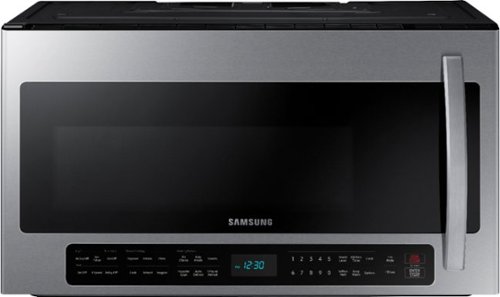
This 2.1 cu. ft. extra-large capacity over-the-range microwave makes preparing multiple dishes effortless by accommodating even your biggest dishes. The Sensor Cook technology automatically adjusts your cooking time for optimal results. Additionally, the ceramic enamel interior features a durable, scratch-resistant, and easy-to-clean surface, making everyday maintenance simple.
Customer Rating

5
Super Sleek and Modern!
on June 2, 2023
Posted by: NicoR
Verified Purchase:Yes
I recently had the pleasure of using the Samsung 2.1 Cu. Ft. Over-the-Range Microwave with Sensor Cook, and I must say it has exceeded my expectations in multiple ways. This sleek stainless steel microwave not only performs exceptionally well, but it also offers some fantastic modern features that enhance its overall functionality.
First and foremost, the design of this microwave is simply stunning. The stainless steel finish adds a touch of elegance to my kitchen, effortlessly blending with my other appliances. The clean and sleek appearance gives it a modern and sophisticated look that is sure to complement any kitchen decor. It's not just a kitchen appliance; it's a statement piece.
One standout feature of this microwave is its built-in Wi-Fi connectivity. This cutting-edge addition allows me to control and monitor the microwave from my smartphone or tablet through the Samsung SmartThings app. I can easily adjust settings, start or stop cooking, and even receive notifications when my food is ready. The convenience of controlling the microwave remotely is a game-changer, especially when I'm busy multitasking in the kitchen.
Another highlight is the sensor cook technology. With this feature, the microwave automatically detects the moisture and humidity levels in the food and adjusts the cooking time and power accordingly. This results in perfectly cooked meals every time, without any guesswork or constant monitoring. Whether it's reheating leftovers, defrosting, or cooking a full meal, the sensor cook feature ensures consistent and delicious results.
In terms of performance, the Samsung 2.1 Cu. Ft. Over-the-Range Microwave delivers excellent cooking power. The 2.1 cubic feet capacity provides ample space for larger dishes and allows me to cook multiple items simultaneously. The microwave heats up quickly and evenly, thanks to its powerful cooking elements. I appreciate that it also offers a variety of preset cooking options, making it easy to cook common dishes with just a touch of a button.
Cleaning this microwave is a breeze as well. The interior is designed with a ceramic enamel coating, which is not only durable but also effortless to wipe clean. I no longer have to spend excessive time scrubbing away stubborn stains or dealing with lingering odors.
In conclusion, the Samsung 2.1 Cu. Ft. Over-the-Range Microwave with Sensor Cook is an exceptional appliance that combines style, convenience, and powerful performance. Its sleek stainless steel design adds a touch of elegance to any kitchen, while the built-in Wi-Fi capabilities and sensor cook technology elevate the user experience. If you're looking for a reliable and visually appealing microwave that offers modern features, this model from Samsung is definitely worth considering.
Length of ownership: 12
Mobile Submission: True
I would recommend this to a friend!
Cook Settings

4
Performance
5
Quality
5

Share this review:


+1point
1of 1voted this as helpful.
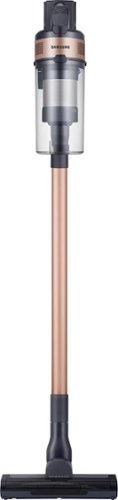
The Samsung Jet 60 Pet Cordless Stick Vacuum features a lightweight and maneuverable design plus a removable battery for extended cleaning time up to 40 minutes. The mini motorized tool is perfect for cleaning up pet dander and allergens. Compatible with the Samsung Clean Station.
Customer Rating
5
East to use!
on May 30, 2023
Posted by: NicoR
Verified Purchase:Yes
Great vaccum design and cordless does last for the use of multiple rooms or quick pickup
Length of ownership: 30
Mobile Submission: True
I would recommend this to a friend!
Cleaning Quality
5
Ease of Assembly
5
Maneuverability
5
Share this review:


0points
0of 0voted this as helpful.
NicoR's Review Comments
NicoR has not submitted comments on any reviews.
NicoR's Questions
NicoR has not submitted any questions.
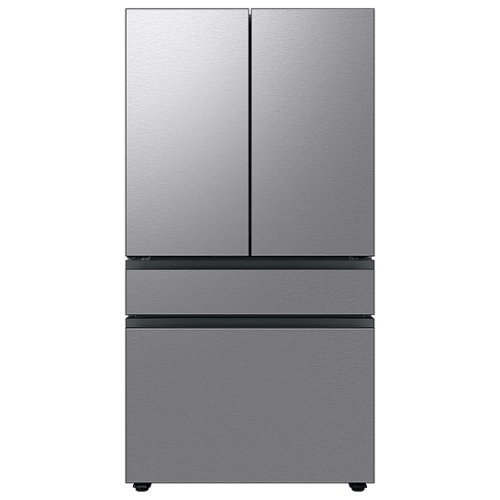
Extra-large capacity 4-Door French Door Refrigerator will reinvent water and ice the way you want it with Samsung~s AutoFill Water Pitcher and Dual Ice Maker with cubed ice and Ice Bites.
I need to replace the water filters on the pitcher and the water dispenser what do I need to buy?
To replace the water filters on the pitcher and the water dispenser of the Samsung Bespoke 29 cu. ft. French Door with AutoFill Pitcher in Stainless Steel, you will need to purchase the following filters:
Pitcher water filter: DA29-00020B
Dispenser water filter: DA29-00020A
You can purchase these filters from Samsung's website, from a Samsung authorized retailer, or from a third-party retailer.
Here are the steps to replace the pitcher water filter:
Remove the pitcher from the refrigerator.
Open the pitcher lid.
Push the tab down to release the old filter.
Insert the new filter into the pitcher.
Close the pitcher lid.
Place the pitcher back in the refrigerator.
Here are the steps to replace the dispenser water filter:
Open the refrigerator door.
Locate the dispenser water filter cover.
Remove the dispenser water filter cover.
Turn the old filter counterclockwise to remove it.
Insert the new filter clockwise until it stops.
Replace the dispenser water filter cover.
Close the refrigerator door.
Once you have replaced both filters, run the water dispenser for a few minutes to flush out any air bubbles. Then, you can start using the filtered water.
It is recommended to replace the pitcher water filter every 2 months and the dispenser water filter every 6 months. However, you may need to replace the filters more often if you have hard water or if you use the filtered water frequently.
Pitcher water filter: DA29-00020B
Dispenser water filter: DA29-00020A
You can purchase these filters from Samsung's website, from a Samsung authorized retailer, or from a third-party retailer.
Here are the steps to replace the pitcher water filter:
Remove the pitcher from the refrigerator.
Open the pitcher lid.
Push the tab down to release the old filter.
Insert the new filter into the pitcher.
Close the pitcher lid.
Place the pitcher back in the refrigerator.
Here are the steps to replace the dispenser water filter:
Open the refrigerator door.
Locate the dispenser water filter cover.
Remove the dispenser water filter cover.
Turn the old filter counterclockwise to remove it.
Insert the new filter clockwise until it stops.
Replace the dispenser water filter cover.
Close the refrigerator door.
Once you have replaced both filters, run the water dispenser for a few minutes to flush out any air bubbles. Then, you can start using the filtered water.
It is recommended to replace the pitcher water filter every 2 months and the dispenser water filter every 6 months. However, you may need to replace the filters more often if you have hard water or if you use the filtered water frequently.
2 years, 9 months ago
by
NicoR
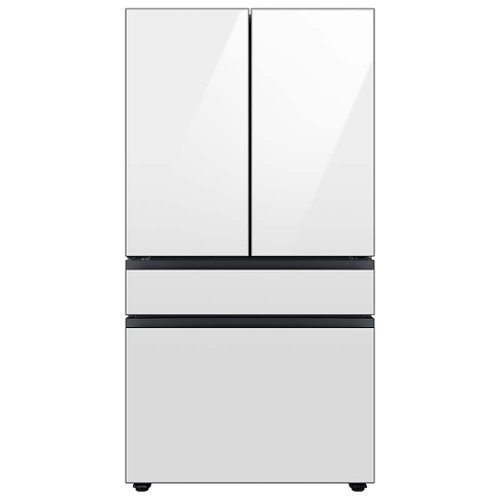
Extra-large capacity 4-Door French Door Refrigerator with customizable and changeable door panels available in a variety of colors and finishes. Reinvent water and ice the way you want it with Samsung~s AutoFill Water Pitcher and Dual Ice Maker with cubed ice and Ice Bites.
Do all Samsung Bespoke refrigerators have casters or wheels to facilitate moving the refrigerator across the floor?
No, not all Samsung Bespoke refrigerators have casters or wheels. Whether or not a Bespoke refrigerator has casters or wheels depends on the specific model. Some models, such as the RF29BB8600QL, do have casters or wheels, while others, such as the RF28T5501SR, do not.
2 years, 9 months ago
by
NicoR

Everything you need is right in your screen. Watch, work and chat - all without connecting a separate PC - with Smart Monitor. Your favorite content, productivity and video call apps are built-in for a simpler and more stylish desk setup that~s a joy to use every time.
What refresh rate is this?
The Samsung M7 Series 32 Tizen 4K has a refresh rate of 60Hz. This means that the screen can display up to 60 frames per second.
60Hz is a common refresh rate for TVs and monitors. It is sufficient for most uses, such as watching TV shows and movies, playing video games, and browsing the web. However, if you are looking for a TV or monitor with a smoother gaming experience, you may want to consider a higher refresh rate, such as 120Hz or 144Hz.
60Hz is a common refresh rate for TVs and monitors. It is sufficient for most uses, such as watching TV shows and movies, playing video games, and browsing the web. However, if you are looking for a TV or monitor with a smoother gaming experience, you may want to consider a higher refresh rate, such as 120Hz or 144Hz.
2 years, 9 months ago
by
NicoR
Everything you need is right in your screen. Watch, work and chat - all without connecting a separate PC - with Smart Monitor. Your favorite content, productivity and video call apps are built-in for a simpler and more stylish desk setup that~s a joy to use every time.
Speakers seam to be not so good my 32" smart TV is amazing what happened to sound quality how can it be fixed. As it was open box maybe displayed and speakers could be bad I'm not sure. Maybe I'm supposed to get a new soundbar for good sound ....
There are a few things you can try to improve the sound quality of your Samsung M7 Series 32 Tizen 4K with built-in speakers:
Adjust the TV's sound settings. Try adjusting the TV's sound settings to see if that helps. You can adjust the treble, bass, and other settings.
Use the TV's sound mode. The TV has a variety of sound modes, such as standard, movie, and music. Try using different sound modes to see which one sounds best to you.
Use the TV's equalizer. The TV has an equalizer that allows you to adjust the sound levels of different frequency bands. Try using the equalizer to boost the bass or treble, or to reduce the midrange.
Use a soundbar. If you are still not satisfied with the sound quality, you can use a soundbar. Soundbars are designed to provide better sound quality than the built-in speakers on TVs.
Check the TV's speakers for damage. If you think that the TV's speakers may be damaged, you can contact Samsung support for assistance.
Adjust the TV's sound settings. Try adjusting the TV's sound settings to see if that helps. You can adjust the treble, bass, and other settings.
Use the TV's sound mode. The TV has a variety of sound modes, such as standard, movie, and music. Try using different sound modes to see which one sounds best to you.
Use the TV's equalizer. The TV has an equalizer that allows you to adjust the sound levels of different frequency bands. Try using the equalizer to boost the bass or treble, or to reduce the midrange.
Use a soundbar. If you are still not satisfied with the sound quality, you can use a soundbar. Soundbars are designed to provide better sound quality than the built-in speakers on TVs.
Check the TV's speakers for damage. If you think that the TV's speakers may be damaged, you can contact Samsung support for assistance.
2 years, 9 months ago
by
NicoR
Everything you need is right in your screen. Watch, work and chat - all without connecting a separate PC - with Smart Monitor. Your favorite content, productivity and video call apps are built-in for a simpler and more stylish desk setup that~s a joy to use every time.
How many watts per speaker? I do have 3rd party premium desk speakers but don't want to use them to save space. I do have 2 headsets but using them for long periods of time hurts my head. So 4w or greater is good for me!
According to the official Samsung website, the speakers on the Samsung M7 Series 32 Tizen 4K with built-in speakers have 5 watts per speaker. This is a good amount of power for small speakers, and it should be enough to fill a small room with sound.
However, if you are looking for louder speakers, you may want to consider using your 3rd party premium desk speakers. These speakers will likely be able to produce more sound than the built-in speakers on the TV.
If you don't want to use your desk speakers, you could also consider using a soundbar. Soundbars are designed to provide better sound quality than the built-in speakers on TVs. They are also relatively slim and compact, so they won't take up too much space.
Ultimately, the best way to decide which speakers are right for you is to listen to them in person. This will allow you to compare the sound quality of the different speakers and choose the ones that you like the best.
However, if you are looking for louder speakers, you may want to consider using your 3rd party premium desk speakers. These speakers will likely be able to produce more sound than the built-in speakers on the TV.
If you don't want to use your desk speakers, you could also consider using a soundbar. Soundbars are designed to provide better sound quality than the built-in speakers on TVs. They are also relatively slim and compact, so they won't take up too much space.
Ultimately, the best way to decide which speakers are right for you is to listen to them in person. This will allow you to compare the sound quality of the different speakers and choose the ones that you like the best.
2 years, 9 months ago
by
NicoR
Everything you need is right in your screen. Watch, work and chat - all without connecting a separate PC - with Smart Monitor. Your favorite content, productivity and video call apps are built-in for a simpler and more stylish desk setup that~s a joy to use every time.
Are you able to stream content like Netflix and computer content at the same time? Basically picture in picture...
Yes, the Samsung M7 Series 32 Tizen 4K with built-in speakers supports picture-in-picture (PIP). This means that you can stream content from two different sources at the same time, with one source displayed in a smaller window over the other source.
To use PIP on the Samsung M7 Series 32 Tizen 4K with built-in speakers, follow these steps:
Open the source that you want to display in the PIP window.
Press the PIP button on the remote control.
Select the source that you want to display in the main window.
Adjust the size and position of the PIP window using the remote control.
You can also use PIP to display a computer screen on your TV. To do this, you will need to connect your computer to the TV using an HDMI cable. Once the computer is connected, follow the steps above to use PIP.
PIP is a useful feature for multitasking or for watching two different things at the same time. For example, you could use PIP to watch a TV show while working on your computer, or to watch a sports game while browsing the internet.
Here are some tips for using PIP on the Samsung M7 Series 32 Tizen 4K with built-in speakers:
Use a wireless keyboard and mouse to make it easier to interact with the PIP window.
Use the voice control feature to search for content in the PIP window.
Adjust the size and position of the PIP window so that it does not block your view of the main window.
Experiment with different sources to see what works best for you.
To use PIP on the Samsung M7 Series 32 Tizen 4K with built-in speakers, follow these steps:
Open the source that you want to display in the PIP window.
Press the PIP button on the remote control.
Select the source that you want to display in the main window.
Adjust the size and position of the PIP window using the remote control.
You can also use PIP to display a computer screen on your TV. To do this, you will need to connect your computer to the TV using an HDMI cable. Once the computer is connected, follow the steps above to use PIP.
PIP is a useful feature for multitasking or for watching two different things at the same time. For example, you could use PIP to watch a TV show while working on your computer, or to watch a sports game while browsing the internet.
Here are some tips for using PIP on the Samsung M7 Series 32 Tizen 4K with built-in speakers:
Use a wireless keyboard and mouse to make it easier to interact with the PIP window.
Use the voice control feature to search for content in the PIP window.
Adjust the size and position of the PIP window so that it does not block your view of the main window.
Experiment with different sources to see what works best for you.
2 years, 9 months ago
by
NicoR
Everything you need is right in your screen. Watch, work and chat - all without connecting a separate PC - with Smart Monitor. Your favorite content, productivity and video call apps are built-in for a simpler and more stylish desk setup that~s a joy to use every time.
do you need a computer or pc to use discord on this?
No, you do not need a computer or PC to use Discord on the Samsung M7 Series 32 Tizen 4K with built-in speakers. Discord has a dedicated app for Tizen TVs, which you can download from the Samsung App Store.
To use Discord on your TV, you will need to create an account or log in to your existing account. Once you are logged in, you can join servers, chat with friends, and make video calls.
It is important to note that the Discord app for Tizen TVs does not have all of the same features as the Discord app for computers and mobile devices. For example, you cannot use the Discord app on your TV to stream games or share your screen.
Overall, the Discord app for Tizen TVs is a good way to chat with friends and join servers while watching TV. However, it is not a replacement for the Discord app on computers and mobile devices if you need to use all of the features that Discord has to offer.
Here are some tips for using Discord on your Samsung M7 Series 32 Tizen 4K with built-in speakers:
Use a wireless keyboard to make typing easier.
Use the voice control feature to search for friends and servers.
Connect the TV to your Wi-Fi network for the best Discord experience.
Use a VPN to protect your privacy and security when using Discord.
To use Discord on your TV, you will need to create an account or log in to your existing account. Once you are logged in, you can join servers, chat with friends, and make video calls.
It is important to note that the Discord app for Tizen TVs does not have all of the same features as the Discord app for computers and mobile devices. For example, you cannot use the Discord app on your TV to stream games or share your screen.
Overall, the Discord app for Tizen TVs is a good way to chat with friends and join servers while watching TV. However, it is not a replacement for the Discord app on computers and mobile devices if you need to use all of the features that Discord has to offer.
Here are some tips for using Discord on your Samsung M7 Series 32 Tizen 4K with built-in speakers:
Use a wireless keyboard to make typing easier.
Use the voice control feature to search for friends and servers.
Connect the TV to your Wi-Fi network for the best Discord experience.
Use a VPN to protect your privacy and security when using Discord.
2 years, 9 months ago
by
NicoR
Everything you need is right in your screen. Watch, work and chat - all without connecting a separate PC - with Smart Monitor. Your favorite content, productivity and video call apps are built-in for a simpler and more stylish desk setup that~s a joy to use every time.
Can this monitor be daisy chained?
The Samsung M7 Series 32 Tizen 4K with built-in speakers does not have a daisy chain feature. This means that you cannot connect multiple monitors together using a single port on your computer.
To connect multiple monitors to your computer, you will need to use a separate port for each monitor. If your computer does not have enough ports, you can use a USB-C hub or a docking station to add more ports.
Here are some alternative ways to connect multiple monitors to your computer:
Use a display adapter. A display adapter is a device that allows you to connect multiple monitors to your computer using a single port. Display adapters are available in a variety of types, including USB-C to HDMI, DisplayPort to HDMI, and HDMI to VGA.
Use a docking station. A docking station is a device that allows you to connect multiple monitors, peripherals, and other devices to your computer using a single cable. Docking stations are typically used with laptops, but they can also be used with desktop computers.
Use a KVM switch. A KVM switch is a device that allows you to control multiple computers using a single keyboard, mouse, and monitor. KVM switches are typically used in office and data center environments, but they can also be used for personal use.
To connect multiple monitors to your computer, you will need to use a separate port for each monitor. If your computer does not have enough ports, you can use a USB-C hub or a docking station to add more ports.
Here are some alternative ways to connect multiple monitors to your computer:
Use a display adapter. A display adapter is a device that allows you to connect multiple monitors to your computer using a single port. Display adapters are available in a variety of types, including USB-C to HDMI, DisplayPort to HDMI, and HDMI to VGA.
Use a docking station. A docking station is a device that allows you to connect multiple monitors, peripherals, and other devices to your computer using a single cable. Docking stations are typically used with laptops, but they can also be used with desktop computers.
Use a KVM switch. A KVM switch is a device that allows you to control multiple computers using a single keyboard, mouse, and monitor. KVM switches are typically used in office and data center environments, but they can also be used for personal use.
2 years, 9 months ago
by
NicoR
Everything you need is right in your screen. Watch, work and chat - all without connecting a separate PC - with Smart Monitor. Your favorite content, productivity and video call apps are built-in for a simpler and more stylish desk setup that~s a joy to use every time.
What is remote model number?
The remote model number for the Samsung M7 Series 32 Tizen 4K with built-in speakers is BN59-01312A. This is the same remote control that is used for other Samsung 4K smart TVs released in 2022 and 2023.
If you have lost or damaged your remote control, you can purchase a replacement remote from Samsung or from a third-party retailer. You can also use a universal remote control to control your TV. However, universal remote controls may not have all of the same features as the original remote control.
To program a universal remote control to work with your TV, you will need the TV's remote control code. The remote control code for the Samsung M7 Series 32 Tizen 4K with built-in speakers is 00186.
To program a universal remote control, consult the remote control's manual for instructions. Once the remote control is programmed, you will be able to use it to control your TV, including turning it on and off, changing the volume, and switching channels.
If you have lost or damaged your remote control, you can purchase a replacement remote from Samsung or from a third-party retailer. You can also use a universal remote control to control your TV. However, universal remote controls may not have all of the same features as the original remote control.
To program a universal remote control to work with your TV, you will need the TV's remote control code. The remote control code for the Samsung M7 Series 32 Tizen 4K with built-in speakers is 00186.
To program a universal remote control, consult the remote control's manual for instructions. Once the remote control is programmed, you will be able to use it to control your TV, including turning it on and off, changing the volume, and switching channels.
2 years, 9 months ago
by
NicoR
Everything you need is right in your screen. Watch, work and chat - all without connecting a separate PC - with Smart Monitor. Your favorite content, productivity and video call apps are built-in for a simpler and more stylish desk setup that~s a joy to use every time.
What size screw are used on the VESA mount area?
he Samsung M7 Series 32 Tizen 4K with built-in speakers uses M4 screws for the VESA mount area.
VESA screws are used to mount a TV or monitor to a wall mount or other mounting bracket. The VESA screw size is determined by the VESA mount pattern of the TV or monitor. The VESA mount pattern is a set of four holes on the back of the TV or monitor that are used to attach the mounting bracket.
To mount the Samsung M7 Series 32 Tizen 4K with built-in speakers to a wall mount, you will need four M4 screws. The screws should be at least 20mm long. You may also need to use washers and spacers, depending on the wall mount you are using.
Here are some tips for mounting your TV or monitor to a wall:
Make sure that the wall mount is rated to support the weight of your TV or monitor.
Use a level to make sure that the wall mount is level before you attach it to the wall.
Use the correct screw size and length for the VESA mount pattern of your TV or monitor.
Be careful not to overtighten the screws, as this could damage the TV or monitor.
VESA screws are used to mount a TV or monitor to a wall mount or other mounting bracket. The VESA screw size is determined by the VESA mount pattern of the TV or monitor. The VESA mount pattern is a set of four holes on the back of the TV or monitor that are used to attach the mounting bracket.
To mount the Samsung M7 Series 32 Tizen 4K with built-in speakers to a wall mount, you will need four M4 screws. The screws should be at least 20mm long. You may also need to use washers and spacers, depending on the wall mount you are using.
Here are some tips for mounting your TV or monitor to a wall:
Make sure that the wall mount is rated to support the weight of your TV or monitor.
Use a level to make sure that the wall mount is level before you attach it to the wall.
Use the correct screw size and length for the VESA mount pattern of your TV or monitor.
Be careful not to overtighten the screws, as this could damage the TV or monitor.
2 years, 9 months ago
by
NicoR