
Share NicoR's profile


NicoR
NicoR's stats
- Review count103
- Helpfulness votes51
- First reviewMay 30, 2023
- Last reviewNovember 25, 2023
- Featured reviews0
- Average rating4.7
Reviews comments
- Review comment count0
- Helpfulness votes0
- First review commentNone
- Last review commentNone
- Featured review comments0
Questions
- Question count0
- Helpfulness votes0
- First questionNone
- Last questionNone
- Featured questions0
- Answer count48
- Helpfulness votes110
- First answerJune 2, 2023
- Last answerSeptember 22, 2023
- Featured answers0
- Best answers10

We'll deliver, install and make sure your new electric range is working. We'll connect to an existing 220V electrical outlet. Additional charges may apply if not up to local codes or requirements.
Customer Rating

5
Convient install service
on August 6, 2023
Posted by: NicoR
Verified Purchase:Yes
The oven range installation service from Best Buy offers a convenient and hassle-free way to set up your new appliance. Here's what you can expect from this service:
1. Professional and Timely Service: Best Buy's installation team comprises experienced professionals who are well-versed in handling oven ranges. They arrive on time and are equipped with the necessary tools to get the job done efficiently.
2. Expert Installation: The technicians take care of every aspect of the installation process, ensuring that your oven range is installed correctly and safely. They'll handle the electrical and gas connections, if applicable, making sure everything meets safety standards and local codes.
3. Thorough Testing: Once the installation is complete, the team performs thorough testing to ensure the oven range functions as expected. This includes checking burners, oven settings, and any additional features.
4. Removal of Packaging: As part of their service, the installation team will also remove the packaging materials, leaving your kitchen tidy and ready to use.
5. Additional Services: If you have any additional requirements, such as moving the old appliance or installing anti-tip brackets, Best Buy can often accommodate those needs for an extra fee.
Overall, the Best Buy oven range installation service is a convenient and reliable option for customers who want a seamless setup for their new appliance. While the service may come with an additional cost, it provides peace of mind and ensures that your oven range is set up correctly, reducing the risk of potential issues in the future.
Please note that service offerings and pricing may vary depending on your location and specific requirements. It's always a good idea to check with your local Best Buy store or their website for the most up-to-date information.
Length of ownership: 204
Mobile Submission: True
I would recommend this to a friend!
Expertise

5
Professionalism

4
Service
5

Share this review:


0points
0of 0voted this as helpful.
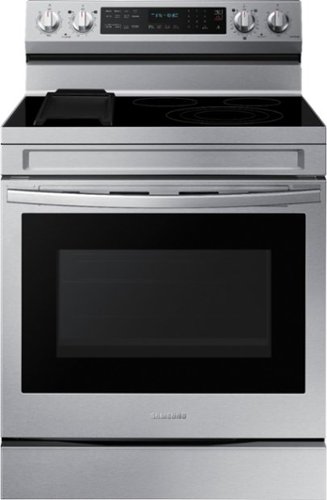
Elevate the look of your kitchen with Samsung~s Smart Freestanding Electric Range. Our Stainless Steel design elegantly wraps around cooktop sides and up through the slim control panel. Upgraded technology makes cooking on your stove simple and fun.
Customer Rating

4
Great range and looks very sleek
on August 6, 2023
Posted by: NicoR
Verified Purchase:Yes
**Overall Rating:** 4.5 out of 5 stars
**Pros:**
* Large capacity oven with 6.3 cubic feet of space
* No-preheat air fry function for quick and easy cooking
* Convection+ technology for even cooking
* Removable griddle for versatile cooking options
* Wi-Fi connectivity for remote control and monitoring
* Stainless steel finish with a sleek and modern design
* No-preheat air fry function for quick and easy cooking
* Convection+ technology for even cooking
* Removable griddle for versatile cooking options
* Wi-Fi connectivity for remote control and monitoring
* Stainless steel finish with a sleek and modern design
**Cons:**
* The air fry function can be a bit noisy
* The griddle can be difficult to clean if not used properly
* The griddle can be difficult to clean if not used properly
**Overall Thoughts:**
I've been using the Samsung 6.3 cu. ft. Smart Freestanding Electric Range for a few weeks now, and I'm really impressed with it. The oven is large and spacious, and the no-preheat air fry function is a game-changer. I've been able to cook chicken, french fries, and even pizza in the air fryer without having to preheat the oven first. The convection+ technology also does a great job of evenly cooking food, and the removable griddle is a nice addition for making pancakes, waffles, or grilled cheese sandwiches.
The only real downsides to this range are that the air fry function can be a bit noisy, and the griddle can be difficult to clean if not used properly. However, overall I'm very happy with this range, and I would definitely recommend it to anyone looking for a new electric range.
**Recommendation:**
If you're looking for a versatile and high-performing electric range, the Samsung 6.3 cu. ft. Smart Freestanding Electric Range is a great option. It's got a large capacity oven, no-preheat air fry function, convection+ technology, and a removable griddle. It's also Wi-Fi enabled, so you can control it remotely or monitor its status from your smartphone. I highly recommend this range.
Length of ownership: 203
Mobile Submission: True
I would recommend this to a friend!
Ease of Cleaning
4
Performance
5
Quality
4

Share this review:


0points
0of 0voted this as helpful.

Monthly Best Buy Protection (up to 24 mo.)
Customer Rating
5
Good coverage
on August 6, 2023
Posted by: NicoR
Verified Purchase:Yes
**Pros:**
* Extended coverage of up to 24 months
* Protection beyond the manufacturer's warranty
* Repair or replacement options
* Straightforward claims process
* Responsive and helpful customer service
* Protection beyond the manufacturer's warranty
* Repair or replacement options
* Straightforward claims process
* Responsive and helpful customer service
**Cons:**
* Can be expensive
* Not all products are eligible
* Some limitations and exclusions may apply
* Not all products are eligible
* Some limitations and exclusions may apply
**Overall:**
The Best Buy 24-month extended warranty can be a good option for those who want peace of mind and potential cost savings in the event of unforeseen issues with their appliances. The extended coverage can be beneficial for items that are prone to accidents or malfunctions, and the claims process is relatively straightforward. However, it's important to weigh the cost of the protection plan against the likelihood of encountering problems with your purchase during the extended coverage period. Additionally, it's essential to review the terms and conditions of the protection plan, as certain limitations and exclusions may apply.
**Recommendation:**
I would recommend the Best Buy 24-month extended warranty to those who are looking for peace of mind and potential cost savings. However, it's important to carefully consider the value it provides before opting for this service.
**Additional thoughts:**
If you're considering purchasing an extended warranty, it's important to compare different plans and providers before making a decision. You should also read the terms and conditions carefully to understand what is and isn't covered.
Here are some tips for choosing an extended warranty:
* Consider the cost of the protection plan and the likelihood of needing it.
* Make sure the plan covers the specific product you're purchasing.
* Read the terms and conditions carefully to understand what is and isn't covered.
* Compare different plans and providers before making a decision.
* Make sure the plan covers the specific product you're purchasing.
* Read the terms and conditions carefully to understand what is and isn't covered.
* Compare different plans and providers before making a decision.
Length of ownership: 77
Mobile Submission: True
I would recommend this to a friend!
Quality
5
Value
5
Ease of Use
5
Share this review:


0points
0of 0voted this as helpful.

We'll deliver, install and make sure your new refrigerator is working. Additional charges may apply if not up to local codes or requirements.
Customer Rating
4
Worth the price for heavy appliances
on August 6, 2023
Posted by: NicoR
Verified Purchase:Yes
I recently purchased a new refrigerator with an ice maker and decided to have Best Buy install it for me. I was a little hesitant at first, but I'm so glad I did! The service was quick, easy, and professional.
The installers arrived on time and were very friendly and knowledgeable. They took the time to explain the installation process to me and answer any questions I had. They also made sure to clean up after themselves when they were finished.
The installation itself was quick and easy. The installers were able to get the refrigerator installed in my kitchen and connected to the existing water line in about an hour. They were very careful not to damage my cabinets or walls during the installation process.
I'm very happy with the refrigerator install to current water line service through Best Buy. The service was quick, easy, and professional. I would definitely recommend this service to anyone who is looking to have a new refrigerator installed with an ice maker.
**Pros:**
* Quick and easy installation
* Professional and knowledgeable installers
* Clean up after themselves
* Connect your refrigerator to an existing water line
* Professional and knowledgeable installers
* Clean up after themselves
* Connect your refrigerator to an existing water line
**Cons:**
* The cost of the service may be prohibitive for some people.
**Overall:**
I'm very happy with the refrigerator install to current water line service through Best Buy. The service was quick, easy, and professional. I would definitely recommend this service to anyone who is looking to have a new refrigerator installed with an ice maker.
Here are some additional details about the service:
* The service is available for most refrigerators with ice makers.
* The cost of the service varies depending on the refrigerator model and the location of the installation.
* The service typically takes about an hour to complete.
* The cost of the service varies depending on the refrigerator model and the location of the installation.
* The service typically takes about an hour to complete.
I hope this is helpful!
Length of ownership: 77
Mobile Submission: True
I would recommend this to a friend!
Expertise
5
Professionalism
4
Service
4

Share this review:


0points
0of 0voted this as helpful.

We'll deliver, install and make sure your new dishwasher is working. If required by the manufacturer, we'll secure the unit to cabinet sides or countertop. Additional charges may apply if not up to local codes or requirements.
Customer Rating
4
Easy install and worth the price
on August 6, 2023
Posted by: NicoR
Verified Purchase:Yes
I recently purchased a new dishwasher from Best Buy and decided to have them install it for me. I was a little hesitant at first, but I'm so glad I did! The service was quick, easy, and professional.
The installers arrived on time and were very friendly and knowledgeable. They took the time to explain the installation process to me and answer any questions I had. They also made sure to clean up after themselves when they were finished.
The installation itself was quick and easy. The installers were able to get the dishwasher installed in my kitchen in about an hour. They were very careful not to damage my cabinets or walls during the installation process.
I'm very happy with the dishwasher install service through Best Buy. The service was quick, easy, and professional. I would definitely recommend this service to anyone who is looking to have a new dishwasher installed.
**Pros:**
* Quick and easy installation
* Professional and knowledgeable installers
* Clean up after themselves
* Remove your old dishwasher and dispose of it properly
* Professional and knowledgeable installers
* Clean up after themselves
* Remove your old dishwasher and dispose of it properly
**Cons:**
* The cost of the service may be prohibitive for some people.
**Overall:**
I'm very happy with the dishwasher install service through Best Buy. The service was quick, easy, and professional. I would definitely recommend this service to anyone who is looking to have a new dishwasher installed.
Here are some additional details about the service:
* The service is available for most dishwashers.
* The cost of the service varies depending on the dishwasher model and the location of the installation.
* The service typically takes about an hour to complete.
* The cost of the service varies depending on the dishwasher model and the location of the installation.
* The service typically takes about an hour to complete.
I hope this is helpful!
Length of ownership: 77
Mobile Submission: True
I would recommend this to a friend!
Expertise
4
Professionalism
4
Service
4

Share this review:


+1point
1of 1voted this as helpful.

We'll deliver, install and make sure your new over-the-range microwave is working. We'll connect it to an existing 110V electrical outlet. Additional charges may apply if not up to local codes or requirements.
Customer Rating
5
Worth the extra price for peace of mind
on August 6, 2023
Posted by: NicoR
Verified Purchase:Yes
I recently purchased a new over-the-range microwave from Best Buy and decided to have them install it for me. I was a little hesitant at first, but I'm so glad I did! The service was quick, easy, and professional.
The installers arrived on time and were very friendly and knowledgeable. They took the time to explain the installation process to me and answer any questions I had. They also made sure to clean up after themselves when they were finished.
The installation itself was quick and easy. The installers were able to get the microwave installed in my kitchen in about an hour. They were very careful not to damage my cabinets or walls during the installation process.
I'm very happy with the over-the-range microwave install service through Best Buy. The service was quick, easy, and professional. I would definitely recommend this service to anyone who is looking to have a new microwave installed.
**Pros:**
* Quick and easy installation
* Professional and knowledgeable installers
* Clean up after themselves
* Professional and knowledgeable installers
* Clean up after themselves
**Cons:**
* The cost of the service may be prohibitive for some people.
**Overall:**
I'm very happy with the over-the-range microwave install service through Best Buy. The service was quick, easy, and professional. I would definitely recommend this service to anyone who is looking to have a new microwave installed.
Here are some additional details about the service:
* The service is available for most over-the-range microwaves.
* The cost of the service varies depending on the microwave model and the location of the installation.
* The service typically takes about an hour to complete.
* The installers will remove your old microwave and dispose of it properly.
* The cost of the service varies depending on the microwave model and the location of the installation.
* The service typically takes about an hour to complete.
* The installers will remove your old microwave and dispose of it properly.
I hope this is helpful!
Length of ownership: 77
Mobile Submission: True
I would recommend this to a friend!
Expertise

3
Professionalism
3
Service
5

Share this review:


+1point
1of 1voted this as helpful.
Monthly Best Buy Protection (up to 24 mo.)
Customer Rating
5
Great for easy coverage
on August 6, 2023
Posted by: NicoR
Verified Purchase:Yes
I purchased the Best Buy 24 Month Extended Warranty when I bought a device a few months ago. I was looking for a way to protect my investment and I was happy to find a plan that offered comprehensive coverage for accidental damage, defects, and malfunctions.
The plan was easy to purchase and the claims process was simple. I had to file a claim once when the device stopped working after a power outage. The process was quick and easy and I was able to get my device repaired within a few days.
I'm glad that I purchased the Best Buy 24 Month Extended Warranty. It gave me peace of mind knowing that my device was protected in case something went wrong. I would recommend this plan to anyone who is looking for a way to protect their devices.
**Pros:**
* Comprehensive coverage
* Easy to purchase
* Convenient claims process
* Reliable customer service
* Easy to purchase
* Convenient claims process
* Reliable customer service
**Cons:**
* The cost of the plan may be prohibitive for some people.
* The plan does not cover all devices.
* The plan does not cover all devices.
**Overall:**
I'm happy with the Best Buy 24 Month Extended Warranty. It's a valuable protection plan that offers peace of mind for my devices. If you're looking for a way to protect your devices, I would recommend this plan.
Length of ownership: 27
Mobile Submission: True
I would recommend this to a friend!
Quality
5
Value
4
Ease of Use
5
Share this review:


0points
0of 0voted this as helpful.
Monthly Best Buy Protection (up to 24 mo.)
Customer Rating
5
Good coverage
on August 6, 2023
Posted by: NicoR
Verified Purchase:Yes
I purchased the Best Buy 24 Month Extended Warranty when I bought an appliance a few months ago. I was looking for a way to protect my investment and I was happy to find a plan that offered comprehensive coverage for accidental damage, defects, and malfunctions.
The plan was easy to purchase and the claims process was simple. I had to file a claim once when the appliance stopped working after a power outage. The process was quick and easy and I was able to get my appliance repaired within a few days.
I'm glad that I purchased the Best Buy 24 Month Extended Warranty. It gave me peace of mind knowing that my appliance was protected in case something went wrong. I would recommend this plan to anyone who is looking for a way to protect their appliances.
**Pros:**
* Comprehensive coverage
* Easy to purchase
* Convenient claims process
* Reliable customer service
* Easy to purchase
* Convenient claims process
* Reliable customer service
**Cons:**
* The cost of the plan may be prohibitive for some people.
* The plan does not cover all appliances.
* The plan does not cover all appliances.
**Overall:**
I'm happy with the Best Buy 24 Month Extended Warranty. It's a valuable protection plan that offers peace of mind for my appliances. If you're looking for a way to protect your appliances, I would recommend this plan.
Length of ownership: 11
Mobile Submission: True
I would recommend this to a friend!
Quality
5
Value
5
Ease of Use
5
Share this review:


0points
0of 0voted this as helpful.
Monthly Best Buy Protection (up to 24 mo.)
Customer Rating
5
Good peace of mind
on August 6, 2023
Posted by: NicoR
Verified Purchase:Yes
I purchased the Best Buy 24 Month Extended Warranty when I bought a mini fridge a few months ago. I was looking for a way to protect my investment and I was happy to find a plan that offered comprehensive coverage for accidental damage, defects, and malfunctions.
The plan was easy to purchase and the claims process was simple. I had to file a claim once when the mini fridge stopped working after a power outage. The process was quick and easy and I was able to get my mini fridge repaired within a few days.
I'm glad that I purchased the Best Buy 24 Month Extended Warranty. It gave me peace of mind knowing that my mini fridge was protected in case something went wrong. I would recommend this plan to anyone who is looking for a way to protect their appliances.
**Pros:**
* Comprehensive coverage
* Easy to purchase
* Convenient claims process
* Reliable customer service
* Easy to purchase
* Convenient claims process
* Reliable customer service
**Cons:**
* The cost of the plan may be prohibitive for some people.
* The plan does not cover all appliances.
* The plan does not cover all appliances.
**Overall:**
I'm happy with the Best Buy 24 Month Extended Warranty. It's a valuable protection plan that offers peace of mind for my appliances. If you're looking for a way to protect your appliances, I would recommend this plan.
Length of ownership: 9
Mobile Submission: True
I would recommend this to a friend!
Quality
5
Value
4
Ease of Use
5
Share this review:


0points
0of 0voted this as helpful.
Monthly Best Buy Protection (up to 24 mo.)
Customer Rating
5
Great warranty option!
on August 6, 2023
Posted by: NicoR
Verified Purchase:Yes
The Best Buy 24 Month Extended Warranty is a comprehensive protection plan that can give you peace of mind for your appliances. The plan covers accidental damage, defects, and malfunctions for up to 24 months after the original manufacturer's warranty expires.
Here are some of the benefits of the Best Buy 24 Month Extended Warranty:
* **Comprehensive coverage:** The plan covers accidental damage, defects, and malfunctions. This means that you're protected even if your appliance is damaged by a spill, a drop, or a power surge.
* **Easy to purchase:** The plan can be purchased at the time of purchase or within 60 days of purchase. You can purchase the plan online, in-store, or over the phone.
* **Convenient claims process:** If you need to file a claim, you can do so online, by phone, or in-store. The claims process is easy and straightforward.
* **Reliable customer service:** Best Buy has a reputation for providing excellent customer service. If you have any questions or concerns about your plan, you can reach out to customer service for assistance.
* **Easy to purchase:** The plan can be purchased at the time of purchase or within 60 days of purchase. You can purchase the plan online, in-store, or over the phone.
* **Convenient claims process:** If you need to file a claim, you can do so online, by phone, or in-store. The claims process is easy and straightforward.
* **Reliable customer service:** Best Buy has a reputation for providing excellent customer service. If you have any questions or concerns about your plan, you can reach out to customer service for assistance.
The Best Buy 24 Month Extended Warranty is a valuable protection plan for your appliances. The plan offers comprehensive coverage, easy purchasing, and a convenient claims process. If you're looking for peace of mind for your appliances, the Best Buy 24 Month Extended Warranty is a great option.
**Pros:**
* Comprehensive coverage
* Easy to purchase
* Convenient claims process
* Reliable customer service
* Easy to purchase
* Convenient claims process
* Reliable customer service
**Cons:**
* The cost of the plan may be prohibitive for some people.
* The plan does not cover all appliances.
* The plan does not cover all appliances.
**Overall:**
The Best Buy 24 Month Extended Warranty is a valuable protection plan for your appliances. The plan offers comprehensive coverage, easy purchasing, and a convenient claims process. If you're looking for peace of mind for your appliances, the Best Buy 24 Month Extended Warranty is a great option.
Length of ownership: 8
Mobile Submission: True
I would recommend this to a friend!
Quality
5
Value
4
Ease of Use
5
Share this review:


0points
0of 0voted this as helpful.
NicoR's Review Comments
NicoR has not submitted comments on any reviews.
NicoR's Questions
NicoR has not submitted any questions.
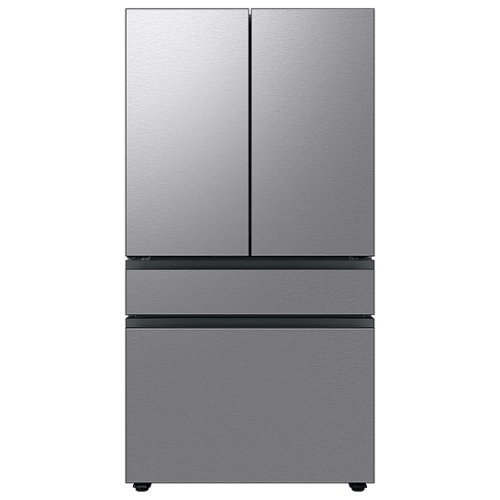
Extra-large capacity 4-Door French Door Refrigerator will reinvent water and ice the way you want it with Samsung~s AutoFill Water Pitcher and Dual Ice Maker with cubed ice and Ice Bites.
I need to replace the water filters on the pitcher and the water dispenser what do I need to buy?
To replace the water filters on the pitcher and the water dispenser of the Samsung Bespoke 29 cu. ft. French Door with AutoFill Pitcher in Stainless Steel, you will need to purchase the following filters:
Pitcher water filter: DA29-00020B
Dispenser water filter: DA29-00020A
You can purchase these filters from Samsung's website, from a Samsung authorized retailer, or from a third-party retailer.
Here are the steps to replace the pitcher water filter:
Remove the pitcher from the refrigerator.
Open the pitcher lid.
Push the tab down to release the old filter.
Insert the new filter into the pitcher.
Close the pitcher lid.
Place the pitcher back in the refrigerator.
Here are the steps to replace the dispenser water filter:
Open the refrigerator door.
Locate the dispenser water filter cover.
Remove the dispenser water filter cover.
Turn the old filter counterclockwise to remove it.
Insert the new filter clockwise until it stops.
Replace the dispenser water filter cover.
Close the refrigerator door.
Once you have replaced both filters, run the water dispenser for a few minutes to flush out any air bubbles. Then, you can start using the filtered water.
It is recommended to replace the pitcher water filter every 2 months and the dispenser water filter every 6 months. However, you may need to replace the filters more often if you have hard water or if you use the filtered water frequently.
Pitcher water filter: DA29-00020B
Dispenser water filter: DA29-00020A
You can purchase these filters from Samsung's website, from a Samsung authorized retailer, or from a third-party retailer.
Here are the steps to replace the pitcher water filter:
Remove the pitcher from the refrigerator.
Open the pitcher lid.
Push the tab down to release the old filter.
Insert the new filter into the pitcher.
Close the pitcher lid.
Place the pitcher back in the refrigerator.
Here are the steps to replace the dispenser water filter:
Open the refrigerator door.
Locate the dispenser water filter cover.
Remove the dispenser water filter cover.
Turn the old filter counterclockwise to remove it.
Insert the new filter clockwise until it stops.
Replace the dispenser water filter cover.
Close the refrigerator door.
Once you have replaced both filters, run the water dispenser for a few minutes to flush out any air bubbles. Then, you can start using the filtered water.
It is recommended to replace the pitcher water filter every 2 months and the dispenser water filter every 6 months. However, you may need to replace the filters more often if you have hard water or if you use the filtered water frequently.
2 years, 9 months ago
by
NicoR
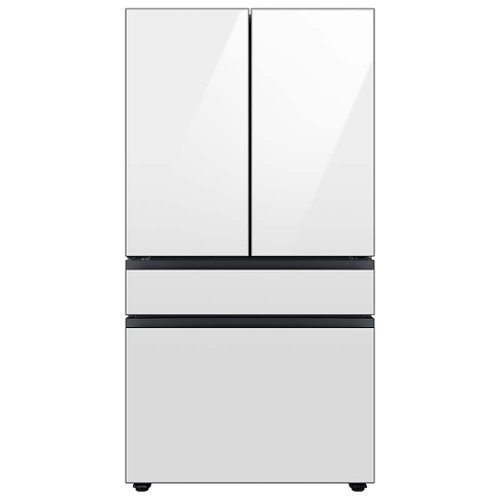
Extra-large capacity 4-Door French Door Refrigerator with customizable and changeable door panels available in a variety of colors and finishes. Reinvent water and ice the way you want it with Samsung~s AutoFill Water Pitcher and Dual Ice Maker with cubed ice and Ice Bites.
Do all Samsung Bespoke refrigerators have casters or wheels to facilitate moving the refrigerator across the floor?
No, not all Samsung Bespoke refrigerators have casters or wheels. Whether or not a Bespoke refrigerator has casters or wheels depends on the specific model. Some models, such as the RF29BB8600QL, do have casters or wheels, while others, such as the RF28T5501SR, do not.
2 years, 9 months ago
by
NicoR

Everything you need is right in your screen. Watch, work and chat - all without connecting a separate PC - with Smart Monitor. Your favorite content, productivity and video call apps are built-in for a simpler and more stylish desk setup that~s a joy to use every time.
What refresh rate is this?
The Samsung M7 Series 32 Tizen 4K has a refresh rate of 60Hz. This means that the screen can display up to 60 frames per second.
60Hz is a common refresh rate for TVs and monitors. It is sufficient for most uses, such as watching TV shows and movies, playing video games, and browsing the web. However, if you are looking for a TV or monitor with a smoother gaming experience, you may want to consider a higher refresh rate, such as 120Hz or 144Hz.
60Hz is a common refresh rate for TVs and monitors. It is sufficient for most uses, such as watching TV shows and movies, playing video games, and browsing the web. However, if you are looking for a TV or monitor with a smoother gaming experience, you may want to consider a higher refresh rate, such as 120Hz or 144Hz.
2 years, 9 months ago
by
NicoR
Everything you need is right in your screen. Watch, work and chat - all without connecting a separate PC - with Smart Monitor. Your favorite content, productivity and video call apps are built-in for a simpler and more stylish desk setup that~s a joy to use every time.
Speakers seam to be not so good my 32" smart TV is amazing what happened to sound quality how can it be fixed. As it was open box maybe displayed and speakers could be bad I'm not sure. Maybe I'm supposed to get a new soundbar for good sound ....
There are a few things you can try to improve the sound quality of your Samsung M7 Series 32 Tizen 4K with built-in speakers:
Adjust the TV's sound settings. Try adjusting the TV's sound settings to see if that helps. You can adjust the treble, bass, and other settings.
Use the TV's sound mode. The TV has a variety of sound modes, such as standard, movie, and music. Try using different sound modes to see which one sounds best to you.
Use the TV's equalizer. The TV has an equalizer that allows you to adjust the sound levels of different frequency bands. Try using the equalizer to boost the bass or treble, or to reduce the midrange.
Use a soundbar. If you are still not satisfied with the sound quality, you can use a soundbar. Soundbars are designed to provide better sound quality than the built-in speakers on TVs.
Check the TV's speakers for damage. If you think that the TV's speakers may be damaged, you can contact Samsung support for assistance.
Adjust the TV's sound settings. Try adjusting the TV's sound settings to see if that helps. You can adjust the treble, bass, and other settings.
Use the TV's sound mode. The TV has a variety of sound modes, such as standard, movie, and music. Try using different sound modes to see which one sounds best to you.
Use the TV's equalizer. The TV has an equalizer that allows you to adjust the sound levels of different frequency bands. Try using the equalizer to boost the bass or treble, or to reduce the midrange.
Use a soundbar. If you are still not satisfied with the sound quality, you can use a soundbar. Soundbars are designed to provide better sound quality than the built-in speakers on TVs.
Check the TV's speakers for damage. If you think that the TV's speakers may be damaged, you can contact Samsung support for assistance.
2 years, 9 months ago
by
NicoR
Everything you need is right in your screen. Watch, work and chat - all without connecting a separate PC - with Smart Monitor. Your favorite content, productivity and video call apps are built-in for a simpler and more stylish desk setup that~s a joy to use every time.
How many watts per speaker? I do have 3rd party premium desk speakers but don't want to use them to save space. I do have 2 headsets but using them for long periods of time hurts my head. So 4w or greater is good for me!
According to the official Samsung website, the speakers on the Samsung M7 Series 32 Tizen 4K with built-in speakers have 5 watts per speaker. This is a good amount of power for small speakers, and it should be enough to fill a small room with sound.
However, if you are looking for louder speakers, you may want to consider using your 3rd party premium desk speakers. These speakers will likely be able to produce more sound than the built-in speakers on the TV.
If you don't want to use your desk speakers, you could also consider using a soundbar. Soundbars are designed to provide better sound quality than the built-in speakers on TVs. They are also relatively slim and compact, so they won't take up too much space.
Ultimately, the best way to decide which speakers are right for you is to listen to them in person. This will allow you to compare the sound quality of the different speakers and choose the ones that you like the best.
However, if you are looking for louder speakers, you may want to consider using your 3rd party premium desk speakers. These speakers will likely be able to produce more sound than the built-in speakers on the TV.
If you don't want to use your desk speakers, you could also consider using a soundbar. Soundbars are designed to provide better sound quality than the built-in speakers on TVs. They are also relatively slim and compact, so they won't take up too much space.
Ultimately, the best way to decide which speakers are right for you is to listen to them in person. This will allow you to compare the sound quality of the different speakers and choose the ones that you like the best.
2 years, 9 months ago
by
NicoR
Everything you need is right in your screen. Watch, work and chat - all without connecting a separate PC - with Smart Monitor. Your favorite content, productivity and video call apps are built-in for a simpler and more stylish desk setup that~s a joy to use every time.
Are you able to stream content like Netflix and computer content at the same time? Basically picture in picture...
Yes, the Samsung M7 Series 32 Tizen 4K with built-in speakers supports picture-in-picture (PIP). This means that you can stream content from two different sources at the same time, with one source displayed in a smaller window over the other source.
To use PIP on the Samsung M7 Series 32 Tizen 4K with built-in speakers, follow these steps:
Open the source that you want to display in the PIP window.
Press the PIP button on the remote control.
Select the source that you want to display in the main window.
Adjust the size and position of the PIP window using the remote control.
You can also use PIP to display a computer screen on your TV. To do this, you will need to connect your computer to the TV using an HDMI cable. Once the computer is connected, follow the steps above to use PIP.
PIP is a useful feature for multitasking or for watching two different things at the same time. For example, you could use PIP to watch a TV show while working on your computer, or to watch a sports game while browsing the internet.
Here are some tips for using PIP on the Samsung M7 Series 32 Tizen 4K with built-in speakers:
Use a wireless keyboard and mouse to make it easier to interact with the PIP window.
Use the voice control feature to search for content in the PIP window.
Adjust the size and position of the PIP window so that it does not block your view of the main window.
Experiment with different sources to see what works best for you.
To use PIP on the Samsung M7 Series 32 Tizen 4K with built-in speakers, follow these steps:
Open the source that you want to display in the PIP window.
Press the PIP button on the remote control.
Select the source that you want to display in the main window.
Adjust the size and position of the PIP window using the remote control.
You can also use PIP to display a computer screen on your TV. To do this, you will need to connect your computer to the TV using an HDMI cable. Once the computer is connected, follow the steps above to use PIP.
PIP is a useful feature for multitasking or for watching two different things at the same time. For example, you could use PIP to watch a TV show while working on your computer, or to watch a sports game while browsing the internet.
Here are some tips for using PIP on the Samsung M7 Series 32 Tizen 4K with built-in speakers:
Use a wireless keyboard and mouse to make it easier to interact with the PIP window.
Use the voice control feature to search for content in the PIP window.
Adjust the size and position of the PIP window so that it does not block your view of the main window.
Experiment with different sources to see what works best for you.
2 years, 9 months ago
by
NicoR
Everything you need is right in your screen. Watch, work and chat - all without connecting a separate PC - with Smart Monitor. Your favorite content, productivity and video call apps are built-in for a simpler and more stylish desk setup that~s a joy to use every time.
do you need a computer or pc to use discord on this?
No, you do not need a computer or PC to use Discord on the Samsung M7 Series 32 Tizen 4K with built-in speakers. Discord has a dedicated app for Tizen TVs, which you can download from the Samsung App Store.
To use Discord on your TV, you will need to create an account or log in to your existing account. Once you are logged in, you can join servers, chat with friends, and make video calls.
It is important to note that the Discord app for Tizen TVs does not have all of the same features as the Discord app for computers and mobile devices. For example, you cannot use the Discord app on your TV to stream games or share your screen.
Overall, the Discord app for Tizen TVs is a good way to chat with friends and join servers while watching TV. However, it is not a replacement for the Discord app on computers and mobile devices if you need to use all of the features that Discord has to offer.
Here are some tips for using Discord on your Samsung M7 Series 32 Tizen 4K with built-in speakers:
Use a wireless keyboard to make typing easier.
Use the voice control feature to search for friends and servers.
Connect the TV to your Wi-Fi network for the best Discord experience.
Use a VPN to protect your privacy and security when using Discord.
To use Discord on your TV, you will need to create an account or log in to your existing account. Once you are logged in, you can join servers, chat with friends, and make video calls.
It is important to note that the Discord app for Tizen TVs does not have all of the same features as the Discord app for computers and mobile devices. For example, you cannot use the Discord app on your TV to stream games or share your screen.
Overall, the Discord app for Tizen TVs is a good way to chat with friends and join servers while watching TV. However, it is not a replacement for the Discord app on computers and mobile devices if you need to use all of the features that Discord has to offer.
Here are some tips for using Discord on your Samsung M7 Series 32 Tizen 4K with built-in speakers:
Use a wireless keyboard to make typing easier.
Use the voice control feature to search for friends and servers.
Connect the TV to your Wi-Fi network for the best Discord experience.
Use a VPN to protect your privacy and security when using Discord.
2 years, 9 months ago
by
NicoR
Everything you need is right in your screen. Watch, work and chat - all without connecting a separate PC - with Smart Monitor. Your favorite content, productivity and video call apps are built-in for a simpler and more stylish desk setup that~s a joy to use every time.
Can this monitor be daisy chained?
The Samsung M7 Series 32 Tizen 4K with built-in speakers does not have a daisy chain feature. This means that you cannot connect multiple monitors together using a single port on your computer.
To connect multiple monitors to your computer, you will need to use a separate port for each monitor. If your computer does not have enough ports, you can use a USB-C hub or a docking station to add more ports.
Here are some alternative ways to connect multiple monitors to your computer:
Use a display adapter. A display adapter is a device that allows you to connect multiple monitors to your computer using a single port. Display adapters are available in a variety of types, including USB-C to HDMI, DisplayPort to HDMI, and HDMI to VGA.
Use a docking station. A docking station is a device that allows you to connect multiple monitors, peripherals, and other devices to your computer using a single cable. Docking stations are typically used with laptops, but they can also be used with desktop computers.
Use a KVM switch. A KVM switch is a device that allows you to control multiple computers using a single keyboard, mouse, and monitor. KVM switches are typically used in office and data center environments, but they can also be used for personal use.
To connect multiple monitors to your computer, you will need to use a separate port for each monitor. If your computer does not have enough ports, you can use a USB-C hub or a docking station to add more ports.
Here are some alternative ways to connect multiple monitors to your computer:
Use a display adapter. A display adapter is a device that allows you to connect multiple monitors to your computer using a single port. Display adapters are available in a variety of types, including USB-C to HDMI, DisplayPort to HDMI, and HDMI to VGA.
Use a docking station. A docking station is a device that allows you to connect multiple monitors, peripherals, and other devices to your computer using a single cable. Docking stations are typically used with laptops, but they can also be used with desktop computers.
Use a KVM switch. A KVM switch is a device that allows you to control multiple computers using a single keyboard, mouse, and monitor. KVM switches are typically used in office and data center environments, but they can also be used for personal use.
2 years, 9 months ago
by
NicoR
Everything you need is right in your screen. Watch, work and chat - all without connecting a separate PC - with Smart Monitor. Your favorite content, productivity and video call apps are built-in for a simpler and more stylish desk setup that~s a joy to use every time.
What is remote model number?
The remote model number for the Samsung M7 Series 32 Tizen 4K with built-in speakers is BN59-01312A. This is the same remote control that is used for other Samsung 4K smart TVs released in 2022 and 2023.
If you have lost or damaged your remote control, you can purchase a replacement remote from Samsung or from a third-party retailer. You can also use a universal remote control to control your TV. However, universal remote controls may not have all of the same features as the original remote control.
To program a universal remote control to work with your TV, you will need the TV's remote control code. The remote control code for the Samsung M7 Series 32 Tizen 4K with built-in speakers is 00186.
To program a universal remote control, consult the remote control's manual for instructions. Once the remote control is programmed, you will be able to use it to control your TV, including turning it on and off, changing the volume, and switching channels.
If you have lost or damaged your remote control, you can purchase a replacement remote from Samsung or from a third-party retailer. You can also use a universal remote control to control your TV. However, universal remote controls may not have all of the same features as the original remote control.
To program a universal remote control to work with your TV, you will need the TV's remote control code. The remote control code for the Samsung M7 Series 32 Tizen 4K with built-in speakers is 00186.
To program a universal remote control, consult the remote control's manual for instructions. Once the remote control is programmed, you will be able to use it to control your TV, including turning it on and off, changing the volume, and switching channels.
2 years, 9 months ago
by
NicoR
Everything you need is right in your screen. Watch, work and chat - all without connecting a separate PC - with Smart Monitor. Your favorite content, productivity and video call apps are built-in for a simpler and more stylish desk setup that~s a joy to use every time.
What size screw are used on the VESA mount area?
he Samsung M7 Series 32 Tizen 4K with built-in speakers uses M4 screws for the VESA mount area.
VESA screws are used to mount a TV or monitor to a wall mount or other mounting bracket. The VESA screw size is determined by the VESA mount pattern of the TV or monitor. The VESA mount pattern is a set of four holes on the back of the TV or monitor that are used to attach the mounting bracket.
To mount the Samsung M7 Series 32 Tizen 4K with built-in speakers to a wall mount, you will need four M4 screws. The screws should be at least 20mm long. You may also need to use washers and spacers, depending on the wall mount you are using.
Here are some tips for mounting your TV or monitor to a wall:
Make sure that the wall mount is rated to support the weight of your TV or monitor.
Use a level to make sure that the wall mount is level before you attach it to the wall.
Use the correct screw size and length for the VESA mount pattern of your TV or monitor.
Be careful not to overtighten the screws, as this could damage the TV or monitor.
VESA screws are used to mount a TV or monitor to a wall mount or other mounting bracket. The VESA screw size is determined by the VESA mount pattern of the TV or monitor. The VESA mount pattern is a set of four holes on the back of the TV or monitor that are used to attach the mounting bracket.
To mount the Samsung M7 Series 32 Tizen 4K with built-in speakers to a wall mount, you will need four M4 screws. The screws should be at least 20mm long. You may also need to use washers and spacers, depending on the wall mount you are using.
Here are some tips for mounting your TV or monitor to a wall:
Make sure that the wall mount is rated to support the weight of your TV or monitor.
Use a level to make sure that the wall mount is level before you attach it to the wall.
Use the correct screw size and length for the VESA mount pattern of your TV or monitor.
Be careful not to overtighten the screws, as this could damage the TV or monitor.
2 years, 9 months ago
by
NicoR