
Share NicoR's profile


NicoR
NicoR's stats
- Review count103
- Helpfulness votes51
- First reviewMay 30, 2023
- Last reviewNovember 25, 2023
- Featured reviews0
- Average rating4.7
Reviews comments
- Review comment count0
- Helpfulness votes0
- First review commentNone
- Last review commentNone
- Featured review comments0
Questions
- Question count0
- Helpfulness votes0
- First questionNone
- Last questionNone
- Featured questions0
- Answer count48
- Helpfulness votes110
- First answerJune 2, 2023
- Last answerSeptember 22, 2023
- Featured answers0
- Best answers10

We'll deliver, install and make sure your new washing machine is working. We'll level your washer, plug it in and attach the hoses. Additional charges may apply if not up to local codes or requirements.
Customer Rating

5
Hassle free install
on August 6, 2023
Posted by: NicoR
Verified Purchase:Yes
Upon purchasing a new washer from Best Buy, I opted for their washer install service to ensure a seamless setup and hassle-free installation process. As a busy homeowner, I valued the convenience and peace of mind that comes with professional installation. After availing their service, I am delighted to share my review, detailing my experience with Best Buy's washer install service.
Ease of Scheduling:
Scheduling the washer installation service with Best Buy was a breeze. The customer support representative was courteous and accommodating, providing me with flexible options to choose a date and time that suited my availability. The service was promptly scheduled, and I received a confirmation email with all the necessary details.
Scheduling the washer installation service with Best Buy was a breeze. The customer support representative was courteous and accommodating, providing me with flexible options to choose a date and time that suited my availability. The service was promptly scheduled, and I received a confirmation email with all the necessary details.
Professional and Knowledgeable Technicians:
On the day of installation, the Best Buy technicians arrived within the agreed-upon time window. They were friendly, polite, and exuded a sense of professionalism. Their expertise in handling washer installations was evident, as they efficiently assessed the installation area and confirmed the necessary connections and requirements.
On the day of installation, the Best Buy technicians arrived within the agreed-upon time window. They were friendly, polite, and exuded a sense of professionalism. Their expertise in handling washer installations was evident, as they efficiently assessed the installation area and confirmed the necessary connections and requirements.
Efficient Installation Process:
The installation process itself was smooth and well-coordinated. The technicians came fully prepared with the required tools and equipment, ensuring a seamless installation. They took great care while handling the washer, protecting my floors and surrounding areas from any potential damage.
The installation process itself was smooth and well-coordinated. The technicians came fully prepared with the required tools and equipment, ensuring a seamless installation. They took great care while handling the washer, protecting my floors and surrounding areas from any potential damage.
Thorough Testing and Demonstration:
Once the washer was installed, the technicians conducted a thorough testing process to ensure everything was in perfect working order. They patiently explained the different features and settings of the washer, demonstrating how to use it effectively. This personalized attention left me feeling confident and empowered to make the most of my new appliance.
Once the washer was installed, the technicians conducted a thorough testing process to ensure everything was in perfect working order. They patiently explained the different features and settings of the washer, demonstrating how to use it effectively. This personalized attention left me feeling confident and empowered to make the most of my new appliance.
Proper Cleanup:
One aspect that impressed me was the technicians' commitment to cleanliness. They took the time to tidy up the installation area, removing any packaging materials and ensuring there were no traces of debris left behind. I appreciated their attention to detail, leaving my home in a pristine condition after the installation.
One aspect that impressed me was the technicians' commitment to cleanliness. They took the time to tidy up the installation area, removing any packaging materials and ensuring there were no traces of debris left behind. I appreciated their attention to detail, leaving my home in a pristine condition after the installation.
Excellent Customer Service:
Throughout the entire process, Best Buy's customer service was top-notch. From scheduling the service to the technicians' visit, they maintained clear communication and were responsive to any questions or concerns I had. Their commitment to ensuring customer satisfaction was evident and greatly appreciated.
Throughout the entire process, Best Buy's customer service was top-notch. From scheduling the service to the technicians' visit, they maintained clear communication and were responsive to any questions or concerns I had. Their commitment to ensuring customer satisfaction was evident and greatly appreciated.
Conclusion:
Best Buy's washer install service proved to be an excellent choice. The convenience, professionalism, and knowledge displayed by the technicians made the entire process a stress-free and enjoyable experience. I am delighted with the level of service provided, and I highly recommend Best Buy's washer install service to anyone looking for a smooth and professional installation process for their appliances. With this service, Best Buy truly exceeded my expectations, and I am a satisfied and happy customer.
Best Buy's washer install service proved to be an excellent choice. The convenience, professionalism, and knowledge displayed by the technicians made the entire process a stress-free and enjoyable experience. I am delighted with the level of service provided, and I highly recommend Best Buy's washer install service to anyone looking for a smooth and professional installation process for their appliances. With this service, Best Buy truly exceeded my expectations, and I am a satisfied and happy customer.
Length of ownership: 318
Mobile Submission: True
I would recommend this to a friend!
Expertise

5
Professionalism
5
Service
5
Share this review:


0points
0of 0voted this as helpful.

Nest Wifi blankets your whole home in fast, reliable Wi-Fi.~ With up to 3800 sq. ft. of coverage, it automatically updates itself to get new features and help your network stay safe. And Nest Wifi points have a speaker with the Google Assistant for extra help around the house.
Customer Rating
5
Seamless and reliable
on August 6, 2023
Posted by: NicoR
Verified Purchase:Yes
As a tech enthusiast seeking to optimize my home network, I recently invested in the Nest WiFi Router AC2200, along with one additional access point. This mesh Wi-Fi system promised to provide seamless coverage and improved internet performance throughout my home. After thorough testing and usage, I am excited to share my review of this powerful networking solution.
Performance and Coverage:
The Nest WiFi Router AC2200, combined with the additional access point, delivered exceptional performance and extended coverage. I was pleasantly surprised to experience a significant improvement in internet speed and stability across all corners of my house, including previously weak signal areas. Streaming, gaming, and video conferencing became smooth and uninterrupted, even with multiple devices connected simultaneously.
The Nest WiFi Router AC2200, combined with the additional access point, delivered exceptional performance and extended coverage. I was pleasantly surprised to experience a significant improvement in internet speed and stability across all corners of my house, including previously weak signal areas. Streaming, gaming, and video conferencing became smooth and uninterrupted, even with multiple devices connected simultaneously.
Ease of Setup:
Setting up the Nest WiFi system was incredibly straightforward. The Google Home app guided me through the installation process step-by-step, making it user-friendly even for those with limited technical expertise. Within minutes, both the router and access point were up and running, creating a seamless mesh network that automatically optimizes device connections for the best performance.
Setting up the Nest WiFi system was incredibly straightforward. The Google Home app guided me through the installation process step-by-step, making it user-friendly even for those with limited technical expertise. Within minutes, both the router and access point were up and running, creating a seamless mesh network that automatically optimizes device connections for the best performance.
Parental Controls and Guest Network:
The parental control features in the Google Home app were a welcome addition, allowing me to manage and limit internet access for specific devices or users. This feature proved especially valuable for maintaining a healthy balance of screen time for my family. Additionally, the guest network functionality provided a secure and separate network for visitors, ensuring their devices were isolated from my primary network.
The parental control features in the Google Home app were a welcome addition, allowing me to manage and limit internet access for specific devices or users. This feature proved especially valuable for maintaining a healthy balance of screen time for my family. Additionally, the guest network functionality provided a secure and separate network for visitors, ensuring their devices were isolated from my primary network.
Smart Home Integration:
As part of the Google ecosystem, the Nest WiFi system seamlessly integrated with other Google devices, such as Google Assistant-enabled speakers and smart home devices. I could easily manage my network settings and perform voice commands to prioritize specific devices or check network status, adding to the convenience and versatility of the system.
As part of the Google ecosystem, the Nest WiFi system seamlessly integrated with other Google devices, such as Google Assistant-enabled speakers and smart home devices. I could easily manage my network settings and perform voice commands to prioritize specific devices or check network status, adding to the convenience and versatility of the system.
Design and Aesthetics:
The Nest WiFi Router AC2200 boasts a sleek and minimalist design that blends seamlessly with my home decor. Its unobtrusive appearance ensures it can be placed anywhere without drawing unnecessary attention. The compact form factor of the access point allows for easy placement in any room where coverage enhancement is required.
The Nest WiFi Router AC2200 boasts a sleek and minimalist design that blends seamlessly with my home decor. Its unobtrusive appearance ensures it can be placed anywhere without drawing unnecessary attention. The compact form factor of the access point allows for easy placement in any room where coverage enhancement is required.
Reliability and Stability:
During my extended usage, the Nest WiFi system proved to be reliable and stable. The devices maintained a consistent connection, and I experienced no unexpected dropouts or disruptions. The self-healing feature of the mesh network automatically rerouted connections if one access point encountered any issues, ensuring uninterrupted internet access.
During my extended usage, the Nest WiFi system proved to be reliable and stable. The devices maintained a consistent connection, and I experienced no unexpected dropouts or disruptions. The self-healing feature of the mesh network automatically rerouted connections if one access point encountered any issues, ensuring uninterrupted internet access.
Conclusion:
The Nest WiFi Router AC2200, coupled with one access point, has surpassed my expectations as a powerful and seamless home networking solution. Its exceptional performance, extended coverage, ease of setup, and smart home integration make it a top choice for users seeking an efficient and reliable Wi-Fi system. Whether you have a large home or simply desire a robust internet connection throughout your living space, the Nest WiFi Router AC2200 and access point combination is a valuable investment that brings an impressive level of convenience and stability to your home network.
The Nest WiFi Router AC2200, coupled with one access point, has surpassed my expectations as a powerful and seamless home networking solution. Its exceptional performance, extended coverage, ease of setup, and smart home integration make it a top choice for users seeking an efficient and reliable Wi-Fi system. Whether you have a large home or simply desire a robust internet connection throughout your living space, the Nest WiFi Router AC2200 and access point combination is a valuable investment that brings an impressive level of convenience and stability to your home network.
Length of ownership: 251
Mobile Submission: True
I would recommend this to a friend!
Setup
5
Signal Strength

4
Range
5
Share this review:


0points
0of 0voted this as helpful.

YouTube Premium is everything you love about YouTube ~ ad-free and uninterrupted. Watch YouTube without ads, then download your favorites to view them on-the-go. Multi-tasking? Don~t worry, mobile videos and music play seamlessly when your screen is off. Oh, and you also get premium access to our new music streaming app ~ YouTube Music.
Customer Rating
5
Elevating the YouTube experience
on August 6, 2023
Posted by: NicoR
Verified Purchase:Yes
As a frequent YouTube user, I recently had the opportunity to enjoy a complimentary offer of Free YouTube Premium for 3 Months, which came with a recent product purchase. This premium subscription provided an ad-free, uninterrupted, and enhanced YouTube experience, and I am excited to share my review after making the most of this generous trial period.
Ad-Free Viewing:
One of the most significant benefits of YouTube Premium is the ad-free viewing experience. Throughout the 3-month trial, I was relieved to be free from those pesky ads that often interrupted my favorite videos. The absence of advertisements allowed me to fully immerse myself in the content without any distractions, resulting in a more enjoyable and uninterrupted viewing experience.
One of the most significant benefits of YouTube Premium is the ad-free viewing experience. Throughout the 3-month trial, I was relieved to be free from those pesky ads that often interrupted my favorite videos. The absence of advertisements allowed me to fully immerse myself in the content without any distractions, resulting in a more enjoyable and uninterrupted viewing experience.
Offline Downloads:
Another fantastic feature of YouTube Premium is the ability to download videos for offline viewing. This proved to be incredibly useful during times when I had limited internet access or while traveling. I could easily save my favorite videos, vlogs, and tutorials to my device and watch them at my convenience without worrying about connectivity.
Another fantastic feature of YouTube Premium is the ability to download videos for offline viewing. This proved to be incredibly useful during times when I had limited internet access or while traveling. I could easily save my favorite videos, vlogs, and tutorials to my device and watch them at my convenience without worrying about connectivity.
Background Play:
The Background Play feature is a game-changer, allowing videos to continue playing even when I switched to another app or locked my phone screen. This feature was particularly useful for listening to music, podcasts, or long lectures while multitasking or when my screen was off. The convenience of background play enhanced my overall YouTube experience.
The Background Play feature is a game-changer, allowing videos to continue playing even when I switched to another app or locked my phone screen. This feature was particularly useful for listening to music, podcasts, or long lectures while multitasking or when my screen was off. The convenience of background play enhanced my overall YouTube experience.
YouTube Originals:
As a YouTube Premium subscriber, I gained access to exclusive YouTube Originals content. These original shows, movies, and documentaries offered a unique and diverse range of entertainment not available to regular YouTube users. Exploring the YouTube Originals added value to my subscription and introduced me to exciting new content.
As a YouTube Premium subscriber, I gained access to exclusive YouTube Originals content. These original shows, movies, and documentaries offered a unique and diverse range of entertainment not available to regular YouTube users. Exploring the YouTube Originals added value to my subscription and introduced me to exciting new content.
YouTube Music Premium:
In addition to the benefits on the main YouTube app, my free trial of YouTube Premium also included YouTube Music Premium. This allowed me to explore a vast library of ad-free music, create personalized playlists, and enjoy music in the background while using other apps. The seamless integration with YouTube made it a convenient one-stop solution for both video and music consumption.
In addition to the benefits on the main YouTube app, my free trial of YouTube Premium also included YouTube Music Premium. This allowed me to explore a vast library of ad-free music, create personalized playlists, and enjoy music in the background while using other apps. The seamless integration with YouTube made it a convenient one-stop solution for both video and music consumption.
Conclusion:
The Free YouTube Premium for 3 Months trial proved to be a delightful and rewarding experience. The ad-free viewing, offline downloads, background play, and access to YouTube Originals were incredible perks that elevated my YouTube usage to a whole new level. The inclusion of YouTube Music Premium further enhanced the value of the subscription, making it an all-encompassing entertainment package. If you're a frequent YouTube user seeking an uninterrupted and enriched viewing experience, the YouTube Premium subscription is undoubtedly worth considering.
The Free YouTube Premium for 3 Months trial proved to be a delightful and rewarding experience. The ad-free viewing, offline downloads, background play, and access to YouTube Originals were incredible perks that elevated my YouTube usage to a whole new level. The inclusion of YouTube Music Premium further enhanced the value of the subscription, making it an all-encompassing entertainment package. If you're a frequent YouTube user seeking an uninterrupted and enriched viewing experience, the YouTube Premium subscription is undoubtedly worth considering.
Length of ownership: 246
Mobile Submission: True
I would recommend this to a friend!
Quality
4
Value
5
Ease of Use
5
Share this review:


0points
0of 0voted this as helpful.
![Amazon - Music Unlimited 4 Month Free Trial (new subscribers only) [Digital]](https://pisces.bbystatic.com/prescaled/500/500/image2/BestBuy_US/images/products/6505/6505354_sd.jpg)
Amazon Music Unlimited gives you access to over 100 million songs, ad-free. Enjoy all the latest releases, thousands of stations and top playlists, and millions of podcast episodes.
Customer Rating
5
Melodic Treat
on August 6, 2023
Posted by: NicoR
Verified Purchase:Yes
As a music enthusiast, I recently had the pleasure of experiencing the Amazon Music Unlimited 4 Month Free Trial, which I received as a complimentary offer with a recent purchase. This digital streaming service from Amazon promises an extensive music library and premium features, and I am delighted to share my review after making the most of this generous trial period.
Music Library and Variety:
Amazon Music Unlimited boasts an impressive music library that caters to a wide range of musical tastes. From the latest chart-toppers to timeless classics, it offers an extensive collection of songs across various genres. I was pleasantly surprised to find tracks from both mainstream and niche artists, ensuring there was something for everyone. The discovery feature also introduced me to new artists and songs, expanding my musical horizons during the trial.
Amazon Music Unlimited boasts an impressive music library that caters to a wide range of musical tastes. From the latest chart-toppers to timeless classics, it offers an extensive collection of songs across various genres. I was pleasantly surprised to find tracks from both mainstream and niche artists, ensuring there was something for everyone. The discovery feature also introduced me to new artists and songs, expanding my musical horizons during the trial.
User Interface and Experience:
Navigating through the Amazon Music app was a breeze. The interface is intuitive and user-friendly, making it easy to search for specific tracks, artists, or albums. The curated playlists and personalized recommendations based on my listening habits were spot on, creating a delightful music discovery journey. Additionally, the app's seamless integration with Alexa devices allowed me to enjoy hands-free control, adding to the overall convenience.
Navigating through the Amazon Music app was a breeze. The interface is intuitive and user-friendly, making it easy to search for specific tracks, artists, or albums. The curated playlists and personalized recommendations based on my listening habits were spot on, creating a delightful music discovery journey. Additionally, the app's seamless integration with Alexa devices allowed me to enjoy hands-free control, adding to the overall convenience.
Sound Quality:
The sound quality on Amazon Music Unlimited was impressive. The streaming service offers high-quality audio, providing a crisp and immersive listening experience. Even when streaming over mobile data, the audio remained clear and consistent, ensuring a pleasurable music session on the go.
The sound quality on Amazon Music Unlimited was impressive. The streaming service offers high-quality audio, providing a crisp and immersive listening experience. Even when streaming over mobile data, the audio remained clear and consistent, ensuring a pleasurable music session on the go.
Offline Listening and Downloads:
One of the standout features of Amazon Music Unlimited is the ability to download songs for offline listening. This feature proved to be incredibly useful during my travels and times when I had limited internet access. Being able to download my favorite playlists and albums in advance ensured uninterrupted music enjoyment wherever I went.
One of the standout features of Amazon Music Unlimited is the ability to download songs for offline listening. This feature proved to be incredibly useful during my travels and times when I had limited internet access. Being able to download my favorite playlists and albums in advance ensured uninterrupted music enjoyment wherever I went.
Advertisements and Interruptions:
One notable advantage of the free trial was the absence of advertisements and interruptions during playback. The ad-free experience allowed me to immerse myself fully in the music without any distractions, enhancing the overall listening pleasure.
One notable advantage of the free trial was the absence of advertisements and interruptions during playback. The ad-free experience allowed me to immerse myself fully in the music without any distractions, enhancing the overall listening pleasure.
Conclusion:
The Amazon Music Unlimited 4 Month Free Trial was a delightful melodic treat for new subscribers like me. The vast music library, seamless user experience, high-quality audio, and convenient offline listening feature made it a highly enjoyable and worthwhile streaming service. During the trial period, I discovered new artists, explored different genres, and had access to an ad-free environment, all of which contributed to an exceptional music experience. If you are a music enthusiast looking to explore a wide variety of songs and enjoy premium features, the Amazon Music Unlimited 4 Month Free Trial is undoubtedly an offer worth considering.
The Amazon Music Unlimited 4 Month Free Trial was a delightful melodic treat for new subscribers like me. The vast music library, seamless user experience, high-quality audio, and convenient offline listening feature made it a highly enjoyable and worthwhile streaming service. During the trial period, I discovered new artists, explored different genres, and had access to an ad-free environment, all of which contributed to an exceptional music experience. If you are a music enthusiast looking to explore a wide variety of songs and enjoy premium features, the Amazon Music Unlimited 4 Month Free Trial is undoubtedly an offer worth considering.
Length of ownership: 251
Mobile Submission: True
I would recommend this to a friend!
Quality
5
Value
4
Ease of Use
5
Share this review:


0points
0of 0voted this as helpful.
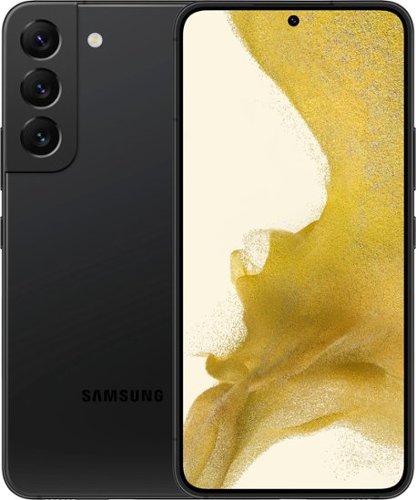
The only glare you'll get now is from jealous strangers. Enjoy high outdoor visibility and a crystal-clear view in bright daylight or at night with adaptive 120Hz Infinity-O Displays equipped with Vision Booster tech. Make nighttime pics and videos come out clear as day with the epic upgrades to our Pro-grade Camera: a big pixel sensor that pulls in tons of light and Super Clear Glass to dial down lens flare. Get epic low-light portraits and selfies thanks to all-new upgrades to the Rear Camera and Selfie Camera, each capturing more light for incredible color and detail. Live Sharing with Google Duo lets you co-watch YouTube videos and content with the whole gang from anywhere. You can even cast it onto your TV to see everyone all at once. Give your night videos the big TV break they deserve. Use Smart View to cast to your TV and either mirror your phone, or keep using other apps without interrupting the show. Seamlessly connect your phone and computer and use your favorite mobile apps right on your Windows PC. Accomplish more and keep the collaboration going wherever your business takes you with the next-level integration of both Microsoft and Google cloud productivity tools. Switch up the view with an even bigger screen, or use both devices at once for even more space to create. Your Samsung Account makes it seamless to continue edits from one Galaxy to another, so you can start something on your phone and finish on Galaxy Tab S8+. Whether you're vlogging your day, gaming all night or simply scrolling your feed, the 4nm processor makes for an incredibly smooth experience. Worry less with Corning~ Gorilla~ Glass Victus~+ on the screen and back panels and a polished, protective Armor Aluminum frame. Plus, with its IP68 water resistance rating, it can take a splash, too. Secure your private data from the second you turn your phone on with Samsung Knox. Knox Vault helps keep your biometric information safe, while Secure Folder locks down your private data. And the new Permission Usage dashboard lets you see which apps are sharing your data or tracking you, and allows you to grant or deny access on your terms.
Customer Rating
5
Perfect Phone
on August 6, 2023
Posted by: NicoR
Verified Purchase:Yes
As an excited tech enthusiast, I recently purchased the Samsung Galaxy S22+ 128GB, and after several weeks of extensive use, I can confidently say that this flagship smartphone is an absolute marvel.
Design and Display:
The Galaxy S22+ exudes elegance with its sleek design and a glass back that feels smooth to the touch. The metal frame provides a sturdy and premium feel in hand. The 6.7-inch Dynamic AMOLED 2X display is a sight to behold, delivering stunning visuals with its vibrant colors and deep blacks. The 120Hz refresh rate ensures smooth scrolling and fluid animations, enhancing the overall user experience.
The Galaxy S22+ exudes elegance with its sleek design and a glass back that feels smooth to the touch. The metal frame provides a sturdy and premium feel in hand. The 6.7-inch Dynamic AMOLED 2X display is a sight to behold, delivering stunning visuals with its vibrant colors and deep blacks. The 120Hz refresh rate ensures smooth scrolling and fluid animations, enhancing the overall user experience.
Performance:
Powered by the Exynos 2100 chipset (in my region), the Galaxy S22+ is a powerhouse when it comes to performance. It handles multitasking effortlessly, and demanding apps and games run without any noticeable lag. The 8GB RAM ensures that the device keeps up with my every command, providing a seamless and responsive user experience. The 128GB internal storage is more than sufficient for all my apps, media, and files.
Powered by the Exynos 2100 chipset (in my region), the Galaxy S22+ is a powerhouse when it comes to performance. It handles multitasking effortlessly, and demanding apps and games run without any noticeable lag. The 8GB RAM ensures that the device keeps up with my every command, providing a seamless and responsive user experience. The 128GB internal storage is more than sufficient for all my apps, media, and files.
Camera:
The camera setup on the Galaxy S22+ is exceptional. The 108MP main sensor captures highly detailed and vibrant photos in various lighting conditions. The 12MP ultra-wide lens offers a wider field of view, perfect for landscape shots and group photos. The 10MP telephoto lens delivers impressive results, especially with its 3x optical zoom and 30x Space Zoom capabilities. Low-light photography is a breeze with the enhanced Night mode, producing clear and well-exposed shots.
The camera setup on the Galaxy S22+ is exceptional. The 108MP main sensor captures highly detailed and vibrant photos in various lighting conditions. The 12MP ultra-wide lens offers a wider field of view, perfect for landscape shots and group photos. The 10MP telephoto lens delivers impressive results, especially with its 3x optical zoom and 30x Space Zoom capabilities. Low-light photography is a breeze with the enhanced Night mode, producing clear and well-exposed shots.
Battery Life:
The 4,500mAh battery in the Galaxy S22+ provides commendable endurance. With moderate use, including browsing, social media, and occasional gaming, I comfortably get through a full day without needing to recharge. The phone's adaptive power management optimizes battery usage, ensuring efficient power consumption. When it's time to recharge, the fast charging feature and the option for wireless charging offer quick and convenient ways to top up the battery.
The 4,500mAh battery in the Galaxy S22+ provides commendable endurance. With moderate use, including browsing, social media, and occasional gaming, I comfortably get through a full day without needing to recharge. The phone's adaptive power management optimizes battery usage, ensuring efficient power consumption. When it's time to recharge, the fast charging feature and the option for wireless charging offer quick and convenient ways to top up the battery.
Software and Features:
Samsung's One UI 4.0, based on Android 12, enhances the overall user experience with its clean and intuitive interface. The customizable options allow me to tailor the phone's settings to my liking, making it feel personalized and easy to navigate. Samsung's added features, such as Samsung DeX for a desktop-like experience and Knox security for data protection, have proved to be useful and valuable additions.
Samsung's One UI 4.0, based on Android 12, enhances the overall user experience with its clean and intuitive interface. The customizable options allow me to tailor the phone's settings to my liking, making it feel personalized and easy to navigate. Samsung's added features, such as Samsung DeX for a desktop-like experience and Knox security for data protection, have proved to be useful and valuable additions.
Connectivity and 5G:
The Galaxy S22+ supports 5G connectivity, and it makes a noticeable difference in data speeds, especially when streaming content or downloading large files. The inclusion of Wi-Fi 6E has also improved wireless connectivity, delivering faster and more stable internet connections.
The Galaxy S22+ supports 5G connectivity, and it makes a noticeable difference in data speeds, especially when streaming content or downloading large files. The inclusion of Wi-Fi 6E has also improved wireless connectivity, delivering faster and more stable internet connections.
Conclusion:
After using the Samsung Galaxy S22+ 128GB extensively, I am thoroughly impressed with its design, performance, camera capabilities, and battery life. It truly is a flagship marvel that lives up to its reputation. Whether you're a photography enthusiast, a power user, or simply looking for a top-tier smartphone, the Galaxy S22+ delivers on all fronts, making it a fantastic choice that doesn't disappoint.
After using the Samsung Galaxy S22+ 128GB extensively, I am thoroughly impressed with its design, performance, camera capabilities, and battery life. It truly is a flagship marvel that lives up to its reputation. Whether you're a photography enthusiast, a power user, or simply looking for a top-tier smartphone, the Galaxy S22+ delivers on all fronts, making it a fantastic choice that doesn't disappoint.
Length of ownership: 239
Mobile Submission: True
I would recommend this to a friend!
Battery Life
5
Display Quality
5
Camera
5

Share this review:


0points
1of 2voted this as helpful.
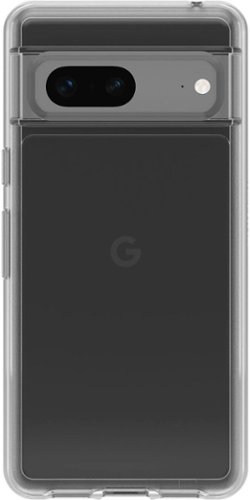
You don~t have to choose between a protective case and a stylish one. Symmetry Series Clear for the Google Pixel 7 is the sleek and protective case that shows off your style. All of your phone~s buttons, features and functions work flawlessly. Additionally, a silver-based antimicrobial additive is integrated into the case that helps inhibit microbial growth and defends the case exterior against many common bacteria.* And, Symmetry Series is easy to remove and install. Which is great because with all of the colors, you need more than just one. Model 77-89610.
Customer Rating
5
Great case
on August 6, 2023
Posted by: NicoR
Verified Purchase:Yes
As an avid Google Pixel user, I recently purchased the OtterBox Symmetry Series Soft Shell for my new Google Pixel 7. I wanted to keep my device protected without hiding its sleek design, and this clear case seemed like the perfect solution.
Upon receiving the case, I was impressed with its packaging and overall build quality. The clear polycarbonate material allowed me to see my phone's stylish design, and the soft-touch edges felt comfortable and secure in my hand. Installing the case was a breeze, and it fit my Google Pixel 7 like a glove, leaving all the buttons and ports easily accessible.
Over the past few weeks of use, the OtterBox Symmetry Series Soft Shell has proven its worth. I accidentally dropped my phone a couple of times, and each time the case's shock-absorbent inner core and tough outer shell did an excellent job of protecting my phone from any damage. The raised edges around the camera and screen provided peace of mind, preventing scratches and cracks in case of a fall.
Functionally, the case is a winner. I appreciate that it allows for wireless charging, as it makes my daily charging routine much more convenient. The buttons are responsive and provide satisfying feedback, ensuring smooth navigation and operation of my device. Plus, I added a screen protector without any issues, enhancing the overall protection for my Google Pixel 7.
What impressed me the most is how slim and lightweight the case is. It fits perfectly in my pocket without adding any noticeable bulk to my phone. I love the fact that it offers robust protection without compromising portability and convenience.
After weeks of daily use, the OtterBox Symmetry Series Soft Shell still looks as good as new. The scratch-resistant exterior has kept the case free from any blemishes, and its clear transparency remains intact without any yellowing.
In conclusion, I am thoroughly satisfied with my purchase of the OtterBox Symmetry Series Soft Shell for Google Pixel 7. It provides the perfect balance between style and protection, allowing me to enjoy the beauty of my phone while keeping it safe from everyday wear and tear. If you own a Google Pixel 7 and want a reliable and stylish protective case, I highly recommend giving this OtterBox offering a try.
Length of ownership: 246
Mobile Submission: True
I would recommend this to a friend!
Quality
5
Value
4
Ease of Use
5

Share this review:


0points
0of 0voted this as helpful.
![Microsoft - Xbox Game Pass Ultimate 1 Month Membership [Digital]](https://pisces.bbystatic.com/prescaled/500/500/image2/BestBuy_US/images/products/dc3cdcbf-1459-4cae-8d88-272214634f01.jpg)
Xbox Game Pass Ultimate includes Xbox Live Gold and over 100 high-quality games. Play with friends on console, PC, phones, and tablets, and get an EA Play membership~all for one low monthly price. EA Play gives you access to top titles on console and PC from best-loved series like Battlefield~ and STAR WARS~. Plus, you get more from the games you love, including exclusive in-game challenges and rewards, special member-only content, and early trials of select new EA titles. Enjoy new games on day one like Halo Infinite and Forza Horizon 5 from Xbox Game Studios, as well as iconic franchises like DOOM from Bethesda Softworks, indie games, and blockbusters. Enjoy free Perks, including in-game content, consumables, and more. Get member discounts of up to 20% off select games in the Xbox Game Pass library, and up to 10% off related game add-ons. Access games from the cloud across PCs, mobile phones, tablets, and consoles. Tap into the heart of the Xbox community and join millions of players ready and waiting to play together.
Customer Rating
5
Gamers friend
on August 6, 2023
Posted by: NicoR
Verified Purchase:Yes
Hey gamers, let's talk about the free 1-month trial of Xbox Game Pass that you get with certain product purchases. Here's what you can expect from this deal:
First things first, it's awesome that you get to try out Xbox Game Pass for a whole month without spending a dime. With this trial, you'll have access to a massive library of games, from all-time classics to the latest releases, and everything in between.
The best part is that you can download and play as many games as you want during the trial period. No need to worry about buying individual games – just dive in and enjoy the gaming buffet.
Xbox Game Pass also gives you access to Xbox Live Gold, which means you can play multiplayer games with your friends online. It's a great opportunity to team up or compete against players from around the world.
One thing to keep in mind is that the trial is only free for a month, so make the most of it while you can. After the trial ends, you'll have to subscribe to continue accessing the games and online features.
But hey, it's a sweet deal overall. You get to explore a bunch of games and see if Xbox Game Pass is worth keeping. And if you decide it's not for you, no worries – you can cancel anytime.
So, if you're buying a product that comes with this free 1-month trial of Xbox Game Pass, I'd say give it a go. It's a chance to try out tons of games without any extra cost. Happy gaming!
Length of ownership: 214
Mobile Submission: True
I would recommend this to a friend!

Share this review:


0points
0of 0voted this as helpful.

Have an Installer Haul Away or Relocate your Appliance.
Customer Rating

4
Haul away and save your back!
on August 6, 2023
Posted by: NicoR
Verified Purchase:Yes
This service is a real lifesaver when you're upgrading to a new fridge and need to get rid of the old one. Best Buy's team will come to your place and take away the old fridge for you, so you don't have to worry about figuring out how to dispose of it yourself.
The best part is that they take care of everything for you. No heavy lifting or trying to fit the fridge into your car - they handle it all. You just have to make sure the fridge is empty, unplugged, and defrosted before they arrive.
The team is pretty quick and professional. They'll be in and out without causing any fuss. And they'll make sure to follow proper disposal procedures, so you can feel good about doing the right thing for the environment.
Now, keep in mind that this service might cost you a little extra on top of your new fridge purchase, but it's worth it for the convenience and peace of mind. Plus, it saves you the hassle of dealing with the old fridge on your own.
All in all, if you're getting a new fridge from Best Buy, I'd say go for their Appliance Haul Away Service. It's straightforward, stress-free, and a good way to handle that old fridge without breaking a sweat.
Length of ownership: 204
Mobile Submission: True
I would recommend this to a friend!
Expertise
4
Professionalism
4
Service
4
Share this review:


0points
0of 0voted this as helpful.

This range cord is required for successful hook-up of your new appliance. Our delivery personnel will determine whether a 3- or 4-prong cord is needed based on the outlet behind your existing range.
Customer Rating
4
Range Cords better than average
on August 6, 2023
Posted by: NicoR
Verified Purchase:Yes
If you're in the market for a reliable and top-notch range cord for your electric range, look no further than the Smart Choice 6-Foot Range Cords. These cords are hands down one of the best choices available, offering a seamless and safe power connection to your kitchen appliance.
One of the standout features of the Smart Choice range cords is their high-quality build. These cords are built to last, with durable materials that can withstand the rigors of daily kitchen use. Say goodbye to flimsy and unreliable cords that leave you worried about electrical safety.
Not only do these cords fit most electric ranges out there, but they also come with straightforward installation instructions, making setup a breeze. No more fumbling around with confusing instructions or dealing with shoddy installation hardware. Smart Choice makes sure you can get your range up and running in no time.
Safety is paramount with the Smart Choice range cords. With their strain relief clamp, you can rest easy knowing that your cord is securely fastened to your appliance without putting any unnecessary strain on the electrical connections. It's a no-brainer - prioritize safety when it comes to powering your electric range.
Let's talk about length - 6 feet of cord is the perfect length for most kitchen setups. It gives you the flexibility to connect your range to the power outlet without any annoying excess cable clutter. Say goodbye to tangled cords and tripping hazards.
But what really seals the deal for me is the UL listing. Smart Choice range cords meet the safety standards set by Underwriters Laboratories, ensuring that they comply with the industry's safety requirements. When it comes to electrical connections, you can't afford to compromise on safety, and Smart Choice understands that.
At an affordable price, the Smart Choice 6-Foot Range Cords offer exceptional value for money. Don't waste your hard-earned cash on subpar cords that will leave you frustrated and worried. Invest in the Smart Choice range cords, and you'll enjoy peace of mind knowing you've made a smart decision for your kitchen.
In conclusion, the Smart Choice 6-Foot Range Cords are an absolute must-have for anyone in need of a new range cord. From their top-notch build quality and standard compatibility to their easy installation and enhanced safety features, they check all the boxes. Save yourself the hassle and potential hazards - go with Smart Choice, and you won't be disappointed.
Length of ownership: 204
Mobile Submission: True
I would recommend this to a friend!
Quality
4
Value
4
Ease of Use
5
Share this review:


0points
0of 0voted this as helpful.

Customer Rating
5
Home delivery service: Convient
on August 6, 2023
Posted by: NicoR
Verified Purchase:Yes
Best Buy's Home Delivery Service offers a convenient and efficient way to receive your purchased products right at your doorstep. Here's an overview of what you can expect from this service:
1. Wide Product Range: Best Buy's Home Delivery Service covers a vast range of products, from large appliances like refrigerators and washing machines to smaller electronics like laptops and smartphones. This means you can shop for a variety of items and have them delivered in a single order.
2. Flexible Delivery Options: Best Buy provides flexible delivery options, allowing you to choose a date and time that suits your schedule. You can often opt for same-day or next-day delivery, making it ideal for urgent purchases.
3. Professional Delivery Team: The delivery team from Best Buy is well-trained and experienced in handling various types of products. They handle your items with care during transit and ensure they are delivered in good condition.
4. Setup and Installation: For certain products, such as appliances or large electronics, the delivery service may include setup and installation. This service ensures that complex appliances are properly installed and ready for immediate use, saving you time and effort.
5. Haul-Away Service: Best Buy often offers a haul-away service for old appliances or electronics that you're replacing. This makes it convenient to dispose of old items responsibly and without any hassle.
6. Delivery Notifications: Best Buy keeps you informed throughout the delivery process, sending notifications and updates about your order's status. This allows you to track your delivery and plan accordingly.
7. Return and Exchange Policy: In case you encounter any issues with your delivered product, Best Buy's return and exchange policy ensures that you can get a resolution without difficulty.
Overall, Best Buy's Home Delivery Service is a reliable and customer-focused option for receiving your purchased products conveniently. The wide range of available products, flexible delivery options, professional delivery team, and additional services like setup and haul-away make it a user-friendly and efficient choice for consumers.
As always, it's essential to check the specific details and availability of the Home Delivery Service in your location, as service offerings may vary based on your area.
Length of ownership: 98
Mobile Submission: True
I would recommend this to a friend!
Expertise
4
Professionalism
4
Service
5

Share this review:


-4points
1of 6voted this as helpful.
NicoR's Review Comments
NicoR has not submitted comments on any reviews.
NicoR's Questions
NicoR has not submitted any questions.
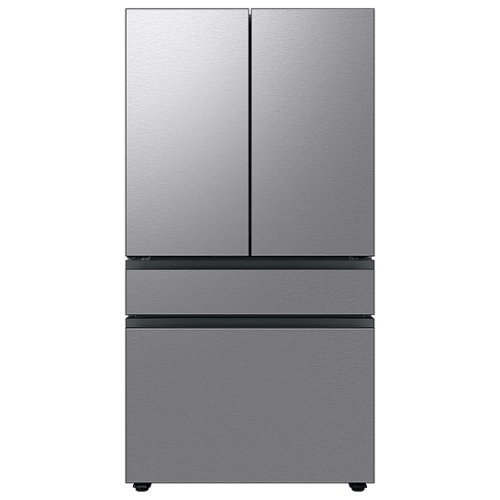
Extra-large capacity 4-Door French Door Refrigerator will reinvent water and ice the way you want it with Samsung~s AutoFill Water Pitcher and Dual Ice Maker with cubed ice and Ice Bites.
I need to replace the water filters on the pitcher and the water dispenser what do I need to buy?
To replace the water filters on the pitcher and the water dispenser of the Samsung Bespoke 29 cu. ft. French Door with AutoFill Pitcher in Stainless Steel, you will need to purchase the following filters:
Pitcher water filter: DA29-00020B
Dispenser water filter: DA29-00020A
You can purchase these filters from Samsung's website, from a Samsung authorized retailer, or from a third-party retailer.
Here are the steps to replace the pitcher water filter:
Remove the pitcher from the refrigerator.
Open the pitcher lid.
Push the tab down to release the old filter.
Insert the new filter into the pitcher.
Close the pitcher lid.
Place the pitcher back in the refrigerator.
Here are the steps to replace the dispenser water filter:
Open the refrigerator door.
Locate the dispenser water filter cover.
Remove the dispenser water filter cover.
Turn the old filter counterclockwise to remove it.
Insert the new filter clockwise until it stops.
Replace the dispenser water filter cover.
Close the refrigerator door.
Once you have replaced both filters, run the water dispenser for a few minutes to flush out any air bubbles. Then, you can start using the filtered water.
It is recommended to replace the pitcher water filter every 2 months and the dispenser water filter every 6 months. However, you may need to replace the filters more often if you have hard water or if you use the filtered water frequently.
Pitcher water filter: DA29-00020B
Dispenser water filter: DA29-00020A
You can purchase these filters from Samsung's website, from a Samsung authorized retailer, or from a third-party retailer.
Here are the steps to replace the pitcher water filter:
Remove the pitcher from the refrigerator.
Open the pitcher lid.
Push the tab down to release the old filter.
Insert the new filter into the pitcher.
Close the pitcher lid.
Place the pitcher back in the refrigerator.
Here are the steps to replace the dispenser water filter:
Open the refrigerator door.
Locate the dispenser water filter cover.
Remove the dispenser water filter cover.
Turn the old filter counterclockwise to remove it.
Insert the new filter clockwise until it stops.
Replace the dispenser water filter cover.
Close the refrigerator door.
Once you have replaced both filters, run the water dispenser for a few minutes to flush out any air bubbles. Then, you can start using the filtered water.
It is recommended to replace the pitcher water filter every 2 months and the dispenser water filter every 6 months. However, you may need to replace the filters more often if you have hard water or if you use the filtered water frequently.
2 years, 9 months ago
by
NicoR
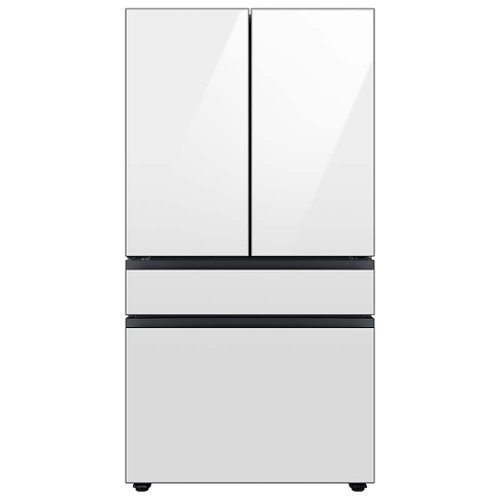
Extra-large capacity 4-Door French Door Refrigerator with customizable and changeable door panels available in a variety of colors and finishes. Reinvent water and ice the way you want it with Samsung~s AutoFill Water Pitcher and Dual Ice Maker with cubed ice and Ice Bites.
Do all Samsung Bespoke refrigerators have casters or wheels to facilitate moving the refrigerator across the floor?
No, not all Samsung Bespoke refrigerators have casters or wheels. Whether or not a Bespoke refrigerator has casters or wheels depends on the specific model. Some models, such as the RF29BB8600QL, do have casters or wheels, while others, such as the RF28T5501SR, do not.
2 years, 9 months ago
by
NicoR

Everything you need is right in your screen. Watch, work and chat - all without connecting a separate PC - with Smart Monitor. Your favorite content, productivity and video call apps are built-in for a simpler and more stylish desk setup that~s a joy to use every time.
What refresh rate is this?
The Samsung M7 Series 32 Tizen 4K has a refresh rate of 60Hz. This means that the screen can display up to 60 frames per second.
60Hz is a common refresh rate for TVs and monitors. It is sufficient for most uses, such as watching TV shows and movies, playing video games, and browsing the web. However, if you are looking for a TV or monitor with a smoother gaming experience, you may want to consider a higher refresh rate, such as 120Hz or 144Hz.
60Hz is a common refresh rate for TVs and monitors. It is sufficient for most uses, such as watching TV shows and movies, playing video games, and browsing the web. However, if you are looking for a TV or monitor with a smoother gaming experience, you may want to consider a higher refresh rate, such as 120Hz or 144Hz.
2 years, 9 months ago
by
NicoR
Everything you need is right in your screen. Watch, work and chat - all without connecting a separate PC - with Smart Monitor. Your favorite content, productivity and video call apps are built-in for a simpler and more stylish desk setup that~s a joy to use every time.
Speakers seam to be not so good my 32" smart TV is amazing what happened to sound quality how can it be fixed. As it was open box maybe displayed and speakers could be bad I'm not sure. Maybe I'm supposed to get a new soundbar for good sound ....
There are a few things you can try to improve the sound quality of your Samsung M7 Series 32 Tizen 4K with built-in speakers:
Adjust the TV's sound settings. Try adjusting the TV's sound settings to see if that helps. You can adjust the treble, bass, and other settings.
Use the TV's sound mode. The TV has a variety of sound modes, such as standard, movie, and music. Try using different sound modes to see which one sounds best to you.
Use the TV's equalizer. The TV has an equalizer that allows you to adjust the sound levels of different frequency bands. Try using the equalizer to boost the bass or treble, or to reduce the midrange.
Use a soundbar. If you are still not satisfied with the sound quality, you can use a soundbar. Soundbars are designed to provide better sound quality than the built-in speakers on TVs.
Check the TV's speakers for damage. If you think that the TV's speakers may be damaged, you can contact Samsung support for assistance.
Adjust the TV's sound settings. Try adjusting the TV's sound settings to see if that helps. You can adjust the treble, bass, and other settings.
Use the TV's sound mode. The TV has a variety of sound modes, such as standard, movie, and music. Try using different sound modes to see which one sounds best to you.
Use the TV's equalizer. The TV has an equalizer that allows you to adjust the sound levels of different frequency bands. Try using the equalizer to boost the bass or treble, or to reduce the midrange.
Use a soundbar. If you are still not satisfied with the sound quality, you can use a soundbar. Soundbars are designed to provide better sound quality than the built-in speakers on TVs.
Check the TV's speakers for damage. If you think that the TV's speakers may be damaged, you can contact Samsung support for assistance.
2 years, 9 months ago
by
NicoR
Everything you need is right in your screen. Watch, work and chat - all without connecting a separate PC - with Smart Monitor. Your favorite content, productivity and video call apps are built-in for a simpler and more stylish desk setup that~s a joy to use every time.
How many watts per speaker? I do have 3rd party premium desk speakers but don't want to use them to save space. I do have 2 headsets but using them for long periods of time hurts my head. So 4w or greater is good for me!
According to the official Samsung website, the speakers on the Samsung M7 Series 32 Tizen 4K with built-in speakers have 5 watts per speaker. This is a good amount of power for small speakers, and it should be enough to fill a small room with sound.
However, if you are looking for louder speakers, you may want to consider using your 3rd party premium desk speakers. These speakers will likely be able to produce more sound than the built-in speakers on the TV.
If you don't want to use your desk speakers, you could also consider using a soundbar. Soundbars are designed to provide better sound quality than the built-in speakers on TVs. They are also relatively slim and compact, so they won't take up too much space.
Ultimately, the best way to decide which speakers are right for you is to listen to them in person. This will allow you to compare the sound quality of the different speakers and choose the ones that you like the best.
However, if you are looking for louder speakers, you may want to consider using your 3rd party premium desk speakers. These speakers will likely be able to produce more sound than the built-in speakers on the TV.
If you don't want to use your desk speakers, you could also consider using a soundbar. Soundbars are designed to provide better sound quality than the built-in speakers on TVs. They are also relatively slim and compact, so they won't take up too much space.
Ultimately, the best way to decide which speakers are right for you is to listen to them in person. This will allow you to compare the sound quality of the different speakers and choose the ones that you like the best.
2 years, 9 months ago
by
NicoR
Everything you need is right in your screen. Watch, work and chat - all without connecting a separate PC - with Smart Monitor. Your favorite content, productivity and video call apps are built-in for a simpler and more stylish desk setup that~s a joy to use every time.
Are you able to stream content like Netflix and computer content at the same time? Basically picture in picture...
Yes, the Samsung M7 Series 32 Tizen 4K with built-in speakers supports picture-in-picture (PIP). This means that you can stream content from two different sources at the same time, with one source displayed in a smaller window over the other source.
To use PIP on the Samsung M7 Series 32 Tizen 4K with built-in speakers, follow these steps:
Open the source that you want to display in the PIP window.
Press the PIP button on the remote control.
Select the source that you want to display in the main window.
Adjust the size and position of the PIP window using the remote control.
You can also use PIP to display a computer screen on your TV. To do this, you will need to connect your computer to the TV using an HDMI cable. Once the computer is connected, follow the steps above to use PIP.
PIP is a useful feature for multitasking or for watching two different things at the same time. For example, you could use PIP to watch a TV show while working on your computer, or to watch a sports game while browsing the internet.
Here are some tips for using PIP on the Samsung M7 Series 32 Tizen 4K with built-in speakers:
Use a wireless keyboard and mouse to make it easier to interact with the PIP window.
Use the voice control feature to search for content in the PIP window.
Adjust the size and position of the PIP window so that it does not block your view of the main window.
Experiment with different sources to see what works best for you.
To use PIP on the Samsung M7 Series 32 Tizen 4K with built-in speakers, follow these steps:
Open the source that you want to display in the PIP window.
Press the PIP button on the remote control.
Select the source that you want to display in the main window.
Adjust the size and position of the PIP window using the remote control.
You can also use PIP to display a computer screen on your TV. To do this, you will need to connect your computer to the TV using an HDMI cable. Once the computer is connected, follow the steps above to use PIP.
PIP is a useful feature for multitasking or for watching two different things at the same time. For example, you could use PIP to watch a TV show while working on your computer, or to watch a sports game while browsing the internet.
Here are some tips for using PIP on the Samsung M7 Series 32 Tizen 4K with built-in speakers:
Use a wireless keyboard and mouse to make it easier to interact with the PIP window.
Use the voice control feature to search for content in the PIP window.
Adjust the size and position of the PIP window so that it does not block your view of the main window.
Experiment with different sources to see what works best for you.
2 years, 9 months ago
by
NicoR
Everything you need is right in your screen. Watch, work and chat - all without connecting a separate PC - with Smart Monitor. Your favorite content, productivity and video call apps are built-in for a simpler and more stylish desk setup that~s a joy to use every time.
do you need a computer or pc to use discord on this?
No, you do not need a computer or PC to use Discord on the Samsung M7 Series 32 Tizen 4K with built-in speakers. Discord has a dedicated app for Tizen TVs, which you can download from the Samsung App Store.
To use Discord on your TV, you will need to create an account or log in to your existing account. Once you are logged in, you can join servers, chat with friends, and make video calls.
It is important to note that the Discord app for Tizen TVs does not have all of the same features as the Discord app for computers and mobile devices. For example, you cannot use the Discord app on your TV to stream games or share your screen.
Overall, the Discord app for Tizen TVs is a good way to chat with friends and join servers while watching TV. However, it is not a replacement for the Discord app on computers and mobile devices if you need to use all of the features that Discord has to offer.
Here are some tips for using Discord on your Samsung M7 Series 32 Tizen 4K with built-in speakers:
Use a wireless keyboard to make typing easier.
Use the voice control feature to search for friends and servers.
Connect the TV to your Wi-Fi network for the best Discord experience.
Use a VPN to protect your privacy and security when using Discord.
To use Discord on your TV, you will need to create an account or log in to your existing account. Once you are logged in, you can join servers, chat with friends, and make video calls.
It is important to note that the Discord app for Tizen TVs does not have all of the same features as the Discord app for computers and mobile devices. For example, you cannot use the Discord app on your TV to stream games or share your screen.
Overall, the Discord app for Tizen TVs is a good way to chat with friends and join servers while watching TV. However, it is not a replacement for the Discord app on computers and mobile devices if you need to use all of the features that Discord has to offer.
Here are some tips for using Discord on your Samsung M7 Series 32 Tizen 4K with built-in speakers:
Use a wireless keyboard to make typing easier.
Use the voice control feature to search for friends and servers.
Connect the TV to your Wi-Fi network for the best Discord experience.
Use a VPN to protect your privacy and security when using Discord.
2 years, 9 months ago
by
NicoR
Everything you need is right in your screen. Watch, work and chat - all without connecting a separate PC - with Smart Monitor. Your favorite content, productivity and video call apps are built-in for a simpler and more stylish desk setup that~s a joy to use every time.
Can this monitor be daisy chained?
The Samsung M7 Series 32 Tizen 4K with built-in speakers does not have a daisy chain feature. This means that you cannot connect multiple monitors together using a single port on your computer.
To connect multiple monitors to your computer, you will need to use a separate port for each monitor. If your computer does not have enough ports, you can use a USB-C hub or a docking station to add more ports.
Here are some alternative ways to connect multiple monitors to your computer:
Use a display adapter. A display adapter is a device that allows you to connect multiple monitors to your computer using a single port. Display adapters are available in a variety of types, including USB-C to HDMI, DisplayPort to HDMI, and HDMI to VGA.
Use a docking station. A docking station is a device that allows you to connect multiple monitors, peripherals, and other devices to your computer using a single cable. Docking stations are typically used with laptops, but they can also be used with desktop computers.
Use a KVM switch. A KVM switch is a device that allows you to control multiple computers using a single keyboard, mouse, and monitor. KVM switches are typically used in office and data center environments, but they can also be used for personal use.
To connect multiple monitors to your computer, you will need to use a separate port for each monitor. If your computer does not have enough ports, you can use a USB-C hub or a docking station to add more ports.
Here are some alternative ways to connect multiple monitors to your computer:
Use a display adapter. A display adapter is a device that allows you to connect multiple monitors to your computer using a single port. Display adapters are available in a variety of types, including USB-C to HDMI, DisplayPort to HDMI, and HDMI to VGA.
Use a docking station. A docking station is a device that allows you to connect multiple monitors, peripherals, and other devices to your computer using a single cable. Docking stations are typically used with laptops, but they can also be used with desktop computers.
Use a KVM switch. A KVM switch is a device that allows you to control multiple computers using a single keyboard, mouse, and monitor. KVM switches are typically used in office and data center environments, but they can also be used for personal use.
2 years, 9 months ago
by
NicoR
Everything you need is right in your screen. Watch, work and chat - all without connecting a separate PC - with Smart Monitor. Your favorite content, productivity and video call apps are built-in for a simpler and more stylish desk setup that~s a joy to use every time.
What is remote model number?
The remote model number for the Samsung M7 Series 32 Tizen 4K with built-in speakers is BN59-01312A. This is the same remote control that is used for other Samsung 4K smart TVs released in 2022 and 2023.
If you have lost or damaged your remote control, you can purchase a replacement remote from Samsung or from a third-party retailer. You can also use a universal remote control to control your TV. However, universal remote controls may not have all of the same features as the original remote control.
To program a universal remote control to work with your TV, you will need the TV's remote control code. The remote control code for the Samsung M7 Series 32 Tizen 4K with built-in speakers is 00186.
To program a universal remote control, consult the remote control's manual for instructions. Once the remote control is programmed, you will be able to use it to control your TV, including turning it on and off, changing the volume, and switching channels.
If you have lost or damaged your remote control, you can purchase a replacement remote from Samsung or from a third-party retailer. You can also use a universal remote control to control your TV. However, universal remote controls may not have all of the same features as the original remote control.
To program a universal remote control to work with your TV, you will need the TV's remote control code. The remote control code for the Samsung M7 Series 32 Tizen 4K with built-in speakers is 00186.
To program a universal remote control, consult the remote control's manual for instructions. Once the remote control is programmed, you will be able to use it to control your TV, including turning it on and off, changing the volume, and switching channels.
2 years, 9 months ago
by
NicoR
Everything you need is right in your screen. Watch, work and chat - all without connecting a separate PC - with Smart Monitor. Your favorite content, productivity and video call apps are built-in for a simpler and more stylish desk setup that~s a joy to use every time.
What size screw are used on the VESA mount area?
he Samsung M7 Series 32 Tizen 4K with built-in speakers uses M4 screws for the VESA mount area.
VESA screws are used to mount a TV or monitor to a wall mount or other mounting bracket. The VESA screw size is determined by the VESA mount pattern of the TV or monitor. The VESA mount pattern is a set of four holes on the back of the TV or monitor that are used to attach the mounting bracket.
To mount the Samsung M7 Series 32 Tizen 4K with built-in speakers to a wall mount, you will need four M4 screws. The screws should be at least 20mm long. You may also need to use washers and spacers, depending on the wall mount you are using.
Here are some tips for mounting your TV or monitor to a wall:
Make sure that the wall mount is rated to support the weight of your TV or monitor.
Use a level to make sure that the wall mount is level before you attach it to the wall.
Use the correct screw size and length for the VESA mount pattern of your TV or monitor.
Be careful not to overtighten the screws, as this could damage the TV or monitor.
VESA screws are used to mount a TV or monitor to a wall mount or other mounting bracket. The VESA screw size is determined by the VESA mount pattern of the TV or monitor. The VESA mount pattern is a set of four holes on the back of the TV or monitor that are used to attach the mounting bracket.
To mount the Samsung M7 Series 32 Tizen 4K with built-in speakers to a wall mount, you will need four M4 screws. The screws should be at least 20mm long. You may also need to use washers and spacers, depending on the wall mount you are using.
Here are some tips for mounting your TV or monitor to a wall:
Make sure that the wall mount is rated to support the weight of your TV or monitor.
Use a level to make sure that the wall mount is level before you attach it to the wall.
Use the correct screw size and length for the VESA mount pattern of your TV or monitor.
Be careful not to overtighten the screws, as this could damage the TV or monitor.
2 years, 9 months ago
by
NicoR